bilibili-mcp 使用示例
将函数注册为 MCP 工具,可被外部调用。函数获取 B 站 API 数据。确保最多返回 10 个视频。:返回结构化的字典列表。
·
目录
🚀 安装和设置
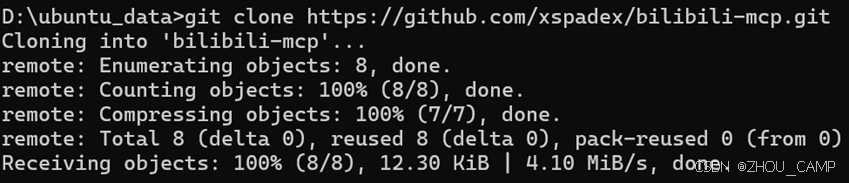
1. 克隆项目
git clone https://github.com/xspadex/bilibili-mcp.git
cd bilibili-mcp
2. 创建虚拟环境
uv venv
source .venv/bin/activate  # Linux/Mac
# 或者在 Windows 上:
.venv\Scripts\activate
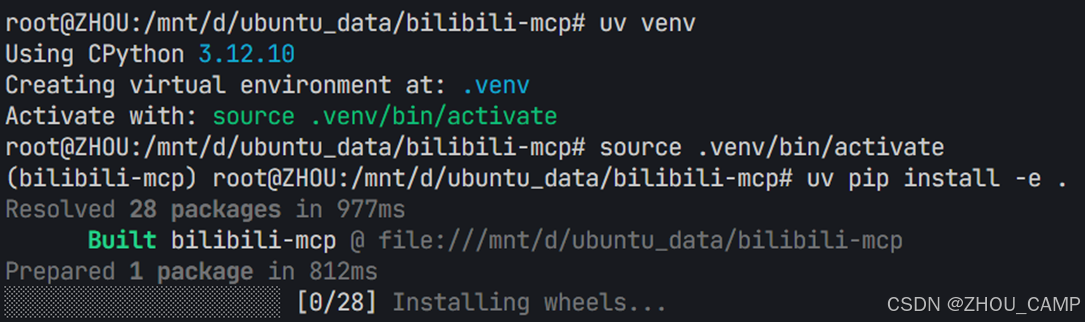
3. 安装依赖
uv pip install -e .
完整代码
bilibili_mcp.py
from typing import Any
import httpx
from mcp.server.fastmcp import FastMCP

# Initialize FastMCP server for Bilibili popular list
mcp = FastMCP("blbl")

# API endpoint for B 站热榜
BILIBILI_POPULAR_URL = "https://api.bilibili.com/x/web-interface/popular"
USER_AGENT = "blbl-mcp/1.0"

headers = {
    "User-Agent": "qwq"
}

async def make_request(url: str, top_k: int = 3) -> dict[str, Any] | None:
    async with httpx.AsyncClient(http2=False) as client:
        try:
            response = await client.get(url, headers=headers, params={"ps": top_k, "pn": 1})
            response.raise_for_status()
            return response.json()
        except Exception as e:
            print(e)
            return None

@mcp.tool()
async def get_popular(top_k: int = 3) -> dict[str, Any] | str:
    """Fetch the current Bilibili popular videos list.

    Returns the raw JSON from Bilibili’s popular interface,
    or an error message if the fetch fails.
    """
    top_k = min(top_k, 10)
    data = await make_request(BILIBILI_POPULAR_URL, top_k)
    if data is None:
        return "Unable to fetch Bilibili popular list."
    data_list = data['data']['list']
    result = []
    for item in data_list:
        title = item['title']
        link = item['short_link_v2']
        desc = item['desc']
        view = item['stat']['view']
        like = item['stat']['like']
        result.append({
            'title': title,
            'link': link,
            'desc': desc,
            'view': view,
            'like': like
        })
        if len(result) >= top_k:
            break
    return result

if __name__ == "__main__":
    # Run the MCP server over stdio
    mcp.run(transport='stdio')
代码解释
📦 导入模块
from typing import Any
import httpx
from mcp.server.fastmcp import FastMCP
typing.Any:用于类型注解,表示任意类型httpx:现代异步 HTTP 客户端库,用于发送网络请求FastMCP:MCP(Model Context Protocol)的快速实现框架
🔧 初始化和配置
# Initialize FastMCP server for Bilibili popular list
mcp = FastMCP("blbl")

# API endpoint for B 站热榜
BILIBILI_POPULAR_URL = "https://api.bilibili.com/x/web-interface/popular"
USER_AGENT = "blbl-mcp/1.0"

headers = {
    "User-Agent": "qwq"
}
- 创建名为 “blbl” 的 FastMCP 服务器实例
- 定义 B 站热榜 API 的 URL 端点
- 设置请求头,包含 User-Agent 信息(注意:代码中实际使用的是 “qwq”)
🌐 网络请求函数
async def make_request(url: str, top_k: int = 3) -> dict[str, Any] | None:
    async with httpx.AsyncClient(http2=False) as client:
        try:
            response = await client.get(url, headers=headers, params={"ps": top_k, "pn": 1})
            response.raise_for_status()
            return response.json()
        except Exception as e:
            print(e)
            return None
功能说明:
- 异步函数,用于发送 HTTP GET 请求
- 使用
httpx.AsyncClient创建异步客户端(禁用 HTTP/2) - 请求参数:
ps:每页数量(page size)pn:页码(page number),固定为 1
- 错误处理:捕获异常并返回
None - 成功时返回 JSON 响应数据
🛠 主要工具函数
@mcp.tool()
async def get_popular(top_k: int = 3) -> dict[str, Any] | str:
    """Fetch the current Bilibili popular videos list.

    Returns the raw JSON from Bilibili's popular interface,
    or an error message if the fetch fails.
    """
    top_k = min(top_k, 10)
    data = await make_request(BILIBILI_POPULAR_URL, top_k)
    if data is None:
        return "Unable to fetch Bilibili popular list."
    data_list = data['data']['list']
    result = []
    for item in data_list:
        title = item['title']
        link = item['short_link_v2']
        desc = item['desc']
        view = item['stat']['view']
        like = item['stat']['like']
        result.append({
            'title': title,
            'link': link,
            'desc': desc,
            'view': view,
            'like': like
        })
        if len(result) >= top_k:
            break
    return result
功能详解:
-
装饰器
@mcp.tool():将函数注册为 MCP 工具,可被外部调用 -
参数限制:
top_k = min(top_k, 10)确保最多返回 10 个视频 -
数据获取:调用
make_request函数获取 B 站 API 数据 -
数据解析:从 API 响应中提取关键信息:
title:视频标题short_link_v2:短链接desc:视频描述stat.view:播放量stat.like:点赞数
-
结果格式化:返回结构化的字典列表
🔍 调试和测试
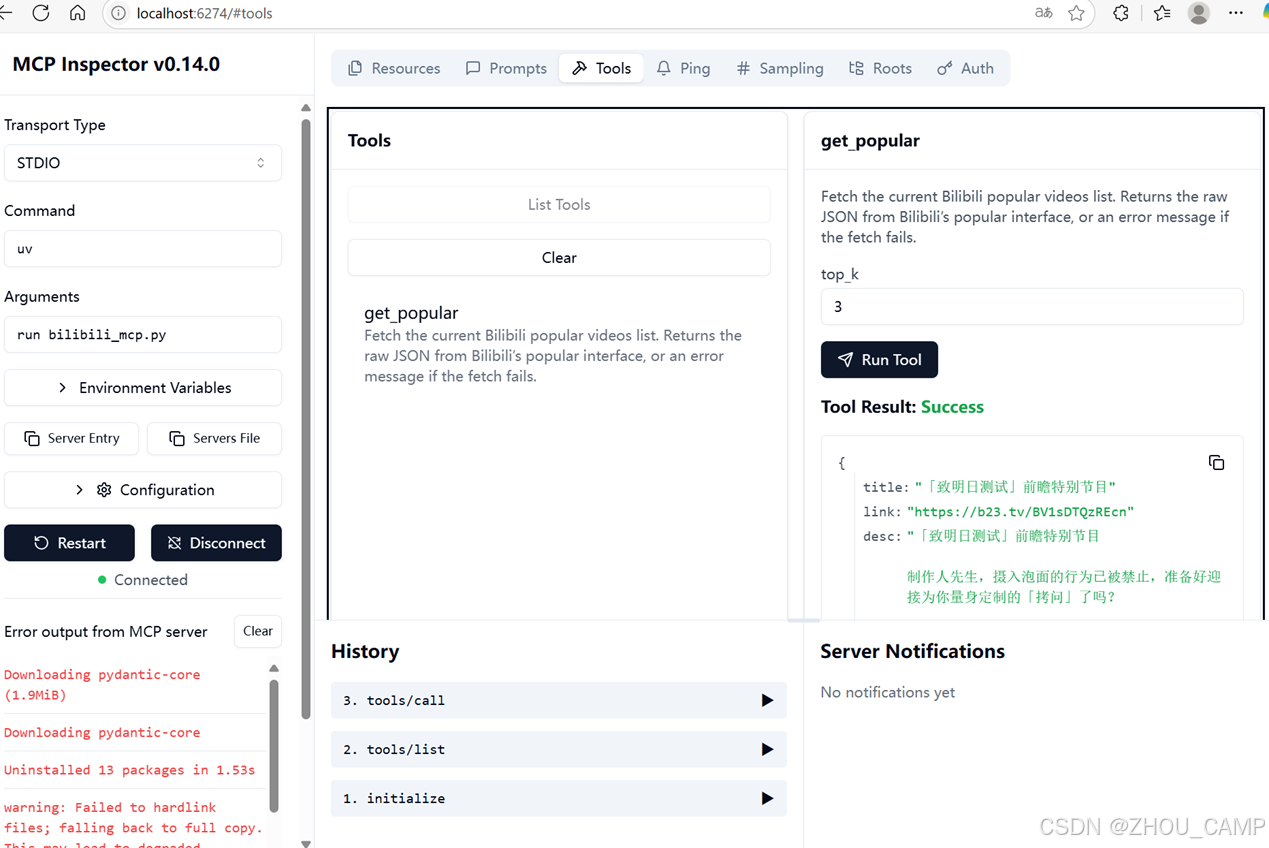
使用 MCP Inspector 可以方便地测试工具:
- 启动 Inspector:
npx @modelcontextprotocol/inspector - 在浏览器中打开
http://127.0.0.1:6277 - 连接到您的 bilibili-mcp 服务器
- 测试
get_popular工具的各种参数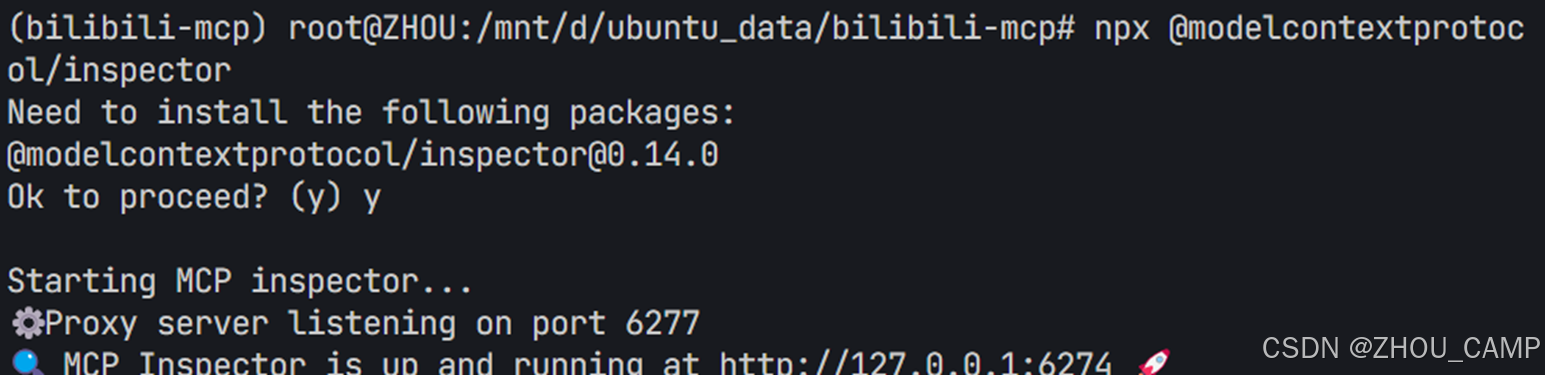
📝 注意事项
- 确保 Python 版本 ≥ 3.12
- 避免过于频繁地调用 B 站 API
- 工具返回的数据基于 B 站公开接口
- 默认最多返回 10 个视频信息
💡 使用场景示例
-
获取热门内容灵感:
请帮我获取当前B站热榜前5个视频,我想了解最近的热门话题 -
分析热门趋势:
获取B站热榜数据,分析一下当前最受欢迎的内容类型 -
内容创作参考:
查看B站热榜,帮我分析哪些类型的视频容易获得高播放量

中国智能体开发者社区,聚焦智能体与大模型开发,提供前沿资讯、实用工具链、开源项目及行业案例。通过技术沙龙、开发者大赛等活动,促进经验交流与协作,助力开发者快速构建创新智能应用。
更多推荐
 28
28 0
0- 0


 已为社区贡献107条内容

所有评论(0)