STM32F4系列RT-Thread开启额外的RAM(CCMRAM)
1.配置RTthread的连接文件,这里直接编辑原文件(linkscripts文件夹下),添加CCMRAM段,一般是64K。如果要使用动态内存分配rt_memheap_alloc(),还需要开启heap内存堆对象。然后使用时直接就能用了,这里rt_memory_info打印不出来变化,因为并没有统一。使用CCMRAM不能用于DMA,因为这个总线不能直接访问到,配置stm32的启动文件,RTTstu
参考:RT-Thread-STM32F4在RT-Thread Studio中使用CCM SRAMRT-Thread问答社区 - RT-Thread
我这里使用STM32F405做测试,芯片资料说的总的SRAM是192k,其中一般只使用128k,有64k是挂在CPU的数据总线上(参考:SRAM电路设计_64-kbyte of ccm (core coupled memory) data ram-CSDN博客)
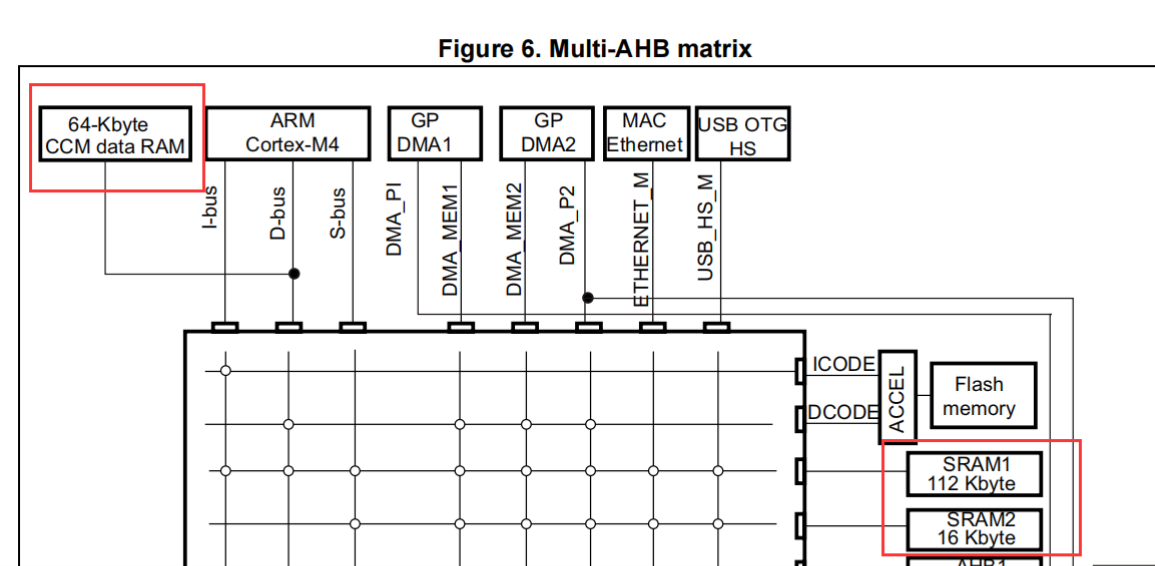
使用CCMRAM不能用于DMA,因为这个总线不能直接访问到,
配置流程
1.配置RTthread的连接文件,
这里直接编辑原文件(linkscripts文件夹下),添加CCMRAM段,一般是64K
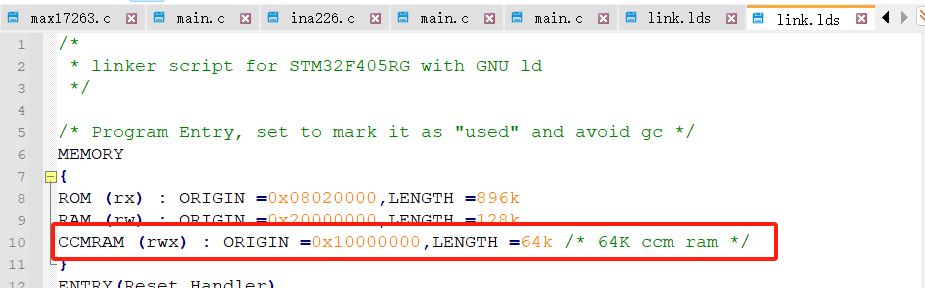
修改.data段
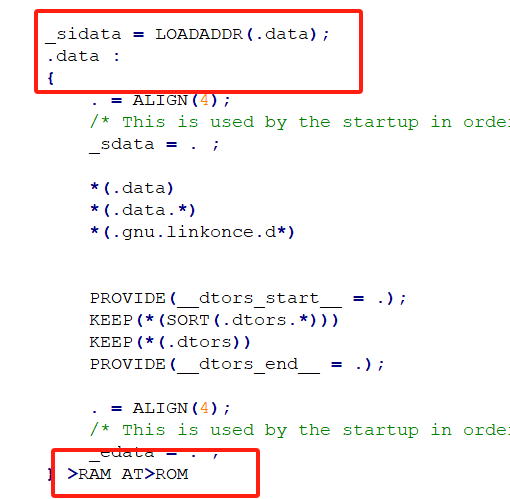
添加ccmram段
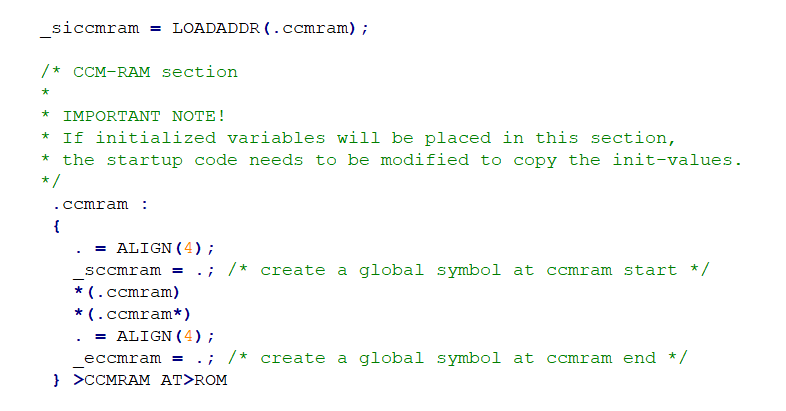
关键部分原文件
/*
 * linker script for STM32F405RG with GNU ld
 */

/* Program Entry, set to mark it as "used" and avoid gc */
MEMORY
{
ROM (rx) : ORIGIN =0x08020000,LENGTH =896k
RAM (rw) : ORIGIN =0x20000000,LENGTH =128k
CCMRAM (rwx) : ORIGIN =0x10000000,LENGTH =64k /* 64K ccm ram */
}
ENTRY(Reset_Handler)
_system_stack_size = 0x400;

SECTIONS
{
    .text :
    {
        . = ALIGN(4);
        _stext = .;
        KEEP(*(.isr_vector))            /* Startup code */

        . = ALIGN(4);
        *(.text)                        /* remaining code */
        *(.text.*)                      /* remaining code */
        *(.rodata)                      /* read-only data (constants) */
        *(.rodata*)
        *(.glue_7)
        *(.glue_7t)
        *(.gnu.linkonce.t*)

        /* section information for finsh shell */
        . = ALIGN(4);
        __fsymtab_start = .;
        KEEP(*(FSymTab))
        __fsymtab_end = .;

        . = ALIGN(4);
        __vsymtab_start = .;
        KEEP(*(VSymTab))
        __vsymtab_end = .;

        /* section information for utest */
        . = ALIGN(4);
        __rt_utest_tc_tab_start = .;
        KEEP(*(UtestTcTab))
        __rt_utest_tc_tab_end = .;

        /* section information for at server */
        . = ALIGN(4);
        __rtatcmdtab_start = .;
        KEEP(*(RtAtCmdTab))
        __rtatcmdtab_end = .;
        . = ALIGN(4);

        /* section information for initial. */
        . = ALIGN(4);
        __rt_init_start = .;
        KEEP(*(SORT(.rti_fn*)))
        __rt_init_end = .;

        . = ALIGN(4);

        PROVIDE(__ctors_start__ = .);
        KEEP (*(SORT(.init_array.*)))
        KEEP (*(.init_array))
        PROVIDE(__ctors_end__ = .);

        . = ALIGN(4);

        _etext = .;
    } > ROM = 0

    /* .ARM.exidx is sorted, so has to go in its own output section.  */
    __exidx_start = .;
    .ARM.exidx :
    {
        *(.ARM.exidx* .gnu.linkonce.armexidx.*)

        /* This is used by the startup in order to initialize the .data secion */
        _sidata = .;
    } > ROM
    __exidx_end = .;

    /* .data section which is used for initialized data */

	_sidata = LOADADDR(.data);
    .data :
    {
        . = ALIGN(4);
        /* This is used by the startup in order to initialize the .data secion */
        _sdata = . ;

        *(.data)
        *(.data.*)
        *(.gnu.linkonce.d*)


        PROVIDE(__dtors_start__ = .);
        KEEP(*(SORT(.dtors.*)))
        KEEP(*(.dtors))
        PROVIDE(__dtors_end__ = .);

        . = ALIGN(4);
        /* This is used by the startup in order to initialize the .data secion */
        _edata = . ;
    } >RAM AT>ROM

	_siccmram = LOADADDR(.ccmram);

	/* CCM-RAM section
	*
	* IMPORTANT NOTE!
	* If initialized variables will be placed in this section,
	* the startup code needs to be modified to copy the init-values.
	*/
	 .ccmram :
	 {
	   . = ALIGN(4);
	   _sccmram = .; /* create a global symbol at ccmram start */
	   *(.ccmram)
	   *(.ccmram*)
	   . = ALIGN(4);
	   _eccmram = .; /* create a global symbol at ccmram end */
	 } >CCMRAM AT>ROM

    .stack :
    {
        . = ALIGN(4);
        _sstack = .;
        . = . + _system_stack_size;
        . = ALIGN(4);
        _estack = .;
    } >RAM

    __bss_start = .;
    .bss :
    {
        . = ALIGN(4);
        /* This is used by the startup in order to initialize the .bss secion */
        _sbss = .;

        *(.bss)
        *(.bss.*)
        *(COMMON)

        . = ALIGN(4);
        /* This is used by the startup in order to initialize the .bss secion */
        _ebss = . ;

        *(.bss.init)
    } > RAM
    __bss_end = .;

    _end = .;

}
配置stm32的启动文件,
RTTstudio中工程路径如下
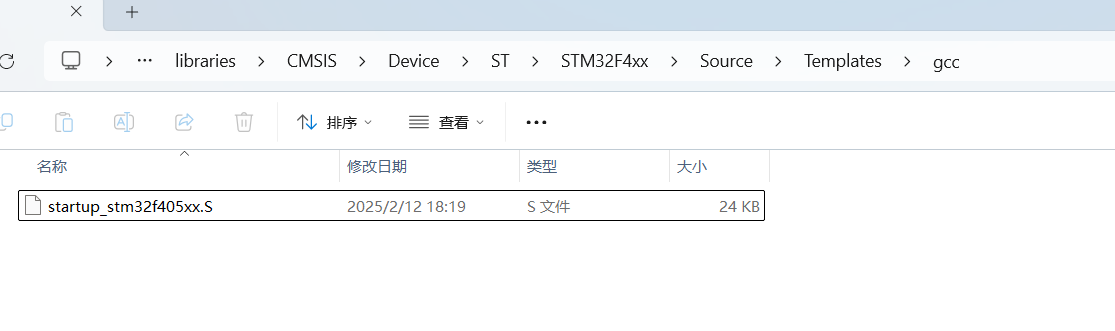
修改可对照下面的
Reset_Handler:
  ldr   sp, =_estack       /* set stack pointer */

/* Copy the data segment initializers from flash to SRAM */
  movs  r1, #0
  b  LoopCopyDataInit

CopyDataInit:
  ldr  r3, =_sidata
  ldr  r3, [r3, r1]
  str  r3, [r0, r1]
  adds  r1, r1, #4

LoopCopyDataInit:
  ldr  r0, =_sdata
  ldr  r3, =_edata
  adds  r2, r0, r1
  cmp  r2, r3
  bcc  CopyDataInit

  movs r1, #0
  b LoopCopyDataInit1

CopyDataInit1:
  ldr r3, =_siccmram
  ldr r3, [r3, r1]
  str r3, [r0, r1]
  adds r1, r1, #4

LoopCopyDataInit1:
  ldr r0, =_sccmram
  ldr r3, =_eccmram
  adds r2, r0, r1
  cmp r2, r3
  bcc CopyDataInit1

  ldr  r2, =_sbss
  b  LoopFillZerobss
/* Zero fill the bss segment. */
FillZerobss:
  movs  r3, #0
  str  r3, [r2], #4

LoopFillZerobss:
  ldr  r3, = _ebss
  cmp  r2, r3
  bcc  FillZerobss

/* Call the clock system intitialization function.*/
  bl  SystemInit
/* Call static constructors */
    /* bl __libc_init_array */
/* Call the application's entry point.*/
  bl  entry
  bx  lr
.size  Reset_Handler, .-Reset_Handler
如果要使用内存分配
rt_memheap_alloc(),
还需要开启heap内存堆对象

然后就能愉快的使用了
简单测试
创建变量
	ALIGN(RT_ALIGN_SIZE)
	static int test_stack[512] __attribute__((section (".ccmram")));

    or

    __attribute__((section(".ccmram"))) const char *test_chr = "ccmram_test";
创建函数
__attribute__((section("ccmram"))) void ccmram_test_fun(uint8_t x,uint8_t y,uint8_t t){

}
动态使用,需要先在初始化时初始化这片内存
#define HEAP_CCMRAM_BEGIN                (0x10000000)
#define HEAP_CCMRAM_SIZE                 (1 * 1024)
static struct rt_memheap memheap_ccmram;//不能用于DMA
int system_ccmram_init(void)
{
    return rt_memheap_init(&memheap_ccmram, "ccmram", (void *)HEAP_CCMRAM_BEGIN, (rt_size_t)HEAP_CCMRAM_SIZE);
}
INIT_BOARD_EXPORT(system_ccmram_init);
然后使用时直接就能用了,这里rt_memory_info打印不出来变化,因为并没有统一
    	int *a = (int *)rt_memheap_alloc(&memheap_ccmram, 128);
    	if(a != RT_NULL){
			rt_memory_info(&total_mem,&used_mem,&max_used_mem);//查看内存使用信息
			rt_kprintf("total %d used %d max_used %d\n",total_mem,used_mem,max_used_mem);
			rt_kprintf("%d %d\n",a[0],a[1]);
			a[0] = 1;
			a[1] = 2;
			rt_kprintf("%d %d\n",a[0],a[1]);
    	}else{
    		rt_kprintf("err\n");
    	}
火山引擎开发者社区是火山引擎打造的AI技术生态平台,聚焦Agent与大模型开发,提供豆包系列模型(图像/视频/视觉)、智能分析与会话工具,并配套评测集、动手实验室及行业案例库。社区通过技术沙龙、挑战赛等活动促进开发者成长,新用户可领50万Tokens权益,助力构建智能应用。
更多推荐
 4
4 0
0- 0


 已为社区贡献1条内容

所有评论(0)