【简单应用】LangChain + FastAPI AI修改WORD格式 AI WORD排版
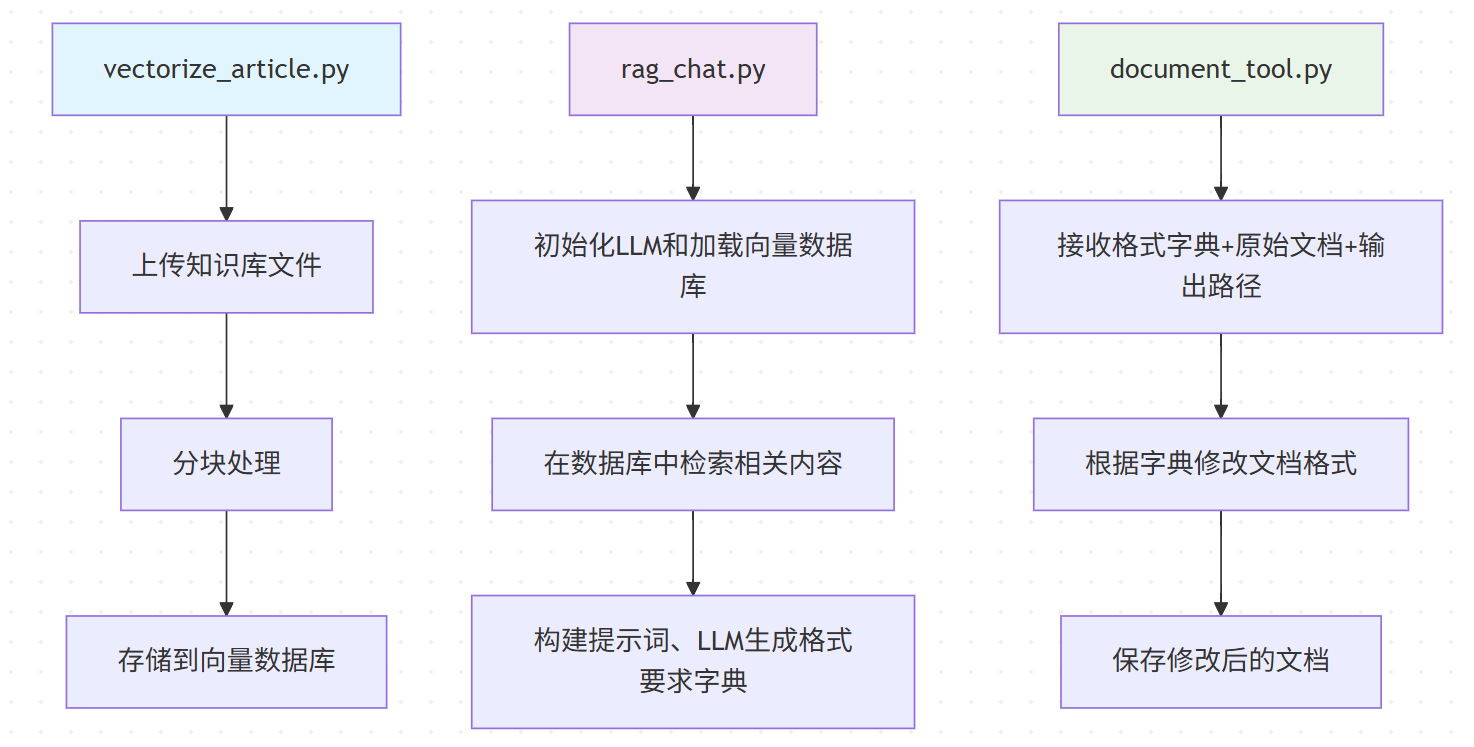
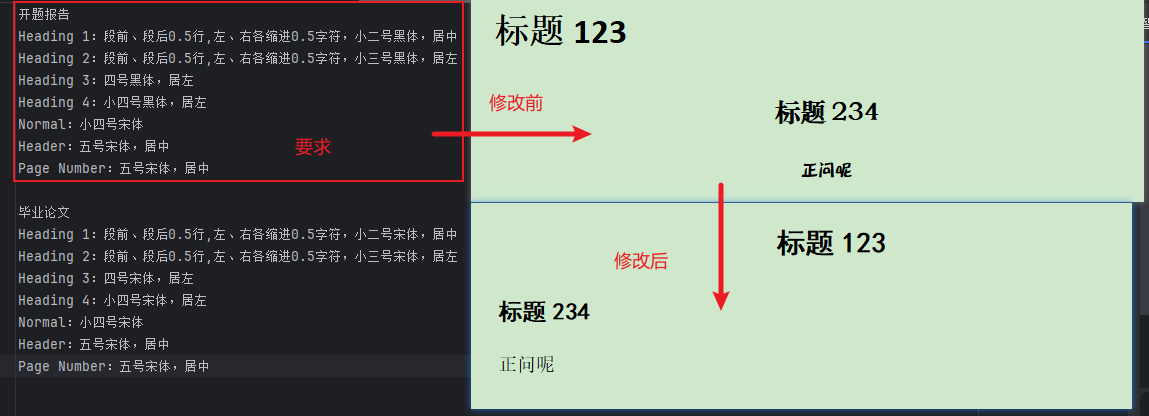
项目十分简单,可以延申到其他复杂的项目,项目逻辑如下:项目演示:问题:根据开题报告的要求,修改example.docx的格式。AI根据知识库查询到开题报告的详细格式,再修改文档。
项目地址:AIDocx: AI智能修改WORD格式Agent助手
项目十分简单,可以延申到其他复杂的项目,项目逻辑如下:
项目演示:
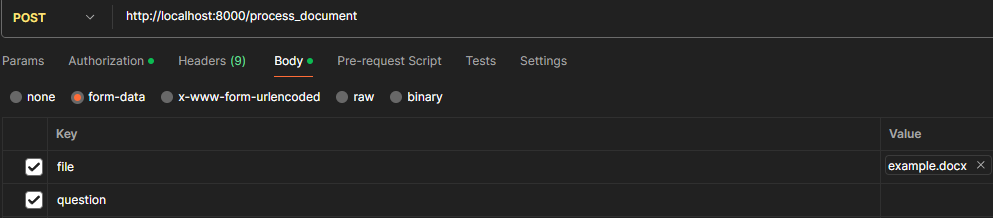
问题:
根据开题报告的要求,修改example.docx的格式。
AI根据知识库查询到开题报告的详细格式,再修改文档。
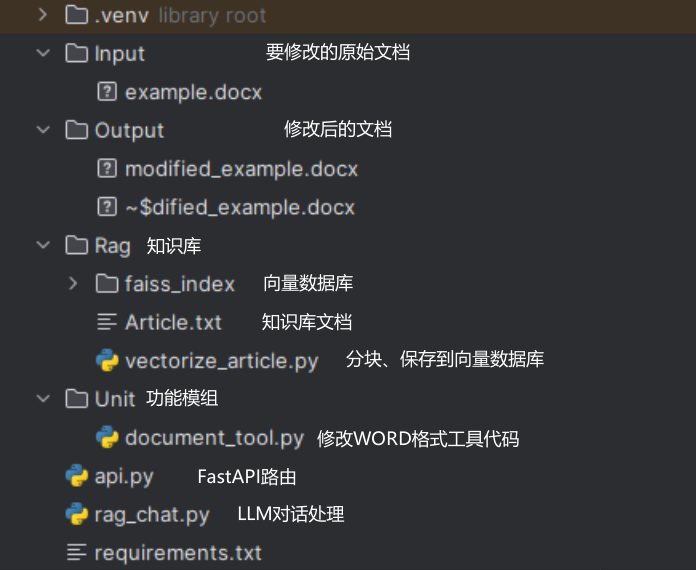
项目结构:
一、分块、保存到向量数据库vectorize_article.py详解
1.1 知识库文档分块处理
开题报告
Heading 1:段前、段后0.5行,左、右各缩进0.5字符,小二号黑体,居中
Heading 2:段前、段后0.5行,左、右各缩进0.5字符,小三号黑体,居左
Heading 3:四号黑体,居左
Heading 4:小四号黑体,居左
Normal:小四号宋体
Header:五号宋体,居中
Page Number:五号宋体,居中

毕业论文
Heading 1:段前、段后0.5行,左、右各缩进0.5字符,小二号宋体,居中
Heading 2:段前、段后0.5行,左、右各缩进0.5字符,小三号宋体,居左
Heading 3:四号宋体,居左
Heading 4:小四号宋体,居左
Normal:小四号宋体
Header:五号宋体,居中
Page Number:五号宋体,居中
上面是简单的论文格式的知识库,开题报告、毕业论文的两个格式要求,以空行为分割,结果是list[str]列表,格式如['开题报告\nHeading 1:......','毕业论文....']
1.2 向量化、存储到向量化数据库
得到的list[str]需要用 嵌入模型 来向量化,得到的如[‘-12312.123...','123.333..']向量化的数据,我用的是阿里的模型,模型介绍如下,注意阿里的是DashScopeEmbeddings而不是OPENAI的,否则报错:
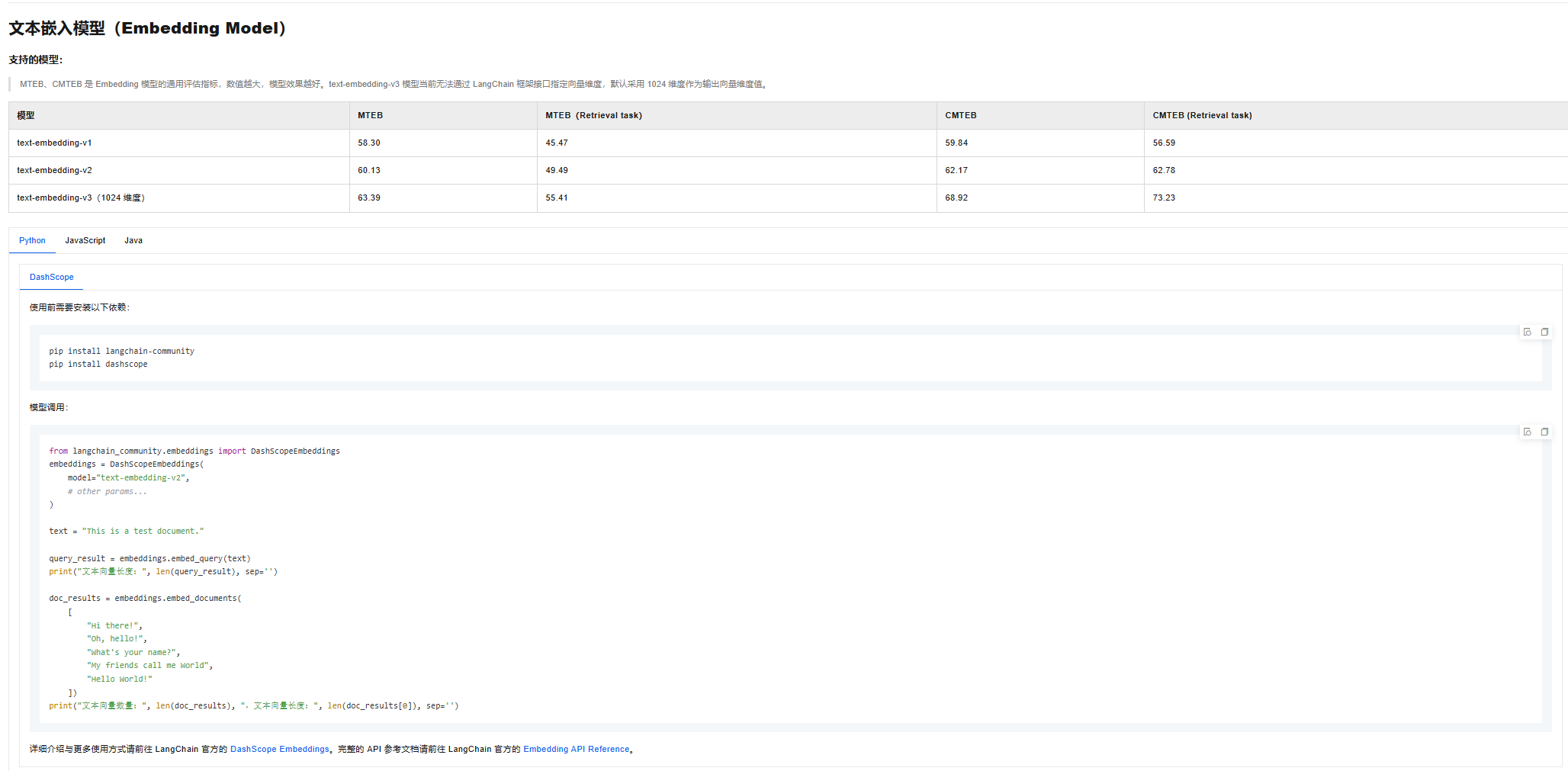
def vectorize_and_store_documents(documents: List[str], vectorstore_path: str = "faiss_index"):
    """
    对文档进行向量化并存储到向量数据库

    Args:
        documents (List[str]): 字符串列表
        vectorstore_path (str): 向量数据库存储路径
    """
    # 初始化嵌入模型
    from langchain_community.embeddings import DashScopeEmbeddings

    embeddings = DashScopeEmbeddings(
        model="text-embedding-v2",  # 正确的模型名
        dashscope_api_key="你的通义的APIKEY,https://help.aliyun.com/zh/model-studio/get-api-key?spm=a2c4g.11186623.0.0.7e8322e4UBHKuY获取"
    )

    # 清除现有的向量数据库
    clear_vectorstore_if_exists(vectorstore_path)

    # 创建向量数据库
    vectorstore = FAISS.from_texts(documents, embeddings)

    # 保存向量数据库
    vectorstore.save_local(vectorstore_path)
    print(f"向量数据库已保存到: {vectorstore_path}")

    return vectorstore
结果是保存到Rag\fass_index数据库中,每次更新都需要重新运行vectorize_article.py
二、内容检索、LLM输出格式字典、根据字典修改文档rag_chat.py
def search_documents(vectorstore: FAISS, query: str, k: int = 3):
    """
    在向量数据库中搜索相关文档

    Args:
        vectorstore (FAISS): 向量数据库实例
        query (str): 查询语句
        k (int): 返回结果数量

    Returns:
        List[str]: 相关文档内容列表
    """
    # 执行相似性搜索
    docs = vectorstore.similarity_search(query, k=k)
    # 提取文档内容
    contents = [doc.page_content for doc in docs]
    return contents
context就是检索到的相关内容,例如问题是开题报告的格式,则搜索内容如下,会添加到后续的提示词中:
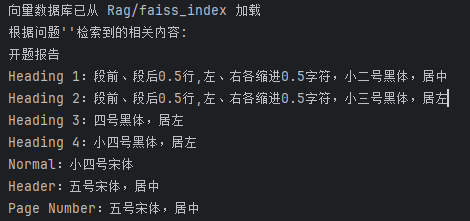
实际上向量数据库检索不够精准,会多出多余的内容,但LLM会自动删除,后续context添加到提示词中来指定LLM的输出格式,得到格式字典result。
def parse_format_requirements(context: str):
    """
    解析格式要求并生成样式映射

    Args:
        context (str): 检索到的文档内容

    Returns:
        dict: 样式格式映射
    """
    # 初始化通义千问模型
    llm = ChatOpenAI(
        model="qwen-plus",
        ……
    )

    # 构建提示词,context就是上面代码检索到的内容
    prompt = f"""
    请分析格式要求,将其转换为样式格式映射字典。
    输出应为一个Python字典,键是样式名(如 'Heading 1', 'Heading 2' 等),值是包含格式设置的字典。
    格式设置字典可以包含以下键:
    - 'font_name' (str): 字体名称 (如 '黑体', '宋体')
    - 'font_size' (int): 字号 (单位:磅)
    - 'bold' (bool): 是否加粗
    - 'alignment' (str): 对齐方式 ('left', 'center', 'right', 'justify')
    - 'space_before' (float): 段前间距 (单位:磅)
    - 'space_after' (float): 段后间距 (单位:磅)
    - 'line_spacing' (float): 行距 (倍数)

    只输出Python字典代码,不要有其他文字。

    格式要求:
    {context}

    样式格式映射字典:
    """

    # 调用通义千问生成样式映射
    response = llm.predict(prompt)

    try:
        # 安全地评估响应为Python字典
        style_mapping = eval(response)
        return style_mapping
    except:
        print("解析格式要求时出错,使用默认样式映射")
       ……
三、修改WORD document_tool.py 和实际逻辑
def modify_document_format(doc_path: str, style_format_mapping: dict, output_path: str = None):
    """
    遍历 Word 文档的段落,根据其样式应用指定的格式。

    Args:
        doc_path (str): 输入 Word 文档的路径。
        style_format_mapping (dict): 一个字典,键是样式名(如 '标题 1'),值是包含格式设置的字典。
                                    格式字典可以包含以下键:
                                    - 'font_name' (str): 字体名称 (如 '黑体')
                                    - 'font_size' (int): 字号 (单位:磅)
                                    - 'bold' (bool): 是否加粗
                                    - 'italic' (bool): 是否倾斜
                                    - 'underline' (bool): 是否下划线
                                    - 'alignment' (str): 对齐方式 ('left', 'center', 'right', 'justify')
                                    - 'space_before' (float): 段前间距 (单位:磅)
                                    - 'space_after' (float): 段后间距 (单位:磅)
                                    - 'line_spacing' (float): 行距 (倍数)
        output_path (str, optional): 输出文档的路径。如果为 None,则覆盖原文件。

    Returns:
        bool: 操作成功返回 True,否则返回 False。
    """
LLM只需要提供style_format_mapping的字典,就是上面得到的result,而格式已经添加到提示词中,因此符合函数的输入,也可以使用@TOOL工具。
上面介绍的都是工具函数,而实际运行中,按顺序调用对应函数即可,具体代码如下:
def process_document_with_requirements(question: str, vectorstore: FAISS, input_file_path: str = None):
    """
    根据问题检索相关文档内容,解析格式要求并修改Word文档

    Args:
        question (str): 用户问题
        vectorstore (FAISS): 向量数据库实例
        input_file_path (str, optional): 输入文件路径,默认为Input/example.docx
    """
    # 检索相关文档
    relevant_docs = search_documents(vectorstore, question)

    # 合并检索到的内容
    context = "\n\n".join(relevant_docs)
    print(f"根据问题'{question}'检索到的相关内容:")
    print(context)

    # 解析格式要求
    print("\n正在解析格式要求...")
    style_mapping = parse_format_requirements(context)
    print("解析得到的样式映射:")
    print(style_mapping)

    # 设置文件路径
    if input_file_path is None:
        input_doc_path = os.path.join("Input", "example.docx")
    else:
        input_doc_path = input_file_path

    output_doc_path = os.path.join("Output", "modified_example.docx")

    # 确保输出目录存在
    os.makedirs("Output", exist_ok=True)

    # 检查输入文件是否存在
    if not os.path.exists(input_doc_path):
        print(f"输入文件 {input_doc_path} 不存在,请确保文件存在")
        return False

    # 导入文档处理工具
    try:
        import sys
        sys.path.append(os.path.join(os.path.dirname(__file__), 'Unit'))
        from Unit.document_tool import modify_document_format

        print(f"\n正在修改文档格式: {input_doc_path}")
        success = modify_document_format(input_doc_path, style_mapping, output_doc_path)

        if success:
            print(f"文档格式修改成功,已保存至: {output_doc_path}")
        else:
            print("文档格式修改失败")

        return success
    except Exception as e:
        print(f"导入或调用文档处理工具时发生错误: {e}")
        return False
火山引擎开发者社区是火山引擎打造的AI技术生态平台,聚焦Agent与大模型开发,提供豆包系列模型(图像/视频/视觉)、智能分析与会话工具,并配套评测集、动手实验室及行业案例库。社区通过技术沙龙、挑战赛等活动促进开发者成长,新用户可领50万Tokens权益,助力构建智能应用。
更多推荐
 5
5 0
0- 0


 已为社区贡献2条内容

所有评论(0)