图像处理实践之车牌识别
基于图像处理的车牌定位与识别实践
数字图像处理技术应用案例
目录
- 项目概述
- 技术方法分析
- 关键代码解析
- 处理效果展示
- 心得体会
- 改进方向
1. 项目概述
核心目标:
- 从复杂背景中精确定位车牌区域
- 实现倾斜矫正和字符区域提取
处理流程:
2. 技术方法分析
关键技术:
| 技术 | 函数/算法 | 作用 |
|---|---|---|
| 颜色空间转换 | cv2.cvtColor | RGB→HSV转换 |
| 阈值分割 | cv2.inRange | 蓝色区域提取 |
| 形态学处理 | cv2.morphologyEx | 去噪/填充 |
| 边缘检测 | Canny算法 | 轮廓提取 |
| 投影分析 | 垂直投影法 | 边框去除 |
3. 关键代码解析
3.1 RGB到HSV的转换
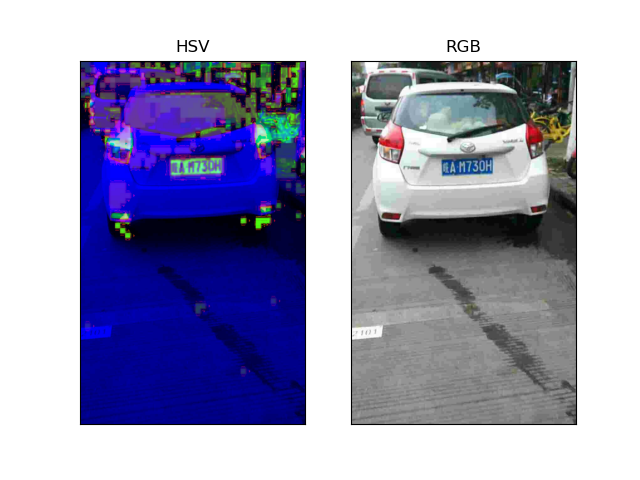
HSV空间由色调(H)、饱和度(S)和亮度(V)组成,颜色信息与光照分离。色调表示颜色的种类,饱和度表示颜色的纯度,亮度表示颜色的明暗。HSV空间对光照变化具有较好的鲁棒性,适合颜色分割任务。
cv2.cvtColor函数将图像从RGB色彩空间转换为HSV色彩空间(处理后效果如下图4.1)
# OpenCV读取车牌图像
img = cv2.imread('data/0002.jpg')
# BGR转为RGB格式
img = cv2.cvtColor(img, cv2.COLOR_BGR2RGB)
# RGB转为HSV格式
hsv = cv2.cvtColor(img, cv2.COLOR_RGB2HSV)
3.2 蓝色像素提取
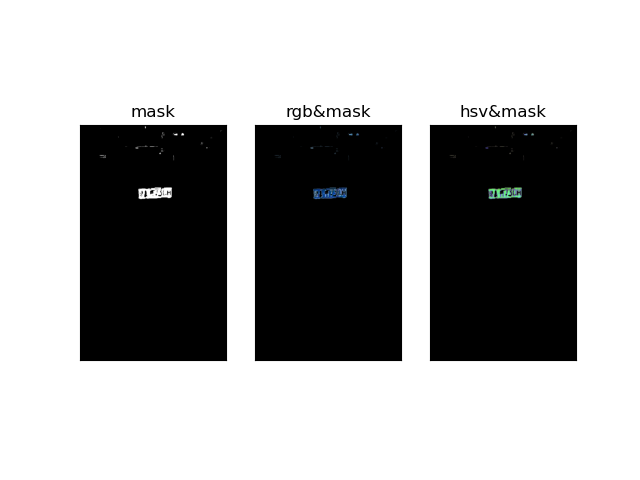
使用cv2.inRange函数根据HSV阈值提取蓝色像素,初步定位车牌区域(效果如图4.2)
通过设置合适的HSV阈值,可以有效区分蓝色车牌与其他颜色的背景
# inRange函数获取蓝色像素mask
# 设定蓝色空间lowerb阈值
raw_blue_min = np.array([100, 90, 80])
# 设定蓝色空间的upperb阈值
raw_blue_max = np.array([130, 255, 255])
# 获得掩模mask
mask = cv2.inRange(hsv, raw_blue_min, raw_blue_max)
3.3 形态学图像处理
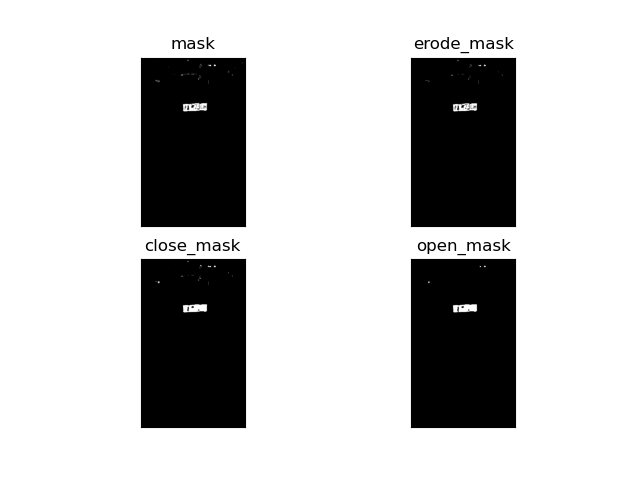
cv2.erode函数对图像进行腐蚀操作,消除小物体和断开连接的部分(效果如图4.3)
腐蚀操作可以去除图像中的噪声,使车牌区域更加清晰
# erode函数及morphologyEx函数对mask做形态学图像处理
# 腐蚀mask避免非车牌区域干扰
erode_mask = cv2.erode(mask, kernel=(33, 33), iterations=1)
kernel = np.ones((7, 7), np.uint8)
# 对腐蚀后的mask做闭操作填充车牌像素点
close_mask = cv2.morphologyEx(erode_mask, cv2.MORPH_CLOSE, kernel)
# 进而对close_mask 开操作消除噪点
open_mask = cv2.morphologyEx(close_mask, cv2.MORPH_OPEN, kernel)
3.4 车牌轮廓检测
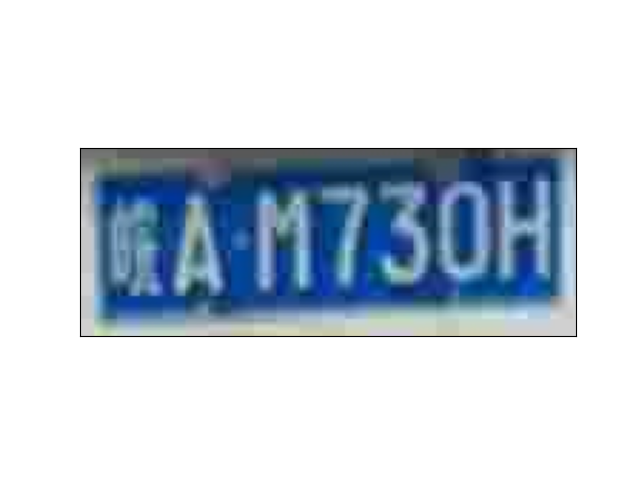
连通域是图像中具有相同像素值的区域,可以通过cv2.findContours函数提取。提取的连通域可以用于后续的车牌定位和矫正
外接矩形是包围轮廓的最小矩形,可以通过cv2.boundingRect函数计算。外接矩形可以用于确定车牌的位置和大小
(效果如图4.4)
# 利用findContours函数标志连通域
rec = list()
# 获取各连通域外接矩形
contours, _ = cv2.findContours(open_mask, cv2.RETR_EXTERNAL, cv2.CHAIN_APPROX_SIMPLE)
for c in contours:
    # 找出轮廓的左上点和右下点,由此计算它的面积和长度
    x, y, w, h = cv2.boundingRect(c)
    if w / h > 2.2:
        rec.append([x, y, x + w, y + h, w * h])
if len(rec) == 0:
    print('there are not rectangles ')
else:
    rec = sorted(rec, key=lambda _x: _x[4])
# 根据面积大小筛选连通域
rect = rec[-1][: -1]
# 对标志出的车牌连通域扩充边界以获得车牌区域外信息
rect[0], rect[1], rect[2], rect[3] = rect[0] - 5, rect[1] - 5, rect[2] + 5, rect[3] + 5
cut_img = img[rect[1]: rect[3], rect[0]: rect[2], :]
3.5 车牌倾斜校正
Hough原理:Hough变换通过参数空间检测直线,将图像中的直线表示为参数空间中的点。通过累加器统计参数空间中的点,可以检测出图像中的直线。
Hough应用:Hough变换可以用于车牌倾斜角度的检测与矫正,提高车牌定位的准确性。通过检测车牌边缘的直线,可以计算出车牌的倾斜角度。
使用cv2.HoughLines函数检测图像中的直线,计算车牌的倾斜角度(效果如图4.5)
通过ndimage.rotate函数对图像进行旋转矫正,使车牌水平
# HoughLines函数直线检测及车牌图像倾斜矫正
import math
# 从scipy库导入ndimage模块
from scipy import ndimage

def canny_detect(img):
    thresh1, thresh2 = 60, 150
    return cv2.Canny(img, thresh1, thresh2)
# RGB转为灰度图
cut_img_gray = cv2.cvtColor(cut_img, cv2.COLOR_RGB2GRAY)
# 对灰度图做边缘检测得到车牌的边缘图像 edges
edges = canny_detect(cut_img_gray)
# 利用HoughLines对边缘图像做直线检测,计算出倾斜角后对图像做倾斜矫正
lines = cv2.HoughLines(edges, 1, np.pi / 180, 0)
for rho, theta in lines[0]:
    a = np.cos(theta)
    b = np.sin(theta)
    x0 = a * rho
    y0 = b * rho
    x1 = int(x0 + 1000 * (-b))
    y1 = int(y0 + 1000 * (a))
    x2 = int(x0 - 1000 * (-b))
    y2 = int(y0 - 1000 * (a))
# 计算检测出直线的斜率
t = float(y2 - y1) / (x2 - x1)
# 利用直线的斜率计算出倾斜夹角
rotate_angle = math.degrees(math.atan(t))
if rotate_angle > 45:
    rotate_angle = -90 + rotate_angle
elif rotate_angle < -45:
    rotate_angle = 90 + rotate_angle
rotate_img = ndimage.rotate(cut_img, rotate_angle)
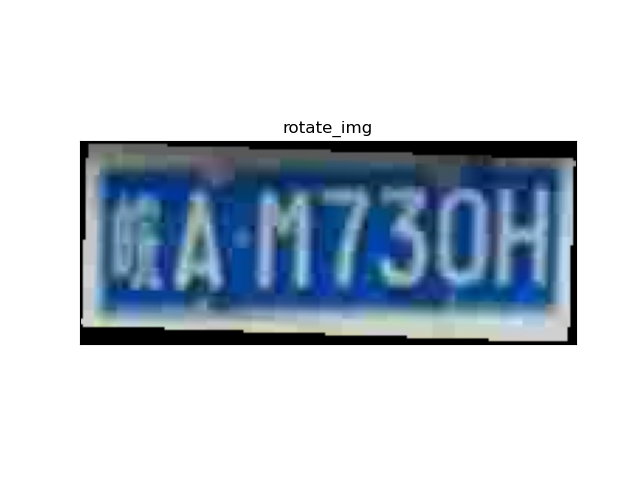
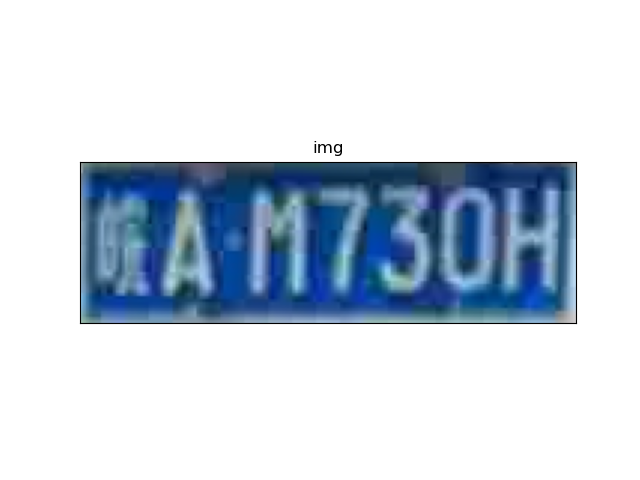
3.6 精细定位优化车牌区域
再次使用cv2.inRange和形态学处理,进一步优化车牌区域(效果如图4.6)
提高车牌定位的准确性,为后续处理做准备
# 粗略定位车牌图像基础上形态学图像处理精细定位车牌
# 初始化蓝色HSV空间阈值
eaxt_blue_min = np.array([100, 90, 90])
eaxt_blue_max = np.array([130, 255, 255])
# RGB转HSV
hsv_ex = cv2.cvtColor(rotate_img, cv2.COLOR_RGB2HSV)
# 利用HSV提取蓝色像素阈值
mask_ex = cv2.inRange(hsv_ex, eaxt_blue_min, eaxt_blue_max)
# 形态学图像处理
mask_ex_erode = cv2.erode(mask_ex, kernel=(15, 15), iterations=1)
mask_ex_open = cv2.morphologyEx(mask_ex_erode, cv2.MORPH_OPEN, kernel=np.ones((5, 5), np.uint8))
mask_ex_cann = cv2.Canny(mask_ex_open, 60, 150)
mask_ex = cv2.morphologyEx(mask_ex_erode, cv2.MORPH_CLOSE, kernel=np.ones((7, 7), np.uint8))
# 标志车牌连通域
rec = list()
contours, hierarchy = cv2.findContours(mask_ex, cv2.RETR_EXTERNAL, cv2.CHAIN_APPROX_SIMPLE)
for c in contours:
    x, y, w, h = cv2.boundingRect(c)
    if 2.2 < w / h < 3.2:
        rec.append([x, y, x + w, y + h, w * h])
if len(rec) == 0:
    print('there are not rectangles ')
else:
    rec = sorted(rec, key=lambda _x: _x[4])
rect_mask_ex = rec[-1][: -1]
# 从粗略定位车牌图像中分割出精细定位车牌图像
cut_mask_ex = rotate_img[rect_mask_ex[1]: rect_mask_ex[3], rect_mask_ex[0]: rect_mask_ex[2], :]
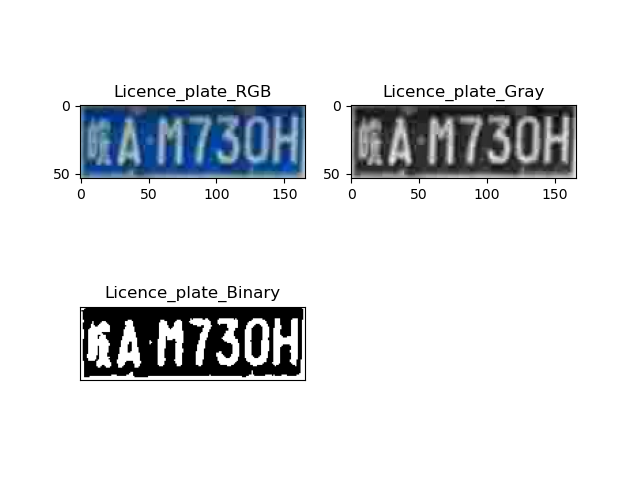
3.7 二值化处理
二值化将图像转换为黑白两色,便于进行字符分割和识别;使用大津法可以自动确定二值化的阈值,提高二值化的准确性。
使用cv2.threshold函数和大津法将灰度图转换为二值图(效果如图4.7)
# RGB精细定位车牌图像转二值图
# 精细定位车牌RGB图像转灰度图
gray_ex = cv2.cvtColor(cut_mask_ex, cv2.COLOR_RGB2GRAY)  # change here to avoid the second
# 大津法灰度图像转为二值图
ret, thresh = cv2.threshold(gray_ex, 0, 255, cv2.THRESH_BINARY + cv2.THRESH_OTSU)
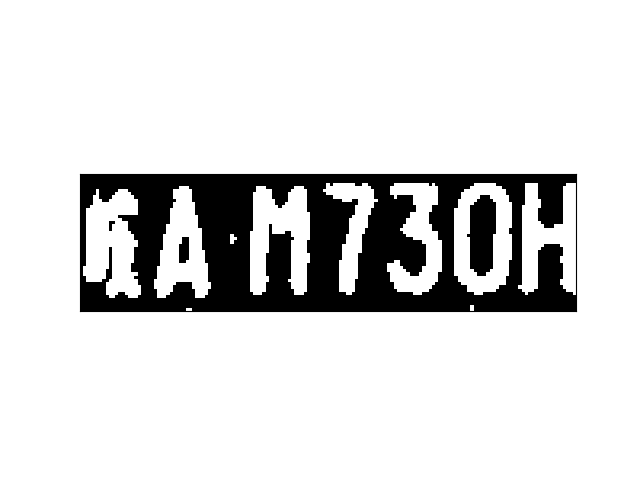
3.8 垂直投影法去除车牌边框
垂直投影法通过计算图像在垂直方向上的投影,去除多余的边框。
垂直投影法可以提取纯净的车牌区域,提高字符识别的准确性。
使用垂直投影法去除车牌图像的上下左右边框(效果如图4.8)
# 垂直投影法去除车牌图像上下左右边框过程
thresh_pad = np.pad(thresh, ((1, 1), (1, 1)), 'constant', constant_values=(0, 0))
h, w = thresh.shape
_h, _w = thresh_pad.shape
meta_kernel = np.asarray([0.2, 1, 0.2])
hori_kernel = np.tile(meta_kernel, (_w, 1)).transpose()
hori_pixel = list()
for index in range(0, h):
    hori_piece = thresh_pad[0 + index: 3 + index, :] // 255  # 归一化灰度值
    hori_res = (hori_piece * hori_kernel).sum()
    hori_pixel.append(hori_res)
ax = plt.axes([0.1, 0.38, 0.8, 0.26])
ax.set_facecolor("black")
hori_pixel = hori_pixel[:: -1]  # 取逆序,方便画图展示结果
# 显示水平方向垂直投影图像
plt.barh(range(len(hori_pixel)), hori_pixel, height=1, fc='w')
plt.yticks([])
plt.xticks([])
plt.show()
hori_pixel = [i / w * 100 for i in hori_pixel]
hori_pixel = np.asarray(hori_pixel)
candidate_index = np.where(hori_pixel < 21)[0]
hori_array = np.arange(0, h)
low_hori_standard_arr = hori_array[3: round(h * 0.25)]
high_hori_standard_arr = hori_array[-round(h * 0.25): -3]
hori_low_indexs = list(set(candidate_index).intersection(low_hori_standard_arr))
hori_high_indexs = list(set(candidate_index).intersection(high_hori_standard_arr))
hori_low_index = None
hori_high_index = None
if len(hori_low_indexs) > 0:
    hori_low_index = min(set(np.where(hori_pixel == \
                                      hori_pixel[hori_low_indexs].min())[0]).intersection(hori_low_indexs))
if len(hori_high_indexs) > 0:
    hori_high_index = min(set(np.where(hori_pixel == \
                                       hori_pixel[hori_high_indexs].min())[0]).intersection(hori_high_indexs))
de_horibox_thresh_pad = thresh_pad[hori_low_index: hori_high_index, :]
# 显示去除上下边框后的二进制车牌图像
plt.imshow(de_horibox_thresh_pad, cmap=plt.cm.gray)
plt.yticks([])
plt.xticks([])
plt.show()

# 在去除了水平边框的基础上, 接下来去除垂直方向边框
_meta_kernel = np.asarray([0, 1, 0])
meta_kernel = np.asarray([0.2, 1, 0.2])
ver_pixel = list()
new_h, new_w = de_horibox_thresh_pad.shape  # new_w = _w, new_h < _h, (new_h + 裁切掉值) == _h,
ver_kernel = np.tile(_meta_kernel, (new_h, 1))
for index in range(0, w):
    ver_piece = de_horibox_thresh_pad[:, 0 + index: 3 + index] // 255  # 归一化灰度值
    ver_res = (ver_piece * ver_kernel).sum()
    ver_pixel.append(ver_res)
# 显示竖直方向垂直投影图像
ax = plt.axes([0.1, 0.38, 0.8, 0.26])
ax.set_facecolor('black')
plt.bar(range(len(ver_pixel)), ver_pixel, width=1, fc='w')
plt.yticks([])
plt.xticks([])
plt.show()

ver_pixel = [i / h * 50 for i in ver_pixel]
ver_pixel = np.asarray(ver_pixel)
ver_left_index = None
ver_right_index = None
ver_array = np.arange(0, w)
left_ver_standard_arr = ver_array[: round(w * 0.04)]
right_ver_standard_arr = ver_array[-round(w * 0.04):]

candidate_index = np.where(ver_pixel < 10)[0]
ver_left_indexs = list(set(candidate_index).intersection(left_ver_standard_arr))
ver_right_indexs = list(set(candidate_index).intersection(right_ver_standard_arr))

if len(ver_left_indexs) > 0:
    ver_left_index = max(ver_left_indexs)
if len(ver_right_indexs) > 0:
    ver_right_index = min(ver_right_indexs)
de_horiboxAndverbox_thresh = de_horibox_thresh_pad[:, ver_left_index: ver_right_index]
# 显示去除上下左右边框后的二进制车牌图像
plt.imshow(de_horiboxAndverbox_thresh, cmap=plt.cm.gray)
plt.yticks([])
plt.xticks([])
plt.show()
4. 处理效果展示
4.1 颜色空间转换对比
4.2 掩模处理效果
4.3 形态学处理
4.4 车牌初步定位结果
4.5 倾斜矫正对比
4.6 精细定位结果
4.7 二值化处理
4.8 投影法去边框后
5. 心得体会
技术收获:
- ✔️ 掌握了颜色空间的实际应用场景
- ✔️ 理解了形态学处理的核心作用
- ✔️ 学会了基于统计的特征提取方法
实践感悟:
“参数调整需要反复试验,特别是HSV阈值和形态学核大小对结果影响显著”
6. 改进方向
现有不足:
- 仅支持蓝色车牌
- 大角度倾斜矫正效果不佳
- 复杂背景干扰明显
优化建议:
- 引入深度学习提高鲁棒性
- 增加多颜色支持
- 开发自适应参数调整算法

中国智能体开发者社区,聚焦智能体与大模型开发,提供前沿资讯、实用工具链、开源项目及行业案例。通过技术沙龙、开发者大赛等活动,促进经验交流与协作,助力开发者快速构建创新智能应用。
更多推荐

 13
13 0
0- 0


 已为社区贡献1条内容

所有评论(0)