Android12 U盘挂载流程学习(一)
Android的外部存储根目录是/storage/emulated/userid(0),但是该目录下所有文件、目录等真正来源都是/data/media/userid目录。至此,U盘挂载的流程…差不多结束了,我们现在有了U盘的源目录/mnt/media_rw/usb0和指向这个路径的/mnt/pass_through/0/usb0。// /data/media/0/Android/data挂载到/m
VOLD(Volume Daemon)是 Android 系统中负责管理外部存储设备的守护进程,主要处理存储设备的挂载、卸载和格式化等操作。
主要功能
- 存储设备管理:
-
检测和识别外部存储设备(如 SD 卡、USB 存储设备)。
-
处理设备的插入和移除事件。
- 挂载与卸载:
-
挂载存储设备到指定目录,使系统能够访问。
-
卸载设备,确保数据安全移除。
- 文件系统支持:
-
支持多种文件系统(如 FAT32、exFAT、NTFS、ext4 等)。
-
根据设备类型选择合适的文件系统进行挂载。
- 权限管理:
-
控制不同应用对存储设备的访问权限。
-
确保用户数据的安全性和隐私。
Vold主要包含NetLinkManager(nm)、VolumeManager(vm)、VoldNativeService。
NetLinkManager:主要负责监听来自kernel的UEvent
VolumeManager:主要是配置相关的选项并告知上层,并接受上层所返回的消息
VoldNativeService:真正去实现挂载的服务,会创建相应的文件夹,设定U盘权限,是否开启FUSE等等
1. 卷管理
卷通常指的是存储设备或存储介质上的一个独立区域,用于存储文件和数据。在操作系统中,一个硬盘可以被分为多个分区,每个分区可以被格式化为一个独立的卷。用直白的话说就是卷是存储设备上的一部分,是可以直接拿来存储文件的。vold管理着存储设备 (比如SD卡、U盘) 所有的卷,其中卷又有虚拟卷 (EmulatedVolume) 、obb卷 (ObbVolume) 、私有卷 (PrivateVolume)、公有卷 (public Volume)、stub卷 (StubVolume)
2. Vold模块的启动
vold模块启动流程如下:
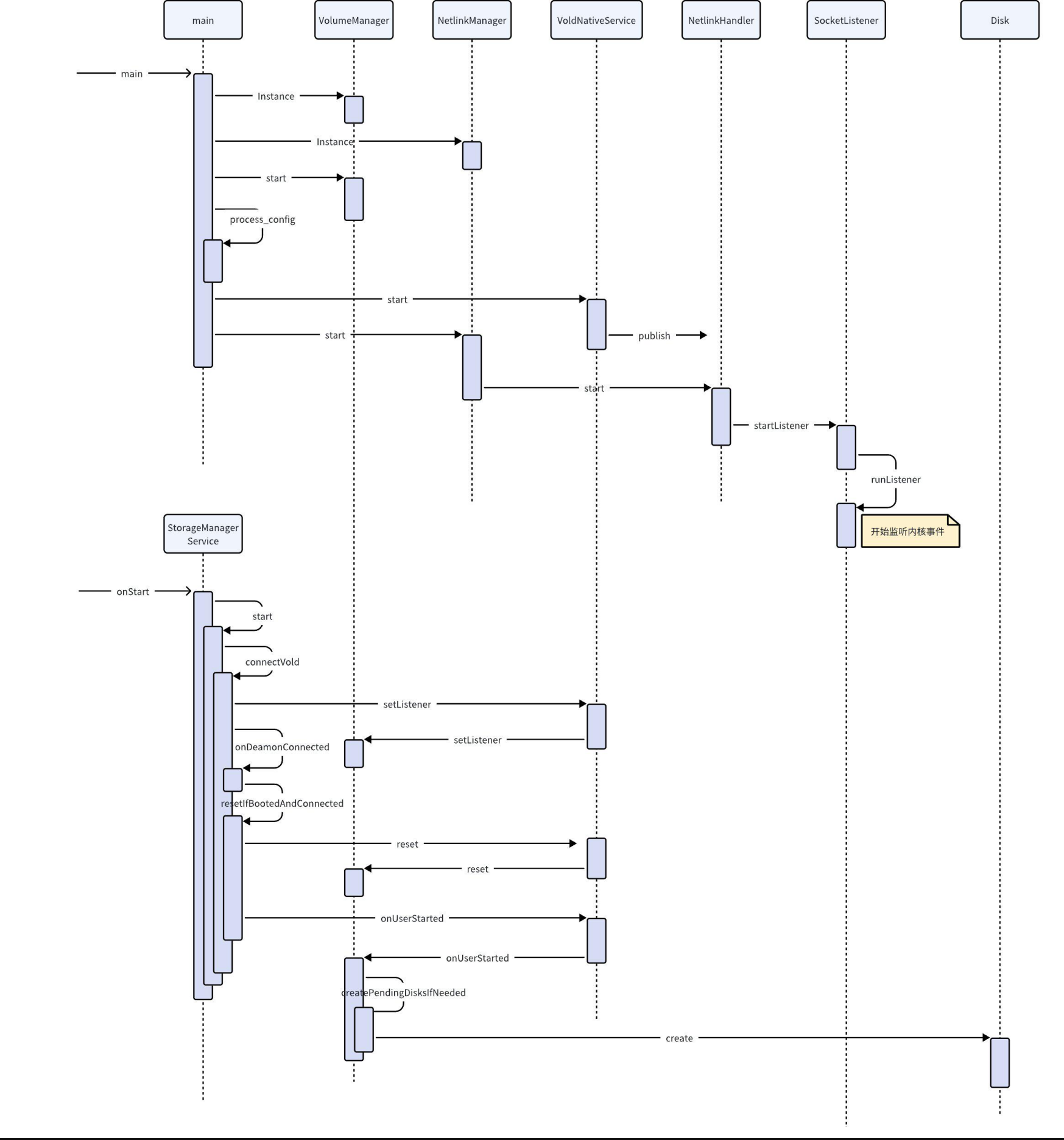
vold启动在init.rc中:
Java
service vold /system/bin/vold
–blkid_context=u:r:blkid:s0 --blkid_untrusted_context=u:r:blkid_untrusted:s0
–fsck_context=u:r:fsck:s0 --fsck_untrusted_context=u:r:fsck_untrusted:s0
class core
ioprio be 2
writepid /dev/cpuset/foreground/tasks
shutdown critical
group root reserved_disk
vold代码在/system/vold下面
函数入口是main函数:
Java
/system/vold/main.cpp
int main(int argc, char** argv) {
…
VolumeManager* vm;
NetlinkManager* nm;
parse_args(argc, argv);
sehandle = selinux_android_file_context_handle();
if (sehandle) {
selinux_android_set_sehandle(sehandle);
}
// 创建目录,用于放置后面建立的vold节点
mkdir(“/dev/block/vold”, 0755);
// VolumeManager负责Volume的一些管理
if (!(vm = VolumeManager::Instance())) {
LOG(ERROR) << “Unable to create VolumeManager”;
exit(1);
}
// NetlinkManager负责与内核之间的通信
if (!(nm = NetlinkManager::Instance())) {
LOG(ERROR) << “Unable to create NetlinkManager”;
exit(1);
}
if (android::base::GetBoolProperty(“vold.debug”, false)) {
vm->setDebug(true);
}
// 启动VolumeManager
if (vm->start()) {
PLOG(ERROR) << “Unable to start VolumeManager”;
exit(1);
}
VoldConfigs configs = {};
// 解析fstab文件
if (process_config(vm, &configs)) {
PLOG(ERROR) << “Error reading configuration… continuing anyways”;
}
android::hardware::configureRpcThreadpool(1, false /* callerWillJoin */);
// 创建VoldNativeService
if (android::vold::VoldNativeService::start() != android::OK) {
LOG(ERROR) << “Unable to start VoldNativeService”;
exit(1);
}
ATRACE_END();
LOG(DEBUG) << “VoldNativeService::start() completed OK”;
// 启动NetlinkManager
if (nm->start()) {
PLOG(ERROR) << “Unable to start NetlinkManager”;
exit(1);
}
…
android::IPCThreadState::self()->joinThreadPool();
exit(0);
}
2.1 VolumeManager#start
Java
int VolumeManager::start() {
ATRACE_NAME(“VolumeManager::start”);
// 始终从头开始,卸载我们拥有的目录中的所有内容,以防崩溃
unmountAll();
Devmapper::destroyAll();
Loop::destroyAll();
CHECK(mInternalEmulatedVolumes.empty());
// 构造出内置存储目录/data/media
auto vol = std::shared_ptrandroid::vold::VolumeBase(
new android::vold::EmulatedVolume(“/data/media”, 0));
vol->setMountUserId(0);
vol->create();
mInternalEmulatedVolumes.push_back(vol);
// 构造虚拟磁盘
updateVirtualDisk();
return 0;
}
2.2 VoldNativeService#start
Java
status_t VoldNativeService::start() {
IPCThreadState::self()->disableBackgroundScheduling(true);
status_t ret = BinderService::publish();
if (ret != android::OK) {
return ret;
}
sp ps(ProcessState::self());
ps->startThreadPool();
ps->giveThreadPoolName();
return android::OK;
}
VoldNativeService负责连接vold与StorageManagerService
2.3 NetlinkManager#start
Java
int NetlinkManager::start() {
struct sockaddr_nl nladdr;
int sz = 64 * 1024;
int on = 1;
memset(&nladdr, 0, sizeof(nladdr));
nladdr.nl_family = AF_NETLINK;
nladdr.nl_pid = getpid();
nladdr.nl_groups = 0xffffffff;
// 注册UEVENT事件,用于接收内核信息
if ((mSock = socket(PF_NETLINK, SOCK_DGRAM | SOCK_CLOEXEC, NETLINK_KOBJECT_UEVENT)) < 0) {
PLOG(ERROR) << “Unable to create uevent socket”;
return -1;
}
if ((setsockopt(mSock, SOL_SOCKET, SO_RCVBUFFORCE, &sz, sizeof(sz)) < 0) &&
(setsockopt(mSock, SOL_SOCKET, SO_RCVBUF, &sz, sizeof(sz)) < 0)) {
PLOG(ERROR) << “Unable to set uevent socket SO_RCVBUF/SO_RCVBUFFORCE option”;
goto out;
}
if (setsockopt(mSock, SOL_SOCKET, SO_PASSCRED, &on, sizeof(on)) < 0) {
PLOG(ERROR) << “Unable to set uevent socket SO_PASSCRED option”;
goto out;
}
if (bind(mSock, (struct sockaddr*)&nladdr, sizeof(nladdr)) < 0) {
PLOG(ERROR) << “Unable to bind uevent socket”;
goto out;
}
// NetlinkHandler用于对接收到的内核消息进行处理
mHandler = new NetlinkHandler(mSock);
// 开始监听内核消息
if (mHandler->start()) {
PLOG(ERROR) << “Unable to start NetlinkHandler”;
goto out;
}
return 0;
out:
close(mSock);
return -1;
}
2.3.1 NetlinkHandler#start
C++
int NetlinkHandler::start() {
return this->startListener();
}
这里的startListener是SocketListener的一个成员方法,NetlinkHandler继承了NetlinkListener,NetlinkListener继承了SocketListener:
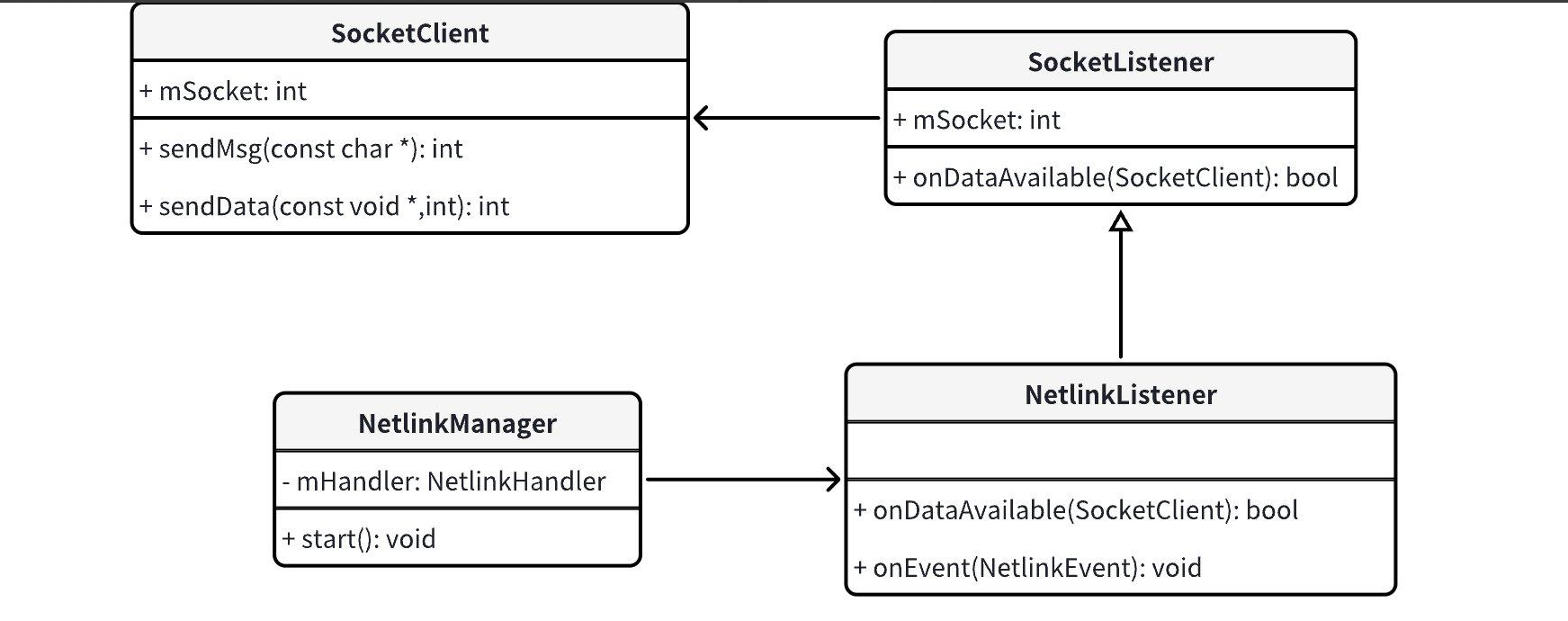
2.3.1.1 SocketListener#startListener
C++
int SocketListener::startListener() {
return startListener(4);
}
int SocketListener::startListener(int backlog) {
// mSocket在创建NetlinkHandler时赋值了
if (!mSocketName && mSock == -1) {
SLOGE(“Failed to start unbound listener”);
errno = EINVAL;
return -1;
} else if (mSocketName) {
if ((mSock = android_get_control_socket(mSocketName)) < 0) {
SLOGE(“Obtaining file descriptor socket ‘%s’ failed: %s”,
mSocketName, strerror(errno));
return -1;
}
SLOGV(“got mSock = %d for %s”, mSock, mSocketName);
fcntl(mSock, F_SETFD, FD_CLOEXEC);
}
if (mListen && listen(mSock, backlog) < 0) {
SLOGE(“Unable to listen on socket (%s)”, strerror(errno));
return -1;
} else if (!mListen)
mClients[mSock] = new SocketClient(mSock, false, mUseCmdNum);
//建立管道,用于后面的关闭监听循环
if (pipe2(mCtrlPipe, O_CLOEXEC)) {
SLOGE(“pipe failed (%s)”, strerror(errno));
return -1;
}
if (pthread_create(&mThread, nullptr, SocketListener::threadStart, this)) {
SLOGE(“pthread_create (%s)”, strerror(errno));
return -1;
}
return 0;
}
void *SocketListener::threadStart(void *obj) {
SocketListener *me = reinterpret_cast<SocketListener *>(obj);
me->runListener();
pthread_exit(nullptr);
return nullptr;
}
2.3.1.2 SocketListener#runListener
C++
void SocketListener::runListener() {
while (true) {
std::vector fds;
pthread_mutex_lock(&mClientsLock);
fds.reserve(2 + mClients.size());
fds.push_back({.fd = mCtrlPipe[0], .events = POLLIN});
if (mListen) fds.push_back({.fd = mSock, .events = POLLIN});
for (auto pair : mClients) {
// NB: calling out to an other object with mClientsLock held (safe)
const int fd = pair.second->getSocket();
if (fd != pair.first) SLOGE(“fd mismatch: %d != %d”, fd, pair.first);
fds.push_back({.fd = fd, .events = POLLIN});
}
pthread_mutex_unlock(&mClientsLock);
SLOGV(“mListen=%d, mSocketName=%s”, mListen, mSocketName);
int rc = TEMP_FAILURE_RETRY(poll(fds.data(), fds.size(), -1));
if (rc < 0) {
SLOGE(“poll failed (%s) mListen=%d”, strerror(errno), mListen);
sleep(1);
continue;
}
if (fds[0].revents & (POLLIN | POLLERR)) {
char c = CtrlPipe_Shutdown;
TEMP_FAILURE_RETRY(read(mCtrlPipe[0], &c, 1));
if (c == CtrlPipe_Shutdown) {
break;
}
continue;
}
if (mListen && (fds[1].revents & (POLLIN | POLLERR))) {
int c = TEMP_FAILURE_RETRY(accept4(mSock, nullptr, nullptr, SOCK_CLOEXEC));
if (c < 0) {
SLOGE(“accept failed (%s)”, strerror(errno));
sleep(1);
continue;
}
pthread_mutex_lock(&mClientsLock);
mClients[c] = new SocketClient(c, true, mUseCmdNum);
pthread_mutex_unlock(&mClientsLock);
}
// Add all active clients to the pending list first, so we can release
// the lock before invoking the callbacks.
std::vector<SocketClient*> pending;
pthread_mutex_lock(&mClientsLock);
const int size = fds.size();
for (int i = mListen 2 : 1; i < size; ++i) {
const struct pollfd& p = fds[i];
if (p.revents & (POLLIN | POLLERR)) {
auto it = mClients.find(p.fd);
if (it == mClients.end()) {
SLOGE(“fd vanished: %d”, p.fd);
continue;
}
SocketClient* c = it->second;
pending.push_back©;
c->incRef();
}
}
pthread_mutex_unlock(&mClientsLock);
for (SocketClient* c : pending) {
// Process it, if false is returned, remove from the map
SLOGV(“processing fd %d”, c->getSocket());
// 处理消息
if (!onDataAvailable©) {
release(c, false);
}
c->decRef();
}
}
}
这里就是kernel与native通信的接口,内核上报u盘插入事件后就会通过这里通知到上层。
3. StorageManagerService的启动
StorageManagerService通过SystemServer启动,启动完成后调用ServiceManager.addService注册服务
C++
/frameworks/base/services/core/java/com/android/server/StorageManagerService.java
public void onStart() {
mStorageManagerService = new StorageManagerService(getContext());
publishBinderService(“mount”, mStorageManagerService);
mStorageManagerService.start();
}
protected final void publishBinderService(String name, IBinder service,
boolean allowIsolated, int dumpPriority) {
ServiceManager.addService(name, service, allowIsolated, dumpPriority);
}
3.1 Start
C++
private void start() {
// 连接文件系统监控服务
connectStoraged();
// 连接vold
connectVold();
}
3.2 connectVold
C++
private void connectVold() {
IBinder binder = ServiceManager.getService(“vold”);
…
if (binder != null) {
// 获取native层服务端索引
mVold = IVold.Stub.asInterface(binder);
try {
// 设置监听
mVold.setListener(mListener);
} catch (RemoteException e) {
mVold = null;
Slog.w(TAG, “vold listener rejected; trying again”, e);
}
} else {
Slog.w(TAG, “vold not found; trying again”);
}
if (mVold == null) {
BackgroundThread.getHandler().postDelayed(() -> {
connectVold();
}, DateUtils.SECOND_IN_MILLIS);
} else {
restoreLocalUnlockedUsers();
onDaemonConnected();
}
}
3.2.1 VoldNativeService#setListener
这里通过mVold调用了VoldNativeService的setListener,在system/vold/binder/android/os/IVold.aidl文件中声明了mvold可以调用的函数。
C++
binder::Status VoldNativeService::setListener(
const android::spandroid::os::IVoldListener& listener) {
ENFORCE_SYSTEM_OR_ROOT;
ACQUIRE_LOCK;
VolumeManager::Instance()->setListener(listener);
return Ok();
}
VolumeManager.cpp
void setListener(android::spandroid::os::IVoldListener listener) { mListener = listener; }
这里在VolumeManager里注册了一个监听回调,对应的监听事件在system/vold/binder/android/os/IVoldListener.aidl里:
C++
package android.os;
/** {@hide} */
oneway interface IVoldListener {
void onDiskCreated(@utf8InCpp String diskId, int flags);
void onDiskScanned(@utf8InCpp String diskId);
void onDiskMetadataChanged(@utf8InCpp String diskId,
long sizeBytes, @utf8InCpp String label, @utf8InCpp String sysPath);
void onDiskDestroyed(@utf8InCpp String diskId);
void onVolumeCreated(@utf8InCpp String volId,
int type, @utf8InCpp String diskId, @utf8InCpp String partGuid, int userId);
void onVolumeStateChanged(@utf8InCpp String volId, int state);
void onVolumeMetadataChanged(@utf8InCpp String volId,
@utf8InCpp String fsType, @utf8InCpp String fsUuid, @utf8InCpp String fsLabel);
void onVolumePathChanged(@utf8InCpp String volId,
@utf8InCpp String path);
void onVolumeInternalPathChanged(@utf8InCpp String volId,
@utf8InCpp String internalPath);
void onVolumeDestroyed(@utf8InCpp String volId);
}
3.2.2 onDaemonConnected
onDaemonConnected会发送一个消息,最后调到handleDaemonConnected:
C++
private void handleDaemonConnected() {
initIfBootedAndConnected();
resetIfBootedAndConnected();
// On an encrypted device we can’t see system properties yet, so pull
// the system locale out of the mount service.
if (“”.equals(VoldProperties.encrypt_progress().orElse(“”))) {
copyLocaleFromMountService();
}
}
3.2.2.1 resetIfBootedAndConnected
C++
private void resetIfBootedAndConnected() {
Slog.d(TAG, “Thinking about reset, mBootCompleted=” + mBootCompleted
+ “, mDaemonConnected=” + mDaemonConnected);
// 等待启动完成并且连接上storage或vold守护服务
if (mBootCompleted && mDaemonConnected) {
…
try {
…
Slog.i(TAG, “Resetting vold…”);
mVold.reset();
Slog.i(TAG, “Reset vold”);
…
for (int userId : systemUnlockedUsers) {
mVold.onUserStarted(userId);
mStoraged.onUserStarted(userId);
}
…
}
}
3.2.2.2 VoldManager#reset
C++
int VolumeManager::reset() {
// Tear down all existing disks/volumes and start from a blank slate so
// newly connected framework hears all events.
for (const auto& vol : mInternalEmulatedVolumes) {
vol->destroy();
}
mInternalEmulatedVolumes.clear();
// 更新已存在的disk
for (const auto& disk : mDisks) {
disk->destroy();
disk->create();
}
// 更新virtualdisk
updateVirtualDisk();
mAddedUsers.clear();
mStartedUsers.clear();
return 0;
}
更新disk的目的是为了回调Framework这些disk已创建。
3.2.2.3 VoldManager#onUserStarted
C++
int VolumeManager::onUserStarted(userid_t userId) {
LOG(INFO) << "onUserStarted: " << userId;
if (mStartedUsers.find(userId) == mStartedUsers.end()) {
createEmulatedVolumesForUser(userId);
}
mStartedUsers.insert(userId);
createPendingDisksIfNeeded();
return 0;
}
void VolumeManager::createPendingDisksIfNeeded() {
bool userZeroStarted = mStartedUsers.find(0) != mStartedUsers.end();
if (!mSecureKeyguardShowing && userZeroStarted) {
// Framework启动之后把mPendingDisks里的成员都启动起来
// 如果开机时就已经插入了U盘,U盘的挂载行为可能会从这里开始
for (const auto& disk : mPendingDisks) {
disk->create();
mDisks.push_back(disk);
}
mPendingDisks.clear();
}
}
Framework启动之前(user0启动之前)启动的disk都存在mPendingDisks里,否则就直接创建存到mDisks里。
至此vold就已经启动了,下面看一下vold的第一个任务:解密及挂载/data
4. 挂载userdata与加解密
4.1 Android外部存储
Android的外部存储根目录是/storage/emulated/userid(0),但是该目录下所有文件、目录等真正来源都是/data/media/userid目录。在访问/data/media之前需要先挂载userdata分区,挂载userdata分区标志着可以访问/data目录。挂载userdata分区用到了vold进程的mountFstab接口,但是此时/data目录是处于加密状态,需要进行解密。解密的操作是在VoldNativeService的initUser0里完成的。
4.2 启动流程
AMS的bootAnimationComplete里,在完成了启动的而最后一些处理后,会发送USER_UNLOCK_MSG消息。这是开机流程的一个重要步骤,标志着user正式启动,而系统启动的第一个用户的id就是0,会走到这里
TODO
5. Emulated挂载流程
/data目录解密后就可以访问到外部存储的根目录了,现在需要等待一个时机——AMS的bootAnimationComplete里发送USER_UNLOCK_MSG。发送消息之后会一路调到StorageManagerService的onUnlockUser。来简单地看下这个流程:
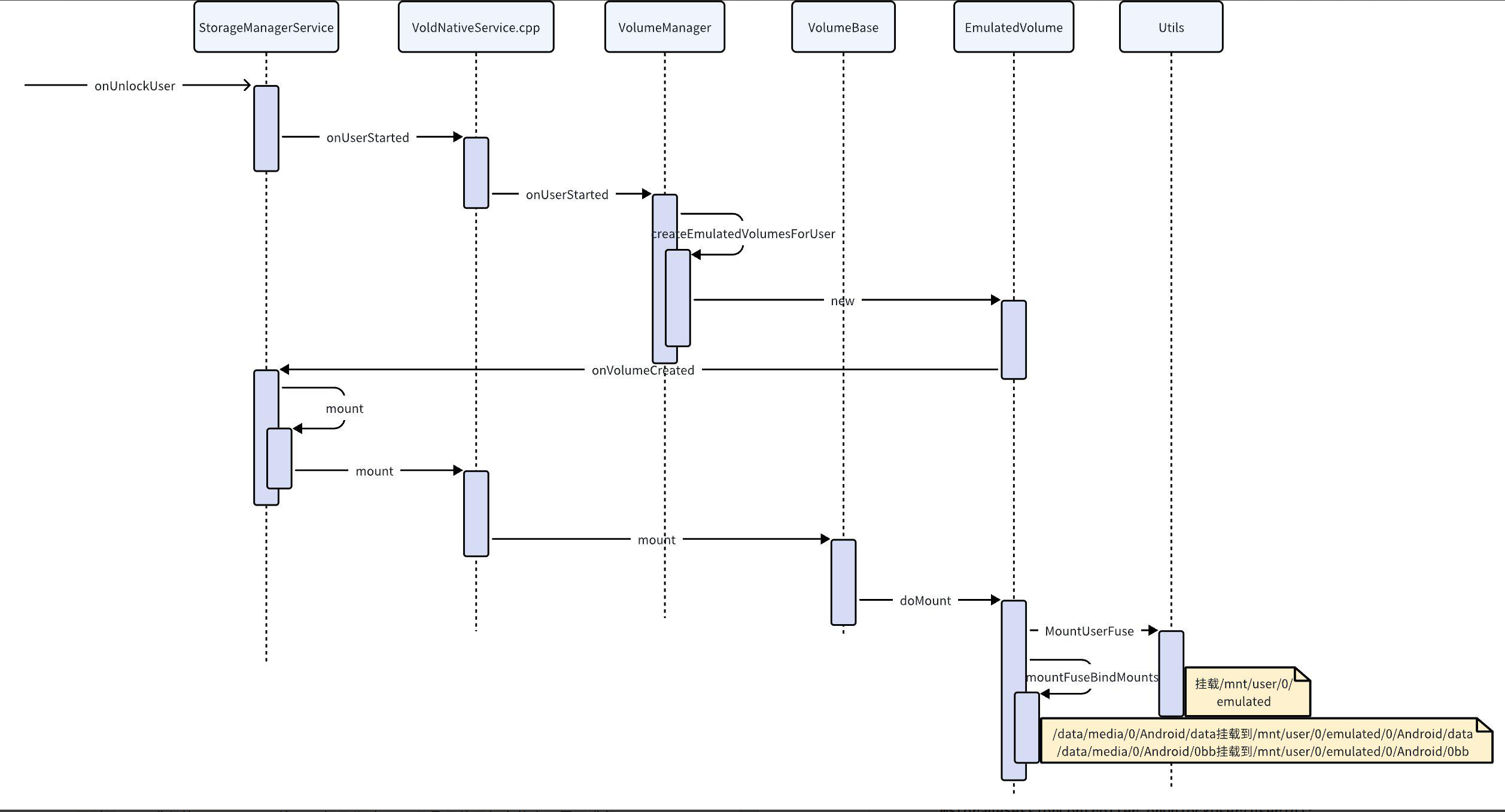
5.1 StorageManagerService#onUnlockUser
C++
private void onUnlockUser(int userId) {
Slog.d(TAG, "onUnlockUser " + userId);
try {
// 创建MediaProvider
mStorageSessionController.onUnlockUser(userId);
mVold.onUserStarted(userId);
mStoraged.onUserStarted(userId);
} catch (Exception e) {
Slog.wtf(TAG, e);
}
…
}
5.2 VoldNativeService#onUserStarted
C++
binder::Status VoldNativeService::onUserStarted(int32_t userId) {
ENFORCE_SYSTEM_OR_ROOT;
ACQUIRE_LOCK;
return translate(VolumeManager::Instance()->onUserStarted(userId));
}
int VolumeManager::onUserStarted(userid_t userId) {
LOG(INFO) << "onUserStarted: " << userId;
if (mStartedUsers.find(userId) == mStartedUsers.end()) {
createEmulatedVolumesForUser(userId);
}
mStartedUsers.insert(userId);
createPendingDisksIfNeeded();
return 0;
}
void VolumeManager::createEmulatedVolumesForUser(userid_t userId) {
// Create unstacked EmulatedVolumes for the user
auto vol = std::shared_ptrandroid::vold::VolumeBase(
new android::vold::EmulatedVolume(“/data/media”, userId));
vol->setMountUserId(userId);
mInternalEmulatedVolumes.push_back(vol);
vol->create();
…
}
5.3 VolumeBase#create
C++
status_t VolumeBase::create() {
CHECK(!mCreated);
mCreated = true;
// 直接返回OK
status_t res = doCreate();
auto listener = getListener();
if (listener) {
listener->onVolumeCreated(getId(), static_cast<int32_t>(mType), mDiskId, mPartGuid,
mMountUserId);
}
setState(State::kUnmounted);
return res;
}
5.4 onVolumeCreated
C++
public void onVolumeCreated(String volId, int type, String diskId, String partGuid,
int userId) {
synchronized (mLock) {
final DiskInfo disk = mDisks.get(diskId);
final VolumeInfo vol = new VolumeInfo(volId, type, disk, partGuid);
vol.mountUserId = userId;
mVolumes.put(volId, vol);
onVolumeCreatedLocked(vol);
}
}
private void onVolumeCreatedLocked(VolumeInfo vol) {
…
if (vol.type == VolumeInfo.TYPE_EMULATED) {
if (!mStorageSessionController.supportsExternalStorage(vol.mountUserId)) {
Slog.d(TAG, “Ignoring volume " + vol.getId() + " because user "
+ Integer.toString(vol.mountUserId)
+ " does not support external storage.”);
return;
}
final StorageManager storage = mContext.getSystemService(StorageManager.class);
final VolumeInfo privateVol = storage.findPrivateForEmulated(vol);
if ((Objects.equals(StorageManager.UUID_PRIVATE_INTERNAL, mPrimaryStorageUuid)
&& VolumeInfo.ID_PRIVATE_INTERNAL.equals(privateVol.id))
|| Objects.equals(privateVol.fsUuid, mPrimaryStorageUuid)) {
Slog.v(TAG, "Found primary storage at " + vol);
vol.mountFlags |= VolumeInfo.MOUNT_FLAG_PRIMARY;
vol.mountFlags |= VolumeInfo.MOUNT_FLAG_VISIBLE;
mHandler.obtainMessage(H_VOLUME_MOUNT, vol).sendToTarget();
}
} …
}
case H_VOLUME_MOUNT: {
final VolumeInfo vol = (VolumeInfo) msg.obj;
if (isMountDisallowed(vol)) {
Slog.i(TAG, “Ignoring mount " + vol.getId() + " due to policy”);
break;
}
…
mount(vol);
break;
}
private void mount(VolumeInfo vol) {
try {
// TODO(b/135341433): Remove cautious logging when FUSE is stable
Slog.i(TAG, "Mounting volume " + vol);
mVold.mount(vol.id, vol.mountFlags, vol.mountUserId, new IVoldMountCallback.Stub() {
@Override
public boolean onVolumeChecking(FileDescriptor fd, String path,
String internalPath) {
…
}
});
Slog.i(TAG, "Mounted volume " + vol);
} catch (Exception e) {
Slog.wtf(TAG, e);
}
}
5.5 VoldNativeService#mount
C++
binder::Status VoldNativeService::mount(
const std::string& volId, int32_t mountFlags, int32_t mountUserId,
const android::spandroid::os::IVoldMountCallback& callback) {
ENFORCE_SYSTEM_OR_ROOT;
CHECK_ARGUMENT_ID(volId);
ACQUIRE_LOCK;
auto vol = VolumeManager::Instance()->findVolume(volId);
if (vol == nullptr) {
return error("Failed to find volume " + volId);
}
vol->setMountFlags(mountFlags);
vol->setMountUserId(mountUserId);
LOG(INFO) << “called vold mount”;
vol->setMountCallback(callback);
int res = vol->mount();
vol->setMountCallback(nullptr);
if (res != OK) {
return translate(res);
}
return translate(OK);
}
status_t VolumeBase::mount() {
if ((mState != State::kUnmounted) && (mState != State::kUnmountable)) {
LOG(WARNING) << getId() << " mount requires state unmounted or unmountable";
return -EBUSY;
}
setState(State::kChecking);
status_t res = doMount();
// doMount失败后设置状态为fuse_unmounter
setState(res == OK State::kMounted : State::kUnmountable);
if (res == OK) {
doPostMount();
}
return res;
}
5.5.1 EmulatedVolume#doMount
C++
status_t EmulatedVolume::doMount() {
// label就是emulated
std::string label = getLabel();
bool isVisible = getMountFlags() & MountFlags::kVisible;
// 这些路径都是用于控制应用运行时访问emulated的权限
// 当一个应用进程取得了读外置存储的权限,那么它将使用 /mnt/runtime/read/%s目录来操作外置存储
mSdcardFsDefault = StringPrintf(“/mnt/runtime/default/%s”, label.c_str());
mSdcardFsRead = StringPrintf(“/mnt/runtime/read/%s”, label.c_str());
mSdcardFsWrite = StringPrintf(“/mnt/runtime/write/%s”, label.c_str());
mSdcardFsFull = StringPrintf(“/mnt/runtime/full/%s”, label.c_str());
// mRawPath就是/data/media
setInternalPath(mRawPath);
setPath(StringPrintf(“/storage/%s”, label.c_str()));
if (fs_prepare_dir(mSdcardFsDefault.c_str(), 0700, AID_ROOT, AID_ROOT) ||
fs_prepare_dir(mSdcardFsRead.c_str(), 0700, AID_ROOT, AID_ROOT) ||
fs_prepare_dir(mSdcardFsWrite.c_str(), 0700, AID_ROOT, AID_ROOT) ||
fs_prepare_dir(mSdcardFsFull.c_str(), 0700, AID_ROOT, AID_ROOT)) {
PLOG(ERROR) << getId() << " failed to create mount points";
return -errno;
}
dev_t before = GetDevice(mSdcardFsFull);
// mUseSdcardFs是false,这里是处理sdcard文件系统的
if (mUseSdcardFs && getMountUserId() == 0) {
…
}
if (isVisible) {
// 作用域守卫,离开sdcardfs_guard的作用域后会自动调用sdcardfs_unmounter
auto sdcardfs_unmounter = [&]() {
LOG(INFO) << “sdcardfs_unmounter scope_guard running”;
unmountSdcardFs();
};
auto sdcardfs_guard = android::base::make_scope_guard(sdcardfs_unmounter);
LOG(INFO) << “Mounting emulated fuse volume”;
android::base::unique_fd fd;
int user_id = getMountUserId();
// rootPath就是/data/media/0
auto volumeRoot = getRootPath();
// 确认Android相关的路径是否存在
status_t res = PrepareAndroidDirs(volumeRoot);
if (res != OK) {
LOG(ERROR) << “Failed to prepare Android/ directories”;
return res;
}
res = MountUserFuse(user_id, getInternalPath(), label, &fd);
if (res != 0) {
PLOG(ERROR) << “Failed to mount emulated fuse volume”;
return res;
}
mFuseMounted = true;
// 作用域守卫,离开fuse_guard的作用域后会自动调用fuse_unmounter
auto fuse_unmounter = [&]() {
LOG(INFO) << “fuse_unmounter scope_guard running”;
fd.reset();
// unmount /mnt/user/0/emulated和/mnt/pass_through/0/emulated
if (UnmountUserFuse(user_id, getInternalPath(), label) != OK) {
PLOG(INFO) << “UnmountUserFuse failed on emulated fuse volume”;
}
mFuseMounted = false;
};
auto fuse_guard = android::base::make_scope_guard(fuse_unmounter);
auto callback = getMountCallback();
if (callback) {
bool is_ready = false;
callback->onVolumeChecking(std::move(fd), getPath(), getInternalPath(), &is_ready);
if (!is_ready) {
return -EIO;
}
}
// bind fuse相关目录
res = mountFuseBindMounts();
if (res != OK) {
return res;
}
ConfigureReadAheadForFuse(GetFuseMountPathForUser(user_id, label), 256u);
// 默认情况下,FUSE的max_dity比率为1%。
// 这意味着在系统中的所有脏页中,只允许1%属于任何FUSE文件系统。
// 之所以这样做,是因为默认情况下不应该信任FUSE文件系统;
// FUSE文件系统可能会占用100%的脏页,随后拒绝将其写回存储。
// 然后,内核将应用速率限制,并阻止其他任务写入。
// 然而,对于这个特殊的FUSE文件系统,我们信任它的实现
// 因为它是Android平台的一部分。因此,使用默认比率100%。
//
// 我们设置此设置的原因是:
// 有人怀疑内核在极端内存压力的情况下开始对FUSE文件系统进行速率限制。
// 虽然只有当回写跟不上写入速率时,内核才会进行速率限制,
// 但在极端的内存压力下,写入速率也可能下降,
// 在这种情况下,对1%max_ratity文件系统的FUSE写入被限制在极端数量。
//
// 我们设置的原因是为了防止这种情况,
// 只需给FUSE 40%的max_aratio,这意味着它最多可以占用系统中所有脏页面的40%。
ConfigureMaxDirtyRatioForFuse(GetFuseMountPathForUser(user_id, label), 40u);
sdcardfs_guard.Disable();
// 取消执行fuse_guard
fuse_guard.Disable();
}
return OK;
}
5.5.1.1 Utils#MountUserFuse
C++
status_t MountUserFuse(userid_t user_id, const std::string& absolute_lower_path,
const std::string& relative_upper_path, android::base::unique_fd* fuse_fd) {
// 这个是/mnt/user/0
std::string pre_fuse_path(StringPrintf(“/mnt/user/%d”, user_id));
// /mnt/user/0/emulated
std::string fuse_path(
StringPrintf(“%s/%s”, pre_fuse_path.c_str(), relative_upper_path.c_str()));
// pass_through都是和“透传”机制相关
// /mnt/pass_through/0
std::string pre_pass_through_path(StringPrintf(“/mnt/pass_through/%d”, user_id));
// /mnt/pass_through/0/emulated
std::string pass_through_path(
StringPrintf(“%s/%s”, pre_pass_through_path.c_str(), relative_upper_path.c_str()));
// 确保/mnt/user的权限是0750
auto result = PrepareDir(“/mnt/user”, 0750, AID_ROOT, AID_MEDIA_RW);
if (result != android::OK) {
PLOG(ERROR) << “Failed to prepare directory /mnt/user”;
return -1;
}
// 确认/mnt/user/0的权限
result = PrepareDir(pre_fuse_path, 0710, user_id AID_ROOT : AID_SHELL,
multiuser_get_uid(user_id, AID_EVERYBODY));
if (result != android::OK) {
PLOG(ERROR) << "Failed to prepare directory " << pre_fuse_path;
return -1;
}
// /mnt/user/0/emulated
result = PrepareDir(fuse_path, 0700, AID_ROOT, AID_ROOT);
if (result != android::OK) {
PLOG(ERROR) << "Failed to prepare directory " << fuse_path;
return -1;
}
…
if (relative_upper_path == “emulated”) {
// /mnt/user/0/self
std::string linkpath(StringPrintf(“/mnt/user/%d/self”, user_id));
result = PrepareDir(linkpath, 0755, AID_ROOT, AID_ROOT);
if (result != android::OK) {
PLOG(ERROR) << “Failed to prepare directory " << linkpath;
return -1;
}
linkpath += “/primary”;
// /mnt/user/0/self指向/storage/emulated/0
Symlink(”/storage/emulated/" + std::to_string(user_id), linkpath);
std::string pass_through_linkpath(StringPrintf(“/mnt/pass_through/%d/self”, user_id));
result = PrepareDir(pass_through_linkpath, 0710, AID_ROOT, AID_MEDIA_RW);
if (result != android::OK) {
PLOG(ERROR) << “Failed to prepare directory " << pass_through_linkpath;
return -1;
}
pass_through_linkpath += “/primary”;
// /mnt/pass_through/0/self也指向/storage/emulated/0
Symlink(”/storage/emulated/" + std::to_string(user_id), pass_through_linkpath);
}
// Open fuse fd.
fuse_fd->reset(open(“/dev/fuse”, O_RDWR | O_CLOEXEC));
if (fuse_fd->get() == -1) {
PLOG(ERROR) << “Failed to open /dev/fuse”;
return -1;
}
const auto opts = StringPrintf(
“fd=%i,”
“rootmode=40000,”
“allow_other,”
“user_id=0,group_id=0,”,
fuse_fd->get());
// /dev/fuse挂载到/mnt/user/0/emulated
result = TEMP_FAILURE_RETRY(mount(“/dev/fuse”, fuse_path.c_str(), “fuse”,
MS_NOSUID | MS_NODEV | MS_NOEXEC | MS_NOATIME | MS_LAZYTIME,
opts.c_str()));
if (result != 0) {
PLOG(ERROR) << "Failed to mount " << fuse_path;
return -errno;
}
if (IsSdcardfsUsed()) {
…
} else {
LOG(INFO) << "Bind mounting " << absolute_lower_path << " to " << pass_through_path;
// /data/media挂载到/mnt/pass_through/0/emulated
return BindMount(absolute_lower_path, pass_through_path);
}
}
5.5.1.2 EmulatedVolume#mountFuseBindMounts
C++
status_t EmulatedVolume::mountFuseBindMounts() {
std::string androidSource;
std::string label = getLabel();
int userId = getMountUserId();
std::liststd::string pathsToUnmount;
auto unmounter = [&]() {
LOG(INFO) << “mountFuseBindMounts() unmount scope_guard running”;
for (const auto& path : pathsToUnmount) {
LOG(INFO) << "Unmounting " << path;
auto status = UnmountTree(path);
if (status != OK) {
LOG(INFO) << "Failed to unmount " << path;
} else {
LOG(INFO) << "Unmounted " << path;
}
}
};
auto unmount_guard = android::base::make_scope_guard(unmounter);
if (mUseSdcardFs) {
androidSource = StringPrintf(“/mnt/runtime/default/%s/%d/Android”, label.c_str(), userId);
} else {
// /data/media/0/Android
androidSource = StringPrintf(“/%s/%d/Android”, mRawPath.c_str(), userId);
}
status_t status = OK;
// 如果启用了应用程序数据隔离,ygote将卸载这些目录,因此应用程序无法直接访问这些目录
std::string androidDataSource = StringPrintf(“%s/data”, androidSource.c_str());
std::string androidDataTarget(
StringPrintf(“/mnt/user/%d/%s/%d/Android/data”, userId, label.c_str(), userId));
// /data/media/0/Android/data挂载到/mnt/user/0/emulated/0/Android/data
status = doFuseBindMount(androidDataSource, androidDataTarget, pathsToUnmount);
if (status != OK) {
return status;
}
// /data/media/0/Android/obb挂载到/mnt/user/0/emulated/0/Android/obb
std::string androidObbSource = StringPrintf(“%s/obb”, androidSource.c_str());
std::string androidObbTarget(
StringPrintf(“/mnt/user/%d/%s/%d/Android/obb”, userId, label.c_str(), userId));
status = doFuseBindMount(androidObbSource, androidObbTarget, pathsToUnmount);
if (status != OK) {
return status;
}
…
unmount_guard.Disable();
return OK;
}
emulated相关的路径已经创建完成了
6. U盘挂载/卸载流程
6.1 基本流程
Android挂载U盘时会创建出不同的挂载点目录,如/mnt/user/0/usb0、/mnt/media_rw/usb0,下面是挂载的简要流程:
- 检测U盘插入
-
当U盘插入Android设备时,内核会检测到设备并为其分配设备节点(如/dev/block/vold/8:1)
-
内核通过uevent机制通知用户空间的vold服务
- vold服务处理——本节的重点
- vold会读取U盘的文件系统类型等信息,并决定如何挂载U盘
- 创建挂载点
- vold会为U盘创建挂载目录,通常位于/mnt/media_rw/和/mnt/user/下
- 挂载U盘
- vold使用mount将U盘挂载到指定的挂载点
- Fuse挂载
-
挂载完成后,vold会通过StorageManagerService通知系统和其他应用程序U盘已经挂载
-
其他组件创建FuseDeamon初始化/mnt/user/0/usb0目录
-
其他应用(例如USB音乐、USB视频)启动扫描
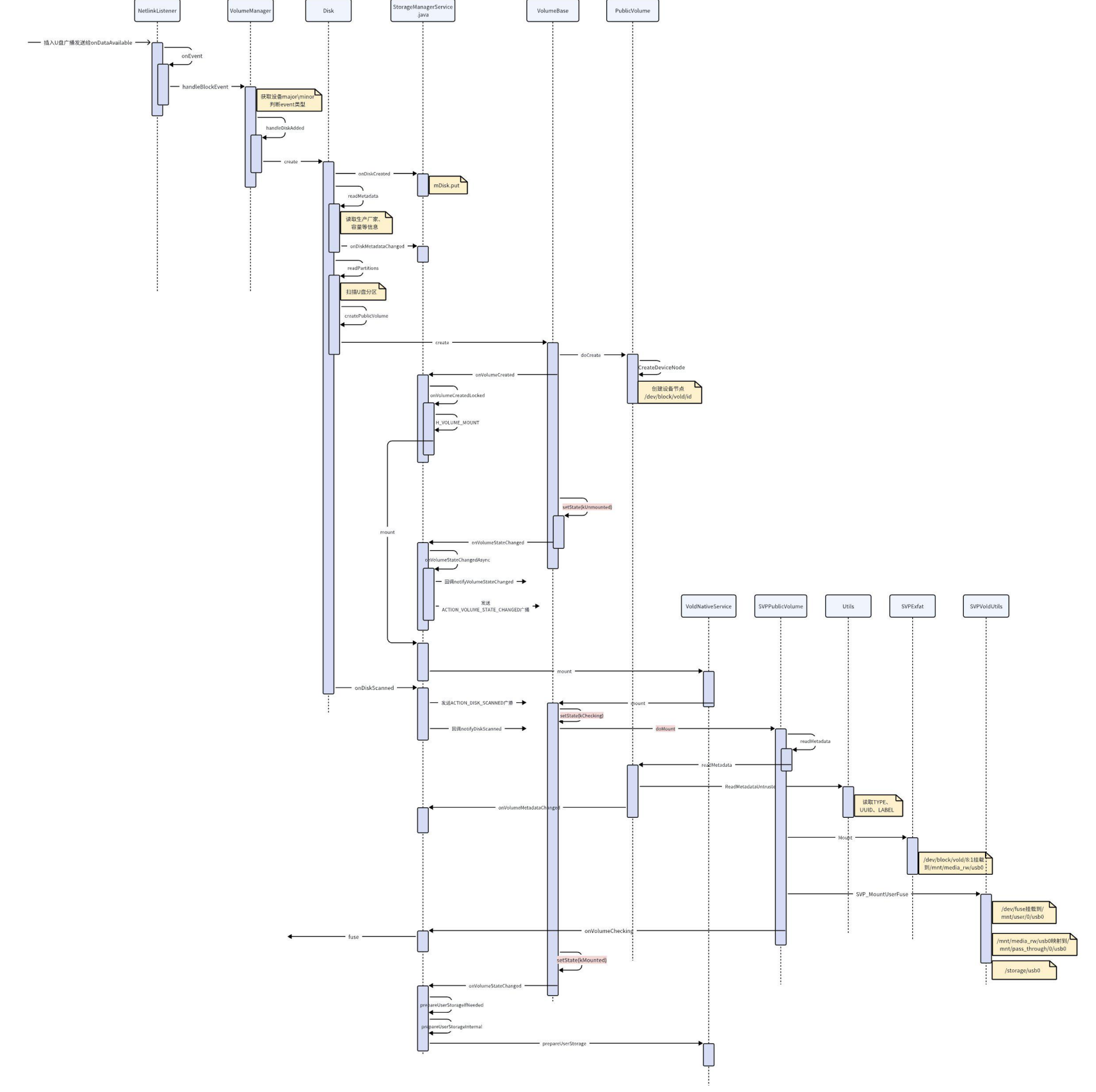
/mnt/media_rw/usb0和/mnt/user/0/usb0的区别
- /mnt/media_rw/usb0
-
这是U盘的原始挂载点,由vold直接挂载
-
只有系统进程和具有root权限的用户可以访问
-
用于系统内部对U盘的直接访问和管理
-
作为/mnt/user/0/usb0的底层挂载点
- /mnt/user/0/usb0
-
用户可见的挂载点,通过绑定挂载(Bind Mount)将/mnt/media_rw/usb0的内容暴露给用户
-
普通应用程序可以通过Storage Access Framework或MediaStore API访问该目录
-
用途是为用户提供对U盘内容的访问和支持多用户环境
6.2 NetlinkListener#onDataAvailable
在SocketListener的runListener中会一直监听,等待某个连接的到来或者已经连接的套接字上数据的到来,当某个套接字上有数据到来时,会调用NetlinkListener::onDataAvalibale函数处理。
插入u盘后,可以在串口看见这个打印:
C++
USB device info:
bInterfaceClass:8
bInterfaceSubClass:6
bInterfaceProtocol:50
idVendor:0x951
idProduct:0x1666
然后内核会给vold发消息,最后到达onDataAvailable:
C++
bool NetlinkListener::onDataAvailable(SocketClient *cli)
{
int socket = cli->getSocket();
ssize_t count;
uid_t uid = -1;
bool require_group = true;
if (mFormat == NETLINK_FORMAT_BINARY_UNICAST) {
require_group = false;
}
count = TEMP_FAILURE_RETRY(uevent_kernel_recv(socket,
mBuffer, sizeof(mBuffer), require_group, &uid));
if (count < 0) {
SLOGE(“recvmsg failed (%s)”, strerror(errno));
return false;
}
NetlinkEvent *evt = new NetlinkEvent();
if (evt->decode(mBuffer, count, mFormat)) {
onEvent(evt);
} else if (mFormat != NETLINK_FORMAT_BINARY) {
// Don’t complain if parseBinaryNetlinkMessage returns false. That can
// just mean that the buffer contained no messages we’re interested in.
SLOGE(“Error decoding NetlinkEvent”);
}
delete evt;
return true;
}
接收到数据后new一个NetlinkEvent并调用它的decode函数对收到的数据进行解析,最后调用NetlinkHandler的onEvent。
decode会对数据进行解析,解析出ACTION、DEVPATH、SUBSYSTEM等,下面是u盘插入时的一份log:
C++
D/NetlinkEvent( 946): s = add@/devices/platform/hiusb-ehci.0/usb1/1-2/1-2.2/1-2.2:1.0/host1/target1:0:0/1:0:0:0/block/sda
D/NetlinkEvent( 946): s = ACTION=add
D/NetlinkEvent( 946): s = DEVPATH=/devices/platform/hiusb-ehci.0/usb1/1-2/1-2.2/1-2.2:1.0/host1/target1:0:0/1:0:0:0/block/sda
D/NetlinkEvent( 946): s = SUBSYSTEM=block
D/NetlinkEvent( 946): s = MAJOR=8
D/NetlinkEvent( 946): s = MINOR=0
D/NetlinkEvent( 946): s = DEVNAME=sda
D/NetlinkEvent( 946): s = DEVTYPE=disk
D/NetlinkEvent( 946): s = NPARTS=1
D/NetlinkEvent( 946): s = SEQNUM=1058
D/NetlinkEvent( 1206): s = DEVPATH=/devices/platform/hiusb-ehci.0/usb1/1-2/1-2.2/1-2.2:1.0/host1/target1:0:0/1:0:0:0/block/sda/sda1
D/NetlinkEvent( 1206): s = SUBSYSTEM=block
D/NetlinkEvent( 1206): s = MAJOR=8
D/NetlinkEvent( 1206): s = MINOR=1
D/NetlinkEvent( 1206): s = DEVNAME=sda1
D/NetlinkEvent( 1206): s = DEVTYPE=partition
D/NetlinkEvent( 1206): s = PARTN=1
D/NetlinkEvent( 1206): s = SEQNUM=1059
6.3 NetlinkHandler#onEvent
C++
void NetlinkHandler::onEvent(NetlinkEvent* evt) {
VolumeManager* vm = VolumeManager::Instance();
const char* subsys = evt->getSubsystem();
std::string usbvbus(evt->findParam(“USB_VBUS”) evt->findParam(“USB_VBUS”) : “”);
std::string usbUDC(evt->findParam(“USB_UDC”) evt->findParam(“USB_UDC”) : “”);
if (std::string(subsys) == “block”) {
vm->handleBlockEvent(evt);
}
if (std::string(usbvbus) == “usb0”) {
LOG(INFO) << “pull usb0 vbus some time”;
property_set(USB0_VBUS_CTL_PROP, “0”);
}
else if (std::string(usbvbus) == “usb1”) {
LOG(INFO) << “pull usb1 vbus some time”;
property_set(USB1_VBUS_CTL_PROP, “0”);
}
…
}
从log可以看到subsys是block,所以这里会调用handleBlockEvent
6.4 VolumeManager#handleBlockEvent
C++
void VolumeManager::handleBlockEvent(NetlinkEvent* evt) {
std::lock_guardstd::mutex lock(mLock);
if (mDebug) {
LOG(DEBUG) << “----------------”;
LOG(DEBUG) << "handleBlockEvent with action " << (int)evt->getAction();
evt->dump();
}
std::string eventPath(evt->findParam(“DEVPATH”) evt->findParam(“DEVPATH”) : “”);
std::string devType(evt->findParam(“DEVTYPE”) evt->findParam(“DEVTYPE”) : “”);
if (devType != “disk”) return;
int major = std::stoi(evt->findParam(“MAJOR”));// 获取主设备号
int minor = std::stoi(evt->findParam(“MINOR”));// 获取次设备号
dev_t device = makedev(major, minor);
std::string bootdevice = android::base::GetProperty(“ro.boot.boot_devices”, “unknown”);
std::string::size_type idx = eventPath.find(bootdevice);
if ( idx != std::string::npos) {
LOG(ERROR) << “handleBlockEvent return”;
return;
}
switch (evt->getAction()) {// 获取设备类型
case NetlinkEvent::Action::kAdd: {// 插入操作
for (const auto& source : mDiskSources) {
if (source->matches(eventPath)) {
// For now, assume that MMC and virtio-blk (the latter is
// specific to virtual platforms; see Utils.cpp for details)
// devices are SD, and that everything else is USB
int flags = source->getFlags();
if (major == kMajorBlockMmc || IsVirtioBlkDevice(major)) {
flags |= android::vold::Disk::Flags::kSd;
} else {
flags |= android::vold::Disk::Flags::kUsb;
}
// 新建disk对象
auto disk =
new android::vold::Disk(eventPath, device, source->getNickname(), flags);
// 处理插入事件
handleDiskAdded(std::shared_ptrandroid::vold::Disk(disk));
break;
}
}
break;
}
case NetlinkEvent::Action::kChange: {// 变更事件
LOG(DEBUG) << “Disk at " << major << “:” << minor << " changed”;
handleDiskChanged(device);
break;
}
case NetlinkEvent::Action::kRemove: {// 移除事件
LOG(INFO) << “Disk eventPath=” << eventPath << “, will be remove”;
handleDiskRemoved(device);
break;
}
default: {
LOG(WARNING) << "Unexpected block event action " << (int)evt->getAction();
break;
}
}
}
6.4.1 handleDiskAdded
C++
void VolumeManager::handleDiskAdded(const std::shared_ptrandroid::vold::Disk& disk) {
bool userZeroStarted = mStartedUsers.find(0) != mStartedUsers.end();
if (!userZeroStarted) {
LOG(INFO) << “Found disk at " << disk->getEventPath()
<< " but delaying scan due to user zero not having started”;
mPendingDisks.push_back(disk);
} else {// systemserver已经启动
disk->create();
mDisks.push_back(disk);
}
}
mSecureKeyguardShowing参数的值意味着systemserver是否完全启动,mSecureKeyguardShowing为true时,表示systemserver并未完全启动,此时需要延时创建Disk,因为设备开机时,当systemserver没有完全启动时挂载大容量设备的时间较长,而负载过高,有可能会触发watchdong,导致systemserver重启,从而引发系统操作异常。
6.4.1.1 Disk#create
C++
status_t Disk::create() {
CHECK(!mCreated);
mCreated = true;
auto listener = VolumeManager::Instance()->getListener();
// 通知StorageManagerService有disk创建
if (listener) listener->onDiskCreated(getId(), mFlags);
if (isStub()) {
createStubVolume();
return OK;
}
// 读取文件系统格式
readMetadata();
// 读取文件分区列表
readPartitions();
return OK;
}
6.4.1.1.1 StorageManagerService#onDiskCreated
C++
@Override
public void onDiskCreated(String diskId, int flags) {
synchronized (mLock) {
final String value = SystemProperties.get(StorageManager.PROP_ADOPTABLE);
switch (value) {
case “force_on”:
flags |= DiskInfo.FLAG_ADOPTABLE;
break;
case “force_off”:
flags &= ~DiskInfo.FLAG_ADOPTABLE;
break;
}
// diskinfo存到mDisks
mDisks.put(diskId, new DiskInfo(diskId, flags));
}
}
6.4.1.2 readMetadata
读取磁盘信息,就是U盘本身的信息
C++
status_t Disk::readMetadata() {
…
// 获取majorid
unsigned int majorId = major(mDevice);
// 读取生产厂家、容量等信息
switch (majorId) {
case kMajorBlockLoop: {
mLabel = “Virtual”;
break;
}
// clang-format off
case kMajorBlockScsiA: case kMajorBlockScsiB: case kMajorBlockScsiC:
case kMajorBlockScsiD: case kMajorBlockScsiE: case kMajorBlockScsiF:
case kMajorBlockScsiG: case kMajorBlockScsiH: case kMajorBlockScsiI:
case kMajorBlockScsiJ: case kMajorBlockScsiK: case kMajorBlockScsiL:
case kMajorBlockScsiM: case kMajorBlockScsiN: case kMajorBlockScsiO:
case kMajorBlockScsiP: {
// mSysPath是/sys/+NetlinkEvent里的DEVPATH
std::string path(mSysPath + “/device/vendor”);
std::string tmp;
if (!ReadFileToString(path, &tmp)) {
PLOG(WARNING) << "Failed to read vendor from " << path;
return -errno;
}
tmp = android::base::Trim(tmp);
mLabel = tmp;
break;
}
…
}
auto listener = VolumeManager::Instance()->getListener();
// 回调
if (listener) listener->onDiskMetadataChanged(getId(), mSize, mLabel, mSysPath);
return OK;
}
6.4.1.2.1 StorageManagerService#onDiskMetadataChanged
C++
public void onDiskMetadataChanged(String diskId, long sizeBytes, String label,
String sysPath) {
synchronized (mLock) {
final DiskInfo disk = mDisks.get(diskId);
// 赋予新参数
if (disk != null) {
disk.size = sizeBytes;
disk.label = label;
disk.sysPath = sysPath;
}
}
}
6.4.1.3 readPartitions
C++
status_t Disk::readPartitions() {
int maxMinors = getMaxMinors();
if (maxMinors < 0) {
return -ENOTSUP;
}
destroyAllVolumes();
// Parse partition table
std::vectorstd::string cmd;
cmd.push_back(kSgdiskPath);
cmd.push_back(“–android-dump”);
cmd.push_back(mDevPath);
std::vectorstd::string output;
if (res != OK) {
LOG(WARNING) << "sgdisk failed to scan " << mDevPath;
auto listener = VolumeManager::Instance()->getListener();
if (listener) listener->onDiskScanned(getId());
mJustPartitioned = false;
return res;
}
Table table = Table::kUnknown;
bool foundParts = false;
for (const auto& line : output) {
auto split = android::base::Split(line, kSgdiskToken);
auto it = split.begin();
if (it == split.end()) continue;
if (*it == “DISK”) {
if (++it == split.end()) continue;
if (*it == “mbr”) {
table = Table::kMbr;
} else if (*it == “gpt”) {
table = Table::kGpt;
} else {
LOG(WARNING) << "Invalid partition table " << *it;
continue;
}
} else if (*it == “PART”) {
if (++it == split.end()) continue;
int i = 0;
if (!android::base::ParseInt(*it, &i, 1, maxMinors)) {
LOG(WARNING) << "Invalid partition number " << *it;
continue;
}
dev_t partDevice = makedev(major(mDevice), minor(mDevice) + i);
if (table == Table::kMbr) {
if (++it == split.end()) continue;
int type = 0;
if (!android::base::ParseInt(“0x” + *it, &type)) {
LOG(WARNING) << "Invalid partition type " << *it;
continue;
}
switch (type) {
case 0x06: // FAT16
case 0x07: // HPFS/NTFS/exFAT
case 0x0b: // W95 FAT32 (LBA)
case 0x0c: // W95 FAT32 (LBA)
case 0x0e: // W95 FAT16 (LBA)
// 创建公共卷
createPublicVolume(partDevice);
break;
}
} …
}
}
// Ugly last ditch effort, treat entire disk as partition
if (table == Table::kUnknown || !foundParts) {
LOG(WARNING) << mId << " has unknown partition table; trying entire device";
std::string fsType;
std::string unused;
if (ReadMetadataUntrusted(mDevPath, &fsType, &unused, &unused) == OK) {
createPublicVolume(mDevice);
} else {
LOG(WARNING) << mId << " failed to identify, giving up";
}
}
auto listener = VolumeManager::Instance()->getListener();
// 回调disk扫描完成
if (listener) listener->onDiskScanned(getId());
mJustPartitioned = false;
return OK;
}
这里扫描了磁盘的分区信息,包括分区方式、分区的文件系统等,随后根据分区调用了createPublicVolume,最后回调onDiskScanned
6.4.1.3.1 createPublicVolume
C++
void Disk::createPublicVolume(dev_t device) {
// 创建PublicVolume
auto vol = std::shared_ptr(new PublicVolume(device));
if (mJustPartitioned) {
LOG(DEBUG) << “Device just partitioned; silently formatting”;
vol->setSilent(true);
vol->create();
vol->format(“auto”);
vol->destroy();
vol->setSilent(false);
}
// 新创建的volume存到disk的mVolumes
mVolumes.push_back(vol);
vol->setDiskId(getId());
// 调用VolumeBase的create
vol->create();
}
6.4.1.3.1.1 VolumeBase#create
C++
status_t VolumeBase::create() {
CHECK(!mCreated);
mCreated = true;
// 调用PublicVolume的doCreate
status_t res = doCreate();
auto listener = getListener();
if (listener) {
// 回调volume已创建
listener->onVolumeCreated(getId(), static_cast<int32_t>(mType), mDiskId, mPartGuid,
mMountUserId);
}
// 状态改为kUnmounted
setState(State::kUnmounted);
return res;
}
6.4.1.3.1.1.1 setState
先看下这个,这个流程比较短
C++
void VolumeBase::setState(State state) {
mState = state;
// 设置状态,同时回调一个onVolumeStateChanged
LOG(INFO) << "setState " << stateToString(state) << “…”;
auto listener = getListener();
if (listener) {
listener->onVolumeStateChanged(getId(), static_cast<int32_t>(mState));
}
}
6.4.1.3.1.1.1.1 onVolumeStateChanged
C++
public void onVolumeStateChanged(String volId, int state) {
synchronized (mLock) {
final VolumeInfo vol = mVolumes.get(volId);
if (vol != null) {
final int oldState = vol.state;
final int newState = state;
vol.state = newState;
final VolumeInfo vInfo = new VolumeInfo(vol);
final SomeArgs args = SomeArgs.obtain();
args.arg1 = vInfo;
args.arg2 = oldState;
args.arg3 = newState;
// 发一个消息
mHandler.obtainMessage(H_VOLUME_STATE_CHANGED, args).sendToTarget();
onVolumeStateChangedLocked(vInfo, oldState, newState);
}
}
}
case H_VOLUME_STATE_CHANGED: {
final SomeArgs args = (SomeArgs) msg.obj;
onVolumeStateChangedAsync((VolumeInfo) args.arg1, (int) args.arg2,
(int) args.arg3);
}
private void onVolumeStateChangedAsync(VolumeInfo vol, int oldState, int newState) {
…
if (newState == VolumeInfo.STATE_MOUNTED) {
// 新状态是已挂载,走这里
prepareUserStorageIfNeeded(vol);
}
try {
// 通知StorageSessionController,这里会crash
mStorageSessionController.notifyVolumeStateChanged(vol);
} catch (ExternalStorageServiceException e) {
Log.e(TAG, “Failed to notify volume state changed to the Storage Service”, e);
}
synchronized (mLock) {
// 向所有注册了listener的对象调用notifyVolumeStateChanged
mCallbacks.notifyVolumeStateChanged(vol, oldState, newState);
// Do not broadcast before boot has completed to avoid launching the
// processes that receive the intent unnecessarily.
if (mBootCompleted && isBroadcastWorthy(vol)) {
final Intent intent = new Intent(VolumeInfo.ACTION_VOLUME_STATE_CHANGED);
intent.putExtra(VolumeInfo.EXTRA_VOLUME_ID, vol.id);
intent.putExtra(VolumeInfo.EXTRA_VOLUME_STATE, newState);
intent.putExtra(VolumeRecord.EXTRA_FS_UUID, vol.fsUuid);
intent.addFlags(Intent.FLAG_RECEIVER_REGISTERED_ONLY_BEFORE_BOOT
| Intent.FLAG_RECEIVER_INCLUDE_BACKGROUND);
// 发送ACTION_VOLUME_STATE_CHANGED广播,作用不明
mHandler.obtainMessage(H_INTERNAL_BROADCAST, intent).sendToTarget();
}
final String oldStateEnv = VolumeInfo.getEnvironmentForState(oldState);
final String newStateEnv = VolumeInfo.getEnvironmentForState(newState);
if (!Objects.equals(oldStateEnv, newStateEnv)) {
// Kick state changed event towards all started users. Any users
// started after this point will trigger additional
// user-specific broadcasts.
for (int userId : mSystemUnlockedUsers) {
if (vol.isVisibleForRead(userId)) {
final StorageVolume userVol = vol.buildStorageVolume(mContext, userId,
false);
// 发送EXTRA_STORAGE_VOLUME广播
mHandler.obtainMessage(H_VOLUME_BROADCAST, userVol).sendToTarget();
// 回调onStorageStateChanged
mCallbacks.notifyStorageStateChanged(userVol.getPath(), oldStateEnv,
newStateEnv);
}
}
}
…
}
}
6.4.1.3.1.1.1.2 prepareUserStorageIfNeeded
C++
private void prepareUserStorageIfNeeded(VolumeInfo vol) {
if (vol.type != VolumeInfo.TYPE_PRIVATE) {
return;
}
final UserManager um = mContext.getSystemService(UserManager.class);
final UserManagerInternal umInternal =
LocalServices.getService(UserManagerInternal.class);
for (UserInfo user : um.getUsers()) {
final int flags;
if (umInternal.isUserUnlockingOrUnlocked(user.id)) {
flags = StorageManager.FLAG_STORAGE_DE | StorageManager.FLAG_STORAGE_CE;
} else if (umInternal.isUserRunning(user.id)) {
flags = StorageManager.FLAG_STORAGE_DE;
} else {
continue;
}
prepareUserStorageInternal(vol.fsUuid, user.id, user.serialNumber, flags);
}
}
private void prepareUserStorageInternal(String volumeUuid, int userId, int serialNumber,
int flags) {
try {
// 使用lstat准备等会会用到的目录
mVold.prepareUserStorage(volumeUuid, userId, serialNumber, flags);
…
}
6.4.1.3.1.1.2 doCreate
C++
status_t PublicVolume::doCreate() {
// 使用mknod在mDevPath下创建了一个node,/dev/block/vold/+对应id
return CreateDeviceNode(mDevPath, mDevice);
}
6.4.1.3.1.1.3 StorageManagerService#onVolumeCreated
C++
public void onVolumeCreated(String volId, int type, String diskId, String partGuid,
int userId) {
synchronized (mLock) {
final DiskInfo disk = mDisks.get(diskId);
// 使用disk创建volume
final VolumeInfo vol = new VolumeInfo(volId, type, disk, partGuid);
vol.mountUserId = userId;
mVolumes.put(volId, vol);
onVolumeCreatedLocked(vol);
}
}
6.4.1.3.1.1.3.1 onVolumeCreatedLocked
C++
private void onVolumeCreatedLocked(VolumeInfo vol) {
…
} else if (vol.type == VolumeInfo.TYPE_PUBLIC) {
// TODO: only look at first public partition
if (Objects.equals(StorageManager.UUID_PRIMARY_PHYSICAL, mPrimaryStorageUuid)
&& vol.disk.isDefaultPrimary()) {
Slog.v(TAG, "Found primary storage at " + vol);
vol.mountFlags |= VolumeInfo.MOUNT_FLAG_PRIMARY;
vol.mountFlags |= VolumeInfo.MOUNT_FLAG_VISIBLE;
}
// Adoptable public disks are visible to apps, since they meet
// public API requirement of being in a stable location.
if (vol.disk.isAdoptable()) {
vol.mountFlags |= VolumeInfo.MOUNT_FLAG_VISIBLE;
}
vol.mountUserId = mCurrentUserId;
// 通过mHandler发送H_VOLUME_MOUNT消息
mHandler.obtainMessage(H_VOLUME_MOUNT, vol).sendToTarget();
}
…
}
6.4.1.3.1.1.3.2 H_VOLUME_MOUNT
C++
case H_VOLUME_MOUNT: {
final VolumeInfo vol = (VolumeInfo) msg.obj;
// 已经启动完成,直接挂载
mount(vol);
break;
}
6.4.1.3.1.1.3.3 mount
C++
private void mount(VolumeInfo vol) {
try {
// TODO(b/135341433): Remove cautious logging when FUSE is stable
Slog.i(TAG, "Mounting volume " + vol);
// 调用vold的mount,同时传入一个callback,接收onVolumeChecking
mVold.mount(vol.id, vol.mountFlags, vol.mountUserId, new IVoldMountCallback.Stub() {
@Override
public boolean onVolumeChecking(FileDescriptor fd, String path,
String internalPath) {
// 这里后面会调回来,后面再看
…
}
});
Slog.i(TAG, "Mounted volume " + vol);
} catch (Exception e) {
Slog.wtf(TAG, e);
}
}
6.4.1.3.1.1.3.4 VoldNativeService#mount
C++
binder::Status VoldNativeService::mount(
const std::string& volId, int32_t mountFlags, int32_t mountUserId,
const android::spandroid::os::IVoldMountCallback& callback) {
ENFORCE_SYSTEM_OR_ROOT;
CHECK_ARGUMENT_ID(volId);
ACQUIRE_LOCK;
// 这里找到就是上面创建的那个PublicVolume
auto vol = VolumeManager::Instance()->findVolume(volId);
if (vol == nullptr) {
return error("Failed to find volume " + volId);
}
vol->setMountFlags(mountFlags);
vol->setMountUserId(mountUserId);
LOG(INFO) << “called vold mount”;
vol->setMountCallback(callback);
// 关键函数,调用VolumeBase的mount
int res = vol->mount();
vol->setMountCallback(nullptr);
if (res != OK) {
return translate(res);
}
return translate(OK);
}
6.4.1.3.1.1.3.5 VolumeBase#mount
C++
status_t VolumeBase::mount() {
if ((mState != State::kUnmounted) && (mState != State::kUnmountable)) {
LOG(WARNING) << getId() << " mount requires state unmounted or unmountable";
return -EBUSY;
}
// 状态改为kChecking
setState(State::kChecking);
status_t res = doMount();
// 等到doMount结束,如果执行成功就设置成kMounted
// 然后会回调onVolumeStateChanged,这个回调后续会带来一系列调用,放到Fuse的章节再看
setState(res == OK State::kMounted : State::kUnmountable);
if (res == OK) {
// 这里什么也没做
doPostMount();
}
return res;
}
6.4.1.3.1.1.3.6 doMount
C++
//system/vold/model/PublicVolume.cpp
status_t PublicVolume::doMount() {
bool isVisible = getMountFlags() & MountFlags::kVisible;
// 读取U盘的基本信息
readMetadata();
if (mFsType == “vfat” && vfat::IsSupported()) {
if (vfat::Check(mDevPath)) {
LOG(ERROR) << getId() << " failed filesystem check";
return -EIO;
}
} else if (mFsType == “exfat” && exfat::IsSupported()) {
if (exfat::Check(mDevPath)) {
LOG(ERROR) << getId() << " failed filesystem check";
return -EIO;
}
} else {
LOG(ERROR) << getId() << " unsupported filesystem " << mFsType;
return -EIO;
}
// 这里是U盘的原始目录
mRawPath = StringPrintf(“/mnt/media_rw/%s”, stableName.c_str());
mSdcardFsDefault = StringPrintf(“/mnt/runtime/default/%s”, stableName.c_str());
mSdcardFsRead = StringPrintf(“/mnt/runtime/read/%s”, stableName.c_str());
mSdcardFsWrite = StringPrintf(“/mnt/runtime/write/%s”, stableName.c_str());
mSdcardFsFull = StringPrintf(“/mnt/runtime/full/%s”, stableName.c_str());
setInternalPath(mRawPath);
// if (user_id == 0) {
if (getMountFlags() & MountFlags::kVisible) {
PLOG(INFO) << “MountFlags::kVisible path=” << stableName;
// 这里设置的是/storage/usb0
setPath(StringPrintf(“/storage/%s”, stableName.c_str()));
} else {
PLOG(INFO) << “path=” << mRawPath;
setPath(mRawPath);
}
/**
* update by uidq1610,
* change AID_ROOT TO AID_MEDIA_RW, slove mount failed when /mnt/media_rw/usbx exists exceptionally
*/
// 使用lstat处理目录
if (fs_prepare_dir(mRawPath.c_str(), 0700, AID_MEDIA_RW, AID_MEDIA_RW)) {
PLOG(ERROR) << getId() << " failed to create mount points";
return -errno;
}
// 下面根据不同的类型调用Mount
if (mFsType == “vfat”) {
…
} else if (mFsType == “exfat”) {
// mDevPath是在PublicVolume的构造函数中赋值的
// 是/dev/block/vold和id的组合,这里是/dev/block/vold/8:1
// id是通过major和minor的组合形成的
if (exfat::Mount(mDevPath.c_str(), mRawPath.c_str(), false, true, false,
AID_MEDIA_RW, AID_MEDIA_RW, 0007, true)) {
PLOG(ERROR) << getId() << " exfat failed to mount " << mDevPath;
return -EIO;
}
}
…
if (!isVisible) {
LOG(INFO) << “mount successfull”;
// Not visible to apps, so no need to spin up sdcardfs or FUSE
return OK;
}
LOG(DEBUG) <<“start to ready dir,mUseSdcardFs:”<<mUseSdcardFs;
if (mUseSdcardFs) {
…
// 这里不会执行
}
// We need to mount FUSE *after* sdcardfs, since the FUSE daemon may depend
// on sdcardfs being up.
android::base::unique_fd fd;
// 挂载fuse相关的目录
// getInternalPath获取到的就是mRawPath
// 注意最后一个参数fd,函数结束后它会指向/dev/fuse
int result = MountUserFuse(user_id, getInternalPath(), stableName, &fd);
if (result != 0) {
// 如果挂载失败了需要unmount
LOG(ERROR) << “Failed to mount public fuse volume”;
doUnmount();
return -result;
}
mFuseMounted = true;
auto callback = getMountCallback();
if (callback) {
bool is_ready = false;
// 回调onVolumeChecking,这个就是跟着mount函数一起传进来的那个回调
// fd被一起传回去了
callback->onVolumeChecking(std::move(fd), getPath(), getInternalPath(), &is_ready);
if (!is_ready) {
// 调用失败也要unmount
LOG(ERROR) << “Failed to complete public volume mount”;
doUnmount();
return -EIO;
}
}
ConfigureReadAheadForFuse(GetFuseMountPathForUser(user_id, stableName), 256u);
// See comment in model/EmulatedVolume.cpp
ConfigureMaxDirtyRatioForFuse(GetFuseMountPathForUser(user_id, stableName), 40u);
LOG(INFO) << “mount successfull”;
return OK;
}
6.4.1.3.1.1.3.6.1 PublicVolume#readMetadata
注意这里和Disk里面的readMetadata不一样,这里调用的是PublicVolume里的readMetadata
C++
status_t PublicVolume::readMetadata() {
status_t res = ReadMetadataUntrusted(mDevPath, &mFsType, &mFsUuid, &mFsLabel);
auto listener = getListener();
// 更新volume的信息
if (listener) listener->onVolumeMetadataChanged(getId(), mFsType, mFsUuid, mFsLabel);
return res;
}
Utils#ReadMetadataUntrusted
这里和readPartitions类似,创建一个新线程执行一个cmd读取mDevPath里的信息
C++
status_t ReadMetadataUntrusted(const std::string& path, std::string* fsType, std::string* fsUuid,
std::string* fsLabel) {
return readMetadata(path, fsType, fsUuid, fsLabel, true);
}
static status_t readMetadata(const std::string& path, std::string* fsType, std::string* fsUuid,
std::string* fsLabel, bool untrusted) {
fsType->clear();
fsUuid->clear();
fsLabel->clear();
std::vectorstd::string cmd;
cmd.push_back(kBlkidPath);
cmd.push_back(“-c”);
cmd.push_back(“/dev/null”);
cmd.push_back(“-s”);
cmd.push_back(“TYPE”);
cmd.push_back(“-s”);
cmd.push_back(“UUID”);
cmd.push_back(“-s”);
cmd.push_back(“LABEL”);
cmd.push_back(path);
std::vectorstd::string output;
status_t res = performLimitedThread(cmd, output, DEFAULT_LIMIT_THREAD_THRESHOLD1, untrusted sBlkidUntrustedContext : sBlkidContext, true);
…
return OK;
}
6.4.1.3.1.1.3.6.2 Exfat#Mount
这里的操作就是使用mount函数把/dev/block/vold/8:1挂载到/mnt/media_rw/usb0
C++
status_t Mount(const char *fsPath, const char *mountPoint,
bool ro, bool remount, bool executable,
int ownerUid, int ownerGid, int permMask, bool createLost) {
int mountFlags = MS_NODEV | MS_NOSUID | MS_DIRSYNC | MS_NOATIME | MS_NOEXEC;
auto mountData = android::base::StringPrintf(“uid=%d,gid=%d,fmask=%o,dmask=%o”, ownerUid,
ownerGid, permMask, permMask);
if (mount(source.c_str(), target.c_str(), “exfat”, mountFlags, mountData.c_str()) == 0) {
return 0;
}
PLOG(ERROR) << “Mount failed; attempting read-only”;
mountFlags |= MS_RDONLY;
if (mount(source.c_str(), target.c_str(), “exfat”, mountFlags, mountData.c_str()) == 0) {
return 0;
}
return -1;
}
经过这个操作之后我们就能通过/mnt/media_rw/usb0访问到U盘的目录了。
6.4.1.3.1.1.3.6.3 VoldUtils#MountUserFuse
这里是和Fuse相关的操作,Fuse会在下面的章节介绍,这里先简单看下
C++
status_t MountUserFuse(userid_t user_id, const std::string& absolute_lower_path,
const std::string& relative_upper_path, android::base::unique_fd* fuse_fd) {
// 这里就是/mnt/user/0
std::string pre_fuse_path(StringPrintf(“/mnt/user/%d”, user_id));
// relative_upper_path就是U盘的stableName,例如usb0之类的
// 组合起来就是u盘的路径/mnt/user/0/usb0
std::string fuse_path(
StringPrintf(“%s/%s”, pre_fuse_path.c_str(), relative_upper_path.c_str()));
// /mnt/pass_through/0
std::string pre_pass_through_path(StringPrintf(“/mnt/pass_through/%d”, user_id));
// /mnt/pass_through/0/usb0
// pass_through是一种“透传”机制,使得应用程序可以不通过Android的api直接访问U盘数据
std::string pass_through_path(
StringPrintf(“%s/%s”, pre_pass_through_path.c_str(), relative_upper_path.c_str()));
// lstat确认路径,如果权限不是0750还会修改权限
auto result = PrepareDir(“/mnt/user”, 0750, AID_ROOT, AID_MEDIA_RW);
if (result != android::OK) {
PLOG(ERROR) << “Failed to prepare directory /mnt/user”;
return -1;
}
// prepare /mnt/user/0
result = PrepareDir(pre_fuse_path, 0710, user_id AID_ROOT : AID_SHELL,
multiuser_get_uid(user_id, AID_EVERYBODY));
…
result = PrepareDir(fuse_path, 0700, AID_ROOT, AID_ROOT);
…
result = PrepareDir(pre_pass_through_path, 0710, AID_ROOT, AID_MEDIA_RW);
…
result = PrepareDir(pass_through_path, 0710, AID_ROOT, AID_MEDIA_RW);
…
// 这里是针对emulated的处理
// /mnt/user/0/emulated/0/就是我们熟悉的sdcard目录
if (relative_upper_path == “emulated”) {
std::string linkpath(StringPrintf(“/mnt/user/%d/self”, user_id));
result = PrepareDir(linkpath, 0755, AID_ROOT, AID_ROOT);
if (result != android::OK) {
PLOG(ERROR) << “Failed to prepare directory " << linkpath;
return -1;
}
linkpath += “/primary”;
// /mnt/user/0/self 指向 /storage/emulated/
Symlink(”/storage/emulated/" + std::to_string(user_id), linkpath);
// 下面是差不多的操作
std::string pass_through_linkpath(StringPrintf(“/mnt/pass_through/%d/self”, user_id));
result = PrepareDir(pass_through_linkpath, 0710, AID_ROOT, AID_MEDIA_RW);
if (result != android::OK) {
PLOG(ERROR) << “Failed to prepare directory " << pass_through_linkpath;
return -1;
}
pass_through_linkpath += “/primary”;
// /mnt/pass_through/0/self链接到/storage/emulated/0
Symlink(”/storage/emulated/" + std::to_string(user_id), pass_through_linkpath);
}
// Open fuse fd.
fuse_fd->reset(open(“/dev/fuse”, O_RDWR | O_CLOEXEC));
if (fuse_fd->get() == -1) {
PLOG(ERROR) << “Failed to open /dev/fuse”;
return -1;
}
// 挂载参数
std::string opts ;
if (relative_upper_path != “emulated”) {
LOG(DEBUG) <<“add wq, set mount flag for usb”;
opts = StringPrintf(
“fd=%i,”
“rootmode=40000,”
“allow_other,”
“user_id=1023,group_id=1023,”,
fuse_fd->get());
} …
// 挂载/dev/fuse到/mnt/user/0/usb0,访问/mnt/user/0/usb0就会指向/dev/fuse
result = TEMP_FAILURE_RETRY(mount(“/dev/fuse”, fuse_path.c_str(), “fuse”,
MS_NOSUID | MS_NODEV | MS_NOEXEC | MS_NOATIME | MS_LAZYTIME,
opts.c_str()));
if (IsSdcardfsUsed()) {
…
} else {
LOG(INFO) << "Bind mounting " << absolute_lower_path << " to " << pass_through_path;
// 把/mnt/media_rw/usb0挂载到/mnt/pass_through/0/usb0
return BindMount(absolute_lower_path, pass_through_path);
}
}
6.4.1.3.1.1.3.6.4 StorageManagerService#onVolumeChecking
之前我们说到了onVolumeChecking会调到mount函数传入的callback里,这里基本上只调用了StorageSessionController的onVolumeMount,但是后面的流程就是Fuse的部分了,我们放在后面再看
C++
private void mount(VolumeInfo vol) {
try {
// TODO(b/135341433): Remove cautious logging when FUSE is stable
Slog.i(TAG, "Mounting volume " + vol);
mVold.mount(vol.id, vol.mountFlags, vol.mountUserId, new IVoldMountCallback.Stub() {
@Override
public boolean onVolumeChecking(FileDescriptor fd, String path,
String internalPath) {
vol.path = path;
vol.internalPath = internalPath;
ParcelFileDescriptor pfd = new ParcelFileDescriptor(fd);
try {
mStorageSessionController.onVolumeMount(pfd, vol);
return true;
}…
}
至此,U盘挂载的流程…差不多结束了,我们现在有了U盘的源目录/mnt/media_rw/usb0和指向这个路径的/mnt/pass_through/0/usb0
另外文件系统里已经存在/storage/usb0这个目录了,它是u盘在外置存储的官方目录。但是这时我们去ls查看会发现它还只是一个壳子,里面什么都没有。
后面还有一大堆流程,放在Fuse的章节里再看吧。
6.4.1.3.2 StorageManagerService#onDiskScanned
创建完成,这里是最后的回调
C++
public void onDiskScanned(String diskId) {
synchronized (mLock) {
final DiskInfo disk = mDisks.get(diskId);
if (disk != null) {
onDiskScannedLocked(disk);
}
}
}
private void onDiskScannedLocked(DiskInfo disk) {
int volumeCount = 0;
for (int i = 0; i < mVolumes.size(); i++) {
final VolumeInfo vol = mVolumes.valueAt(i);
if (Objects.equals(disk.id, vol.getDiskId())) {
volumeCount++;
}
}
final Intent intent = new Intent(DiskInfo.ACTION_DISK_SCANNED);
intent.addFlags(Intent.FLAG_RECEIVER_REGISTERED_ONLY_BEFORE_BOOT
| Intent.FLAG_RECEIVER_INCLUDE_BACKGROUND);
intent.putExtra(DiskInfo.EXTRA_DISK_ID, disk.id);
intent.putExtra(DiskInfo.EXTRA_VOLUME_COUNT, volumeCount);
// 发送ACTION_DISK_SCANNED广播
mHandler.obtainMessage(H_INTERNAL_BROADCAST, intent).sendToTarget();
final CountDownLatch latch = mDiskScanLatches.remove(disk.id);
if (latch != null) {
latch.countDown();
}
disk.volumeCount = volumeCount;
// 回调notifyDiskScanned
mCallbacks.notifyDiskScanned(disk, volumeCount);
}
6.4.1.4 挂载流程的关键log
C++
过滤vold和StorageManagerService关键字
这里action1代表插入事件
vold : ----------------
vold : handleBlockEvent with action 1
vold : ----------------
这两句代表USER0已启动,可以开始挂载了
StorageManagerService: onUnlockUser 0
vold : onUserStarted: 0
vold开始了一次挂载开始创建disk,具体的挂载参数需要从后续log中查看
vold : setState Unmounted…
StorageManagerService调用了vold的mount函数
vold : called vold mount
vold开始检查disk参数
vold : setState Checking…
U盘的具体参数,第一个是文件节点,LABEL是U盘的名字和插电脑上看见的是一样的,TYPE是文件系统类型
vold : /dev/block/vold/8:1: LABEL=“KINGSTON” UUID=“3A1D-CF30” TYPE=“exfat”
调到了doMount
vold : in PublicVolume::doMount mFsType=exfat user_id=0
挂载参数,用户id是0,path是后面fuse的路径,InternalPath是源路径,stableName是根路径名:usb0之类的
vold : Mounting public fuse volume user_id : 0 path: /storage/usb0 InternalPath: /mnt/media_rw/usb0 stableName usb0
挂载成功
vold : mount successfull
设置状态为已挂载
vold : setState Mounted…
向用户0发送MEDIA_MOUNTED广播
StorageManagerService: Volume 8:1 broadcasting mounted to UserHandle{0}
关键失败日志
vold : setState kUnmountable…
6.4.2 handleDiskRemoved
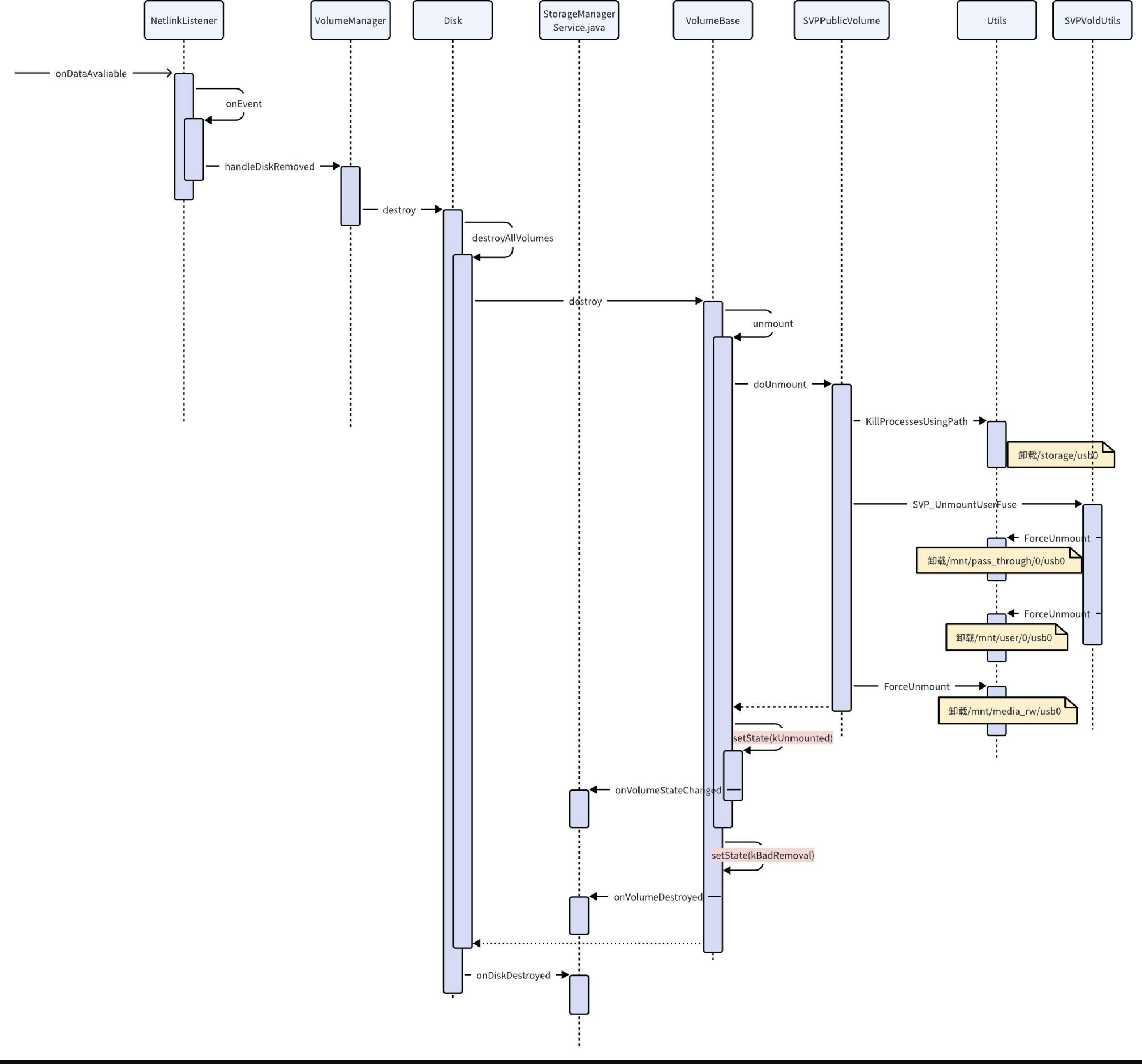
下面是U盘卸载流程
C++
void VolumeManager::handleDiskRemoved(dev_t device) {
auto i = mDisks.begin();
while (i != mDisks.end()) {
// 找到对应device的disk,并调用destroy
if ((*i)->getDevice() == device) {
(*i)->destroy();
i = mDisks.erase(i);
} else {
++i;
}
}
// 删除对应的pending disk
auto j = mPendingDisks.begin();
while (j != mPendingDisks.end()) {
if ((*j)->getDevice() == device) {
j = mPendingDisks.erase(j);
} else {
++j;
}
}
}
6.4.2.1 Disk#destroy
C++
status_t Disk::destroy() {
CHECK(mCreated);
// 卸载所有的卷
destroyAllVolumes();
mCreated = false;
auto listener = VolumeManager::Instance()->getListener();
// 回调
if (listener) listener->onDiskDestroyed(getId());
return OK;
}
6.4.2.1.1 destroyAllVolumes
C++
void Disk::destroyAllVolumes() {
for (const auto& vol : mVolumes) {
// 调用destroy,下面以U盘的PublicVolume为例
vol->destroy();
}
mVolumes.clear();
}
6.4.2.1.2 VolumeBase#destroy
C++
status_t VolumeBase::destroy() {
CHECK(mCreated);
if (mState == State::kMounted) {
unmount();
// 状态设置为kBadRemoval
setState(State::kBadRemoval);
} else {
setState(State::kRemoved);
}
auto listener = getListener();
if (listener) {
// 从mVolumes中删除对应的volume
listener->onVolumeDestroyed(getId());
}
// 直接返回OK
status_t res = doDestroy();
mCreated = false;
return res;
}
6.4.2.1.3 unmount
C++
status_t VolumeBase::unmount() {
if (mState != State::kMounted) {
LOG(WARNING) << getId() << " unmount requires state mounted";
return -EBUSY;
}
// 状态设置为kEjecting
setState(State::kEjecting);
// 对不同user的volume执行destroy
for (const auto& vol : mVolumes) {
if (vol->destroy()) {
LOG(WARNING) << getId() << " failed to destroy " << vol->getId() << " stacked above";
}
}
mVolumes.clear();
// 执行PublicVolume的doUnmount
status_t res = doUnmount();
// 状态设置为kUnmuonted
// 同时会发Unmounted广播和回调
setState(State::kUnmounted);
return res;
}
6.4.2.1.4 PublicVolume#doUnmount
C++
status_t PublicVolume::doUnmount() {
…
// 在终止FUSE进程之前卸载存储
// 如果我们首先终止FUSE进程,则大多数文件系统操作将返回ENOTCONN,直到卸载完成
// 这是一个奇特而不寻常的错误代码,可能会导致应用程序中的行为中断
// 这里的path就是doMount里设置的/storage/usb0
KillProcessesUsingPath(getPath());
// doMount里会把mFuseMounted赋值为true
if (mFuseMounted) {
// Use UUID as stable name, if available
std::string stableName;
// nickname是usb0
if (!mNickname.empty()) {
stableName = mNickname;
} else if (!mFsUuid.empty()) {
stableName = mFsUuid;
}
// 解除fuse相关目录的挂载
if (UnmountUserFuse(getMountUserId(), getInternalPath(), stableName) != OK) {
PLOG(INFO) << “UnmountUserFuse failed on public fuse volume”;
return -errno;
}
mFuseMounted = false;
}
// 卸载/mnt/secure/asec
ForceUnmount(kAsecPath);
// 这里是false
if (mUseSdcardFs) {
…
}
// 卸载/mnt/media_rw/usb0
ForceUnmount(mRawPath);
// 删除/mnt/media_rw/usb0
rmdir(mRawPath.c_str());
mRawPath.clear();
return OK;
}
6.4.2.1.4.1 Utils#KillProcessesUsingPath
C++
status_t KillProcessesUsingPath(const std::string& path) {
// 使用逐渐提高等级的SIGNAL杀掉占用这个path的进程
// 查询是否有进程占用该资源,如果是fuse占用了这个进程就不杀
if (KillProcessesWithOpenFiles(path, SIGINT, false /* killFuseDaemon */) == 0) {
return OK;
}
if (sSleepOnUnmount) sleep(5);
// 查询是否有进程占用该资源,如果是fuse占用了这个进程就不杀
if (KillProcessesWithOpenFiles(path, SIGTERM, false /* killFuseDaemon */) == 0) {
return OK;
}
if (sSleepOnUnmount) sleep(5);
// 查询是否有进程占用该资源,如果是fuse占用了这个进程就不杀
if (KillProcessesWithOpenFiles(path, SIGKILL, false /* killFuseDaemon */) == 0) {
return OK;
}
if (sSleepOnUnmount) sleep(5);
// 杀掉任何占用这个资源的进程,即使是fuse
if (KillProcessesWithOpenFiles(path, SIGKILL, true /* killFuseDaemon */) == 0) {
return OK;
}
PLOG(ERROR) << "Failed to kill processes using " << path;
return -EBUSY;
}
6.4.2.1.4.1.1 Process#KillProcessesWithOpenFiles
C++
int KillProcessesWithOpenFiles(const std::string& prefix, int signal, bool killFuseDaemon) {
std::unordered_set<pid_t> pids;
auto proc_d = std::unique_ptr<DIR, int (*)(DIR*)>(opendir(“/proc”), closedir);
if (!proc_d) {
PLOG(ERROR) << “Failed to open proc”;
return -1;
}
struct dirent* proc_de;
// 遍历各个进程的资源文件查询是否占用了这个path
while ((proc_de = readdir(proc_d.get())) != nullptr) {
// We only care about valid PIDs
pid_t pid;
if (proc_de->d_type != DT_DIR) continue;
if (!android::base::ParseInt(proc_de->d_name, &pid)) continue;
// Look for references to prefix
bool found = false;
auto path = StringPrintf(“/proc/%d”, pid);
found |= checkMaps(path + “/maps”, prefix);
found |= checkSymlink(path + “/cwd”, prefix);
found |= checkSymlink(path + “/root”, prefix);
found |= checkSymlink(path + “/exe”, prefix);
auto fd_path = path + “/fd”;
auto fd_d = std::unique_ptr<DIR, int (*)(DIR*)>(opendir(fd_path.c_str()), closedir);
if (!fd_d) {
PLOG(WARNING) << "Failed to open " << fd_path;
} else {
struct dirent* fd_de;
while ((fd_de = readdir(fd_d.get())) != nullptr) {
if (fd_de->d_type != DT_LNK) continue;
found |= checkSymlink(fd_path + “/” + fd_de->d_name, prefix);
}
}
if (found) {
// 没有指定killFuseDaemon时不杀FuseDaemon
if (!IsFuseDaemon(pid) || killFuseDaemon) {
pids.insert(pid);
} else {
LOG(WARNING) << “Found FUSE daemon with open file. Skipping…”;
}
}
}
// signal不是0时杀掉pids里的所有进程
if (signal != 0) {
for (const auto& pid : pids) {
std::string comm;
android::base::ReadFileToString(StringPrintf(“/proc/%d/comm”, pid), &comm);
comm = android::base::Trim(comm);
std::string exe;
android::base::Readlink(StringPrintf(“/proc/%d/exe”, pid), &exe);
LOG(WARNING) << “Sending " << strsignal(signal) << " to pid " << pid << " (” << comm
<< ", " << exe << “)”;
// 执行kill
kill(pid, signal);
}
}
return pids.size();
}
6.4.2.1.4.2 VoldUtils#UnmountUserFuse
C++
status_t UnmountUserFuse(userid_t user_id, const std::string& absolute_lower_path,
const std::string& relative_upper_path) {
std::string fuse_path(StringPrintf(“/mnt/user/%d/%s”, user_id, relative_upper_path.c_str()));
std::string pass_through_path(
StringPrintf(“/mnt/pass_through/%d/%s”, user_id, relative_upper_path.c_str()));
// Best effort unmount pass_through path
sSleepOnUnmount = false;
LOG(INFO) << "Unmounting pass_through_path " << pass_through_path;
// 卸载/mnt/pass_through/0/usb0
// 这里有一个bug,卸载时pass_through路径可能会因为被占用导致无法卸载
auto status = ForceUnmount(pass_through_path);
if (status != android::OK) {
LOG(ERROR) << "Failed to unmount ";
}
if(relative_upper_path != “emulated”) {
std::string external_path = “/storage/” + relative_upper_path;
auto status = ForceUnmount(external_path);
if (status != android::OK) {
LOG(ERROR) << "Failed to unmount " << external_path;
}
rmdir(external_path.c_str());
}
// 删除pass_through目录
rmdir(pass_through_path.c_str());
LOG(INFO) << "Unmounting fuse path " << fuse_path;
// 卸载/mnt/user/0/usb0
android::status_t result = ForceUnmount(fuse_path);
sSleepOnUnmount = true;
if (result != android::OK) {
// fuse需要MNT_DETACH,因为umount2可能会因EBUSY而发生故障
PLOG(ERROR) << “Failed to unmount. Trying MNT_DETACH " << fuse_path << " …”;
if (umount2(fuse_path.c_str(), UMOUNT_NOFOLLOW | MNT_DETACH) && errno != EINVAL &&
errno != ENOENT) {
PLOG(ERROR) << "Failed to unmount with MNT_DETACH " << fuse_path;
return -errno;
}
result = android::OK;
}
// 删除fuse目录
rmdir(fuse_path.c_str());
return result;
}
6.4.2.1.4.2.1 Utils#ForceUnmount
C++
status_t ForceUnmount(const std::string& path) {
const char* cpath = path.c_str();
// 先试试使用unmount2卸载这个目录,成功就直接return
if (!umount2(cpath, UMOUNT_NOFOLLOW) || errno == EINVAL || errno == ENOENT) {
return OK;
}
// 应用程序可能仍在处理弹出请求,请等待我们开始发送信号
if (sSleepOnUnmount) sleep(5);
// 查询是否有进程占用了这个资源,有就杀掉这个进程
KillProcessesWithOpenFiles(path, SIGINT);
if (sSleepOnUnmount) sleep(5);
// 再次尝试卸载
if (!umount2(cpath, UMOUNT_NOFOLLOW) || errno == EINVAL || errno == ENOENT) {
return OK;
}
// 使用更高等级的SIGNAL杀掉进程
KillProcessesWithOpenFiles(path, SIGTERM);
if (sSleepOnUnmount) sleep(5);
// 再次尝试卸载
if (!umount2(cpath, UMOUNT_NOFOLLOW) || errno == EINVAL || errno == ENOENT) {
return OK;
}
// 还没有成功,使用SIGKILL杀掉进程
KillProcessesWithOpenFiles(path, SIGKILL);
if (sSleepOnUnmount) sleep(5);
// 最后一次卸载
if (!umount2(cpath, UMOUNT_NOFOLLOW) || errno == EINVAL || errno == ENOENT) {
return OK;
}
PLOG(INFO) << “ForceUnmount failed”;
// 卸载失败
return -errno;
}
6.4.2.2 卸载流程的关键log
C++
这里action2代表拔出事件
vold : ----------------
vold : handleBlockEvent with action 2
vold : ----------------
vold : handleBlockEvent with action 2
调到了VolumeBase的unmount函数
vold : setState Ejecting…
卸载几个关键节点
vold : Unmounting pass_through_path /mnt/pass_through/0/usb0
vold : Unmounted pass_through_path /mnt/pass_through/0/usb0,errno 2
vold : Unmounting fuse path /mnt/user/0/usb0
vold : Unmounted fuse path /mnt/user/0/usb0,errno 16
设置卸载状态,这里不管卸载成功与否都会设置这几个状态
vold : setState Unmounted…
vold : setState BadRemoval…
发送MEDIA_UNMOUNTED广播
StorageManagerService: Volume 8:1 broadcasting unmounted to UserHandle{0}
关键失败日志
vold : Failed to unmount
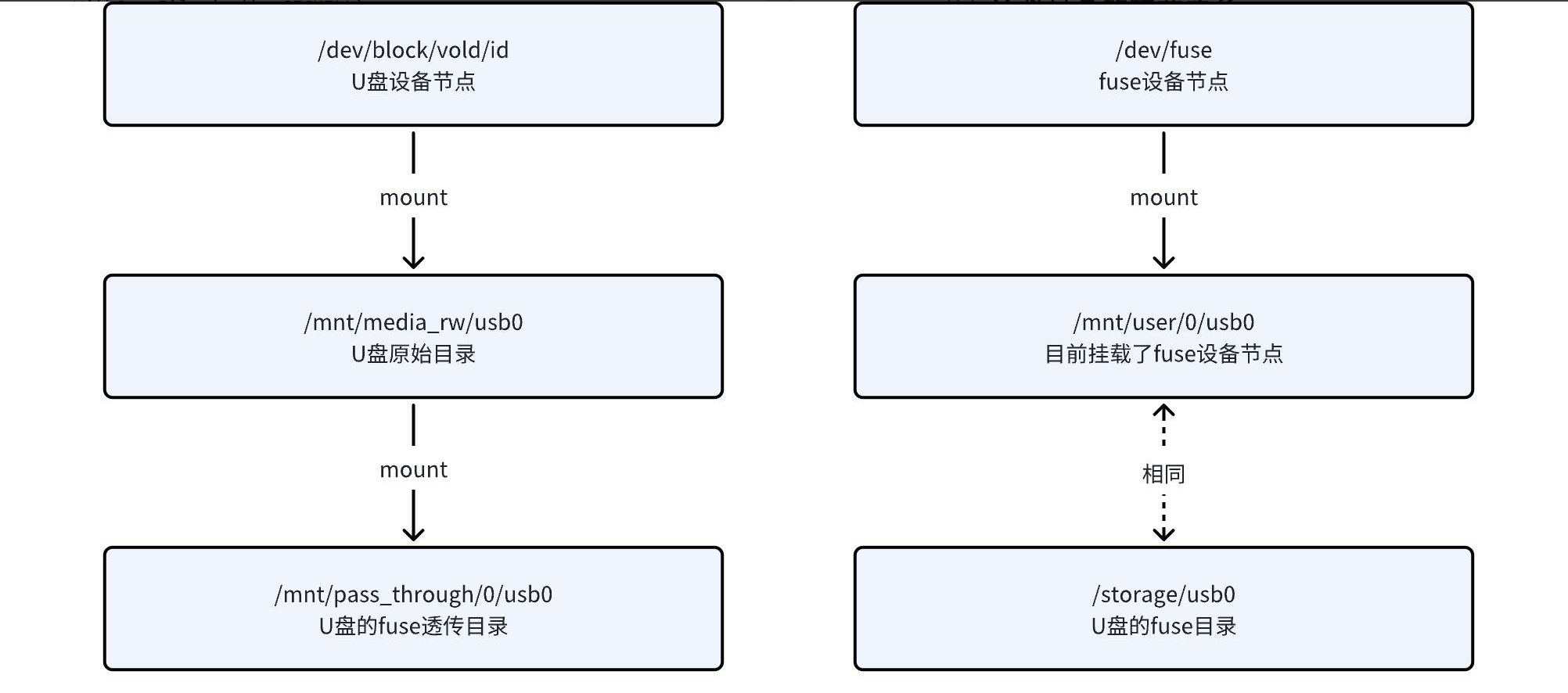
6.5 U盘目录的挂载关系
上面的流程中有很多目录,相信你已经头晕眼花了,下面我们来总结一下这些目录的作用和挂载关系
- /dev/block/vold/id:U盘的原始设备节点,挂载的源头
- /mnt/media_rw/usb0:U盘的原始目录,挂载了/dev/block/vold/id
- /storage/usb0:U盘的upper path,由Fuse进行处理(我怀疑/storage/usb0和/mnt/user/0/usb0就是同一个目录,但是我没有找到具体的证据)
- /mnt/user/0/usb0:U盘的fuse目录,目前挂载了/dev/fuse
- /mnt/pass_through/0/usb0:U盘的fuse透传目录,挂载了/mnt/media_rw/usb0
- /dev/fuse:fuse的设备节点

中国智能体开发者社区,聚焦智能体与大模型开发,提供前沿资讯、实用工具链、开源项目及行业案例。通过技术沙龙、开发者大赛等活动,促进经验交流与协作,助力开发者快速构建创新智能应用。
更多推荐
 4
4 0
0- 0


 已为社区贡献4条内容

所有评论(0)