使用 Spring AI Alibaba MCP 结合 Nacos 实现企业级智能体应用
1、Spring AI Alibaba MCP 结合 Nacos 服务注册中心,为企业级智能体应用提供了强大的基础架构支持。这一组合解决方案主要围绕三条核心技术线展开,实现了从服务注册、工具代理到服务发现的完整闭环,为企业级 AI 应用部署提供了坚实基础。2、
1、Spring AI Alibaba MCP 结合 Nacos 服务注册中心,为企业级智能体应用提供了强大的基础架构支持。这一组合解决方案主要围绕三条核心技术线展开,实现了从服务注册、工具代理到服务发现的完整闭环,为企业级 AI 应用部署提供了坚实基础。
2、
MCP 服务注册到 Nacos
Spring AI Alibaba MCP Nacos Registry 服务注册是整个系统的基础环节,通过将 MCP Server 信息与 Tools 注册到 Nacos,实现了服务能力的中央化管理。
3、
Gateway 代理 Nacos 中的 MCP 服务
Spring AI Alibaba MCP Gateway 是将注册到 Nacos 中的 MCP Server 信息动态转换为 MCP 工具,实现了服务能力到 AI 工具的转化。
4、
Client 结合 Nacos 实现 MCP 集群发现
Spring AI Alibaba MCP Client 结合 Nacos 实现了 MCP 服务的集群发现和负载均衡能力。
5、mcp服务注册到nacos 服务端代码
nacos 版本3.0.2 spring-ai 版本 1.0.0 spring-ai-alibaba 版本1.0.0.3
pom文件
<?xml version="1.0" encoding="UTF-8"?>
<project xmlns="http://maven.apache.org/POM/4.0.0"
         xmlns:xsi="http://www.w3.org/2001/XMLSchema-instance"
         xsi:schemaLocation="http://maven.apache.org/POM/4.0.0 http://maven.apache.org/xsd/maven-4.0.0.xsd">
    <modelVersion>4.0.0</modelVersion>

    <parent>
        <groupId>com.alibaba.cloud.ai</groupId>
        <artifactId>spring-ai-alibaba-mcp-example</artifactId>
        <version>${revision}</version>
        <relativePath>../pom.xml</relativePath>
    </parent>

    <version>${revision}</version>
    <artifactId>spring-ai-alibaba-mcp-nacos-example</artifactId>
    <packaging>pom</packaging>
    <properties>
        <project.build.sourceEncoding>UTF-8</project.build.sourceEncoding>
    </properties>

    <description>Spring AI Alibaba Starter MCP Nacos Example</description>
    <name>Spring AI Alibaba Starter MCP Nacos Examples</name>

    <modules>
        <module>server/mcp-nacos2-server-example</module>
        <module>server/mcp-nacos-register-example</module>
        <module>server/mcp-nacos-gateway-example</module>
        <module>client/mcp-nacos2-client-example</module>
        <module>client/mcp-nacos-discovery-example</module>
    </modules>

    <dependencyManagement>
        <dependencies>
            <dependency>
                <groupId>org.springframework.ai</groupId>
                <artifactId>spring-ai-bom</artifactId>
                <version>${spring-ai.version}</version>
                <type>pom</type>
                <scope>import</scope>
            </dependency>
        </dependencies>
    </dependencyManagement>

    <build>
        <plugins>
            <plugin>
                <groupId>org.apache.maven.plugins</groupId>
                <artifactId>maven-deploy-plugin</artifactId>
                <version>${maven-deploy-plugin.version}</version>
                <configuration>
                    <skip>true</skip>
                </configuration>
            </plugin>
        </plugins>
    </build>

</project>
application.yml
server:
  port: 21000

spring:
  application:
    name: mcp-nacos-registry-example
  ai:
    mcp:
      server:
        # mcp服务名
        name: webflux-mcp-server
        version: 1.0.0
        type: ASYNC  # Recommended for reactive applications
        instructions: "This reactive server provides time information tools and resources"
        sse-message-endpoint: /mcp/messages
        capabilities:
          tool: true
          resource: true
          prompt: true
          completion: true

    alibaba:
      mcp:
        nacos:
          namespace: 8279be91-ac4e-465b-a87a-bbaa1fd66d26
          server-addr: 127.0.0.1:8848
          username: nacos
          password: nacos
          register:
            enabled: true
            # mcp服务注册到nacos服务中的分组
            service-group: mcp-server
            # mcp服务注册到nacos服务中的服务名
            service-name: webflux-mcp-server
mcp服务service
/*
 * Copyright 2025-2026 the original author or authors.
 *
 * Licensed under the Apache License, Version 2.0 (the "License");
 * you may not use this file except in compliance with the License.
 * You may obtain a copy of the License at
 *
 *      https://www.apache.org/licenses/LICENSE-2.0
 *
 * Unless required by applicable law or agreed to in writing, software
 * distributed under the License is distributed on an "AS IS" BASIS,
 * WITHOUT WARRANTIES OR CONDITIONS OF ANY KIND, either express or implied.
 * See the License for the specific language governing permissions and
 * limitations under the License.
 */

package com.alibaba.cloud.ai.example.service;

import org.slf4j.Logger;
import org.slf4j.LoggerFactory;
import org.springframework.ai.tool.annotation.Tool;
import org.springframework.ai.tool.annotation.ToolParam;
import org.springframework.stereotype.Service;

import java.time.ZoneId;
import java.time.ZonedDateTime;
import java.time.format.DateTimeFormatter;

/**
 * @author yingzi
 * @date 2025/5/28 08:55
 */

@Service
public class TimeService {

    private static final Logger logger = LoggerFactory.getLogger(TimeService.class);

    @Tool(description = "Get the time of a specified city.")
    public String  getCityTimeMethod(@ToolParam(description = "Time zone id, such as Asia/Shanghai") String timeZoneId) {
        logger.info("The current time zone is {}", timeZoneId);
        return String.format("The current time zone is %s and the current time is " + "%s", timeZoneId,
                getTimeByZoneId(timeZoneId));
    }

    private String getTimeByZoneId(String zoneId) {

        // Get the time zone using ZoneId
        ZoneId zid = ZoneId.of(zoneId);

        // Get the current time in this time zone
        ZonedDateTime zonedDateTime = ZonedDateTime.now(zid);

        // Defining a formatter
        DateTimeFormatter formatter = DateTimeFormatter.ofPattern("yyyy-MM-dd HH:mm:ss z");

        // Format ZonedDateTime as a string
        String formattedDateTime = zonedDateTime.format(formatter);

        return formattedDateTime;
    }
}
启动类
/*
 * Copyright 2024-2025 the original author or authors.
 *
 * Licensed under the Apache License, Version 2.0 (the "License");
 * you may not use this file except in compliance with the License.
 * You may obtain a copy of the License at
 *
 *      https://www.apache.org/licenses/LICENSE-2.0
 *
 * Unless required by applicable law or agreed to in writing, software
 * distributed under the License is distributed on an "AS IS" BASIS,
 * WITHOUT WARRANTIES OR CONDITIONS OF ANY KIND, either express or implied.
 * See the License for the specific language governing permissions and
 * limitations under the License.
 */

package com.alibaba.cloud.ai.example;

import com.alibaba.cloud.ai.example.service.TimeService;
import org.springframework.ai.tool.ToolCallbackProvider;
import org.springframework.ai.tool.method.MethodToolCallbackProvider;
import org.springframework.boot.SpringApplication;
import org.springframework.boot.autoconfigure.SpringBootApplication;
import org.springframework.context.annotation.Bean;

/**
 * @author yHong
 * @version 1.0
 * @since 2025/4/21 20:00
 */
@SpringBootApplication
public class McpRegisterApplication {

    public static void main(String[] args) {
        SpringApplication.run(McpRegisterApplication.class, args);
    }

    @Bean
    public ToolCallbackProvider timeServiceTools(TimeService timeService) {
        return MethodToolCallbackProvider.builder().toolObjects(timeService).build();
    }

}
mcp服务启动后访问nacos
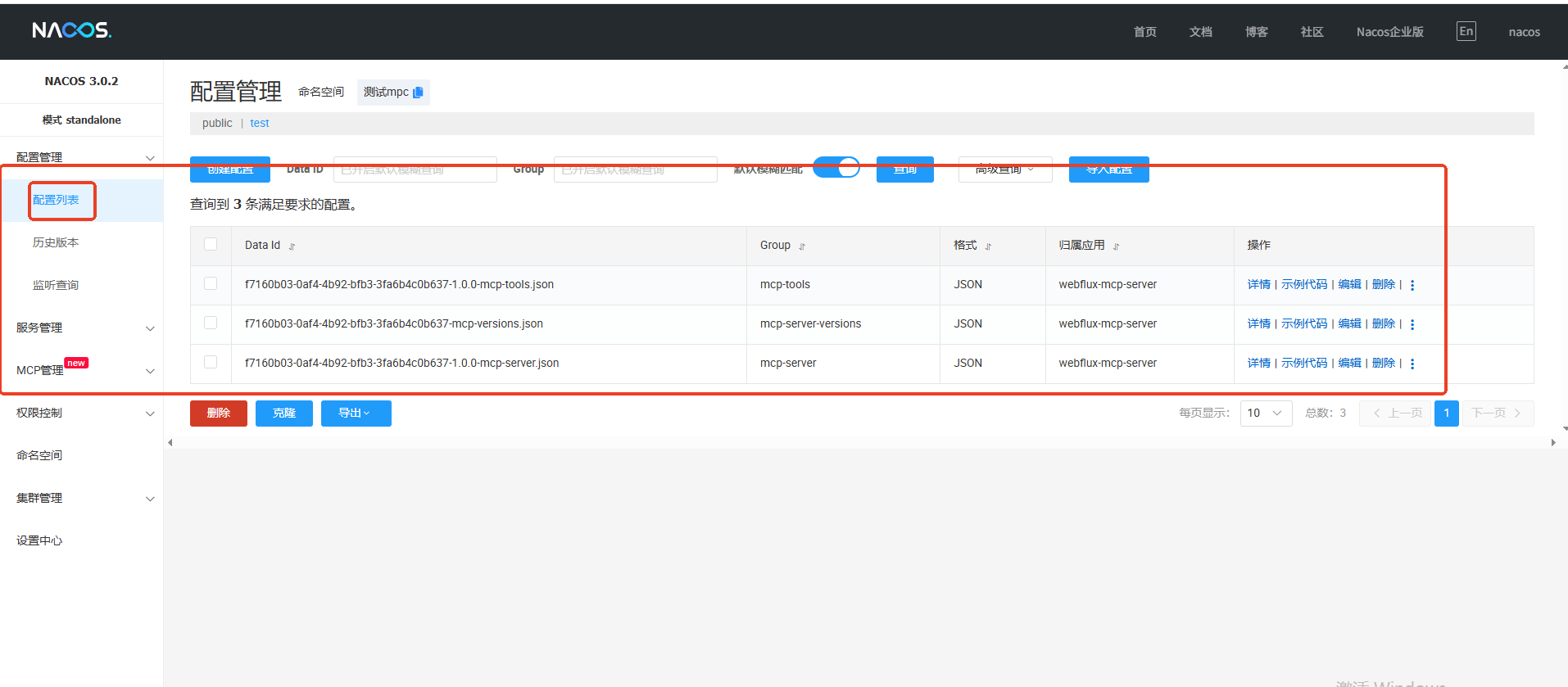
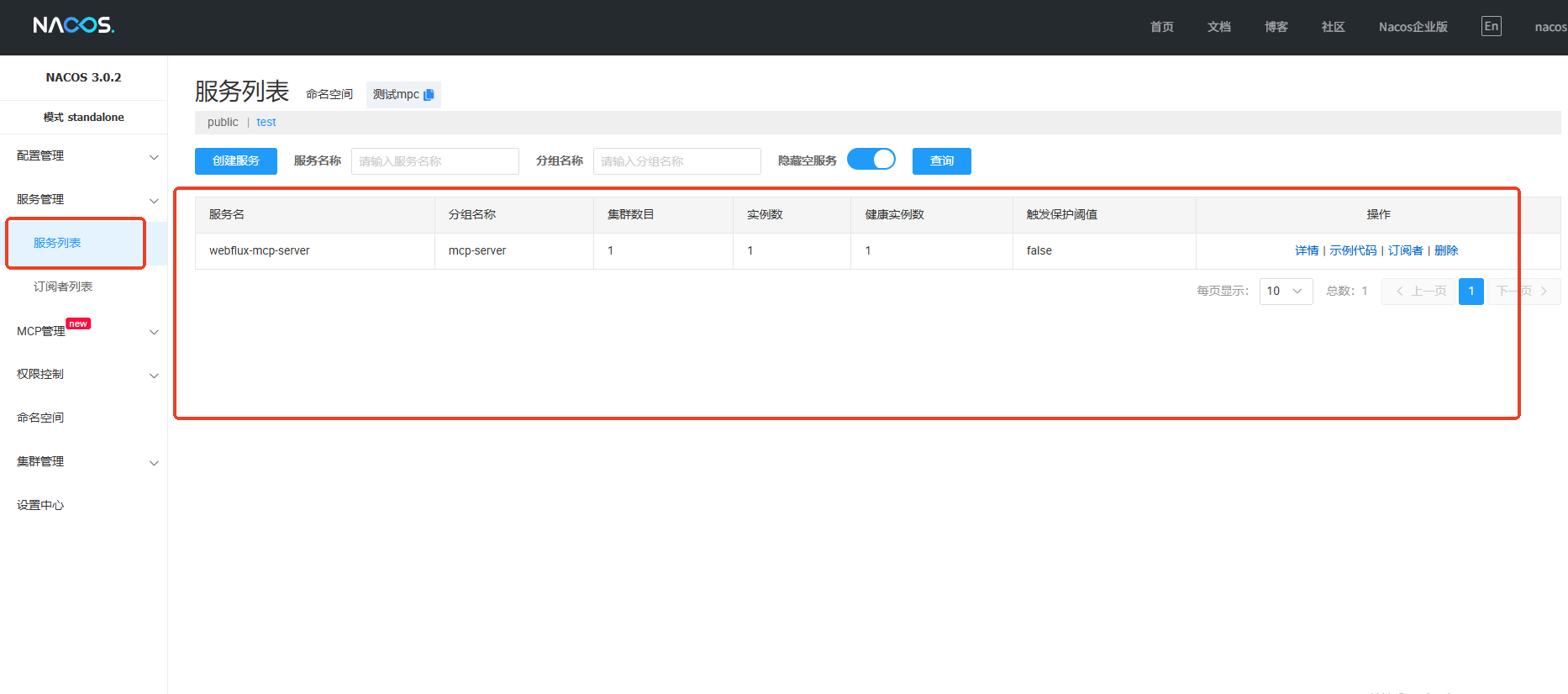
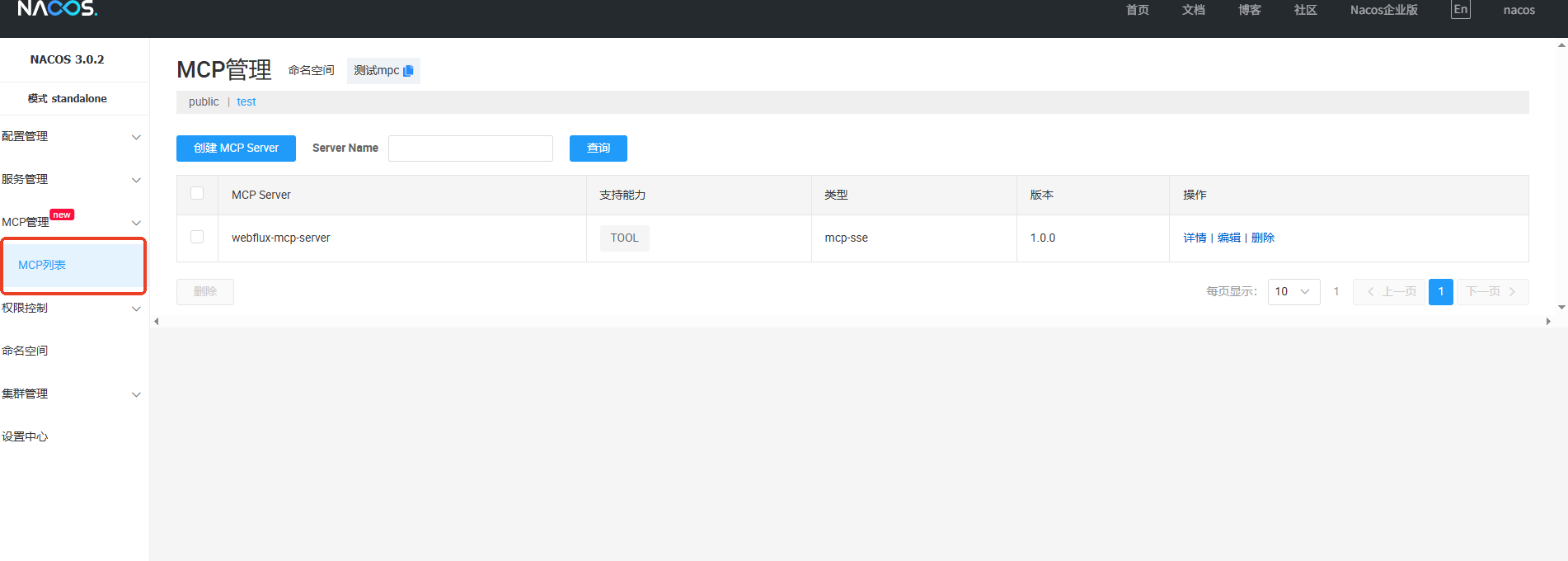
6、mcp客户端调用mcp服务端, 客户端代码
1. MCP Server多节点注册在Nacos中
2. MCP Client建立1-N连接
3. 根据sync、async模式提供clints自动注入
```java
    @Autowired
    private List<LoadbalancedMcpSyncClient> loadbalancedMcpSyncClients;
```
or
```java
    @Autowired
    private List<LoadbalancedMcpAsyncClient> loadbalancedMcpAsyncClients;
```
4. 提供ToolCallbackProvider
```java
@Qualifier("loadbalancedSyncMcpToolCallbacks") ToolCallbackProvider tools
```
or
```java
@Qualifier("loadbalancedMcpAsyncToolCallbacks") ToolCallbackProvider tools
pom
<?xml version="1.0" encoding="UTF-8"?>
<project xmlns="http://maven.apache.org/POM/4.0.0"
         xmlns:xsi="http://www.w3.org/2001/XMLSchema-instance"
         xsi:schemaLocation="http://maven.apache.org/POM/4.0.0 http://maven.apache.org/xsd/maven-4.0.0.xsd">
    <modelVersion>4.0.0</modelVersion>
    <parent>
        <groupId>com.alibaba.cloud.ai</groupId>
        <artifactId>spring-ai-alibaba-mcp-nacos-example</artifactId>
        <version>${revision}</version>
        <relativePath>../../pom.xml</relativePath>
    </parent>

    <artifactId>mcp-nacos-discovery-example</artifactId>
    <name>Spring AI - NACOS MCP SSE Client EXAMPLE</name>

    <properties>
        <spring-ai-alibaba.version>1.0.0.3-SNAPSHOT</spring-ai-alibaba.version>
    </properties>

    <dependencies>

        <dependency>
            <groupId>org.springframework.ai</groupId>
            <artifactId>spring-ai-autoconfigure-model-openai</artifactId>
        </dependency>

        <dependency>
            <groupId>org.springframework.ai</groupId>
            <artifactId>spring-ai-autoconfigure-model-chat-client</artifactId>
        </dependency>

        <dependency>
            <groupId>com.alibaba.cloud.ai</groupId>
            <artifactId>spring-ai-alibaba-starter-nacos-mcp-client</artifactId>
            <version>${spring-ai-alibaba.version}</version>
        </dependency>

        <dependency>
            <groupId>org.springframework.ai</groupId>
            <artifactId>spring-ai-starter-mcp-client-webflux</artifactId>
        </dependency>

    </dependencies>

</project>
application.yml
server:
  port: 8080

spring:
  main:
    web-application-type: none
  application:
    name: mcp-nacos-discovery-example
  ai:
    openai:
      api-key: ${AI_DASHSCOPE_API_KEY}
      base-url: https://dashscope.aliyuncs.com/compatible-mode
      chat:
        options:
          model: qwen-max
    mcp:
      client:
        enabled: true
        name: my-mcp-client
        version: 1.0.0
        request-timeout: 30s
        type: ASYNC  # or ASYNC for reactive applications

    alibaba:
      mcp:
        nacos:
          namespace: 8279be91-ac4e-465b-a87a-bbaa1fd66d26
          server-addr: 127.0.0.1:8848
          username: nacos
          password: nacos
          client:
            enabled: true
            sse:
              connections:
                server1:
                  # 服务端名称
                  service-name: webflux-mcp-server
                  version: 1.0.0

# 调试日志
logging:
  level:
    io:
      modelcontextprotocol:
        client: DEBUG
        spec: DEBUG
java代码
/*
 * Copyright 2025-2026 the original author or authors.
 *
 * Licensed under the Apache License, Version 2.0 (the "License");
 * you may not use this file except in compliance with the License.
 * You may obtain a copy of the License at
 *
 *      https://www.apache.org/licenses/LICENSE-2.0
 *
 * Unless required by applicable law or agreed to in writing, software
 * distributed under the License is distributed on an "AS IS" BASIS,
 * WITHOUT WARRANTIES OR CONDITIONS OF ANY KIND, either express or implied.
 * See the License for the specific language governing permissions and
 * limitations under the License.
 */

package com.alibaba.cloud.ai;

import org.springframework.ai.chat.client.ChatClient;
import org.springframework.ai.tool.ToolCallbackProvider;
import org.springframework.beans.factory.annotation.Qualifier;
import org.springframework.boot.CommandLineRunner;
import org.springframework.boot.SpringApplication;
import org.springframework.boot.autoconfigure.SpringBootApplication;
import org.springframework.context.ConfigurableApplicationContext;
import org.springframework.context.annotation.Bean;

import java.util.Scanner;

/**
 * @author yingzi
 * @date 2025/5/13:13:47
 */
@SpringBootApplication
public class NacosMcpDiscoveryClientApplication {


    public static void main(String[] args) {
        SpringApplication.run(NacosMcpDiscoveryClientApplication.class, args);
    }

    @Bean
    public CommandLineRunner predefinedQuestionsDemo(ChatClient.Builder chatClientBuilder, @Qualifier("loadbalancedMcpAsyncToolCallbacks") ToolCallbackProvider tools,
                                                 ConfigurableApplicationContext context) {

        return args -> {
            var chatClient = chatClientBuilder
                    .defaultToolCallbacks(tools.getToolCallbacks())
                    .build();

            Scanner scanner = new Scanner(System.in);
            while (true) {
                System.out.print("\n>>> QUESTION: ");
                String userInput = scanner.nextLine();
                if (userInput.equalsIgnoreCase("exit")) {
                    break;
                }
                if (userInput.isEmpty()) {
                    userInput = "北京时间现在几点钟";
                }
                System.out.println("\n>>> ASSISTANT: " + chatClient.prompt(userInput).call().content());
            }
            scanner.close();
            context.close();
        };
    }
}
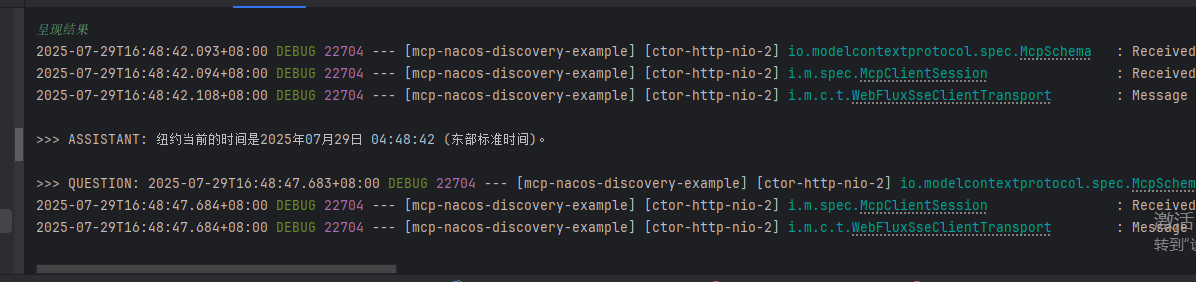
输入 :纽约时间现在是几点
呈现结果

火山引擎开发者社区是火山引擎打造的AI技术生态平台,聚焦Agent与大模型开发,提供豆包系列模型(图像/视频/视觉)、智能分析与会话工具,并配套评测集、动手实验室及行业案例库。社区通过技术沙龙、挑战赛等活动促进开发者成长,新用户可领50万Tokens权益,助力构建智能应用。
更多推荐
 4
4 0
0- 0


 已为社区贡献40条内容

所有评论(0)