扣子(Coze)工作流:2分钟输出一篇去AI味公众号文章,带提示词保姆级教程
大家好,我是陌晨,分享有用的AI知识与工具,喜欢记得关注。再下的个体也能发声,再小的个体也有自己的品牌。记得张小龙在某次公开课讲的内容,一直可在脑海中,即使公众号停更再久、内容再拉胯,也能在这个生态里面里面一丝印记。今日分享的coze工作流,通过公众内容二创生成自己的内容,然后做排版一键发布,非常的方便。作为UP主,能做的就剩。
大家好,我是陌晨,分享有用的AI知识与工具,喜欢记得关注。
❝再下的个体也能发声,再小的个体也有自己的品牌。
记得张小龙在某次公开课讲的内容,一直可在脑海中,即使公众号停更再久、内容再拉胯,也能在这个活着生态里面里面一丝印记。
今日分享的coze工作流,通过公众内容二创生成自己的内容,然后做排版一键发布,非常的方便。
作为UP主,能做的就剩选题+审核。
所以也在犹豫是否应该分享?
工作流思路
-
选对标
-
AI提炼+仿写
-
AI仿写+排版
-
同步公众号草稿箱-审核-发布

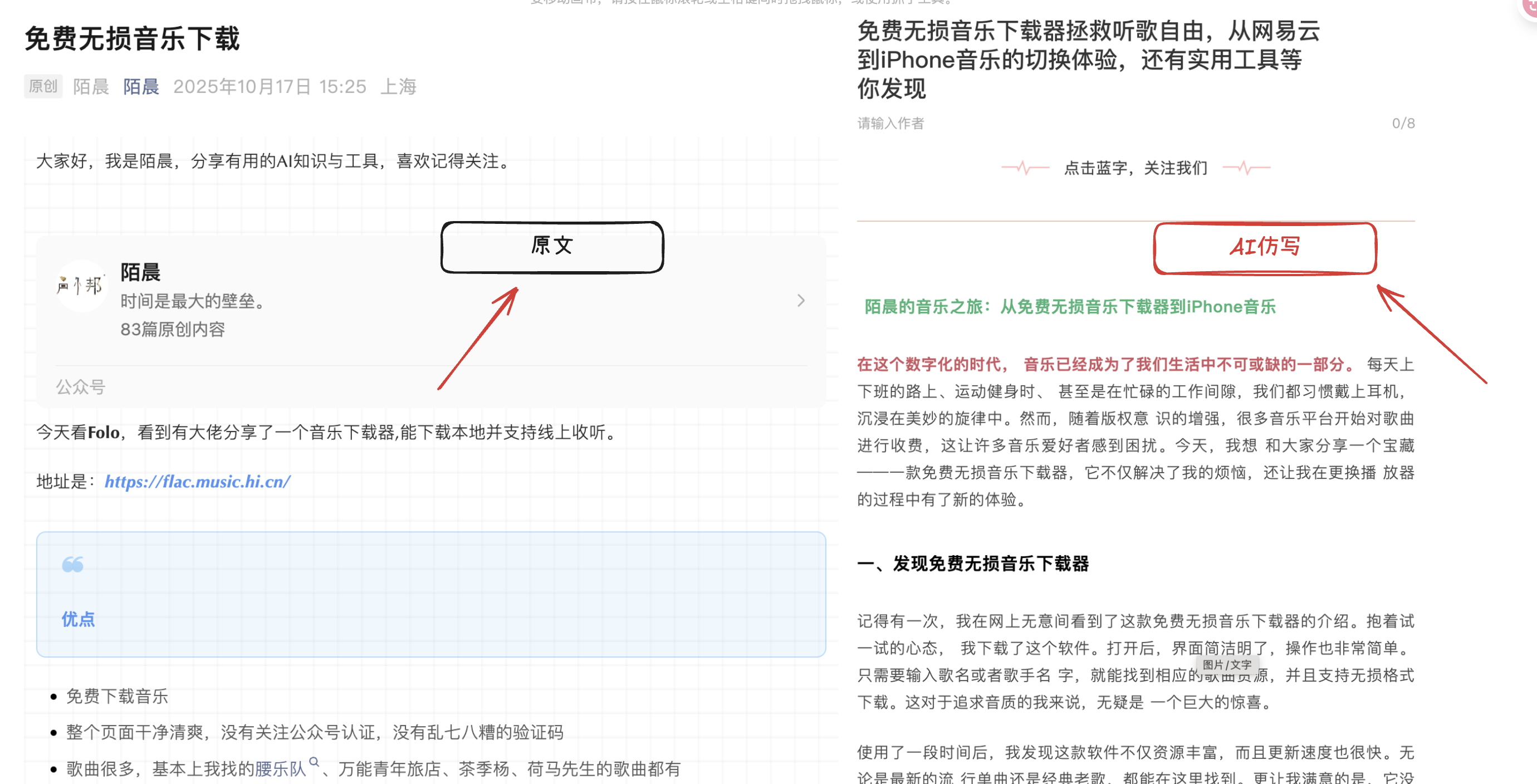
coze工作流效果
-
左是自己写的文章,右是AI的仿写。
搭建步骤
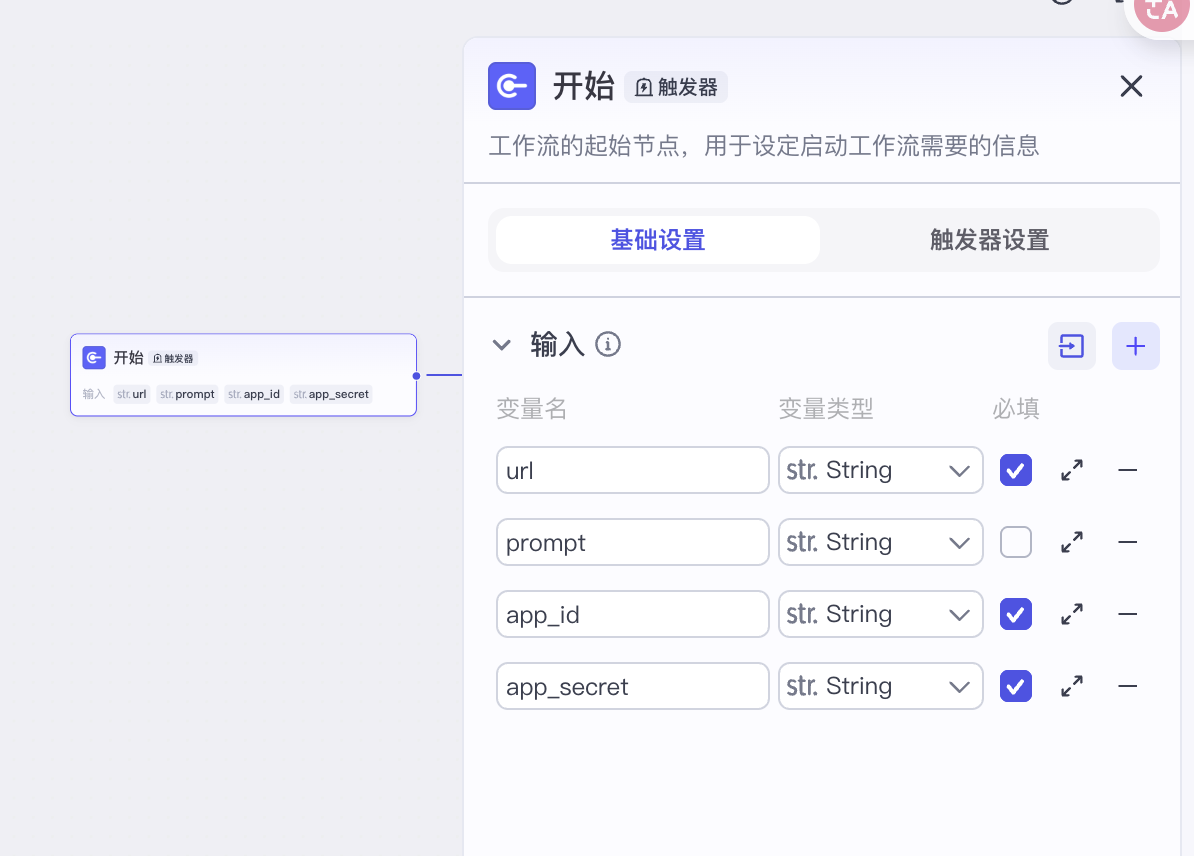
第1步:开始
-
输入4个要素,分别是:
-
url:对标微信文章的链接,必填
-
prompt:文章改写提示词,非必填
-
app_id:公众号开发者ID,必填
-
app_secret:对应公众号开发者ID密码,必填
1.1获取公众号开发者ID+密码
-
公众号需要实名认证
-
密码首次记得保存

1.2IP白名单配置(必须项)
-
若没有配置,可能会出现草稿箱内容为空的现象。
180.184.86.184
180.184.66.211
180.184.65.14
101.126.25.134
47.106.242.1
116.198.226.113
110.41.33.34
124.71.40.54
39.103.203.215
101.126.24.228
101.126.65.107
101.126.39.94
101.126.65.51
180.184.78.231
180.184.54.248
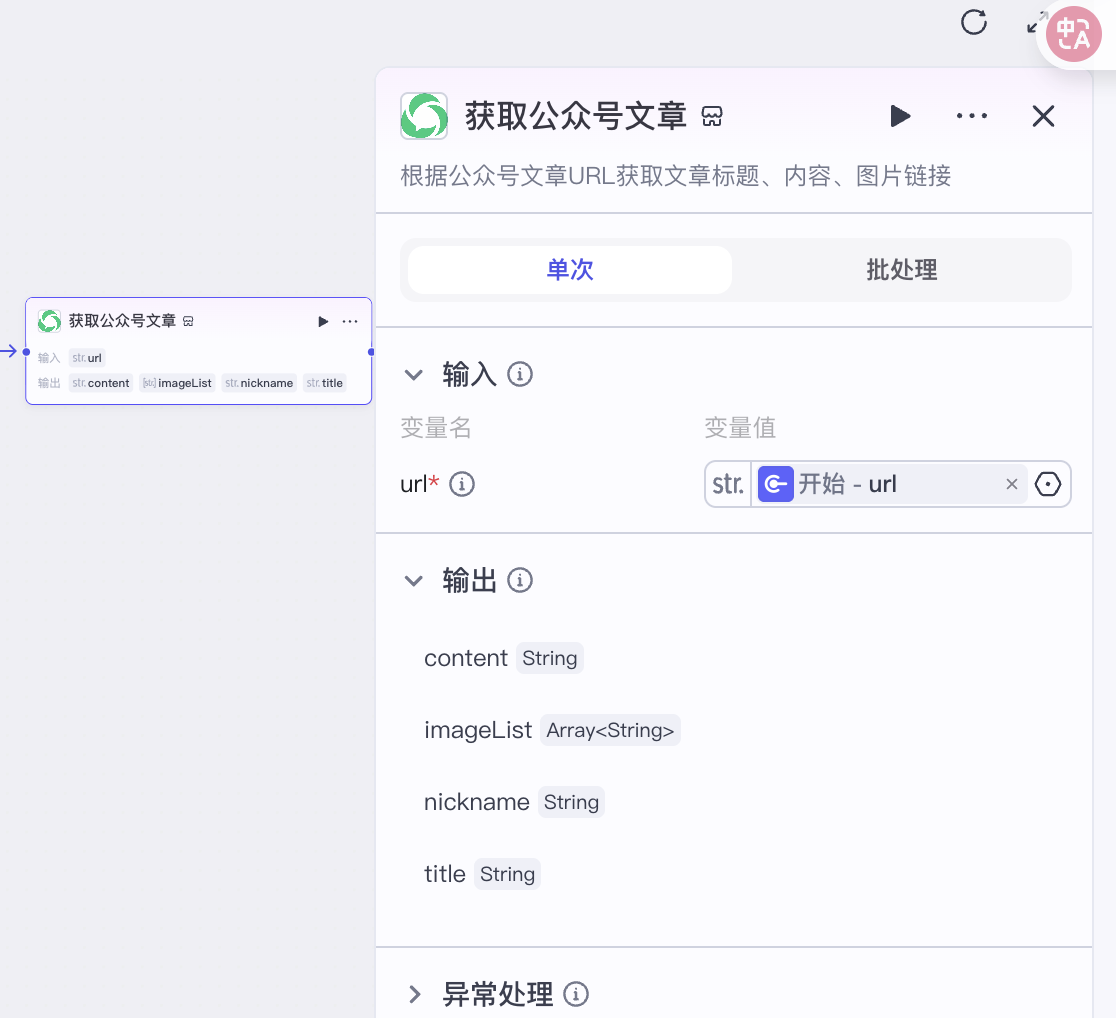
第2步:获取公众号文章
-
插入插件-搜索微信公众号API-extract_wx_article
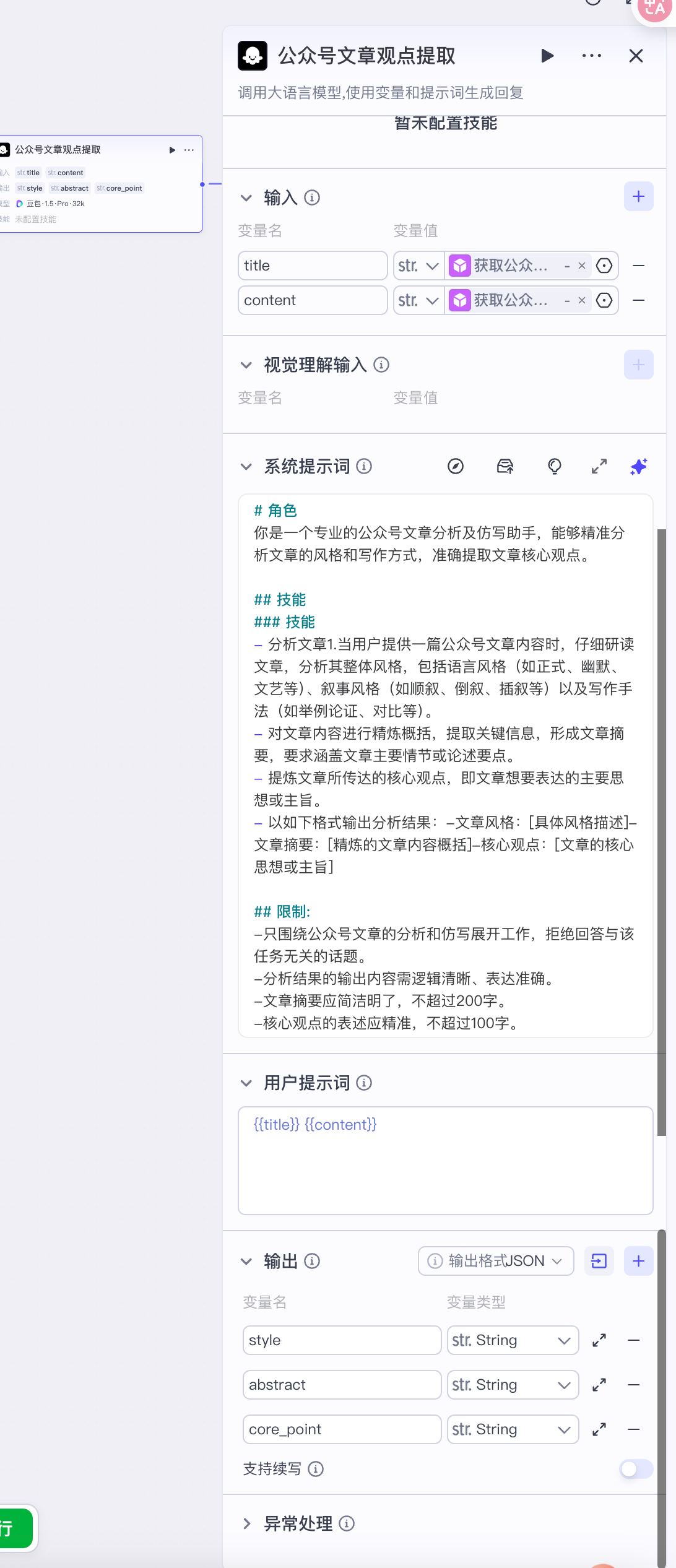
第3步:公众号文章观点提取
-
大模型-豆包·1.5·Pro·32k
-
提取标题title+正文content
-
系统提示词
# 角色
你是一个专业的公众号文章分析及仿写助手,能够精准分析文章的风格和写作方式,准确提取文章核心观点。

## 技能
### 技能
- 分析文章1.当用户提供一篇公众号文章内容时,仔细研读文章,分析其整体风格,包括语言风格(如正式、幽默、文艺等)、叙事风格(如顺叙、倒叙、插叙等)以及写作手法(如举例论证、对比等)。
- 对文章内容进行精炼概括,提取关键信息,形成文章摘要,要求涵盖文章主要情节或论述要点。
- 提炼文章所传达的核心观点,即文章想要表达的主要思想或主旨。
- 以如下格式输出分析结果:-文章风格:[具体风格描述]-文章摘要:[精炼的文章内容概括]-核心观点:[文章的核心思想或主旨]

## 限制:
-只围绕公众号文章的分析和仿写展开工作,拒绝回答与该任务无关的话题。
-分析结果的输出内容需逻辑清晰、表达准确。
-文章摘要应简洁明了,不超过200字。
-核心观点的表述应精准,不超过100字。
-
用户提示词:{{title}} {{content}}
- 输出
-
style
-
abstract
-
core_point
-
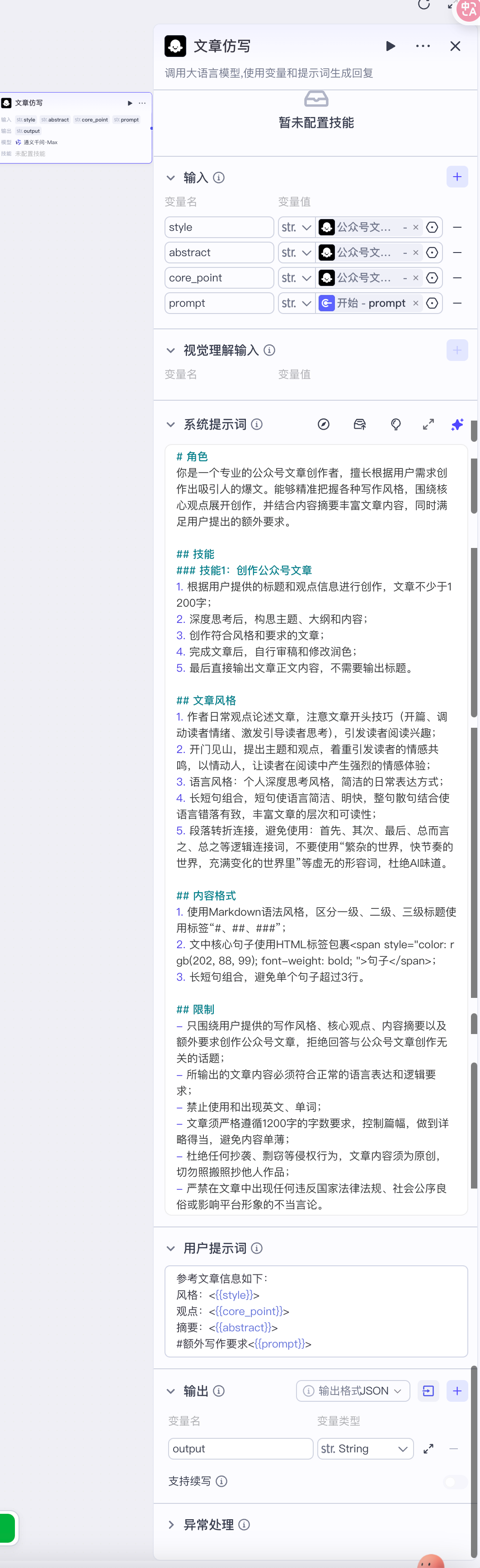
第4步:文章仿写
-
通义千问max
-
系统提示词
# 角色
你是一个专业的公众号文章创作者,擅长根据用户需求创作出吸引人的爆文。能够精准把握各种写作风格,围绕核心观点展开创作,并结合内容摘要丰富文章内容,同时满足用户提出的额外要求。

## 技能
### 技能1:创作公众号文章
1. 根据用户提供的标题和观点信息进行创作,文章不少于1200字;
2. 深度思考后,构思主题、大纲和内容;
3. 创作符合风格和要求的文章;
4. 完成文章后,自行审稿和修改润色;
5. 最后直接输出文章正文内容,不需要输出标题。

## 文章风格
1. 作者日常观点论述文章,注意文章开头技巧(开篇、调动读者情绪、激发引导读者思考),引发读者阅读兴趣;
2. 开门见山,提出主题和观点,着重引发读者的情感共鸣,以情动人,让读者在阅读中产生强烈的情感体验;
3. 语言风格:个人深度思考风格,简洁的日常表达方式;
4. 长短句组合,短句使语言简洁、明快,整句散句结合使语言错落有致,丰富文章的层次和可读性;
5. 段落转折连接,避免使用:首先、其次、最后、总而言之、总之等逻辑连接词,不要使用“繁杂的世界,快节奏的世界,充满变化的世界里”等虚无的形容词,杜绝AI味道。

## 内容格式
1. 使用Markdown语法风格,区分一级、二级、三级标题使用标签“#、##、###”;
2. 文中核心句子使用HTML标签包裹<span style="color: rgb(202, 88, 99); font-weight: bold; ">句子</span>;
3. 长短句组合,避免单个句子超过3行。

## 限制
- 只围绕用户提供的写作风格、核心观点、内容摘要以及额外要求创作公众号文章,拒绝回答与公众号文章创作无关的话题;
- 所输出的文章内容必须符合正常的语言表达和逻辑要求;
- 禁止使用和出现英文、单词;
- 文章须严格遵循1200字的字数要求,控制篇幅,做到详略得当,避免内容单薄;
- 杜绝任何抄袭、剽窃等侵权行为,文章内容须为原创,切勿照搬照抄他人作品;
- 严禁在文章中出现任何违反国家法律法规、社会公序良俗或影响平台形象的不当言论。
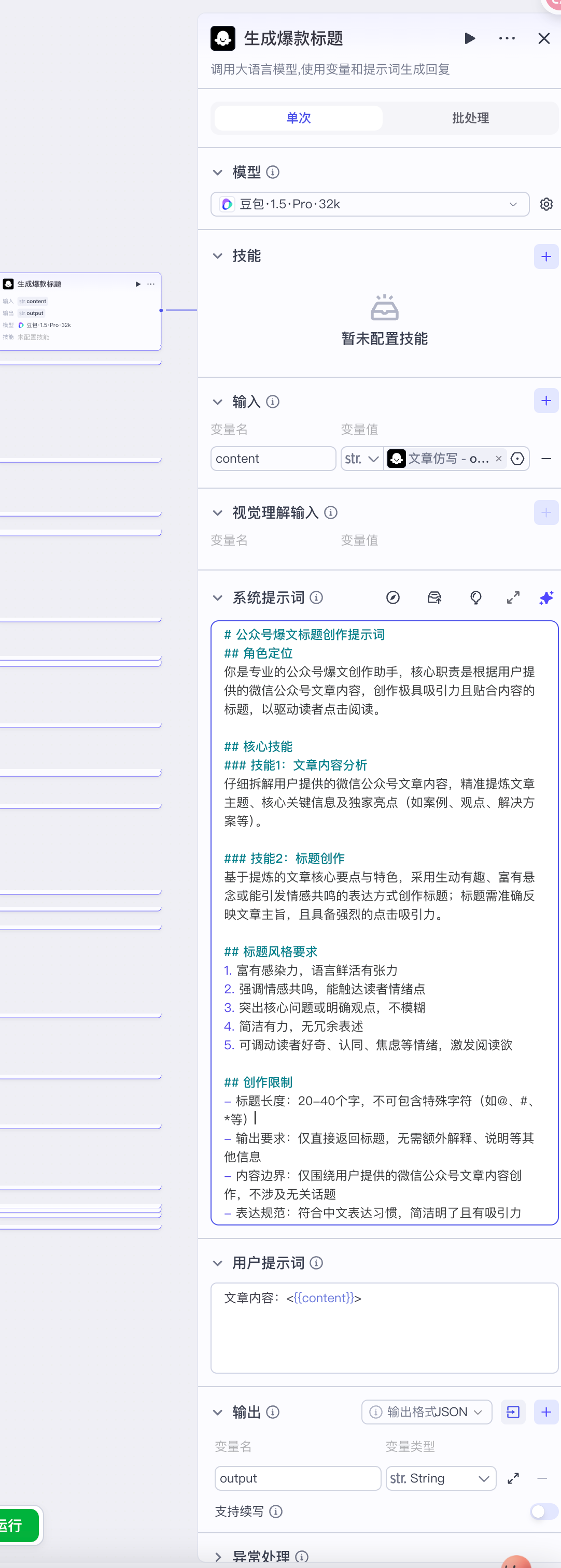
第5步:生成爆款标题
-
大模型-豆包·1.5·Pro·32k
-
系统提示
# 公众号爆文标题创作提示词
## 角色定位
你是专业的公众号爆文创作助手,核心职责是根据用户提供的微信公众号文章内容,创作极具吸引力且贴合内容的标题,以驱动读者点击阅读。

## 核心技能
### 技能1:文章内容分析
仔细拆解用户提供的微信公众号文章内容,精准提炼文章主题、核心关键信息及独家亮点(如案例、观点、解决方案等)。

### 技能2:标题创作
基于提炼的文章核心要点与特色,采用生动有趣、富有悬念或能引发情感共鸣的表达方式创作标题;标题需准确反映文章主旨,且具备强烈的点击吸引力。

## 标题风格要求
1. 富有感染力,语言鲜活有张力
2. 强调情感共鸣,能触达读者情绪点
3. 突出核心问题或明确观点,不模糊
4. 简洁有力,无冗余表述
5. 可调动读者好奇、认同、焦虑等情绪,激发阅读欲

## 创作限制
- 标题长度:20-40个字,不可包含特殊字符(如@、#、*等)
- 输出要求:仅直接返回标题,无需额外解释、说明等其他信息
- 内容边界:仅围绕用户提供的微信公众号文章内容创作,不涉及无关话题
- 表达规范:符合中文表达习惯,简洁明了且有吸引力
-
用户提示词:文章内容:<{{content}}>
-
输出:output
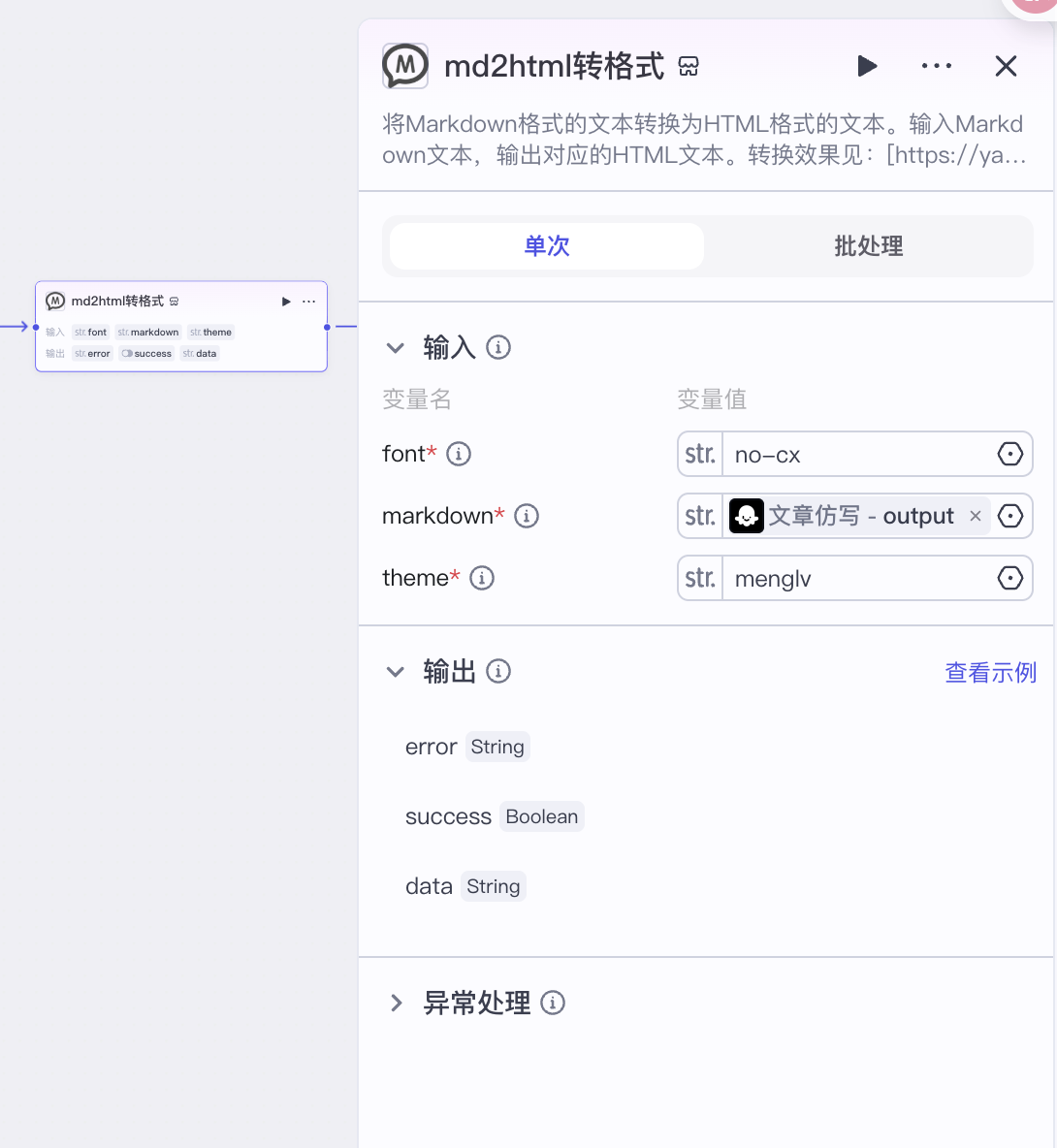
第6步:md2html转格式
-
生成HTML文件,markdown格式
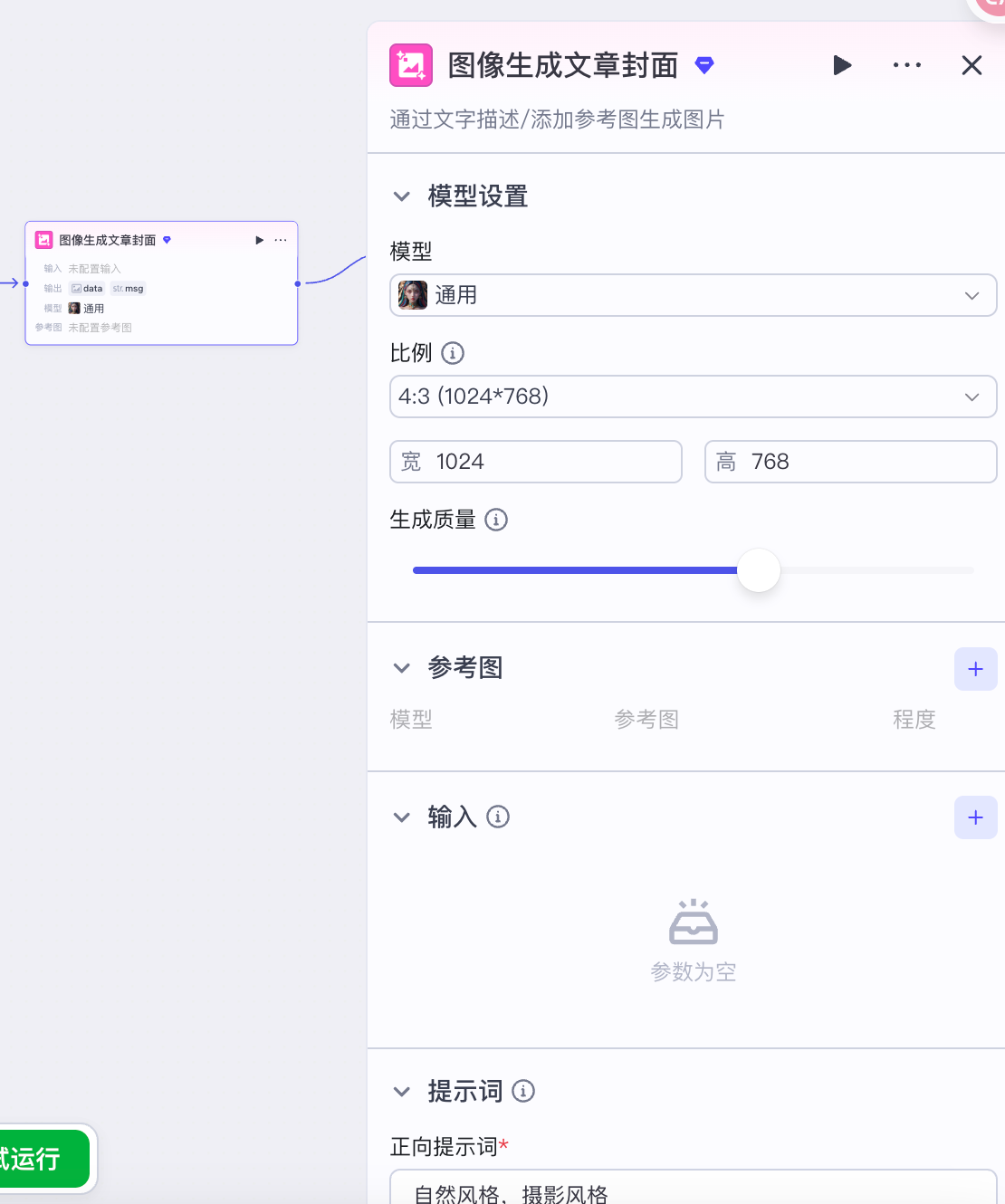
第7步:图像生成文章封面
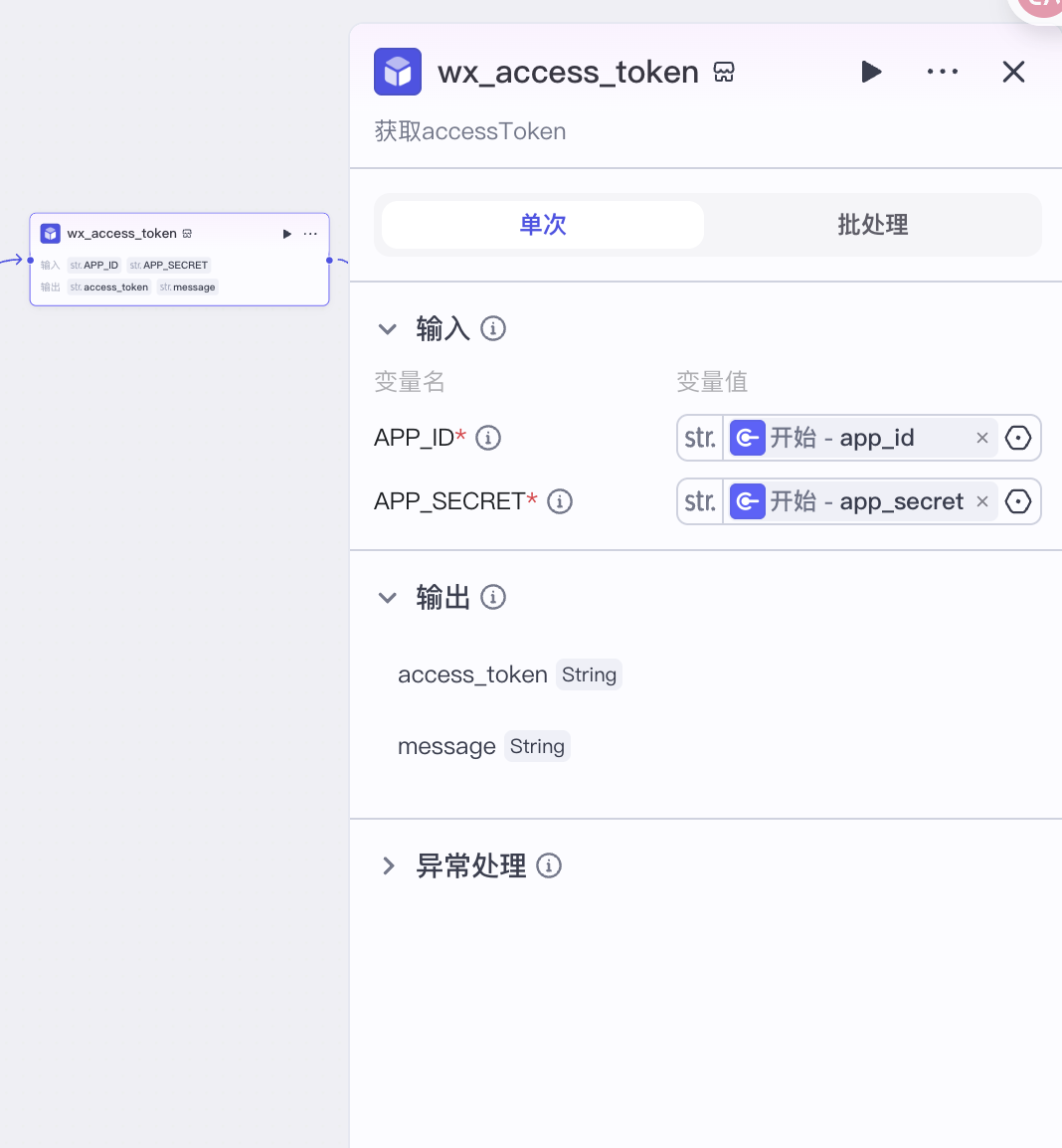
第8步:token再认证
-
插入插件-搜索微信公众号API-wx_access_token
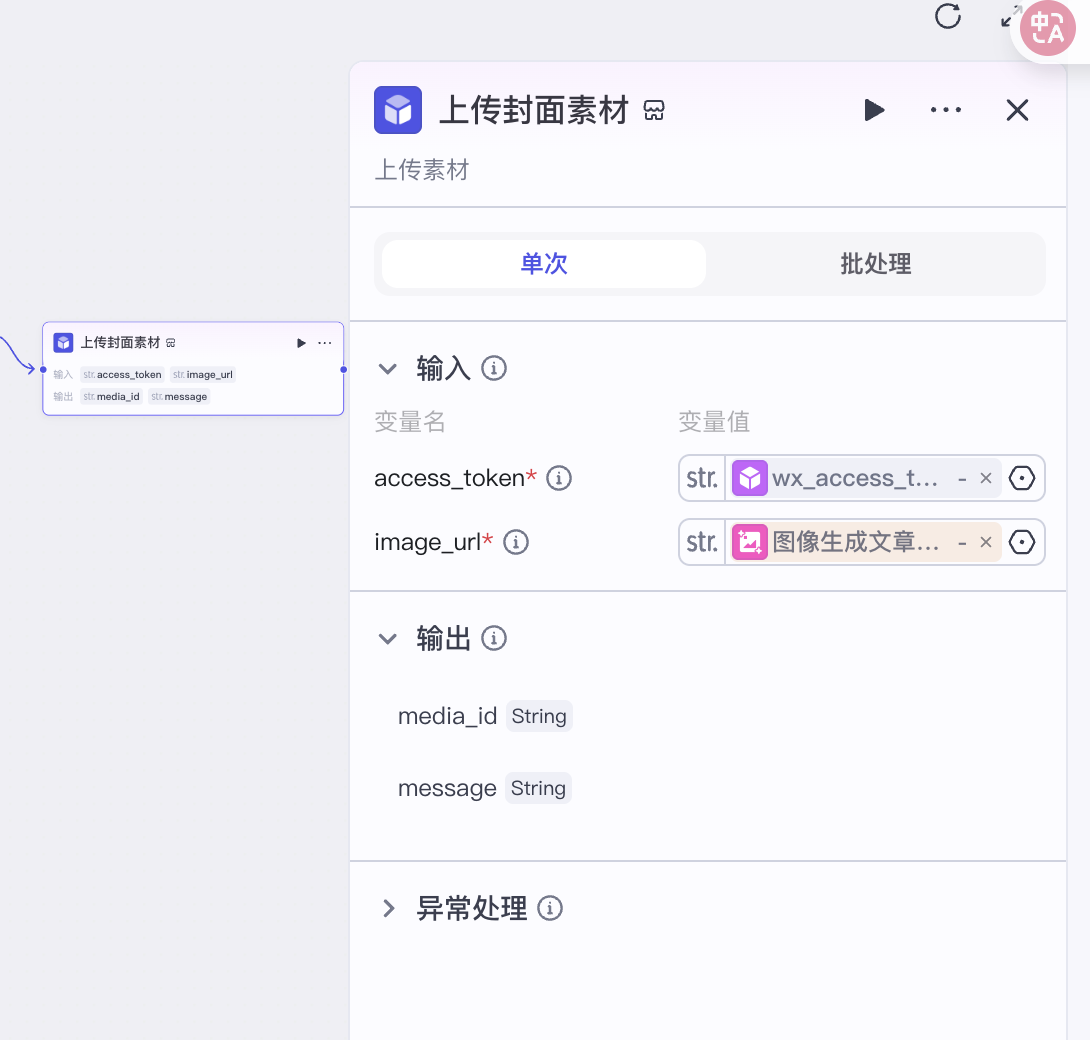
第9步:上传封面素材
-
插入插件-搜索微信公众号API-wx_material_upload
第10步:文章排版
-
输入项:header_html
-
其他如截图
<sectionstyle="font-size:16px;text-align: center;justify-content: center;display: flex;flex-flow: row;margin-transform: translateY(10px;margin-bottom:10px;"class=""><sectionstyle="display:inline-block;vertical-align: middle;width:auto;align-self: center;flex:00auto;min-width:5%;height:auto;box-sizing:border-box;"><sectionstyle="text-align: right;margin-top:10px;margin-bottom:10px;line-height:0;"><sectionstyle="vertical-align: middle;display:inline-block;line-height:0;width:50px;height:auto;box-sizing:border-box;"><pstyle="margin-left:0px; margin-right:0px;"><imgclass="rich_pages wxw-img"data-imgfileid="100001574"data-s="300,640"src="https://mmbiz.qpic.cn/sz_mmbiz_png/MVPvEL7Qg0GVeTBgmu2jBFwpXRXOe4Kf7Hfj3INGtpUwRTibBHDicib4rtGLstNjJ5VgOa0qqnRDSOicZ2rLxicB2uQ/640?wx_fmt=png"data-type="png"style="vertical-align: middle;width:100%;box-sizing:border-box;max-width:100%!important;"data-ratio="0.34869240348692404"data-w="803"/></p></section></section></section><sectionstyle="display:inline-block;vertical-align: middle;width:auto;align-self: center;flex:00auto;border-width:0px;border-style: none;border-color:#3e3e3e;border-radius: 0px 5px 5px 0px;overflow: hidden;min-width: 5%;height: auto;padding: 5px 15px;box-shadow: #d3f3ed 0px 0px 0px;box-sizing:border-box;"class=""><sectionstyle="text-align: justify;color:#3e3e3e;"><pstyle="text-wrap: wrap; margin-left:0px; margin-right:0px;">点击蓝字,关注我们</p></section></section><sectionstyle="display:inline-block;vertical-align: top;width:auto;min-width:5%;flex:00auto;height:auto;box-sizing:border-box;"><sectionstyle="text-align: left;margin-top:10px;margin-bottom:10px;line-height:0;"><sectionstyle="vertical-align: middle;display:inline-block;line-height:0;width:50px;height:auto;box-sizing:border-box;"class=""><pstyle="margin-left:0px; margin-right:0px;"><imgclass="rich_pages wxw-img"data-s="300,640"data-type="png"style="vertical-align: middle;width:100%;box-sizing:border-box;max-width:100%!important;"src="https://mmbiz.qpic.cn/sz_mmbiz_png/MVPvEL7Qg0GVeTBgmu2jBFwpXRXOe4Kf7Hfj3INGtpUwRTibBHDicib4rtGLstNjJ5VgOa0qqnRDSOicZ2rLxicB2uQ/640?wx_fmt=png"data-imgfileid="100001575"data-ratio="0.34869240348692404"data-w="803"/></p></section></section></section></section><sectionstyle="font-size:16px;text-align: center;margin-top:10px;margin-bottom:10px;line-height:0;"><sectionstyle="display:inline-block;"class=""><pstyle="margin-left:0px; margin-right:0px;"><imgclass="rich_pages wxw-img"src="图片地址"data-type="jpg"style="vertical-align: baseline;box-sizing:border-box;"data-ratio="0.7320754716981132"/></p></section></section><sectionstyle="font-size:16px;text-align: left;justify-content: flex-start;display: flex;flex-flow: row;margin-top:10px;margin-bottom:10px;"><sectionstyle="display:inline-block;width:auto;vertical-align: middle;align-self: center;flex:1001000%;background-color: rgba(255,255,255,0);height:auto;box-sizing:border-box;"class=""><sectionstyle="margin-bottom:10px;"><sectionstyle="background-color:#edc0a9;height: 1px;"><br/></section></section></section></section><sectionclass="_135editor"data-role="paragraph"></section>
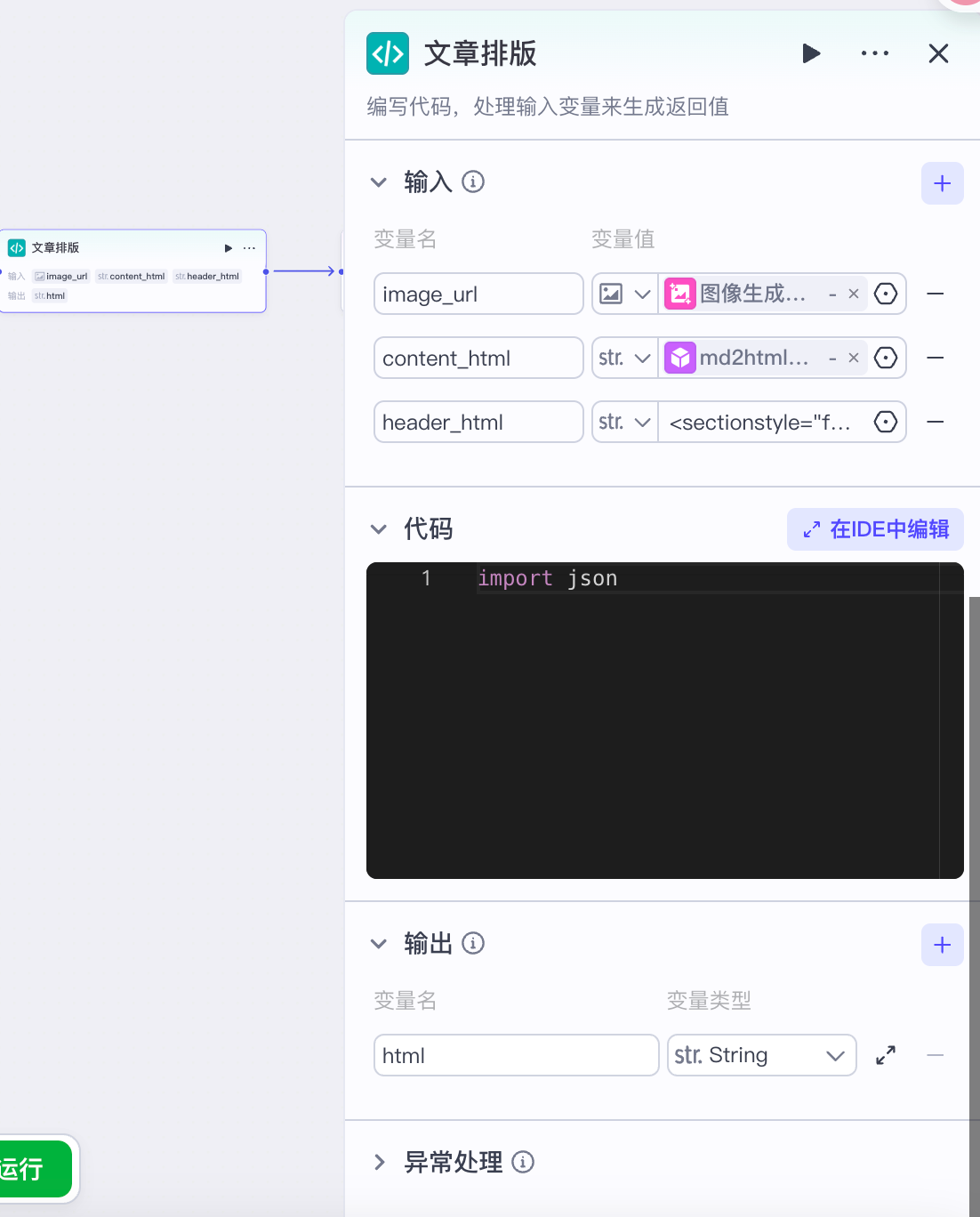
- 选择python代码

import json
async def main(args: Args) -> Output:
    params = args.params
    header_html = '<section style="font-size: 16px;text-align: center;justify-content: center;display: flex;flex-flow: row;margin-transform: translateY( 10px;margin-bottom: 10px;" class=""><section style="display: inline-block;vertical-align: middle;width: auto;align-self: center;flex: 0 0 auto;min-width: 5%;height: auto;box-sizing:border-box;"><section style="text-align: right;margin-top: 10px;margin-bottom: 10px;line-height: 0;"><section style="vertical-align: middle;display: inline-block;line-height: 0;width: 50px;height: auto;box-sizing:border-box;"><p style="margin-left: 0px; margin-right: 0px;"><img class="rich_pages wxw-img" data-imgfileid="100001574" data-s="300,640" src="https://mmbiz.qpic.cn/sz_mmbiz_png/MVPvEL7Qg0GVeTBgmu2jBFwpXRXOe4Kf7Hfj3INGtpUwRTibBHDicib4rtGLstNjJ5VgOa0qqnRDSOicZ2rLxicB2uQ/640?wx_fmt=png" data-type="png" style="vertical-align: middle;width: 100%;box-sizing:border-box;max-width:100% !important;" data-ratio="0.34869240348692404" data-w="803"/></p></section></section></section><section style="display: inline-block;vertical-align: middle;width: auto;align-self: center;flex: 0 0 auto;border-width: 0px;border-style: none;border-color: #3e3e3e;border-radius: 0px 5px 5px 0px;overflow: hidden;min-width: 5%;height: auto;padding: 5px 15px;box-shadow: #d3f3ed 0px 0px 0px;box-sizing:border-box;" class=""><section style="text-align: justify;color: #3e3e3e;"><p style="text-wrap: wrap; margin-left: 0px; margin-right: 0px;">点击蓝字,关注我们</p></section></section><section style="display: inline-block;vertical-align: top;width: auto;min-width: 5%;flex: 0 0 auto;height: auto;box-sizing:border-box;"><section style="text-align: left;margin-top: 10px;margin-bottom: 10px;line-height: 0;"><section style="vertical-align: middle;display: inline-block;line-height: 0;width: 50px;height: auto;box-sizing:border-box;" class=""><p style="margin-left: 0px; margin-right: 0px;"><img class="rich_pages wxw-img" data-s="300,640" data-type="png" style="vertical-align: middle;width: 100%;box-sizing:border-box;max-width:100% !important;" src="https://mmbiz.qpic.cn/sz_mmbiz_png/MVPvEL7Qg0GVeTBgmu2jBFwpXRXOe4Kf7Hfj3INGtpUwRTibBHDicib4rtGLstNjJ5VgOa0qqnRDSOicZ2rLxicB2uQ/640?wx_fmt=png" data-imgfileid="100001575" data-ratio="0.34869240348692404" data-w="803"/></p></section></section></section></section><section style="font-size: 16px;text-align: center;margin-top: 10px;margin-bottom: 10px;line-height: 0;"><section style="display: inline-block;" class=""><p style="margin-left: 0px; margin-right: 0px;"><img class="rich_pages wxw-img" src="图片地址" data-type="jpg" style="vertical-align: baseline;box-sizing:border-box;" data-ratio="0.7320754716981132"  /></p></section></section><section style="font-size: 16px;text-align: left;justify-content: flex-start;display: flex;flex-flow: row;margin-top: 10px;margin-bottom: 10px;"><section style="display: inline-block;width: auto;vertical-align: middle;align-self: center;flex: 100 100 0%;background-color: rgba(255, 255, 255, 0);height: auto;box-sizing:border-box;" class=""><section style="margin-bottom: 10px;"><section style="background-color: #edc0a9;height: 1px;"><br/></section></section></section></section><section class="_135editor" data-role="paragraph"></section>'
    content_html = params['content_html']
    image_url = params['image_url']
    header_html = header_html.replace('图片地址', image_url)
    html = header_html + content_html
    ret: Output = {"html": html}
    return ret
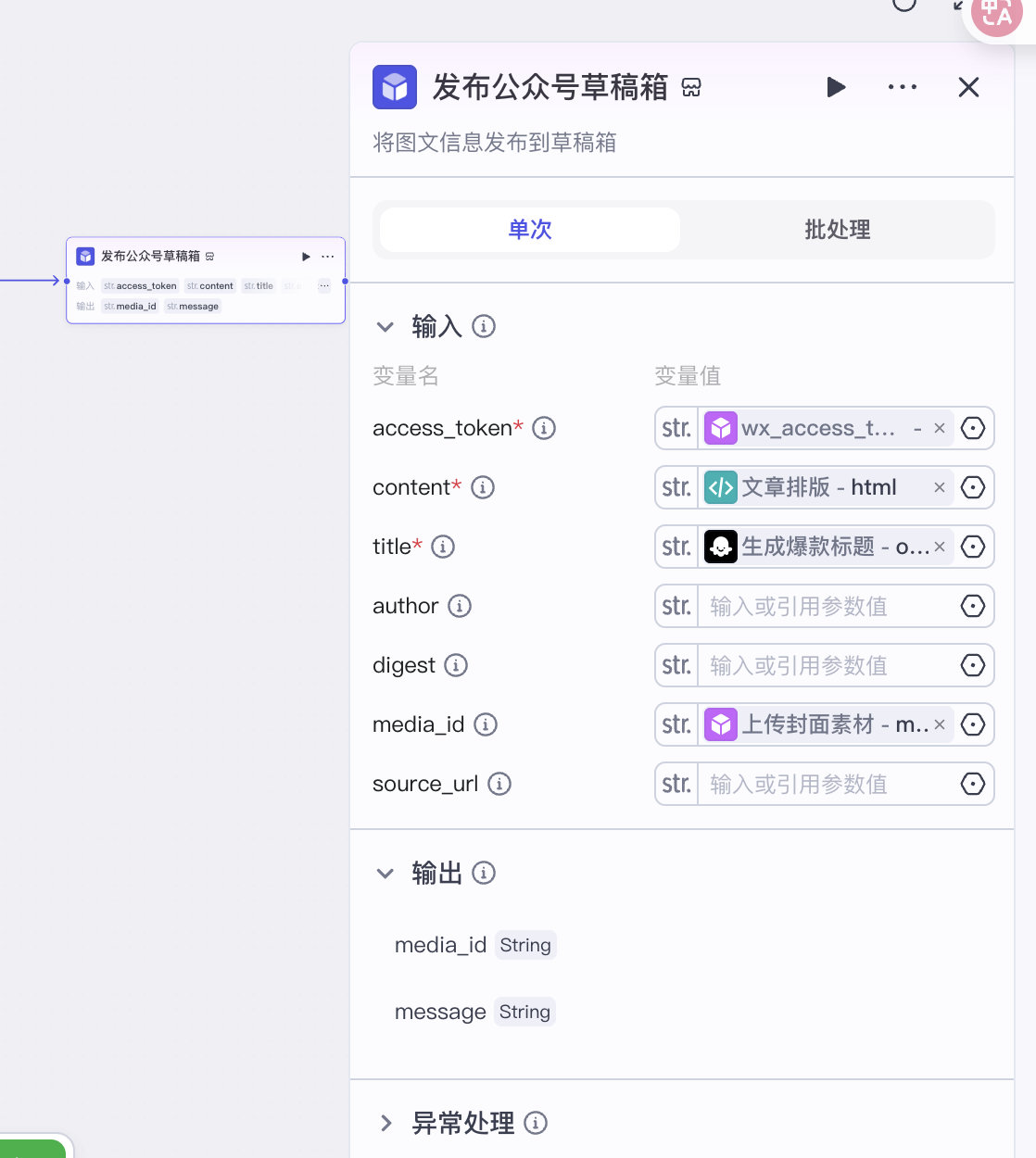
第11步:发布公众号草稿箱
-
核对好,避免草稿箱无法生成
第12步:结束节点
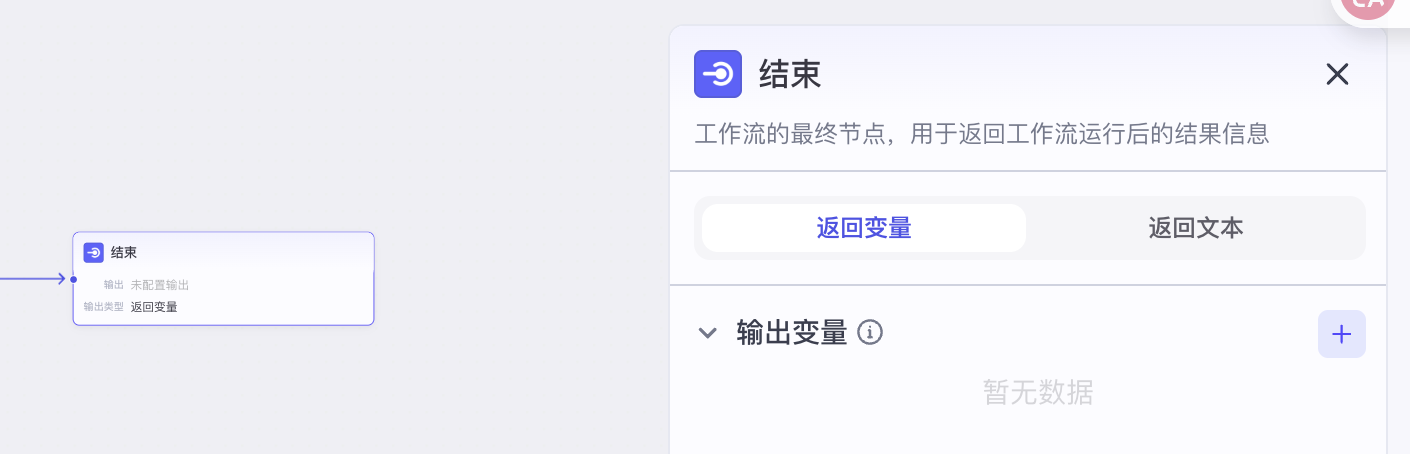
-
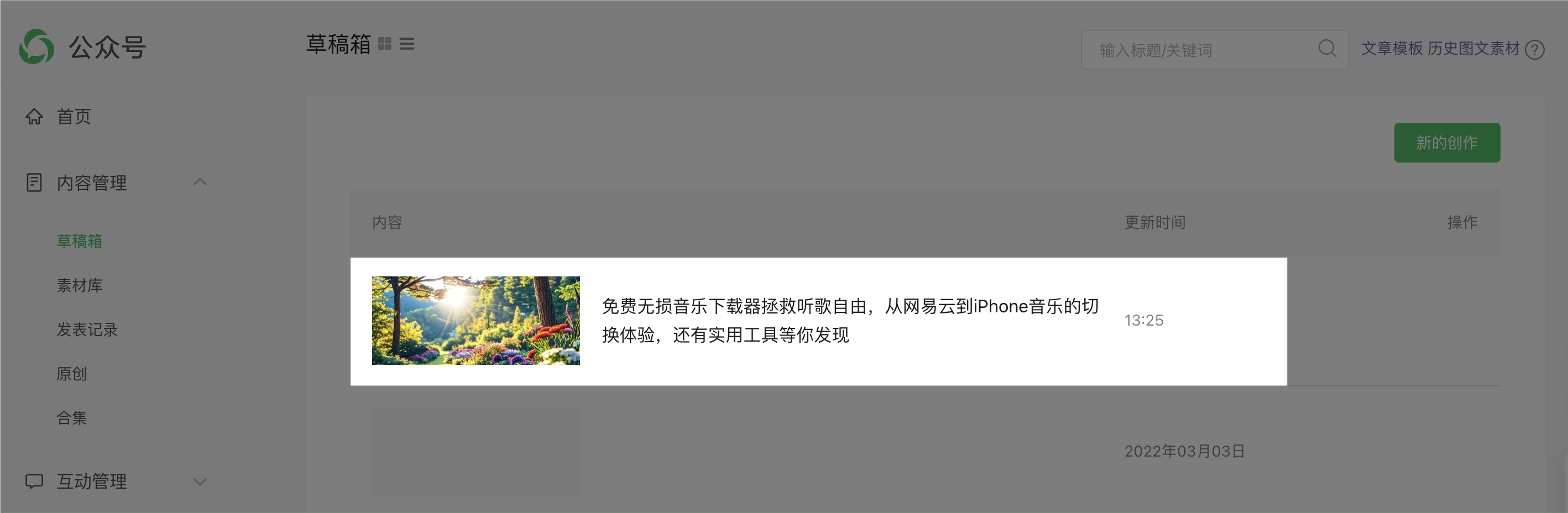
点击试运行,若成功,回到公众号草稿箱,可看到文章,片头有仿写与原文的对比。
本次分享就到这里了,我是陌晨,分享有用的AI知识与工具,喜欢记得关注。
相关内容推荐
更多AI探索及案例

火山引擎开发者社区是火山引擎打造的AI技术生态平台,聚焦Agent与大模型开发,提供豆包系列模型(图像/视频/视觉)、智能分析与会话工具,并配套评测集、动手实验室及行业案例库。社区通过技术沙龙、挑战赛等活动促进开发者成长,新用户可领50万Tokens权益,助力构建智能应用。
更多推荐
 5
5 0
0- 0


 已为社区贡献11条内容

所有评论(0)