browser-use + qwen完成web自动化测试
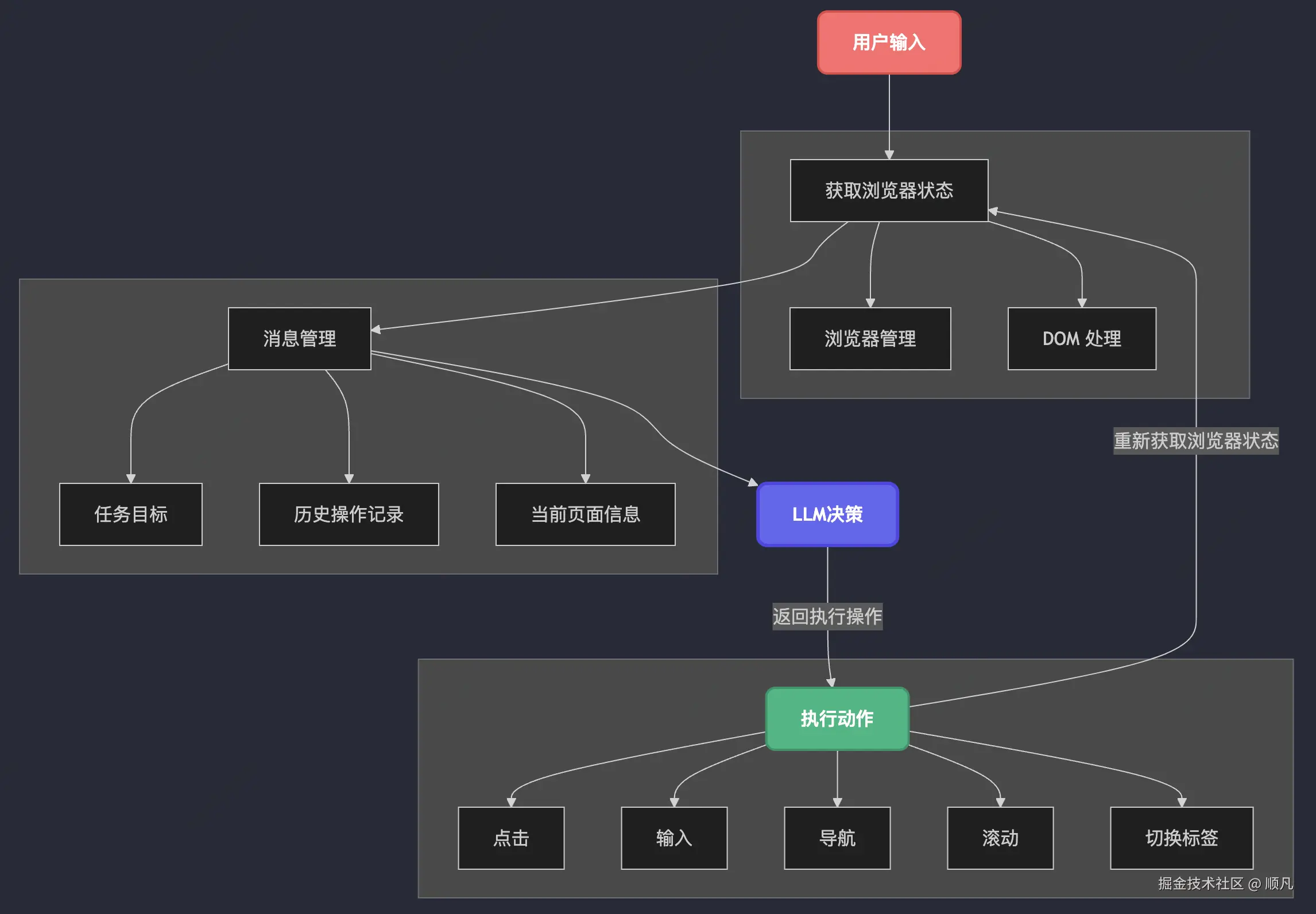
Browser Use 首先捕获了浏览器实时状态,然后整合结构化信息交由 LLM 进行智能决策,随后执行确定的动作,完成后再次获取更新后的浏览器状态,循环往复直至任务完成。它支持 Chromium(Chrome、Edge)、Firefox 和 WebKit(Safari)三大浏览器引擎,且适用于跨平台(基于 Playwright 实现浏览器的核心控制与管理,负责启动浏览器实例、处理浏览器上下文和页
browser-use
Browser Use - The AI browser agent
Browser Use 是一个基于 Python 开发的开源库,它将先进的 AI 技术与浏览器自动化功能深度融合。通过集成Playwright等浏览器自动化工具,Browser Use允许开发者使用大型语言模型(如GPT、qwen等)来自动化浏览网页、提取信息、模拟用户操作等。
相关工具
playwright
Playwright 是一个由微软开发的现代化 端到端(E2E)测试工具,专门用于自动化 Web 浏览器操作。它支持 Chromium(Chrome、Edge)、Firefox 和 WebKit(Safari)三大浏览器引擎,且适用于跨平台(Windows、macOS、Linux)。
LangChain
LangChain 是一个用于构建大语言模型(LLM)应用的开发框架,它通过模块化设计简化了LLM 应用的开发流程,支持开发者快速搭建基于语言模型的复杂应用(如聊天机器人、知识库问答、自动化工作流等)。其核心思想是通过“链(Chain)”将不同组件(如模型、数据、工具)灵活组合,实现端到端的功能。
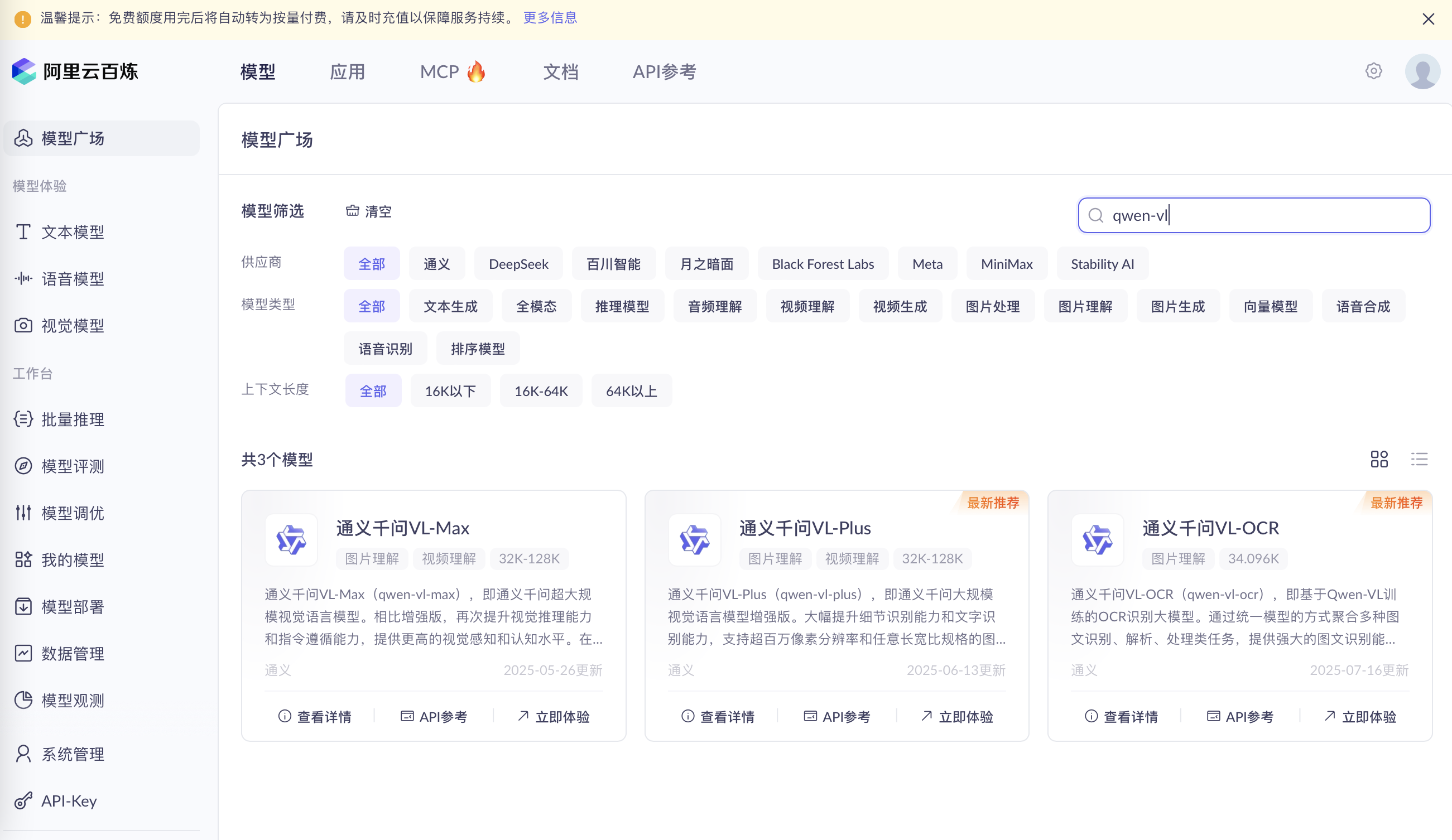
阿里云百炼
新用户在半年内对于每个模型有100w免费token
工作原理
参考链接:https://juejin.cn/post/7486757133808746546#heading-0
Browser Use 首先捕获了浏览器实时状态,然后整合结构化信息交由 LLM 进行智能决策,随后执行确定的动作,完成后再次获取更新后的浏览器状态,循环往复直至任务完成。
|
模块 |
核心功能 |
|
Agent |
任务规划与状态管理 定义了 AI 代理的角色、输入格式、响应规则(system_prompt.md) |
|
Browser |
基于 Playwright 实现浏览器的核心控制与管理,负责启动浏览器实例、处理浏览器上下文和页面 |
|
DOM |
解析和提取页面元素信息、元素高亮定位 提供精确的元素定位和交互能力,帮助 LLM 更准确的决策 |
| Controller |
动作注册与执行 |
以"打开百度"任务为例,执行流程如下:
- LLM分析当前状态并返回结构化决策(如导航到百度)
- 决策被解析为具体动作(如go_to_url)
- Agent将动作传递给Controller
- Controller通过执行对应的处理函数
代码
import asyncio
import os
from browser_use.llm import ChatOpenAI
from browser_use import Agent,Browser ,BrowserConfig
from dotenv import load_dotenv
load_dotenv()

config = BrowserConfig(
    headless=False,
    disable_security=True
)
browser = Browser(config=config)

async def process_by_ai(task):
    agent = Agent(
       task=task,
       llm=ChatOpenAI(
          base_url="https://dashscope.aliyuncs.com/compatible-mode/v1",
          model='qwen-vl-max-latest',
          api_key=os.getenv("DASHSCOPE_API_KEY"),#配置在.env文件中,或直接在这写。如何获取API Key:https://help.aliyun.com/zh/model-studio/developer-reference/get-api-key
          timeout=60
       ),
       browser=browser,

    )
    history = await agent.run()
    return history.is_successful()

asyncio.run(process_by_ai("1、打开https://bailian.console.aliyun.com/?spm=5176.29597918.0.0.100f7b086ysSBU&tab=model#/model-market  2、点击“应用”"))
>运行日志
/usr/local/bin/python3.13 /Users/ljy/Desktop/AI_TEST/AI_process.py
sk-3e9411fc4ed6483996bc93e3173c996a
INFO     [browser_use.telemetry.service] Anonymized telemetry enabled. See https://docs.browser-use.com/development/telemetry for more information.
INFO     [browser_use.agent.service] 💾 File system path: /var/folders/xj/qcrr40513zn6b7905sqmt0vc0000gn/T/browser_use_agent_068833ae-3d57-7108-8000-385e891ff56d
INFO     [browser_use.Agent🅰 f56d on 🆂 f56d 🅟 32] 🧠 Starting a browser-use agent 0.5.2 with base_model=qwen-vl-max-latest +vision extraction_model=qwen-vl-max-latest  +file_system
INFO     [browser_use.Agent🅰 f56d on 🆂 2661 🅟 32] 🚀 Starting task: 1、打开https://bailian.console.aliyun.com/?spm=5176.29597918.0.0.100f7b086ysSBU&tab=model#/model-market  2、点击“应用”
INFO     [browser_use.BrowserSession🆂 2661 #20 🅟 32] 🌎 Launching new local browser context playwright:chromium keep_alive=False user_data_dir= /private/var/folders/xj/qcrr40513zn6b7905sqmt0vc0000gn/T/browseruse-tmp-singleton-ukd8c6rg
INFO     [browser_use.BrowserSession🆂 2661 #20 🅟 32]  ↳ Spawning Chrome subprocess listening on CDP port 127.0.0.1:54512 with user_data_dir= /private/var/folders/xj/qcrr40513zn6b7905sqmt0vc0000gn/T/browseruse-tmp-singleton-ukd8c6rg
INFO     [browser_use.BrowserSession🆂 2661 #20 🅟 32] 🌎 Connecting to newly spawned browser subprocess: browser_pid=37824 on http://127.0.0.1:54512/
INFO     [browser_use.BrowserSession🆂 2661 #20 🅟 32] ➡️ Page navigation [0]chrome://new-tab-page/ took 0.52s
INFO     [browser_use.Agent🅰 f56d on 🆂 2661 🅟 52] 📍 Step 1: Evaluating page with 0 interactive elements on: chrome://new-tab-page/
INFO     [browser_use.Agent🅰 f56d on 🆂 2661 🅟 52] 💡 Thinking:
The user has requested to open a specific URL and then click on an element labeled '应用'. The current browser state shows that we are on a new tab page with no interactive elements. The first step is to navigate to the provided URL.
INFO     [browser_use.Agent🅰 f56d on 🆂 2661 🅟 52] ❔ Eval: No previous action taken as this is the first step. Verdict: N/A
INFO     [browser_use.Agent🅰 f56d on 🆂 2661 🅟 52] 🧠 Memory: Starting the task by navigating to the specified URL.
INFO     [browser_use.Agent🅰 f56d on 🆂 2661 🅟 52] 🎯 Next goal: Navigate to the URL https://bailian.console.aliyun.com/?spm=5176.29597918.0.0.100f7b086ysSBU&tab=model#/model-market.

INFO     [cost] 🧠 qwen-vl-max-latest | 📥 5.5k | 📤 235
INFO     [browser_use.controller.service] 🔗 Navigated to https://bailian.console.aliyun.com/?spm=5176.29597918.0.0.100f7b086ysSBU&tab=model#/model-market
INFO     [browser_use.Agent🅰 f56d on 🆂 2661 🅟 52] ☑️ Executed action 1/1: go_to_url()
INFO     [browser_use.Agent🅰 f56d on 🆂 2661 🅟 52] 📍 Step 2: Ran 1 actions in 24.41s: ✅ 1
INFO     [browser_use.sync.auth] ────────────────────────────────────────
INFO     [browser_use.sync.auth] 🌐  View the details of this run in Browser Use Cloud:
INFO     [browser_use.sync.auth]     👉  https://cloud.browser-use.com/hotlink?user_code=6Z9EKKNLHYBLE6DS
INFO     [browser_use.sync.auth] ────────────────────────────────────────

INFO     [browser_use.BrowserSession🆂 2661 #20 🅟 32] ➡️ Page navigation [0]bailian.console.aliyun.com/?spm=5176.295… took 5.06s
INFO     [browser_use.Agent🅰 f56d on 🆂 2661 🅟 52] 📍 Step 2: Evaluating page with 2 interactive elements on: https://bailian.console.aliyun.com/?spm=5176.29597...
INFO     [browser_use.Agent🅰 f56d on 🆂 2661 🅟 52] 💡 Thinking:
The current page has been navigated to the specified URL. The next step is to click on the '应用' (Application) tab as per the user request. The screenshot shows the '应用' tab, which needs to be clicked.
INFO     [browser_use.Agent🅰 f56d on 🆂 2661 🅟 52] 👍 Eval: Successfully navigated to the specified URL. Verdict: Success
INFO     [browser_use.Agent🅰 f56d on 🆂 2661 🅟 52] 🧠 Memory: Navigated to the URL https://bailian.console.aliyun.com/?spm=5176.29597918.0.0.100f7b086ysSBU&tab=model#/model-market. Next, need to click on the '应用' tab.
INFO     [browser_use.Agent🅰 f56d on 🆂 2661 🅟 52] 🎯 Next goal: Click on the '应用' tab to proceed with the task.

INFO     [cost] 🧠 qwen-vl-max-latest | 📥 6.8k | 📤 194
INFO     [browser_use.controller.service] 🖱️ Clicked button with index 1:
INFO     [browser_use.Agent🅰 f56d on 🆂 2661 🅟 52] ☑️ Executed action 1/1: click_element_by_index()
INFO     [browser_use.Agent🅰 f56d on 🆂 2661 🅟 52] 📍 Step 3: Ran 1 actions in 16.97s: ✅ 1
INFO     [browser_use.BrowserSession🆂 2661 #20 🅟 32] ➡️ Page navigation [0]bailian.console.aliyun.com/?spm=5176.295… took 0.51s
INFO     [browser_use.Agent🅰 f56d on 🆂 2661 🅟 52] 📍 Step 3: Evaluating page with 17 interactive elements on: https://bailian.console.aliyun.com/?spm=5176.29597...
INFO     [browser_use.Agent🅰 f56d on 🆂 2661 🅟 52] 💡 Thinking:
The current goal is to click on the '应用' tab. Based on the browser state, the '应用' tab is identified as element index 3. This aligns with the user's request to navigate to the '应用' section after opening the specified URL.
INFO     [browser_use.Agent🅰 f56d on 🆂 2661 🅟 52] 👍 Eval: Successfully navigated to the specified URL and identified the '应用' tab. Verdict: Success
INFO     [browser_use.Agent🅰 f56d on 🆂 2661 🅟 52] 🧠 Memory: Navigated to the URL and located the '应用' tab with index 3. Ready to click on it.
INFO     [browser_use.Agent🅰 f56d on 🆂 2661 🅟 52] 🎯 Next goal: Click on the '应用' tab (index 3) to proceed with the task.

INFO     [cost] 🧠 qwen-vl-max-latest | 📥 8.4k | 📤 158
INFO     [browser_use.controller.service] 🖱️ Clicked button with index 3: 应用
INFO     [browser_use.Agent🅰 f56d on 🆂 2661 🅟 52] ☑️ Executed action 1/1: click_element_by_index()
INFO     [browser_use.Agent🅰 f56d on 🆂 2661 🅟 52] 📍 Step 4: Ran 1 actions in 10.00s: ✅ 1
INFO     [browser_use.BrowserSession🆂 2661 #20 🅟 32] ➡️ Page navigation [0]bailian.console.aliyun.com/?spm=5176.295… took 1.54s
INFO     [browser_use.Agent🅰 f56d on 🆂 2661 🅟 52] 📍 Step 4: Evaluating page with 10 interactive elements on: https://bailian.console.aliyun.com/?spm=5176.29597...
INFO     [browser_use.Agent🅰 f56d on 🆂 2661 🅟 52] 💡 Thinking:
The user requested to navigate to the URL and click on the '应用' tab. The current browser state shows that we have successfully navigated to the URL and clicked on the '应用' tab, as indicated by the highlighted '应用' tab in the screenshot and the interactive elements list. The task appears to be completed as per the user's request.
INFO     [browser_use.Agent🅰 f56d on 🆂 2661 🅟 52] 👍 Eval: Successfully clicked on the '应用' tab as requested. Verdict: Success
INFO     [browser_use.Agent🅰 f56d on 🆂 2661 🅟 52] 🧠 Memory: Navigated to the specified URL and clicked on the '应用' tab. The task is complete as per the user's request.
INFO     [browser_use.Agent🅰 f56d on 🆂 2661 🅟 52] 🎯 Next goal: Prepare to call done as the task is complete.

INFO     [cost] 🧠 qwen-vl-max-latest | 📥 7.9k | 📤 203
INFO     [browser_use.Agent🅰 f56d on 🆂 2661 🅟 52] ☑️ Executed action 1/1: done()
INFO     [browser_use.Agent🅰 f56d on 🆂 2661 🅟 52] 📄 Result: Successfully navigated to the specified URL and clicked on the '应用' tab as requested.
INFO     [browser_use.Agent🅰 f56d on 🆂 2661 🅟 52] 📍 Step 5: Ran 1 actions in 10.63s: ✅ 1
INFO     [browser_use.Agent🅰 f56d on 🆂 2661 🅟 52] ✅ Task completed successfully
INFO     [cost] 📊 Per-Model Usage Breakdown:
INFO     [cost]   🤖 qwen-vl-max-latest: 29.4k tokens | ⬅️ 28.6k | ➡️ 790 | 📞 4 calls | 📈 7.4k/call
INFO     [browser_use.agent.service] Cloud authentication started - continuing in background
INFO     [browser_use.BrowserSession🆂 2661 #20 🅟 32] 🛑 Closing cdp_url=http://127.0.0.1:54512/ browser context  <Browser type=<BrowserType name=chromium executable_path=/Users/ljy/Library/Caches/ms-playwright/chromium-1179/chrome-mac/Chromium.app/Contents/MacOS/Chromium> version=138.0.7204.23>
INFO     [browser_use.BrowserSession🆂 2661 #20 🅟 32]  ↳ Killing browser_pid=37824 ~/Library/Caches/ms-playwright/chromium-1179/chrome-mac/Chromium.app/Contents/MacOS/Chromium (terminate() called)
执行结果-history.is_done() True
执行结果-history.is_successful() True
执行结果-history.final_result() Successfully navigated to the specified URL and clicked on the '应用' tab as requested.
执行结果-history.errors() [None, None, None, None]

Process finished with exit code 0

火山引擎开发者社区是火山引擎打造的AI技术生态平台,聚焦Agent与大模型开发,提供豆包系列模型(图像/视频/视觉)、智能分析与会话工具,并配套评测集、动手实验室及行业案例库。社区通过技术沙龙、挑战赛等活动促进开发者成长,新用户可领50万Tokens权益,助力构建智能应用。
更多推荐
 14
14 0
0- 0


 已为社区贡献1条内容

所有评论(0)