Android 开发 写入日志(Log)文件到本地
Android日志文件写入实现方案 摘要:本文介绍了Android应用中实现日志写入文件的方法。首先需要申请WRITE_EXTERNAL_STORAGE权限,然后在应用私有目录创建日志文件。通过FileHelper工具类实现安全写入,包括:1)检查父目录是否存在并创建;2)使用BufferedWriter写入UTF-8格式内容;3)强制同步数据到磁盘;4)确保资源关闭。该方法可用于开发调试和线上问
·
前言
在Android开发中,日志(Log) 不仅在开发阶段用于调试,也用于线上问题排查。为了在应用运行过程中收集关键日志并提供给运维或开发团队查看,我们需要将日志写入文件并保存到内部存储或应用私有目录。如下图,废话少说 直接开练
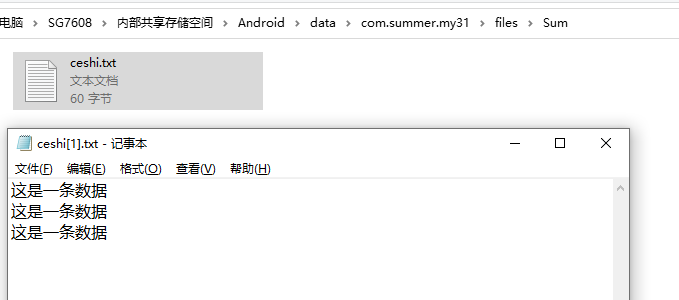
一、申请读写权限,创建目录文件
 // 检查权限
  if (ContextCompat.checkSelfPermission(this, Manifest.permission.WRITE_EXTERNAL_STORAGE)
                        != PackageManager.PERMISSION_GRANTED) {
                    ActivityCompat.requestPermissions(this,
                            new String[]{Manifest.permission.WRITE_EXTERNAL_STORAGE},
                            REQUEST_CODE_STORAGE_PERMISSION);
                    break;
                }

                try {
                    File dir = new File(getExternalFilesDir(null), "Sum");
                    if (!dir.exists() && !dir.mkdirs()) {
                        Log.e("FileError", "无法创建目录");
                        break;
                    }

                    File file = new File(dir, "ceshi.txt");
                    if (file.exists()) {
                        file.delete();
                    }

                    // 模拟写入三条数据,也可以是返回的数组json串
                    for (int m = 0; m < 3; m++) {
                        FileHelper.appendFile(file, "这是一条数据");
                        Log.i("bbwzt", "添加成功");
                    }
                } catch (Exception e) {
                    String message = e.getMessage();
                    Log.e("FileError", "文件操作失败" + message);
                }
二、FileHelper 工具类
public class FileHelper {

    private static final String TAG = "FileHelper";

    /**
     * 追加文件内容
     *
     * @param file    文件对象
     * @param content 要追加的内容
     */
    public static void appendFile(File file, String content) {
        BufferedWriter writer = null;
        FileOutputStream fos = null;
        try {
            // 确保父目录存在
            File parent = file.getParentFile();
            if (parent != null && !parent.exists()) {
                if (!parent.mkdirs()) {
                    Log.e(TAG, "无法创建父目录");
                    return;
                }
            }

            fos = new FileOutputStream(file, true);
            writer = new BufferedWriter(new OutputStreamWriter(fos, StandardCharsets.UTF_8));
            writer.write(content + "\r\n");
            writer.flush();

            // 更安全的同步方式
            if (fos != null) {
                FileDescriptor fd = fos.getFD();
                if (fd != null) {
                    fd.sync();
                }
            }

            Log.i(TAG, "写入成功");
        } catch (Exception e) {
            String message = e.getMessage();
            Log.e(TAG, "写入文件失败" + message);
        } finally {
            // 确保关闭所有资源
            try {
                if (writer != null) writer.close();
                if (fos != null) fos.close();
            } catch (IOException e) {
                String message = e.getMessage();
                Log.e(TAG, "关闭流失败" + message);
            }
        }
    }

    /**
     * 创建文件
     *
     * @param file 要创建的文件对象
     * @return 是否成功
     */
    public static boolean createFile(File file) {
        try {
            File parent = file.getParentFile();
            if (parent != null && !parent.exists()) {
                if (!parent.mkdirs()) {
                    return false;
                }
            }
            return file.createNewFile();
        } catch (IOException e) {
            Log.e(TAG, "创建文件失败", e);
            return false;
        }
    }
}
总结
对于日志的本地写入可以很好的帮助我们进行线上的数据对比排查,进而进一步快速的找出问题所在

火山引擎开发者社区是火山引擎打造的AI技术生态平台,聚焦Agent与大模型开发,提供豆包系列模型(图像/视频/视觉)、智能分析与会话工具,并配套评测集、动手实验室及行业案例库。社区通过技术沙龙、挑战赛等活动促进开发者成长,新用户可领50万Tokens权益,助力构建智能应用。
更多推荐
 6
6 0
0- 0


 已为社区贡献1条内容

所有评论(0)