π0基于自己的数据集微调,convert_libero_data_to_lerobot.py、compute_norm_stats.py各种报错的解决方法
留个纪念,记录下解决问题的思路因为后来翻issue发现官方把问题都修复了(早知道我也去提了 :)有下列问题的,拉一下最新代码就行了吧,除了【未解决】的那个还卡着。在做:π0基于自己的数据集微调 Fine-Tuning Base Models on Your Own Data 的时候遇到各种报错,记录一下。
留个纪念,记录下解决问题的思路
因为后来翻issue发现官方把问题都修复了(早知道我也去提了 :)
有下列问题的,拉一下最新代码就行了吧,除了【未解决】的那个还卡着。
π0 github地址
在做:π0基于自己的数据集微调 Fine-Tuning Base Models on Your Own Data 的时候遇到各种报错,记录一下。
推荐教程:π0的微调——如何基于各种开源数据集、以及私有数据集微调通用VLA π0(含我司七月的微调实践及在机械臂上的部署)
【未解决】XLA_PYTHON_CLIENT_MEM_FRACTION=0.9 uv run scripts/train.py pi0_fast_libero --exp-name=my_experiment --overwrite 卡在 Restoring checkpoint from /home/xxx/.cache/openpi/openpi-assets/checkpoints/pi0_fast_base/params
卡在 Restoring checkpoint from /home/xxx/.cache/openpi/openpi-assets/checkpoints/pi0_fast_base/params 就直接结束了,
还不知道怎么解决,等万能的网友回复 : )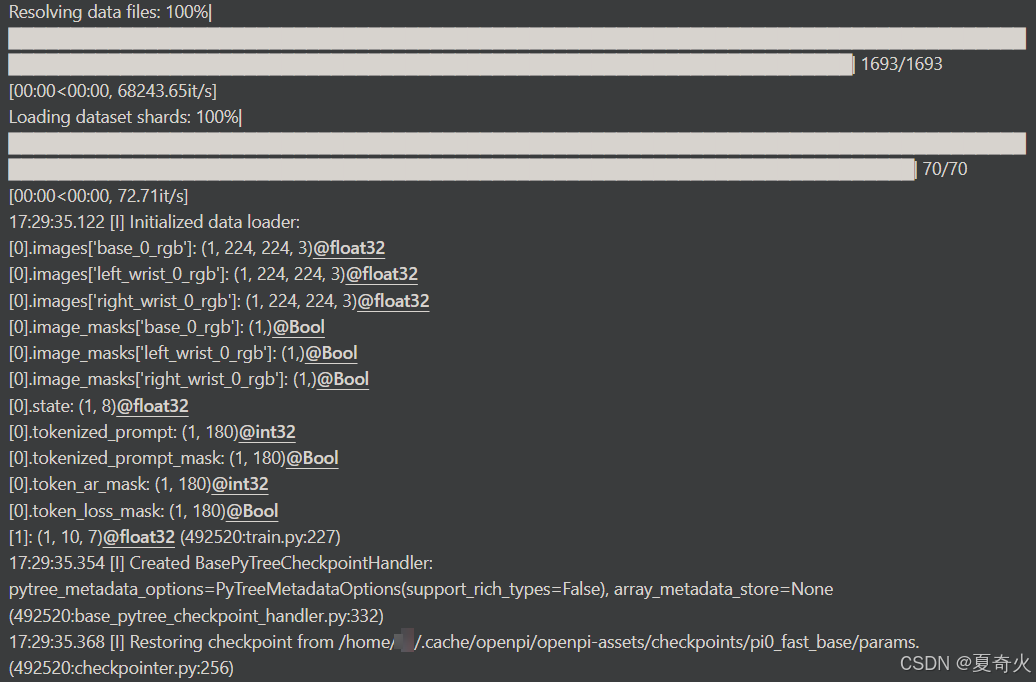
执行代码如下:
git clone https://github.com/Physical-Intelligence/openpi.git
git submodule update --init --recursive
GIT_LFS_SKIP_SMUDGE=1 uv sync
GIT_LFS_SKIP_SMUDGE=1 uv pip install -e .
uv run scripts/compute_norm_stats.py --config-name pi0_fast_libero
XLA_PYTHON_CLIENT_MEM_FRACTION=0.9 uv run scripts/train.py pi0_fast_libero --exp-name=my_experiment --overwrite
跳过了:
Convert your data to a LeRobot dataset:uv run examples/libero/convert_libero_data_to_lerobot.py --data_dir /path/to/your/libero/data 这一步,难道是我看compute_norm_stats.py下载了数据集,我就跳过了convert_libero_data_to_lerobot,所以卡住了??但我跳过的原因是觉得已经下载了LeRobot数据集v2.0
发现下面这些问题,官方都修复了,只要拉取最新的代码就行
convert_libero_data_to_lerobot.py 报错:ImportError: cannot import name ‘LEROBOT_HOME’ from ‘lerobot.common.datasets.lerobot_dataset’
modified_libero_rlds数据集我放在了~/modified_libero_rlds这个路径
所以执行的代码是uv run examples/libero/convert_libero_data_to_lerobot.py --data_dir ~/modified_libero_rlds 为了方便,还是写上/path/to/your/libero/data,下一节有个 No module named 'tensorflow_datasets’的报错,需要把uv run改成python,即python examples/libero/convert_libero_data_to_lerobot.py --data_dir ~/modified_libero_rlds
执行uv run examples/libero/convert_libero_data_to_lerobot.py --data_dir /path/to/your/libero/data
报错:
Traceback (most recent call last):
File “/root/openpi/examples/libero/convert_libero_data_to_lerobot.py”, line 23, in
from lerobot.common.datasets.lerobot_dataset import LEROBOT_HOME
ImportError: cannot import name ‘LEROBOT_HOME’ from ‘lerobot.common.datasets.lerobot_dataset’
解决方法:convert_libero_data_to_lerobot.py中注释掉from lerobot.common.datasets.lerobot_dataset import LEROBOT_HOME,然后补上LEROBOT_HOME还有REPO_NAME 的定义
修改convert_libero_data_to_lerobot.py如下:
#from lerobot.common.datasets.lerobot_dataset import LEROBOT_HOME 注释掉
from lerobot.common.datasets.lerobot_dataset import LeRobotDataset
import tensorflow_datasets as tfds
import tyro

from pathlib import Path # 要加上
LEROBOT_HOME = Path("\~/modified_libero_rlds") # 随便放,不一定是libero数据集路径
REPO_NAME = Path("haha/libero")  # 先随便起个名
RAW_DATASET_NAMES = [
    "libero_10_no_noops",
    "libero_goal_no_noops",
    "libero_object_no_noops",
    "libero_spatial_no_noops",
]
def main(data_dir: str, *, push_to_hub: bool = False): # data_dir是libero数据集路径
    # Clean up any existing dataset in the output directory
    output_path = LEROBOT_HOME / REPO_NAME
    if output_path.exists(): # 如果这里报错了,就是haha这个文件夹存在了,把它删掉重跑即可
        shutil.rmtree(output_path)
记得如果用os.join.path的话会报错如下,需要用from pathlib import Path
Traceback (most recent call last):
File “/root/openpi/examples/libero/convert_libero_data_to_lerobot.py”, line 106, in
tyro.cli(main)
File “/home/vipuser/miniconda3/lib/python3.11/site-packages/tyro/_cli.py”, line 229, in cli
return run_with_args_from_cli()
^^^^^^^^^^^^^^^^^^^^^^^^
File “/root/openpi/examples/libero/convert_libero_data_to_lerobot.py”, line 39, in main
output_path = LEROBOT_HOME / REPO_NAME
~~~^
TypeError: unsupported operand type(s) for /: ‘str’ and ‘str’
convert_libero_data_to_lerobot.py 报错:ModuleNotFoundError: No module named ‘tensorflow_datasets’ 和 Missing features: {‘task’}
执行uv run examples/libero/convert_libero_data_to_lerobot.py --data_dir /path/to/your/libero/data 报错:
Traceback (most recent call last):
File “/root/openpi/examples/libero/convert_libero_data_to_lerobot.py”, line 25, in
import tensorflow_datasets as tfds
ModuleNotFoundError: No module named ‘tensorflow_datasets’
查看到相关issues:https://github.com/Physical-Intelligence/openpi/issues/354 得知,要改成:python examples/libero/convert_libero_data_to_lerobot.py --data_dir /path/to/your/libero/data ,改完后会有一个task的报错Missing features: {'task'}: 继续修改
继续修改convert_libero_data_to_lerobot.py:
for raw_dataset_name in RAW_DATASET_NAMES:
    raw_dataset = tfds.load(raw_dataset_name, data_dir=data_dir, split="train")
    for episode in raw_dataset:
        for step in episode["steps"].as_numpy_iterator():
            dataset.add_frame(
                {
                    "image": step["observation"]["image"],
                    "wrist_image": step["observation"]["wrist_image"],
                    "state": step["observation"]["state"],
                    "actions": step["action"],
                    "task": step["language_instruction"].decode(), #补上这句
                }
            )
        dataset.save_episode() #记得这里参数有个task=xxx的,也要删掉
就ok了,开始将Libero数据集转换为LeRobot数据集v2.0格式
compute_norm_stats.py 报错:No such file or directory: ‘/root/.cache/huggingface/lerobot/physical-intelligence/libero/meta/info.json’
REPO_NAME改成haha后,在第二步的uv run scripts/compute_norm_stats.py --config-name pi0_fast_libero中,在\src\openpi\training\config.py中搜索pi0_fast_libero,把里头的physical-intelligence/libero改成haha。否则
    TrainConfig(
        name="pi0_fast_libero",
        model=pi0_fast.Pi0FASTConfig(action_dim=7, action_horizon=10, max_token_len=180),
        data=LeRobotLiberoDataConfig(
            repo_id="haha/libero", # "physical-intelligence/libero"
            base_config=DataConfig(
                local_files_only=True,  # Set to True for local-only datasets.
                prompt_from_task=True,
            ),
        ),
        # Note that we load the pi0-FAST base model checkpoint here.
        weight_loader=weight_loaders.CheckpointWeightLoader("s3://openpi-assets/checkpoints/pi0_fast_base/params"),
        num_train_steps=30_000,
    ),
开始计算训练数据的归一化统计量:
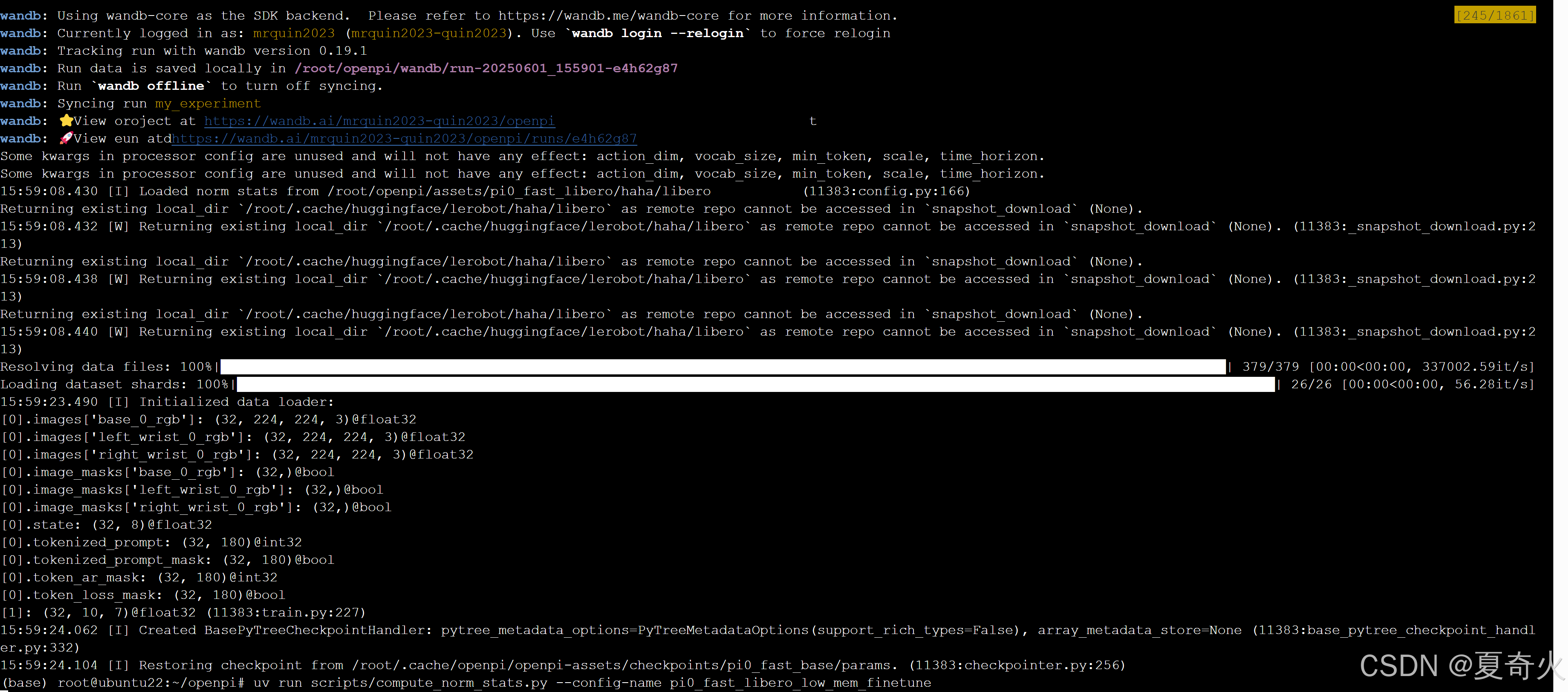
compute_norm_stats.py后,显示Restoring checkpoint from /root/.cache/openpi/openpi-assets/checkpoints/pi0_fast_base/params后就停止了
换成
uv run scripts/compute_norm_stats.py --config-name pi0_fast_libero_low_mem_finetune
XLA_PYTHON_CLIENT_MEM_FRACTION=0.9 uv run scripts/train.py pi0_fast_libero_low_mem_finetune --exp-name=my_experiment --overwrite –

火山引擎开发者社区是火山引擎打造的AI技术生态平台,聚焦Agent与大模型开发,提供豆包系列模型(图像/视频/视觉)、智能分析与会话工具,并配套评测集、动手实验室及行业案例库。社区通过技术沙龙、挑战赛等活动促进开发者成长,新用户可领50万Tokens权益,助力构建智能应用。
更多推荐
 11
11 0
0- 0


 已为社区贡献2条内容

所有评论(0)