Vue Flow实现Ai应用workflow编辑器
主要总结了下vue flow实现ai应用workflow一些核心实现点二、自定义节点常规节点循环节点循环内部开始节点三、自定义边三、 demo地址https://github.com/chenjixue/flowEditor
·
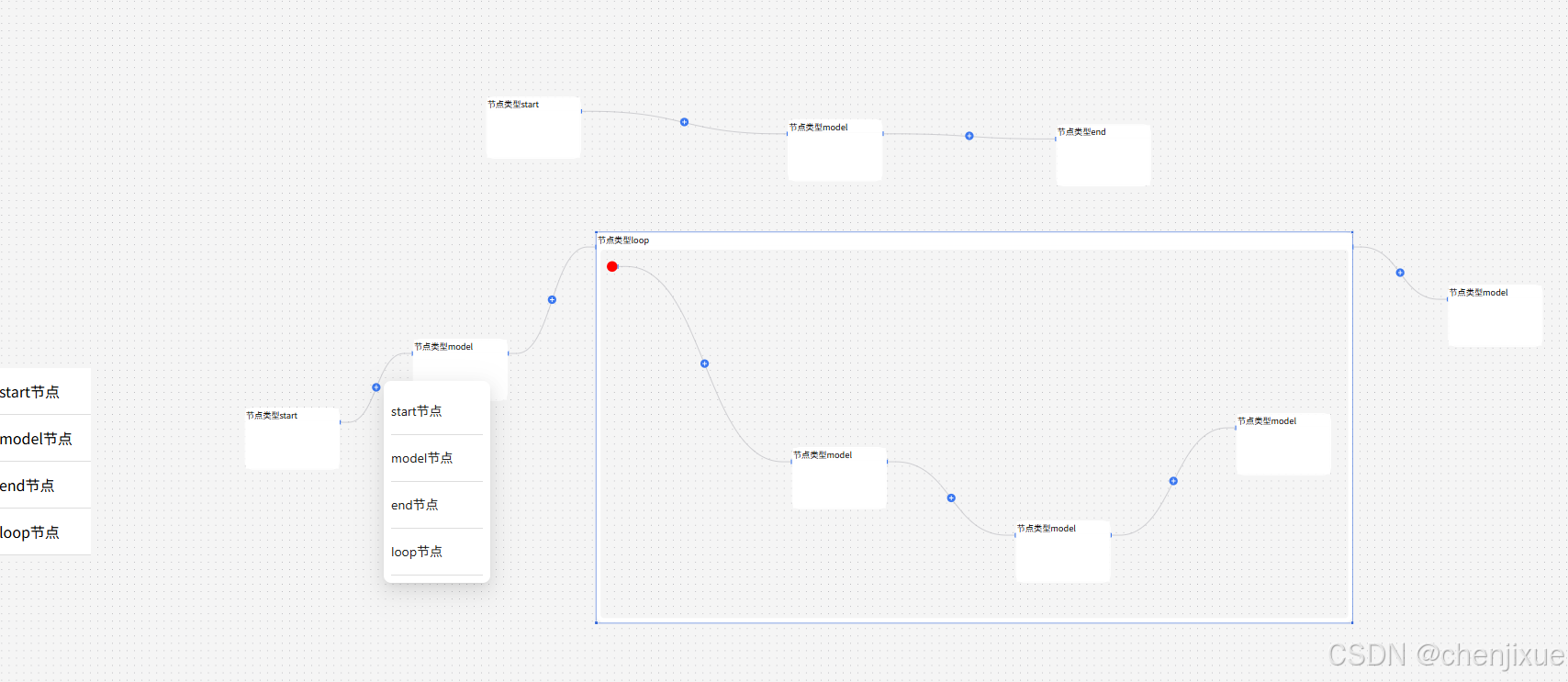
主要总结了下vue flow实现ai应用workflow一些核心实现点
一、VueFlow基本构建
<template>
  <VueFlow
      class="agent-flow"
      :nodes="initData.nodes"
      :edges="initData.edges"
      :default-viewport="defaultViewport"
      :min-zoom="minZoom"
      :max-zoom="maxZoom"
      ref="vueFlowRef"
      :connection-mode="ConnectionMode.Strict"
      @init="handleInit"
  >
    <!--    自定义边-->
    <template #edge-button="buttonEdgeProps">
      <EdgeWithButton
          :id="buttonEdgeProps.id"
          :source-x="buttonEdgeProps.sourceX"
          :source-y="buttonEdgeProps.sourceY"
          :target-x="buttonEdgeProps.targetX"
          :target-y="buttonEdgeProps.targetY"
          :source-position="buttonEdgeProps.sourcePosition"
          :target-position="buttonEdgeProps.targetPosition"
          :marker-end="buttonEdgeProps.markerEnd"
          :style="buttonEdgeProps.style"
          :source-node="buttonEdgeProps.sourceNode"
          :target-node="buttonEdgeProps.targetNode"
      />
    </template>
    <Background :gap="14" :style="{ background: backgroundColor }"/>
    <!--    节点处理-->
    <template #node-start="{ id, data }">
      <AgentFlowNodeTypeCommon :id="id" :data="data"/>
    </template>
    <template #node-end="{ id, data }">
      <AgentFlowNodeTypeCommon :id="id" :data="data"/>
    </template>
    <template #node-model="{ id, data }">
      <AgentFlowNodeTypeCommon :id="id" :data="data"/>
    </template>
    <template #node-loop="{ id, data }">
      <AgentFlowNodeTypeNestParent :id="id" :data="data"/>
    </template>
    <template #node-nestedStart="{ id, data }">
      <AgentFlowNodeTypeNestStart :id="id" :data="data"/>
    </template>
  </VueFlow>
</template>

<script setup>
import {computed, nextTick, watch, ref} from "vue";
import "@vue-flow/core/dist/style.css";
import "@vue-flow/core/dist/theme-default.css";
import {VueFlow, useVueFlow, Panel, ConnectionMode} from "@vue-flow/core";
import {Background} from "@vue-flow/background";
import AgentFlowNodeTypeCommon from "./AgentFlowNodeTypeCommon.vue";
import AgentFlowNodeTypeNestParent from "@/components/AgentFlowNodeTypeNestParent.vue";
import AgentFlowNodeTypeNestStart from "@/components/AgentFlowNodeTypeNestStart.vue";
import {useOperation} from "@/util/createNode.js";
import EdgeWithButton from "@/components/EdgeWithButton.vue";

const props = defineProps({
  data: {
    type: Object,
    required: true,
  },
  defaultViewport: {
    type: Object,
    required: true,
  },
  backgroundColor: {
    type: String,
    default: "#f5f5f5",
  },
  minZoom: {
    type: Number,
    default: 0.2,
  },
  maxZoom: {
    type: Number,
    default: 4,
  },
});
let initData = []
watch(props.data, () => {
  initData = props.data
}, {
  immediate: true,
})
const {
  nodes,
  onPaneClick,
  onConnect,
  edges,
  findNode,
  removeEdges,
  addEdges,
  updateNodeInternals
} = useVueFlow();
onPaneClick(e => {
  document.dispatchEvent(new MouseEvent('mousedown', {
    bubbles: true,
    cancelable: true
  }))
})
let {collectDescendantNodes} = useOperation();

onConnect((connectingEdge) => {
  // 如果已有相同连线则无需处理
  if (
      edges.value.find(
          (e) =>
              e.sourceHandle === connectingEdge.sourceHandle &&
              e.targetHandle === connectingEdge.targetHandle
      )
  ) {
    return
  }
  // 禁止形成循环
  if (connectingEdge.source === connectingEdge.target) {
    return
  }
  const targetDescendants = collectDescendantNodes(connectingEdge.target)
  if (targetDescendants.some((t) => t.id === connectingEdge.source)) {
    return
  }
  const targetId = connectingEdge.target
  const targetNode = findNode(targetId)
  const sourceId = connectingEdge.source
  const sourceNode = findNode(sourceId)
  const edgeId = parseInt(Math.random() * 1000) + '';
  // 添加连线
  const newEdge = {
    id: edgeId,
    type: "button",
    ...connectingEdge
  }
  const oldSourceEdges = edges.value.filter((e) => e.sourceHandle === connectingEdge.sourceHandle)
  const oldTargetEdges = edges.value.filter((e) => e.targetHandle === connectingEdge.targetHandle)

  const oldSourceTargets = oldSourceEdges.map((e) => e?.target)
  const oldTargetSources = oldTargetEdges.map((e) => e?.source)

  const collectRemovingEdges = []
  collectRemovingEdges.push(...oldSourceEdges)

  // 当target节点为分支合并,允许连接多个source节点
  // if (targetNode?.type !== "convergence") {
  //   collectRemovingEdges.push(...oldTargetEdges)
  // }
  const removingEdgeIds = [...collectRemovingEdges.map((e) => e?.id).filter(Boolean)]
  removeEdges(removingEdgeIds)
  addEdges([newEdge])
  nextTick(() => {
    const needUpdateNodes = [...new Set(
        [
          ...oldSourceTargets,
          ...oldTargetSources,
          connectingEdge.source,
          connectingEdge.target
        ].filter(Boolean)
    )]
    updateNodeInternals(needUpdateNodes)
  })
})
</script>

<style lang="less" scoped>
.agent-flow {
  --node-transition-duration: 0.3s;

  :deep(.vue-flow__node) {
    // 节点样式
    .agent-flow-node-content {
      transition-property: box-shadow;
      transition-duration: var(--node-transition-duration);
      transition-timing-function: ease-in-out;
    }

    &:hover .agent-flow-node-content,
    .agent-flow-node-content.agent-flow-node-content--selected {
      box-shadow: 0 2px 12px 0 rgba(0, 0, 0, 0.16) !important;
    }
  }

  :deep(.vue-flow__edge) {
    pointer-events: all;
  }
}
</style>
二、自定义节点
常规节点
<template>
  <AgentFlowNodeContent :id="id" :data="data"/>

  <AgentFlowSourceHandle
      :node-id="id"
      handle-type="source"
      :position="Position.Right"
  />

  <AgentFlowSourceHandle
      :node-id="id"
      handle-type="target"
      :position="Position.Left"
  />
</template>

<script setup>
import {Position} from '@vue-flow/core'
import AgentFlowSourceHandle from './AgentFlowSourceHandle.vue'
import AgentFlowNodeContent from './AgentFlowNodeContent.vue'

const props = defineProps({
  id: {
    type: String,
    required: true
  },
  data: {
    type: Object,
    required: true
  },
})
</script>
循环节点
<template>
  <AgentFlowNodeContent :id="id" :data="data" />

  <AgentFlowSourceHandle
    v-if="sourceHandle"
    :node-id="id"
    handle-type="source"
    :position="Position.Right"
  />
  <AgentFlowSourceHandle
    v-if="targetHandle"
    :node-id="id"
    handle-type="target"
    :position="Position.Left"
  />
</template>

<script setup>
import { Position } from '@vue-flow/core'
import '@vue-flow/node-resizer/dist/style.css'
import AgentFlowSourceHandle from './AgentFlowSourceHandle.vue'
import AgentFlowNodeContent from './AgentFlowNodeContent.vue'

const props = defineProps({
  id: {
    type: String,
    required: true
  },
  data: {
    type: Object,
    required: true
  },
  sourceHandle: {
    type: Boolean,
    default: true
  },
  targetHandle: {
    type: Boolean,
    default: true
  }
})
</script>

<style lang="less" scoped></style>
循环内部开始节点
<template>
  <div class="agent-flow-node__nest-start  nodrag nopan">
    <div class="agent-start">
    </div>
    <div class="agent-add" v-if="!hasChildNode">
      <div class="line"></div>
      <a-popover
          trigger="click"
          v-model:open="open"
          :arrow="false"
          :trigger="['click']"
          placement="rightTop"
      >
        <button>
          <span>添加节点</span>
        </button>
        <template #content>
          <AgentFlowFloatAddMenu @click="addNode" :style="{position: 'static'}"></AgentFlowFloatAddMenu>
        </template>
      </a-popover>
    </div>
    <AgentFlowSourceHandle
        :node-id="id"
        :handle-id="sourceId"
        :show-add-button="false"
        handle-type="source"
        :position="Position.Right"
        :style="{top: '10px',pointerEvents: !hasChildNode ? 'none' : undefined}"
    />
  </div>

</template>

<script setup>
import {computed, inject, ref} from 'vue'
import {Position, useNode, useVueFlow} from '@vue-flow/core'
import AgentFlowSourceHandle from './AgentFlowSourceHandle.vue'
import AgentFlowFloatAddMenu from "@/components/AgentFlowFloatAddMenu.vue";
import {getSourceHandleId, useOperation} from "@/util/createNode.js";

const props = defineProps({
  id: {
    type: String,
    required: true
  },
  data: {
    type: Object,
    required: true
  }
})
const sourceId = computed(() => getSourceHandleId(props.id, "source"))
const open = ref(false);
const nestStartNode = useNode(props.id)
const parentNodeId = nestStartNode?.node?.parentNode
const {nodes} = useVueFlow()
const hasChildNode = computed(() => {
  if (!parentNodeId) {
    return []
  }
  const nestNodes = (nodes.value || []).filter((t) => t.parentNode === parentNodeId)
  const hasSomeNestNodes = nestNodes.length >= 2
  return hasSomeNestNodes
})
let {handleClick} = useOperation()
const addNode = (type) => {
  open.value = false
  handleClick(type, props.id)
}
</script>

<style lang="less" scoped>
.static-positon {
  position: static;
}

.agent-flow-node__nest-start {
  //background-color: red;
  position: relative;


  .agent-start {
    width: 20px;
    height: 20px;
    border-radius: 10px;
    //background: #00f;
    background-color: red;
  }

  .agent-add {
    position: absolute;
    width: 200px;
    display: flex;
    align-items: center;
    top: -1px;
    left: 20px;

    .line {
      height: 2px;
      width: 50px;
      background: #606266;
    }
  }

  .line {
    height: 1px;
  }
}
</style>
三、自定义边
<script setup>
import {BaseEdge, EdgeLabelRenderer, getBezierPath, useVueFlow} from '@vue-flow/core'
import {computed, ref} from 'vue'
import AgentFlowFloatAddMenu from "@/components/AgentFlowFloatAddMenu.vue";
import {useOperation} from "@/util/createNode.js";

const props = defineProps({
  id: {
    type: String,
    required: true,
  },
  sourceX: {
    type: Number,
    required: true,
  },
  sourceY: {
    type: Number,
    required: true,
  },
  targetX: {
    type: Number,
    required: true,
  },
  targetY: {
    type: Number,
    required: true,
  },
  sourcePosition: {
    type: String,
    required: true,
  },
  targetPosition: {
    type: String,
    required: true,
  },
  markerEnd: {
    type: String,
    required: false,
  },
  style: {
    type: Object,
    required: false,
  },
  targetNode: {
    type: Object,
    required: false,
  },
  sourceNode: {
    type: Object,
    required: false,
  },
})

let {createNode, createEdge, insertNodeAt} = useOperation()
let {addNodes, addEdges, onNodesInitialized, updateNodeInternals, removeEdges, findNode, nodes} = useVueFlow()
const path = computed(() => getBezierPath(props))
let open = ref(false)
let addNodeFromEdge = (type) => {
  open.value = false
  let parentNodeId = props.sourceNode.parentNode
  let sourceNodeId = props.sourceNode.id
  let targetNodeId = props.targetNode.id
  removeEdges([props.id])
  const newNode = createNode(type);
  // 处理嵌套节点
  if (parentNodeId) {
    newNode.parentNode = parentNodeId
    newNode.expandParent = true
    newNode.data.bizData.parentNode = parentNodeId
  }
  const newEdgeOne = createEdge(sourceNodeId, newNode.id)
  const newEdgeTwo = createEdge(newNode.id, targetNodeId)
  // debugger
  addNodes(newNode);
  addEdges([newEdgeOne, newEdgeTwo]);

  const {off} = onNodesInitialized(() => {

    updateNodeInternals([sourceNodeId, targetNodeId])
    insertNodeAt(newNode.id, targetNodeId)
    if (parentNodeId) {
      const parentNode = findNode(parentNodeId)
      // 更新所有子节点、父节点
      const childrenIds = nodes.value
          .filter((t) => t.parentNode === parentNodeId)
          .map((t) => t.id)
      updateNodeInternals([parentNodeId, ...childrenIds])
    }
    off()
  })
}
</script>

<script>
export default {
  inheritAttrs: false,
}
</script>

<template>
  <!-- You can use the `BaseEdge` component to create your own custom edge more easily -->
  <BaseEdge :id="id" :style="style" :path="path[0]"/>

  <!-- Use the `EdgeLabelRenderer` to escape the SVG world of edges and render your own custom label in a `<div>` ctx -->
  <EdgeLabelRenderer>
    <a-popover
        v-model:open="open"
        :arrow="false"
        :trigger="['click']"
        placement="rightTop"
        :overlay-inner-style="{
      padding: '8px'
    }"
    >
      <div
          :style="{
        pointerEvents: 'all',
         cursor: 'pointer',
        position: 'absolute',
        transform: `translate(-50%, -50%) translate(${path[1]}px,${path[2]}px)`,
      }"
          class="nodrag nopan"
      >
        <img
            src='/img/node-icon-add-next.svg'
            class="agent-flow-source-handle__add-icon"
        />
      </div>
      <template #content>
        <AgentFlowFloatAddMenu @click="addNodeFromEdge" :style="{position: 'static'}"></AgentFlowFloatAddMenu>
      </template>
    </a-popover>
  </EdgeLabelRenderer>
</template>
<style scoped>
.agent-flow-source-handle__add-icon {
  cursor: pointer;
}
</style>
三、 demo地址

火山引擎开发者社区是火山引擎打造的AI技术生态平台,聚焦Agent与大模型开发,提供豆包系列模型(图像/视频/视觉)、智能分析与会话工具,并配套评测集、动手实验室及行业案例库。社区通过技术沙龙、挑战赛等活动促进开发者成长,新用户可领50万Tokens权益,助力构建智能应用。
更多推荐
 4
4 0
0- 0


 已为社区贡献1条内容

所有评论(0)