【VLM】Qwen3-VL-SFT微调流程
note
一、Qwen3-VL微调训练数据
数据集汇总
| 数据集 | 样本数 | 大小 | 字段 |
|---|---|---|---|
| alpaca-gpt4-data-zh | 48,818 | 30.69 MB | instruction, input, output |
| la_te_x_ocr | 1,200 | 15.49 MB | image, text |
| video_chat_gpt | 1,996 | 0.71 MB | video_name, question, answer |
| 总计 | 52,014 | ~47 MB | - |
样例展示
1. alpaca-gpt4-data-zh (中文指令数据)
- 纯文本问答对,如:
instruction: 保持健康的三个提示→output: 1.保持身体活动...
2. la_te_x_ocr (LaTeX公式OCR)
- 图像+文本对,如:公式图片 →
z_{1} = r_{1}(\cos\theta_{1} + i\sin\theta_{1})
3. video_chat_gpt (视频对话)
- 视频+问答对,如:
video: v_hFi6S_guB7I+question: 视频开头女舞者的外观?→answer: 五位穿不同颜色肚皮舞服装的女舞者...
二、模型训练和推理
两阶段训练vl模型(训练 Aligner 层 + 训练整个模型):https://swift.readthedocs.io/zh-cn/latest/BestPractices/Rapidly-Training-VL-model.html
- 训练 Aligner 层:仅训练视觉到语言的对齐层(Aligner),冻结 ViT 和 LLM 部分
- 训练整个模型:解冻所有模块,联合训练以增强模型的整体视觉理解能力
对llm模块Lora微调(冻结vit和projector部分):
model_path="./model/Qwen3-VL-8B-Instruct"

# 2 * 21GiB
PYTORCH_CUDA_ALLOC_CONF='expandable_segments:True' \
IMAGE_MAX_TOKEN_NUM=1024 \
VIDEO_MAX_TOKEN_NUM=128 \
FPS_MAX_FRAMES=16 \
NPROC_PER_NODE=2 \
CUDA_VISIBLE_DEVICES=0,1 \
swift sft \
    --model $model_path \
    --dataset 'AI-ModelScope/alpaca-gpt4-data-zh#10000' \
              'AI-ModelScope/LaTeX_OCR:human_handwrite#5000' \
              'swift/VideoChatGPT:Generic#2000' \
    --load_from_cache_file true \
    --split_dataset_ratio 0.01 \
    --tuner_type lora \
    --torch_dtype bfloat16 \
    --num_train_epochs 1 \
    --per_device_train_batch_size 1 \
    --per_device_eval_batch_size 1 \
    --attn_impl flash_attn \
    --padding_free true \
    --learning_rate 1e-4 \
    --lora_rank 8 \
    --lora_alpha 32 \
    --target_modules all-linear \
    --freeze_vit true \
    --freeze_aligner true \
    --packing true \
    --gradient_checkpointing true \
    --vit_gradient_checkpointing false \
    --gradient_accumulation_steps 2 \
    --eval_steps 100 \
    --save_steps 100 \
    --save_total_limit 2 \
    --logging_steps 5 \
    --max_length 4096 \
    --output_dir output \
    --warmup_ratio 0.05 \
    --deepspeed zero2 \
    --dataset_num_proc 4 \
    --dataloader_num_workers 4
1、LaTeX OCR数据集推理测试例子:
真值和推理结果如下所示:
📋 Ground Truth: z _ { 1 } = r _ { 1 } ( \cos \theta _ { 1 } + i \sin \theta _ { 1 } )
🤖 模型预测: $$z _ { i } = r _ { i } ( \cos \theta _ { i } + i \sin \theta _ { i } )$$
2、GUI agent任务(computer use)推理测试:query=打开浏览器并搜索天气
图中左上角有个浏览器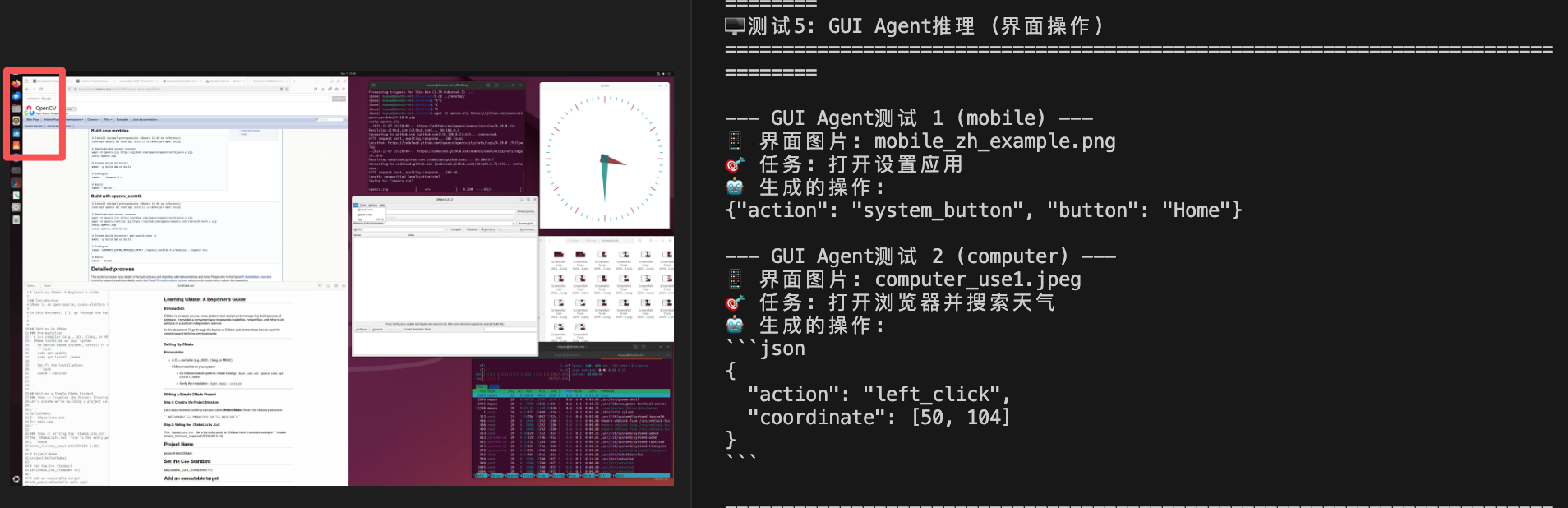
3、function call测试:对着手机某无关app的截图,query=我想查看北京今天的天气情况
这种情况图中也不会有实时更新天气数据,所以还是会function call。
📋 可用工具列表:
   • search_web: 在网上搜索信息,参数: query(搜索关键词)
   • get_weather: 获取天气信息,参数: city(城市名)
   • open_app: 打开应用程序,参数: app_name(应用名称)
   • send_message: 发送消息,参数: recipient(收件人), content(内容)
   • take_screenshot: 截取当前屏幕,无参数
   • navigate_to: 导航到指定位置,参数: destination(目的地)

--- Function Call测试 1 ---
🖼️ 图片: mobile_zh_example.png
❓ 用户问题: 我想查看北京今天的天气情况
🤖 工具调用:
{
    "thought": "用户想查看北京今天的天气情况,这是一个获取天气信息的需求。图片内容与天气无关,因此需要调用获取天气的工具。",
    "tool_name": "get_weather",
    "tool_args": {
        "city": "北京"
    }
}
4、视频理解,现在主流的还是通过抽帧拼接query进行推理
和训练一致,对每个视频最多抽FPS_MAX_FRAMES=16 帧,目标帧率为FPS=2.0(即Frames Per Second,每秒2帧),比如10s(比如300 帧,30 FPS的原始视频)的视频抽取min[10*2, 16]=16帧。
测试了一个case,出来的结果:
A man is getting his hair cut in a well-lit room with a window and a shelf with various items. The barber is wearing a grey hoodie and a kippah, and the man getting his hair cut is wearing a black t-shirt. The barber uses a clipper to cut the man's hair, and the man is seen laughing and looking at the camera. The barber then uses a comb to comb the man's hair and cuts it again. The video ends with the man getting a cake smashed in his face.
训练/推理时抽帧代码可以参考qwen_vl_utils/vision_process.py,看torch.linspace(0, total_frames - 1, nframes).round().long()就是均匀抽帧的做法:
def _read_video_torchvision(
    ele: Dict[str, Any],
) -> Tuple[torch.Tensor, float]:
    """read video using torchvision.io.read_video

    Args:
        ele (dict): a dict contains the configuration of video.
        support keys:
            - video: the path of video. support "file://", "http://", "https://" and local path.
            - video_start: the start time of video.
            - video_end: the end time of video.
    Returns:
        torch.Tensor: the video tensor with shape (T, C, H, W).
    """
    video_path = ele["video"]
    if version.parse(torchvision.__version__) < version.parse("0.19.0"):
        if "http://" in video_path or "https://" in video_path:
            warnings.warn("torchvision < 0.19.0 does not support http/https video path, please upgrade to 0.19.0.")
        if "file://" in video_path:
            video_path = video_path[7:]
    st = time.time()
    video, audio, info = io.read_video(
        video_path,
        start_pts=ele.get("video_start", 0.0),
        end_pts=ele.get("video_end", None),
        pts_unit="sec",
        output_format="TCHW",
    )
    total_frames, video_fps = video.size(0), info["video_fps"]
    logger.info(f"torchvision:  {video_path=}, {total_frames=}, {video_fps=}, time={time.time() - st:.3f}s")
    nframes = smart_nframes(ele, total_frames=total_frames, video_fps=video_fps)
    idx = torch.linspace(0, total_frames - 1, nframes).round().long()
    sample_fps = nframes / max(total_frames, 1e-6) * video_fps
    video = video[idx]

    video_metadata = dict(
        fps=video_fps,
        frames_indices=idx,
        total_num_frames=total_frames,
        video_backend="torchvision",
    )
    return video, video_metadata, sample_fps
Reference
[1] 两阶段训练vl模型(训练 Aligner 层 + 训练整个模型参数):
https://swift.readthedocs.io/zh-cn/latest/BestPractices/Rapidly-Training-VL-model.html
[2] Qwen3-VL最佳实践(包括dense和moe版本模型训练):
https://swift.readthedocs.io/zh-cn/latest/BestPractices/Qwen3-VL-Best-Practice.html
[3] Simple-VL-8B模型训练过程(通过将 Qwen3-8B 的语言建模能力与 Qwen2.5-VL-7B-Instruct 的视觉理解架构相结合进行训练):
https://www.modelscope.cn/models/swift/Simple-VL-8B/summary

中国智能体开发者社区,聚焦智能体与大模型开发,提供前沿资讯、实用工具链、开源项目及行业案例。通过技术沙龙、开发者大赛等活动,促进经验交流与协作,助力开发者快速构建创新智能应用。
更多推荐

 11
11 0
0- 0


 已为社区贡献66条内容

所有评论(0)