AI Agents in LangGraph-2
从零构建一个基于状态图的循环智能体
上一篇文章已经介绍如何手写一个执行ReAct协议的AI agent,这一篇文章,我们重点讲述利用langGraph基于状态图构建循环智能体,让大模型具备下面所示的自主迭代能力:
思考 →\rightarrow→ 决定调用工具 →\rightarrow→ 执行工具 →\rightarrow→ 把结果喂回大模型
环境变量的加载
from langchain_openai import ChatOpenAI
import os
import re
from load_dotenv import load_dotenv
load_dotenv()

if os.environ.get("OPENAI_API_KEY"):
    print("Bro API KEY Variable exists")
else :
    raise ValueError("OPENAI_API_KEY not found")

if os.environ.get("TAVILY_API_KEY"):
    print("Bro AVILY_API KEY Variable exists")
else :
    raise ValueError("OPENAI_API_KEY not found")

from langchain_core.prompts import PromptTemplate
from langchain_core.messages import HumanMessage, SystemMessage, AIMessage
from langchain_core.prompts import ChatPromptTemplate
from langchain_core.output_parsers import StrOutputParser, PydanticOutputParser
from langgraph.graph import StateGraph, END
from typing import TypedDict, Annotated
import operator
from langchain_core.messages import AnyMessage, SystemMessage, HumanMessage, ToolMessage
from langchain_openai import ChatOpenAI
from langchain_tavily import TavilySearch

llm_openai = ChatOpenAI(model = "gpt-5-mini-2025-08-07", temperature=0)

tool = TavilySearch(max_results=4) #increased number of results
print(type(tool))
print(tool.name)
调用 python-dotenv 库自动读取当前目录下的 .env 文件,将其中的环境变量(如 OPENAI_API_KEY, TAVILY_API_KEY)加载到系统的 os.environ 中,方便后续调用大模型和搜索工具时免去手动硬编码密钥的麻烦。
定义智能体的状态
class AgentState(TypedDict):
    messages: Annotated[list[AnyMessage], operator.add]
这段代码是使用 LangGraph 开发 AI Agent(智能体)时的核心模式。它定义了 Agent 的状态(State)结构以及状态的更新规则(Reducer)。
- LangGraph 默认使用一个 Python 字典(TypedDict)在图(Graph)的各个节点(Nodes)之间传递和共享数据。AgentState 就是这个字典的“说明书”,声明了状态中包含哪些字段。
- list[AnyMessage]声明了 messages 字段的类型是一个列表,列表中的元素是 AnyMessage(LangChain 中所有消息类型的基类,包括 HumanMessage, AIMessage, SystemMessage, ToolMessage 等)。
- Annotated关键字允许你在声明类型的同时,附加一些自定义的元数据(Metadata)。在这里,Annotated 将实际类型 list[AnyMessage] 和元数据 operator.add 绑定在了一起。
- operator.add利用了 LangGraph 的 Reducer(合并器)机制, 当指定了 operator.add(即 Python内置的加法运算,对于列表而言就是 list1 + list2 拼接)作为 Reducer 后: 当一个节点返回新消息 {“messages”: [new_msg]} 时,LangGraph 不会覆盖原状态,而是会调用 operator.add(existing_messages, [new_msg]),将新消息追加到原有的消息列表末尾。
核心类Agent的设计
class Agent:

    def __init__(self, model, tools, system=""):
        self.system = system
         # 1. 初始化状态图,指定状态结构为 AgentState
        graph = StateGraph(AgentState)

        # 2. 注册节点。节点名对应具体执行的类方法
        graph.add_node("llm", self.call_openai)
        graph.add_node("action", self.take_action)

        # 3. 注册条件边。从 "llm" 节点出来后,调用 self.exists_action 函数判断去向
        graph.add_conditional_edges(
            "llm",
            self.exists_action,
            {True: "action", False: END}  # 返回 True 去 "action" 节点,返回 False 则结束 (END)
        )

        # 4. 注册普通边。从 "action" 节点出来后,必定回到 "llm" 节点
        graph.add_edge("action", "llm")

        # 5. 设置图的起点
        graph.set_entry_point("llm")

        # 6. 编译图,使其可运行
        self.graph = graph.compile()

        # 7. 将工具列表转换成字典,方便通过名字快速查找工具,例如 {"tavily": TavilySearchResults(...)}
        self.tools = {t.name: t for t in tools}

        # 8. 将工具绑定到大语言模型中,让模型“知道”有哪些工具可用,并在需要时输出格式化的工具调用指令 (tool_calls)
        self.model = model.bind_tools(tools)

    # 路由条件:这个函数用来决定模型生成回复后,是继续调用工具还是直接回答用户。
    def exists_action(self, state: AgentState):
        # 获取当前消息列表中的最后一条消息(即 LLM 刚刚生成的回复)
        result = state['messages'][-1]
        # 检查大模型是否产生了工具调用指令(result.tool_calls 列表是否为空)
        return len(result.tool_calls) > 0

    # LLM 节点:call_openai 调用绑定的模型进行思考和决策。
    def call_openai(self, state: AgentState):
        messages = state['messages']
         # 如果初始化时传入了全局 System Prompt (系统设定),则临时将其拼接到消息列表的最前面
        if self.system:
            messages = [SystemMessage(content=self.system)] + messages

        # 调用大模型
        message = self.model.invoke(messages)
        # 返回更新的状态。由于在 AgentState 中配置了 operator.add,
        # 这里的 [message] 会被自动追加到已有的 messages 历史列表中
        return {'messages': [message]}

    #  工具执行节点->当 exists_action 确定需要执行工具时,程序会流转到这个节点。
    def take_action(self, state: AgentState):
        # 1. 获取大模型在最后一条消息中输出的所有工具调用指令
        tool_calls = state['messages'][-1].tool_calls
        results = []
        # 2. 遍历大模型要求调用的每一个工具(大模型支持单次并行调用多个工具)
        for t in tool_calls:
            print(f"Calling: {t}")
            # 容错处理:如果大模型胡诌了一个不存在的工具名
            if not t['name'] in self.tools:
                print("\n ....bad tool name....")
                result = "bad tool name, retry"  # 反馈给大模型工具名错误,让它重试
            else:
                # 正常调用:传入大模型生成的参数 t['args'] 执行工具
                result = self.tools[t['name']].invoke(t['args'])
            # 3. 将工具执行结果封装为 ToolMessage 格式,必须携带 tool_call_id 以便大模型对齐
            results.append(ToolMessage(tool_call_id=t['id'], name=t['name'], content=str(result)))
        print("Back to the model!")
        # 4. 返回执行结果列表,这些 ToolMessage 会被自动追加到 messages 状态中
        return {'messages': results}
这段代码实现了一个基于LangGraph的ReAct架构的 AI Agent, 它通过构建一个有向环状图(Cyclic Graph),使大模型能够循环进行:“思考(LLM) -> 决定是否调用工具 -> 执行工具(Action) -> 将结果反馈给大模型 -> 再次思考” 的过程,直到任务完成。
该段代码的状态图如下所示:
演示示例
prompt = """You are a smart research assistant. Use the search engine to look up information. \
You are allowed to make multiple calls (either together or in sequence). \
Only look up information when you are sure of what you want. \
If you need to look up some information before asking a follow up question, you are allowed to do that!
"""

model = llm_openai
abot = Agent(model, [tool], system=prompt)
from IPython.display import Image, display

display(Image(abot.graph.get_graph().draw_mermaid_png()))
使用上面的代码打印出当前agent的有向图结构,和上图的状态图基本一致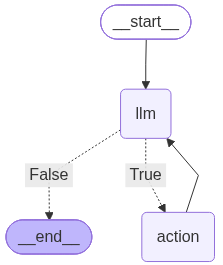
输入messages,测试agent是否正常工作
messages = [HumanMessage(content="What is the weather in sf?")]
result = abot.graph.invoke({"messages": messages})
模型输出结果如下所示:
Calling: {'name': 'tavily_search', 'args': {'query': 'San Francisco weather now', 'search_depth': 'fast', 'include_images': False}, 'id': 'call_T37UDw9Aax3rTgzG4ej4XUmS', 'type': 'tool_call'}
Back to the model!
Calling: {'name': 'tavily_search', 'args': {'query': 'San Francisco CA weather current conditions', 'search_depth': 'fast'}, 'id': 'call_3HjyVeQPuU8Vbvbrhcy97wiw', 'type': 'tool_call'}
Back to the model!
更具体一点:
result['messages'][-1].content
模型输出结果
‘Do you mean San Francisco, CA? Do you want the current conditions right now or a forecast (today/next few days)? I can look it up — OK to fetch current weather?’

中国智能体开发者社区,聚焦智能体与大模型开发,提供前沿资讯、实用工具链、开源项目及行业案例。通过技术沙龙、开发者大赛等活动,促进经验交流与协作,助力开发者快速构建创新智能应用。
更多推荐



 5
5 0
0- 0


 已为社区贡献2条内容

所有评论(0)