Codex实战:APP远程升级服务搭建(一)NodeJS_Express
摘要
最近给 APP(QGC/地面站)做了一套远程升级服务,目标很明确:App 启动后请求服务器,服务器根据当前 versionCode 判断是否有新版本,如果有就返回 APK 下载地址、版本号和更新说明,App 端再弹窗下载并安装。
这篇先讲服务端主链路,也就是:
App -> /fra/check/update -> update-config.json -> /updates/*.apk
本文偏实战,不讲大而全的发布平台,只把一个可落地、可部署、可维护的小型升级服务跑起来。
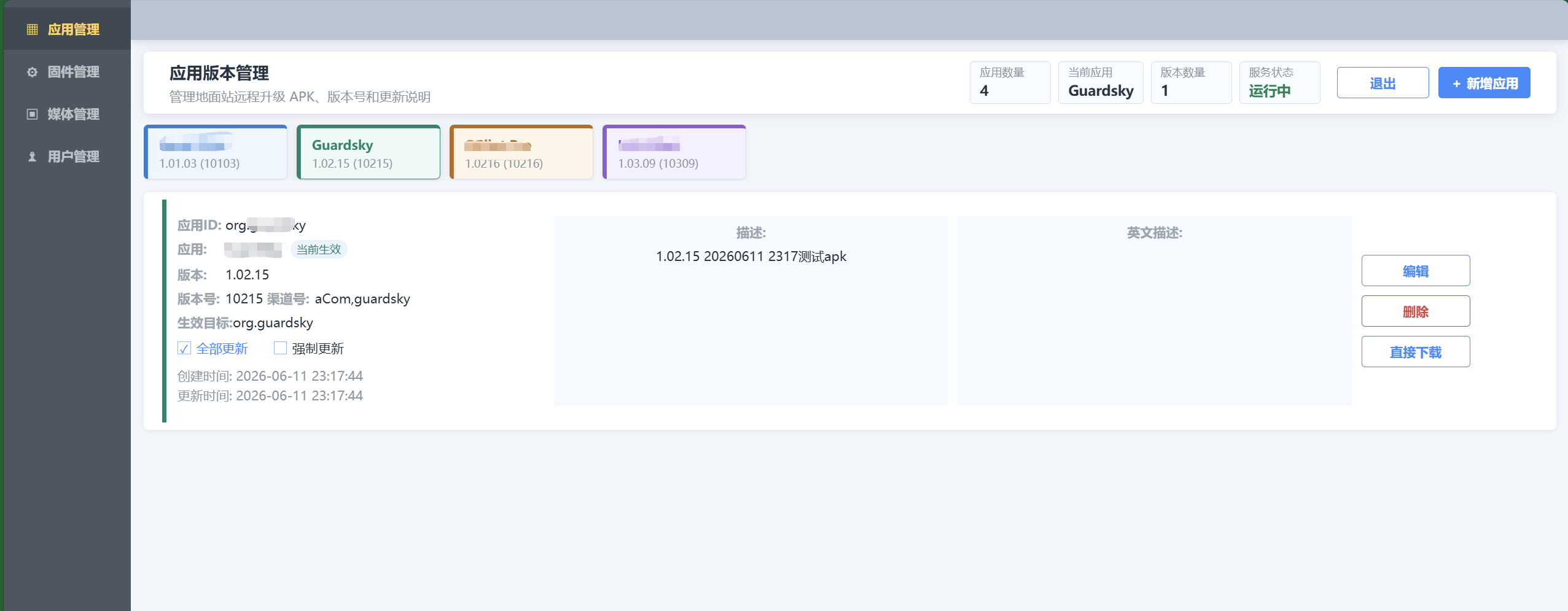
最终的web:
适用场景
- QGC、地面站、Android 工具类 App 需要远程升级。
- 暂时不想接第三方应用市场或企业分发平台。
- 需要自己控制多应用、多渠道、强制更新、更新说明。
- 服务端希望轻量,Node.js + Express 即可部署到 Ubuntu 云服务器。
本文效果
完成后可以得到:
- 一个健康检查接口
/health。 - 一个兼容 App 的升级检查接口
/fra/check/update。 - 一个静态 APK 下载目录
/updates。 - 一个本地 JSON 版本库
update-config.json。 - 支持按应用 ID 和版本号筛选最新版本。
背景
地面站项目里,App 端升级逻辑通常已经有一部分:比如启动时请求接口、拿到 APK 地址、显示升级弹窗、下载完成后调 Android 安装界面。
真正容易卡住的是服务端:
- App 请求地址必须稳定,不能写成本机
localhost。 - 返回 JSON 必须和客户端字段匹配。
- 版本判断要用
versionCode,不能只看versionName。 - APK 地址要返回公网可访问的完整 URL。
- 后续要能通过后台维护多个 App 的版本。
所以我这里没有一上来搞复杂数据库,而是先用 update-config.json 做版本配置,Express 提供接口,APK 放到静态目录里。
系统框架图
目录结构
服务端目录大概是这样:
server
├── server.js
├── package.json
├── update-config.json
├── public
│   ├── admin
│   └── updates
├── deploy
└── client-porting
其中本篇重点是:
server.js:升级接口和版本判断。update-config.json:保存版本配置。public/updates:保存 APK 文件。
package.json
依赖很少,核心就是 Express、cookie、multer:
{
  "name": "gcs-update-server",
  "version": "1.0.0",
  "private": true,
  "type": "commonjs",
  "scripts": {
    "start": "node server.js"
  },
  "dependencies": {
    "cookie-parser": "^1.4.7",
    "express": "^4.19.2",
    "multer": "^2.1.1"
  },
  "engines": {
    "node": ">=18"
  }
}
安装依赖:
npm install
启动:
$env:ADMIN_PASSWORD="your-admin-password"
$env:PUBLIC_BASE_URL="http://203.0.113.10:8080"
npm start
这里的 203.0.113.10 是示例公网 IP,实际部署时换成自己的 ECS IP 或域名。
版本配置结构
update-config.json 是当前服务端的版本库。为了方便公开,这里做了脱敏示例:
{
  "latest": {
    "id": "b369425a32ee",
    "appName": "GCS Demo",
    "appIds": ["com.example.gcs"],
    "flavors": ["release"],
    "versionCode": 10308,
    "versionName": "1.03.08",
    "fileName": "GCS-Demo-1.03.08.apk",
    "fileUrl": "/updates/GCS-Demo-1.03.08.apk",
    "sizeKB": 211849,
    "force": false,
    "description": "修复已知问题,优化升级流程",
    "descriptionEn": "",
    "enabled": true
  },
  "versions": [
    {
      "id": "b369425a32ee",
      "appName": "GCS Demo",
      "appIds": ["com.example.gcs"],
      "flavors": ["release"],
      "versionCode": 10308,
      "versionName": "1.03.08",
      "fileName": "GCS-Demo-1.03.08.apk",
      "fileUrl": "/updates/GCS-Demo-1.03.08.apk",
      "sizeKB": 211849,
      "force": false,
      "description": "修复已知问题,优化升级流程",
      "descriptionEn": "",
      "enabled": true
    }
  ]
}
几个字段比较关键:
appIds:客户端传上来的应用 ID,必须能匹配。versionCode:升级判断真正使用的数字版本号。fileUrl:APK 相对地址,服务端会转换成完整公网地址。enabled:是否参与升级判断。force:是否强制升级,客户端可以据此控制弹窗按钮。
核心实现:选择最新版本
服务端不是简单返回 latest,而是从版本列表里筛选启用的版本,并选择 versionCode 最大的版本。
function selectLatest(versions) {
  const enabledVersions = versions.filter((version) => version.enabled !== false);
  if (enabledVersions.length === 0) {
    return null;
  }

  return enabledVersions.reduce((best, version) => {
    if (!best || Number(version.versionCode) > Number(best.versionCode)) {
      return version;
    }
    return best;
  }, null);
}

function selectLatestForRequest(versions, form) {
  return selectLatest(versions.filter((version) => (
    version.enabled !== false
    && isAllowed(form.appIds, version.appIds)
  )));
}

function isAllowed(value, allowedValues) {
  return !Array.isArray(allowedValues)
    || allowedValues.length === 0
    || allowedValues.includes(value);
}
这里的判断比较朴素,但实际够用:
- 后台可以保留历史版本。
- 只有
enabled !== false的版本参与升级。 - 先按
appIds匹配应用,再从匹配结果里选最大versionCode。
核心实现:拼接公网 APK 地址
客户端拿到的 fileUrl 必须能直接访问。部署在 Nginx 或反向代理后,不能简单写死 localhost。
function absoluteUrl(req, maybeRelativeUrl) {
  if (/^https?:\/\//i.test(maybeRelativeUrl)) {
    return maybeRelativeUrl;
  }

  const relativePath = maybeRelativeUrl.startsWith("/")
    ? maybeRelativeUrl
    : `/${maybeRelativeUrl}`;

  if (publicBaseUrl) {
    return `${publicBaseUrl}${relativePath}`;
  }

  const proto = req.headers["x-forwarded-proto"] || req.protocol || "http";
  const host = req.headers["x-forwarded-host"] || req.headers.host;
  return `${proto}://${host}${relativePath}`;
}
我更建议线上配置 PUBLIC_BASE_URL,比如:
PUBLIC_BASE_URL=http://203.0.113.10:8080
这样无论请求从哪里进来,返回给 App 的 APK 地址都是稳定的公网地址。
核心实现:升级检查接口
App 端请求:
POST /fra/check/update
Content-Type: application/x-www-form-urlencoded

&app_ids=com.example.gcs&app_code=10307&app_flavor=release
服务端接口:
app.get("/health", (req, res) => {
  res.json({ ok: true });
});

app.post(["/fra/check/update", "/fra-bate/check/update"], (req, res) => {
  const form = parseForm(req);
  const config = readConfig();
  const latest = selectLatestForRequest(config.versions, form);

  if (!latest) {
    res.json({ code: 2201, msg: "no update for this app" });
    return;
  }

  if (form.appCode >= Number(latest.versionCode)) {
    res.json({ code: 2201, msg: "already latest" });
    return;
  }

  const apkPath = path.join(updatesDir, latest.fileName);
  let sizeKB = Number(latest.sizeKB || 0);
  if (fs.existsSync(apkPath)) {
    sizeKB = Math.max(1, Math.ceil(fs.statSync(apkPath).size / 1024));
  }

  res.json({
    code: 2000,
    msg: "new version available",
    data: {
      versionCode: Number(latest.versionCode),
      versionName: latest.versionName,
      fileName: latest.fileName,
      fileUrl: absoluteUrl(req, latest.fileUrl),
      sizeKB,
      force: Boolean(latest.force),
      description: latest.description || "",
      descriptionEn: latest.descriptionEn || ""
    }
  });
});
注意这里兼容了两个路径:
/fra/check/update
/fra-bate/check/update
这是为了兼容历史客户端,实际新项目只保留一个也可以。
升级请求时序图
本地验证
启动服务:
cd D:\your_workspace\server
$env:ADMIN_PASSWORD="your-admin-password"
$env:PUBLIC_BASE_URL="http://localhost:8080"
npm start
健康检查:
Invoke-RestMethod http://localhost:8080/health
期望结果:
{
  "ok": true
}
升级接口验证:
Invoke-RestMethod -Method Post `
  -Uri http://localhost:8080/fra/check/update `
  -ContentType 'application/x-www-form-urlencoded' `
  -Body '&app_ids=com.example.gcs&app_code=10307&app_flavor=release'
如果服务器上配置的版本号是 10308,客户端传 10307,正常会返回:
{
  "code": 2000,
  "msg": "new version available",
  "data": {
    "versionCode": 10308,
    "versionName": "1.03.08",
    "fileName": "GCS-Demo-1.03.08.apk",
    "fileUrl": "http://localhost:8080/updates/GCS-Demo-1.03.08.apk",
    "sizeKB": 211849,
    "force": false,
    "description": "修复已知问题,优化升级流程",
    "descriptionEn": ""
  }
}
如果客户端传的 app_code 已经大于等于服务端版本,则返回:
{
  "code": 2201,
  "msg": "already latest"
}
常见问题
1. 为什么不用 versionName 判断?
versionName 是展示给用户看的字符串,比如 1.03.08。字符串比较容易出问题,比如 1.10.0 和 1.9.9。
真正用于升级判断的应该是 Android 的 versionCode,它是整数,只要新包比旧包大即可。
2. 为什么 App 下载地址不能返回 localhost?
因为 localhost 对手机来说是手机自己,不是你的电脑或服务器。
本地调试可以让手机访问电脑局域网 IP,正式发布必须使用公网 IP 或域名。
3. 为什么返回 code=2201?
常见原因:
- 客户端
app_ids和服务端appIds不一致。 - 客户端
app_code已经是最新或更高。 - 服务端版本
enabled=false。 - APK 版本配置没有写入
update-config.json。 - 请求地址不对,比如少了
/fra/前缀。
小结
这一篇先把远程升级服务的主链路跑通了。核心其实就三件事:
- App 把应用 ID 和当前
versionCode发给服务端。 - 服务端从版本列表里找到匹配应用的最高可用版本。
- 如果服务器版本更高,就返回
code=2000和 APK 公网下载地址。
下一篇继续写部署,把这个 Node 服务放到阿里云 ECS 的 Ubuntu 上,用 systemd 托管,并处理安全组、Nginx 转发这些线上必踩点。

中国智能体开发者社区,聚焦智能体与大模型开发,提供前沿资讯、实用工具链、开源项目及行业案例。通过技术沙龙、开发者大赛等活动,促进经验交流与协作,助力开发者快速构建创新智能应用。
更多推荐
 6
6 0
0- 0


 已为社区贡献1条内容

所有评论(0)