Java: 简单本地调用deepseek-r1:1.5b 模型 using JDK 21
·
/**
 * 版权所有 2021 涂聚文有限公司
 * 许可信息查看: 言語成了邀功盡責的功臣,還需要行爲每日來值班嗎
 * 描述:SQL Server,Oracle,PostgreSQL,MySQL,SQLite,neo4j
 * 数据库:MS SQL Server 2019
 * IDE: IntelliJ IDEA 2025.1.3
 * OS: Windows 10 x64
 * 历史版本:  JDK 21
 * author: Geovin Du 涂聚文,geovindu
 */

import com.fasterxml.jackson.databind.JsonNode;
import com.fasterxml.jackson.databind.ObjectMapper;
import com.fasterxml.jackson.databind.node.ArrayNode;
import com.fasterxml.jackson.databind.node.ObjectNode;

import java.io.BufferedReader;
import java.io.IOException;
import java.io.InputStream;
import java.io.InputStreamReader;
import java.net.URI;
import java.net.http.HttpClient;
import java.net.http.HttpRequest;
import java.net.http.HttpResponse;
import java.nio.charset.StandardCharsets;
import java.util.Scanner;

public class Main {

    // Default Ollama API URL
    private static final String OLLAMA_API_URL = "http://localhost:11434/api/chat";
    // Model name - change this if your local model has a different tag
    private static final String MODEL_NAME = "deepseek-r1:1.5b";

    public static void main(String[] args) {
        System.out.println("Connecting to Ollama (" + MODEL_NAME + ")...");
        System.out.println("Type 'exit' or 'quit' to end the chat.");

        HttpClient client = HttpClient.newHttpClient();
        ObjectMapper mapper = new ObjectMapper();
        Scanner scanner = new Scanner(System.in);

        // Chat history
        ArrayNode messages = mapper.createArrayNode();

        while (true) {
            System.out.print("\nYou: ");
            String userInput = scanner.nextLine();

            if ("exit".equalsIgnoreCase(userInput) || "quit".equalsIgnoreCase(userInput)) {
                System.out.println("Goodbye!");
                break;
            }

            if (userInput.trim().isEmpty()) {
                continue;
            }

            // Add user message to history
            ObjectNode userMessage = mapper.createObjectNode();
            userMessage.put("role", "user");
            userMessage.put("content", userInput);
            messages.add(userMessage);

            // Prepare request body
            ObjectNode requestBody = mapper.createObjectNode();
            requestBody.put("model", MODEL_NAME);
            requestBody.set("messages", messages);
            requestBody.put("stream", true); // Enable streaming

            try {
                String jsonRequest = mapper.writeValueAsString(requestBody);

                HttpRequest request = HttpRequest.newBuilder()
                        .uri(URI.create(OLLAMA_API_URL))
                        .header("Content-Type", "application/json")
                        .POST(HttpRequest.BodyPublishers.ofString(jsonRequest))
                        .build();

                System.out.print("AI: ");

                // Send request and handle streaming response
                client.sendAsync(request, HttpResponse.BodyHandlers.ofInputStream())
                        .thenAccept(response -> {
                            if (response.statusCode() != 200) {
                                System.err.println("\nError: " + response.statusCode());
                                return;
                            }

                            try (InputStream is = response.body();
                                 BufferedReader reader = new BufferedReader(new InputStreamReader(is, StandardCharsets.UTF_8))) {

                                StringBuilder fullResponseContent = new StringBuilder();
                                String line;
                                while ((line = reader.readLine()) != null) {
                                    JsonNode jsonResponse = mapper.readTree(line);
                                    if (jsonResponse.has("message")) {
                                        JsonNode messageNode = jsonResponse.get("message");
                                        if (messageNode.has("content")) {
                                            String content = messageNode.get("content").asText();
                                            System.out.print(content);
                                            fullResponseContent.append(content);
                                        }
                                    }
                                    if (jsonResponse.has("done") && jsonResponse.get("done").asBoolean()) {
                                        // Message complete, add to history
                                        ObjectNode assistantMessage = mapper.createObjectNode();
                                        assistantMessage.put("role", "assistant");
                                        assistantMessage.put("content", fullResponseContent.toString());
                                        messages.add(assistantMessage);
                                    }
                                }
                            } catch (IOException e) {
                                e.printStackTrace();
                            }
                        })
                        .join(); // Wait for completion

                System.out.println(); // New line after response

            } catch (Exception e) {
                System.err.println("Error communicating with Ollama: " + e.getMessage());
                e.printStackTrace();
            }
        }
    }
}
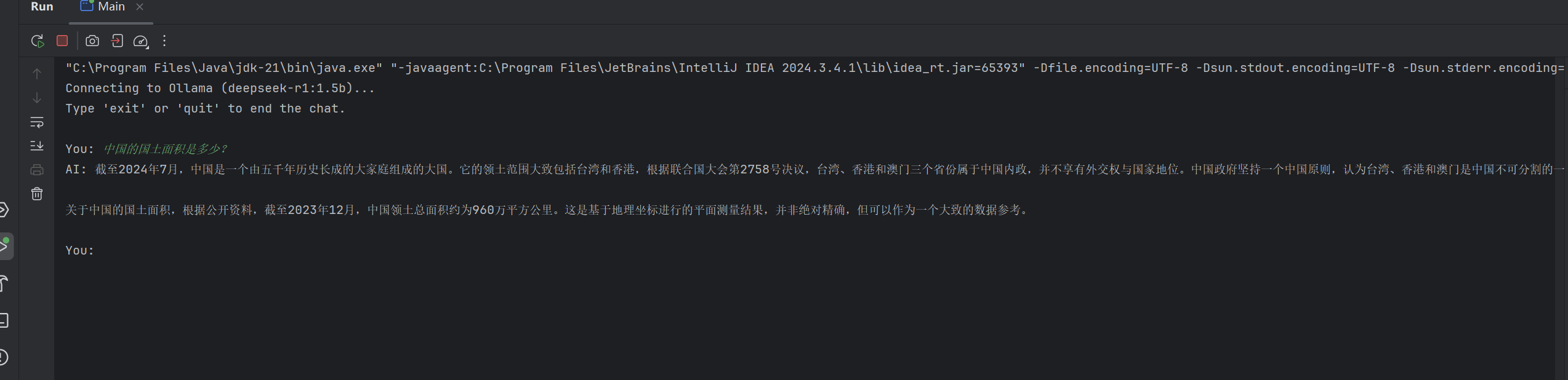
输出:

中国智能体开发者社区,聚焦智能体与大模型开发,提供前沿资讯、实用工具链、开源项目及行业案例。通过技术沙龙、开发者大赛等活动,促进经验交流与协作,助力开发者快速构建创新智能应用。
更多推荐
 1
1 0
0- 0


 已为社区贡献2条内容

所有评论(0)