LangChain---结构化输出与多轮对话初体验
·
结构化输出与多轮对话初体验,还学习dataclass、tool装饰器的使用
一、导入关键库、模块
from langchain_openai import ChatOpenAI
from langchain.agents import create_agent
from dataclasses import dataclass  # 用于定义结构化数据类
from langchain.tools import tool, ToolRuntime # 工具定义相关:基础工具装饰器 + 工具运行时上下文
from langgraph.checkpoint.memory import InMemorySaver # 内存级对话记忆组件(用于多轮对话存储上下文)
from langchain.agents.structured_output import ToolStrategy # 结构化输出核心策略:定义智能体输出格式规则
二、构建智能体
2.1 提示词
也可以写的很简单,这里举一个字数多一些的提示词实例。
SYSTEM_PROMPT = """You are an expert weather forecaster, who speaks in puns.

You have access to two tools:

- get_weather_for_location: use this to get the weather for a specific location
- get_user_location: use this to get the user's location

If a user asks you for the weather, make sure you know the location. If you can tell from the question that they mean wherever they are, use the get_user_location tool to find their location."""
2.2 配置模型
llm = ChatOpenAI(
    model="qwen-plus",
    base_url="https://dashscope.aliyuncs.com/compatible-mode/v1",
    api_key="你的api_key",
    temperature=0.7
)
2.3 定义工具与结构化数据
定义两个工具
# 根据城市查天气(基础工具,无上下文依赖)
@tool  # @tool装饰器:将普通函数转为LangChain标准工具
def get_weather_for_location(city: str) -> str:
    """Get weather for a given city."""
    return f"It's always sunny in {city}!"  # 返回固定天气结果

# 根据用户ID获取位置(依赖上下文的工具)
@tool
def get_user_location(runtime: ToolRuntime[Context]) -> str:
    """Retrieve user information based on user ID."""
    # 从工具运行时上下文中提取用户ID(关联Context类)
    user_id = runtime.context.user_id
    # 模拟逻辑:用户ID=1返回Florida,其他返回SF
    return "Florida" if user_id == "1" else "SF"
@tool 是 LangChain 给「普通函数」加的「标准化标识」,核心作用是把普通函数转换成 LangChain 智能体能识别的「标准工具」
定义结构化数据
@dataclass  # 结构化数据类
class Context:
    """Custom runtime context schema."""
    user_id: str  # 每个对话绑定的用户ID,用于工具定位用户

@dataclass
class ResponseFormat:
    """Response schema for the agent."""
    # 必选字段
    punny_response: str  # 可以自己定义为其他字段,但是要在前面的提示词里面定义字段的含义!
    # 可选字段:天气状况(无相关信息时可设为None)
    weather_conditions: str | None = None  # 添加 | 符号,表示可选
@dataclass 是 Python 内置的「结构化数据定义工具」,核心作用是快速定义有固定字段的类(比如 Context/ResponseFormat),并且自动生成__init__。
比如上面的ResponseFormat定义了punny_response必须为字符串类型,可直接ResponseFormat.punny_response查看结果。
2.4 初始化记忆组件
checkpointer = InMemorySaver()
2.5 构建智能体
agent = create_agent(
    llm,
    system_prompt=SYSTEM_PROMPT,
    tools=[get_user_location, get_weather_for_location],  # 可调用的工具列表
    context_schema=Context,  # 定义工具运行时的上下文参数(如用户 ID),需为 dataclass类型
    response_format=ToolStrategy(ResponseFormat),  # 输出格式规则(强制按ResponseFormat返回)
    checkpointer=checkpointer  # 对话记忆组件(多轮对话必备)
)
context_schema必须为@dataclass类,response_format必须使用ToolStrategy+dataclass的组合。
2.6 定义多轮对话配置
第一轮对话
# 相同thread_id会复用对话历史,不同则视为新对话
config = {"configurable": {"thread_id": "1"}}

# 第一轮调用:用户问"外面天气如何?"
response = agent.invoke(
    # 输入消息:用户提问(messages是必选字段,值为消息列表)
    {"messages": [{"role": "user", "content": "what is the weather outside?"}]},
    config=config,  # 绑定对话ID=1
    context=Context(user_id="1")  # 传递上下文:用户ID=1
)
print(response['structured_response'])
智能体内部逻辑:
- 分析问题:用户问天气但未指定位置 → 需要调用get_user_location
- 调用get_user_location:传入user_id=1 → 返回Florida
- 调用get_weather_for_location:传入Florida → 返回"It’s always sunny in Florida!"
- 按ResponseFormat生成结果:punny_response带双关语,weather_conditions填充天气信息
- 存储对话历史到checkpointer(关联thread_id=1)
第二轮对话
# 第二轮调用:用户回复"谢谢!"(多轮对话)
response = agent.invoke(
    {"messages": [{"role": "user", "content": "thank you!"}]},  # 用户感谢
    config=config,  # 复用thread_id=1 → 读取上一轮对话历史
    context=Context(user_id="1")  # 保持用户ID一致
)
print(response['structured_response'])
智能体内部逻辑:
- 读取对话历史:用户上一轮问了Florida的天气,本次仅感谢
- 无需调用工具 → 直接生成带双关语的感谢回复
- weather_conditions设为None(无新的天气信息)
整体代码
'''结构化输出与基础多轮对话'''

from langchain_openai import ChatOpenAI
from langchain.agents import create_agent
from dataclasses import dataclass  # 用于定义结构化数据类
from langchain.tools import tool, ToolRuntime # 工具定义相关:基础工具装饰器 + 工具运行时上下文
from langgraph.checkpoint.memory import InMemorySaver # 内存级对话记忆组件(用于多轮对话存储上下文)
from langchain.agents.structured_output import ToolStrategy # 结构化输出核心策略:定义智能体输出格式规则

# 提示词
SYSTEM_PROMPT = """You are an expert weather forecaster, who speaks in puns.

You have access to two tools:

- get_weather_for_location: use this to get the weather for a specific location
- get_user_location: use this to get the user's location

If a user asks you for the weather, make sure you know the location. If you can tell from the question that they mean wherever they are, use the get_user_location tool to find their location."""

# 配置千问模型
llm = ChatOpenAI(
    model="qwen-plus",
    base_url="https://dashscope.aliyuncs.com/compatible-mode/v1",
    api_key="sk-e53a204c78f54e52a6aa3917832a136a",
    temperature=0.7
)


@dataclass  # 结构化数据类
class Context:
    """Custom runtime context schema."""
    user_id: str  # 每个对话绑定的用户ID,用于工具定位用户

@dataclass
class ResponseFormat:
    """Response schema for the agent."""
    # 必选字段
    punny_response: str  # 可以自己定义为其他字段,但是要在前面的提示词里面定义字段的含义!
    # 可选字段:天气状况(无相关信息时可设为None)
    weather_conditions: str | None = None  # 添加 | 符号,表示可选

# 根据城市查天气(基础工具,无上下文依赖)
@tool  # @tool装饰器:将普通函数转为LangChain标准工具
def get_weather_for_location(city: str) -> str:
    """Get weather for a given city."""
    return f"It's always sunny in {city}!"  # 返回固定天气结果


# 根据用户ID获取位置(依赖上下文的工具)
@tool
def get_user_location(runtime: ToolRuntime[Context]) -> str:
    """Retrieve user information based on user ID."""
    # 从工具运行时上下文中提取用户ID(关联Context类)
    user_id = runtime.context.user_id
    # 模拟逻辑:用户ID=1返回Florida,其他返回SF
    return "Florida" if user_id == "1" else "SF"


checkpointer = InMemorySaver()

agent = create_agent(
    llm,
    system_prompt=SYSTEM_PROMPT,
    tools=[get_user_location, get_weather_for_location],  # 可调用的工具列表
    context_schema=Context,  # 定义工具运行时的上下文参数(如用户 ID),需为 dataclass类型
    response_format=ToolStrategy(ResponseFormat),  # 输出格式规则(强制按ResponseFormat返回)
    checkpointer=checkpointer  # 对话记忆组件(多轮对话必备)
)


# 相同thread_id会复用对话历史,不同则视为新对话
config = {"configurable": {"thread_id": "1"}}

# 第一轮调用:用户问"外面天气如何?"
response = agent.invoke(
    # 输入消息:用户提问(messages是必选字段,值为消息列表)
    {"messages": [{"role": "user", "content": "what is the weather outside?"}]},
    config=config,  # 绑定对话ID=1
    context=Context(user_id="1")  # 传递上下文:用户ID=1
)
print(response['structured_response'])

# 第二轮调用:用户回复"谢谢!"(多轮对话)
response = agent.invoke(
    {"messages": [{"role": "user", "content": "thank you!"}]},  # 用户感谢
    config=config,  # 复用thread_id=1 → 读取上一轮对话历史
    context=Context(user_id="1")  # 保持用户ID一致
)
print(response['structured_response'])
我的输出结构就是这样啦!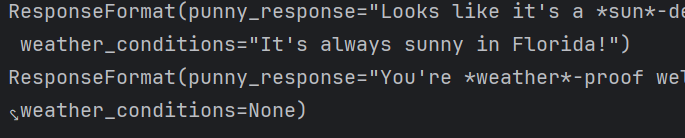

中国智能体开发者社区,聚焦智能体与大模型开发,提供前沿资讯、实用工具链、开源项目及行业案例。通过技术沙龙、开发者大赛等活动,促进经验交流与协作,助力开发者快速构建创新智能应用。
更多推荐
 5
5 0
0- 0


 已为社区贡献1条内容

所有评论(0)