Claude Code Hooks System 深度解析:让 AI 编码工具真正“听话“
AI工程化落地的前端/全栈工程师,具备丰富的工具链集成与自动化流程设计经验。请基于 Claude Code Hooks System 的真实源码实现(事件类型、配置格式、stdin/stdout 通信协议、exit code 语义、asyncRewake 等高级特性),撰写一篇面向中高级工程师的深度技术博客。
要求:
- 结构清晰:背景动机 → 核心概念 → 生命周期架构图 → 配置格式详解 → 实战案例 → 高级特性 → 最佳实践
- 图文并茂:用 Mermaid 流程图展示 Hook 执行链路与生命周期
- 代码驱动:提供可直接运行的 Python/Shell 示例,覆盖基础到进阶
- 工程视角:从"用 Hooks 解决真实工程问题"出发,而非文档翻译
- 深度适中:基础用法(exit code)→ 中级(matcher/if 过滤)→ 高级(asyncRewake/continueOnBlock)
Claude Code Hooks System 深度解析:让 AI 编码工具真正"听话"
一、为什么需要 Hooks?
Claude Code 是一个强大的 AI 编码 Agent,但在企业级工程实践中,我们往往需要在 AI 行为的关键节点插入自定义逻辑:
- 安全合规:在 AI 写文件前,检查是否引入了硬编码密钥或 SQL 注入漏洞
- 工程规范:强制 AI 使用
rg而非grep,使用项目内的 lint 工具 - 流程集成:AI 完成一轮任务后,自动触发测试、通知 Slack、更新 JIRA
- 上下文注入:每次会话开始时,自动注入团队规范文档
这正是 Hooks System 的设计初衷——在 Claude Code 执行生命周期的关键节点,注入可编程的自定义行为。
Hooks 于 v1.0.38 正式发布,源于社区 issue #712 的大量需求反馈。
二、核心概念速览
| 概念 | 说明 |
|---|---|
| Hook Event | 生命周期中的触发点,如 PreToolUse、Stop |
| Hook Type | 实现方式:command(脚本)或 prompt(LLM 驱动) |
| Matcher | 过滤器,指定 Hook 只对特定工具生效,如 "Bash" |
| Exit Code | 脚本返回值,决定 Claude Code 的后续行为 |
| additionalContext | Hook 向 Claude 注入的额外上下文信息 |
| asyncRewake | 异步执行后唤醒 Claude 继续处理结果 |
三、Hook 生命周期全景图
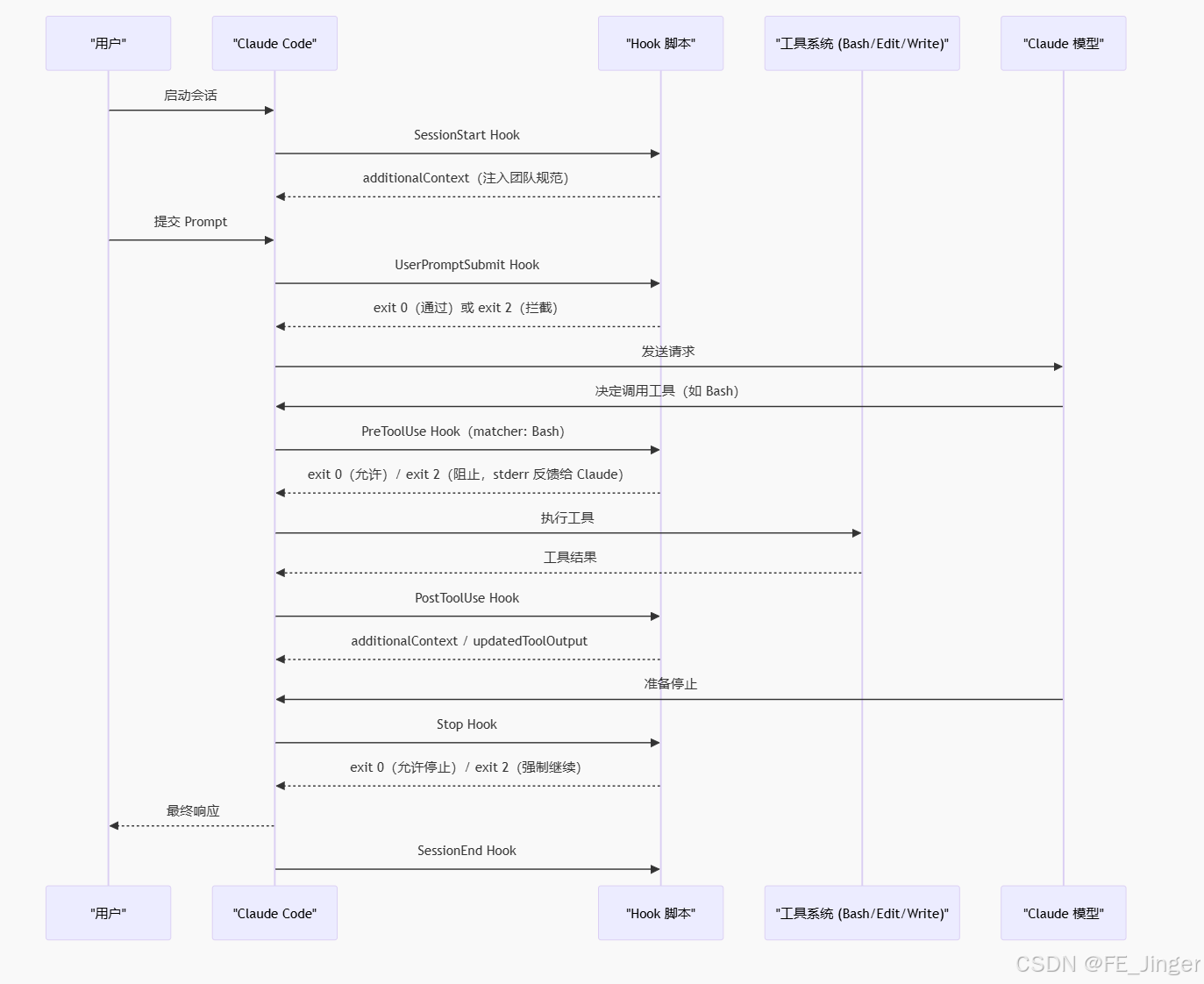
四、完整事件类型表
| Hook 事件 | 触发时机 | 典型用途 |
|---|---|---|
SessionStart |
会话开始,用户交互前 | 注入团队规范、初始化环境 |
UserPromptSubmit |
用户提交 Prompt 时 | 捕获 git 基线、Prompt 安全检查 |
PreToolUse |
工具执行前 | 命令验证、安全拦截、参数改写 |
PostToolUse |
工具执行后 | 安全扫描、日志记录、结果增强 |
Stop |
主 Agent 准备停止时 | 运行测试、最终安全审查 |
SubagentStart |
子 Agent 启动时 | 子任务初始化 |
SubagentStop |
子 Agent 停止时 | 子任务结果收集 |
PreCompact |
上下文压缩前 | 保留关键信息到摘要 |
SessionEnd |
会话结束时 | 清理、状态持久化 |
Notification |
Claude 发送通知时 | 转发到 Slack/钉钉 |
WorktreeCreate |
创建 git worktree 时 | 环境初始化 |
WorktreeRemove |
删除 git worktree 时 | 清理资源 |
TeammateIdle |
团队 Agent 空闲时 | 任务调度 |
EnterWorktree |
切换 worktree 时 | 上下文切换 |
PermissionRequest |
工具权限请求时 | 自动审批/拒绝 |
PermissionDenied |
权限被拒绝后 | 通知模型可重试 |
TaskCreated |
任务通过 TaskCreate 创建时 | 任务追踪 |
ConfigChange |
配置文件变更时 | 热重载响应 |
五、配置格式详解
Hooks 在 settings.json 中配置(全局:~/.claude/settings.json,项目级:.claude/settings.json):
{
  "hooks": {
    "PreToolUse": [
      {
        "matcher": "Bash",
        "hooks": [
          {
            "type": "command",
            "command": "python3 /path/to/my_hook.py",
            "timeout": 30
          }
        ]
      }
    ],
    "PostToolUse": [
      {
        "matcher": "Edit|Write|MultiEdit",
        "hooks": [
          {
            "type": "command",
            "command": "python3 /path/to/security_check.py",
            "if": "Bash(git commit:*)",
            "asyncRewake": true,
            "rewakeMessage": "安全扫描完成,请处理以下发现:",
            "rewakeSummary": "发现安全问题"
          }
        ]
      }
    ]
  }
}
关键配置字段
| 字段 | 类型 | 说明 |
|---|---|---|
matcher |
string | 正则匹配工具名,如 "Bash" 或 "Edit|Write" |
if |
string | 权限规则语法过滤,如 "Bash(git commit:*)" |
timeout |
number | 超时秒数 |
asyncRewake |
boolean | 异步执行后唤醒 Claude |
rewakeMessage |
string | 唤醒时注入给 Claude 的消息 |
continueOnBlock |
boolean | exit 2 时继续执行而非中断(PostToolUse 专用) |
once |
boolean | 整个会话只执行一次 |
args |
string[] | exec 形式启动,避免 shell 注入 |
六、通信协议:stdin / stdout / exit code
Hook 脚本通过标准 I/O 与 Claude Code 通信:
Claude Code ──stdin(JSON)──▶ Hook 脚本
Claude Code ◀──stdout(JSON)── Hook 脚本
Claude Code ◀──stderr(text)── Hook 脚本(错误信息)
Claude Code ◀──exit code──── Hook 脚本(控制流)
Exit Code 语义
stdin 输入结构(以 PreToolUse 为例)
{
  "session_id": "abc123",
  "hook_event_name": "PreToolUse",
  "tool_name": "Bash",
  "tool_use_id": "toolu_xyz",
  "tool_input": {
    "command": "grep -r 'password' ."
  },
  "cwd": "/home/user/myproject"
}
stdout 输出结构
{
  "hookSpecificOutput": {
    "hookEventName": "PreToolUse",
    "permissionDecision": "allow",
    "updatedInput": { "command": "rg 'password' ." }
  }
}
七、实战案例一:Bash 命令规范检查器(PreToolUse)
这是官方提供的参考实现,强制 AI 使用 rg 替代 grep:
#!/usr/bin/env python3
"""PreToolUse Hook:Bash 命令规范检查器"""
import json, re, sys

_VALIDATION_RULES = [
    (r"^grep\b(?!.*\|)", "请使用 'rg'(ripgrep)替代 'grep',性能更好"),
    (r"^find\s+\S+\s+-name\b", "请使用 'rg --files -g pattern' 替代 'find -name'"),
]

def main():
    input_data = json.load(sys.stdin)

    if input_data.get("tool_name") != "Bash":
        sys.exit(0)  # 非 Bash 工具,直接放行

    command = input_data.get("tool_input", {}).get("command", "")
    issues = [msg for pattern, msg in _VALIDATION_RULES if re.search(pattern, command)]

    if issues:
        for msg in issues:
            print(f"• {msg}", file=sys.stderr)
        sys.exit(2)  # 阻止执行,stderr 反馈给 Claude

if __name__ == "__main__":
    main()
配置方式:
{
  "hooks": {
    "PreToolUse": [
      {
        "matcher": "Bash",
        "hooks": [{ "type": "command", "command": "python3 /path/to/validator.py" }]
      }
    ]
  }
}
八、实战案例二:安全审查插件(多事件联动)
官方 security-guidance 插件展示了多事件协同的完整架构:
hooks.json 配置:
{
  "hooks": {
    "UserPromptSubmit": [
      { "hooks": [{ "type": "command", "command": "python3 security_hook.py" }] }
    ],
    "PostToolUse": [
      {
        "matcher": "Edit|Write|MultiEdit|NotebookEdit",
        "hooks": [{ "type": "command", "command": "python3 security_hook.py" }]
      },
      {
        "matcher": "Bash",
        "hooks": [
          {
            "type": "command",
            "command": "python3 security_hook.py",
            "if": "Bash(git commit:*)",
            "asyncRewake": true,
            "rewakeMessage": "后台安全审查完成,请处理以下发现:",
            "rewakeSummary": "Commit 安全审查发现问题"
          }
        ]
      }
    ],
    "Stop": [
      {
        "hooks": [
          {
            "type": "command",
            "command": "python3 security_hook.py",
            "asyncRewake": true,
            "rewakeMessage": "最终安全审查反馈,请处理后继续:",
            "rewakeSummary": "后台安全审查发现问题"
          }
        ]
      }
    ]
  }
}
九、高级特性详解
9.1 asyncRewake:异步后台执行
普通 Hook 是同步阻塞的——Claude 等待 Hook 完成才继续。asyncRewake: true 让 Hook 在后台运行,Claude 先返回响应,Hook 完成后再唤醒 Claude 处理结果。
适用场景:耗时的 LLM 安全审查、CI 触发、慢速外部 API 调用。
Claude 响应用户 ──▶ [用户看到结果]
                         ↓ (后台)
                    Hook 执行(可能需要数秒)
                         ↓
                    asyncRewake 唤醒 Claude
                         ↓
                    Claude 处理 Hook 发现并继续
```[13](#0-12)

### 9.2 `continueOnBlock`:软性拦截

`PostToolUse` 默认情况下 exit 2 会中断当前 turn。设置 `continueOnBlock: true` 后,拒绝原因会作为上下文反馈给 Claude,但 turn 继续执行。

```json
{
  "type": "command",
  "command": "python3 lint_check.py",
  "continueOnBlock": true
}
9.3 if 条件过滤:精准触发
使用权限规则语法过滤,避免不必要的进程启动:
{
  "if": "Bash(git commit:*)"
}
支持复合命令匹配(ls && git push)和环境变量前缀(FOO=bar git push)。
9.4 args exec 形式:安全启动
{
  "type": "command",
  "command": "/path/to/my_hook",
  "args": ["--mode", "strict"]
}
直接 exec 而非通过 shell,路径中的特殊字符无需转义,防止 shell 注入。
9.5 Plugin 中的 Hooks
Hooks 可以在 Plugin 的 hooks.json 中声明,随插件自动加载,支持 ${CLAUDE_PLUGIN_ROOT} 变量引用插件目录:
{
  "hooks": {
    "SessionStart": [
      {
        "hooks": [{
          "type": "command",
          "command": "bash \"${CLAUDE_PLUGIN_ROOT}/setup.sh\"",
          "timeout": 180
        }]
      }
    ]
  }
}
十、Hook 输出:向 Claude 注入上下文
Hook 可以通过 stdout 输出 JSON 来影响 Claude 的行为:
import json, sys

# PostToolUse:注入额外上下文
output = {
    "hookSpecificOutput": {
        "hookEventName": "PostToolUse",
        "additionalContext": "⚠️ 检测到潜在的 SQL 注入风险,请使用参数化查询"
    }
}
print(json.dumps(output))
sys.exit(0)
# PostToolUse:替换工具输出(v2.1.121+)
output = {
    "hookSpecificOutput": {
        "hookEventName": "PostToolUse",
        "updatedToolOutput": "已过滤敏感信息的工具输出..."
    }
}
print(json.dumps(output))
# SessionStart:注入团队规范
output = {
    "hookSpecificOutput": {
        "hookEventName": "SessionStart",
        "additionalContext": "团队规范:所有 API 调用必须有错误处理,禁止使用 any 类型"
    }
}
print(json.dumps(output))
十一、最佳实践
性能原则
- 用
matcher和if精准过滤:避免每次工具调用都启动进程 - 耗时操作用
asyncRewake:LLM 审查、网络请求不要阻塞主流程 once: true用于初始化:SessionStart 的环境检查只需执行一次
可靠性原则
- exit code 要明确:不要依赖默认行为,显式
sys.exit(0/1/2) - JSON 解析要容错:stdin 解析失败时 exit 0 而非崩溃
- 设置合理 timeout:防止 Hook 挂起阻塞整个会话
安全原则
- 用
args替代 shell 拼接:避免路径中特殊字符导致的注入 - Hook 不能访问终端(v2.1.139+):不要依赖 TTY 交互
- 大输出自动落盘:超过 50K 字符的 Hook 输出会保存到磁盘并以文件引用形式注入 19 20
十二、企业级应用场景速查
| 场景 | Hook 事件 | 实现思路 |
|---|---|---|
| 禁止写入特定目录 | PreToolUse(Write) |
检查 file_path,exit 2 阻止 |
| 自动运行 lint | PostToolUse(Edit/Write) |
调用 eslint/prettier,结果注入 additionalContext |
| git commit 安全审查 | PostToolUse(Bash) + asyncRewake |
分析 diff,发现问题唤醒 Claude |
| 注入团队 CLAUDE.md | SessionStart |
读取团队规范文件,输出 additionalContext |
| 任务完成通知 | Stop |
调用 Slack/钉钉 Webhook |
| 自动审批低风险操作 | PermissionRequest |
检查工具参数,返回 allow 决策 |
| 子 Agent 结果汇总 | SubagentStop |
收集 agent_transcript_path 中的结果 |
总结
Claude Code Hooks System 是一套设计精良的生命周期扩展机制,核心设计哲学是:
- 简单协议:stdin/stdout/exit code,任何语言都能实现
- 精准触发:matcher + if 条件,最小化性能开销
- 双向通信:不仅能拦截,还能注入上下文、改写输入、替换输出
- 异步友好:asyncRewake 让耗时操作不阻塞用户体验
对于 AI 工程化落地而言,Hooks 是将 Claude Code 从"通用 AI 助手"变成"符合团队规范的工程伙伴"的关键抓手。从一个简单的命令验证脚本开始,逐步构建你的 Hook 生态,让 AI 真正融入你的工程流程。

中国智能体开发者社区,聚焦智能体与大模型开发,提供前沿资讯、实用工具链、开源项目及行业案例。通过技术沙龙、开发者大赛等活动,促进经验交流与协作,助力开发者快速构建创新智能应用。
更多推荐



 6
6 0
0- 0


 已为社区贡献4条内容

所有评论(0)