音视频(五)android使用ffmpeg_so推流
ETCD搭建及应用
前言
上章 讲述了 ffmpeg Android so 编译
这章讲述 其应用,主要是 通过手机 得到预览画面 上传到媒体服务器,
还是用跟 音频(三)一样用 rtsp上传
1:环境
win11
androidstudio 4.1.2
ndk 21.e
ffmpeg 相关库 上章编译的 包含头文件 11个 (x264 x265 aac zip 及ffmpeg自带的7个)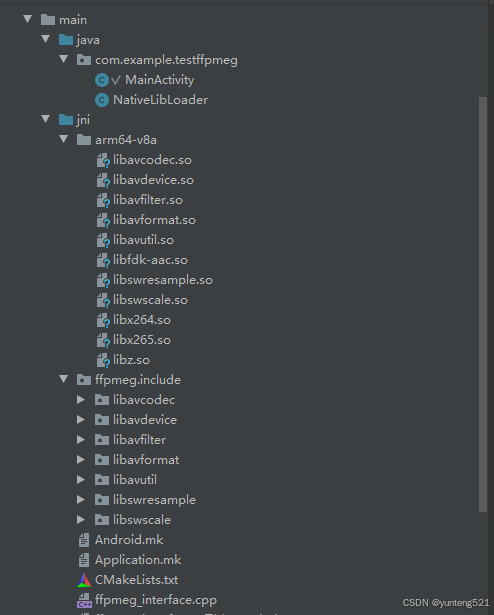
2:直接上代码
布局 一个预览框 3个按钮
<LinearLayout xmlns:android="http://schemas.android.com/apk/res/android"
    android:layout_width="match_parent"
    android:layout_height="match_parent"
    android:orientation="vertical">

    <androidx.camera.view.PreviewView
        android:id="@+id/previewView"
        android:layout_width="match_parent"
        android:layout_height="0dp"
        android:layout_weight="9" />

    <LinearLayout
        android:layout_width="match_parent"
        android:layout_height="0dp"
        android:layout_weight="1"
        android:orientation="horizontal">

        <Button
            android:id="@+id/startPreviewButton"
            android:layout_width="0dp"
            android:layout_height="match_parent"
            android:layout_weight="1"
            android:text="开始预览" />

        <Button
            android:id="@+id/startUploadButton"
            android:layout_width="0dp"
            android:layout_height="match_parent"
            android:layout_weight="1"
            android:text="开始上传" />

        <Button
            android:id="@+id/stopButton"
            android:layout_width="0dp"
            android:layout_height="match_parent"
            android:layout_weight="1"
            android:text="结束" />
    </LinearLayout>
</LinearLayout>
展示的就是一般预览一边上传 通过点击按钮控制
MainActivity.java
package com.example.testffpmeg;


import androidx.annotation.NonNull;
import androidx.appcompat.app.AppCompatActivity;
import androidx.camera.core.Camera;
import androidx.camera.core.CameraSelector;
import androidx.camera.core.ImageAnalysis;
import androidx.camera.core.ImageProxy;
import androidx.camera.core.Preview;
import androidx.camera.lifecycle.ProcessCameraProvider;
import androidx.camera.view.PreviewView;
import androidx.core.app.ActivityCompat;
import androidx.core.content.ContextCompat;

import android.annotation.SuppressLint;
import android.content.pm.PackageManager;
import android.graphics.ImageFormat;
import android.media.Image;
import android.os.Bundle;
import android.util.Log;
import android.view.View;
import android.widget.Button;
import android.widget.Toast;
import com.google.common.util.concurrent.ListenableFuture;
import java.nio.ByteBuffer;
import java.util.concurrent.ExecutionException;
import java.util.concurrent.ExecutorService;
import java.util.concurrent.Executors;

public class MainActivity extends AppCompatActivity {
    private static final int PERMISSION_REQUEST_CODE = 1;
    private PreviewView previewView;
    private ExecutorService cameraExecutor;
    private Thread streamingThread =null;
    private Button startPreviewButton;
    private Button startUploadButton;
    private Button stopButton;
    private ProcessCameraProvider cameraProvider;
    private int width;
    private int height;
    private int imageformat=0;
    private int framerate = 20;
    private int  bupload = 0 ;
    private long curtimems  = 0;
    private long currentTimeMillis=0;
    private long canstart = 0;

    @Override
    protected void onCreate(Bundle savedInstanceState) {
        super.onCreate(savedInstanceState);
        setContentView(R.layout.activity_main);

        previewView = findViewById(R.id.previewView);
        startPreviewButton = findViewById(R.id.startPreviewButton);
        startUploadButton = findViewById(R.id.startUploadButton);
        stopButton = findViewById(R.id.stopButton);
        cameraExecutor = Executors.newSingleThreadExecutor();

        if (checkPermissions()) {
            setupButtons();
        } else {
            requestPermissions();
        }
    }

    private boolean checkPermissions() {
        int cameraPermission = ContextCompat.checkSelfPermission(this, android.Manifest.permission.CAMERA);
        int audioPermission = ContextCompat.checkSelfPermission(this, android.Manifest.permission.RECORD_AUDIO);
        return cameraPermission == PackageManager.PERMISSION_GRANTED && audioPermission == PackageManager.PERMISSION_GRANTED;
    }

    private void requestPermissions() {
        ActivityCompat.requestPermissions(this,
                new String[]{android.Manifest.permission.CAMERA, android.Manifest.permission.RECORD_AUDIO},
                PERMISSION_REQUEST_CODE);
    }

    @Override
    public void onRequestPermissionsResult(int requestCode, @NonNull String[] permissions, @NonNull int[] grantResults) {
        super.onRequestPermissionsResult(requestCode, permissions, grantResults);
        if (requestCode == PERMISSION_REQUEST_CODE) {
            if (grantResults.length > 0 && grantResults[0] == PackageManager.PERMISSION_GRANTED
                    && grantResults[1] == PackageManager.PERMISSION_GRANTED) {
                setupButtons();
            } else {
                Toast.makeText(this, "权限被拒绝,无法使用摄像头和麦克风", Toast.LENGTH_SHORT).show();
                finish();
            }
        }
    }

    private void setupButtons() {
        startPreviewButton.setOnClickListener(new View.OnClickListener() {
            @Override
            public void onClick(View v) {
                startCamera();
            }
        });

        startUploadButton.setOnClickListener(new View.OnClickListener() {
            @Override
            public void onClick(View v) {
                startStreamingInBackground("rtsp://192.168.1.100:554/live/test1", width, height, framerate);

                bupload = 2;
            }
        });

        stopButton.setOnClickListener(new View.OnClickListener() {
            @Override
            public void onClick(View v) {
                stopPreviewAndUpload();
                bupload =0;
            }
        });
    }

    private void startCamera() {
        ListenableFuture<ProcessCameraProvider> cameraProviderFuture = ProcessCameraProvider.getInstance(this);

        cameraProviderFuture.addListener(() -> {
            try {
                cameraProvider = cameraProviderFuture.get();
                bindPreview(cameraProvider);
            } catch (ExecutionException | InterruptedException e) {
                // 处理异常
            }
        }, ContextCompat.getMainExecutor(this));
    }

    private void bindPreview(@NonNull ProcessCameraProvider cameraProvider) {
        Preview preview = new Preview.Builder()
                .build();

        CameraSelector cameraSelector = new CameraSelector.Builder()
                .requireLensFacing(CameraSelector.LENS_FACING_BACK)
                .build();

        preview.setSurfaceProvider(previewView.getSurfaceProvider());

        ImageAnalysis imageAnalysis = new ImageAnalysis.Builder()
                .setBackpressureStrategy(ImageAnalysis.STRATEGY_KEEP_ONLY_LATEST)
                .build();
        imageAnalysis.setAnalyzer(cameraExecutor, new ImageAnalysis.Analyzer() {
            @Override
            public void analyze(@NonNull ImageProxy image) {
                if(bupload ==0 || bupload ==2){
                    if(bupload <2) ++bupload ;
                    @SuppressLint("UnsafeOptInUsageError") Image mediaImage = image.getImage();
                    if (mediaImage != null && mediaImage.getFormat() == ImageFormat.YUV_420_888) {
                        if (imageformat == 0){
                            width = mediaImage.getWidth();
                            height = mediaImage.getHeight();
                            imageformat = mediaImage.getFormat();
                        }
                        if(bupload ==2){
                            currentTimeMillis = System.currentTimeMillis();
                            if(curtimems + 10 < currentTimeMillis ){  //1妙20帧
                                if (curtimems == 0) {
                                    canstart = currentTimeMillis ;
                                }
                                curtimems =currentTimeMillis;
                                if(canstart + 1000 < currentTimeMillis){  //延迟500ms在开始
                                    byte[] frameData = imageToByteArray(mediaImage);
                                    NativeLibLoader.sendFrame(frameData, width, height);
                                }

                            }

                        }

                    }
                }

                image.close();
            }
        });

        try {
            cameraProvider.unbindAll();
            Camera camera = cameraProvider.bindToLifecycle(this, cameraSelector, preview, imageAnalysis);
        } catch (Exception e) {
            Log.e("Camera2", "使用相机时出错: ", e);
        }
    }

    private byte[] imageToByteArray(Image image) {
        ByteBuffer yBuffer = image.getPlanes()[0].getBuffer();
        ByteBuffer uBuffer = image.getPlanes()[1].getBuffer();
        ByteBuffer vBuffer = image.getPlanes()[2].getBuffer();

        int ySize = yBuffer.remaining();
        int uSize = uBuffer.remaining();
        int vSize = vBuffer.remaining();

        byte[] nv21 = new byte[ySize + uSize + vSize];
        yBuffer.get(nv21, 0, ySize);

        byte[] u = new byte[uSize];
        byte[] v = new byte[vSize];
        uBuffer.get(u);
        vBuffer.get(v);

        for (int i = 0; i < vSize; i++) {
            nv21[ySize + 2 * i] = v[i];
            nv21[ySize + 2 * i + 1] = u[i];
        }

        return nv21;
    }

    private void startStreamingInBackground(String outputUrl, int width, int height, int framerate) {
     //   streamingThread = new Thread(() -> NativeLibLoader.startStreaming(outputUrl, width, height, framerate));
     //   streamingThread.start();
        NativeLibLoader.startStreaming(outputUrl, width, height, framerate);
    }

    private void stopPreviewAndUpload() {
        if (cameraProvider != null) {
            cameraProvider.unbindAll();
        }
        if (streamingThread != null && streamingThread.isAlive()) {
            NativeLibLoader.stopStreaming();
            streamingThread.interrupt();
        }
    }

    @Override
    protected void onDestroy() {
        super.onDestroy();
        cameraExecutor.shutdown();
        stopPreviewAndUpload();
    }
}
NativeLibLoader.java
package com.example.testffpmeg;


public class NativeLibLoader {
    static {
        System.loadLibrary("myffpmeg");
    }

    public static native void startStreaming(String outputUrl, int width, int height, int framerate);
    public static native void stopStreaming();
    public static native void sendFrame(byte[] frameData, int width, int height);
}
三个接口
1>startStreaming 启动流,就是初始化各种参数,为上传做准备,这个必须再sendFrame 调用前执行所以在java 代码里 做了延时操作
2>sendFrame 把帧是数据通过ffmpeg 接口通过rstp 上传到媒体服务器
android 图像数据格式为 nv21 jni再把NV21 到 YUV420P
3> sendFrame 停止,没什么好说的
jni 接口文件
ffpmeg_interface.cpp
#include <jni.h>
#include <string>
#include <iostream>
#include <cstdlib>
#include <cstring>
#include <android/log.h>
extern "C" {
#include <libavformat/avformat.h>
#include <libavcodec/avcodec.h>
#include <libavutil/avutil.h>
#include <libavutil/imgutils.h>
#include <libswscale/swscale.h>
}

#define LOG_TAG "FFmpegJNI"
#define LOGD(...) __android_log_print(ANDROID_LOG_DEBUG, LOG_TAG, __VA_ARGS__)
#define LOGE(...) __android_log_print(ANDROID_LOG_ERROR, LOG_TAG, __VA_ARGS__)

AVFormatContext *outputFormatContext = nullptr;
AVCodecContext *codecContext = nullptr;
AVStream *videoStream = nullptr;
SwsContext *swsContext = nullptr;
AVFrame *frame = nullptr;
AVPacket *packet = nullptr;
int frameCount = 0;
bool isStreaming = false;

extern "C" JNIEXPORT void JNICALL
Java_com_example_testffpmeg_NativeLibLoader_startStreaming(JNIEnv *env, jclass clazz, jstring outputUrl,
                                                         jint width, jint height, jint framerate) {
    const char *outputUrlStr = env->GetStringUTFChars(outputUrl, nullptr);
    if (outputUrlStr == nullptr) {
        return;
    }

    // 初始化 FFmpeg
 //   av_register_all();
    avformat_network_init();

    // 分配输出格式上下文
    avformat_alloc_output_context2(&outputFormatContext, nullptr, "rtsp", outputUrlStr);
    if (!outputFormatContext) {
        LOGE("Could not create output context");
        env->ReleaseStringUTFChars(outputUrl, outputUrlStr);
        return;
    }

    // 查找编码器
    AVCodec *codec = avcodec_find_encoder(AV_CODEC_ID_H264);
    if (!codec) {
        LOGE("Codec not found");
        avformat_free_context(outputFormatContext);
        env->ReleaseStringUTFChars(outputUrl, outputUrlStr);
        return;
    }

    // 分配编码器上下文
    codecContext = avcodec_alloc_context3(codec);
    if (!codecContext) {
        LOGE("Could not allocate codec context");
        avformat_free_context(outputFormatContext);
        env->ReleaseStringUTFChars(outputUrl, outputUrlStr);
        return;
    }

    // 设置编码器参数
    codecContext->codec_id = AV_CODEC_ID_H264;
    codecContext->codec_type = AVMEDIA_TYPE_VIDEO;
    codecContext->pix_fmt = AV_PIX_FMT_YUV420P;
    codecContext->width = width;
    codecContext->height = height;
    codecContext->time_base = (AVRational){1, framerate};
    codecContext->framerate = (AVRational){framerate, 1};
    codecContext->bit_rate = 400000;

    // 打开编码器
    if (avcodec_open2(codecContext, codec, nullptr) < 0) {
        LOGE("Could not open codec");
        avcodec_free_context(&codecContext);
        avformat_free_context(outputFormatContext);
        env->ReleaseStringUTFChars(outputUrl, outputUrlStr);
        return;
    }

    // 创建视频流
    videoStream = avformat_new_stream(outputFormatContext, codec);
    if (!videoStream) {
        LOGE("Could not create new stream");
        avcodec_free_context(&codecContext);
        avformat_free_context(outputFormatContext);
        env->ReleaseStringUTFChars(outputUrl, outputUrlStr);
        return;
    }
    videoStream->time_base = codecContext->time_base;
    avcodec_parameters_from_context(videoStream->codecpar, codecContext);

    // 打开输出文件
    if (!(outputFormatContext->oformat->flags & AVFMT_NOFILE)) {
        if (avio_open(&outputFormatContext->pb, outputUrlStr, AVIO_FLAG_WRITE) < 0) {
            LOGE("Could not open output file");
            avcodec_free_context(&codecContext);
            avformat_free_context(outputFormatContext);
            env->ReleaseStringUTFChars(outputUrl, outputUrlStr);
            return;
        }
    }

    // 写入文件头
    if (avformat_write_header(outputFormatContext, nullptr) < 0) {
        LOGE("Error writing header");
        avcodec_free_context(&codecContext);
        if (!(outputFormatContext->oformat->flags & AVFMT_NOFILE)) {
            avio_closep(&outputFormatContext->pb);
        }
        avformat_free_context(outputFormatContext);
        env->ReleaseStringUTFChars(outputUrl, outputUrlStr);
        return;
    }

    // 分配帧和包
    frame = av_frame_alloc();
    if (!frame) {
        LOGE("Could not allocate video frame");
        avcodec_free_context(&codecContext);
        if (!(outputFormatContext->oformat->flags & AVFMT_NOFILE)) {
            avio_closep(&outputFormatContext->pb);
        }
        avformat_free_context(outputFormatContext);
        env->ReleaseStringUTFChars(outputUrl, outputUrlStr);
        return;
    }
    frame->format = codecContext->pix_fmt;
    frame->width = codecContext->width;
    frame->height = codecContext->height;
    if (av_frame_get_buffer(frame, 0) < 0) {
        LOGE("Could not allocate the video frame data");
        av_frame_free(&frame);
        avcodec_free_context(&codecContext);
        if (!(outputFormatContext->oformat->flags & AVFMT_NOFILE)) {
            avio_closep(&outputFormatContext->pb);
        }
        avformat_free_context(outputFormatContext);
        env->ReleaseStringUTFChars(outputUrl, outputUrlStr);
        return;
    }

    packet = av_packet_alloc();
    if (!packet) {
        LOGE("Could not allocate packet");
        av_frame_free(&frame);
        avcodec_free_context(&codecContext);
        if (!(outputFormatContext->oformat->flags & AVFMT_NOFILE)) {
            avio_closep(&outputFormatContext->pb);
        }
        avformat_free_context(outputFormatContext);
        env->ReleaseStringUTFChars(outputUrl, outputUrlStr);
        return;
    }

    // 创建图像转换上下文
    swsContext = sws_getContext(width, height, AV_PIX_FMT_NV21, width, height,
                                AV_PIX_FMT_YUV420P, SWS_BILINEAR, nullptr, nullptr, nullptr);
    if (!swsContext) {
        LOGE("Could not initialize SwsContext");
        av_packet_free(&packet);
        av_frame_free(&frame);
        avcodec_free_context(&codecContext);
        if (!(outputFormatContext->oformat->flags & AVFMT_NOFILE)) {
            avio_closep(&outputFormatContext->pb);
        }
        avformat_free_context(outputFormatContext);
        env->ReleaseStringUTFChars(outputUrl, outputUrlStr);
        return;
    }

    isStreaming = true;
    frameCount = 0;
    env->ReleaseStringUTFChars(outputUrl, outputUrlStr);
     LOGE("####Java_com_example_testffpmeg_NativeLibLoader_startStreaming###OK");
}

extern "C" JNIEXPORT void JNICALL
Java_com_example_testffpmeg_NativeLibLoader_stopStreaming(JNIEnv *env, jclass clazz) {
    if (!isStreaming) {
        return;
    }

    // 写入文件尾
    av_write_trailer(outputFormatContext);

    // 释放资源
    sws_freeContext(swsContext);
    swsContext = nullptr;
    av_packet_free(&packet);
    av_frame_free(&frame);
    if (codecContext) {
        avcodec_free_context(&codecContext);
    }
    if (outputFormatContext && !(outputFormatContext->oformat->flags & AVFMT_NOFILE)) {
        avio_closep(&outputFormatContext->pb);
    }
    if (outputFormatContext) {
        avformat_free_context(outputFormatContext);
    }

    isStreaming = false;
}

extern "C" JNIEXPORT void JNICALL
Java_com_example_testffpmeg_NativeLibLoader_sendFrame(JNIEnv *env, jclass clazz, jbyteArray frameData,
                                                     jint width, jint height) {
    if (!isStreaming) {
        return;
    }

    jbyte *frameDataPtr = env->GetByteArrayElements(frameData, nullptr);
    if (frameDataPtr == nullptr) {
        return;
    }

    // 转换 NV21 到 YUV420P
    const uint8_t *srcSlice[] = {reinterpret_cast<const uint8_t *>(frameDataPtr),
                                 reinterpret_cast<const uint8_t *>(frameDataPtr + width * height)};
    int srcStride[] = {width, width};
    sws_scale(swsContext, srcSlice, srcStride, 0, height, frame->data, frame->linesize);

    frame->pts = frameCount++;

    // 编码帧
    if (avcodec_send_frame(codecContext, frame) < 0) {
        LOGE("Error sending frame to encoder");
        env->ReleaseByteArrayElements(frameData, frameDataPtr, JNI_ABORT);
        return;
    }

    while (avcodec_receive_packet(codecContext, packet) == 0) {
        av_packet_rescale_ts(packet, codecContext->time_base, videoStream->time_base);
        packet->stream_index = videoStream->index;

        // 写入包
        if (av_interleaved_write_frame(outputFormatContext, packet) < 0) {
            LOGE("Error writing packet");
        }
        av_packet_unref(packet);
    }

    env->ReleaseByteArrayElements(frameData, frameDataPtr, JNI_ABORT);
}
Android.mk
LOCAL_PATH := $(call my-dir)

$(warning "Warning Just for Test LOCAL_PATH is $(LOCAL_PATH) --$(PROJECT_PATH)")

include $(CLEAR_VARS)
LOCAL_MODULE := avcodec
LOCAL_SRC_FILES :=$(TARGET_ARCH_ABI)/libavcodec.so
include $(PREBUILT_SHARED_LIBRARY)
$(warning " avcodec LOCAL_SRC_FILES is $(LOCAL_SRC_FILES)  ---1 $(TARGET_ARCH_ABI) ---2 $(LOCAL_PATH) ---3 $(LOCAL_SRC_FILES) --4 $(LOCAL_PATH)/$(TARGET_ARCH_ABI)")

include $(CLEAR_VARS)
LOCAL_MODULE := avformat
LOCAL_SRC_FILES := $(TARGET_ARCH_ABI)/libavformat.so
include $(PREBUILT_SHARED_LIBRARY)

include $(CLEAR_VARS)
LOCAL_MODULE := swresample
LOCAL_SRC_FILES := $(TARGET_ARCH_ABI)/libswresample.so
include $(PREBUILT_SHARED_LIBRARY)

include $(CLEAR_VARS)
LOCAL_MODULE := avfilter
LOCAL_SRC_FILES := $(TARGET_ARCH_ABI)/libavfilter.so
include $(PREBUILT_SHARED_LIBRARY)

include $(CLEAR_VARS)
LOCAL_MODULE := avutil
LOCAL_SRC_FILES := $(TARGET_ARCH_ABI)/libavutil.so
include $(PREBUILT_SHARED_LIBRARY)

include $(CLEAR_VARS)
LOCAL_MODULE := swscale
LOCAL_SRC_FILES := $(TARGET_ARCH_ABI)/libswscale.so
include $(PREBUILT_SHARED_LIBRARY)

include $(CLEAR_VARS)
LOCAL_MODULE := avdevice
LOCAL_SRC_FILES := $(TARGET_ARCH_ABI)/libavdevice.so
include $(PREBUILT_SHARED_LIBRARY)


include $(CLEAR_VARS)
LOCAL_MODULE := x264
LOCAL_SRC_FILES := $(TARGET_ARCH_ABI)/libx264.so
include $(PREBUILT_SHARED_LIBRARY)

include $(CLEAR_VARS)
LOCAL_MODULE := x265
LOCAL_SRC_FILES := $(TARGET_ARCH_ABI)/libx265.so
include $(PREBUILT_SHARED_LIBRARY)

include $(CLEAR_VARS)
LOCAL_MODULE := fdk-aac
LOCAL_SRC_FILES := $(TARGET_ARCH_ABI)/libfdk-aac.so
include $(PREBUILT_SHARED_LIBRARY)

include $(CLEAR_VARS)
LOCAL_MODULE :=z
LOCAL_SRC_FILES := $(TARGET_ARCH_ABI)/libz.so
include $(PREBUILT_SHARED_LIBRARY)

include $(CLEAR_VARS)

LOCAL_MODULE    := myffpmeg

#LOCAL_C_INCLUDES := $(LOCAL_PATH)/ffpmeg/include

LOCAL_SRC_FILES := \
    ffpmeg_interface.cpp

LOCAL_C_INCLUDES += $(LOCAL_PATH)/ffpmeg/include
#LOCAL_LDLIBS :=  -llog
LOCAL_LDLIBS := -L$(LOCAL_PATH)/$(TARGET_ARCH_ABI) -lavcodec \
-lavformat -lswresample -lavfilter  \
-lavutil -lswscale -lavdevice \
-lx264 -lx265 -lfdk-aac -lz \
-llog -landroid

#LOCAL_LDLIBS += $(LOCAL_PATH)/libs/$(TARGET_ARCH_ABI)/libgiada.so

# 设置输出路径
#LOCAL_MODULE_PATH := $(LOCAL_PATH)/../libs/$(TARGET_ARCH_ABI)
LOCAL_MODULE_PATH := $(LOCAL_PATH)/$(TARGET_ARCH_ABI)

include $(BUILD_SHARED_LIBRARY)
Application.mk
#APP_ABI := armeabi-v7a,arm64-v8a
APP_ABI := arm64-v8a
APP_PLATFORM := android-26
APP_STL := c++_shared
APP_CPPFLAGS += -std=c++11
APP_CPPFLAGS += -fopenmp -static-openmp
APP_CPPFLAGS += -fno-rtti -fno-exceptions
编译方式好多种,自行选择,这里不说了
权限增加,存储读写 不需要的 ,自行删减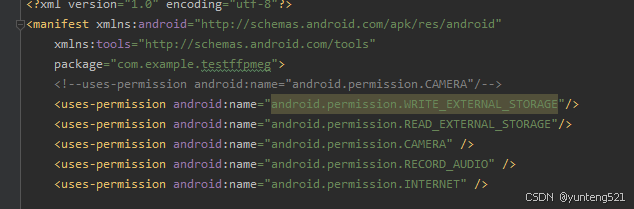
3:运行测试
上面的是VLC media player 拉流播放的, 下面的是手机预览的画面(边预览边上传)(后摄)
上传的 画面大小为640*480 所以跟预览大小由点差异,还有就是播放的画面角度 不一样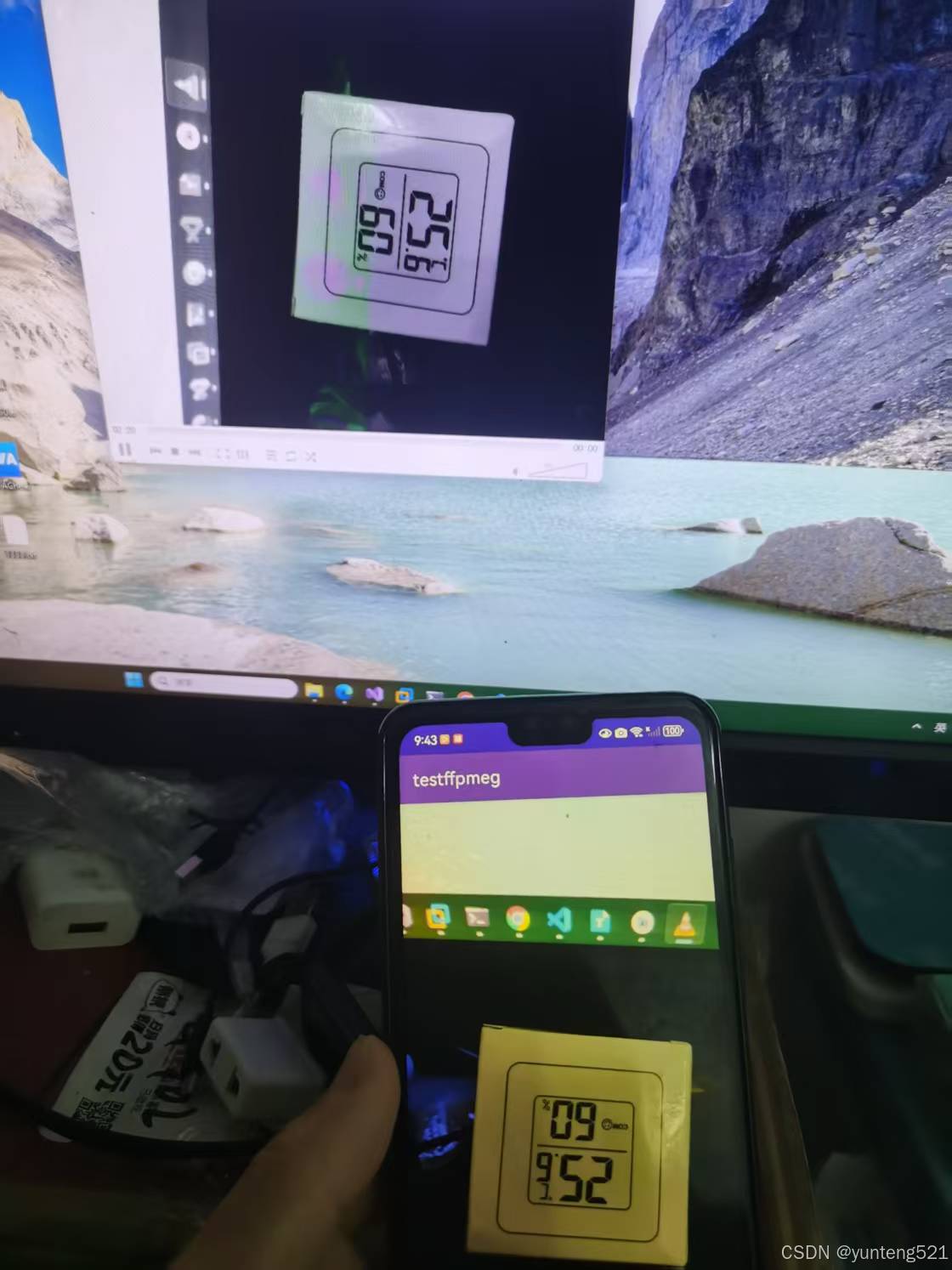
4:如果对你又帮助,麻烦点个赞,加个关注
DEMO 下载地址
MD5:a5815f33276aff9bb2a5076d07726a53
写个android 测试下章

火山引擎开发者社区是火山引擎打造的AI技术生态平台,聚焦Agent与大模型开发,提供豆包系列模型(图像/视频/视觉)、智能分析与会话工具,并配套评测集、动手实验室及行业案例库。社区通过技术沙龙、挑战赛等活动促进开发者成长,新用户可领50万Tokens权益,助力构建智能应用。
更多推荐
 16
16 0
0- 0


 已为社区贡献5条内容

所有评论(0)