使用 paddleocr 识别猪耳标
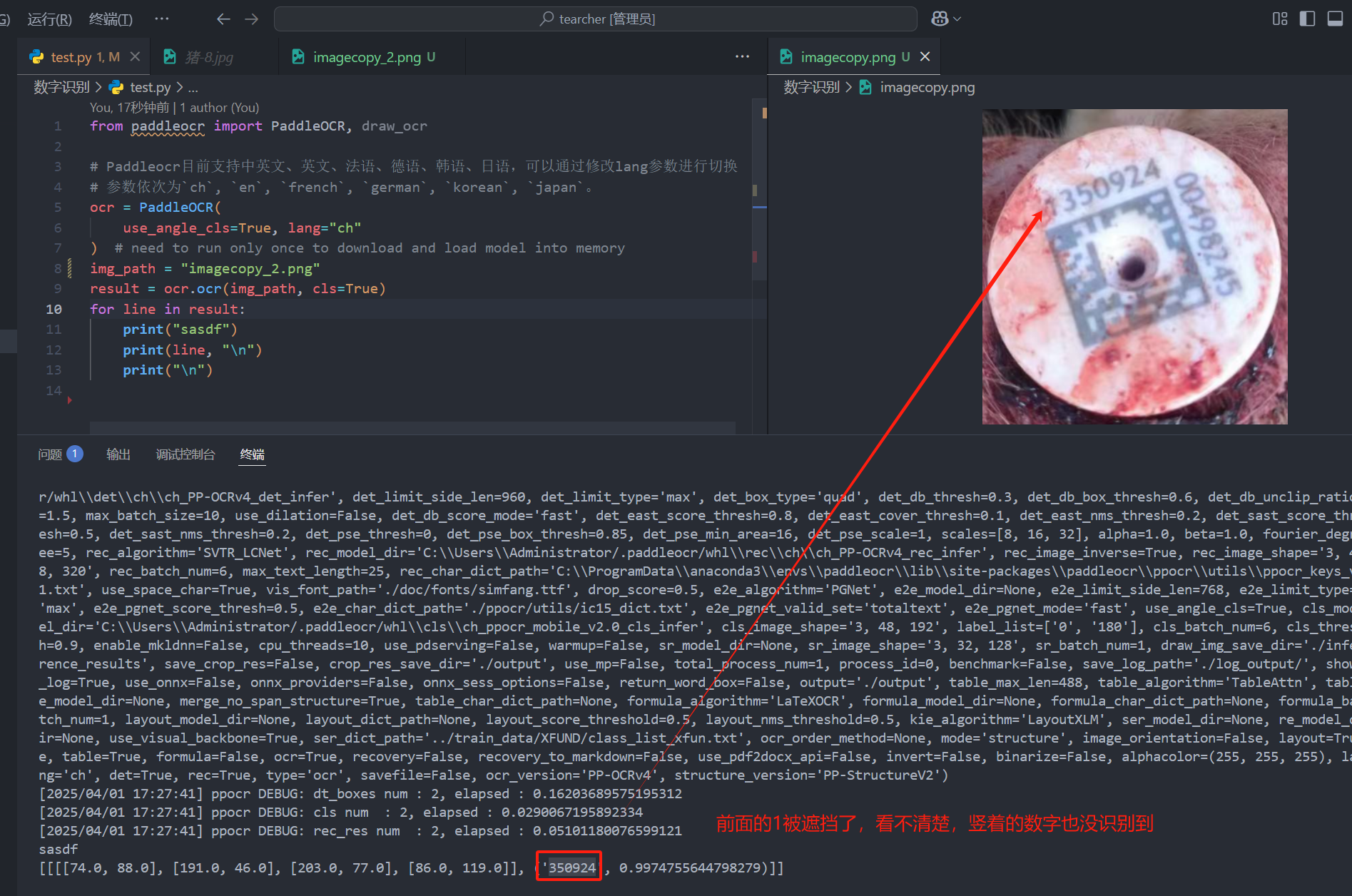
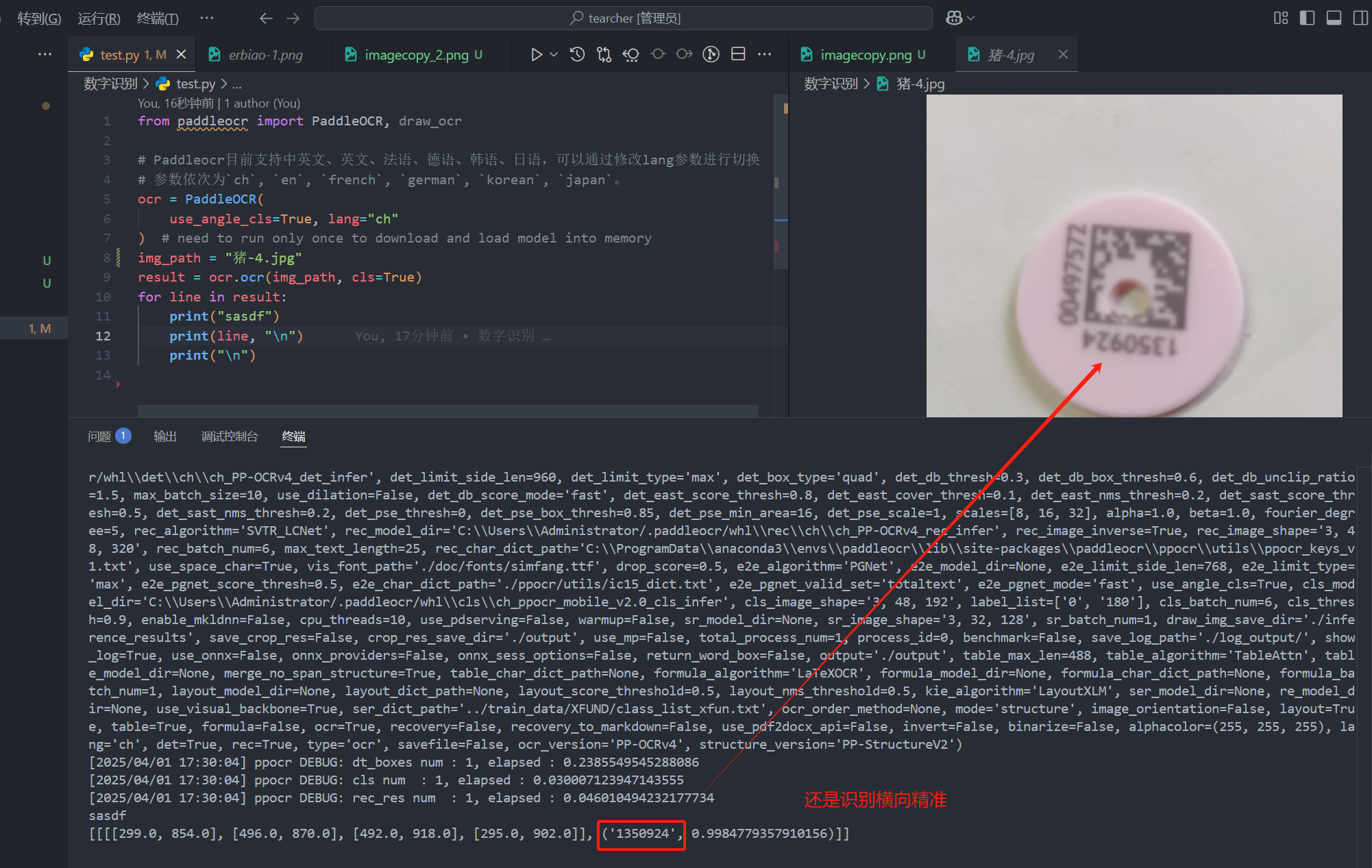
猪耳标的二维码被特殊定制了,因此无法正确扫码耳标的二维码,只能通过数字识别,获取猪耳标的信息。图片质量不太好的情况下只能识别横向的文字。
·
猪耳标
猪耳标的二维码被特殊定制了,因此无法正确扫码耳标的二维码,只能通过数字识别,获取猪耳标的信息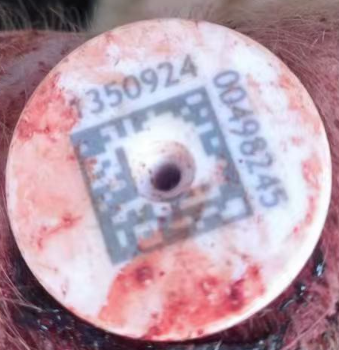
安装 paddleocr
python版本
(paddleocr) D:\work\ai\02-code\tearcher\数字识别>python
Python 3.9.21 (main, Dec 11 2024, 16:35:24) [MSC v.1929 64 bit (AMD64)] on win32
Type "help", "copyright", "credits" or "license" for more information.
>>>
pip安装各种包
pip install paddleocr
(paddleocr) D:\work\ai\02-code\tearcher\数字识别>pip list
Package                Version
---------------------- -----------
albucore               0.0.23
albumentations         2.0.5
annotated-types        0.7.0
anyio                  4.8.0
astor                  0.8.1
beautifulsoup4         4.13.3
certifi                2025.1.31
charset-normalizer     3.4.1
colorama               0.4.6
coloredlogs            15.0.1
contourpy              1.3.0
cycler                 0.12.1
Cython                 3.0.12
decorator              5.2.1
eval_type_backport     0.2.2
exceptiongroup         1.2.2
fire                   0.7.0
flatbuffers            25.2.10
fonttools              4.56.0
h11                    0.14.0
httpcore               1.0.7
httpx                  0.28.1
humanfriendly          10.0
idna                   3.10
imageio                2.37.0
imgaug                 0.4.0
importlib_resources    6.5.2
kiwisolver             1.4.7
lazy_loader            0.4
lmdb                   1.6.2
lxml                   5.3.1
matplotlib             3.9.4
mpmath                 1.3.0
networkx               3.2.1
numpy                  1.26.4
onnxruntime            1.19.2
opencv-contrib-python  4.6.0.66
opencv-python          4.6.0.66
opencv-python-headless 4.11.0.86
opt-einsum             3.3.0
packaging              24.2
paddle2onnx            1.3.1
paddleocr              2.10.0
paddlepaddle           2.6.2
pillow                 11.1.0
pip                    25.0
protobuf               3.20.2
pyclipper              1.3.0.post6
pydantic               2.10.6
pydantic_core          2.27.2
pyparsing              3.2.1
pyreadline3            3.5.4
python-dateutil        2.9.0.post0
python-docx            1.1.2
PyYAML                 6.0.2
RapidFuzz              3.12.2
requests               2.32.3
scikit-image           0.24.0
scipy                  1.13.1
setuptools             75.8.0
simsimd                6.2.1
six                    1.17.0
sniffio                1.3.1
some-package           0.1
soupsieve              2.6
stringzilla            3.12.3
sympy                  1.13.3
termcolor              2.5.0
tifffile               2024.8.30
tqdm                   4.67.1
typing_extensions      4.12.2
urllib3                2.3.0
wheel                  0.45.1
zipp                   3.21.0
测试
图片质量不太好的情况下只能识别横向的文字
代码如下:
from paddleocr import PaddleOCR, draw_ocr

# Paddleocr目前支持中英文、英文、法语、德语、韩语、日语,可以通过修改lang参数进行切换
# 参数依次为`ch`, `en`, `french`, `german`, `korean`, `japan`。
ocr = PaddleOCR(
    use_angle_cls=True, lang="ch"
)  # need to run only once to download and load model into memory
img_path = "imagecopy_2.png"
result = ocr.ocr(img_path, cls=True)
for line in result:
    print("sasdf")
    print(line, "\n")
    print("\n")
问题
问题1 模型位于中文路径
有些电脑的用户名是中文路径,那么如果python的版本又比较高,就会出现问题,比如下面
Traceback (most recent call last):
  File "D:\git\tearcher\数字识别\test.py", line 5, in <module>
    ocr = PaddleOCR(
        use_angle_cls=True, lang="ch"
    )  # need to run only once to download and load model into memory
  File "C:\Users\许文旭\AppData\Local\Programs\Python\Python313\Lib\site-packages\paddleocr\paddleocr.py", line 693, in __init__
    super().__init__(params)
    ~~~~~~~~~~~~~~~~^^^^^^^^
  File "C:\Users\许文旭\AppData\Local\Programs\Python\Python313\Lib\site-packages\paddleocr\tools\infer\predict_system.py", line 53, in __init__
    self.text_detector = predict_det.TextDetector(args)
                         ~~~~~~~~~~~~~~~~~~~~~~~~^^^^^^
  File "C:\Users\许文旭\AppData\Local\Programs\Python\Python313\Lib\site-packages\paddleocr\tools\infer\predict_det.py", line 139, in __init__
    ) = utility.create_predictor(args, "det", logger)
        ~~~~~~~~~~~~~~~~~~~~~~~~^^^^^^^^^^^^^^^^^^^^^
  File "C:\Users\许文旭\AppData\Local\Programs\Python\Python313\Lib\site-packages\paddleocr\tools\infer\utility.py", line 261, in create_predictor
    config = inference.Config(model_file_path, params_file_path)
RuntimeError: (NotFound) Cannot open file C:\Users\许文旭/.paddleocr/whl\det\ch\ch_PP-OCRv4_det_infer/inference.pdmodel, please confirm whether the file is normal.
  [Hint: Expected paddle::inference::IsFileExists(prog_file_) == true, but received paddle::inference::IsFileExists(prog_file_):0 != true:1.] (at ..\paddle\fluid\inference\api\analysis_config.cc:117)
通过修改代码,指定模型的路径,可以规避上述问题,代码如下
from paddleocr import PaddleOCR, draw_ocr

# Paddleocr目前支持中英文、英文、法语、德语、韩语、日语,可以通过修改lang参数进行切换
# 参数依次为`ch`, `en`, `french`, `german`, `korean`, `japan`。
ocr = PaddleOCR(
    use_angle_cls=True, lang="ch",
    det_model_dir=r"../model/whl/det/ch/ch_PP-OCRv4_det_infer",
    cls_model_dir=r"../model/whl/cls/ch_ppocr_mobile_v2.0_cls_infer",
    rec_model_dir=r"../model/whl/rec/ch/ch_PP-OCRv4_rec_infer"
)  # need to run only once to download and load model into memory
img_path = "猪-4.jpg"
result = ocr.ocr(img_path, cls=True)
for line in result:
    print("sasdf")
    print(line, "\n")
    print("\n")
问题2 C++库安装
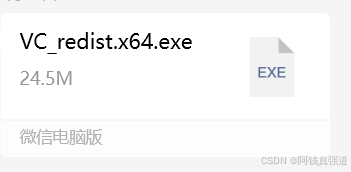
提示DLL无法安装,则需要安装一个C++的依赖库

火山引擎开发者社区是火山引擎打造的AI技术生态平台,聚焦Agent与大模型开发,提供豆包系列模型(图像/视频/视觉)、智能分析与会话工具,并配套评测集、动手实验室及行业案例库。社区通过技术沙龙、挑战赛等活动促进开发者成长,新用户可领50万Tokens权益,助力构建智能应用。
更多推荐
 15
15 0
0- 0


 已为社区贡献2条内容

所有评论(0)