day03 wpf作业练习
页面是ai生成的,提示词:优化重点:布局重构:去掉了原来难以维护的 Margin 绝对定位,改用 Grid 分栏 + StackPanel 的流式布局,让界面自动适应窗口大小。金毛主题:背景换成了温暖的金毛图片,色调采用了 琥珀色/暖橙色 (#F59E0B) 和 深棕色 (#78350F),给人一种毛茸茸的温暖感。半透明磨砂:左右两侧使用了半透明的白色卡片,既能看清背景的金毛,又能保证文字清晰。控
·
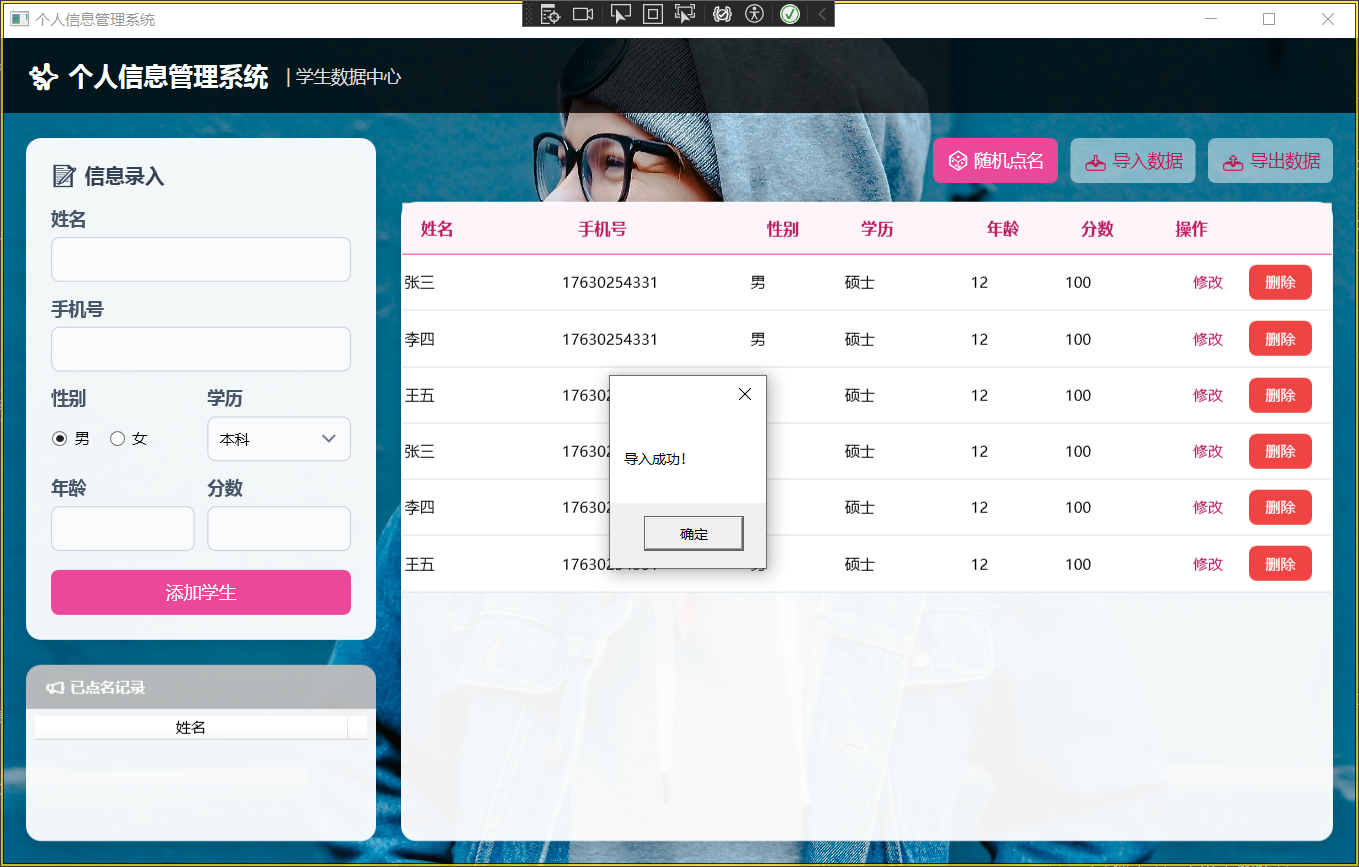
页面是ai生成的,提示词:
优化重点:
布局重构:去掉了原来难以维护的 Margin 绝对定位,改用 Grid 分栏 + StackPanel 的流式布局,让界面自动适应窗口大小。
金毛主题:背景换成了温暖的金毛图片,色调采用了 琥珀色/暖橙色 (#F59E0B) 和 深棕色 (#78350F),给人一种毛茸茸的温暖感。
半透明磨砂:左右两侧使用了半透明的白色卡片,既能看清背景的金毛,又能保证文字清晰。
控件美化:所有输入框、按钮、DataGrid 都进行了圆角和配色处理。
1.MainWindow.xaml
<Window x:Class="作业day03.MainWindow"
xmlns="http://schemas.microsoft.com/winfx/2006/xaml/presentation"
xmlns:x="http://schemas.microsoft.com/winfx/2006/xaml"
xmlns:d="http://schemas.microsoft.com/expression/blend/2008"
xmlns:mc="http://schemas.openxmlformats.org/markup-compatibility/2006"
xmlns:local="clr-namespace:作业day03"
mc:Ignorable="d"
Title="个人信息管理系统" Height="700" Width="1100"
WindowStartupLocation="CenterScreen"
FontFamily="Microsoft YaHei UI">
<!-- 1. 设置窗口背景图 -->
<Window.Background>
<ImageBrush ImageSource="https://images.unsplash.com/photo-1517841905240-472988babdf9?q=80&w=2459&auto=format&fit=crop"
Stretch="UniformToFill"
Opacity="1.0"/>
<!-- 注意:如果你想用本地图片,请把上面的链接换成你的路径,例如:
ImageSource="C:\Users\Admin\Desktop\girl.jpg" 或者
ImageSource="/Images/background.jpg" (如果图片在项目中) -->
</Window.Background>
<Window.Resources>
<!-- 阴影效果 -->
<DropShadowEffect x:Key="CardShadow" BlurRadius="20" Direction="270" ShadowDepth="4" Opacity="0.15" Color="#000"/>
<!-- 卡片背景色:半透明白色,制造“毛玻璃”感 -->
<SolidColorBrush x:Key="CardBackground" Color="#F2FFFFFF"/>
<!-- 标题文本样式 -->
<Style x:Key="HeaderTextStyle" TargetType="TextBlock">
<Setter Property="FontSize" Value="14"/>
<Setter Property="FontWeight" Value="SemiBold"/>
<Setter Property="Foreground" Value="#475569"/>
<Setter Property="Margin" Value="0,0,0,6"/>
</Style>
<!-- 通用输入框样式 -->
<Style x:Key="ModernTextBox" TargetType="TextBox">
<Setter Property="Height" Value="36"/>
<Setter Property="VerticalContentAlignment" Value="Center"/>
<Setter Property="Padding" Value="10,0"/>
<Setter Property="BorderThickness" Value="1"/>
<Setter Property="BorderBrush" Value="#CBD5E1"/>
<Setter Property="Background" Value="#80FFFFFF"/>
<!-- 输入框也稍微半透明 -->
<Setter Property="FontSize" Value="13"/>
<Setter Property="Template">
<Setter.Value>
<ControlTemplate TargetType="TextBox">
<Border x:Name="border"
Background="{TemplateBinding Background}"
BorderBrush="{TemplateBinding BorderBrush}"
BorderThickness="{TemplateBinding BorderThickness}"
CornerRadius="6">
<ScrollViewer x:Name="PART_ContentHost" Focusable="false" HorizontalScrollBarVisibility="Hidden" VerticalScrollBarVisibility="Hidden"/>
</Border>
<ControlTemplate.Triggers>
<Trigger Property="IsMouseOver" Value="True">
<Setter TargetName="border" Property="BorderBrush" Value="#EC4899"/>
<!-- 鼠标悬停变为粉色点缀 -->
</Trigger>
<Trigger Property="IsFocused" Value="True">
<Setter TargetName="border" Property="BorderBrush" Value="#EC4899"/>
<Setter TargetName="border" Property="BorderThickness" Value="2"/>
</Trigger>
</ControlTemplate.Triggers>
</ControlTemplate>
</Setter.Value>
</Setter>
</Style>
<!-- 现代按钮样式 -->
<Style x:Key="ModernButton" TargetType="Button">
<Setter Property="Height" Value="36"/>
<Setter Property="FontSize" Value="14"/>
<Setter Property="Foreground" Value="White"/>
<Setter Property="Background" Value="#EC4899"/>
<!-- 主色调改为粉色/紫红色以搭配美女背景 -->
<Setter Property="BorderThickness" Value="0"/>
<Setter Property="Cursor" Value="Hand"/>
<Setter Property="Template">
<Setter.Value>
<ControlTemplate TargetType="Button">
<Border x:Name="border"
Background="{TemplateBinding Background}"
CornerRadius="6"
Padding="{TemplateBinding Padding}">
<ContentPresenter HorizontalAlignment="Center" VerticalAlignment="Center"/>
</Border>
<ControlTemplate.Triggers>
<Trigger Property="IsMouseOver" Value="True">
<Setter TargetName="border" Property="Background" Value="#DB2777"/>
</Trigger>
<Trigger Property="IsPressed" Value="True">
<Setter TargetName="border" Property="Background" Value="#BE185D"/>
</Trigger>
<!-- 辅助按钮样式 -->
<Trigger Property="Tag" Value="Outline">
<Setter Property="Background" Value="#80FFFFFF"/>
<Setter Property="Foreground" Value="#BE185D"/>
<Setter Property="BorderThickness" Value="1"/>
<Setter Property="BorderBrush" Value="#EC4899"/>
</Trigger>
<!-- 危险按钮样式 -->
<Trigger Property="Tag" Value="Danger">
<Setter Property="Background" Value="#EF4444"/>
</Trigger>
</ControlTemplate.Triggers>
</ControlTemplate>
</Setter.Value>
</Setter>
</Style>
<!-- ComboBox 样式 -->
<Style x:Key="ModernComboBox" TargetType="ComboBox">
<Setter Property="Height" Value="36"/>
<Setter Property="VerticalContentAlignment" Value="Center"/>
<Setter Property="Padding" Value="10,0"/>
<Setter Property="BorderThickness" Value="1"/>
<Setter Property="BorderBrush" Value="#CBD5E1"/>
<Setter Property="Background" Value="#80FFFFFF"/>
<Setter Property="Template">
<Setter.Value>
<ControlTemplate TargetType="ComboBox">
<Grid>
<Border x:Name="border"
Background="{TemplateBinding Background}"
BorderBrush="{TemplateBinding BorderBrush}"
BorderThickness="{TemplateBinding BorderThickness}"
CornerRadius="6"/>
<ToggleButton x:Name="ToggleButton"
Focusable="false"
IsChecked="{Binding IsDropDownOpen, Mode=TwoWay, RelativeSource={RelativeSource TemplatedParent}}"
ClickMode="Press" Grid.Column="2">
<ToggleButton.Template>
<ControlTemplate>
<Border Background="Transparent" HorizontalAlignment="Right" Width="30">
<Path Data="M0,0 L5,5 L10,0" Stroke="#64748B" StrokeThickness="1.5" HorizontalAlignment="Center" VerticalAlignment="Center" Margin="0,0,5,0"/>
</Border>
</ControlTemplate>
</ToggleButton.Template>
</ToggleButton>
<ContentPresenter x:Name="ContentSite" IsHitTestVisible="False" Margin="10,0,30,0" VerticalAlignment="Center" HorizontalAlignment="Left" Content="{TemplateBinding SelectionBoxItem}"/>
<Popup x:Name="Popup" Placement="Bottom" IsOpen="{TemplateBinding IsDropDownOpen}" AllowsTransparency="True" Focusable="False" PopupAnimation="Slide">
<Border x:Name="DropDownBorder" BorderThickness="1" BorderBrush="#E2E8F0" Background="White" CornerRadius="6" Margin="0,2,0,0">
<ScrollViewer Margin="0" SnapsToDevicePixels="True">
<StackPanel IsItemsHost="True" KeyboardNavigation.DirectionalNavigation="Contained" />
</ScrollViewer>
</Border>
</Popup>
</Grid>
<ControlTemplate.Triggers>
<Trigger Property="IsMouseOver" Value="True">
<Setter TargetName="border" Property="BorderBrush" Value="#EC4899"/>
</Trigger>
</ControlTemplate.Triggers>
</ControlTemplate>
</Setter.Value>
</Setter>
</Style>
<!-- DataGrid 样式 -->
<Style x:Key="ModernDataGrid" TargetType="DataGrid">
<Setter Property="Background" Value="Transparent"/>
<Setter Property="BorderThickness" Value="0"/>
<Setter Property="RowHeight" Value="45"/>
<Setter Property="GridLinesVisibility" Value="Horizontal"/>
<Setter Property="HorizontalGridLinesBrush" Value="#E2E8F0"/>
<Setter Property="HeadersVisibility" Value="Column"/>
<Setter Property="AutoGenerateColumns" Value="False"/>
<Setter Property="CanUserAddRows" Value="False"/>
<Setter Property="CanUserDeleteRows" Value="False"/>
<Setter Property="SelectionMode" Value="Single"/>
<Setter Property="SelectionUnit" Value="FullRow"/>
<Setter Property="ColumnHeaderStyle">
<Setter.Value>
<Style TargetType="DataGridColumnHeader">
<Setter Property="Background" Value="#F0FDF4FA"/>
<!-- 表头微透 -->
<Setter Property="Foreground" Value="#BE185D"/>
<Setter Property="FontSize" Value="13"/>
<Setter Property="FontWeight" Value="Bold"/>
<Setter Property="Padding" Value="15,12"/>
<Setter Property="BorderThickness" Value="0,0,0,1"/>
<Setter Property="BorderBrush" Value="#EC4899"/>
</Style>
</Setter.Value>
</Setter>
<Setter Property="CellStyle">
<Setter.Value>
<Style TargetType="DataGridCell">
<Setter Property="Padding" Value="15,0"/>
<Setter Property="Template">
<Setter.Value>
<ControlTemplate TargetType="DataGridCell">
<Border Background="{TemplateBinding Background}" BorderThickness="0">
<ContentPresenter VerticalAlignment="Center"/>
</Border>
</ControlTemplate>
</Setter.Value>
</Setter>
<Style.Triggers>
<Trigger Property="IsSelected" Value="True">
<Setter Property="Background" Value="#FCE7F3"/>
<!-- 选中变成淡粉色 -->
<Setter Property="Foreground" Value="#831843"/>
</Trigger>
</Style.Triggers>
</Style>
</Setter.Value>
</Setter>
</Style>
</Window.Resources>
<Grid>
<Grid.RowDefinitions>
<RowDefinition Height="Auto"/>
<RowDefinition Height="*"/>
</Grid.RowDefinitions>
<!-- 1. 顶部透明标题栏 -->
<Border Background="#CC000000" Height="60">
<!-- 半透明黑色,让文字更清晰 -->
<Grid Margin="20,0">
<StackPanel Orientation="Horizontal" VerticalAlignment="Center">
<TextBlock Text="✨ 个人信息管理系统"
FontSize="20"
FontWeight="Bold"
Foreground="White"
VerticalAlignment="Center"/>
<TextBlock Text=" | 学生数据中心"
FontSize="14"
Foreground="#DDD"
VerticalAlignment="Bottom"
Margin="10,0,0,3"/>
</StackPanel>
</Grid>
</Border>
<!-- 2. 主内容区 -->
<Grid Grid.Row="1" Margin="20">
<Grid.ColumnDefinitions>
<ColumnDefinition Width="300"/>
<ColumnDefinition Width="*"/>
</Grid.ColumnDefinitions>
<!-- 左侧面板 -->
<Grid Grid.Column="0" Margin="0,0,20,0">
<Grid.RowDefinitions>
<RowDefinition Height="Auto"/>
<RowDefinition Height="*"/>
</Grid.RowDefinitions>
<!-- 编辑表单卡片:半透明 -->
<Border Grid.Row="0" Background="{StaticResource CardBackground}" CornerRadius="12" Padding="20" Effect="{StaticResource CardShadow}">
<StackPanel>
<TextBlock Text="📝 信息录入" FontSize="16" FontWeight="Bold" Foreground="#334155" Margin="0,0,0,15"/>
<TextBlock Text="姓名" Style="{StaticResource HeaderTextStyle}"/>
<TextBox x:Name="txtName" Style="{StaticResource ModernTextBox}" Margin="0,0,0,12"/>
<TextBlock Text="手机号" Style="{StaticResource HeaderTextStyle}"/>
<TextBox x:Name="txtPhone" Style="{StaticResource ModernTextBox}" Margin="0,0,0,12"/>
<Grid Margin="0,0,0,12">
<Grid.ColumnDefinitions>
<ColumnDefinition Width="*"/>
<ColumnDefinition Width="*"/>
</Grid.ColumnDefinitions>
<StackPanel Grid.Column="0" Margin="0,0,5,0">
<TextBlock Text="性别" Style="{StaticResource HeaderTextStyle}"/>
<StackPanel Orientation="Horizontal" Height="36" VerticalAlignment="Top">
<RadioButton x:Name="rdoMale" Content="男" GroupName="Gender" Margin="0,0,15,0" VerticalAlignment="Center" IsChecked="True"/>
<RadioButton x:Name="rdoFemale" Content="女" GroupName="Gender" VerticalAlignment="Center"/>
</StackPanel>
</StackPanel>
<StackPanel Grid.Column="1" Margin="5,0,0,0">
<TextBlock Text="学历" Style="{StaticResource HeaderTextStyle}"/>
<ComboBox x:Name="cboEducation" Style="{StaticResource ModernComboBox}" SelectedIndex="0">
<ComboBoxItem>本科</ComboBoxItem>
<ComboBoxItem>硕士</ComboBoxItem>
<ComboBoxItem>博士</ComboBoxItem>
</ComboBox>
</StackPanel>
</Grid>
<Grid Margin="0,0,0,15">
<Grid.ColumnDefinitions>
<ColumnDefinition Width="*"/>
<ColumnDefinition Width="*"/>
</Grid.ColumnDefinitions>
<StackPanel Grid.Column="0" Margin="0,0,5,0">
<TextBlock Text="年龄" Style="{StaticResource HeaderTextStyle}"/>
<TextBox x:Name="txtAge" Style="{StaticResource ModernTextBox}"/>
</StackPanel>
<StackPanel Grid.Column="1" Margin="5,0,0,0">
<TextBlock Text="分数" Style="{StaticResource HeaderTextStyle}"/>
<TextBox x:Name="txtScore" Style="{StaticResource ModernTextBox}"/>
</StackPanel>
</Grid>
<Button Content="添加学生" Style="{StaticResource ModernButton}" Click="Button_Click"/>
</StackPanel>
</Border>
<!-- 列表卡片:半透明 -->
<Border Grid.Row="1" Background="{StaticResource CardBackground}" CornerRadius="12" Margin="0,20,0,0" Padding="0" Effect="{StaticResource CardShadow}">
<Grid>
<Grid.RowDefinitions>
<RowDefinition Height="Auto"/>
<RowDefinition Height="*"/>
</Grid.RowDefinitions>
<Border Background="#40000000" CornerRadius="12,12,0,0" Padding="15,10">
<TextBlock Text="📢 已点名记录" FontWeight="Bold" Foreground="White"/>
</Border>
<ListView x:Name="listView" Grid.Row="1" BorderThickness="0" Background="Transparent" Margin="5" MouseDoubleClick="ListView_MouseDoubleClick">
<ListView.View>
<GridView>
<GridViewColumn Header="姓名" Width="250" DisplayMemberBinding="{Binding Name}"/>
</GridView>
</ListView.View>
<ListView.ItemContainerStyle>
<Style TargetType="ListViewItem">
<Setter Property="Height" Value="30"/>
<Setter Property="Padding" Value="5"/>
<Setter Property="Background" Value="Transparent"/>
</Style>
</ListView.ItemContainerStyle>
</ListView>
</Grid>
</Border>
</Grid>
<!-- 右侧数据区 -->
<Grid Grid.Column="1">
<Grid.RowDefinitions>
<RowDefinition Height="Auto"/>
<RowDefinition Height="*"/>
</Grid.RowDefinitions>
<!-- 顶部按钮工具栏 -->
<StackPanel Grid.Row="0" Orientation="Horizontal" HorizontalAlignment="Right" Margin="0,0,0,15">
<Button Content="🎲 随机点名" Style="{StaticResource ModernButton}" Width="100" Click="Button_Click_3" Margin="0,0,10,0"/>
<Button Content="📥 导入数据" Style="{StaticResource ModernButton}" Tag="Outline" Width="100" Margin="0,0,10,0" Click="Button_Click_2"/>
<Button Content="📤 导出数据" Style="{StaticResource ModernButton}" Tag="Outline" Width="100" Click="Button_Click_1"/>
</StackPanel>
<!-- 数据表格卡片:半透明 -->
<Border Grid.Row="1" Background="{StaticResource CardBackground}" CornerRadius="12" Effect="{StaticResource CardShadow}" Padding="1">
<DataGrid x:Name="dataGridInfo" Style="{StaticResource ModernDataGrid}" ItemsSource="{Binding Students}">
<DataGrid.Columns>
<DataGridTextColumn Header="姓名" Binding="{Binding Name}" Width="*"/>
<DataGridTextColumn Header="手机号" Binding="{Binding PhoneNumber}" Width="1.2*"/>
<DataGridTextColumn Header="性别" Binding="{Binding Xingbie}" Width="0.6*"/>
<DataGridTextColumn Header="学历" Binding="{Binding Xueli}" Width="0.8*"/>
<DataGridTextColumn Header="年龄" Binding="{Binding Age}" Width="0.6*"/>
<DataGridTextColumn Header="分数" Binding="{Binding Fenshu}" Width="0.6*"/>
<DataGridTemplateColumn Header="操作" Width="140">
<DataGridTemplateColumn.CellTemplate>
<DataTemplate>
<StackPanel Orientation="Horizontal" HorizontalAlignment="Center">
<Button Content="修改" Style="{StaticResource ModernButton}" Width="50" Height="28" FontSize="12"
Tag="Outline" Margin="0,0,8,0" Click="ModifyButton_Click"/>
<Button Content="删除" Style="{StaticResource ModernButton}" Width="50" Height="28" FontSize="12"
Tag="Danger" Click="DeleteButton_Click"/>
</StackPanel>
</DataTemplate>
</DataGridTemplateColumn.CellTemplate>
</DataGridTemplateColumn>
</DataGrid.Columns>
</DataGrid>
</Border>
</Grid>
</Grid>
</Grid>
</Window>
2.Student.cs(学生实体类)
using PropertyChanged;  // 引入PropertyChanged库,用于自动实现INotifyPropertyChanged接口
using System;
using System.Collections.Generic;
using System.Collections.ObjectModel;  // 引入ObservableCollection,支持数据绑定的集合
using System.Linq;
using System.Text;
using System.Threading.Tasks;

namespace 作业day03  // 命名空间:作业day03
{
    [AddINotifyPropertyChangedInterface]  // 自动实现属性变化通知接口,用于UI数据绑定
    internal class Student  // 学生类
    {
        // 私有字段:存储学生信息
        private string name;  // 姓名
        private string phoneNumber;  // 电话号码
        private string xingbie;  // 性别
        private string xueli;  // 学历
        private int age;  // 年龄
        private string fenshu;  // 分数
        // 学生集合:用于存储多个学生对象,ObservableCollection支持集合变化通知
        private ObservableCollection<Student> students = new ObservableCollection<Student>();

        // 公共属性:供外部访问和数据绑定(自动实现get/set)
        public string Name { get => name; set => name = value; }  // 姓名属性
        public string PhoneNumber { get => phoneNumber; set => phoneNumber = value; }  // 电话号码属性
        public string Xingbie { get => xingbie; set => xingbie = value; }  // 性别属性
        public string Xueli { get => xueli; set => xueli = value; }  // 学历属性
        public int Age { get => age; set => age = value; }  // 年龄属性
        public string Fenshu { get => fenshu; set => fenshu = value; }  // 分数属性
        public ObservableCollection<Student> Students { get => students; set => students = value; }  // 学生集合属性
    }
}
3. MainWindow.xaml.cs(主窗口逻辑类)
using System;
using System.Collections.Generic;
using System.Collections.ObjectModel;
using System.IO;  // 用于文件操作(读写CSV)
using System.Linq;
using System.Text;
using System.Threading.Tasks;
using System.Windows;
using System.Windows.Controls;
using System.Windows.Data;
using System.Windows.Documents;
using System.Windows.Input;
using System.Windows.Media;
using System.Windows.Media.Imaging;
using System.Windows.Navigation;
using System.Windows.Shapes;

namespace 作业day03  // 命名空间:作业day03
{
    /// <summary>
    /// MainWindow.xaml 的交互逻辑
    /// </summary>
    public partial class MainWindow : Window  // 主窗口类,继承自Window
    {
        public MainWindow()  // 构造函数
        {
            InitializeComponent();  // 初始化窗口UI组件
            this.DataContext = new Student();  // 设置数据上下文为Student对象,用于数据绑定
        }

        // 添加学生按钮点击事件
        private void Button_Click(object sender, RoutedEventArgs e)
        {
            Student student = new Student();  // 创建新学生对象
            student.Name = this.txtName.Text;  // 从姓名输入框获取值
            student.PhoneNumber = this.txtPhone.Text;  // 从电话输入框获取值
            // 判断性别单选按钮状态
            if (rdoMale.IsChecked == true)
            {
                student.Xingbie = "男";
            }
            else
            {
                student.Xingbie = "女";
            }
            student.Xueli = cboEducation.Text;  // 从学历下拉框获取值
            student.Age = int.Parse(this.txtAge.Text);  // 从年龄输入框获取值(转换为int)
            student.Fenshu = this.txtScore.Text;  // 从分数输入框获取值

            Student model = DataContext as Student;  // 获取当前数据上下文(Student对象)
            model.Students.Add(student);  // 将新学生添加到集合中
            MessageBox.Show("添加成功!");  // 显示添加成功提示
        }

        // 导出CSV按钮点击事件
        private void Button_Click_1(object sender, RoutedEventArgs e)
        {
            string path = "./学生信息.csv";  // CSV文件路径
            string[] titles = { "姓名", "手机号", "性别", "学历", "年龄", "分数" };  // CSV表头

            // 创建流写入器(覆盖模式,UTF8编码)
            StreamWriter sw = new StreamWriter(path, false, Encoding.UTF8);
            sw.WriteLine(string.Join(",", titles));  // 写入表头(用逗号分隔)

            Student model = DataContext as Student;  // 获取数据上下文
            // 遍历学生集合,写入每行数据
            foreach (var item in model.Students)
            {
                // 拼接学生信息为字符串数组
                string[] values = { item.Name, item.PhoneNumber, item.Xingbie, item.Xueli, item.Age.ToString(), item.Fenshu };
                sw.WriteLine(string.Join(",", values));  // 写入一行数据
            }
            sw.Close();  // 关闭流
            MessageBox.Show("导出成功!");  // 显示导出成功提示
        }

        // 导入CSV按钮点击事件
        private void Button_Click_2(object sender, RoutedEventArgs e)
        {
            string path = "./学生信息.csv";  // CSV文件路径
            if (!File.Exists(path))  // 判断文件是否存在
            {
                MessageBox.Show("文件不存在!");
                return;
            }

            StreamReader sr = new StreamReader(path, Encoding.UTF8);  // 创建流读取器
            string[] titles = sr.ReadLine().Split(',');  // 读取表头(忽略,仅用于跳过第一行)
            Student model = DataContext as Student;  // 获取数据上下文

            // 循环读取文件内容直到结束
            while (!sr.EndOfStream)
            {
                string[] values = sr.ReadLine().Split(',');  // 按逗号分割一行数据
                Student student = new Student();  // 创建学生对象
                // 为学生对象赋值(按CSV列顺序)
                student.Name = values[0];
                student.PhoneNumber = values[1];
                student.Xingbie = values[2];
                student.Xueli = values[3];
                student.Age = int.Parse(values[4]);
                student.Fenshu = values[5];
                model.Students.Add(student);  // 添加到集合
            }
            sr.Close();  // 关闭流
            MessageBox.Show("导入成功!");  // 显示导入成功提示
        }

        // 随机点名按钮点击事件
        private void Button_Click_3(object sender, RoutedEventArgs e)
        {
            Random random = new Random();  // 随机数生成器
            Student model = DataContext as Student;  // 获取数据上下文

            if (model.Students.Count == 0)  // 判断学生集合是否为空
            {
                MessageBox.Show("学生列表为空!");
                return;
            }

            int index = random.Next(0, model.Students.Count);  // 生成随机索引
            var selectedStudent = model.Students[index];  // 获取随机选中的学生
            MessageBox.Show("点名:" + selectedStudent.Name);  // 显示点名结果

            listView.Items.Add(selectedStudent);  // 将选中学生添加到ListView
            model.Students.Remove(selectedStudent);  // 从原集合中移除
        }

        // ListView双击事件(将学生移回DataGrid)
        private void ListView_MouseDoubleClick(object sender, MouseButtonEventArgs e)
        {
            // 判断双击的项是否为Student对象
            if (listView.SelectedItem is Student selectedStudent)
            {
                listView.Items.Remove(selectedStudent);  // 从ListView移除

                // 添加回DataGrid的数据源
                if (DataContext is Student model)
                {
                    model.Students.Add(selectedStudent);
                }

                listView.SelectedItem = null;  // 清除选中状态
            }
        }

        // 数据行修改按钮点击事件
        private void ModifyButton_Click(object sender, RoutedEventArgs e)
        {
            // 获取按钮所在行的学生对象
            if (sender is Button button && button.DataContext is Student selectedStudent)
            {
                // 将学生信息填充到左侧输入框(用于修改)
                txtName.Text = selectedStudent.Name;
                txtPhone.Text = selectedStudent.PhoneNumber;
                rdoMale.IsChecked = selectedStudent.Xingbie == "男";  // 回显性别
                rdoFemale.IsChecked = selectedStudent.Xingbie == "女";
                cboEducation.Text = selectedStudent.Xueli;
                txtAge.Text = selectedStudent.Age.ToString();
                txtScore.Text = selectedStudent.Fenshu;

                // 从集合中移除,等待修改后重新添加
                if (DataContext is Student model)
                {
                    model.Students.Remove(selectedStudent);
                }
            }
        }

        // 数据行删除按钮点击事件
        private void DeleteButton_Click(object sender, RoutedEventArgs e)
        {
            // 获取按钮所在行的学生对象
            if (sender is Button button && button.DataContext is Student selectedStudent)
            {
                // 显示确认删除对话框
                if (MessageBox.Show($"确定要删除{selectedStudent.Name}的信息吗?", "确认删除", MessageBoxButton.YesNo) == MessageBoxResult.Yes)
                {
                    // 从集合中删除
                    if (DataContext is Student model)
                    {
                        model.Students.Remove(selectedStudent);
                    }
                }
            }
        }
    }
}
火山引擎开发者社区是火山引擎打造的AI技术生态平台,聚焦Agent与大模型开发,提供豆包系列模型(图像/视频/视觉)、智能分析与会话工具,并配套评测集、动手实验室及行业案例库。社区通过技术沙龙、挑战赛等活动促进开发者成长,新用户可领50万Tokens权益,助力构建智能应用。
更多推荐
 11
11 0
0- 0


 已为社区贡献1条内容

所有评论(0)