从新手到上手:团队级 Git 工作流与分支速成
以下内容皆是基于你已经下好了Git之后进行的操作,如果还未下载好git,先下载好git再来进行以下内容的学习和操作。
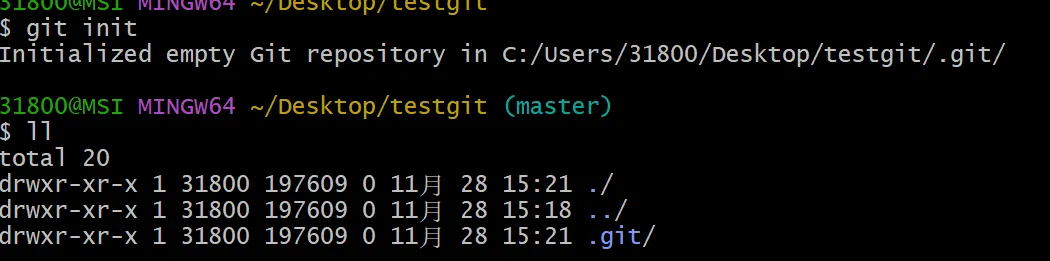
1.1 初始化
- 进入 任意一个目录中,点击右键打开
git bash - 执行
git init - 如果创建成功可以看见隐藏的.git目录
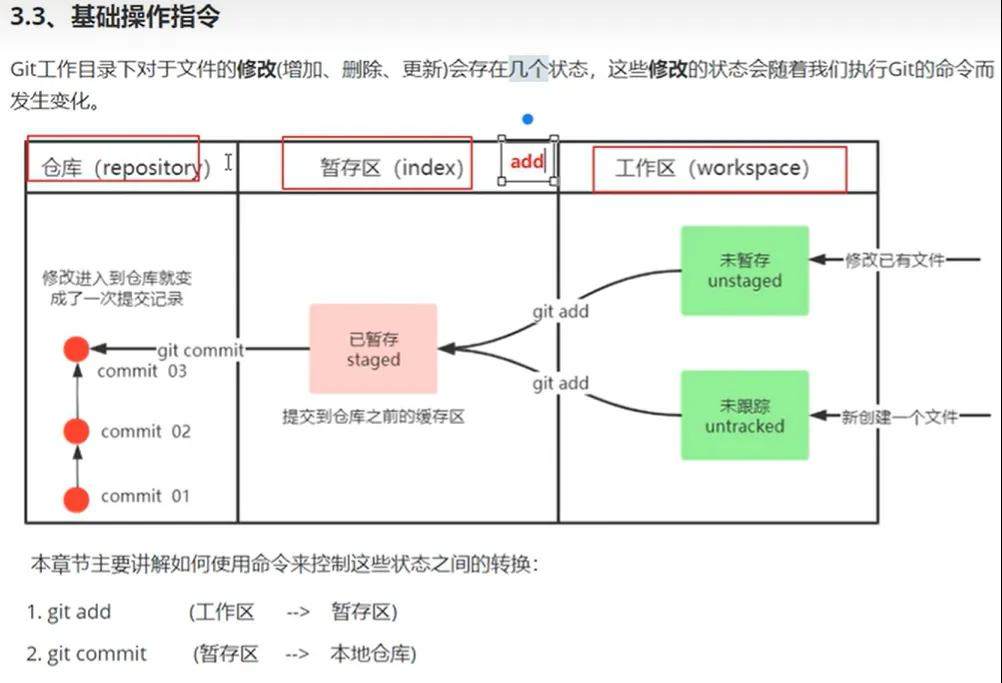
2.1 基础操作指令
2.2.1 查看修改的状态(status)
- 作用:查看修改的状态(暂存区,工作区)
- 命令形式:
git-status
执行 git status 时,它会给你三块核心情报:
-
哪些文件被修改但还没加入暂存区
这是典型的“未纳入发布计划的变更”,属于潜在风险资产。(如图一)
-
哪些文件已进入暂存区但还没 commit
这部分属于“待发布内容”,随时可以进入版本快照(如图二)。
-
哪些文件是未跟踪的(untracked)
通常是临时文件、测试产物,或是你忘了纳入版本控制的新文件(如图三)。
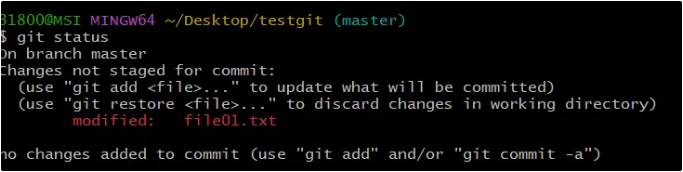
图一
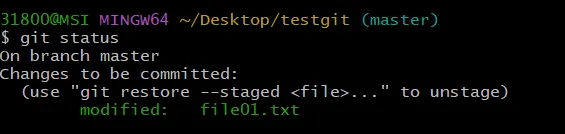
图二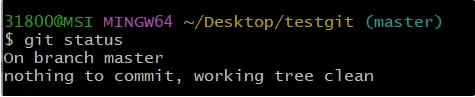
图三
2.2.2 从工作区添加到暂存区(add)
- 作用:添加工作区·的一个或多个文件的修改到暂存区
- 命令形式:
git add单个文件名|通配符- 将所有的修改加入暂存区:
git add .
- 将所有的修改加入暂存区:
2.2.3 提交暂存区到本地仓库(commit)
- 作用:提交暂存区的内容到本地仓库的当前分支
- 命令:
git commit -m”注释内容”
2.2.4 查看提交日志(log)
- 作用:查看提交记录
- 命令: git log [option]
- options
--all显示所有分支--pretty=online将提交信息显示为一行--addrev-commit使得输出的commited更简短--graph以图的形式显示
- options
2.2.5 版本回退
- 命令:
git reset --hard commitID- commitID可以用git log 或git-log来查看 (如果在切换后删除了之前的记录,可以使用git reflog来看自己的操作历史,从中找到要切换的版本)
- 作用:版本切换
31800@MSI MINGW64 ~/Desktop/testgit (master)
$ git log
commit 497ee5494dcd26952fff97f15266af530e2c7add (HEAD -> master)
Author: Flandern1211 <3180066912wzw@gmail.com>
Date:   Fri Nov 28 15:33:13 2025 +0800

    add file01
gi
31800@MSI MINGW64 ~/Desktop/testgit (master)
$ git reflog
497ee54 (HEAD -> master) HEAD@{0}: reset: moving to 497ee54
adae203 HEAD@{1}: commit: update 01
497ee54 (HEAD -> master) HEAD@{2}: commit (initial): add file01

31800@MSI MINGW64 ~/Desktop/testgit (master)
$ git reset --hard adae203
HEAD is now at adae203 update 01

31800@MSI MINGW64 ~/Desktop/testgit (master)
$ git log
commit adae203bc1be06fdadc4b6f472c7c2bf23b933a3 (HEAD -> master)
Author: Flandern1211 <3180066912wzw@gmail.com>
Date:   Fri Nov 28 15:38:54 2025 +0800

    update 01

commit 497ee5494dcd26952fff97f15266af530e2c7add
Author: Flandern1211 <3180066912wzw@gmail.com>
Date:   Fri Nov 28 15:33:13 2025 +0800

    add file01

31800@MSI MINGW64 ~/Desktop/testgit (master)
2.3 添加文件至忽略列表

31800@MSI MINGW64 ~/Desktop/testgit (master)
$ touch .gitignore

31800@MSI MINGW64 ~/Desktop/testgit (master)
$ vim .gitignore//在该文件写下你希望忽略的文件

31800@MSI MINGW64 ~/Desktop/testgit (master)
$ git status
On branch master
Untracked files:
  (use "git add <file>..." to include in what will be committed)
        .gitignore

nothing added to commit but untracked files present (use "git add" to track)

31800@MSI MINGW64 ~/Desktop/testgit (master)
3.1 分支
3.1.1 查看本地分支
- 命令:
git branch
31800@MSI MINGW64 ~/Desktop/testgit (master)
$ git branch
* master
3.1.2 创建本地分支
-
命令:
git branch 分支名分支的创建是基于当前状态,即提交完的文件的状态,而不是从零开始
3.1.3 切换分支(checkout)
- 命令:
git checkout 分支名
可以直接切换到一个不存在的分支(创建并切换)
git checkout -b 分支名
31800@MSI MINGW64 ~/Desktop/testgit (master)
$ git-log
* 1675e68 (HEAD -> master) add ignore file
* adae203 (dev01) update 01
* 497ee54 add file01

31800@MSI MINGW64 ~/Desktop/testgit (master)
$ git checkout master
Already on 'master'

31800@MSI MINGW64 ~/Desktop/testgit (master)
$ git checkout dev01
Switched to branch 'dev01'

31800@MSI MINGW64 ~/Desktop/testgit (dev01)
$ git-log
* 1675e68 (master) add ignore file
* adae203 (HEAD -> dev01) update 01
* 497ee54 add file01
3.1.4 合并分支
- 一个分支上的提交合并到另一个分支上
- 命令:git merge 分支名称
31800@MSI MINGW64 ~/Desktop/testgit (dev01)
$ git-log
* 1675e68 (master) add ignore file
* adae203 (HEAD -> dev01) update 01
* 497ee54 add file01

31800@MSI MINGW64 ~/Desktop/testgit (dev01)
#在dev01分支进行操作
$ touch file02.txt

31800@MSI MINGW64 ~/Desktop/testgit (dev01)
$ git add .

31800@MSI MINGW64 ~/Desktop/testgit (dev01)
$ git commit -m"add file02 branch-dev01"
[dev01 b58af2c] add file02 branch-dev01
 1 file changed, 0 insertions(+), 0 deletions(-)
 create mode 100644 file02.txt

#可以看到log的形式中dev01分支独立出来并显示进行了操作
31800@MSI MINGW64 ~/Desktop/testgit (dev01)
$ git-log
* b58af2c (HEAD -> dev01) add file02 branch-dev01
| * 1675e68 (master) add ignore file
|/
* adae203 update 01
* 497ee54 add file01

#默认合并到master分支
#所以合并时需要先切换到master分支
31800@MSI MINGW64 ~/Desktop/testgit (dev01)
$ git checkout master
Switched to branch 'master'

31800@MSI MINGW64 ~/Desktop/testgit (master)
$ git-log
* b58af2c (dev01) add file02 branch-dev01
| * 1675e68 (HEAD -> master) add ignore file
|/
* adae203 update 01
* 497ee54 add file01

#进行合并
31800@MSI MINGW64 ~/Desktop/testgit (master)
$ git merge dev01
Merge made by the 'ort' strategy.
 file02.txt | 0
 1 file changed, 0 insertions(+), 0 deletions(-)
 create mode 100644 file02.txt

31800@MSI MINGW64 ~/Desktop/testgit (master)
$ git-log

#显示出来的合并结果
*   d0cdc55 (HEAD -> master) Merge branch 'dev01'
|\
| * b58af2c (dev01) add file02 branch-dev01
* | 1675e68 add ignore file
|/
* adae203 update 01
* 497ee54 add file01

31800@MSI MINGW64 ~/Desktop/testgit (master)
3.1.5 删除分支
-
不能删除当前分支,只能删除其他分支
git branch -d b1 删除分支时,需要做各种检查(比如该分支是否提交,添加等)
git branch -D b1 不需要任何检查,强制删除(无论是否提交或添加)
3.2.1 解决冲突
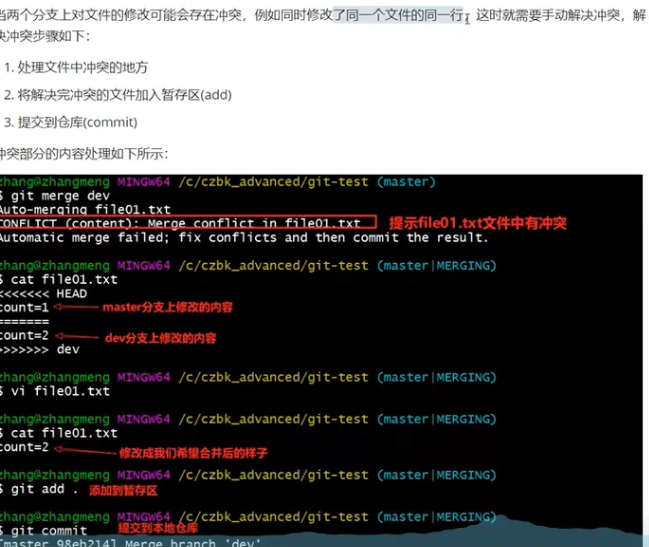
1800@MSI MINGW64 ~/Desktop/testgit (master)
$ git checkout -b dev
Switched to a new branch 'dev'

31800@MSI MINGW64 ~/Desktop/testgit (dev)
$ git-log
*   d0cdc55 (HEAD -> dev, master) Merge branch 'dev01'
|\
| * b58af2c add file02 branch-dev01
* | 1675e68 add ignore file
|/
* adae203 update 01
* 497ee54 add file01

31800@MSI MINGW64 ~/Desktop/testgit (dev)
$ ls
file01.txt  file02.txt

31800@MSI MINGW64 ~/Desktop/testgit (dev)
$ vim file01.txt

31800@MSI MINGW64 ~/Desktop/testgit (dev)
$ git checkout master ss
error: pathspec 'ss' did not match any file(s) known to git

31800@MSI MINGW64 ~/Desktop/testgit (dev)
$ git-log
*   d0cdc55 (HEAD -> dev, master) Merge branch 'dev01'
|\
| * b58af2c add file02 branch-dev01
* | 1675e68 add ignore file
|/
* adae203 update 01
* 497ee54 add file01

31800@MSI MINGW64 ~/Desktop/testgit (dev)
$ git status
On branch dev
Changes not staged for commit:
  (use "git add <file>..." to update what will be committed)
  (use "git restore <file>..." to discard changes in working directory)
        modified:   file01.txt

no changes added to commit (use "git add" and/or "git commit -a")

31800@MSI MINGW64 ~/Desktop/testgit (dev)
$ git add .

31800@MSI MINGW64 ~/Desktop/testgit (dev)
$ git commit -m"update 02 branch-dev"
[dev 733a129] update 02 branch-dev
 1 file changed, 2 insertions(+), 2 deletions(-)

31800@MSI MINGW64 ~/Desktop/testgit (dev)
$ git-log
* 733a129 (HEAD -> dev) update 02 branch-dev
*   d0cdc55 (master) Merge branch 'dev01'
|\
| * b58af2c add file02 branch-dev01
* | 1675e68 add ignore file
|/
* adae203 update 01
* 497ee54 add file01

31800@MSI MINGW64 ~/Desktop/testgit (dev)
$ git checkout master
Switched to branch 'master'

31800@MSI MINGW64 ~/Desktop/testgit (master)
$ ls
file01.txt  file02.txt

31800@MSI MINGW64 ~/Desktop/testgit (master)
$ vim file01.txt

31800@MSI MINGW64 ~/Desktop/testgit (master)
$ git add .

31800@MSI MINGW64 ~/Desktop/testgit (master)
$ git commit -m"update file01 03 branch-master"
[master 49d4724] update file01 03 branch-master
 1 file changed, 1 insertion(+), 1 deletion(-)

31800@MSI MINGW64 ~/Desktop/testgit (master)
$ git-log
* 49d4724 (HEAD -> master) update file01 03 branch-master
| * 733a129 (dev) update 02 branch-dev
|/
*   d0cdc55 Merge branch 'dev01'
|\
| * b58af2c add file02 branch-dev01
* | 1675e68 add ignore file
|/
* adae203 update 01
* 497ee54 add file01

31800@MSI MINGW64 ~/Desktop/testgit (master)
$ git merge dev
Auto-merging file01.txt
CONFLICT (content): Merge conflict in file01.txt
Automatic merge failed; fix conflicts and then commit the result.

31800@MSI MINGW64 ~/Desktop/testgit (master|MERGING)
$ ls
file01.txt  file02.txt

31800@MSI MINGW64 ~/Desktop/testgit (master|MERGING)
$ vim file01.txt

31800@MSI MINGW64 ~/Desktop/testgit (master|MERGING)
$ git-log
* 49d4724 (HEAD -> master) update file01 03 branch-master
| * 733a129 (dev) update 02 branch-dev
|/
*   d0cdc55 Merge branch 'dev01'
|\
| * b58af2c add file02 branch-dev01
* | 1675e68 add ignore file
|/
* adae203 update 01
* 497ee54 add file01

31800@MSI MINGW64 ~/Desktop/testgit (master|MERGING)
$ git status
On branch master
You have unmerged paths.
  (fix conflicts and run "git commit")
  (use "git merge --abort" to abort the merge)

Unmerged paths:
  (use "git add <file>..." to mark resolution)
        both modified:   file01.txt

no changes added to commit (use "git add" and/or "git commit -a")
g
31800@MSI MINGW64 ~/Desktop/testgit (master|MERGING)
$ git add .

31800@MSI MINGW64 ~/Desktop/testgit (master|MERGING)
$ git commit -m"update file01 3 for solve conflict"
[master 7386501] update file01 3 for solve conflict

31800@MSI MINGW64 ~/Desktop/testgit (master)
$ git-log
*   7386501 (HEAD -> master) update file01 3 for solve conflict
|\
| * 733a129 (dev) update 02 branch-dev
* | 49d4724 update file01 03 branch-master
|/
*   d0cdc55 Merge branch 'dev01'
|\
| * b58af2c add file02 branch-dev01
* | 1675e68 add ignore file
|/
* adae203 update 01
* 497ee54 add file01
3.3 开发中分支使用原则和流程
-
master(生产)分支
线上分支,主分支,中小规模项目作为线上运行的应用对应的分支;
-
develop (开发) 分支
是从master创建的分支,一般作为开发部门的主要开发分支,如果没有其他并行开发不同期上线要求,都可以在此版本进行开发,阶段开发完毕后,需要的是合并到master分支,准备上线。
-
feature/xxxxx分支
从develop创建的分支,一般是同期并行开发,但是不同期上线时创建的分支,分支上的研发任务完毕后合并到develop分支上。
-
hotfix/xxxx分支
从master派生的分支,一般作为线上bug修复使用,修复完需要合并到master,test,develop分支。
-
还有一些其他分支,比如test分支(用于测试代码),pre分支(预上线分支)等等。
注意:master和develop分支一般不会被删除,但feature可以被删除
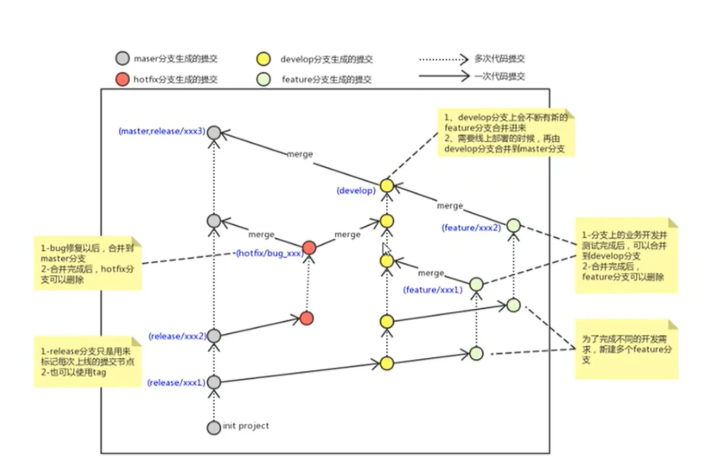
注意:合并的快进模式
- 如果只是修改一个在相同阶段上的一个分支,即如果修改dev01分支后,合并master和dev01分支,会发现并不是形成拱形结构显示合并,而是就像图二一样master分支向上移动了一样。
- 这是因为git的快进模式,master和dev01分支之前是相同的,只是修改一个dev01分支,master分支不改,master分支直接就成为dev01分支的状态就可以了。
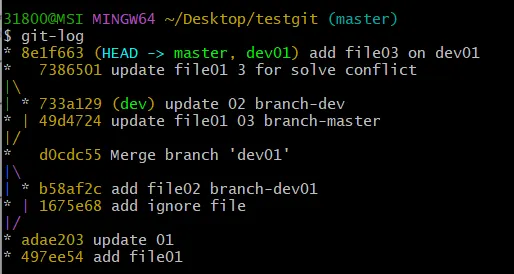
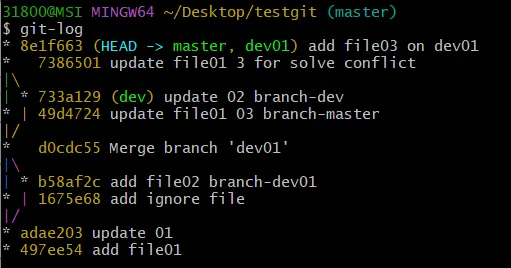
- 但如果是master和dev01都修改了之后合并,就会产生拱形结构显示合并。

中国智能体开发者社区,聚焦智能体与大模型开发,提供前沿资讯、实用工具链、开源项目及行业案例。通过技术沙龙、开发者大赛等活动,促进经验交流与协作,助力开发者快速构建创新智能应用。
更多推荐
 12
12 1
1- 0


 已为社区贡献2条内容

所有评论(0)