ES集群部署以及测试
Elasticsearch 就是一个「超级搜索器」,不管你数据有多少,它都能秒速找到你要的东西,还能帮你分析统计。🎯 实际生活例子淘宝搜索你搜:"红色 羽绒服 冬季服装"Elasticsearch 瞬间:1. 找到所有含"红色"的商品2. 再筛选"羽绒服"3. 再筛选"冬季服装"4. 按销量/价格排序返回微信文章搜索你搜:"Python 教程" Elasticsearch
简介
Elasticsearch 就是一个「超级搜索器」,不管你数据有多少,它都能秒速找到你要的东西,还能帮你分析统计。
🎯 实际生活例子
淘宝搜索
你搜:"红色 羽绒服 冬季服装"
Elasticsearch 瞬间:
1. 找到所有含"红色"的商品
2. 再筛选"羽绒服"
3. 再筛选"冬季服装"
4. 按销量/价格排序返回
微信文章搜索
你搜:"Python 教程" Elasticsearch 瞬间:
1. 标题含"Python"的文章
2. 内容含"教程"的文章
3. 按阅读量排序
4. 还能搜到"Pythn"(拼写纠错)
Elasticsearch 就是一个专门处理搜索和分析的超级数据库,特别擅长处理海量数据的实时检索和分析。
简单说:如果你需要快速搜索大量数据,就用 Elasticsearch!
环境配置
ES版本:8.13.4
JDK版本:使用es内嵌的jdk21,无需额外安装jdk环境
操作系统:Centos 7/9
| IP地址 | 主机名 | 角色 |
|---|---|---|
| 192.168.26.11 | es1 | master&data节点 |
| 192.168.26.12 | es2 | master&data节点 |
| 192.168.26.13 | es3 | master&data节点 |
以下操作在所有节点进行
创建用户
es不能使用root用户进行部署,故创建新用户管理es集群
# 添加一个用户  elasticsearch ,密码   elasticsearch
[root@es1 ~]# useradd elasticsearch && echo elasticsearch|passwd --stdin elasticsearch
# 添加一个用户 elasticsearch ,密码 elasticsearch
[root@es1 ~]# useradd elasticsearch && echo elasticsearch|passwd --stdin elasticsearch本地解析
[root@es1 ~]# vim /etc/hosts
# cat /etc/hosts
127.0.0.1   localhost localhost.localdomain localhost4 localhost4.localdomain4
::1         localhost localhost.localdomain localhost6 localhost6.localdomain6

192.168.26.8  filebeat
192.168.26.9  logstash
192.168.26.11 es1
192.168.26.12 es2
192.168.26.13 es3
192.168.26.14 kafka1
192.168.26.15 kafka2
192.168.26.16 kafka3
系统优化
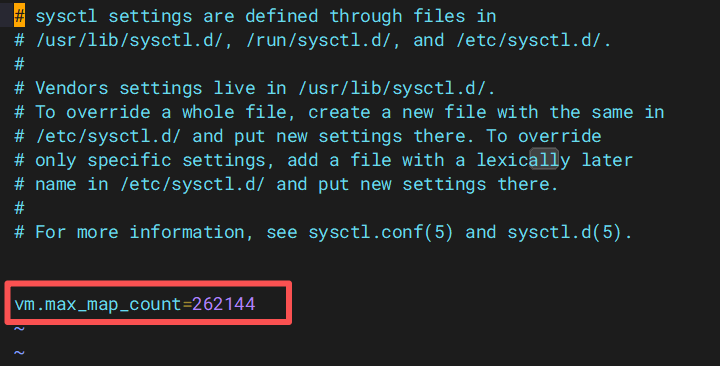
优化最大进程数,最大文件打开数,优化虚拟内存
[root@es1 ~]# vim /etc/security/limits.conf    #写在文件最下面就ok
* soft nofile 65536
* hard nofile 131072
* soft nproc 4096
* hard nproc 6553

[root@es1 ~]# vim /etc/sysctl.conf
vm.max_map_count=262144

[root@es1 ~]# sysctl -p 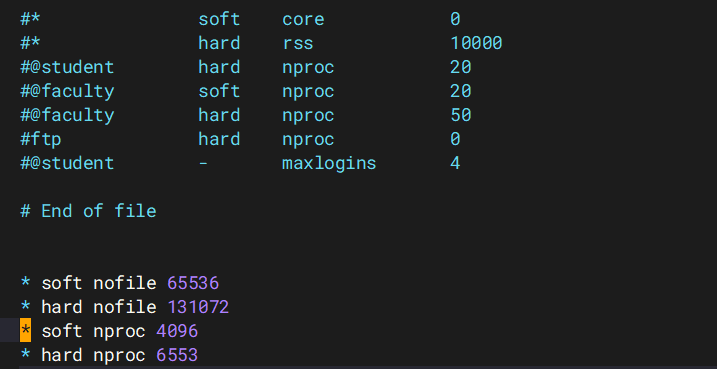
集群部署
1.获取安装包
官网获取
2.解压安装
位置:所有节点
[root@es1 ~]# tar -xf elasticsearch-8.13.4-linux-x86_64.tar.gz -C /usr/local
[root@es1 ~]# mv /usr/local/elasticsearch-8.13.4 /usr/local/es
[root@es1 ~]# chown -R elasticsearch.elasticsearch /usr/local/es
3.配置环境变量
位置:所有节点
[root@es1 ~]# vim /etc/profile
export JAVA_HOME=/usr/local/es/jdk
export ES_HOME=/usr/local/es
export PATH=$ES_HOME/bin:$JAVA_HOME/bin:$PATH

[root@es1 ~]# chmod +x /etc/profile
# 刷新环境变量
[root@es1 ~]# source /etc/profile
4.创建目录
位置:所有节点
目录用来存储数据和存放证书并赋予权限
[root@es1 ~]# mkdir -p /usr/local/es/data
[root@es1 ~]# mkdir -p /usr/local/es/config/certs
要求安装目录所有者和组都得是elasticsearch
[root@es1 ~]# chown -R elasticsearch:elasticsearch /usr/local/es
5.签发证书
位置:es1上操作
# 在第一台服务器节点 es1 设置集群多节点通信密钥
# 切换用户
[root@es1 ~]# su - elasticsearch
[elasticsearch@es1 ~]$ cd /usr/local/es/bin
[elasticsearch@es1 bin]$./elasticsearch-certutil ca

warning: ignoring JAVA_HOME=/usr/local/es/jdk; using bundled JDK
This tool assists you in the generation of X.509 certificates and certificate
signing requests for use with SSL/TLS in the Elastic stack.
The 'ca' mode generates a new 'certificate authority'
This will create a new X.509 certificate and private key that can be used
to sign certificate when running in 'cert' mode.

Use the 'ca-dn' option if you wish to configure the 'distinguished name'
of the certificate authority

By default the 'ca' mode produces a single PKCS#12 output file which holds:
    * The CA certificate
    * The CAs private key

If you elect to generate PEM format certificates (the -pem option), then the output will
be a zip file containing individual files for the CA certificate and private key

Please enter the desired output file [elastic-stack-ca.p12]: # 回车即可
Enter password for elastic-stack-ca.p12 :  # 回车即可

# 用 ca 证书签发节点证书,过程中需按三次回车键,生成目录:es的home:/usr/local/es/
[elasticsearch@es1 bin]$ ./elasticsearch-certutil cert --ca elastic-stack-ca.p12

If you specify any of the following options:
    * -pem (PEM formatted output)
    * -multiple (generate multiple certificates)
    * -in (generate certificates from an input file)
then the output will be be a zip file containing individual certificate/key files

Enter password for CA (elastic-stack-ca.p12) :  # 回车即可
Please enter the desired output file [elastic-certificates.p12]:  # 回车即可
Enter password for elastic-certificates.p12 :  # 回车即可

Certificates written to /usr/local/es/elastic-certificates.p12

This file should be properly secured as it contains the private key for
your instance.
This file is a self contained file and can be copied and used 'as is'
For each Elastic product that you wish to configure, you should copy
this '.p12' file to the relevant configuration directory
and then follow the SSL configuration instructions in the product guide.

For client applications, you may only need to copy the CA certificate and
configure the client to trust this certificate.

# 将生成的证书文件移动到 config/certs 目录中
[elasticsearch@es1 bin]$ cd /usr/local/es/
[elasticsearch@okd elasticsearch-8.11.0]$ ls -l | grep "elastic-"
-rw-------  1 elasticsearch elasticsearch   3596 Feb 10 16:05 elastic-certificates.p12
-rw-------  1 elasticsearch elasticsearch   2672 Feb 10 16:03 elastic-stack-ca.p12

[elasticsearch@es1 es]$ mv elastic-certificates.p12 config/certs/
[elasticsearch@es1 es]$ mv elastic-stack-ca.p12 config/certs/
# 在第一台服务器节点 es1 设置集群多节点通信密钥
# 切换用户
[root@es1 ~]# su - elasticsearch
[elasticsearch@es1 ~]$ cd /usr/local/es/bin
[elasticsearch@es1 bin]$ ./elasticsearch-certutil ca
warning: ignoring JAVA_HOME=/usr/local/es/jdk; using bundled JDK
This tool assists you in the generation of X.509 certificates and certificate
signing requests for use with SSL/TLS in the Elastic stack.
The 'ca' mode generates a new 'certificate authority'
This will create a new X.509 certificate and private key that can be used
to sign certificate when running in 'cert' mode.
Use the 'ca-dn' option if you wish to configure the 'distinguished name'
of the certificate authority
By default the 'ca' mode produces a single PKCS#12 output file which holds:
* The CA certificate
* The CAs private key
If you elect to generate PEM format certificates (the -pem option), then the output will
be a zip file containing individual files for the CA certificate and private key
Please enter the desired output file [elastic-stack-ca.p12]: # 回车即可
Enter password for elastic-stack-ca.p12 : # 回车即可
# 用 ca 证书签发节点证书,过程中需按三次回车键,生成目录:es的home:/usr/local/es/
[elasticsearch@es1 bin]$ ./elasticsearch-certutil cert --ca elastic-stack-ca.p12
If you specify any of the following options:
* -pem (PEM formatted output)
* -multiple (generate multiple certificates)
* -in (generate certificates from an input file)
then the output will be be a zip file containing individual certificate/key files
Enter password for CA (elastic-stack-ca.p12) : # 回车即可
Please enter the desired output file [elastic-certificates.p12]: # 回车即可
Enter password for elastic-certificates.p12 : # 回车即可
Certificates written to /usr/local/es/elastic-certificates.p12
This file should be properly secured as it contains the private key for
your instance.
This file is a self contained file and can be copied and used 'as is'
For each Elastic product that you wish to configure, you should copy
this '.p12' file to the relevant configuration directory
and then follow the SSL configuration instructions in the product guide.
For client applications, you may only need to copy the CA certificate and
configure the client to trust this certificate.
# 将生成的证书文件移动到 config/certs 目录中
[elasticsearch@es1 bin]$ cd /usr/local/es/
[elasticsearch@okd elasticsearch-8.11.0]$ ls -l | grep "elastic-"
-rw------- 1 elasticsearch elasticsearch 3596 Feb 10 16:05 elastic-certificates.p12
-rw------- 1 elasticsearch elasticsearch 2672 Feb 10 16:03 elastic-stack-ca.p12[elasticsearch@es1 es]$ mv elastic-certificates.p12 config/certs/
[elasticsearch@es1 es]$ mv elastic-stack-ca.p12 config/certs/
6.设置集群多节点HTTP证书
# 签发 Https 证书
[elasticsearch@es1 es]$ cd /usr/local/es/bin/
[elasticsearch@es1 bin]$ ./elasticsearch-certutil http
warning: ignoring JAVA_HOME=/usr/local/es/jdk; using bundled JDK

## Elasticsearch HTTP Certificate Utility
The 'http' command guides you through the process of generating certificates
for use on the HTTP (Rest) interface for Elasticsearch.
This tool will ask you a number of questions in order to generate the right
set of files for your needs.
## Do you wish to generate a Certificate Signing Request (CSR)?
A CSR is used when you want your certificate to be created by an existing
Certificate Authority (CA) that you do not control (that is, you do not have
access to the keys for that CA).
If you are in a corporate environment with a central security team, then you
may have an existing Corporate CA that can generate your certificate for you.
Infrastructure within your organisation may already be configured to trust this
CA, so it may be easier for clients to connect to Elasticsearch if you use a
CSR and send that request to the team that controls your CA.
If you choose not to generate a CSR, this tool will generate a new certificate
for you. That certificate will be signed by a CA under your control. This is a
quick and easy way to secure your cluster with TLS, but you will need to
configure all your clients to trust that custom CA.
######################################################
# 是否生成CSR,选择 N ,不需要                           #
######################################################
Generate a CSR? [y/N]N

## Do you have an existing Certificate Authority (CA) key-pair that you wish to use to sign your certificate?

If you have an existing CA certificate and key, then you can use that CA to
sign your new http certificate. This allows you to use the same CA across
multiple Elasticsearch clusters which can make it easier to configure clients,
and may be easier for you to manage.

If you do not have an existing CA, one will be generated for you.
######################################################
# 是否使用已经存在的CA证书,选择 y ,因为已经创建签发好了CA    #
######################################################
Use an existing CA? [y/N]y

## What is the path to your CA?
Please enter the full pathname to the Certificate Authority that you wish to
use for signing your new http certificate. This can be in PKCS#12 (.p12), JKS
(.jks) or PEM (.crt, .key, .pem) format.
######################################################
# 指定CA证书的路径地址,CA Path:后写绝对路径               #
######################################################
CA Path: /usr/local/es/config/certs/elastic-stack-ca.p12
Reading a PKCS12 keystore requires a password.
It is possible for the keystore's password to be blank,
in which case you can simply press <ENTER> at the prompt

######################################################
# 设置密钥库的密码,直接 回车 即可                         #
######################################################
Password for elastic-stack-ca.p12:

## How long should your certificates be valid?

Every certificate has an expiry date. When the expiry date is reached clients
will stop trusting your certificate and TLS connections will fail.
Best practice suggests that you should either:
(a) set this to a short duration (90 - 120 days) and have automatic processes
to generate a new certificate before the old one expires, or
(b) set it to a longer duration (3 - 5 years) and then perform a manual update
a few months before it expires.

You may enter the validity period in years (e.g. 3Y), months (e.g. 18M), or days (e.g. 90D)
######################################################
# 设置证书的失效时间,这里的y表示年,5y则代表失效时间5年       #
######################################################
For how long should your certificate be valid? [5y] 5y

## Do you wish to generate one certificate per node?

If you have multiple nodes in your cluster, then you may choose to generate a
separate certificate for each of these nodes. Each certificate will have its
own private key, and will be issued for a specific hostname or IP address.

Alternatively, you may wish to generate a single certificate that is valid
across all the hostnames or addresses in your cluster.

If all of your nodes will be accessed through a single domain
(e.g. node01.es.example.com, node02.es.example.com, etc) then you may find it
simpler to generate one certificate with a wildcard hostname (*.es.example.com)
and use that across all of your nodes.

However, if you do not have a common domain name, and you expect to add
additional nodes to your cluster in the future, then you should generate a
certificate per node so that you can more easily generate new certificates when
you provision new nodes.

######################################################
# 是否需要为每个节点都生成证书,选择 N 无需每个节点都配置证书   #
######################################################
Generate a certificate per node? [y/N]N

## Which hostnames will be used to connect to your nodes?
These hostnames will be added as "DNS" names in the "Subject Alternative Name"
(SAN) field in your certificate.
You should list every hostname and variant that people will use to connect to
your cluster over http.
Do not list IP addresses here, you will be asked to enter them later.

If you wish to use a wildcard certificate (for example *.es.example.com) you
can enter that here.

Enter all the hostnames that you need, one per line.
######################################################
# 输入需连接集群节点主机名信息,一行输入一个IP地址,空行回车结束 #
######################################################
When you are done, press <ENTER> once more to move on to the next step.

es1
es2
es3

You entered the following hostnames.

 - es1
 - es2
 - es3

####################################################
# 确认以上是否为正确的配置,输入 Y 表示信息正确            #
####################################################
Is this correct [Y/n]Y

## Which IP addresses will be used to connect to your nodes?
If your clients will ever connect to your nodes by numeric IP address, then you
can list these as valid IP "Subject Alternative Name" (SAN) fields in your
certificate.

If you do not have fixed IP addresses, or not wish to support direct IP access
to your cluster then you can just press <ENTER> to skip this step.

Enter all the IP addresses that you need, one per line.
####################################################
# 输入需连接集群节点IP信息,一行输入一个IP地址,空行回车结束 #
####################################################
When you are done, press <ENTER> once more to move on to the next step.

192.168.26.11
192.168.26.12
192.168.26.13

You entered the following IP addresses.

  - 192.168.26.11
  - 192.168.26.12
  - 192.168.26.13

####################################################
# 确认以上是否为正确的配置,输入 Y 表示信息正确            #
####################################################
Is this correct [Y/n]Y

## Other certificate options
The generated certificate will have the following additional configuration
values. These values have been selected based on a combination of the
information you have provided above and secure defaults. You should not need to
change these values unless you have specific requirements.

Key Name: es1
Subject DN: CN=es1
Key Size: 2048

####################################################
# 是否要更改以上这些选项,选择 N ,不更改证书选项配置       #
####################################################
Do you wish to change any of these options? [y/N]N

## What password do you want for your private key(s)?

Your private key(s) will be stored in a PKCS#12 keystore file named "http.p12".
This type of keystore is always password protected, but it is possible to use a
blank password.

####################################################
# 是否要给证书加密,不需要加密,两次 回车 即可             #
####################################################
If you wish to use a blank password, simply press <enter> at the prompt below.
Provide a password for the "http.p12" file:  [<ENTER> for none]

## Where should we save the generated files?
A number of files will be generated including your private key(s),
public certificate(s), and sample configuration options for Elastic Stack products.
These files will be included in a single zip archive.
What filename should be used for the output zip file? [/usr/local/es/elasticsearch-ssl-http.zip]
Zip file written to /usr/local/es/elasticsearch-ssl-http.zip
7.分发证书
# 解压
[elasticsearch@es1 bin]$ cd /usr/local/es/
[elasticsearch@es1 es]$ unzip elasticsearch-ssl-http.zip
# 移动证书
[elasticsearch@es1 es]$ mv ./elasticsearch/http.p12 config/certs/
[elasticsearch@es1 es]$ mv ./kibana/elasticsearch-ca.pem config/certs/

# 将证书分发到其他节点02 03
[elasticsearch@es1 es]$ cd /usr/local/es/config/certs
[elasticsearch@es1 certs]$ ll
total 16
-rw------- 1 elasticsearch elasticsearch 3596 Feb 10 16:05 elastic-certificates.p12
-rw-rw-r-- 1 elasticsearch elasticsearch 1200 Feb 10 16:13 elasticsearch-ca.pem
-rw------- 1 elasticsearch elasticsearch 2672 Feb 10 16:03 elastic-stack-ca.p12
-rw-rw-r-- 1 elasticsearch elasticsearch 3652 Feb 10 16:13 http.p12
[elasticsearch@es1 certs]$ scp * es2:/usr/local/es/config/certs/
[elasticsearch@es1 certs]$ scp * es3:/usr/local/es/config/certs/
8.修改配置
修改完把此配置文件拷贝给2和3并且修改节点名称
[elasticsearch@es1 certs]$ cd /usr/local/es/config/
[elasticsearch@es1 config]$ vim elasticsearch.yml
cluster.name: escluster
node.name: es1
path.data: /usr/local/es/data
path.logs: /usr/local/es/logs
network.host: 0.0.0.0
http.port: 9200
# 种子主机,在选举时用于发现其他主机的,最好配置多个
discovery.seed_hosts: ["es1","es2","es3"]
cluster.initial_master_nodes: ["es1","es2","es3"]
xpack.security.enabled: true # 启用X-Pack安全特性,提供认证、授权、加密传输等功能,增强ES的安全性。
xpack.security.enrollment.enabled: true
xpack.security.http.ssl:
 enabled: true
 keystore.path: /usr/local/es/config/certs/http.p12
 keystore.password: 123456  #如果生成证书时设置了密码则要添加密码配置,没有密码删除此行
 truststore.path: /usr/local/es/config/certs/http.p12
 truststore.password: 123456 #如果生成证书时设置了密码则要添加密码配置,没有密码删除此行
xpack.security.transport.ssl:
 enabled: true
 verification_mode: certificate
 keystore.path: /usr/local/es/config/certs/elastic-certificates.p12
 keystore.password: 123456  #如果生成证书时设置了密码则要添加密码配置
 truststore.path: /usr/local/es/config/certs/elastic-certificates.p12
 truststore.password: 123456 #如果生成证书时设置了密码则要添加密码配置
http.host: [_local_, _site_] # 指定HTTP服务可以绑定的主机名,_local_表示绑定本地主机,_site_允许绑定所有公开站点地址。
ingest.geoip.downloader.enabled: false  # 禁用GeoIP数据库自动下载功能。GeoIP用于地理定位
xpack.security.http.ssl.client_authentication: none # 设置客户端认证方式为"无",意味着HTTP客户端连接到Elasticsearch时不需要提供证书进行认证。
###注意我的注释
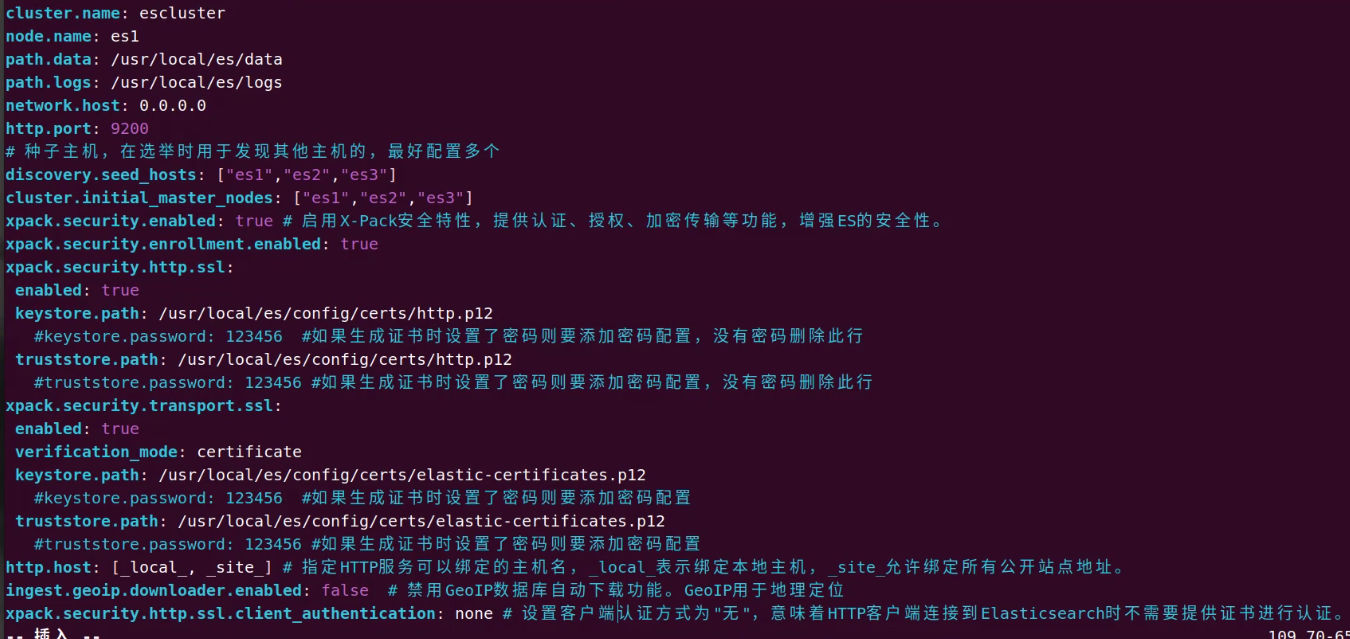
注意:
1.xpack.security.http.ssl和xpack.security.transport.ssl后的子配置需要空一格,遵循yml的格式要求
2.如果不需要后续的http证书认证或者用户密码认证可以将以下参数的值改为false
xpack.security.http.ssl:
 enabled: false
xpack.security.transport.ssl:
 enabled: false
3.如果后续在业务场景中遇到了跨域的问题,解决跨域的问题添加以下参数
http.cors.enabled: true
http.cors.allow-origin: "*"
9.JVM参数调整
所有节点
###注意顶格宝贝们
[elasticsearch@es1 config]$ vim jvm.options
-Xms2g
-Xmx2g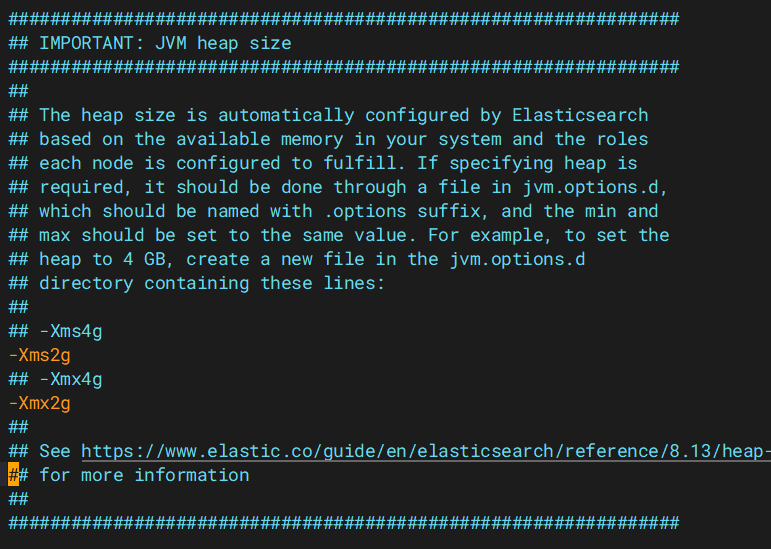
注意:该值为真实内存的1/2
10.启动集群
位置:es2
位置:es3
来到es2跟es3的root账户
[root@es2 ~]# chown -R elasticsearch.elasticsearch /usr/local/es[root@es2 ~]# chown -R elasticsearch.elasticsearch /usr/local/es位置:所有
注意:使用普通账户启动,并且启动前检查所有config目录下的所有者是否s
[elasticsearch@es1 es]$ nohup  /usr/local/es/bin/elasticsearch  &
[elasticsearch@es2 es]$ nohup  /usr/local/es/bin/elasticsearch  &
[elasticsearch@es3 es]$ nohup  /usr/local/es/bin/elasticsearch  &

启动完成后使用如下命令查看启动日志
# tail -f nohup.out

可使用api检查 Elasticsearch 节点状态
# curl -k -u elastic:123456 -X GET "https://localhost:9200/_cat/nodes?v"
ip            heap.percent ram.percent cpu load_1m load_5m load_15m node.role   master name
192.168.26.12           29          81   0    0.04    0.03     0.00 cdfhilmrstw *      es2
192.168.26.11           23          81   1    0.04    0.08     0.03 cdfhilmrstw -      es1
192.168.26.13           51          81   0    0.00    0.02     0.00 cdfhilmrstw -      es3
如果没有创建elastic账户就是出现下面的内容,说明成功了

11.设置登录密码
# 手工指定elastic的新密码 (-i参数)
[elasticsearch@okd ~]$ /usr/local/es/bin/elasticsearch-reset-password -u elastic -i
warning: ignoring JAVA_HOME=/usr/local/es/jdk; using bundled JDK
bThis tool will reset the password of the [elastic] user.
You will be prompted to enter the password.
Please confirm that you would like to continue [y/N]y
Did not understand answer 'by'
Please confirm that you would like to continue [y/N]y

Enter password for [elastic]: 123456 # 输入用户elastic的密码
Re-enter password for [elastic]: 123456 # 输入用户elastic的密码
Password for the [elastic] user successfully reset.
12.集群可用性测试
**使用REST API测试**
# curl -k -u elastic:123456 -X GET "https://localhost:9200"
{
  "name" : "es1",
  "cluster_name" : "escluster",
  "cluster_uuid" : "3P2b9fYkRNa43-bARU60sw",
  "version" : {
    "number" : "8.14.1",
    "build_flavor" : "default",
    "build_type" : "tar",
    "build_hash" : "93a57a1a76f556d8aee6a90d1a95b06187501310",
    "build_date" : "2024-06-10T23:35:17.114581191Z",
    "build_snapshot" : false,
    "lucene_version" : "9.10.0",
    "minimum_wire_compatibility_version" : "7.17.0",
    "minimum_index_compatibility_version" : "7.0.0"
  },
  "tagline" : "You Know, for Search"
}
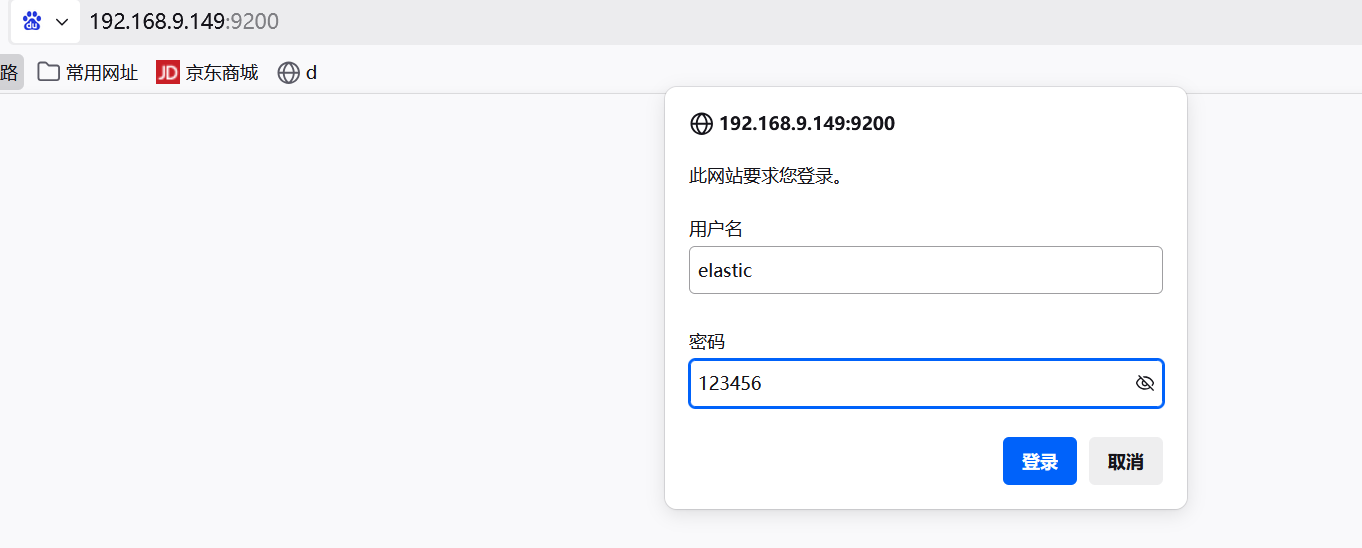
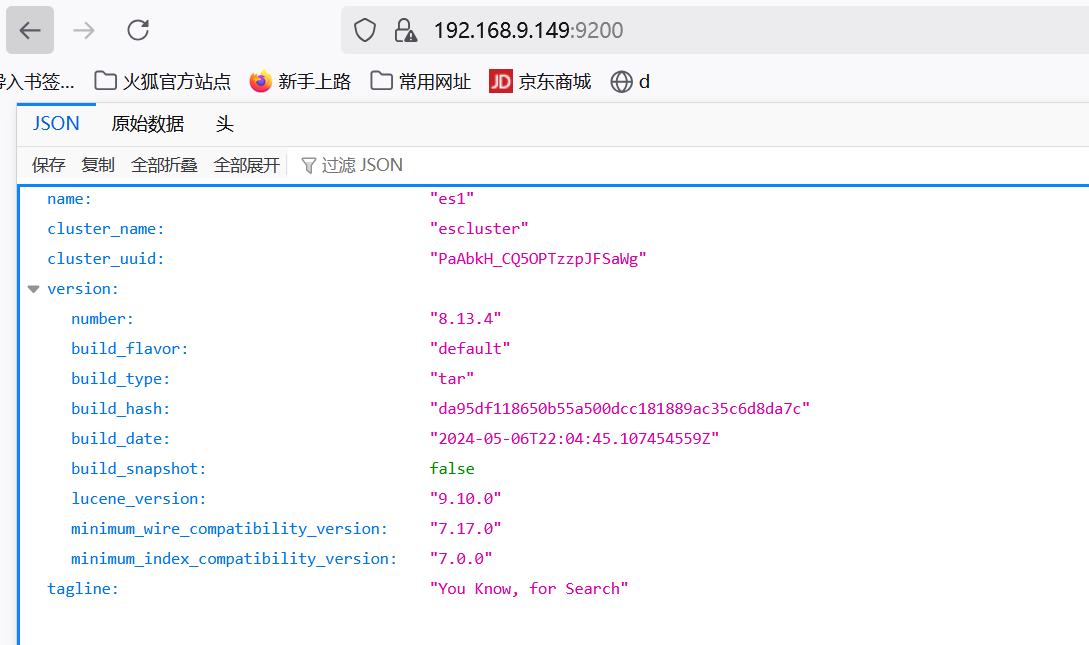
浏览器测试访问
我的浏览器有解析,你的有吗,没有的话就乖乖用ip地址哦
账户密码为:elastic 密码自己设定的
先使用ip地址试验一下
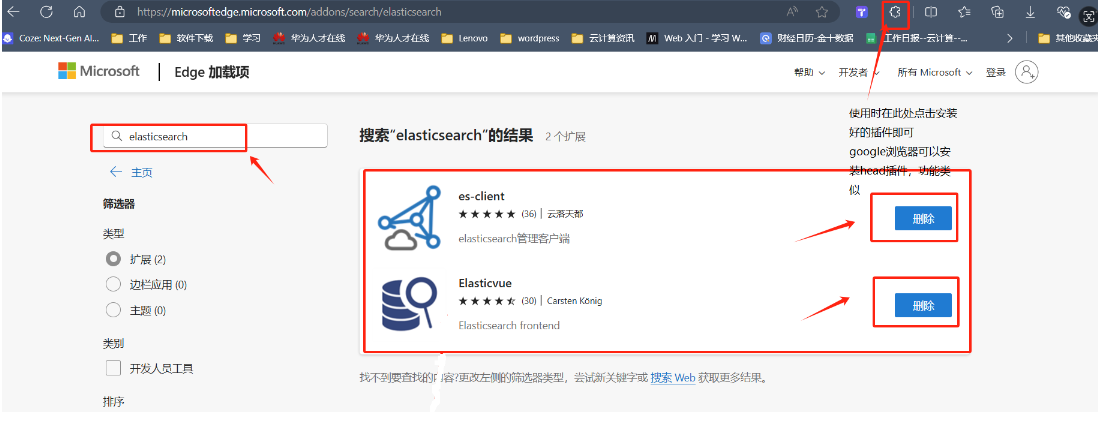
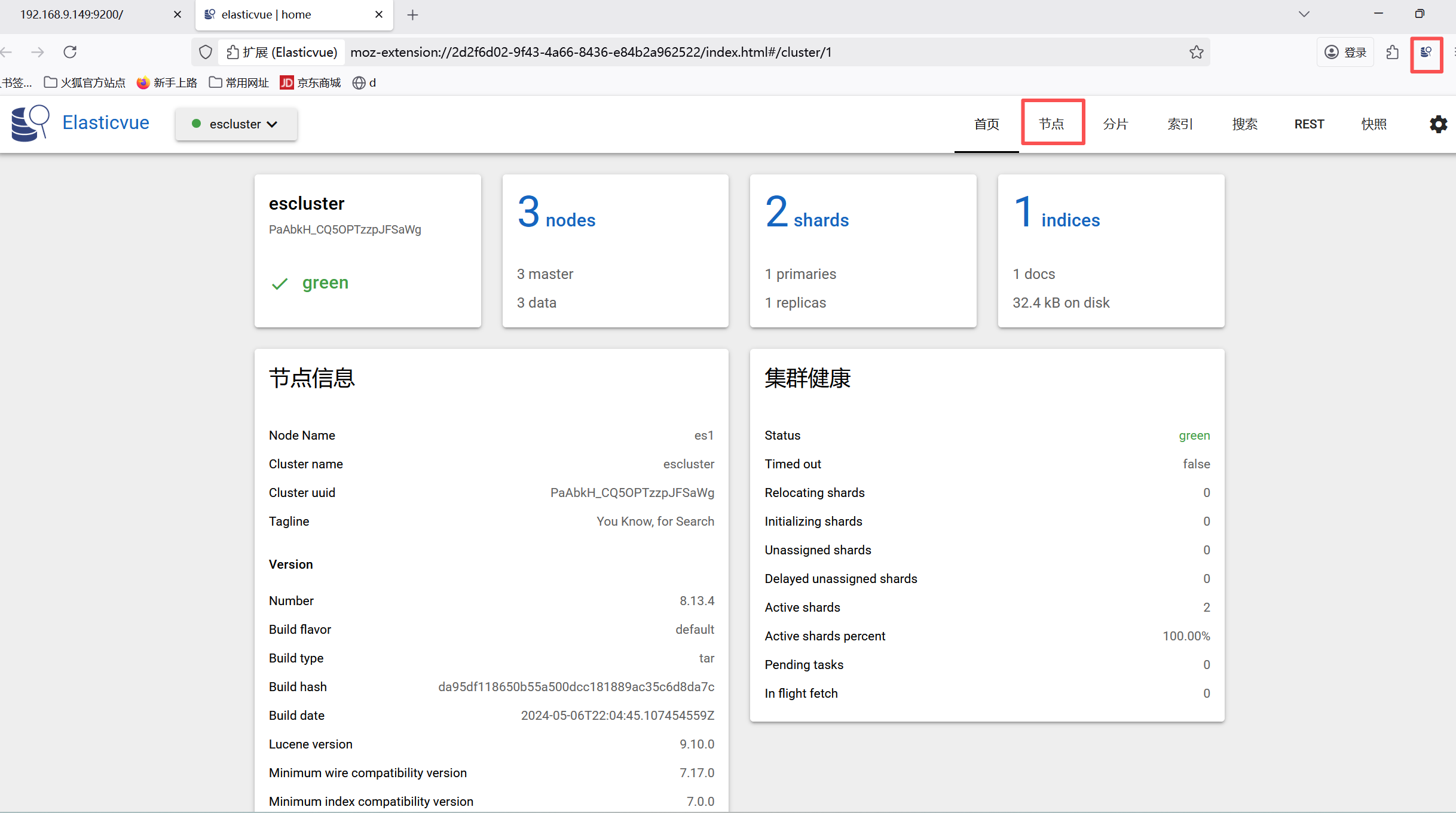
客户端插件测试访问

火山引擎开发者社区是火山引擎打造的AI技术生态平台,聚焦Agent与大模型开发,提供豆包系列模型(图像/视频/视觉)、智能分析与会话工具,并配套评测集、动手实验室及行业案例库。社区通过技术沙龙、挑战赛等活动促进开发者成长,新用户可领50万Tokens权益,助力构建智能应用。
更多推荐
 34
34 0
0- 0


 已为社区贡献3条内容

所有评论(0)