RAPTOR技术革命:构建智能知识树,让RAG性能提升70%,开启知识检索新纪元!
RAPTOR是一种递归抽象处理技术,通过构建层次化知识索引,将RAG系统从简单文档块检索升级为类似人脑的知识组织方式。它通过聚类抽象、LLM总结和递归构建,将原始文档块组织成包含多粒度信息的知识树,大幅提升检索性能,减少Token使用量达70%,有效解决大型知识库的精准定位和上下文理解问题,为RAG技术带来革命性改进。
简介
RAPTOR是一种递归抽象处理技术,通过构建层次化知识索引,将RAG系统从简单文档块检索升级为类似人脑的知识组织方式。它通过聚类抽象、LLM总结和递归构建,将原始文档块组织成包含多粒度信息的知识树,大幅提升检索性能,减少Token使用量达70%,有效解决大型知识库的精准定位和上下文理解问题,为RAG技术带来革命性改进。
你或许已经对 RAG (Retrieval Augmented Generation,检索增强生成) 这个词耳熟能详。它就像一个超级大脑,能让大语言模型(LLM)通过检索外部知识,回答那些训练时没“见过”的问题。从简单的问答机器人到复杂的知识库助手,RAG的应用无处不在。
然而,RAG也并非完美无缺。随着你提供的知识库越来越庞大,问题也随之而来:
- 知识库里信息太多,怎么精准定位到最相关的几条?
- 那些看似无关但实则紧密相连的“上下文”怎么办?
- 当一个概念被不同的人用不同的方式描述时,如何让RAG把它们“认出来”?
我们通常会用各种优化技巧来解决这些问题:查询转换、重排模型、多路检索……但每增加一层,系统就变得更复杂,调用LLM的次数也越多,整个架构像搭积木一样,摇摇欲坠。
那么,有没有一种方法,能从源头解决问题,不增加查询时的复杂性,而是让知识库本身就变得更“聪明”?
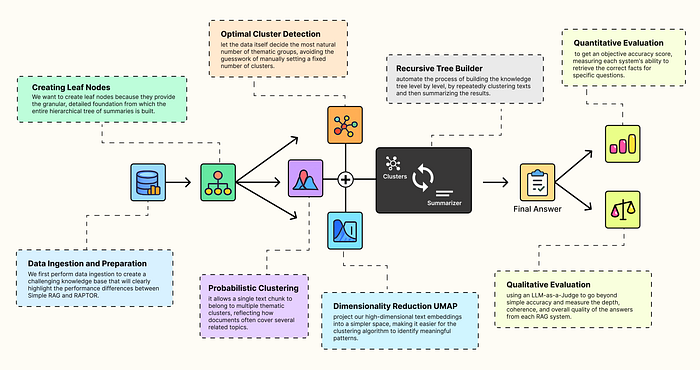
这正是 RAPTOR (Recursive Abstractive Processing for Tree-Organized Retrieval,递归抽象处理树形组织检索) 管道的核心思想。它不改变你查询的方式,而是通过构建一个层次化的索引,让知识库像人脑一样,从细节到高层概念,逐层理解和组织信息。
这个方法到底有多神?它能在不增加查询复杂度的前提下,大幅提升检索性能,甚至可能让你的RAG系统少用70%的Token,从而节省计算和金钱成本。
今天,我们就来深入剖析 RAPTOR,看看它是如何通过一个巧妙的“递归抽象”过程,构建出“聪明”的知识索引,从而彻底颠覆传统RAG。
一、RAPTOR:从“叶子”到“树干”,构建智慧知识库
简单来说,RAPTOR 就像一个图书馆管理员,但它不只是简单地把书本(文档)堆在一起,而是先将书本拆解,然后根据主题归类,再为每类主题写摘要,最后把这些摘要和原始书页一起整理成一本“精要合集”。
这个过程可以拆解为几个核心步骤:
- 创建“叶节点”:首先,将所有原始文档切分成一个个小而详细的文本块。这些文本块就像一棵大树的“叶子”,是知识最基本的组成单元。传统的 RAG 检索通常只停留在这一步,直接对这些“叶子”进行向量化并搜索。
- 聚类抽象:接下来,利用机器学习聚类算法,将语义相关的“叶子”自动分组。比如,所有讨论“模型训练参数”的叶子,都会被分到同一组。
- LLM总结:使用LLM为每个聚类生成一个简洁、高质量的摘要。这些摘要成了这棵知识树的下一个更高层级的“分支”。它概括了本组“叶子”的核心思想。
- 递归向上:重复步骤2和3。对新生成的摘要进行聚类和总结,不断向上构建,直到到达一个能代表整个文档库最高层概念的“根节点”。
- 索引全部:最后,将所有内容——原始的“叶节点”和所有生成的摘要——全部索引到一个向量数据库中。这样,检索时就能在一个“多分辨率”的知识库中进行搜索。
这个“从下到上”的构建过程,让 RAPTOR 管道能够处理不同粒度的查询。当用户问一个具体问题时,它可以检索到精确的“叶子”;当用户问一个宏观概念时,它可以直接检索到高层级的摘要,避免“只见树叶不见森林”的问题。
接下来,我们将通过一个真实的案例——使用Hugging Face的官方文档来构建知识库——来深入探究 RAPTOR 的强大之处。
二、配置RAG环境:准备工作
为了公平地评估 RAPTOR 的性能,我们选择使用一年前发布的、经过量化的旧模型,而不是最新的LLM。这样做的目的是为了确保评估真正考验的是检索质量,而不是模型本身是否“知道”答案。
首先,让我们导入所需的库并配置好 LLM 和 Embedding 模型。
# Import the core PyTorch library for tensor operationsimport torch# Import LangChain's wrappers for Hugging Face modelsfrom langchain_huggingface import HuggingFaceEmbeddings, HuggingFacePipeline# Import core components from the transformers library for model loading and configurationfrom transformers import AutoModelForCausalLM, AutoTokenizer, pipeline, BitsAndBytesConfig# Import LangChain's tools for prompt engineering and output handlingfrom langchain_core.prompts import ChatPromptTemplatefrom langchain_core.output_parsers import StrOutputParser
我们将使用 sentence-transformers/all-MiniLM-L6-v2 作为嵌入模型,因为它轻量且高效,非常适合大规模文档索引。
# --- Configure Embedding Model ---embedding_model_name = "sentence-transformers/all-MiniLM-L6-v2"# Use GPU if available, otherwise fallback to CPUmodel_kwargs = {"device": "cuda"}# Initialize embeddings with LangChain's wrapperembeddings = HuggingFaceEmbeddings( model_name=embedding_model_name, model_kwargs=model_kwargs)
对于文本生成,我们选择 Mistral-7B-Instruct-v0.2,这是一个功能强大但体积紧凑的指令微调模型。为了在显存有限的设备上运行,我们使用4-bit量化技术来加载它。
# --- Configure LLM for Summarization and Generation ---llm_id = "mistralai/Mistral-7B-Instruct-v0.2"# Quantization: reduces memory footprint while preserving performancequantization_config = BitsAndBytesConfig( load_in_4bit=True, bnb_4bit_compute_dtype=torch.float16, bnb_4bit_quant_type="nf4")# Load tokenizertokenizer = AutoTokenizer.from_pretrained(llm_id)# Load LLM with quantizationmodel = AutoModelForCausalLM.from_pretrained( llm_id, torch_dtype=torch.float16, device_map="auto", quantization_config=quantization_config)
加载模型和分词器后,我们将它们封装进一个Hugging Face管道,以便进行文本生成。
# Create a text-generation pipeline using the loaded model and tokenizer.pipe = pipeline( "text-generation", model=model, tokenizer=tokenizer, max_new_tokens=512 # Controls the max length of the generated summaries and answers)# Wrap pipeline for LangChain compatibilityllm = HuggingFacePipeline(pipeline=pipe)
至此,我们已经配置好了 RAG 管道所需的两个核心组件,接下来我们将准备用于测试的知识库。
针对所有自学遇到困难的同学们,我帮大家系统梳理大模型学习脉络,将这份 LLM大模型资料 分享出来:包括LLM大模型书籍、640套大模型行业报告、LLM大模型学习视频、LLM大模型学习路线、开源大模型学习教程等, 😝有需要的小伙伴,可以 扫描下方二维码领取🆓↓↓↓

三、数据准备:抓取Hugging Face文档并分析
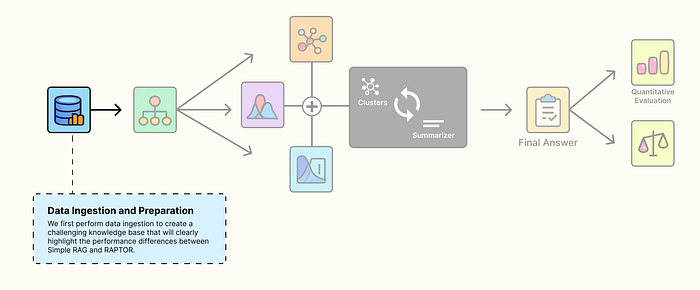
为了充分展示 RAPTOR 的优势,我们需要一个复杂且具有挑战性的知识库。我们选择抓取 Hugging Face 的官方文档,因为其中充满了重叠信息和微妙的差异。
例如,Hugging Face对ZeRO-3检查点保存有多种描述方式:trainer.save_model()、unwrap_model().save_pretrained() 和 zero_to_fp32()。这些都指向同一个底层概念,即将模型分片整合为一个完整的检查点。一个简单的 RAG 管道可能只会检索到其中一种变体,从而导致信息不完整。
我们将抓取以下五个核心指南的文档内容:
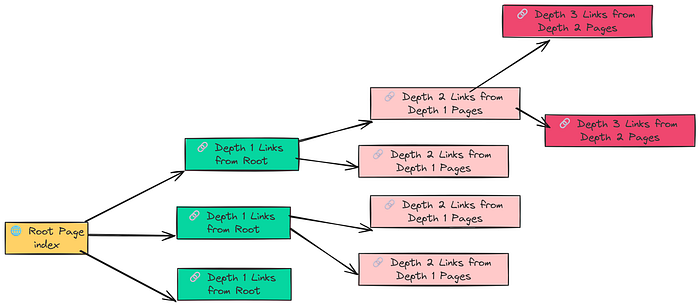
# Define the documentation sections to scrape, with varying crawl depths.urls_to_load = [ {"url": "https://huggingface.co/docs/transformers/index", "max_depth": 3}, {"url": "https://huggingface.co/docs/datasets/index", "max_depth": 2}, {"url": "https://huggingface.co/docs/tokenizers/index", "max_depth": 2}, {"url": "https://huggingface.co/docs/peft/index", "max_depth": 1}, {"url": "https://huggingface.co/docs/accelerate/index", "max_depth": 1}]
```
使用 `RecursiveUrlLoader` 和 `BeautifulSoup` 来抓取内容:
```plaintext
from langchain_community.document_loaders import RecursiveUrlLoaderfrom bs4 import BeautifulSoup as Soup# Empty list to append componentsdocs = []# Iterate through the list and crawl each documentation section.for item in urls_to_load: # Initialize the loader with the specific URL and parameters. loader = RecursiveUrlLoader( url=item["url"], max_depth=item["max_depth"], extractor=lambda x: Soup(x, "html.parser").text, # Use BeautifulSoup to extract text prevent_outside=True, # Ensure we stay within the documentation pages use_async=True, # Use asynchronous requests for faster crawling timeout=600, # Set a generous timeout for slow pages ) # Load the documents and add them to our master list. loaded_docs = loader.load() docs.extend(loaded_docs) print(f"Loaded {len(loaded_docs)} documents from {item['url']}")
运行后,我们得到了145个文档,总计312,566个Token。对文档的Token分布进行分析后,我们发现很多文档都非常长(最大达到12,453个Token),这表明需要进行合理的分块(chunking)。
import numpy as np# We need a consistent way to count tokens, using the LLM's tokenizer is the most accurate method.def count_tokens(text: str) -> int: """Counts the number of tokens in a text using the configured tokenizer.""" # Ensure text is not None and is a string ifnot isinstance(text, str): return0 return len(tokenizer.encode(text))# Extract the text content from the loaded LangChain Document objectsdocs_texts = [d.page_content for d in docs]# Calculate token counts for each documenttoken_counts = [count_tokens(text) for text in docs_texts]# Print statistics to understand the document size distributionprint(f"Total documents: {len(docs_texts)}")print(f"Total tokens in corpus: {np.sum(token_counts)}")print(f"Average tokens per document: {np.mean(token_counts):.2f}")print(f"Min tokens in a document: {np.min(token_counts)}")print(f"Max tokens in a document: {np.max(token_counts)}")# Output# Total documents: 145# Total tokens in corpus: 312566# Average tokens per document: 2155.59# Min tokens in a document: 312# Max tokens in a document: 12453
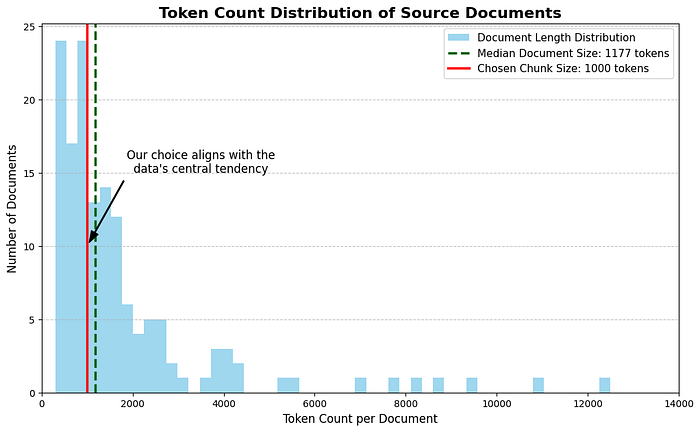
从Token分布直方图来看,文档的Token数量中位数大约在1000左右。因此,我们将chunk_size设置为1000。
四、传统RAG的“硬伤”:为什么会“答非所问”?
为了证明 RAPTOR 的优越性,我们需要一个参照物:一个最基础的、没有优化的 RAG 系统。这个系统将使用和 RAPTOR 相同的模型和知识库,唯一的区别在于它只对原始文档块(即我们前面提到的“叶节点”)进行索引。
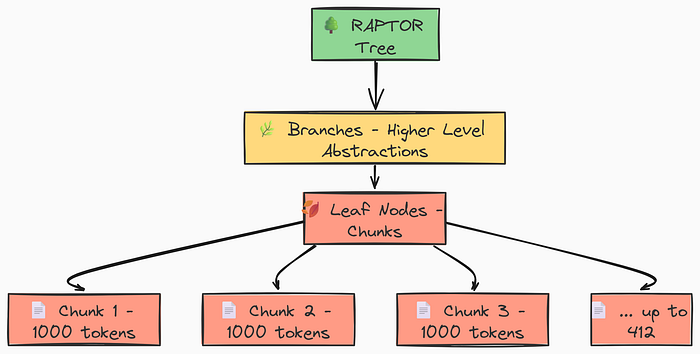
首先,我们利用 RecursiveCharacterTextSplitter 将文档切分成一个个叶节点:
from langchain.text_splitter import RecursiveCharacterTextSplitter# We join all the documents into a single string for more efficient processing.# The '---' separator helps maintain document boundaries if needed later.concatenated_content = "\n\n --- \n\n".join(docs_texts)# Create the text splitter using our LLM's tokenizer for accuracy.text_splitter = RecursiveCharacterTextSplitter.from_huggingface_tokenizer( tokenizer=tokenizer, chunk_size=1000, # The max number of tokens in a chunk chunk_overlap=100# The number of tokens to overlap between chunks)# Split the text into chunks, which will be our leaf nodes.leaf_texts = text_splitter.split_text(concatenated_content)print(f"Created {len(leaf_texts)} leaf nodes (chunks) for the RAPTOR tree.")# Output# Created 412 leaf nodes (chunks) for the RAPTOR tree.
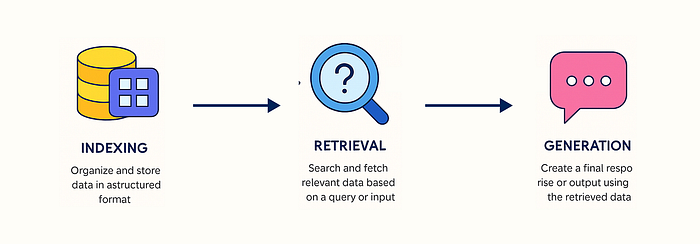
接下来,我们构建一个简单的 RAG 管道,并使用 FAISS 进行向量存储。
from langchain_community.vectorstores import FAISSfrom langchain_core.runnables import RunnablePassthrough# In a simple RAG, the vector store is built only on the leaf-level chunks.vectorstore_normal = FAISS.from_texts( texts=leaf_texts, embedding=embeddings)# Create a retriever from this vector store that fetches the top 5 results.retriever_normal = vectorstore_normal.as_retriever( search_kwargs={'k': 5})print(f"Built Simple RAG vector store with {len(leaf_texts)} documents.")# Output# Built Simple RAG vector store with 412 documents.
现在,我们构建完整的 RAG 链,并提出一个宏观、概念性的问题:
# This prompt template instructs the LLM to answer based ONLY on the provided context.final_prompt_text = """You are an expert assistant for the Hugging Face ecosystem. Answer the user's question based ONLY on the following context. If the context does not contain the answer, state that you don't know.CONTEXT:{context}QUESTION:{question}ANSWER:"""final_prompt = ChatPromptTemplate.from_template(final_prompt_text)# A helper function to format the retrieved documents.def format_docs(docs): return"\n\n".join(doc.page_content for doc in docs)# Construct the RAG chain for the simple approach.rag_chain_normal = ( {"context": retriever_normal | format_docs, "question": RunnablePassthrough()} | final_prompt | llm | StrOutputParser())# Let's ask a broad, conceptual question.question = "What is the core philosophy of the Hugging Face ecosystem?"answer = rag_chain_normal.invoke(question)print(f"Question: {question}\n")print(f"Answer: {answer}")
我们来看看这个简单RAG的输出:
Question: What is the core philosophy of the Hugging Face ecosystem?Answer: The Hugging Face ecosystem is built around the `transformers` library, which provides APIs to easily download and use pretrained models.The core idea is to make these models accessible. For example, the `pipeline`function is a key part of this, offering a simple way to use models for inference. It also includes libraries like `datasets` for data loading and`accelerate` for training.
这个回答没错,但它给人的感觉是零散的、缺乏整体感的。它像是一堆“正确”的事实被硬生生地拼凑在一起,没有真正理解背后的宏大叙事。这就是典型的“迷失在细节中”的问题。检索器只抓住了关键词,却错过了核心思想。而这,正是 RAPTOR 要解决的痛点。
五、揭秘RAPTOR的“智慧大脑”:层次化聚类引擎
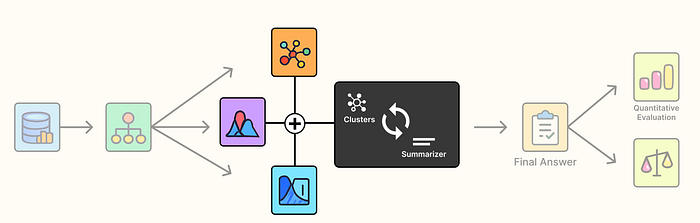
RAPTOR 的魔法,在于它能够将零散的“叶子”组织成有意义的“分支”,这个过程离不开一个精巧的“层次化聚类引擎”。这个引擎由三个核心组件构成:
1. UMAP:降维打击,看清数据的“真实形状”
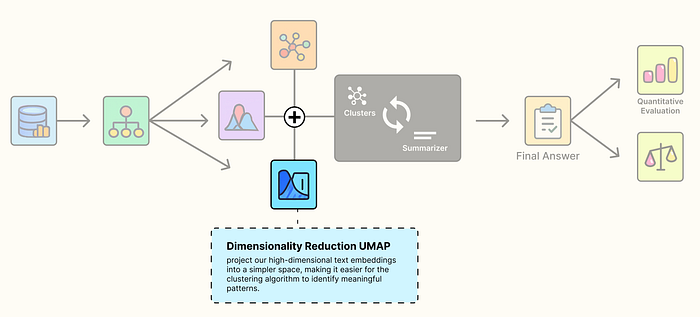
我们的文本嵌入(embeddings)通常存在于一个高维空间中(比如384维)。在这个空间里,数据点之间很拥挤,很难看出它们的真实关系,这就是所谓的“维度诅咒”。
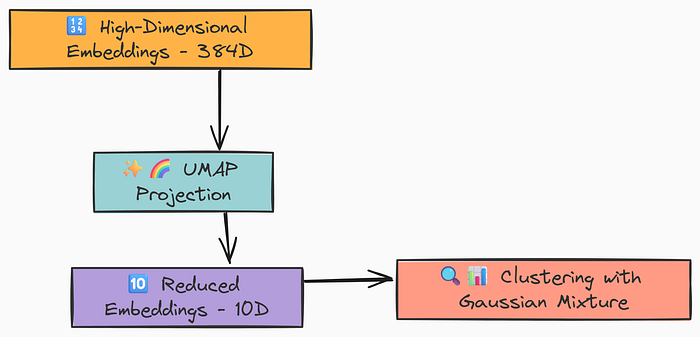
UMAP (Uniform Manifold Approximation and Projection,统一流形近似与投影) 就像一个强大的透视镜,能将这些高维数据投影到更低的维度(比如10维),同时最大限度地保持数据点之间的语义关系。这就像把一张复杂的立体地图变成一张清晰的平面地图,让聚类算法能够更轻松地识别出数据的“形状”和“分组”。
from typing import Dict, List, Optional, Tupleimport numpy as npimport pandas as pdimport umapfrom sklearn.mixture import GaussianMixtureRANDOM_SEED = 42def global_cluster_embeddings(embeddings: np.ndarray, dim: int, n_neighbors: Optional[int] = None, metric: str = "cosine") -> np.ndarray: """Perform global dimensionality reduction on the embeddings using UMAP.""" # Heuristically set n_neighbors if not provided if n_neighbors isNone: n_neighbors = int((len(embeddings) - 1) ** 0.5) # Return the UMAP-transformed embeddings return umap.UMAP( n_neighbors=n_neighbors, n_components=dim, metric=metric, random_state=RANDOM_SEED ).fit_transform(embeddings)
2. GMM + BIC:让数据自己决定“分几组”
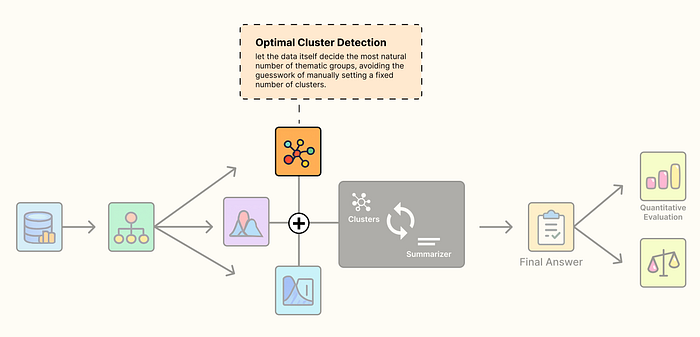
我们该把文档分为5个、10个还是50个主题?凭空猜测一个数字(K值)显然是不合理的。
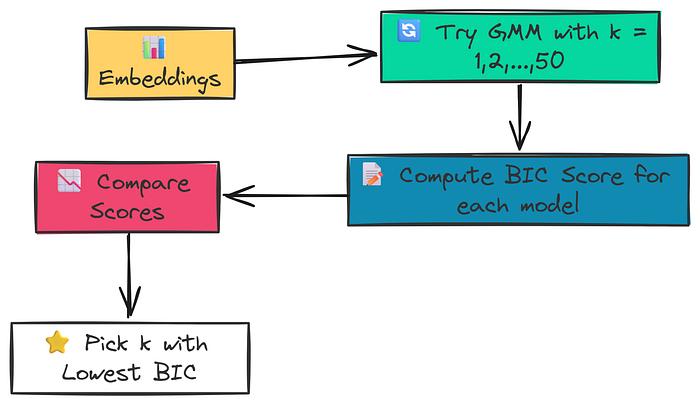
RAPTOR 采取了更科学的方法:使用 GMM (Gaussian Mixture Model,高斯混合模型) 和 BIC (Bayesian Information Criterion,贝叶斯信息准则)。
这个过程就像一个实验:
- 第一步:我们尝试将数据拟合到不同数量的簇中(比如从1个到50个)。
- 第二步:每次拟合后,计算出一个 BIC 分数。BIC 既能衡量模型对数据的拟合程度,又会惩罚过于复杂的模型(即惩罚簇的数量)。
- 第三步:我们选择那个 BIC 分数最低的簇数量,因为它代表了模型在“拟合”和“简洁”之间找到了最佳平衡。
def get_optimal_clusters(embeddings: np.ndarray, max_clusters: int = 50) -> int: """Determine the optimal number of clusters using the Bayesian Information Criterion (BIC).""" # Limit the max number of clusters to be less than the number of data points max_clusters = min(max_clusters, len(embeddings)) # If there's only one point, there can only be one cluster if max_clusters <= 1: return1 # Test different numbers of clusters from 1 to max_clusters n_clusters_range = np.arange(1, max_clusters) bics = [] for n in n_clusters_range: # Initialize and fit the GMM for the current number of clusters gmm = GaussianMixture(n_components=n, random_state=RANDOM_SEED) gmm.fit(embeddings) # Calculate and store the BIC for the current model bics.append(gmm.bic(embeddings)) # Return the number of clusters that resulted in the lowest BIC score return n_clusters_range[np.argmin(bics)]
3. GMM:概率软分配,允许“脚踏两条船”
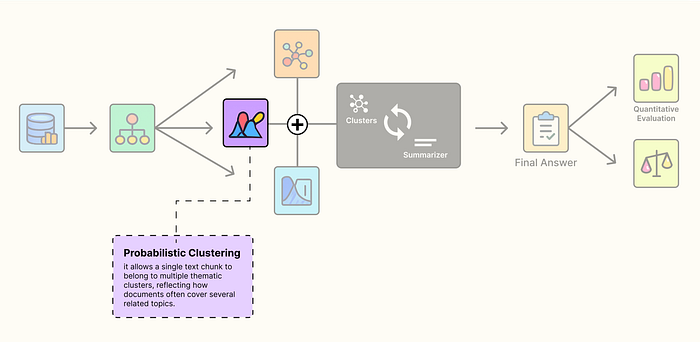
传统的聚类算法(如K-Means)是“硬聚类”,它强制将每个数据点分到且只分到一个簇里。但现实情况是,一个文档块可能同时讨论“模型训练”和“数据预处理”,它理应同时属于这两个主题。
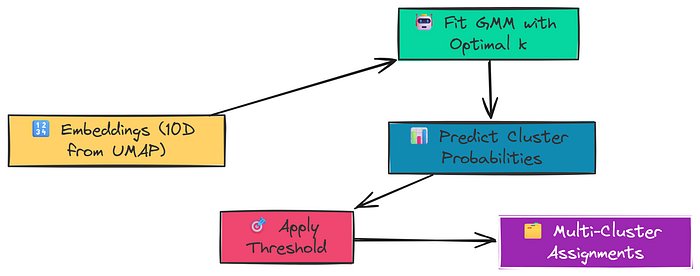
GMM 能够实现“软聚类”。它不直接分配,而是计算每个文档块属于每个簇的概率。通过设置一个概率阈值,我们可以让一个文档块同时被分配到多个相关的簇中。这完美地模拟了知识之间的交叉和关联。
def GMM_cluster(embeddings: np.ndarray, threshold: float) -> Tuple[List[np.ndarray], int]: """Cluster embeddings using a GMM and a probability threshold.""" # Find the optimal number of clusters for this set of embeddings n_clusters = get_optimal_clusters(embeddings) # Fit the GMM with the optimal number of clusters gmm = GaussianMixture(n_components=n_clusters, random_state=RANDOM_SEED) gmm.fit(embeddings) # Get the probability of each point belonging to each cluster probs = gmm.predict_proba(embeddings) # Assign a point to a cluster if its probability is above the threshold # A single point can be assigned to multiple clusters. labels = [np.where(prob > threshold)[0] for prob in probs] return labels, n_clusters
这个“层次化聚类引擎”将 UMAP、BIC 和 GMM 精巧地组合在一起,确保了RAPTOR 能够准确、有深度地理解和组织知识。
六、构建和运行RAPTOR树:从理论到实践
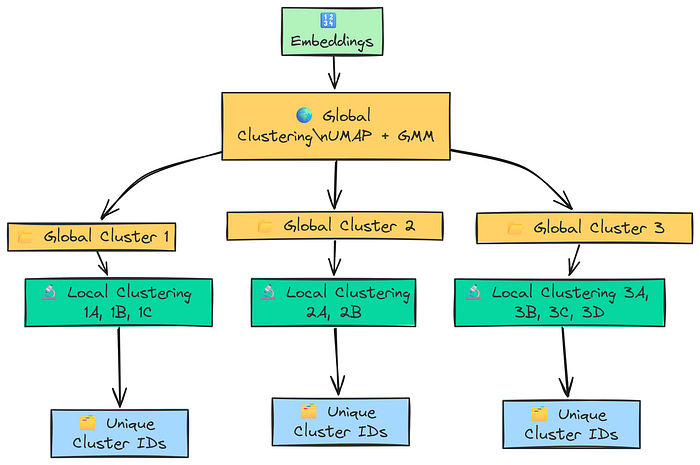
有了这套强大的聚类引擎,我们现在可以将它应用到RAPTOR的构建过程中。这个过程分为两个阶段:
- 全局聚类:首先,对我们所有的
412个叶节点进行一次整体的降维和聚类。这一步的目的是找出文档库中最高层级的主题,比如“Transformers库”、“Datasets库”和“训练与优化”。 - 局部聚类:接下来,我们“放大”每个全局簇。例如,进入“训练与优化”这个簇,对它内部的文档再次进行降维和聚类。这一次,我们会找到更细分的子主题,比如“
PEFT”、“Accelerate”和“Trainer参数”。
这个“先概览,后细看”的RAPTOR策略,完美地模拟了人类的思考过程。它首先建立起知识的宏观框架,然后再填充细节。
我们编写一个名为 perform_clustering 的函数,来整合上述所有步骤,实现这个分层的聚类逻辑。
def perform_clustering(embeddings: np.ndarray, dim: int = 10, threshold: float = 0.1) -> List[np.ndarray]: """Perform hierarchical clustering (global and local) on the embeddings.""" # Handle cases with very few documents to avoid errors during dimensionality reduction. if len(embeddings) <= dim + 1: return [np.array([0]) for _ in range(len(embeddings))] # --- Global Clustering Stage --- # First, reduce the dimensionality of all embeddings globally. reduced_embeddings_global = global_cluster_embeddings(embeddings, dim) # Then, perform GMM clustering on the reduced-dimensional data. global_clusters, n_global_clusters = GMM_cluster(reduced_embeddings_global, threshold) # --- Local Clustering Stage --- # Initialize a list to hold all final local cluster assignments for each document. all_local_clusters = [np.array([]) for _ in range(len(embeddings))] # Keep track of the total number of clusters found so far to ensure unique IDs. total_clusters = 0 # Iterate through each global cluster to find sub-clusters. for i in range(n_global_clusters): # Get all original indices for embeddings that are part of the current global cluster. global_cluster_indices = [idx for idx, gc in enumerate(global_clusters) if i in gc] ifnot global_cluster_indices: continue # Get the actual embeddings for this global cluster. global_cluster_embeddings_ = embeddings[global_cluster_indices] # Perform local clustering on this subset of embeddings. if len(global_cluster_embeddings_) <= dim + 1: local_clusters, n_local_clusters = ([np.array([0])] * len(global_cluster_embeddings_)), 1 else: # We don't need a separate 'local_cluster_embeddings' function. # The global one works, as it adapts n_neighbors to the input reduced_embeddings_local = global_cluster_embeddings(global_cluster_embeddings_, dim) local_clusters, n_local_clusters = GMM_cluster(reduced_embeddings_local, threshold) # Map the local cluster IDs back to the original document indices. for original_idx, local_cluster_ids in zip(global_cluster_indices, local_clusters): # We add 'total_clusters' to ensure each cluster ID is globally unique. all_local_clusters[original_idx] = local_cluster_ids + total_clusters total_clusters += n_local_clusters # Return the final, globally unique cluster assignments for each document. return all_local_clusters
最终,我们将所有原始叶节点和所有层级的摘要全部索引到同一个向量数据库中。当用户发起查询时,例如“如何用 PEFT 和 Accelerate 库进行分布式训练?”,RAPTOR 的检索器会:
- 检索到包含“分布式训练”高层概念的摘要。
- 同时,也会检索到与“
PEFT”和“Accelerate”相关的具体代码示例和API说明(即叶节点)。
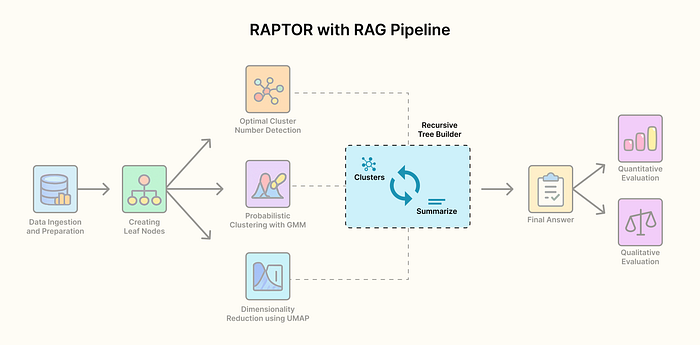
这种“高层概括”与“底层细节”的完美结合,让 RAPTOR 能够给LLM提供一个既有全局观又有具体细节的上下文。当LLM看到这样的上下文时,它能更容易地生成一个结构清晰、内容完整且连贯的答案,而不是东拼西凑的零散事实。
七、未来展望与总结:一场RAG的革命
RAPTOR 管道代表了RAG领域的一个重要趋势:从简单的“检索”走向更深度的“知识组织”。它告诉我们,仅仅将文档切块并向量化是不够的,我们必须像人一样,主动地对知识进行分类、摘要和层次化组织,才能真正释放LLM的潜力。
虽然 RAPTOR 需要在构建索引时进行额外的计算,比如多次调用LLM进行摘要,以及执行复杂的聚类算法,但它带来的回报是巨大的:在查询时,可以显著减少检索到的文档块数量,从而节省大量的 Token 消耗,并获得更优越的回答质量。 这意味着在长远的生产环境中,它将带来更高的效率和更低的成本。
RAPTOR 的成功,也为我们带来了更多思考:
- 我们能否将这种“递归抽象”的思想应用于更多领域?比如,能否用它来组织企业的内部文档库,让新员工能快速找到从宏观战略到具体操作的全部信息?
- RAPTOR 管道能否与其他RAG优化技术(如查询转换、重排)结合,创造出更强大的“超级RAG”?
毫无疑问,RAPTOR 不仅仅是一个技术,它是一种全新的思维方式,正在引领下一代 RAG 的发展。
你认为,RAPTOR 的出现会给你的日常工作或学习带来哪些改变?
八、如何学习AI大模型?
大模型时代,火爆出圈的LLM大模型让程序员们开始重新评估自己的本领。 “AI会取代那些行业?”“谁的饭碗又将不保了?”等问题热议不断。
不如成为「掌握AI工具的技术人」,毕竟AI时代,谁先尝试,谁就能占得先机!
想正式转到一些新兴的 AI 行业,不仅需要系统的学习AI大模型。同时也要跟已有的技能结合,辅助编程提效,或上手实操应用,增加自己的职场竞争力。
但是LLM相关的内容很多,现在网上的老课程老教材关于LLM又太少。所以现在小白入门就只能靠自学,学习成本和门槛很高
那么针对所有自学遇到困难的同学们,我帮大家系统梳理大模型学习脉络,将这份 LLM大模型资料 分享出来:包括LLM大模型书籍、640套大模型行业报告、LLM大模型学习视频、LLM大模型学习路线、开源大模型学习教程等, 😝有需要的小伙伴,可以 扫描下方二维码领取🆓↓↓↓
学习路线
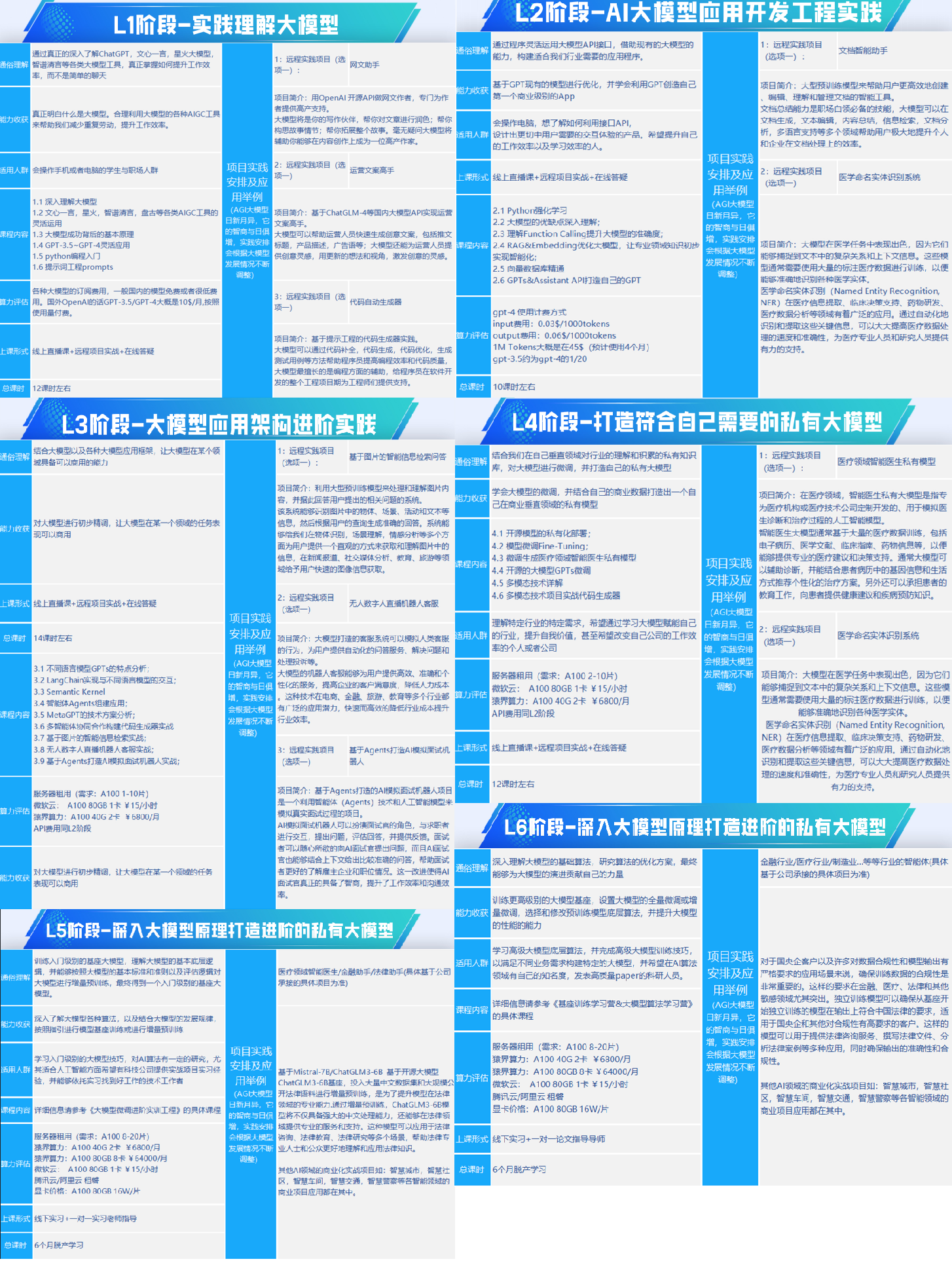
第一阶段: 从大模型系统设计入手,讲解大模型的主要方法;
第二阶段: 在通过大模型提示词工程从Prompts角度入手更好发挥模型的作用;
第三阶段: 大模型平台应用开发借助阿里云PAI平台构建电商领域虚拟试衣系统;
第四阶段: 大模型知识库应用开发以LangChain框架为例,构建物流行业咨询智能问答系统;
第五阶段: 大模型微调开发借助以大健康、新零售、新媒体领域构建适合当前领域大模型;
第六阶段: 以SD多模态大模型为主,搭建了文生图小程序案例;
第七阶段: 以大模型平台应用与开发为主,通过星火大模型,文心大模型等成熟大模型构建大模型行业应用。
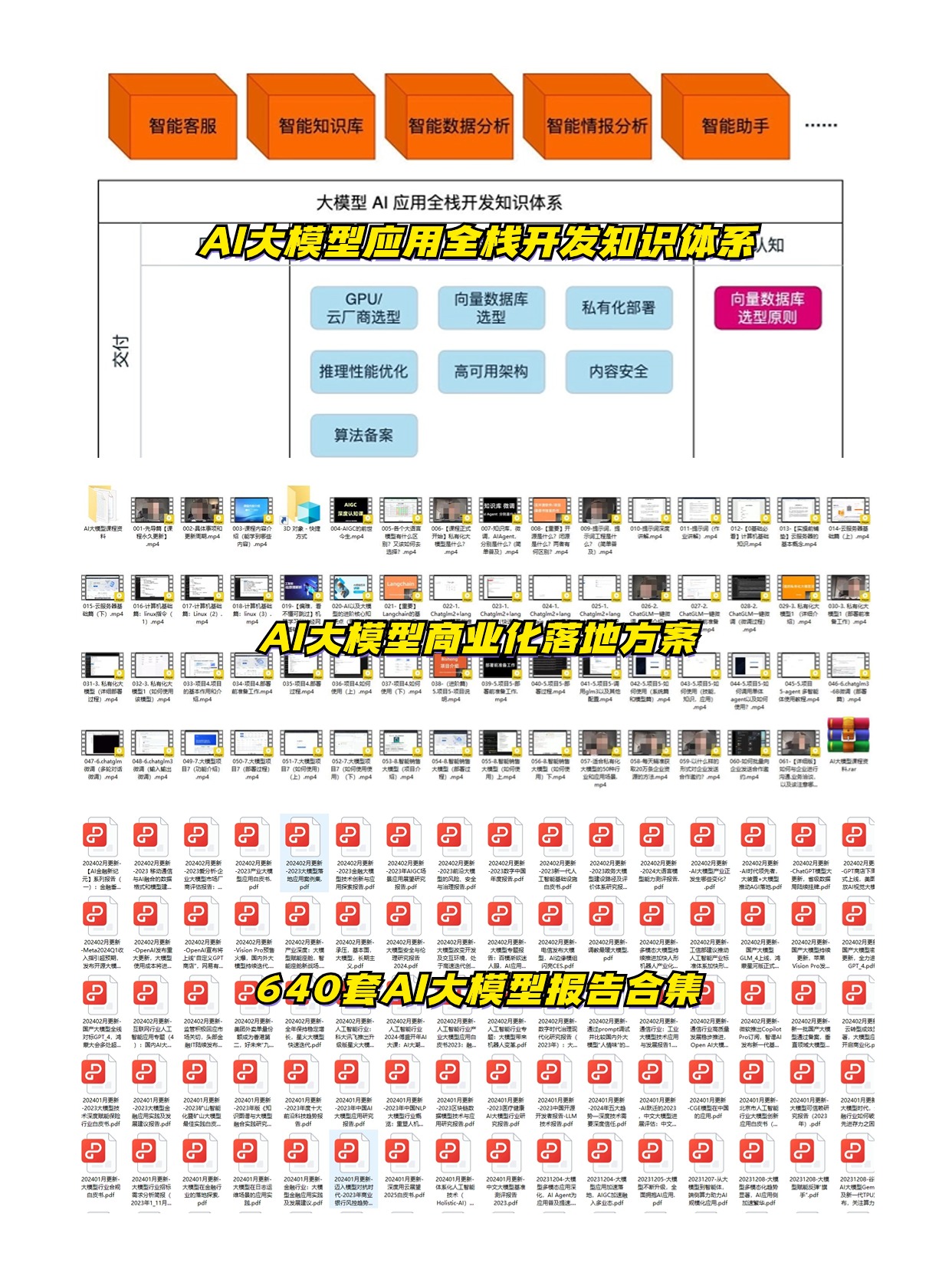
👉学会后的收获:👈
• 基于大模型全栈工程实现(前端、后端、产品经理、设计、数据分析等),通过这门课可获得不同能力;
• 能够利用大模型解决相关实际项目需求: 大数据时代,越来越多的企业和机构需要处理海量数据,利用大模型技术可以更好地处理这些数据,提高数据分析和决策的准确性。因此,掌握大模型应用开发技能,可以让程序员更好地应对实际项目需求;
• 基于大模型和企业数据AI应用开发,实现大模型理论、掌握GPU算力、硬件、LangChain开发框架和项目实战技能, 学会Fine-tuning垂直训练大模型(数据准备、数据蒸馏、大模型部署)一站式掌握;
• 能够完成时下热门大模型垂直领域模型训练能力,提高程序员的编码能力: 大模型应用开发需要掌握机器学习算法、深度学习框架等技术,这些技术的掌握可以提高程序员的编码能力和分析能力,让程序员更加熟练地编写高质量的代码。
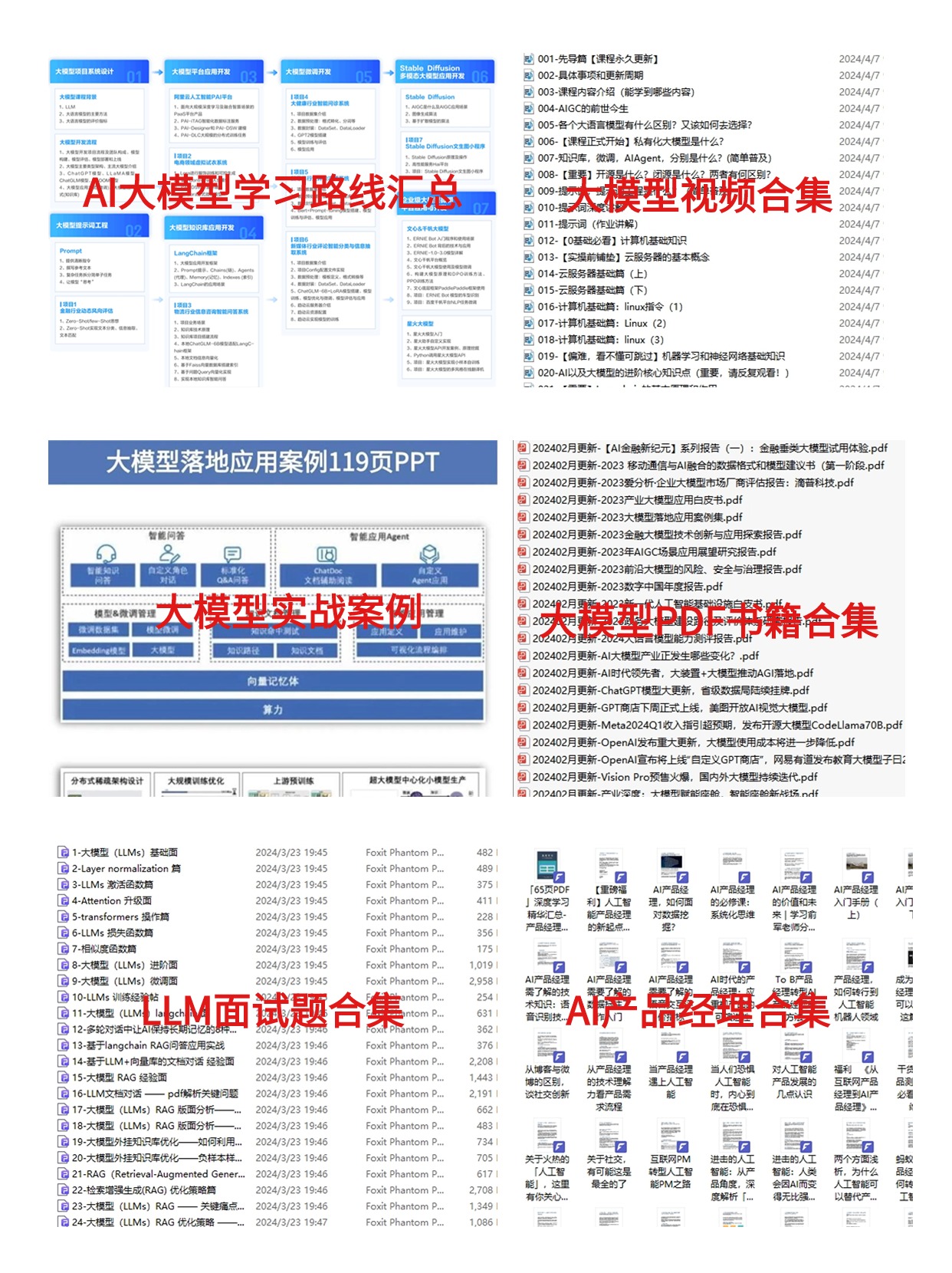
1.AI大模型学习路线图
2.100套AI大模型商业化落地方案
3.100集大模型视频教程
4.200本大模型PDF书籍
5.LLM面试题合集
6.AI产品经理资源合集
👉获取方式:
😝有需要的小伙伴,可以保存图片到wx扫描二v码免费领取【保证100%免费】🆓


火山引擎开发者社区是火山引擎打造的AI技术生态平台,聚焦Agent与大模型开发,提供豆包系列模型(图像/视频/视觉)、智能分析与会话工具,并配套评测集、动手实验室及行业案例库。社区通过技术沙龙、挑战赛等活动促进开发者成长,新用户可领50万Tokens权益,助力构建智能应用。
更多推荐
 19
19 0
0- 0


 已为社区贡献107条内容

所有评论(0)