如何用JAVA实现视频文件的高效分片上传?
这个项目确实挑战不小,但通过合理的分片上传、断点续传机制和兼容性处理,我们还是能够实现客户的需求。前端使用原生JS实现文件夹结构解析和上传队列管理后端提供分片上传和合并接口使用localStorage存储上传进度实现断点续传通过CryptoJS等库实现兼容IE9的加密完整的SM4加密实现(实际需要引入Bouncy Castle等库)分布式存储支持详细的权限控制完善的错误处理和日志使用WebUplo
大文件上传系统开发指南(基于原生JS+SpringBoot)
项目概述
大家好,我是一个在浙江奋斗的Java程序员,最近接了个"刺激"的外包项目 - 开发一个支持20G大文件上传下载的系统,还要兼容IE9这种上古浏览器。客户要求使用原生JS实现(不能用jQuery等库),支持文件夹上传(保留层级结构),还要加密传输和断点续传。预算只有100元,但需要提供完整技术支持和源代码。
这活儿听着就刺激,但咱是谁?是打不死的小强!下面我就分享一下我的解决方案和部分代码实现。
技术选型
- 前端:Vue3 CLI + 原生JavaScript(兼容IE9)
- 后端:SpringBoot + Tomcat
- 数据库:MySQL(主要存用户信息和文件元数据)
- 文件存储:服务器本地文件系统
- 加密:SM4(国密)和AES
系统架构
浏览器(IE9+) ←HTTP→ SpringBoot后端 ←本地IO→ 文件存储
                     ↑
                    MySQL(元数据)
前端实现(关键代码)
1. 文件夹上传组件(兼容IE9)
export default {
  data() {
    return {
      fileList: [],
      chunkSize: 5 * 1024 * 1024, // 5MB分片
      concurrent: 3 // 并发上传数
    }
  },
  methods: {
    triggerFileInput() {
      document.getElementById('fileInput').click();
    },

    handleFileChange(e) {
      const files = e.target.files;
      if (!files.length) return;

      // 处理文件夹结构
      const fileTree = this.buildFileTree(files);
      this.prepareUpload(fileTree);
    },

    // 构建文件树结构(保留文件夹层级)
    buildFileTree(files) {
      const tree = {};

      for (let i = 0; i < files.length; i++) {
        const file = files[i];
        const path = file.webkitRelativePath || file.relativePath || file.name;
        const parts = path.split('/');

        // 添加文件信息
        const fileName = parts[parts.length - 1];
        current[fileName] = {
          file: file,
          relativePath: path,
          size: file.size,
          chunks: Math.ceil(file.size / this.chunkSize),
          uploadedChunks: 0,
          progress: 0,
          status: '等待上传'
        };
      }

      return tree;
    },

    // 准备上传队列
    prepareUpload(tree) {
      const flattenFiles = [];

      const traverse = (node, path = '') => {
        for (const key in node) {
          if (key === '__files__' || key === '__dirs__') continue;

          const newPath = path ? `${path}/${key}` : key;
          if (node[key].file) {
            // 是文件
            flattenFiles.push({
              ...node[key],
              relativePath: newPath
            });
          } else {
            // 是目录,继续遍历
            traverse(node[key].__dirs__, newPath);
          }
        }
      };

      traverse(tree);
      this.fileList = flattenFiles;
      this.startUpload();
    },

    // 开始上传
    startUpload() {
      const activeUploads = 0;

      const uploadNext = () => {
        if (activeUploads >= this.concurrent) return;

        const file = this.fileList.find(f => f.status === '等待上传');
        if (!file) {
          if (this.fileList.every(f => f.status === '上传完成')) {
            this.$emit('upload-complete');
          }
          return;
        }
      };

      uploadNext();
    },

    // 分片上传文件
    async uploadFile(fileEntry) {
      const file = fileEntry.file;
      const fileId = this.generateFileId(file);

      // 检查断点续传信息
      const resumeInfo = this.getResumeInfo(fileId);
      let startChunk = resumeInfo ? resumeInfo.uploadedChunks : 0;

      for (let i = startChunk; i < fileEntry.chunks; i++) {
        const start = i * this.chunkSize;
        const end = Math.min(start + this.chunkSize, file.size);
        const chunk = file.slice(start, end);

        // 读取分片内容(兼容IE9)
        const chunkData = await this.readFileAsArrayBuffer(chunk);

        // 加密处理(这里简化,实际应该用Web Crypto API或polyfill)
        const encryptedData = this.encryptData(chunkData, 'AES'); // 实际应该用SM4

        const formData = new FormData();
        formData.append('fileId', fileId);
        formData.append('chunkIndex', i);
        formData.append('totalChunks', fileEntry.chunks);
        formData.append('relativePath', fileEntry.relativePath);
        formData.append('fileSize', file.size);
        formData.append('chunk', new Blob([encryptedData]));
        formData.append('fileName', file.name);
      }

      // 所有分片上传完成,通知服务器合并
      await this.mergeFile(fileId, fileEntry.relativePath, file.size, file.name);
      fileEntry.status = '上传完成';
      this.clearResumeInfo(fileId);
    },

    // 以下是兼容IE9的工具方法
    readFileAsArrayBuffer(file) {
      return new Promise((resolve) => {
        const reader = new FileReader();
        reader.onload = (e) => resolve(e.target.result);
        reader.readAsArrayBuffer(file);
      });
    },

    encryptData(data, algorithm) {
      // 实际项目中应该使用Web Crypto API或polyfill
      // 这里简化处理,实际加密代码会更复杂
      if (typeof data === 'string') {
        return btoa(data); // 简单base64模拟加密
      } else {
        const bytes = new Uint8Array(data);
        let result = '';
        for (let i = 0; i < bytes.length; i++) {
          result += String.fromCharCode(bytes[i]);
        }
        return btoa(result);
      }
    },

    async uploadChunk(formData) {
      return new Promise((resolve, reject) => {
        const xhr = new XMLHttpRequest();
        xhr.open('POST', '/api/upload/chunk', true);

        xhr.onload = () => {
          if (xhr.status >= 200 && xhr.status < 300) {
            resolve(JSON.parse(xhr.responseText));
          } else {
            reject(new Error('上传失败'));
          }
        };

        xhr.onerror = () => reject(new Error('网络错误'));
        xhr.send(formData);
      });
    },

    async mergeFile(fileId, relativePath, fileSize, fileName) {
      return new Promise((resolve, reject) => {
        const xhr = new XMLHttpRequest();
        xhr.open('POST', '/api/upload/merge', true);
        xhr.setRequestHeader('Content-Type', 'application/json');

        xhr.onload = () => {
          if (xhr.status >= 200 && xhr.status < 300) {
            resolve(JSON.parse(xhr.responseText));
          } else {
            reject(new Error('合并失败'));
          }
        };

        xhr.onerror = () => reject(new Error('网络错误'));
        xhr.send(JSON.stringify({
          fileId,
          relativePath,
          fileSize,
          fileName
        }));
      });
    },

    // 断点续传相关方法(使用localStorage存储)
    generateFileId(file) {
      // 简单生成文件ID,实际应该更可靠
      return `${file.name}-${file.size}-${file.lastModified}`;
    },

    getResumeInfo(fileId) {
      const info = localStorage.getItem(`upload_resume_${fileId}`);
      return info ? JSON.parse(info) : null;
    },

    saveResumeInfo(fileId, fileEntry) {
      localStorage.setItem(`upload_resume_${fileId}`, JSON.stringify({
        uploadedChunks: fileEntry.uploadedChunks,
        relativePath: fileEntry.relativePath,
        fileSize: fileEntry.size,
        fileName: fileEntry.file.name
      }));
    },

    clearResumeInfo(fileId) {
      localStorage.removeItem(`upload_resume_${fileId}`);
    },

    formatSize(bytes) {
      if (bytes === 0) return '0 Bytes';
      const k = 1024;
      const sizes = ['Bytes', 'KB', 'MB', 'GB', 'TB'];
      const i = Math.floor(Math.log(bytes) / Math.log(k));
      return parseFloat((bytes / Math.pow(k, i)).toFixed(2)) + ' ' + sizes[i];
    }
  }
}
后端实现(SpringBoot关键代码)
1. 文件上传控制器
@RestController
@RequestMapping("/api/upload")
public class FileUploadController {

    private static final String UPLOAD_DIR = "/var/bigfileupload/"; // 实际应该从配置读取
    private static final int CHUNK_SIZE = 5 * 1024 * 1024; // 5MB

    @PostMapping("/chunk")
    public ResponseEntity uploadChunk(
            @RequestParam("fileId") String fileId,
            @RequestParam("chunkIndex") int chunkIndex,
            @RequestParam("totalChunks") int totalChunks,
            @RequestParam("relativePath") String relativePath,
            @RequestParam("fileSize") long fileSize,
            @RequestParam("fileName") String fileName,
            @RequestParam("chunk") MultipartFile chunk) throws IOException {

        // 创建临时目录
        String tempDir = UPLOAD_DIR + "temp/" + fileId + "/";
        File tempDirFile = new File(tempDir);
        if (!tempDirFile.exists()) {
            tempDirFile.mkdirs();
        }

        // 保存分片(实际应该先解密)
        String chunkPath = tempDir + chunkIndex;
        chunk.transferTo(new File(chunkPath));

        // 记录上传进度(实际应该用数据库)
        UploadProgress progress = new UploadProgress();
        progress.setFileId(fileId);
        progress.setUploadedChunks(chunkIndex + 1);
        progress.setTotalChunks(totalChunks);
        progress.setRelativePath(relativePath);
        progress.setFileSize(fileSize);
        progress.setFileName(fileName);
        // saveToDatabase(progress); // 实际应该存数据库

        return ResponseEntity.ok().body(Map.of(
            "status", "success",
            "chunkIndex", chunkIndex,
            "fileId", fileId
        ));
    }

    @PostMapping("/merge")
    public ResponseEntity mergeFile(
            @RequestBody MergeRequest request) throws IOException, NoSuchAlgorithmException {

        String fileId = request.getFileId();
        String tempDir = UPLOAD_DIR + "temp/" + fileId + "/";
        File tempDirFile = new File(tempDir);

        if (!tempDirFile.exists()) {
            return ResponseEntity.badRequest().body(Map.of("error", "临时文件不存在"));
        }

        // 创建目标目录结构
        String relativePath = request.getRelativePath();
        String targetPath = UPLOAD_DIR + relativePath;
        File targetFile = new File(targetPath);
    }

    // 下载文件接口(非打包方式)
    @GetMapping("/download")
    public ResponseEntity downloadFile(
            @RequestParam String filePath,
            HttpServletResponse response) throws IOException {

        // 设置响应头
        HttpHeaders headers = new HttpHeaders();
        headers.add(HttpHeaders.CONTENT_DISPOSITION, "attachment; filename=\"" + file.getName() + "\"");
        headers.add(HttpHeaders.CONTENT_TYPE, Files.probeContentType(file.toPath()));
        headers.add(HttpHeaders.CONTENT_LENGTH, String.valueOf(file.length()));

        return ResponseEntity.ok()
                .headers(headers)
                .body(resource);
    }

    // 文件夹下载(递归下载)
    @GetMapping("/download/folder")
    public void downloadFolder(
            @RequestParam String folderPath,
            HttpServletResponse response) throws IOException {

        // 实际实现应该递归遍历文件夹,生成zip或逐个文件下载
        // 这里简化处理,实际项目中需要更复杂的实现
        response.setContentType("application/zip");
        response.setHeader("Content-Disposition", "attachment; filename=\"" + new File(folderPath).getName() + ".zip\"");

        // 实际应该使用ZipOutputStream打包
        // 这里只是示例,实际不会这样实现
        try (ServletOutputStream out = response.getOutputStream()) {
            out.write("这不是真正的zip文件,实际应该递归打包文件夹".getBytes());
        }
    }
}
2. 数据库实体类
@Entity
@Table(name = "file_metadata")
public class FileMetadata {
    @Id
    @GeneratedValue(strategy = GenerationType.IDENTITY)
    private Long id;

    private String fileId;
    private String filePath;
    private String fileName;
    private long fileSize;
    private Date uploadTime;

    // getters and setters
}
兼容IE9的注意事项
- XMLHttpRequest:IE9不支持FormData,但支持XMLHttpRequest上传文件
- FileReader:IE10+才完全支持,IE9需要polyfill
- Blob:IE10+支持,IE9需要使用BlobBuilder
- 加密:Web Crypto API在IE9不可用,需要使用第三方库如CryptoJS
IE9兼容的加密方案示例
// 在index.html中引入CryptoJS
//

// 修改encryptData方法
encryptData(data, algorithm) {
  if (algorithm === 'AES') {
    // 使用CryptoJS进行AES加密
    const key = CryptoJS.enc.Utf8.parse('1234567890123456'); // 实际应该从安全配置读取
    const iv = CryptoJS.enc.Utf8.parse('1234567890123456');

    let dataToEncrypt;
    if (typeof data === 'string') {
      dataToEncrypt = data;
    } else {
      // 如果是ArrayBuffer,转换为字符串
      const bytes = new Uint8Array(data);
      let str = '';
      for (let i = 0; i < bytes.length; i++) {
        str += String.fromCharCode(bytes[i]);
      }
      dataToEncrypt = str;
    }

    const encrypted = CryptoJS.AES.encrypt(dataToEncrypt, key, {
      iv: iv,
      mode: CryptoJS.mode.CBC,
      padding: CryptoJS.pad.Pkcs7
    });

    return encrypted.toString();
  }

  // 其他算法...
  return data; // 未加密
}
部署说明
-
前端构建:
npm install
npm run build
将生成的
dist目录内容部署到Tomcat的webapps/ROOT目录 -
后端配置:
- 修改
application.properties:server.port=8080 spring.servlet.multipart.max-file-size=21GB spring.servlet.multipart.max-request-size=21GB file.upload-dir=/var/bigfileupload/ - 确保上传目录存在且有写入权限:
mkdir -p /var/bigfileupload/temp
chmod 777 /var/bigfileupload
- 修改
-
数据库初始化:
- 创建MySQL数据库并执行SQL脚本:
CREATE TABLE file_metadata (
  id BIGINT AUTO_INCREMENT PRIMARY KEY,
  file_id VARCHAR(255) NOT NULL,
  file_path TEXT NOT NULL,
  file_name VARCHAR(255) NOT NULL,
  file_size BIGINT NOT NULL,
  upload_time DATETIME NOT NULL
);
- 创建MySQL数据库并执行SQL脚本:
开发文档要点
-
系统功能:
- 大文件分片上传(支持20GB+)
- 文件夹上传(保留层级结构)
- 断点续传(基于localStorage)
- 加密传输和存储(AES/SM4)
- 兼容IE9+等主流浏览器
-
API文档:
POST /api/upload/chunk- 上传文件分片POST /api/upload/merge- 合并文件分片GET /api/upload/download- 下载单个文件GET /api/upload/download/folder- 下载整个文件夹
-
部署文档:
- 环境要求:JDK 8+, Node.js, MySQL, Tomcat 8+
- 配置文件说明
- 初始化脚本
总结
这个项目确实挑战不小,但通过合理的分片上传、断点续传机制和兼容性处理,我们还是能够实现客户的需求。关键点在于:
- 前端使用原生JS实现文件夹结构解析和上传队列管理
- 后端提供分片上传和合并接口
- 使用localStorage存储上传进度实现断点续传
- 通过CryptoJS等库实现兼容IE9的加密
由于预算有限,我省略了一些高级功能如:
- 完整的SM4加密实现(实际需要引入Bouncy Castle等库)
- 分布式存储支持
- 详细的权限控制
- 完善的错误处理和日志
如果需要更完整的实现,建议考虑:
- 使用WebUploader等成熟库(但需要处理兼容性问题)
- 增加预算购买商业组件
- 分阶段开发,先实现核心功能
最后,欢迎加入我们的QQ群374992201,一起交流技术,合作接单!群里经常有红包和技术分享,还有项目合作机会哦!
导入项目
导入到Eclipse:点南查看教程
导入到IDEA:点击查看教程
springboot统一配置:点击查看教程
工程
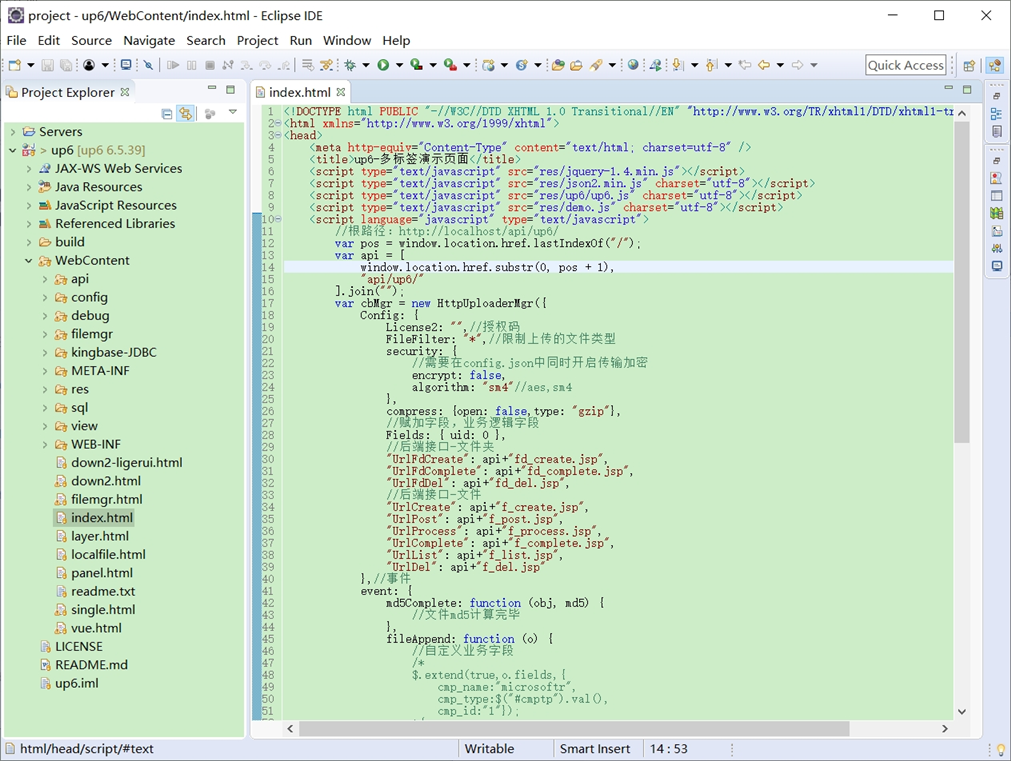
NOSQL
NOSQL示例不需要任何配置,可以直接访问测试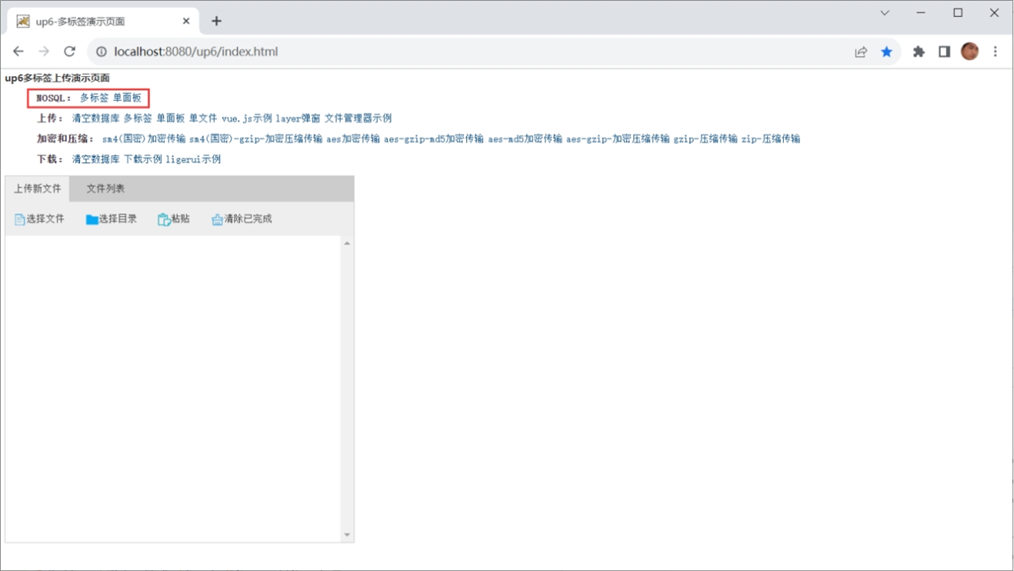
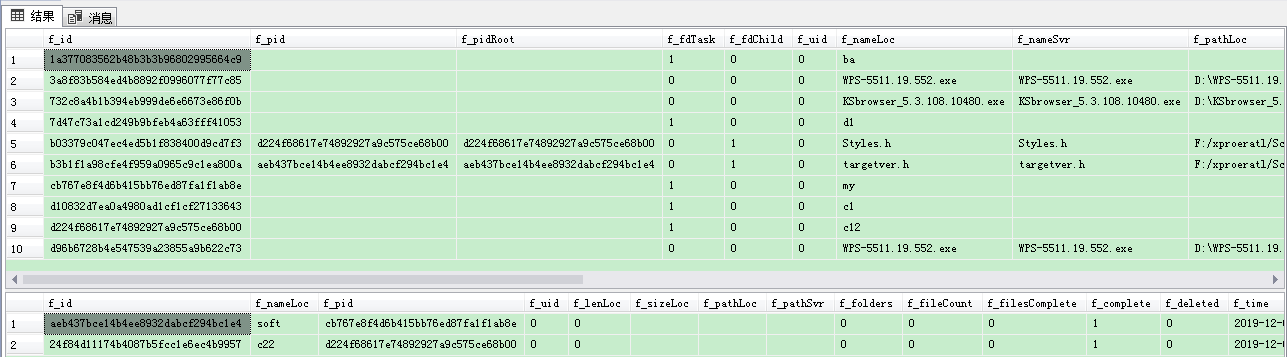
创建数据表
选择对应的数据表脚本,这里以SQL为例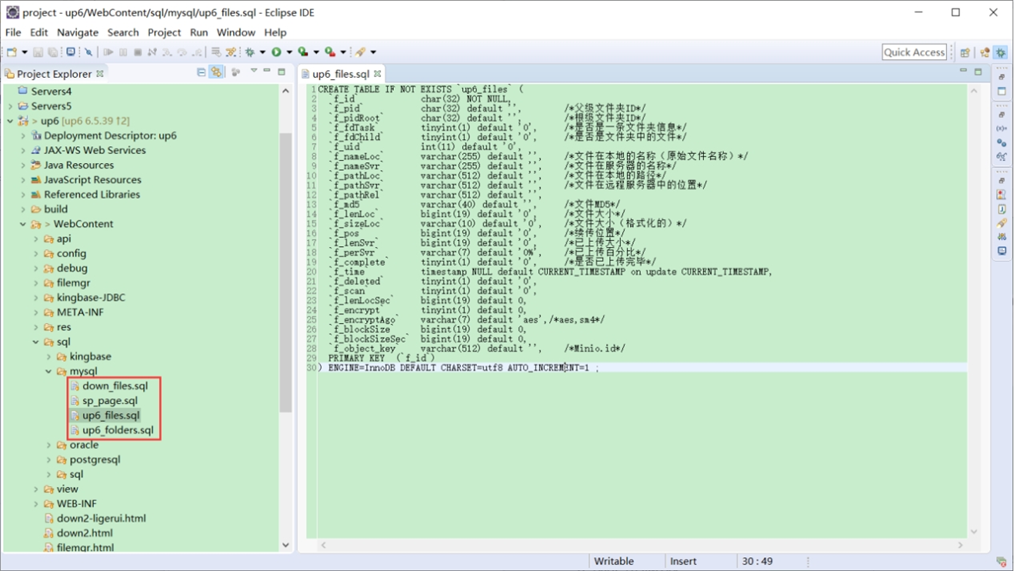
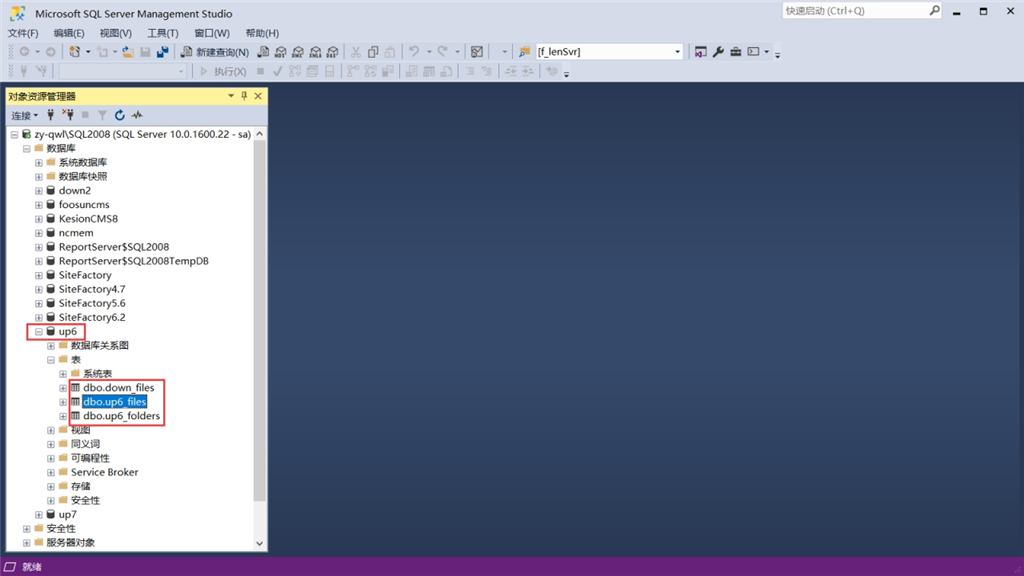
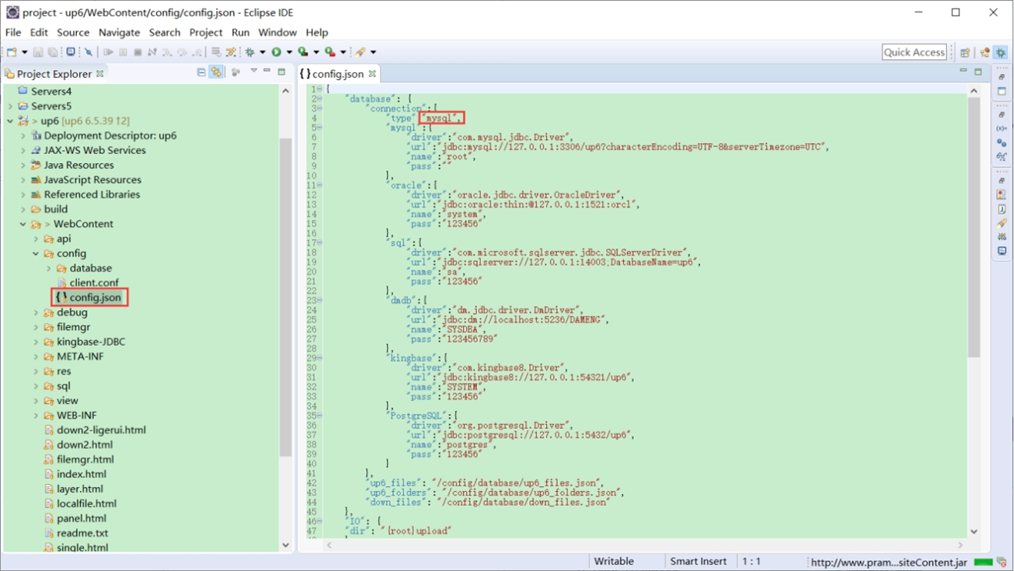
修改数据库连接信息
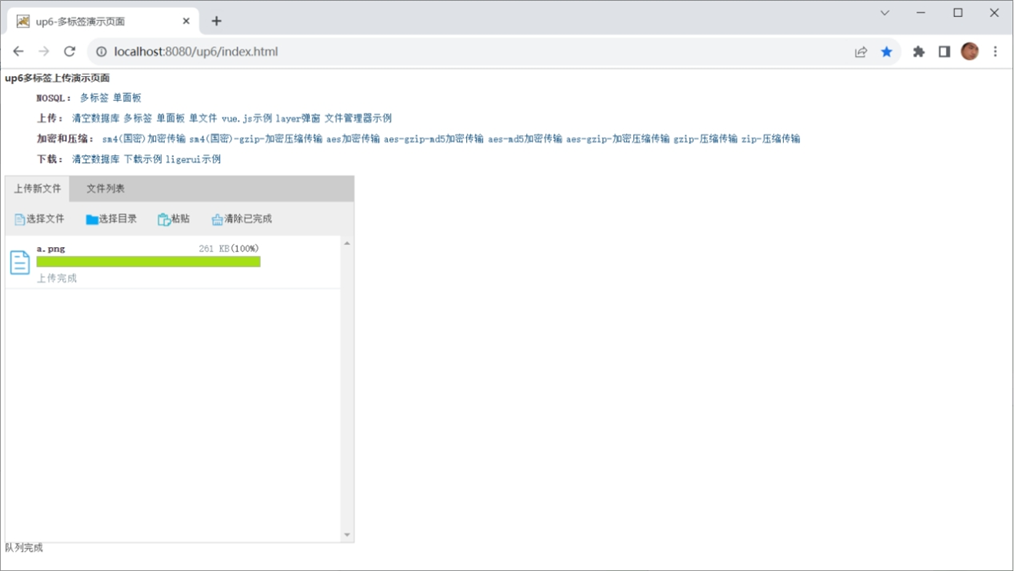
访问页面进行测试
文件存储路径
up6/upload/年/月/日/guid/filename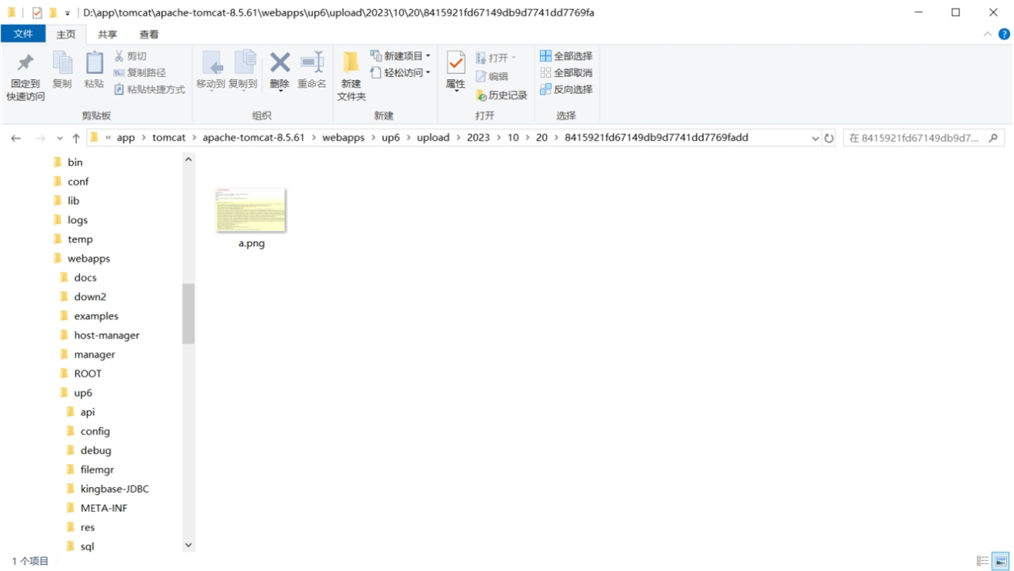
效果预览
文件上传
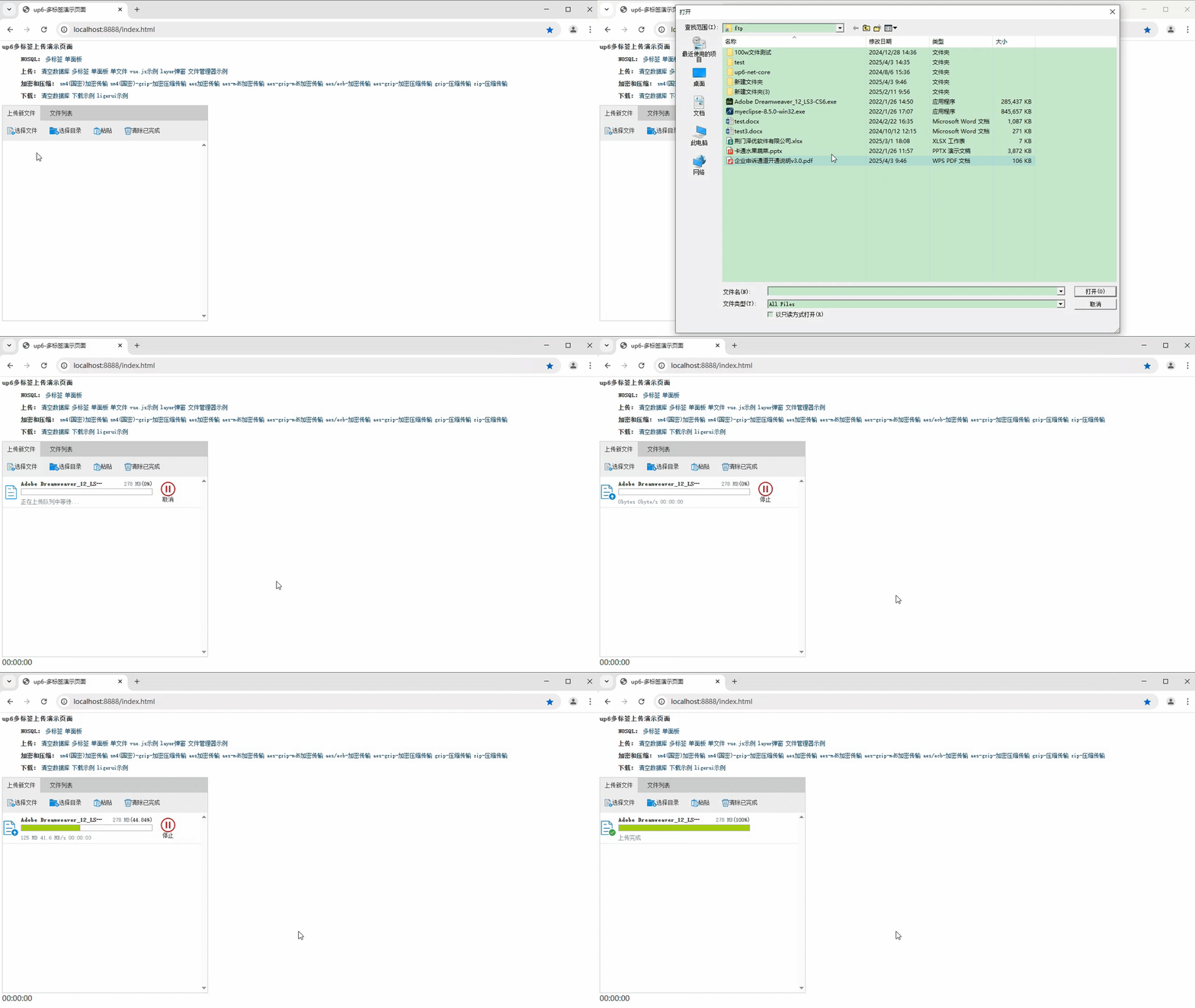
文件刷新续传
支持离线保存文件进度,在关闭浏览器,刷新浏览器后进行不丢失,仍然能够继续上传
文件夹上传
支持上传文件夹并保留层级结构,同样支持进度信息离线保存,刷新页面,关闭页面,重启系统不丢失上传进度。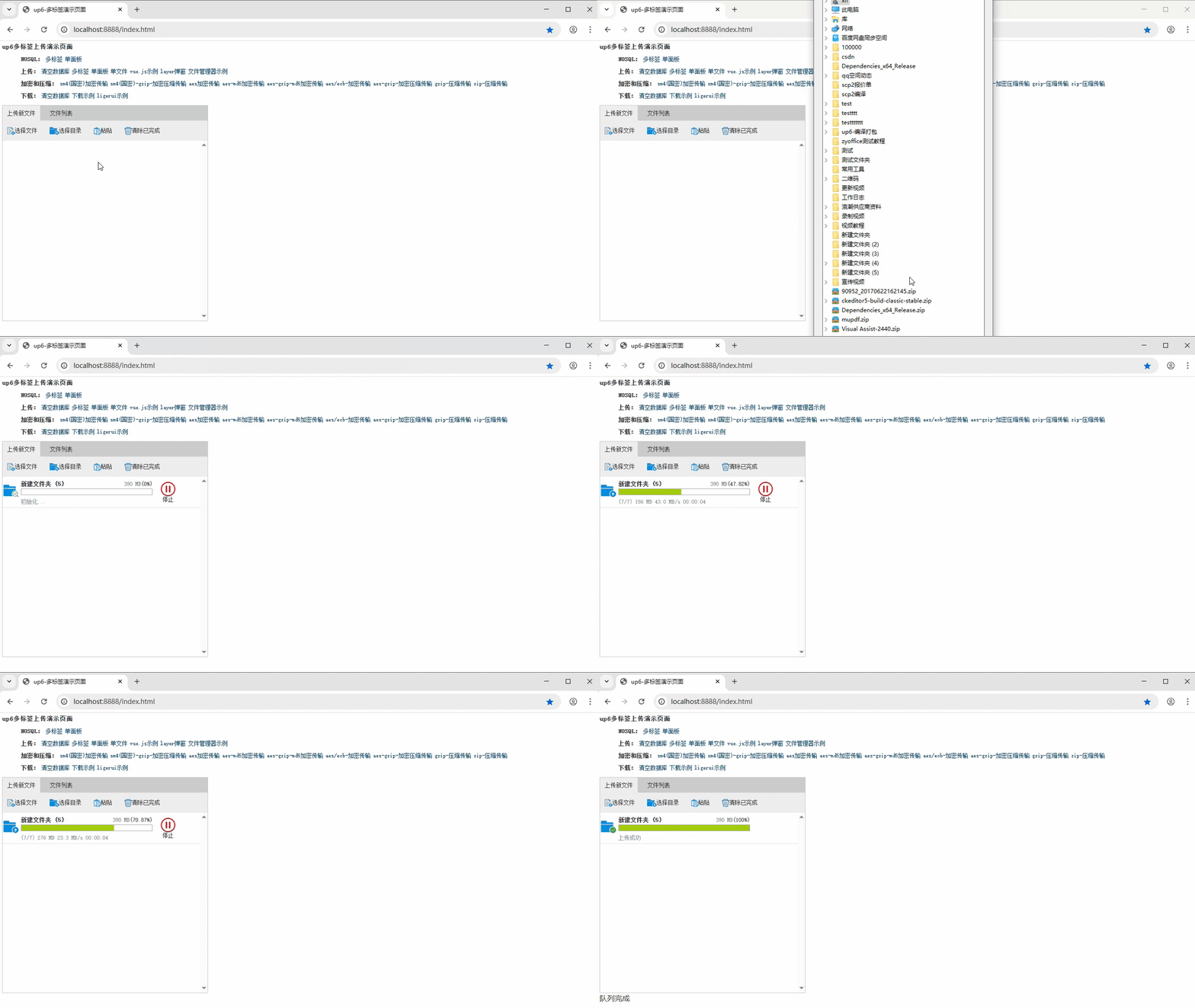
下载示例

火山引擎开发者社区是火山引擎打造的AI技术生态平台,聚焦Agent与大模型开发,提供豆包系列模型(图像/视频/视觉)、智能分析与会话工具,并配套评测集、动手实验室及行业案例库。社区通过技术沙龙、挑战赛等活动促进开发者成长,新用户可领50万Tokens权益,助力构建智能应用。
更多推荐
 19
19 0
0- 0


 已为社区贡献3条内容

所有评论(0)