待办事项小程序开发
本文介绍了微信小程序待办事项应用的开发方案。项目具备添加、标记完成/未完成、删除待办事项等核心功能,并实现本地数据存储。技术实现包括:1)前端页面构建(WXML/WXSS);2)交互逻辑处理(JavaScript);3)本地数据持久化(wx.setStorageSync)。应用采用响应式设计,包含输入框、任务列表和操作按钮,支持任务状态切换和删除功能。通过微信小程序原生API实现数据存储和读取,确
·
1. 项目规划
- 功能需求:
- 添加待办事项
- 标记完成/未完成
- 删除待办事项
- 分类或标签管理(可选)
- 数据持久化(本地存储)
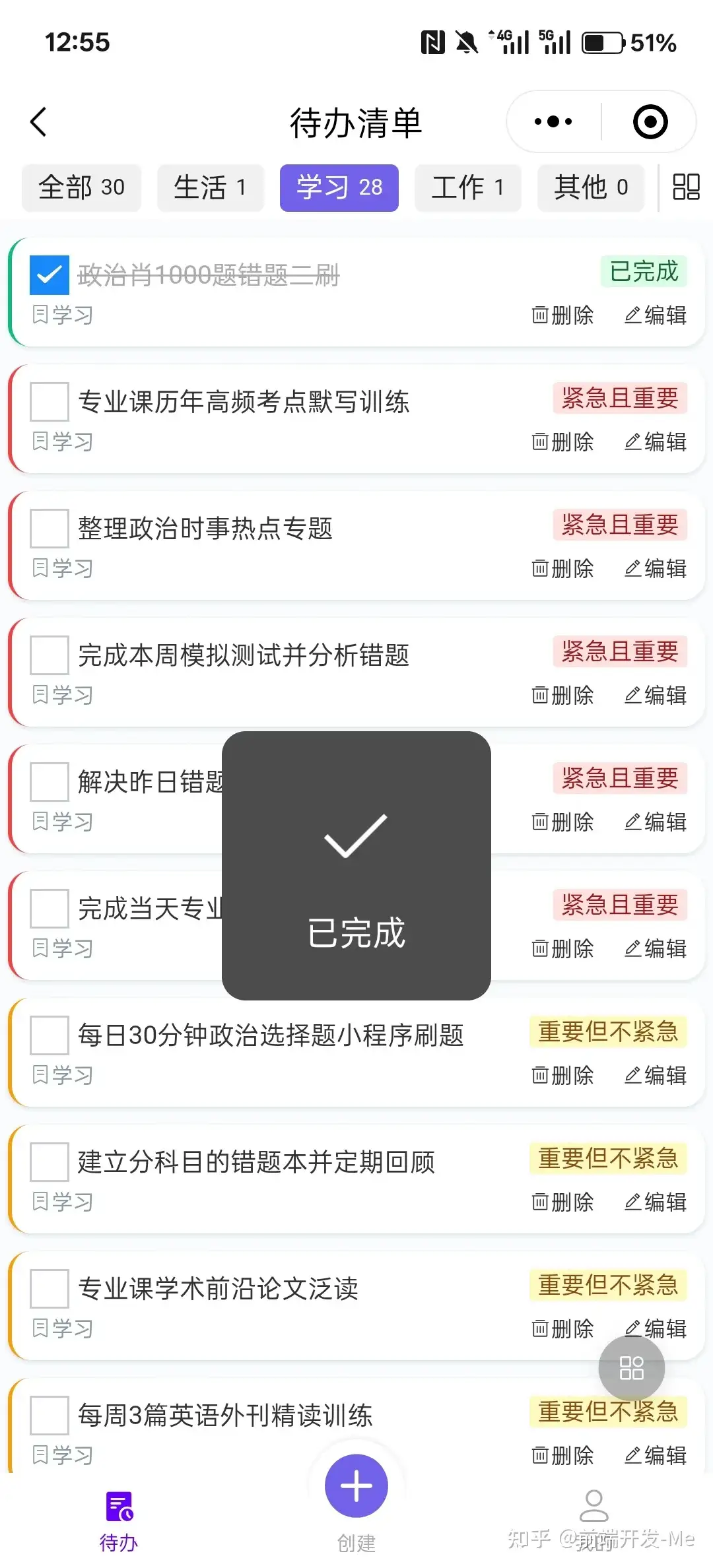
2. 实现功能
- 添加待办事项:
- 监听输入框和按钮事件,将输入内容添加到列表。
- 标记完成/未完成:
- 使用复选框或滑动操作,更新事项状态。
- 删除待办事项:
- 支持左滑删除或长按删除。
- 数据持久化:
- 使用本地存储待办事项数据。
3. 代码实现
基于微信小程序开发一个待办事项应用,主要包括以下功能:
- 创建待办事项
- 标记完成状态
- 删除待办事项
- 本地存储待办事项数据
首先,我会创建以下文件:
app.json- 小程序全局配置pages/index/index.js- 页面逻辑pages/index/index.wxml- 页面结构pages/index/index.wxss- 页面样式pages/index/index.json- 页面配置
{
  "pages": ["pages/index/index"],
  "window": {
    "navigationBarTitleText": "待办事项",
    "navigationBarBackgroundColor": "#ffffff",
    "navigationBarTextStyle": "black"
  },
  "style": "v2",
  "sitemapLocation": "sitemap.json"
}
<view class="container">
<view class="header">
<input
placeholder="添加待办事项"
value="{{inputValue}}"
bindinput="inputChange"
bindconfirm="addTodo"
/>
<button bindtap="addTodo">添加</button>
</view>
<view class="todo-list">
<view
wx:for="{{todos}}"
wx:key="id"
class="todo-item {{item.done ? 'done' : ''}}"
bindtap="toggleTodo"
data-id="{{item.id}}"
>
<text>{{item.text}}</text>
<button bindtap="deleteTodo" data-id="{{item.id}}">删除</button>
</view>
</view>
</view>.container {
padding: 20px;
}
.header {
display: flex;
margin-bottom: 20px;
}
.header input {
flex: 1;
margin-right: 10px;
padding: 10px;
border: 1px solid #ccc;
border-radius: 4px;
}
.todo-list {
margin-top: 20px;
}
.todo-item {
display: flex;
justify-content: space-between;
align-items: center;
padding: 10px;
margin-bottom: 10px;
border: 1px solid #eee;
border-radius: 4px;
}
.todo-item.done {
text-decoration: line-through;
color: #999;
}Page({
data: {
todos: [],
inputValue: ''
},
onLoad() {
this.loadTodos();
},
loadTodos() {
const todos = wx.getStorageSync('todos') || [];
this.setData({ todos });
},
saveTodos() {
wx.setStorageSync('todos', this.data.todos);
},
addTodo() {
if (!this.data.inputValue.trim()) return;
const newTodo = {
id: Date.now(),
text: this.data.inputValue,
done: false
};
this.setData({
todos: [...this.data.todos, newTodo],
inputValue: ''
}, this.saveTodos);
},
toggleTodo(e) {
const { id } = e.currentTarget.dataset;
const todos = this.data.todos.map(todo =>
todo.id === id ? { ...todo, done: !todo.done } : todo
);
this.setData({ todos }, this.saveTodos);
},
deleteTodo(e) {
const { id } = e.currentTarget.dataset;
const todos = this.data.todos.filter(todo => todo.id !== id);
this.setData({ todos }, this.saveTodos);
},
inputChange(e) {
this.setData({ inputValue: e.detail.value });
}
});
火山引擎开发者社区是火山引擎打造的AI技术生态平台,聚焦Agent与大模型开发,提供豆包系列模型(图像/视频/视觉)、智能分析与会话工具,并配套评测集、动手实验室及行业案例库。社区通过技术沙龙、挑战赛等活动促进开发者成长,新用户可领50万Tokens权益,助力构建智能应用。
更多推荐
 9
9 0
0- 0


 已为社区贡献3条内容

所有评论(0)