苍穹外卖实操记录Day1-Day4
8.26
原来已经那么久没有学习了 哎哟
Day 1
完善登陆功能
密码明文保存不安全,所以要存储加密后的密码,一般使用的是md5加密。也就是说后端拿到前端传进来的密码,要进行解密/加密 和数据库中的密码进行比对。
这里用的密码123456对应的MD5码是:e10adc3949ba59abbe56e057f20f883e
在数据库中进行修改,如果是在idea该数据库数据表中的操作,记得submit刷新一下,不然只修改了但是没有保存
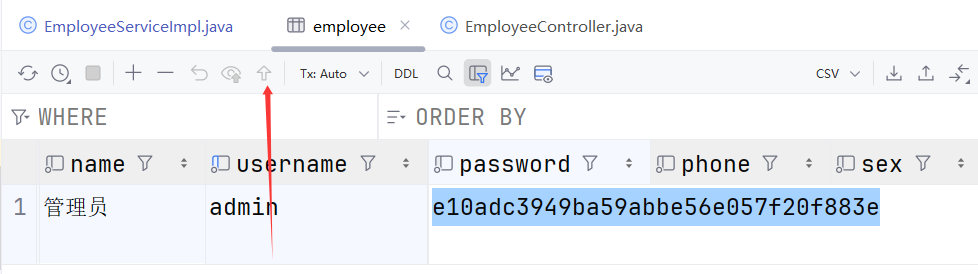
然后前端输入密码还是123456,在后端代码中EmployeeServiceImpl.java中密码比对处,直接使用md5转换的工具类:
password = DigestUtils.md5DigestAsHex(password.getBytes());
Day2
1. 新增员工
功能实现
- 前端传回对象是EmployeeDTO
搜了一下,其定义为:
public class EmployeeDTO implements Serializable {
    private Long id;
    private String username;
    private String name;
    private String phone;
    private String sex;
    private String idNumber;

}
而员工表中的员工数据为:
public class Employee implements Serializable {
    private static final long serialVersionUID = 1L;
    private Long id;
    private String username;
    private String name;
    private String password;
    private String phone;
    private String sex;
    private String idNumber;
    private Integer status;
    //@JsonFormat(pattern = "yyyy-MM-dd HH:mm:ss")
    private LocalDateTime createTime;
    //@JsonFormat(pattern = "yyyy-MM-dd HH:mm:ss")
    private LocalDateTime updateTime;
    private Long createUser;
    private Long updateUser;
}
所以这里在service的实现类中,没有直接传EmployeeDTO 类型(属性也不够放),而是新建了Employee类对象来赋值,并补充如status、createTime等属性
其他的跟之前一样了,只贴service实现类代码:
    /*
    * 新增员工
    * */
    @Override
    public void save(EmployeeDTO employeeDTO) {
        Employee employee = new Employee();

/*        以下可以直接用 对象属性拷贝
        BeanUtils.copyProperties(employeeDTO,employee);*/

        employee.setUsername(employeeDTO.getUsername());
        employee.setName(employeeDTO.getName());
//        设置密码 默认密码123456
        employee.setPassword(DigestUtils.md5DigestAsHex(PasswordConstant.DEFAULT_PASSWORD.getBytes()));
        employee.setPhone(employeeDTO.getPhone());
        employee.setSex(employeeDTO.getSex());
        employee.setIdNumber(employeeDTO.getIdNumber());
//        表示账户状态 默认正常状态 1表示启用 0表示禁用 这里用变量名称
        employee.setStatus(StatusConstant.ENABLE);
        employee.setCreateTime(LocalDateTime.now());
        employee.setUpdateTime(LocalDateTime.now());
//        设置当前记录创建人id和修改人id
//        TODO 后期需要改为当前登录用户的id
        employee.setCreateUser(10L);
        employee.setUpdateUser(10L);
        employeeMapper.insert(employee);
    }
代码完善
- 向SQL添加数据时,若主键已存在会报错,该怎么具体提示?
答:全局异常
这里在 sky-take-out\sky-server\src\main\java\com\sky\handler\GlobalExceptionHandler.java 中重载方法
    /*
    * 处理 SQL异常
    * */
    @ExceptionHandler
    public Result exceptionHandler(SQLIntegrityConstraintViolationException ex){
//        控制台报错话语:Duplicate entry 'zhangsan' for key 'idx_username'
        String message = ex.getMessage();
//        如果存在关键报错话语 此时要来找到重复的用户名
        if (message.contains("Duplicate entry")){
//            对报错话语进行切割 可以看到是空格隔开 放进数组后 'zhangsan'在第三个位置 故索引为2
            String[] split = message.split(" ");
            String username = split[2];
            String msg = username+"已存在";
            return Result.error(msg);
        }
        else{
            return Result.error(MessageConstant.UNKNOWN_ERROR);
        }
    }
- 回显id
答:ThreadLocal 线程独立空间
之前写的没保存上,就这样吧
就是登录校验的时候就解析了登陆人的id,所以在这里进行set一下:BaseContext.setCurrentId(empId);
com/sky/interceptor/JwtTokenAdminInterceptor.java
        //2、校验令牌
        try {
            log.info("jwt校验:{}", token);
            Claims claims = JwtUtil.parseJWT(jwtProperties.getAdminSecretKey(), token);
            Long empId = Long.valueOf(claims.get(JwtClaimsConstant.EMP_ID).toString());
            log.info("当前员工id:", empId);
            BaseContext.setCurrentId(empId);
            //3、通过,放行
            return true;
        } catch (Exception ex) {
            //4、不通过,响应401状态码
            response.setStatus(401);
            return false;
        }
然后在进行新增员工操作的时候get一下:
com/sky/service/impl/EmployeeServiceImpl.java
//        设置当前记录创建人id和修改人id
        employee.setCreateUser(BaseContext.getCurrentId());
        employee.setUpdateUser(BaseContext.getCurrentId());
2. 分页查询
功能实现
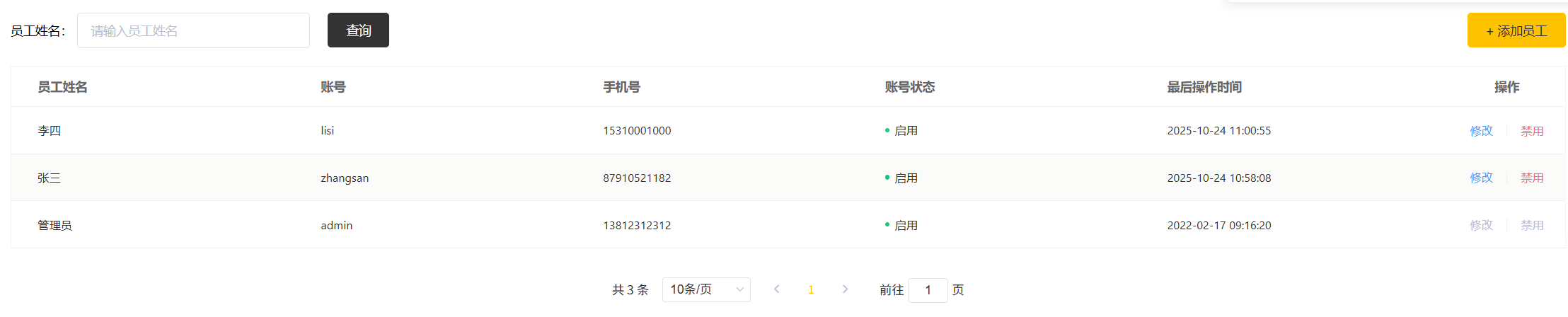
可以直接用前面JavaWebAi的代码,这里怕不一样 就跟着视频敲了下,发现是一样的
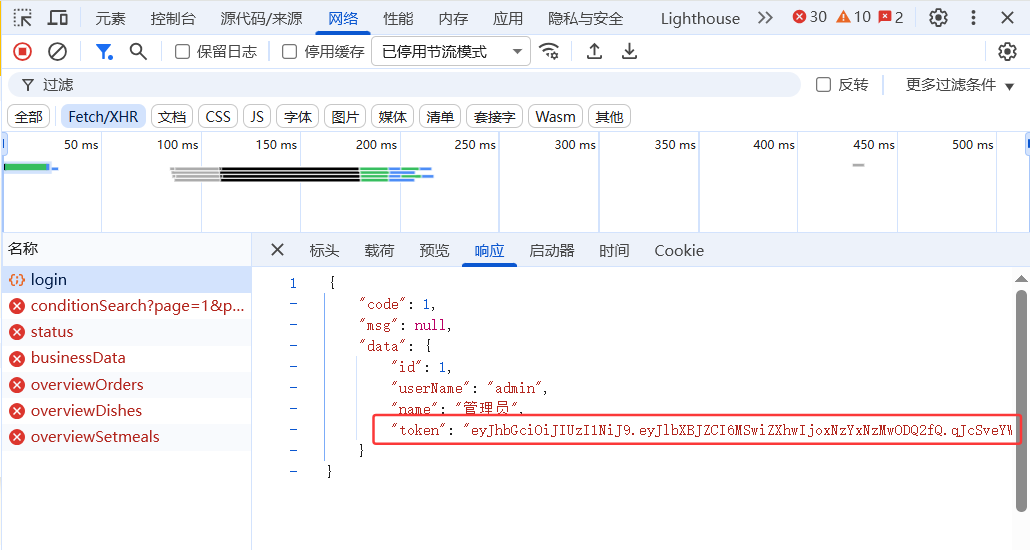
注意:如果有apifox调试的时候记得在header中添加token,并且该项目token有效时间较短,如果报错401就是token过期了,需要重新登录一下获取到token替换一下
这里我用apifox调试登陆功能想获取token的时候,报错了,也不知道咋改,就直接在前后端联调 网页上按F12 登录,看的响应得到的token
如果报500注意是不是SQL层面的错误,最开始我复用前面的代码,但是感觉有问题 就又抄视频的代码,结果一直500
最后才发现就是在代码不断改的过程中,数据类型错了(EmployeeMapper.java 中list方法最开始返回的是List,后面我改成了Page,但是在其xml文件中 之前的引用类型还是List,所以一直不对)
代码完善
这里完善的是时间格式
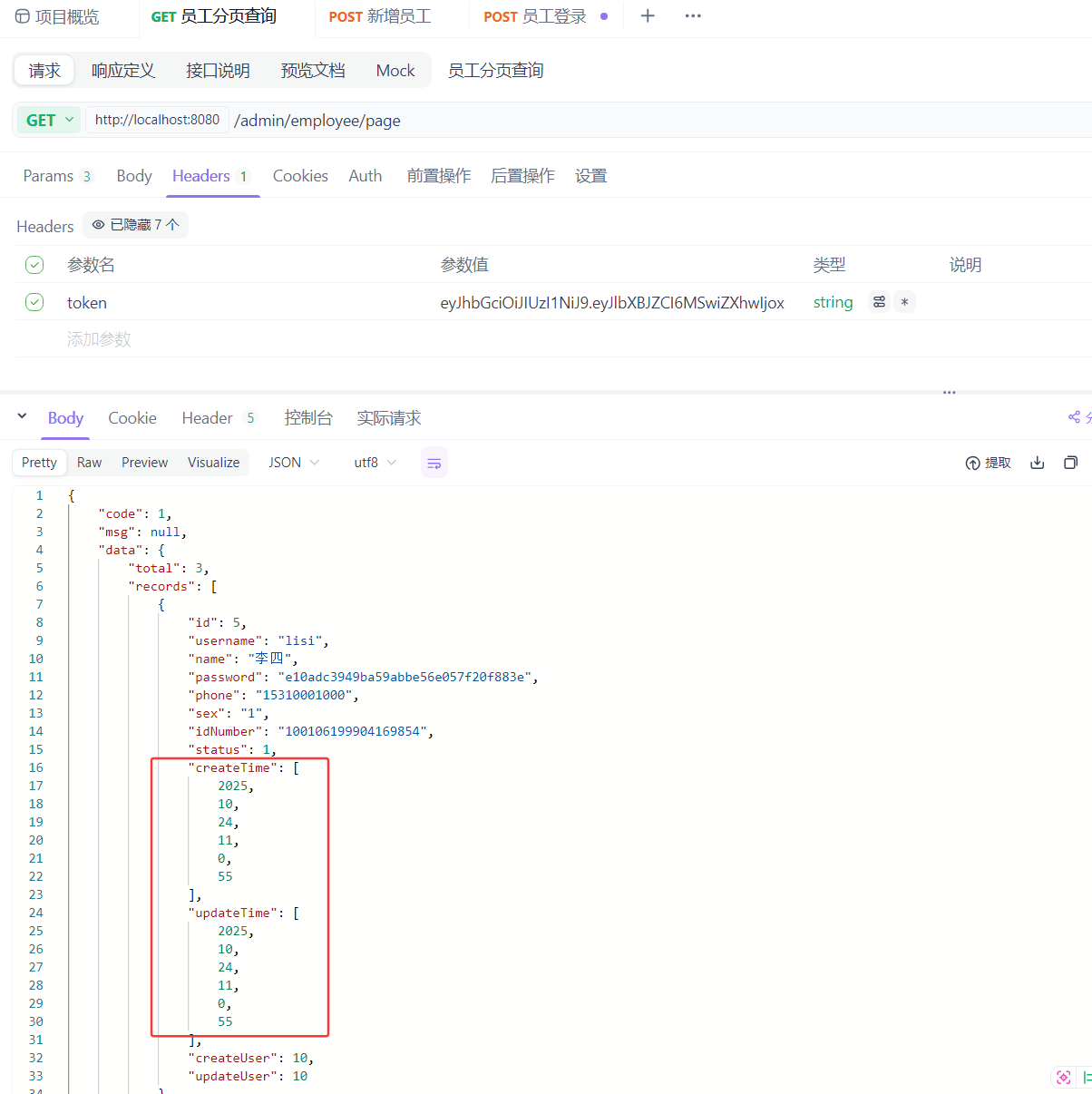
在该实体类中本身就有注释// @JsonFormat(pattern = “yyyy-MM-dd HH:mm:ss”)
去掉其实就能用了,但是因为这个需要挨着手动注释,如果行数太多显得繁琐,这里讲了消息管理器
com/sky/config/WebMvcConfiguration.java 复写extendMessageConverters方法
    /*
    * 扩展SpringMVC的消息转换器
    * */
    @Override
    protected void extendMessageConverters(List<HttpMessageConverter<?>> converters) {
        log.info("扩展消息转换器...");
        // 创建一个消息转换器对象
        MappingJackson2HttpMessageConverter converter = new MappingJackson2HttpMessageConverter();
        // 为消息转换器设置一个对象转换器,对象转换器可以将Java对象转为json
        converter.setObjectMapper(new JacksonObjectMapper());
        // 将自己的消息转换器加入到容器中
        converters.add(0,converter);

    }
可以ctrl+鼠标,点进JacksonObjectMapper,自己选择要用哪种格式,然后注释掉另外的
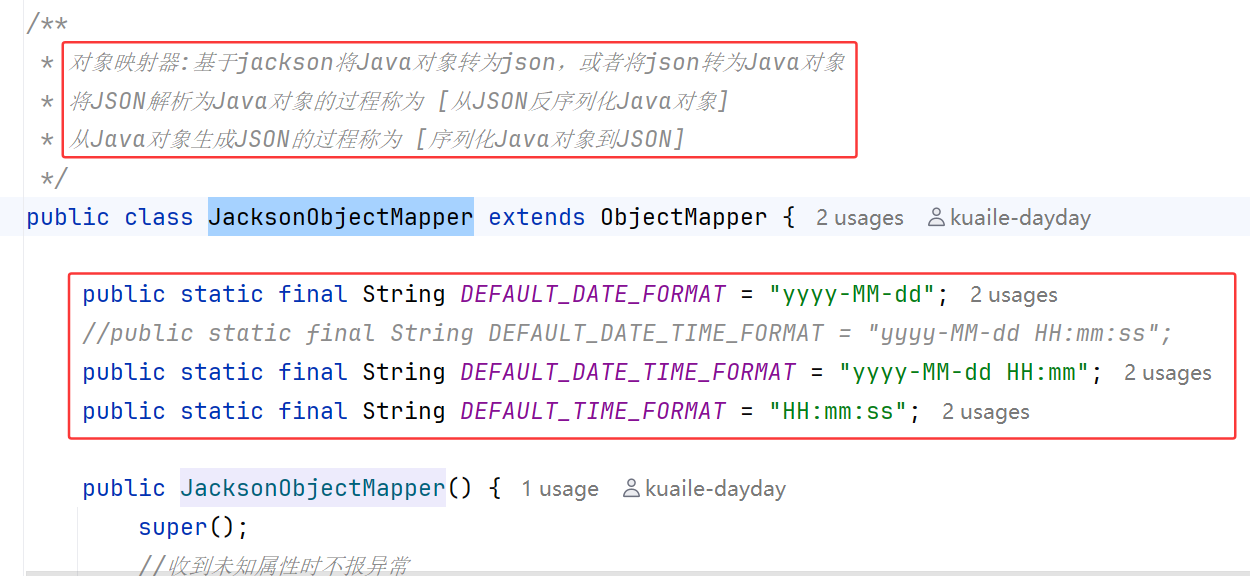
这里注释掉了毫秒行,所以效果为:

converters本身就存在了转换器容器,所以为了先使用我们所加入的这个消息转换器,converters.add(0,converter); 这个0就是设置索引
3. 启用禁用员工
功能实现
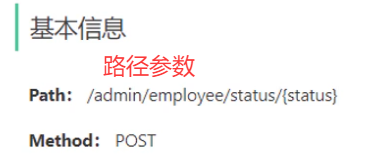
所以用@PathVariable,接口文档中的路径参数只有status,所以只对status用该注解,id不知道咋传的,总之这么用
    /*
    * 启动、禁用员工账号
    * */
    @PostMapping("/status/{status}")
    @ApiOperation("启动、禁用员工账号")
    public Result startOrStop(@PathVariable Integer status, Long id){
        log.info("员工状态:{},员工id:{}",status,id);
        employeeService.startOrStop(status,id);
        return Result.success();
    }
服务层实现类,调用的是update方法,这里在mapper层直接写了个修改任意属性数据的方法,而不单单是状态
所以新建了employee对象,设置id和status,这里我添加了设置修改时间
    /*
     * 启动、禁用员工账号
     * */
    @Override
    public void startOrStop(Integer status, Long id) {
        Employee emp = new Employee();
        emp.setId(id);
        emp.setStatus(status);
        emp.setUpdateTime(LocalDateTime.now());
        emp.setUpdateUser(BaseContext.getCurrentId());

        employeeMapper.update(emp);

    }
mapper层,记得要写where 不然就全都启动禁用了
    <update id="update">
        update employee
        <set>
            <if test="username != null">username = #{username},</if>
            <if test="name != null">name = #{name},</if>
            <if test="password != null">password = #{password},</if>
            <if test="phone != null">phone = #{phone},</if>
            <if test="sex != null">sex = #{sex},</if>
            <if test="idNumber != null">id_number = #{idNumber},</if>
            <if test="status != null">status = #{status},</if>
            <if test="updateTime != null">update_time = #{updateTime},</if>
            <if test="updateUser != null">update_user = #{updateUser},</if>
        </set>
        where id = #{id}
    </update>

4. 编辑员工
功能实现
数据回显+修改数据,都可复用之前的代码,至于修改数据功能其实已经在功能三实现
这里注意:在根据id查询员工数据回显时,从数据库查询到数据返回给controller层的时候要设置密文密码
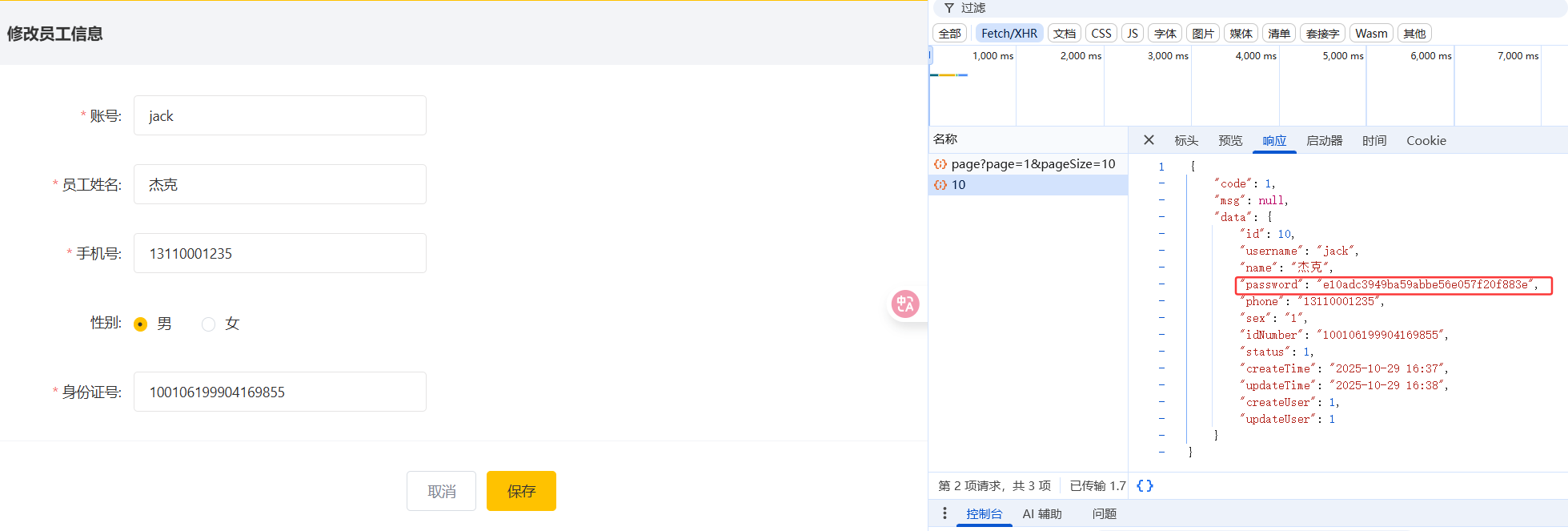
可以看到,如果没有单独设置密文密码,在点击修改按钮响应回来的数据中是有密码的,所以出于安全的考虑,返回时置*
    /*
     * 根据id查询员工信息查询回显
     * */
    @Override
    public Employee getInfo(Long id) {
        Employee employee = employeeMapper.getInfoById(id);
        employee.setPassword("****");
        return employee;
    }
出了点小问题,就是可以正常回显、修改数据,但是修改数据之后数据库中这个用户的密码也改成了****
看了下,原视频中传的是EmployeeDTO数据类型,我复用前面的代码,直接用employee类型。数据回显和修改又是一起的,如果要修改 肯定要根据id查询数据,在这一步密码就被重置,然后修改功能时 数据已经变成***了 传进mapper的已经是了
改了一下服务层实现类的update方法:
    /*
     * 根据id 修改员工数据
     * */
    @Override
    public void update(Employee emp) {
        // 从数据库查询原始员工数据
        Employee originalEmployee = employeeMapper.getInfoById(emp.getId());

        // 将原始密码设置回emp对象,避免被"****"覆盖
        emp.setPassword(originalEmployee.getPassword());

        emp.setUpdateTime(LocalDateTime.now());
        emp.setUpdateUser(BaseContext.getCurrentId());
        employeeMapper.update(emp);
    }
Day3
1. 公共字段自动填充
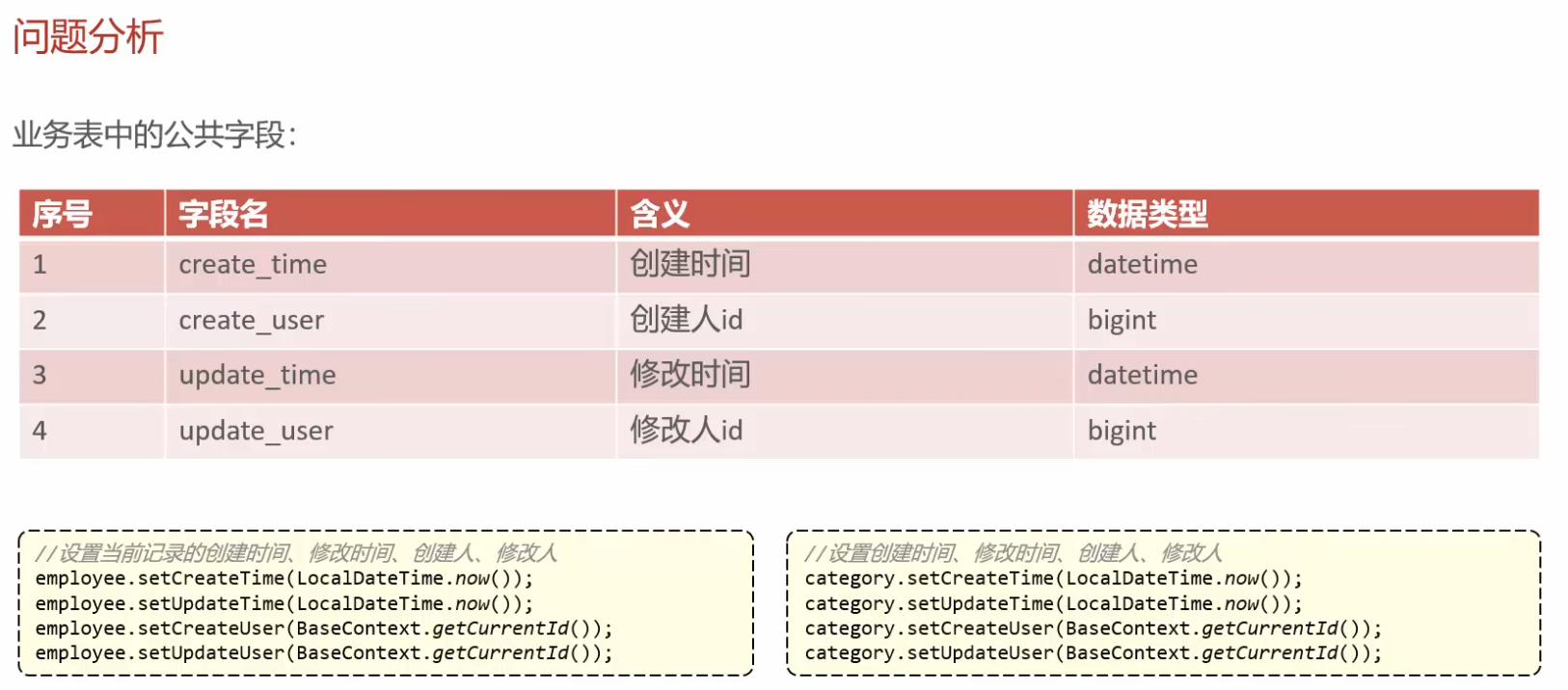
上述set太繁杂,如果表格变换 代码更是难改
提到切面编程,倒回去看了下笔记 就是AOP
但是业务方法太多的时候,每一个方法都要加这么几句代码很繁琐,所以引入AOP希望就这一个问题进行解决。
基于AOP思想,我们就可以直接定义一个类,在类中写下上述几句代码,然后在开始时间和结束时间中间调用业务方法,并在这个类上加上注释,指明其针对哪些进行面向特定方法编程。
跟循步骤写

其实还是有点迷迷糊糊。。。
先说过程中我出现的问题
注意: 这里的是MethodSignature,导入的包是import org.aspectj.lang.reflect.MethodSignature;
跟着视频敲了Signature并查看其他接口时,容易选到 MemberSignature(是我的失误),然后跟着视频敲发现getMethod()报错,并且点进Signature接口发现也没有getMethod方法。
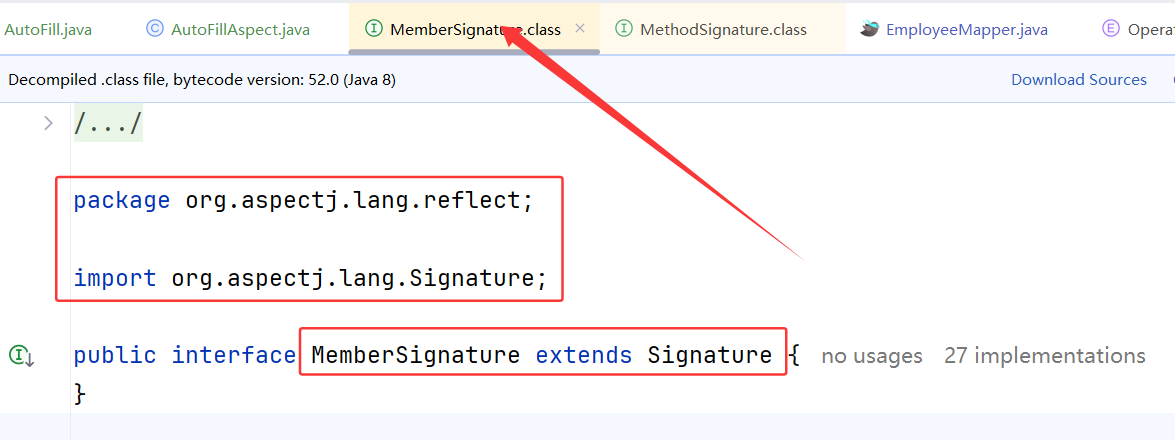
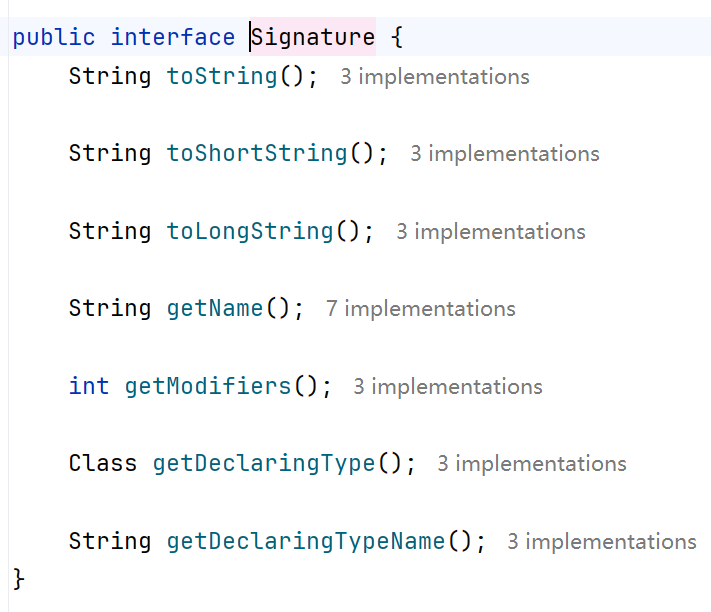
后面找到 MethodSignature
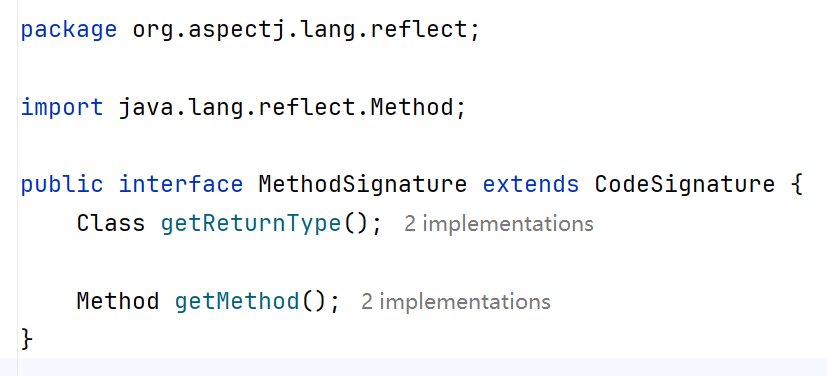
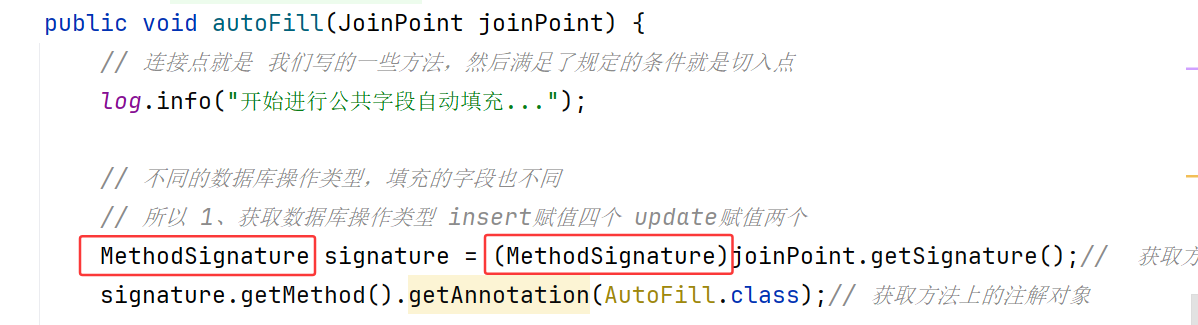
实现过程
- 自定义注解com/sky/annotation/AutoFill.java
/*
* 自定义注解,用于标识某个方法需要进行功能字段自动填充处理
* */
@Target(ElementType.METHOD)
@Retention(RetentionPolicy.RUNTIME)
public @interface AutoFill {
    // 数据库操作类型 update insert(公共字段只有在这两个操作中才会进行填充 查询等 不会用到)
    OperationType value();

}
Target:目标对象,对方法实现? 这两行注解是必须的
OperationType类中定义了需要操作的两种数据库操作类型:
/**
 * 数据库操作类型
 */
public enum OperationType {
    /**
     * 更新操作
     */
    UPDATE,
    /**
     * 插入操作
     */
    INSERT
}
- 自定义切面类 com/sky/aspect/AutoFillAspect.java
(1)先定义切入点,即 定义满足条件
    @Pointcut("execution(* com.sky.mapper.*.*(..)) && @annotation(com.sky.annotation.AutoFill)")
    public void autoFillPointCut() {}
也就是说 com.sky.mapper..(…) mapper层的所有方法参数、加上了AutoFill注解的都要进行判断 去执行这个操作逻辑
(2)定义要执行的操作,加入通知
①前置通知
    /*
    * 前置通知,在通知中进行公共字段的赋值
    * (把符合条件的方法要执行的操作逻辑写进通知里面)
    * */
    @Before("autoFillPointCut()")
    public void autoFill(JoinPoint joinPoint) {...}
② 先获取当前方法(连接点 joinPoint),获取方法签名对象:
MethodSignature signature = (MethodSignature)joinPoint.getSignature();// 获取方法签名对象
这里本来都用的signature ,但不知道为啥要用MethodSignature ,这里注意导入的包,别导错了
③ 获取方法上的注解对象
AutoFill autoFill = signature.getMethod().getAnnotation(AutoFill.class);
这个注解对象应该就是,我们在mapper层方法上加入的注解,这里获取到的就是该注解应用的对象
④ 获得数据库操作类型
OperationType operationType = autoFill.value();
前面提到,OperationType 中定义了 UPDATE 和 INSERT 枚举类型,autoFill 就是获取到的注解对象,再获取其value,得到的就是OperationType 中的一个值, UPDATE 或者 INSERT
⑤ 获取当前被拦截的方法参数–实体对象
Object[] args = joinPoint.getArgs();
joinPoint.getArgs() 就是获取当前(连接点)方法的所有参数,返回的args数组就是依次保存的参数,比如update(Employeee employee) 只有一个参数,那么就是args[0] 为employee对象,这里说 一般默认取第一个参数,所以我们写mapper层方法时也把必要参数放在第一位
        Object[] args = joinPoint.getArgs();
        if (args == null || args.length == 0) {// 判断空指针 即该方法没有参数
            return;
        }
        Object entity = args[0];
判空,然后取第一个参数,这里用Object 类型 是因为不确定参数类型,可以是employee、dish等等
⑥ 准备赋值的数据
        LocalDateTime now = LocalDateTime.now();
        Long currentId = BaseContext.getCurrentId();
主要是设置 创建时间、更新时间、创建操作者、更新操作者,所以这里获取当前时间和用户ID
⑦ 根据对应的数据库操作类型,为对应的字段通过反射赋值
先进行 if 判断 operationType 的值,然后为公共字段赋值
要赋值,我们需要先获取对象定义中声明的方法 getDeclaredMethod(“方法名”,参数类型),如
Method setCreateTime = entity.getClass().getDeclaredMethod("setCreateTime", LocalDateTime.class);
这里对方法名,怕输入的时候会有拼写错误,所以直接使用常量,在 com/sky/constant/AutoFillConstant.java 文件中定义如下:
/**
 * 公共字段自动填充相关常量
 */
public class AutoFillConstant {
    /**
     * 实体类中的方法名称
     */
    public static final String SET_CREATE_TIME = "setCreateTime";
    public static final String SET_UPDATE_TIME = "setUpdateTime";
    public static final String SET_CREATE_USER = "setCreateUser";
    public static final String SET_UPDATE_USER = "setUpdateUser";
}
故代码为:
Method setCreateTime = entity.getClass().getDeclaredMethod(AutoFillConstant.SET_CREATE_TIME, LocalDateTime.class);
再通过反射为对象属性赋值
                setCreateTime.invoke(entity, now);
                setCreateUser.invoke(entity, currentId);
autoFill 整体代码为:
    /*
    * 前置通知,在通知中进行公共字段的赋值
    * (把符合条件的方法要执行的操作逻辑写进通知里面)
    * */
    @Before("autoFillPointCut()")
    public void autoFill(JoinPoint joinPoint) {
        // 连接点就是 我们写的一些方法,然后满足了规定的条件就是切入点
        log.info("开始进行公共字段自动填充...");

        // 不同的数据库操作类型,填充的字段也不同
        // 所以 1、获取数据库操作类型 insert赋值四个 update赋值两个
        MethodSignature signature = (MethodSignature)joinPoint.getSignature();//  获取方法签名对象
        AutoFill autoFill = signature.getMethod().getAnnotation(AutoFill.class);// 获取方法上的注解对象
        // 获得数据库操作类型 (这里获得类型,应该是在mapper层 在对应方法上面添加的注解AutoFill括号中有value,对应update和insert)
        OperationType operationType = autoFill.value();

        // 2、获取当前被拦截的方法参数--实体对象
        Object[] args = joinPoint.getArgs();
        if (args == null || args.length == 0) {// 判断空指针 即该方法没有参数
            return;
        }
        Object entity = args[0];// 不确定参数类型,所以用Object

        // 3、准备赋值的数据
        LocalDateTime now = LocalDateTime.now();
        Long currentId = BaseContext.getCurrentId();

        // 4、根据对应的数据库操作类型,为对应的字段通过反射赋值
        if(operationType == OperationType.INSERT){
            // 为四个公共字段赋值
            // 如何获取 赋值方法 set
            try {
                // 获取该对象定义中的声明方法 getDeclaredMethod,参数1:方法名,参数2:参数类型
                Method setCreateTime = entity.getClass().getDeclaredMethod(AutoFillConstant.SET_CREATE_TIME, LocalDateTime.class);
                Method setCreateUser = entity.getClass().getDeclaredMethod(AutoFillConstant.SET_CREATE_USER, Long.class);
                Method setUpdateTime = entity.getClass().getDeclaredMethod(AutoFillConstant.SET_UPDATE_TIME, LocalDateTime.class);
                Method setUpdateUser = entity.getClass().getDeclaredMethod(AutoFillConstant.SET_UPDATE_USER, Long.class);

                // 通过反射为对象属性赋值
                setCreateTime.invoke(entity, now);
                setCreateUser.invoke(entity, currentId);
                setUpdateTime.invoke(entity, now);
                setUpdateUser.invoke(entity, currentId);
            } catch (Exception e) {
                e.printStackTrace();
            }
        } else if (operationType == OperationType.UPDATE) {
            // 为两个公共字段赋值
            // 同理 先获取赋值方法
            try {
                // 获取该对象定义中的声明方法 getDeclaredMethod,参数1:方法名,参数2:参数类型
                Method setUpdateTime = entity.getClass().getDeclaredMethod(AutoFillConstant.SET_UPDATE_TIME, LocalDateTime.class);
                Method setUpdateUser = entity.getClass().getDeclaredMethod(AutoFillConstant.SET_UPDATE_USER, Long.class);

                // 通过反射为对象属性赋值
                setUpdateTime.invoke(entity, now);
                setUpdateUser.invoke(entity, currentId);
            } catch (Exception e) {
                e.printStackTrace();
            }

        }

    }
com/sky/aspect/AutoFillAspect.java 全部代码
package com.sky.aspect;

import com.sky.annotation.AutoFill;
import com.sky.constant.AutoFillConstant;
import com.sky.context.BaseContext;
import com.sky.enumeration.OperationType;
import lombok.extern.slf4j.Slf4j;
import org.aspectj.lang.JoinPoint;
import org.aspectj.lang.annotation.Aspect;
import org.aspectj.lang.annotation.Before;
import org.aspectj.lang.annotation.Pointcut;
import org.aspectj.lang.reflect.MethodSignature;
import org.springframework.stereotype.Component;

import java.lang.reflect.Method;
import java.time.LocalDateTime;

/*
* 自定义切面,实现公共字段自动填充处理逻辑
* */
@Aspect
@Component
@Slf4j
public class AutoFillAspect {
    /*
    * 切入点: 被指定的符合条件的方法(需要去执行什么操作)
    * */
    @Pointcut("execution(* com.sky.mapper.*.*(..)) && @annotation(com.sky.annotation.AutoFill)")
    public void autoFillPointCut() {}

    /*
    * 前置通知,在通知中进行公共字段的赋值
    * (把符合条件的方法要执行的操作逻辑写进通知里面)
    * */
    @Before("autoFillPointCut()")
    public void autoFill(JoinPoint joinPoint) {
        // 连接点就是 我们写的一些方法,然后满足了规定的条件就是切入点
        log.info("开始进行公共字段自动填充...");

        // 不同的数据库操作类型,填充的字段也不同
        // 所以 1、获取数据库操作类型 insert赋值四个 update赋值两个
        MethodSignature signature = (MethodSignature)joinPoint.getSignature();//  获取方法签名对象
        AutoFill autoFill = signature.getMethod().getAnnotation(AutoFill.class);// 获取方法上的注解对象
        // 获得数据库操作类型 (这里获得类型,应该是在mapper层 在对应方法上面添加的注解AutoFill括号中有value,对应update和insert)
        OperationType operationType = autoFill.value();


        // 2、获取当前被拦截的方法参数--实体对象
        Object[] args = joinPoint.getArgs();
        if (args == null || args.length == 0) {// 判断空指针 即该方法没有参数
            return;
        }
        Object entity = args[0];// 不确定参数类型,所以用Object


        // 3、准备赋值的数据
        LocalDateTime now = LocalDateTime.now();
        Long currentId = BaseContext.getCurrentId();

        // 4、根据对应的数据库操作类型,为对应的字段通过反射赋值
        if(operationType == OperationType.INSERT){
            // 为四个公共字段赋值
            // 如何获取 赋值方法 set
            try {
                // 获取该对象定义中的声明方法 getDeclaredMethod,参数1:方法名,参数2:参数类型
                Method setCreateTime = entity.getClass().getDeclaredMethod(AutoFillConstant.SET_CREATE_TIME, LocalDateTime.class);
                Method setCreateUser = entity.getClass().getDeclaredMethod(AutoFillConstant.SET_CREATE_USER, Long.class);
                Method setUpdateTime = entity.getClass().getDeclaredMethod(AutoFillConstant.SET_UPDATE_TIME, LocalDateTime.class);
                Method setUpdateUser = entity.getClass().getDeclaredMethod(AutoFillConstant.SET_UPDATE_USER, Long.class);

                // 通过反射为对象属性赋值
                setCreateTime.invoke(entity, now);
                setCreateUser.invoke(entity, currentId);
                setUpdateTime.invoke(entity, now);
                setUpdateUser.invoke(entity, currentId);
            } catch (Exception e) {
                e.printStackTrace();
            }
        } else if (operationType == OperationType.UPDATE) {
            // 为两个公共字段赋值
            // 同理 先获取赋值方法
            try {
                // 获取该对象定义中的声明方法 getDeclaredMethod,参数1:方法名,参数2:参数类型
                Method setUpdateTime = entity.getClass().getDeclaredMethod(AutoFillConstant.SET_UPDATE_TIME, LocalDateTime.class);
                Method setUpdateUser = entity.getClass().getDeclaredMethod(AutoFillConstant.SET_UPDATE_USER, Long.class);

                // 通过反射为对象属性赋值
                setUpdateTime.invoke(entity, now);
                setUpdateUser.invoke(entity, currentId);
            } catch (Exception e) {
                e.printStackTrace();
            }

        }

    }
}
2. 新增菜品
文件上传准备工作
又要用aliyun 之前JavaWeb好像是一个模版,替换一下就直接用的,这里要自己写一下,不想学习了害,顺着敲了一下
UUID完全忘了,就是防止所有文件有重名情况,所以会重新给他们命名(但是跟着视频实现,好像也就是一个模版)
另外,这里的功能实现,有了多表查询:
表 dish 中有 category_id —— 表category 中的 id
表 dish_flavor 有 dish_id —— 表 dish 中的 id
这里涉及到,新增菜品是添加进表dish,但是网页中有个口味做法配置,这个口味是添加进dish_flavor表的,所以会涉及两个表的插入操作,所以声明两个mapper
该功能的实现涉及的知识点有:
1、文件上传配置alioss以及如何运用(我还是不会)
2、文件重命名以防止重名,用UUID
3、多个数据表操作需要打开事务管理,防止数据错乱
4、主键回显
表A的id是插入后自动生成,若表B需要这个id则需要主键回显。实现就是,在表A的具体的插入语句中使用
(标准语句)
设为true,后面设为id即该数据库操作完成后就默认返回这个主键id
5、批量插入数据
菜品口味可以有多个,但是对应同一个菜品,所以需要对一个菜品依次插入其口味数据。flavor是一个List,传参也直接传List,在mapper层解析;
这里在mapper层实现用到 foreach语句
foreach collection=“flavors” —— void insertBatch(List flavors) 传参进来的是 flavors,所以这里的collection 填写 flavors
item=“df” —— 从 flavor这个集合中取出来的对象命名为df,以便后续使用如 (#{df.dishId},#{df.name},#{df.value})
separator=“,” —— 以逗号分割
Controller层
    /*
    * 新增菜品和对应的口味
    * */
    @PostMapping
    @ApiOperation("新增菜品")
    public Result save(@RequestBody DishDTO dishDTO){
        log.info("新增菜品:{}",dishDTO);
        dishService.saveWithFlavor(dishDTO);
        return Result.success();
    }
Service层
/*
     * 新增菜品和对应的口味
     * */
    @Override
    @Transactional
    public void saveWithFlavor(DishDTO dishDTO) {
        // 涉及两个表的操作,所以打开事务管理

        Dish  dish = new Dish();
//        BeanUtils.copyProperties(dishDTO,dish);
        dish.setName(dishDTO.getName());
        dish.setCategoryId(dishDTO.getCategoryId());
        dish.setPrice(dishDTO.getPrice());
        dish.setImage(dishDTO.getImage());
        dish.setDescription(dishDTO.getDescription());
        dish.setStatus(dishDTO.getStatus());
        dishMapper.insert(dish);

        /*
        * dish_flavor 表中的 dish_id 是上述操作完成后自动生成的id
        * 所以需要主键回显,在DishMapper具体插入语句中使用 useGeneratedKeys等 (标准语句)
        * */
        Long dishId = dish.getId(); // 获取insert语句生成的主键值

        List<DishFlavor> flavors = dishDTO.getFlavors();
        if (flavors != null && flavors.size() > 0){
            flavors.forEach(dishFlavor -> dishFlavor.setDishId(dishId));
            // 向口味表插入n条数据
            dishFlavorMapper.insertBatch(flavors);

        }
Mapper层
<mapper namespace="com.sky.mapper.DishMapper">
    <insert id="insert" useGeneratedKeys="true" keyProperty="id">
        insert into dish(name,category_id,price,image,description,status,create_time,update_time,create_user,update_user)
        values
            (#{name},#{categoryId},#{price},#{image},#{description},#{status},#{createTime},#{updateTime},#{createUser},#{updateUser})
    </insert>
</mapper>
<mapper namespace="com.sky.mapper.DishFlavorMapper">
    <insert id="insertBatch">
        insert into dish_flavor(dish_id,name,value) values
        <foreach collection="flavors" item="df" separator=",">
            (#{df.dishId},#{df.name},#{df.value})
        </foreach>
    </insert>
</mapper>
3. 菜品分页查询
这里我自己先写了一遍,但是菜品分类不显示
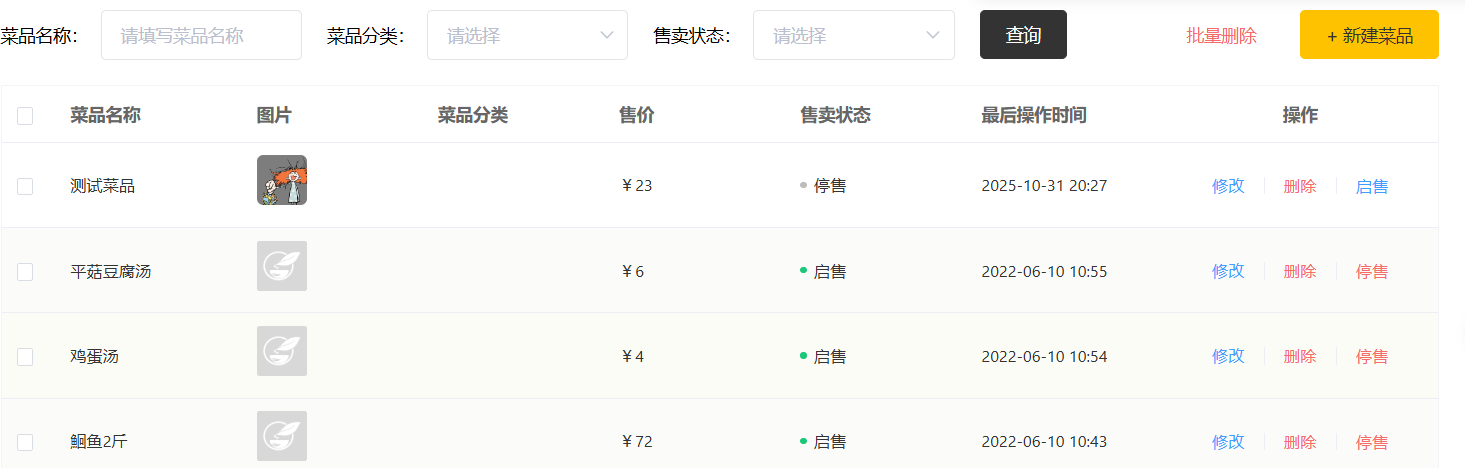
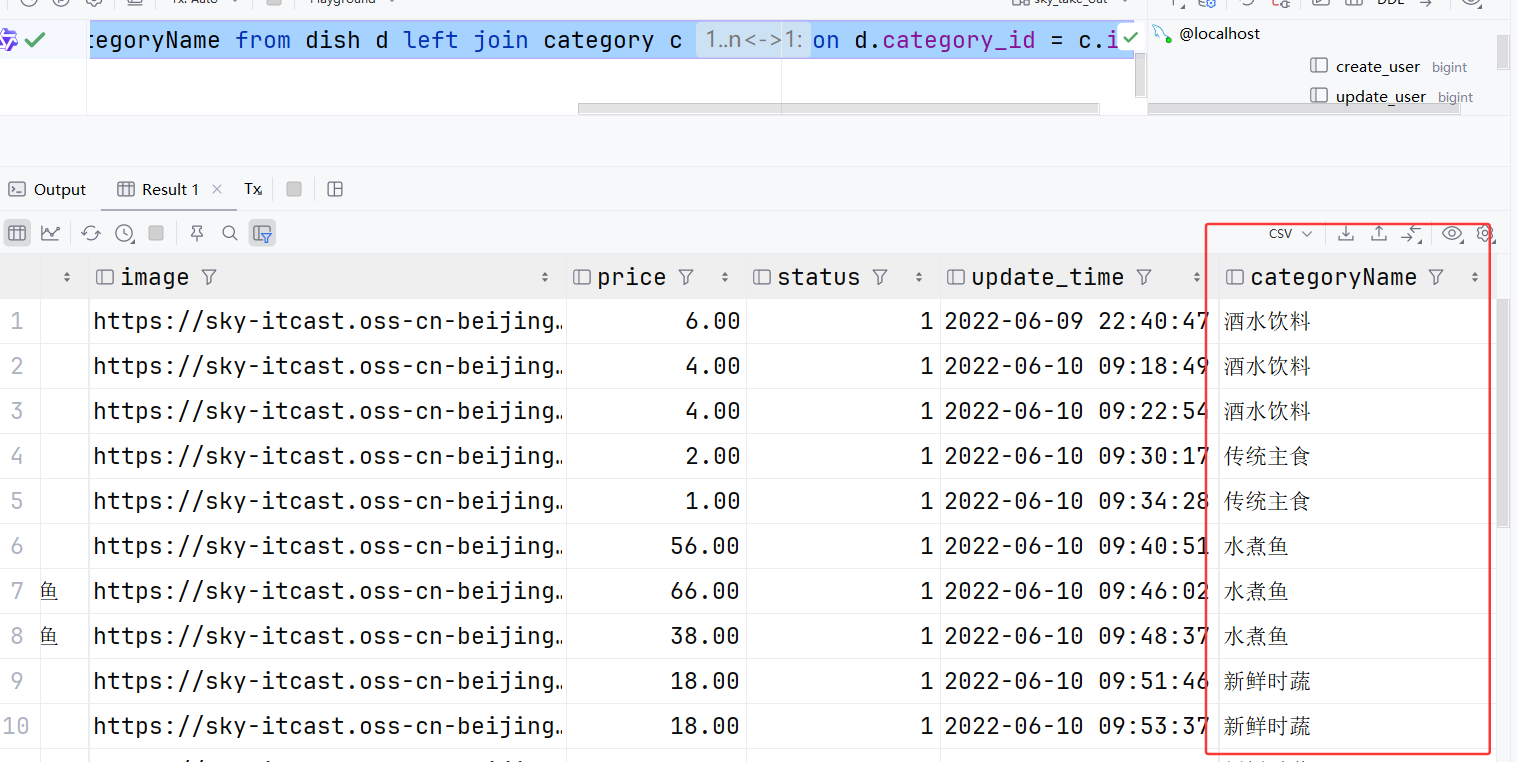
菜品分类是需要多表查询的,我这里也查询了的,在数据库中试了试SQL查询语句:
select d.name, d.image, d.price, d.status, d.update_time, c.name as categoryName from dish d left join category c on d.category_id = c.id
显示结果也是有这一栏的,不懂,再看看视频吧
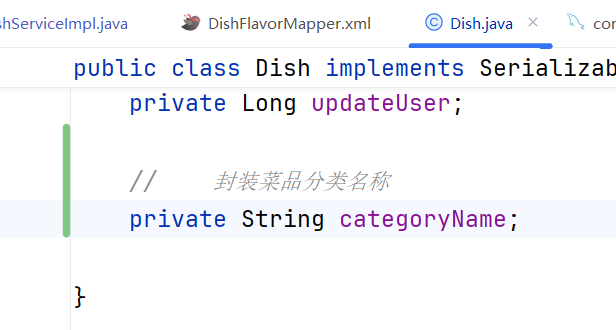
哦好吧,在 Dish.java 中 新增一行就正确显示了
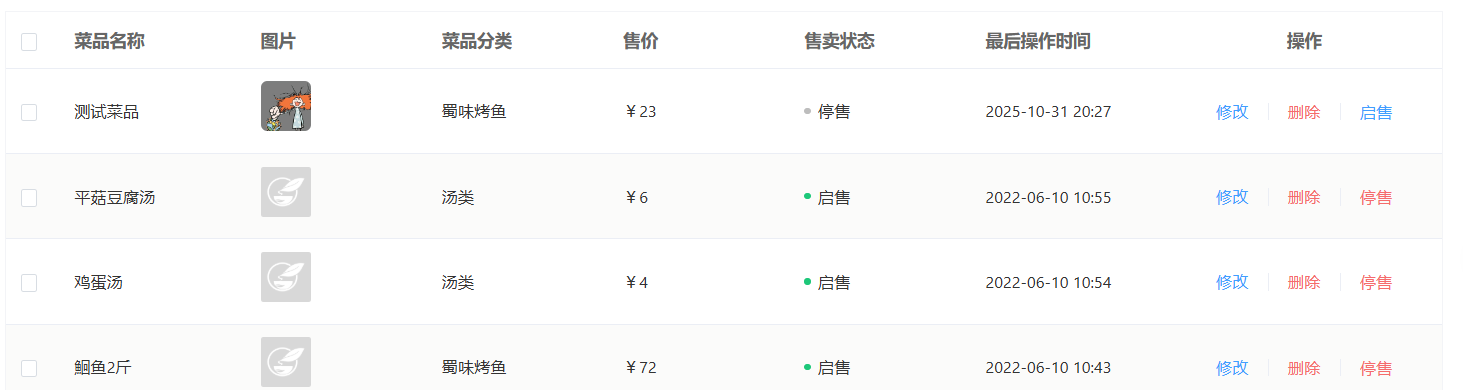
但是视频好像是用了DishVO,还是跟视频看一遍吧
就只有在serviceIml中 用到VO 就是直接将分页查询的结果保存为DishVO
该功能的实现涉及知识点:
**1、分页查询 PageHelper **
2、多表查询 有命名不对齐的情况需要用 as 新名
3、SQL条件查询 和
Controller
    /*
    * 菜品分页查询
    * */
    @GetMapping("/page")
    public Result page(DishPageQueryDTO dishPageQueryDTO){
        log.info("分页查询:{}",dishPageQueryDTO);
        PageResult pageResult = dishService.page(dishPageQueryDTO);
        return Result.success(pageResult);
    }
ServiceIml
    /*
     * 菜品分页查询
     * */
    @Override
    public PageResult page(DishPageQueryDTO dishPageQueryDTO) {
        PageHelper.startPage(dishPageQueryDTO.getPage(),dishPageQueryDTO.getPageSize());
        List<DishVO> dishList = dishMapper.page(dishPageQueryDTO);
        Page<DishVO> p = (Page<DishVO>) dishList;
        return new PageResult(p.getTotal(),p.getResult());
    }
Mapper
    <select id="page" resultType="com.sky.vo.DishVO">
        select d.*, c.name as categoryName from dish d left outer join category c on d.category_id = c.id
        <where>
            <if test="name != null and name != ''">
                and d.name like concat('%',#{name},'%')
            </if>
            <if test="categoryId != null">
                and d.category_id = #{categoryId}
            </if>
            <if test="status != null">
                and d.status = #{status}
            </if>
        </where>
        order by d.create_time desc
    </select>
4. 删除菜品
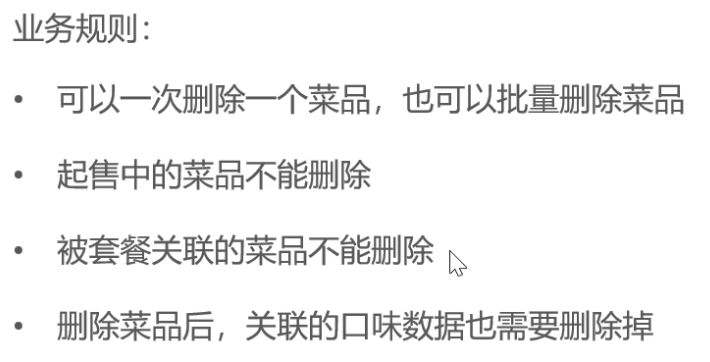
这里也是跟JavaWeb思路一样,可以复用,但需要进行删除的判断
该功能涉及的知识点:
1、Query传参 ?id=1 要用@RequestParam,批量删除传多个id 用List存储
2、多个数据表操作 要打开事务管理
3、批量操作 数据表操作需要遍历时 用foreach语句
Controller
    /*
    * (批量)删除菜品
    * */
    @DeleteMapping
    @ApiOperation("批量删除菜品")
    public Result delete(@RequestParam List<Long> ids){
        log.info("批量删除菜品,ids:{}",ids);
        dishService.delete(ids);
        return Result.success();
    }
ServiceImpl
    /*
     * (批量)删除菜品
     * */
    @Override
    @Transactional
    public void delete(List<Long> ids) {
        // 判断当前菜品是否能够删除——是否存在起售中的菜品
        for (Long id : ids){
            Dish dish = dishMapper.getById(id);
            if (dish.getStatus() == StatusConstant.ENABLE){
                // 当前菜品处于起售中,不能删除
                throw new DeletionNotAllowedException(MessageConstant.DISH_ON_SALE);
            }
        }
        // 判断当前菜品是否能够删除——是否存在关联的套餐
        List<Long> setmealIds = setmealDishMapper.getSetmealIdsByDishIds(ids);
        if (setmealIds != null && setmealIds.size() > 0){
            // 当前菜品被套餐关联,不能删除
            throw new DeletionNotAllowedException(MessageConstant.DISH_BE_RELATED_BY_SETMEAL);
        }

        // 删除菜品 dish表
        dishMapper.deleteByIds(ids);
        // 删除口味表dish_flavor表
        dishFlavorMapper.deleteByDishIds(ids);

    }
Mapper
dish
    /*
    * 根据id查询菜品数据
    * */
    @Select("select * from dish where id = #{id}")
    Dish getById(Long id);
    <delete id="deleteByIds">
        delete from dish where id in
                         <foreach collection="ids" item="id" separator="," open="(" close=")">
                             #{id}
                         </foreach>
    </delete>
dishFlavor
    <delete id="deleteByDishIds">
        delete from dish_flavor where dish_id in
                                <foreach collection="ids" item="dishId" separator="," open="(" close=")">
                                    #{dishId}
                                </foreach>
    </delete>
SetmealDish
    <select id="getSetmealIdsByDishIds" resultType="java.lang.Long">
        select setmeal_id from setmeal_dish where dish_id in
                                            <foreach collection="ids" item="dishId" separator="," open="(" close=")">
                                                #{dishId}
                                            </foreach>
    </select>
5. 修改菜品
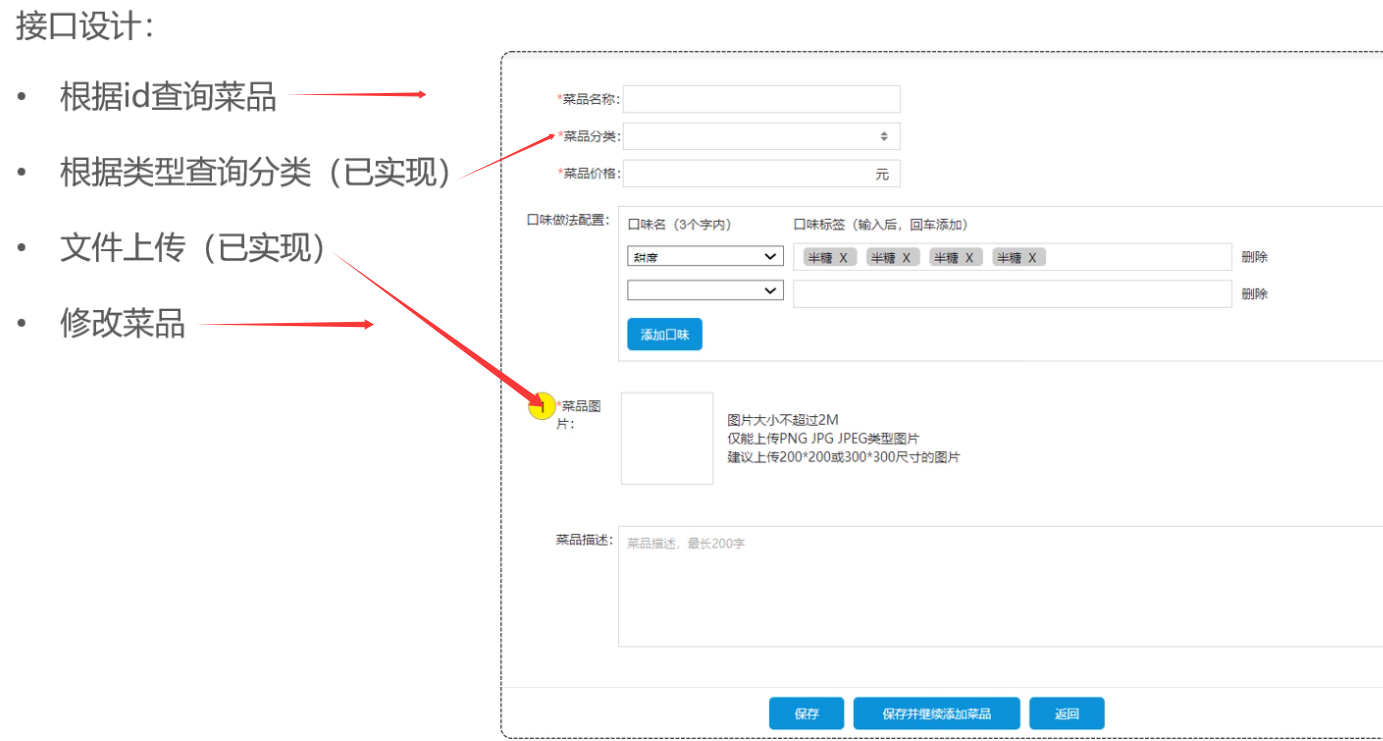
- 根据id查询菜品和对应口味
接口时/{id} 路径参数 用 @PathVariable
这里要查询 菜品分类 和 口味,所以用的是DishVO类(可以自己对比一下两个类定义的属性)
菜品信息查Dish
口味信息依据dishId查 flavor那个表
Controller
    /*
    * 根据id查询菜品和对应口味
    * */
    @GetMapping("/{id}")
    @ApiOperation("根据id查询菜品和口味")
    public Result getDishById(@PathVariable Long id){
        log.info("根据id查询菜品和口味:{}",id);
        DishVO dishVO = dishService.getByIdWithFlavor(id);
        return Result.success(dishVO);
    }
ServiceImpl
DishVo包含全部信息,分别查询两个表,所以可以分开存储再合并
感觉直接用DishVo应该也行吧,有属性就存 没属性就不存,最后再合并一下好了(没试)
    /*
     * 根据id查询菜品和对应口味
     * */
    @Override
    public DishVO getByIdWithFlavor(Long id) {
        Dish dish = dishMapper.getById(id);
        List<DishFlavor> dishFlavors = dishFlavorMapper.getByDishId(id);
        DishVO dishVO = new DishVO();
        BeanUtils.copyProperties(dish,dishVO);
        dishVO.setFlavors(dishFlavors);

        return dishVO;
    }
Mapper
    /*
    * 根据id查询菜品数据
    * */
    @Select("select * from dish where id = #{id}")
    Dish getById(Long id);
    /*
     * 根据菜品id查询对应的口味数据
     * */
    @Select("select * from dish_flavor where dish_id = #{dishId}")
    List<DishFlavor> getByDishId(Long dishId);
- 修改菜品
Controller
    /*
    * 修改菜品
    * */
    @PutMapping
    @ApiOperation("修改菜品")
    public Result update(@RequestBody DishDTO dishDTO){
        log.info("修改菜品:{}",dishDTO);
        dishService.update(dishDTO);
        return Result.success();
    }
ServiceImpl
好像对于一对多的关系,比如一个员工的多条工作经历、一个菜品的多条口味信息,这种以列表的信息存储的,如果要修改,都是先删后加的操作
所以对于Dish表 基础信息就直接用update操作
对于DishFlavor表 先删除这个id对应的口味,前面写的方法deleteByDishIds 传的是列表,这里只传单个数据会报错,就直接让软件提示修改的。也可以单独再写个单个删除的hhh
    /*
     * 修改菜品 和 口味信息
     * */
    @Override
    @Transactional
    public void update(DishDTO dishDTO) {
        // 修改菜品表基本信息
        Dish dish = new Dish();
        BeanUtils.copyProperties(dishDTO,dish);
        dishMapper.update(dish);

        // 删除原有的口味数据
        dishFlavorMapper.deleteByDishIds(Collections.singletonList(dishDTO.getId()));

        // 重新插入口味数据
        List<DishFlavor> flavors = dishDTO.getFlavors();
        if (flavors != null && flavors.size() > 0){
            flavors.forEach(dishFlavor -> dishFlavor.setDishId(dishDTO.getId()));
            dishFlavorMapper.insertBatch(flavors);
        }
    }
Mapper
DishMapper
    <update id="update">
        update dish
        <set>
            <if test="name != null and name !=''">
                name = #{name},
            </if>
            <if test="categoryId != null">
                category_id = #{categoryId},
            </if>
            <if test="price != null">
                price = #{price},
            </if>
            <if test="image != null">
                image = #{image},
            </if>
            <if test="description != null">
                description = #{description},
            </if>
            <if test="status != null">
                status = #{status},
            </if>
            <if test="updateTime != null">
                update_time = #{updateTime},
            </if>
            <if test="updateUser != null">
                update_user = #{updateUser},
            </if>
        </set>
        where id = #{id}
    </update>
其他方法 前面已贴
Day4 套餐管理(自实现)
看了下 setmeal表一个数据都没有,本来想先写查询的,这里按照他给出的资料依次实现
1. 新增套餐
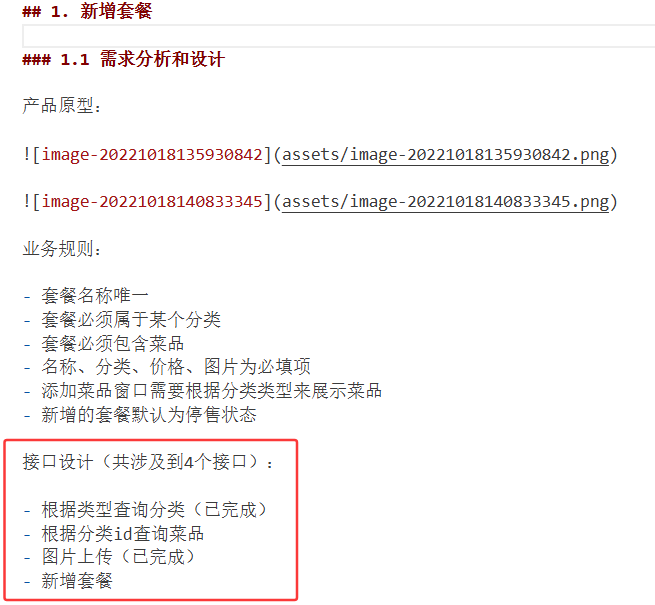 我们需要实现以下两点
根据分类id查询菜品
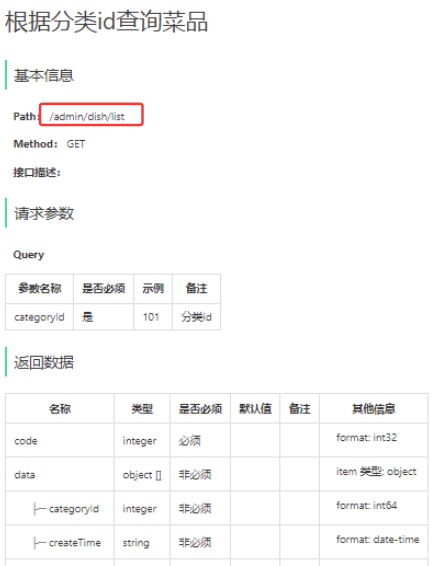
Path: /admin/dish/list
即该方法写在dishController里面,返回所有category_id=categoryId的菜品
Controller
这里创建的对象,就用的Dish,DishVO类型对象没有创建信息,而且也不需要口味信息
com/sky/controller/admin/DishController.java
    /*
    * 根据菜品分类id(categoryId)查询菜品
    * */
    @GetMapping("/list")
    @ApiOperation("根据菜品分类id查询菜品")
    public Result getDishByCategoryId(Long categoryId){
        log.info("根据分类id查询菜品:{}",categoryId);
        List<Dish> dishList = dishService.getDishByCategoryId(categoryId);

        return Result.success(dishList);
    }
ServiceImpl
    /*
     * 根据菜品分类id(categoryId)查询菜品
     * */
    @Override
    public List<Dish> getDishByCategoryId(Long categoryId) {
        List<Dish> dishList = dishMapper.getDishByCategoryId(categoryId);
        return dishList;
    }
Mapper
    /*
     * 根据菜品分类id(categoryId)查询菜品
     * */
    @Select("select * from dish where category_id = #{categoryId}")
    List<Dish> getDishByCategoryId(Long categoryId);
效果
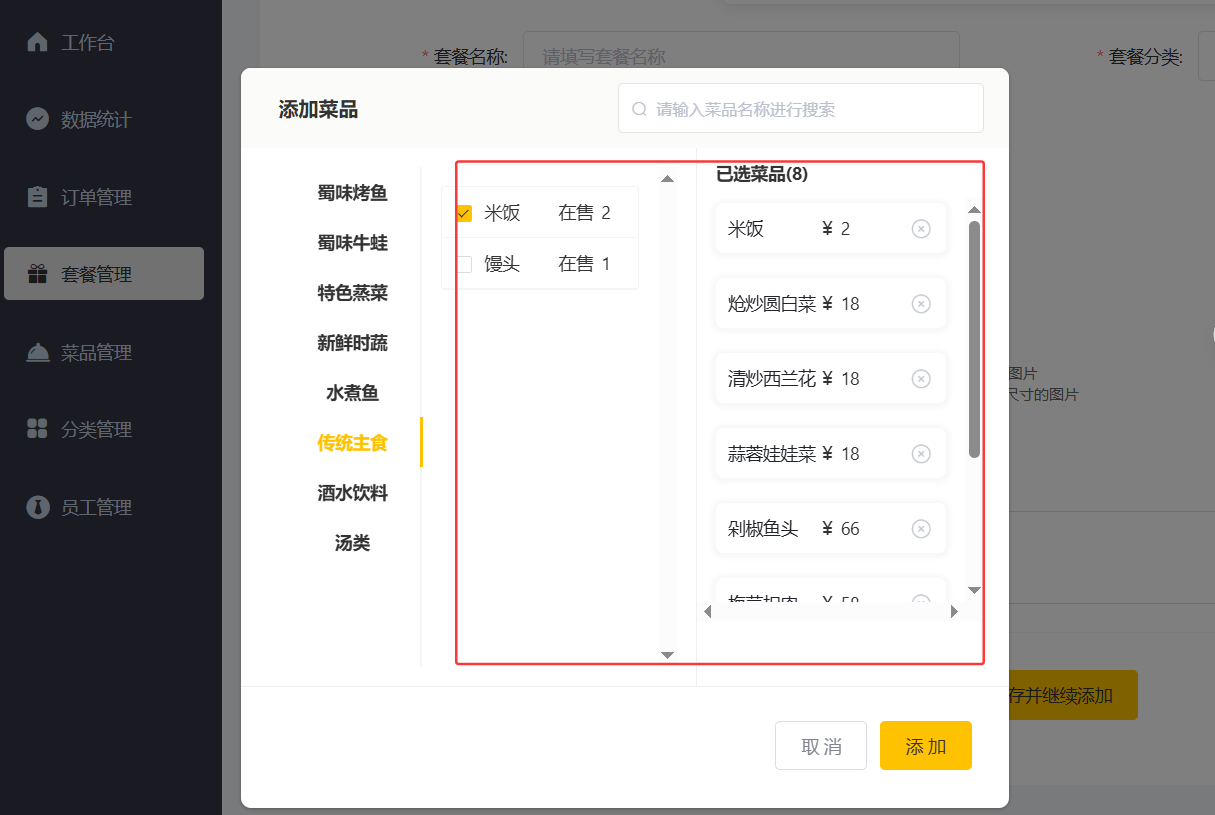
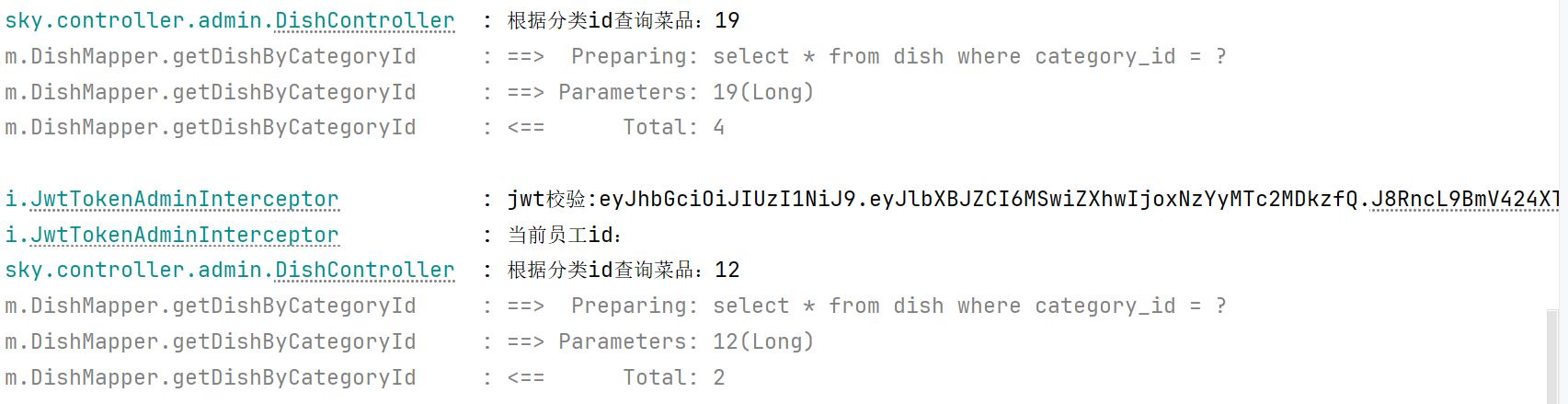
看了下提供的答案,他用的动态查询,可能是后面有条件查询?之后再看看
新增套餐
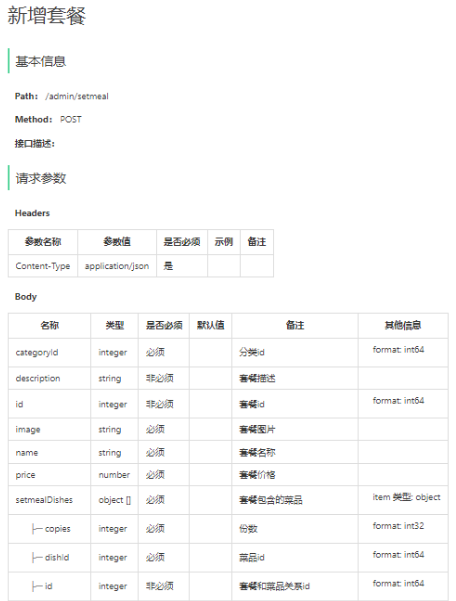
Path: /admin/setmeal
要新建setmeal的controller、service、mapper
新增套餐,就是@RequestBody,并且传入数据包含套餐信息和 套餐包含的菜品信息,所以使用的类型是SetmealDTO
具体操作的表应该是 setmeal 和 setmeal_dish 两张表
Controller
    /*
    * 新增套餐
    * */
    @PostMapping
    @ApiOperation("新增套餐")
    public Result save(@RequestBody SetmealDTO setmealDTO){
        log.info("新增套餐:{}",setmealDTO);
        setMealService.save(setmealDTO);

        return Result.success();
    }
ServiceImpl
    /*
     * 新增套餐
     * */
    @Override
    public void save(SetmealDTO setmealDTO) {
        // 分别操作两张表

        // 将套餐基础信息保存到setmeal表中
        Setmeal setmeal = new Setmeal();
        BeanUtils.copyProperties(setmealDTO, setmeal);
        setmealMapper.insert(setmeal);

        // 将套餐和菜品的关联关系保存到setmeal_dish表中
        // setmeal_dish表中的setmeal_id 是 新增套餐后自动生成的id,所以这里要主键回显
        Long setmealId = setmeal.getId();
        // setmealDTO对象中 套餐和菜品的关联关系 的数据可能有多条,所以每一条数据都要设置 setmealId,所以遍历
        List<SetmealDish> setmealDishList = setmealDTO.getSetmealDishes();
        if (setmealDishList != null && setmealDishList.size() > 0){
            setmealDishList.forEach(setmealDish -> setmealDish.setSetmealId(setmealId));
            setmealDishMapper.insertBatch(setmealDishList);
        }


    }
写得我有点晕乎了。。后面数据库操作属性名都写错了
Mapper
com/sky/mapper/SetmealMapper.java
    /*
     * 新增套餐 基础信息
     * */
    @AutoFill(value = OperationType.INSERT)
    void insert(Setmeal setmeal);
mapper/SetmealMapper.xml
<mapper namespace="com.sky.mapper.SetmealMapper">
    <insert id="insert" useGeneratedKeys="true" keyProperty="id">
        insert into setmeal(category_id, name, price, status, description,
                            image, create_time, update_time, create_user, update_user)
        values (#{categoryId}, #{name}, #{price}, #{status}, #{description}, #{image},
                #{createTime}, #{updateTime}, #{createUser}, #{updateUser})

    </insert>
</mapper>
mapper/SetmealDishMapper.xml
<mapper namespace="com.sky.mapper.SetmealDishMapper">
    <insert id="insertBatch">
        insert into setmeal_dish (setmeal_id, dish_id, name, price, copies)
        values
        <foreach collection="setmealDishList" item="smd" separator=",">
            (#{smd.setmealId},#{smd.dishId},#{smd.name},#{smd.price},#{smd.copies})
        </foreach>
    </insert>

</mapper>
效果


之后写分页查询就可在网站上显示了
2. 套餐分页查询
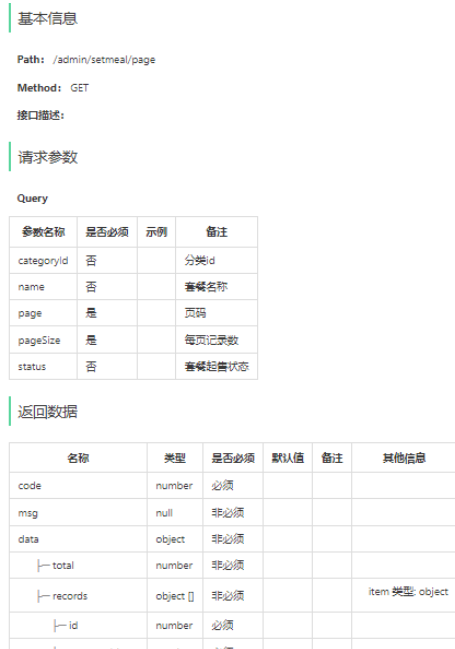
对比下属性,请求参数是 SetmealPageQueryDTO,返回的数据是 SetmealVO,多余的口味信息不管
private Long id;
//分类id
private Long categoryId;
//套餐名称
private String name;
//套餐价格
private BigDecimal price;
//状态 0:停用 1:启用
private Integer status;
//描述信息
private String description;
//图片
private String image;
//更新时间
private LocalDateTime updateTime;
//分类名称
private String categoryName;
联合 setmeal表 和 category表 where s.category_id = c.id
Controller
    /*
    * 套餐分页查询
    * */
    @GetMapping("/page")
    @ApiOperation("套餐分页查询")
    public Result page(SetmealPageQueryDTO setmealPageQueryDTO){
        log.info("套餐分页查询:{}",setmealPageQueryDTO);
        PageResult pageResult = setMealService.page(setmealPageQueryDTO);
        return Result.success(pageResult);
    }
ServiceImpl
    /*
     * 套餐分页查询
     * */
    @Override
    public PageResult page(SetmealPageQueryDTO setmealPageQueryDTO) {
        PageHelper.startPage(setmealPageQueryDTO.getPage(), setmealPageQueryDTO.getPageSize());
        List<SetmealVO> setmealVOList = setmealMapper.page(setmealPageQueryDTO);
        Page<SetmealVO> page = (Page<SetmealVO>)setmealVOList;
        return new PageResult(page.getTotal(),page.getResult());
    }
Mapper
    <select id="page" resultType="com.sky.vo.SetmealVO">
        select s.*, c.name as categoryName from setmeal s left join category c on s.category_id = c.id
        <where>
            <if test="categoryId != null">
                and s.category_id = #{categoryId}
            </if>
            <if test="name != null and name!=''">
                and s.name like concat('%',#{name},'%')
            </if>
            <if test="status != null">
                and s.status = #{status}
            </if>
        </where>
    </select>
效果
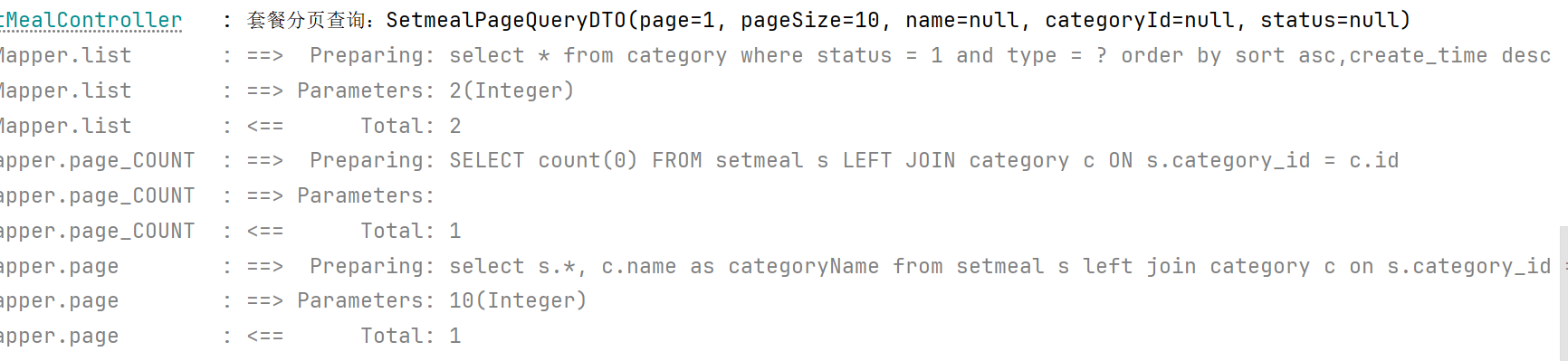

多加了几个测试一下条件查询


3. 删除套餐
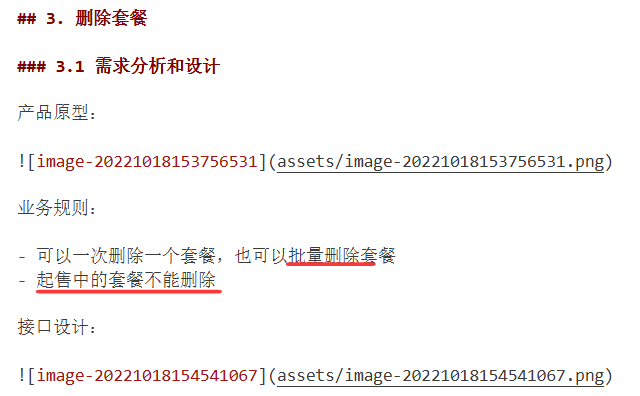
所以传递进来的又是套餐id列表
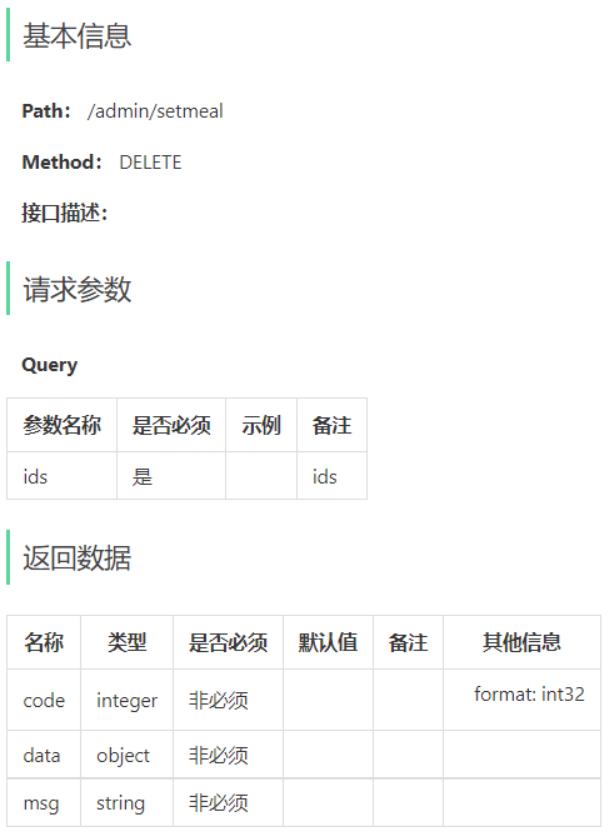
前面新增套餐的时候插入了两张表,这里同样要删除两张表的数据,只是要判断状态
关于删除部分,本来我还在愁咋写
要挨个判断,可以删的删除,不可以删的就不删,那咋写
看了下前面dish的操作,是只要有一个不满足删除的条件,就不删,抛异常,全都满足才一起删了
Controller
    /*
    * 批量删除套餐
    * */
    @DeleteMapping
    @ApiOperation("批量删除套餐")
    public Result delete(@RequestParam List<Long> ids){
        log.info("批量删除套餐:{}",ids);
        setMealService.delete(ids);
        return Result.success();
    }
ServiceImpl
    /*
     * 批量删除套餐
     * */
    @Override
    public void delete(List<Long> ids) {
        // 分别操作两张表,但是先判断启售状态,所以这里要先查询套餐信息
        for (Long id : ids){
            Setmeal setmeal = setmealMapper.getById(id);
            if (setmeal.getStatus() == StatusConstant.ENABLE){
                throw new DeletionNotAllowedException(MessageConstant.SETMEAL_ON_SALE);
            }
        }

        // setmeal表 传入ids 依次删除其所有信息
        setmealMapper.deleteByIds(ids);

        // setmeal_dish表 删除所有关联关系
        setmealDishMapper.deleteBySetmealIds(ids);

    }
Mapper
SetmealMapper
    /*
    * 根据套餐id查询套餐信息
    * */
    @Select("select * from setmeal where id = #{id}")
    Setmeal getById(Long id);
    <delete id="deleteByIds">
        delete from setmeal where id in
                            <foreach collection="ids" item="id" separator="," open="(" close=")">
                                #{id}
                            </foreach>
    </delete>
SetmealDishMapper
    <delete id="deleteBySetmealIds">
        delete from setmeal_dish where setmeal_id in
        <foreach collection="setMealids" item="setmealId" separator="," open="(" close=")">
            #{setmealId}
        </foreach>
    </delete>
效果
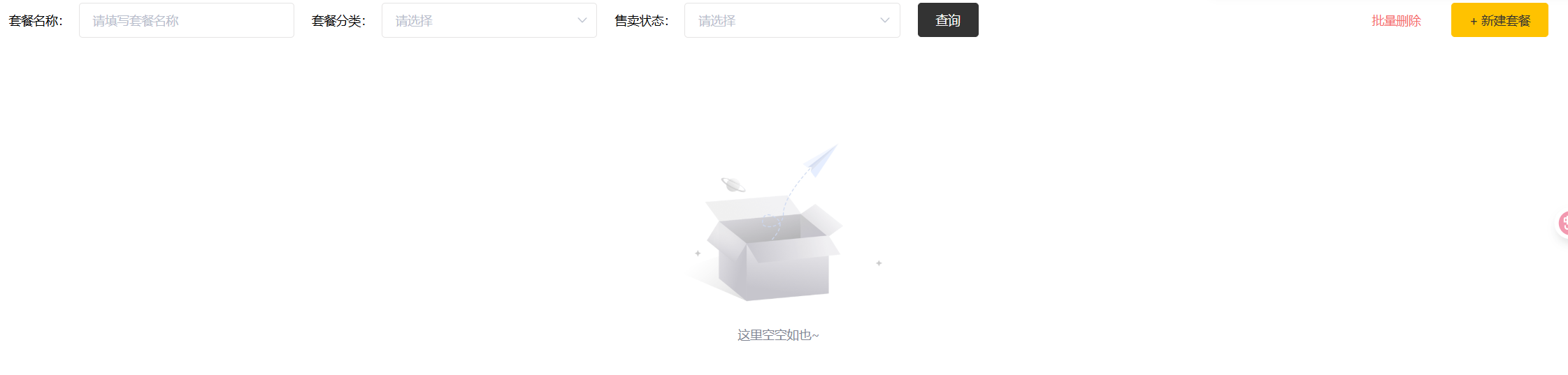
忘记加日志了,没有日志信息了
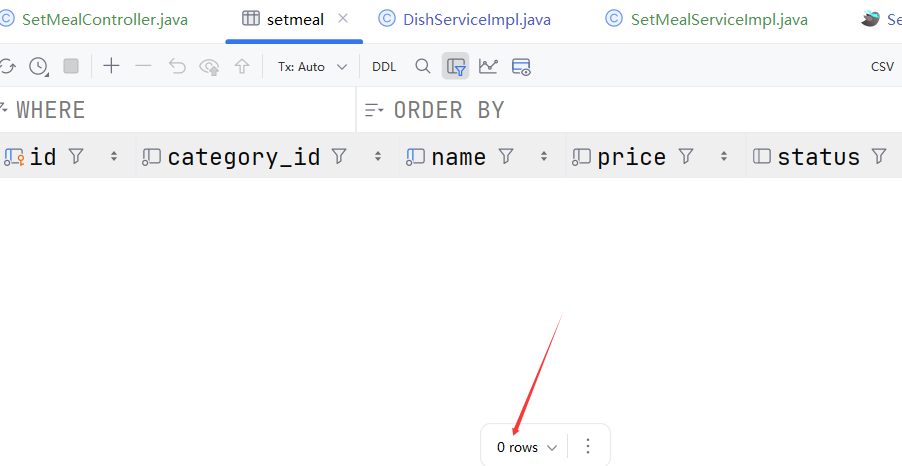
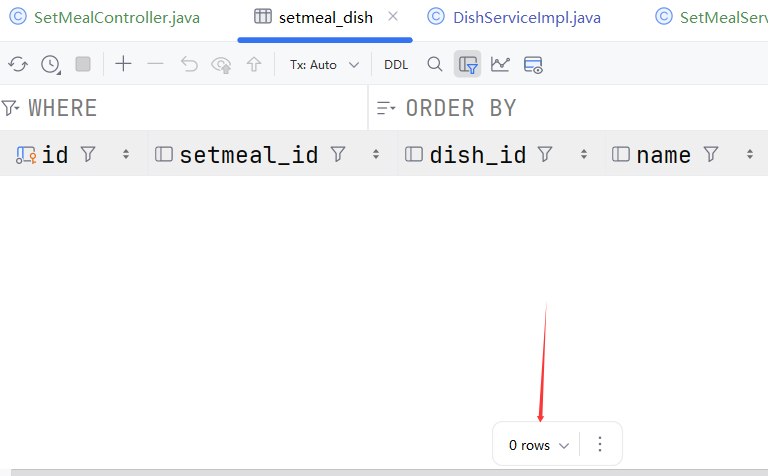
删完了
4. 修改套餐
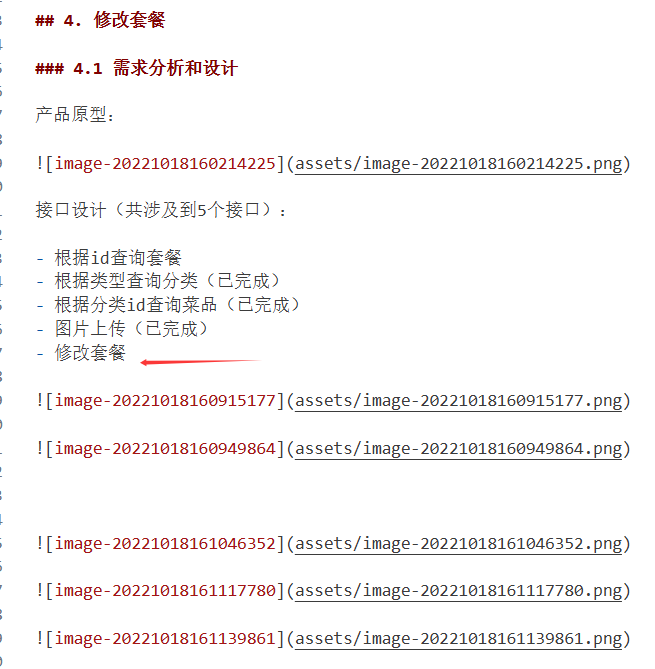
根据id查询套餐
看了下这里的接口文档,传递 id 但是返回的是SetmealVO类型,所以这里的“根据id查询套餐”,要包含套餐和菜品关联信息,所以需要实现(不是上一个功能中实现的只查询套餐信息)
我看要返回categoryName,本来想改方法或者加方法的,但是感觉这就非常冗杂… 看了下提供的代码,也没有专门查这个属性,是哪里已经实现了吗
Controller
    /*
    * 根据id查询套餐信息及其关联菜品信息,用于修改界面回显数据
    * */
    @GetMapping("/{id}")
    @ApiOperation("根据id查询套餐信息及其关联菜品信息")
    public Result getById(@PathVariable Long id){
        log.info("根据id查询套餐及其关联菜品信息:{}",id);
        SetmealVO setmealVO = setMealService.getByIdWithDish(id);
        return Result.success(setmealVO);
    }
ServiceImpl
    /*
     * 根据id查询套餐信息及其关联菜品信息
     * */
    @Override
    public SetmealVO getByIdWithDish(Long id) {
        // 分开查询吧 先查询套餐基础信息
        Setmeal setmeal = setmealMapper.getById(id);
        // 现在查询 套餐关联的菜品信息
        List<SetmealDish> setmealDishList = setmealDishMapper.getBySetmealId(id);
        // 拼接在一起
        SetmealVO setmealVO = new SetmealVO();
        BeanUtils.copyProperties(setmeal, setmealVO);
        setmealVO.setSetmealDishes(setmealDishList);

        return setmealVO;
    }
Mapper
SetmealMapper
    /*
    * 根据套餐id查询套餐信息
    * */
    @Select("select * from setmeal where id = #{id}")
    Setmeal getById(Long id);
SetmealDishMapper
    /*
    * 根据套餐id查询套餐和菜品的关联关系
    * */
    @Select("select * from setmeal_dish where setmeal_id = #{id}")
    List<SetmealDish> getBySetmealId(Long id);
效果
可以回显数据了
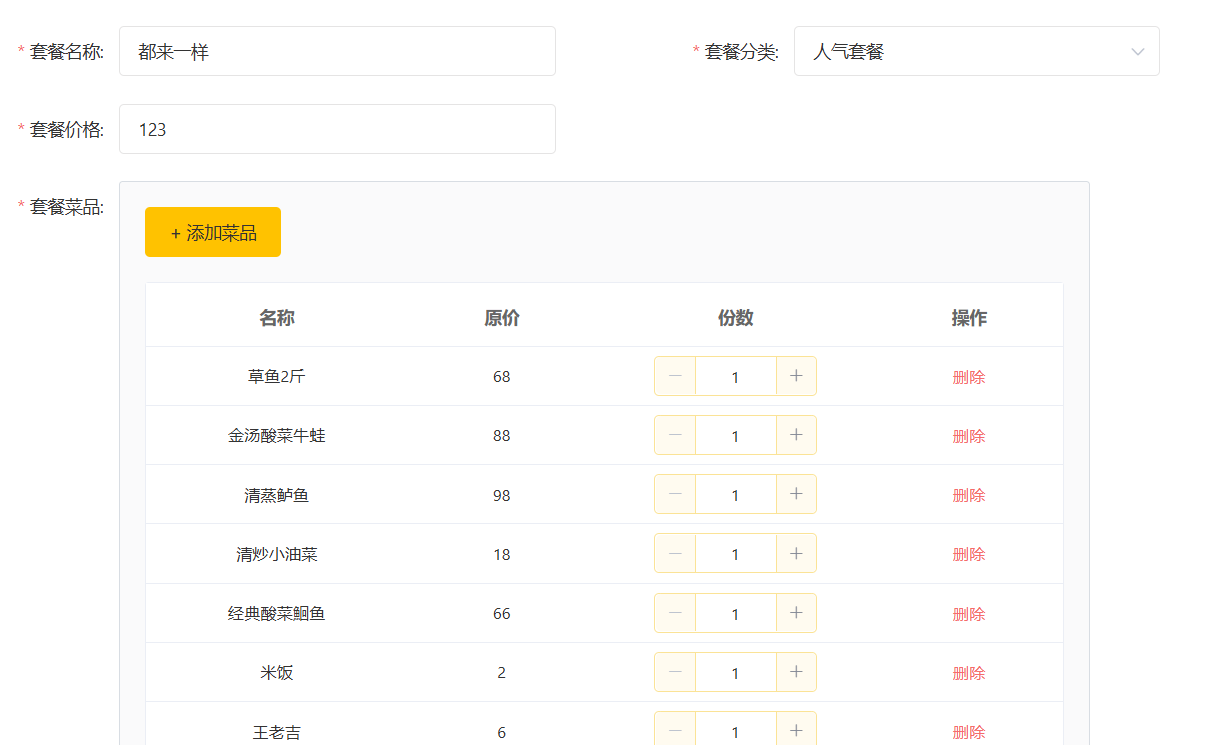
修改套餐
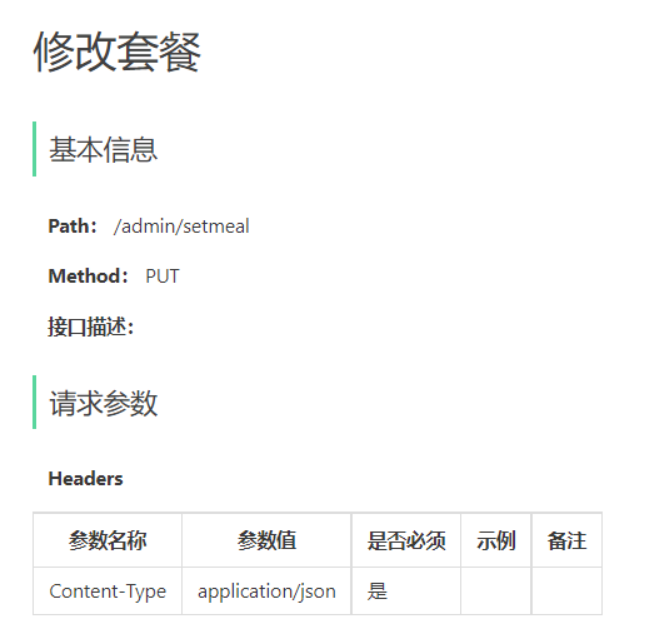
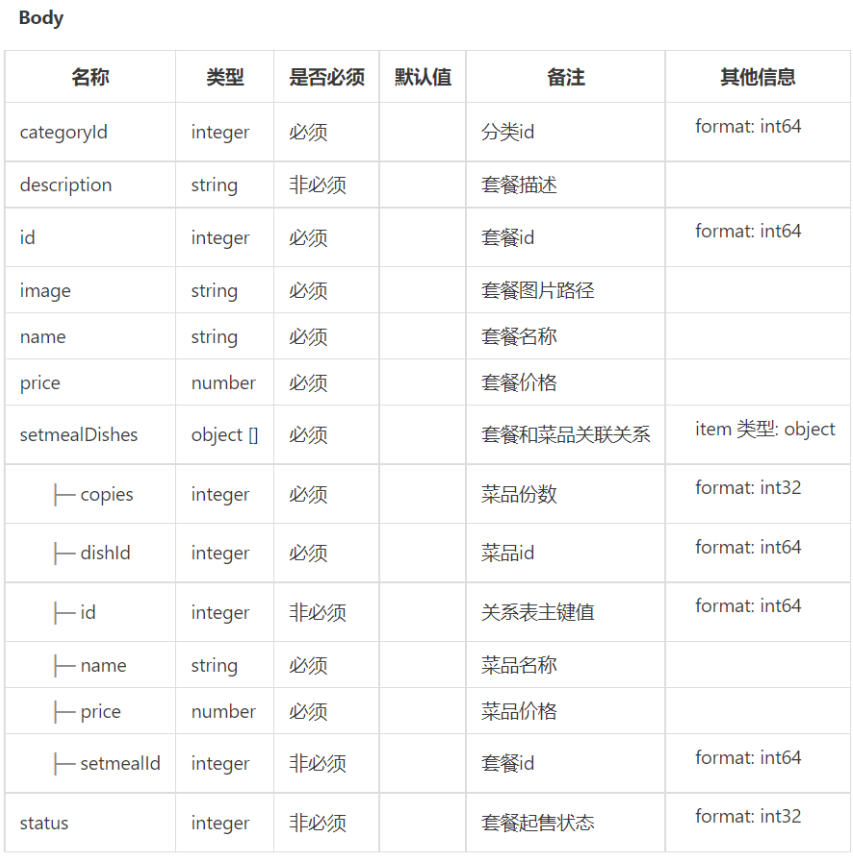
同样是传一个body 需要用@Request Body
Controller
    /*
    * 修改套餐信息
    * */
    @PutMapping
    @ApiOperation("修改套餐信息")
    public Result update(@RequestBody SetmealDTO setmealDTO){
        log.info("修改套餐信息:{}",setmealDTO);
        setMealService.update(setmealDTO);
        return Result.success();
    }
ServiceImpl
    /*
     * 修改套餐信息
     * */
    @Override
    @Transactional
    public void update(SetmealDTO setmealDTO) {
        // 套餐基础信息
        Setmeal setmeal = new Setmeal();
        BeanUtils.copyProperties(setmealDTO, setmeal);
        setmealMapper.update(setmeal);

        Long setmealId = setmeal.getId();

        // 删除套餐和菜品的关联关系,操作setmeal_dish表,执行delete
        setmealDishMapper.deleteBySetmealIds(Collections.singletonList(setmealId));

        // 添加新的套餐和菜品的关联关系,操作setmeal_dish表,执行insert
        List<SetmealDish> setmealDishList = setmealDTO.getSetmealDishes();
        if (setmealDishList != null && setmealDishList.size() > 0){
            setmealDishList.forEach(setmealDish -> setmealDish.setSetmealId(setmealId));
            setmealDishMapper.insertBatch(setmealDishList);
        }

    }
Mapper
SetmealMapper
    <update id="update">
        update setmeal
        <set>
            <if test="categoryId != null">
                category_id = #{categoryId},
            </if>
            <if test="name != null and name != ''">
                name = #{name},
            </if>
            <if test="price != null">
                price = #{price},
            </if>
            <if test="status != null">
                status = #{status},
            </if>
            <if test="description != null and description != ''">
                description = #{description},
            </if>
            <if test="image != null and image != ''">
                image = #{image},
            </if>
        </set>
        where id = #{id}
    </update>
deleteBySetmealIds之前写过
insertBatch 也写过
5. 起售停售套餐
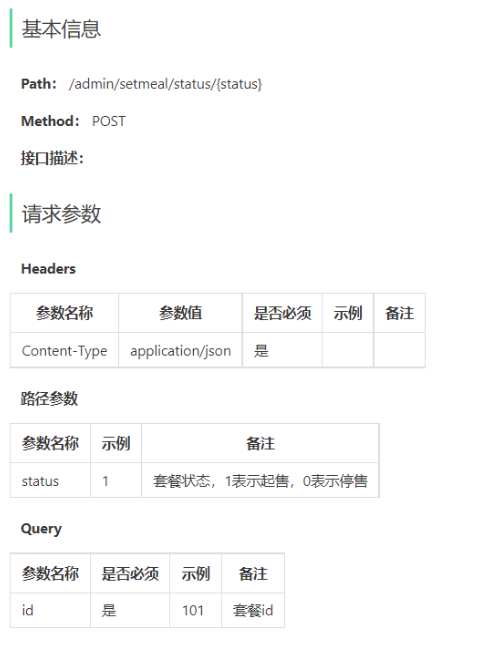
路径参数用@PathVariable
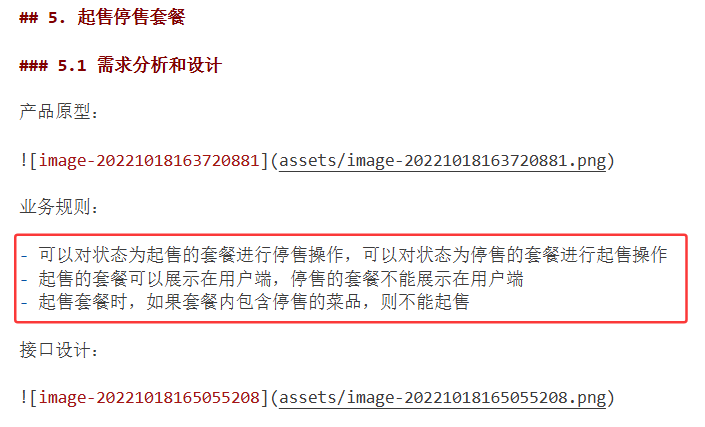
对于规则(1),
需要先查询 该套餐 的状态,也就是通过套餐id查询套餐信息,判断不同的状态进行操作
对于规则(2),
不知道这条规则对这里实现有什么限制
对于规则(3),
当状态是起售的时候,还要查询包含的菜品的状态
所以总的来说,先实现了套餐状态停售的状况,停售了直接起售就行;起售的情况再判断菜品状态
Controller
请求路径只传了status,但是请求参数里面有Query id,所以还是要加上id,虽然不知道是从哪传的
    /*
    * 套餐起售状态更改
    * */
    @PostMapping("/status/{status}")
    @ApiOperation("套餐起售状态更改")
    public Result startOrStop(@PathVariable Integer status,Long id){
        log.info("套餐 {} 起售状态更改:{}",id, status);
        setMealService.startOrStop(status,id);
        return Result.success();
    }
ServiceImpl
这里有点混淆,我不知道是传入的Status 是当前套餐的状态还是想改变的状态,所以判断了套餐id对应的套餐状态,再进行处理
后面是先查询关联的菜品List,再取每一个菜品判断状态,如果停售则不能起售套餐。我看提供的代码是,直接根据套餐ID查询的菜品hhh 都行吧
这个功能只用变一下状态,修改了之后调用update
    /*
     * 套餐起售状态更改
     * */
    @Override
    public void startOrStop(Integer status, Long id) {
        Setmeal setmeal = setmealMapper.getById(id);
        // 先写停售的吧
        if(setmeal.getStatus()==StatusConstant.ENABLE){
            // 当前状态是起售,那就可以停售了 这个没有什么规则
            setmeal.setStatus(StatusConstant.DISABLE);
            setmealMapper.update(setmeal);
        }
        else {
            // 此时是停售,如果要起售就需要判断了
            // 先获取关联菜品
            List<SetmealDish> setmealDishList = setmealDishMapper.getBySetmealId(id);
            if (setmealDishList != null && setmealDishList.size() > 0){
                for (SetmealDish setmealDish : setmealDishList){
                    // 获取每一个关联的菜品
                    Dish dish = dishMapper.getById(setmealDish.getDishId());
                    if (dish.getStatus() == StatusConstant.DISABLE){
                        // 菜品停售了,不能起售套餐
                        throw new SetmealEnableFailedException(MessageConstant.SETMEAL_ENABLE_FAILED);
                    }

                }
            }
            // 运行到这里 说明没有包含停售菜品 可以起售套餐
            setmeal.setStatus(StatusConstant.ENABLE);
            setmealMapper.update(setmeal);
        }


    }
Mapper
都是之前实现过的了
跟提供的代码不太一样,但是前后端联调也实现了,先这样吧,后面不对再改改
补充 菜品管理的修改启售状态
这里发现菜品启售状态还没实现。。

好像视频里就是没实现,这里也不知道有什么实现规则没有,就跟员工管理的状态修改这么改了
DishController
    /*
    * 修改菜品的启售状态
    * */
    @PostMapping("/status/{status}")
    @ApiOperation("修改菜品的启售状态")
    public Result startOrStop(@PathVariable Integer status, Long id){
        log.info("启用或禁用菜品:{}",id);
        dishService.startOrStop(status,id);
        return Result.success();
    }
这里一定要记得加@PathVariable,忘加了,一直都没修改成数据 害
DishServiceImpl
    /*
     * 修改菜品的启售状态
     * */
    @Override
    public void startOrStop(Integer status, Long id) {
        // 菜品管理应该没有什么规则吧
        Dish dish = new Dish();
        dish.setId(id);
        dish.setStatus(status);
        dishMapper.update(dish);
    }
DishMapper
update 之前实现过了
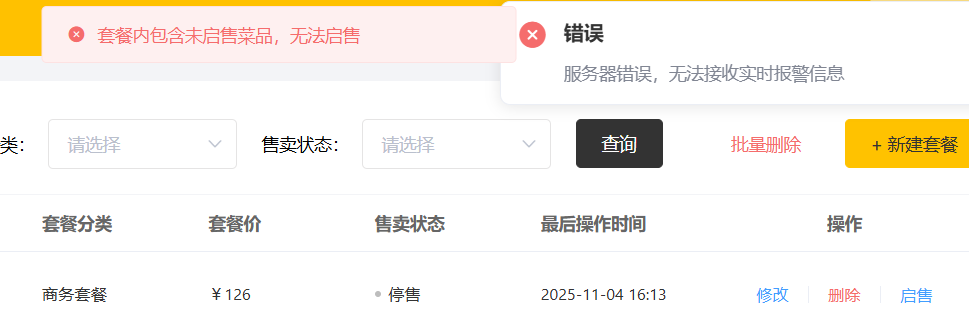
然后又测试了一下起售套餐功能,将其中一个菜品设置为停售,然后套餐起售不了了

中国智能体开发者社区,聚焦智能体与大模型开发,提供前沿资讯、实用工具链、开源项目及行业案例。通过技术沙龙、开发者大赛等活动,促进经验交流与协作,助力开发者快速构建创新智能应用。
更多推荐



 13
13 0
0- 0


 已为社区贡献1条内容

所有评论(0)