Streamlit搭建内网视频通话系统
摘要:本文介绍了一个基于Streamlit的内网视频通话应用,采用了WebRTC技术实现实时音视频通信。系统具备以下核心功能: 用户和设备管理模块,包括自动设备注册和在线状态跟踪 完整的视频通话流程,支持邀请、接听和结束通话功能 实时通知系统,通过铃铛图标显示未读通知 聊天功能,支持文字消息交流 响应式设计,适配手机、平板和桌面设备 系统采用SQLite数据库存储用户信息、通话记录和消息数据,通过
·
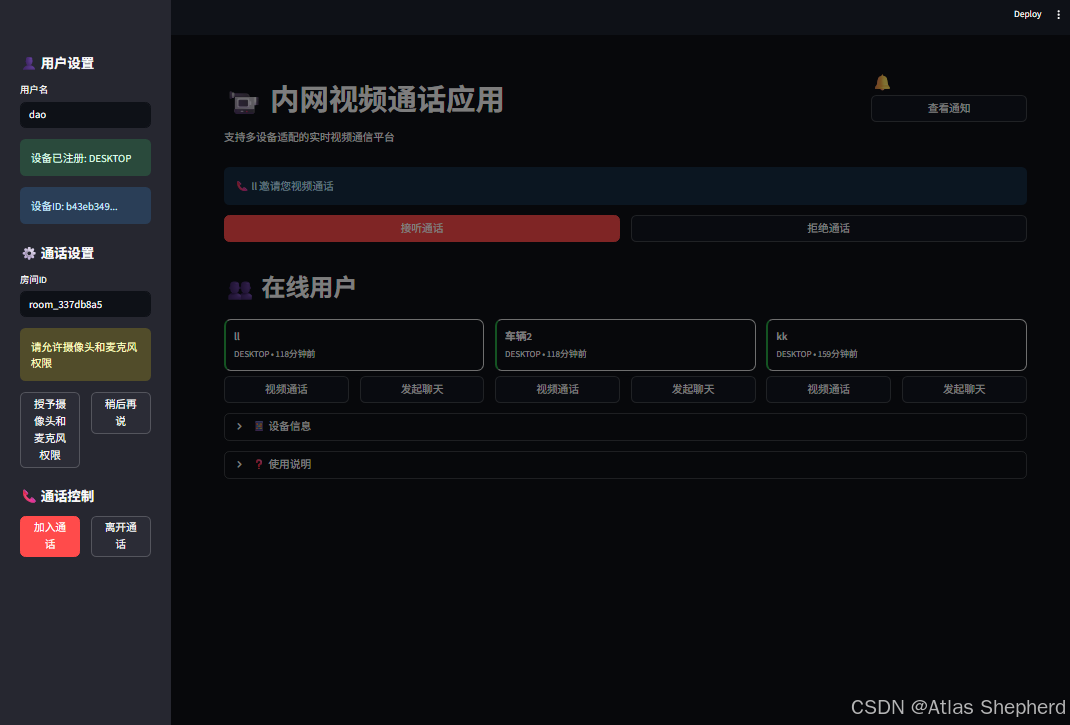
这是一个基于 Streamlit 的内网视频通话应用。让我为您详细解读代码的各个部分:
代码结构分析
1. 导入模块
import streamlit as st  # 主框架
import av  # 音视频处理
from streamlit_webrtc import webrtc_streamer, WebRtcMode  # WebRTC集成
import sqlite3  # 数据库
2. 数据库设计
创建了5个核心表:
- •
devices:设备信息(类型、屏幕尺寸等)
- •
users:用户信息和在线状态
- •
messages:聊天记录
- •
call_invitations:通话邀请管理
- •
notifications:通知系统
3. 设备管理
def get_or_create_device_id():
    # 基于硬件信息生成唯一设备ID
    device_info = f"{platform.platform()}_{socket.gethostname()}"
    device_id = str(uuid.uuid5(uuid.NAMESPACE_DNS, device_info))
4. 核心功能模块
用户认证系统
- •
侧边栏用户名输入
- •
自动设备注册
- •
在线状态管理
通话管理系统
def create_call_invitation(conn, from_user, to_user, call_type, room_id):
    # 创建通话邀请并生成房间ID
通知系统
- •
实时通知铃铛显示
- •
模态框接听界面
- •
通知标记已读
聊天系统
- •
实时消息显示
- •
对话历史记录
- •
支持富文本渲染
5. WebRTC 视频通话
webrtc_ctx = webrtc_streamer(
    key=f"video-{room_id}",
    mode=WebRtcMode.SENDRECV,  # 双向音视频
    rtc_configuration=RTC_CONFIGURATION,
    media_stream_constraints={"video": True, "audio": True}
)
6. 响应式设计
CSS媒体查询适配不同设备:
- •
手机:垂直布局,触摸优化
- •
平板:自适应网格
- •
桌面:多列布局
工作流程
- 1.
用户注册 → 输入用户名自动注册设备
- 2.
查看在线用户 → 显示可通话对象
- 3.
发起通话 → 创建邀请并发送通知
- 4.
接听邀请 → 弹出模态框选择接听/拒绝
- 5.
视频通话 → 建立WebRTC连接
- 6.
结束通话 → 清理资源返回主界面
import streamlit as st
import av
import threading
import queue
import json
import logging
import uuid
import time
import sqlite3
from datetime import datetime, timedelta
from streamlit_webrtc import webrtc_streamer, WebRtcMode, RTCConfiguration
import socket
import platform
import asyncio
from typing import Optional, Dict, List
# 配置日志
logging.basicConfig(level=logging.INFO)
logger = logging.getLogger(__name__)
# 页面配置 - 响应式设计
st.set_page_config(
page_title="内网视频通话",
page_icon="📹",
layout="wide",
initial_sidebar_state="expanded"
)
# 修复Python 3.12的SQLite日期时间适配器警告
def adapt_datetime(val):
return val.isoformat()
def convert_datetime(val):
try:
return datetime.fromisoformat(val.decode())
except (ValueError, AttributeError):
return datetime.now()
sqlite3.register_adapter(datetime, adapt_datetime)
sqlite3.register_converter("TIMESTAMP", convert_datetime)
# 初始化数据库
def init_db():
conn = sqlite3.connect('video_chat.db', check_same_thread=False, detect_types=sqlite3.PARSE_DECLTYPES)
c = conn.cursor()
# 创建设备表
c.execute('''CREATE TABLE IF NOT EXISTS devices
(id TEXT PRIMARY KEY,
device_name TEXT,
username TEXT,
device_type TEXT,
screen_width INTEGER,
screen_height INTEGER,
user_agent TEXT,
first_seen TIMESTAMP,
last_seen TIMESTAMP)''')
# 创建用户表
c.execute('''CREATE TABLE IF NOT EXISTS users
(id TEXT PRIMARY KEY,
username TEXT UNIQUE,
device_id TEXT,
status TEXT,
last_active TIMESTAMP,
FOREIGN KEY (device_id) REFERENCES devices (id))''')
# 创建消息表
c.execute('''CREATE TABLE IF NOT EXISTS messages
(id TEXT PRIMARY KEY,
from_user TEXT,
to_user TEXT,
content TEXT,
timestamp TIMESTAMP,
is_read BOOLEAN)''')
# 创建通话邀请表
c.execute('''CREATE TABLE IF NOT EXISTS call_invitations
(id TEXT PRIMARY KEY,
from_user TEXT,
to_user TEXT,
call_type TEXT,
status TEXT,
room_id TEXT,
created_at TIMESTAMP,
responded_at TIMESTAMP)''')
# 创建通知表
c.execute('''CREATE TABLE IF NOT EXISTS notifications
(id TEXT PRIMARY KEY,
user_id TEXT,
title TEXT,
message TEXT,
notification_type TEXT,
is_read BOOLEAN,
created_at TIMESTAMP,
related_call_id TEXT)''')
conn.commit()
return conn
# 获取或创建设备ID
def get_or_create_device_id():
if 'device_id' not in st.session_state:
# 生成基于硬件和浏览器的唯一标识
device_info = f"{platform.platform()}_{socket.gethostname()}"
device_id = str(uuid.uuid5(uuid.NAMESPACE_DNS, device_info))
st.session_state.device_id = device_id
return st.session_state.device_id
# 检测设备类型
def detect_device_type():
try:
user_agent = st.query_params.get('user_agent', '')
if any(device in user_agent.lower() for device in ['mobile', 'android', 'iphone']):
return "mobile"
elif any(device in user_agent.lower() for device in ['tablet', 'ipad']):
return "tablet"
else:
return "desktop"
except:
return "desktop"
# 注册或更新设备信息
def register_device(conn, username):
device_id = get_or_create_device_id()
device_type = detect_device_type()
c = conn.cursor()
# 检查设备是否已存在
c.execute("SELECT * FROM devices WHERE id = ?", (device_id,))
existing_device = c.fetchone()
current_time = datetime.now()
if existing_device:
# 更新设备信息
c.execute('''UPDATE devices
SET username = ?, last_seen = ?
WHERE id = ?''',
(username, current_time, device_id))
else:
# 插入新设备
c.execute('''INSERT INTO devices
(id, device_name, username, device_type, screen_width, screen_height, user_agent, first_seen, last_seen)
VALUES (?, ?, ?, ?, ?, ?, ?, ?, ?)''',
(device_id, f"{device_type}_{device_id[:8]}", username, device_type,
1920, 1080, "streamlit_app", current_time, current_time))
# 更新用户信息
user_id = str(uuid.uuid4())
c.execute('''INSERT OR REPLACE INTO users
(id, username, device_id, status, last_active)
VALUES (?, ?, ?, ?, ?)''',
(user_id, username, device_id, "online", current_time))
conn.commit()
return device_id, user_id
# 获取在线用户列表
def get_online_users(conn, exclude_user=None):
c = conn.cursor()
if exclude_user:
c.execute('''SELECT u.username, d.device_type, u.last_active
FROM users u
JOIN devices d ON u.device_id = d.id
WHERE u.status = 'online' AND u.username != ?
ORDER BY u.last_active DESC''', (exclude_user,))
else:
c.execute('''SELECT u.username, d.device_type, u.last_active
FROM users u
JOIN devices d ON u.device_id = d.id
WHERE u.status = 'online'
ORDER BY u.last_active DESC''')
return c.fetchall()
# 创建通话邀请
def create_call_invitation(conn, from_user, to_user, call_type="video", room_id=None):
if room_id is None:
room_id = f"room_{uuid.uuid4().hex[:8]}"
call_id = str(uuid.uuid4())
current_time = datetime.now()
c = conn.cursor()
c.execute('''INSERT INTO call_invitations
(id, from_user, to_user, call_type, status, room_id, created_at)
VALUES (?, ?, ?, ?, ?, ?, ?)''',
(call_id, from_user, to_user, call_type, "pending", room_id, current_time))
# 创建通知
notification_id = str(uuid.uuid4())
c.execute('''INSERT INTO notifications
(id, user_id, title, message, notification_type, is_read, created_at, related_call_id)
VALUES (?, ?, ?, ?, ?, ?, ?, ?)''',
(notification_id, to_user, "视频通话邀请",
f"{from_user} 向您发起了视频通话邀请", "call_invitation",
False, current_time, call_id))
conn.commit()
return call_id, room_id
# 获取待处理的通知
def get_pending_notifications(conn, username):
c = conn.cursor()
c.execute('''SELECT id, title, message, notification_type, created_at, related_call_id
FROM notifications
WHERE user_id = ? AND is_read = FALSE
ORDER BY created_at DESC''', (username,))
return c.fetchall()
# 标记通知为已读
def mark_notification_read(conn, notification_id):
c = conn.cursor()
c.execute('''UPDATE notifications SET is_read = TRUE WHERE id = ?''', (notification_id,))
conn.commit()
# 处理通话邀请响应
def respond_to_call_invitation(conn, call_id, response, username):
"""响应通话邀请:accept 或 reject"""
c = conn.cursor()
current_time = datetime.now()
# 更新邀请状态
c.execute('''UPDATE call_invitations
SET status = ?, responded_at = ?
WHERE id = ? AND to_user = ?''',
(response, current_time, call_id, username))
# 获取房间ID
c.execute('''SELECT room_id FROM call_invitations WHERE id = ?''', (call_id,))
result = c.fetchone()
room_id = result[0] if result else None
conn.commit()
return room_id if response == "accepted" else None
# 获取待处理的通话邀请
def get_pending_call_invitations(conn, username):
c = conn.cursor()
c.execute('''SELECT id, from_user, call_type, room_id, created_at
FROM call_invitations
WHERE to_user = ? AND status = 'pending'
ORDER BY created_at DESC''', (username,))
return c.fetchall()
# 检查媒体权限状态
def check_media_permissions():
# 简化处理,实际部署时应该通过前端检测
video_permission = st.session_state.get('video_permission', False)
audio_permission = st.session_state.get('audio_permission', False)
return video_permission, audio_permission
# 请求媒体权限
def request_media_permissions():
st.warning("请允许摄像头和麦克风权限")
col1, col2 = st.columns(2)
with col1:
if st.button("授予摄像头和麦克风权限"):
st.session_state.video_permission = True
st.session_state.audio_permission = True
st.rerun()
with col2:
if st.button("稍后再说"):
st.session_state.video_permission = False
st.session_state.audio_permission = False
# WebRTC配置
RTC_CONFIGURATION = RTCConfiguration(
{"iceServers": [{"urls": ["stun:stun.l.google.com:19302"]}]}
)
# 初始化数据库连接
conn = init_db()
# 响应式CSS
st.markdown("""
<style>
/* 响应式设计 */
@media (max-width: 768px) {
.main-header { font-size: 1.5rem !important; }
.user-card { padding: 8px !important; margin: 4px 0 !important; }
.video-container { height: 200px !important; }
.notification-bell { font-size: 1.2rem !important; }
}
@media (min-width: 769px) and (max-width: 1024px) {
.video-container { height: 300px !important; }
}
@media (min-width: 1025px) {
.video-container { height: 400px !important; }
}
/* 通用样式 */
.user-card {
border: 1px solid #ddd;
border-radius: 10px;
padding: 12px;
margin: 8px 0;
cursor: pointer;
transition: all 0.3s ease;
}
.user-card:hover {
background-color: #f5f5f5;
transform: translateY(-2px);
}
.user-online {
border-left: 4px solid #28a745;
}
.user-offline {
border-left: 4px solid #6c757d;
}
.chat-window {
border: 1px solid #ddd;
border-radius: 10px;
padding: 15px;
margin: 10px 0;
max-height: 400px;
overflow-y: auto;
}
.video-container {
border: 2px solid #007bff;
border-radius: 10px;
margin: 10px 0;
background-color: #000;
}
.notification-bell {
position: relative;
display: inline-block;
font-size: 1.5rem;
}
.notification-badge {
position: absolute;
top: -5px;
right: -5px;
background-color: #ff4b4b;
color: white;
border-radius: 50%;
width: 20px;
height: 20px;
display: flex;
align-items: center;
justify-content: center;
font-size: 0.8rem;
}
.notification-item {
border-left: 4px solid #007bff;
padding: 10px;
margin: 5px 0;
background-color: #f8f9fa;
border-radius: 5px;
}
.call-invitation {
border-left: 4px solid #28a745;
background-color: #e8f5e8;
}
.modal-overlay {
position: fixed;
top: 0;
left: 0;
width: 100%;
height: 100%;
background-color: rgba(0,0,0,0.5);
display: flex;
justify-content: center;
align-items: center;
z-index: 1000;
}
.modal-content {
background: white;
padding: 20px;
border-radius: 10px;
width: 300px;
text-align: center;
}
</style>
""", unsafe_allow_html=True)
# 应用标题和通知区域
col1, col2 = st.columns([4, 1])
with col1:
st.markdown('<h1 class="main-header">📹 内网视频通话应用</h1>', unsafe_allow_html=True)
st.markdown("支持多设备适配的实时视频通信平台")
with col2:
# 通知铃铛
pending_notifications = get_pending_notifications(conn, st.session_state.get('username', ''))
notification_count = len(pending_notifications)
st.markdown(f'''
<div class="notification-bell">
🔔
{f'<span class="notification-badge">{notification_count}</span>' if notification_count > 0 else ''}
</div>
''', unsafe_allow_html=True)
if st.button("查看通知", use_container_width=True):
st.session_state.show_notifications = not st.session_state.get('show_notifications', False)
# 显示通知面板
if st.session_state.get('show_notifications', False) and st.session_state.get('username'):
st.subheader("📢 通知中心")
notifications = get_pending_notifications(conn, st.session_state.username)
if notifications:
for notif_id, title, message, notif_type, created_at, call_id in notifications:
with st.container():
col1, col2 = st.columns([4, 1])
with col1:
st.markdown(f"**{title}**")
st.markdown(f"{message}")
st.caption(f"时间: {created_at.strftime('%H:%M:%S') if hasattr(created_at, 'strftime') else created_at}")
with col2:
if notif_type == "call_invitation":
col2_1, col2_2 = st.columns(2)
with col2_1:
if st.button("接听", key=f"accept_{notif_id}"):
room_id = respond_to_call_invitation(conn, call_id, "accepted", st.session_state.username)
mark_notification_read(conn, notif_id)
st.session_state.call_active = True
st.session_state.current_room = room_id
st.session_state.show_notifications = False
st.rerun()
with col2_2:
if st.button("拒绝", key=f"reject_{notif_id}"):
respond_to_call_invitation(conn, call_id, "rejected", st.session_state.username)
mark_notification_read(conn, notif_id)
st.session_state.show_notifications = False
st.rerun()
else:
if st.button("标记已读", key=f"read_{notif_id}"):
mark_notification_read(conn, notif_id)
st.session_state.show_notifications = False
st.rerun()
st.markdown("---")
else:
st.info("暂无新通知")
# 用户注册和登录
with st.sidebar:
st.header("👤 用户设置")
# 用户名输入
username = st.text_input("用户名", placeholder="请输入您的用户名", key="username_input")
if username and username.strip():
st.session_state.username = username.strip()
# 注册设备
device_id, user_id = register_device(conn, st.session_state.username)
device_type = detect_device_type()
st.success(f"设备已注册: {device_type.upper()}")
st.info(f"设备ID: {device_id[:8]}...")
# 通话设置
st.header("⚙️ 通话设置")
call_id = st.text_input("房间ID", value=f"room_{uuid.uuid4().hex[:8]}", key="room_input")
# 媒体权限检查
video_permission, audio_permission = check_media_permissions()
if not video_permission or not audio_permission:
request_media_permissions()
else:
video_enabled = st.checkbox("启用视频", value=video_permission, key="video_check")
audio_enabled = st.checkbox("启用音频", value=audio_permission, key="audio_check")
# 通话控制
st.header("📞 通话控制")
col1, col2 = st.columns(2)
with col1:
start_call = st.button("加入通话", type="primary", use_container_width=True, key="join_call")
with col2:
end_call = st.button("离开通话", type="secondary", use_container_width=True, key="leave_call")
# 主内容区域
if not st.session_state.get('username'):
st.warning("请在侧边栏输入用户名开始使用")
st.stop()
# 初始化会话状态
if 'current_chat' not in st.session_state:
st.session_state.current_chat = None
if 'call_active' not in st.session_state:
st.session_state.call_active = False
if 'messages' not in st.session_state:
st.session_state.messages = {}
if 'current_room' not in st.session_state:
st.session_state.current_room = None
if 'pending_invitation' not in st.session_state:
st.session_state.pending_invitation = None
if 'show_invitation_modal' not in st.session_state:
st.session_state.show_invitation_modal = False
# 检查是否有待处理的通话邀请
if st.session_state.username and not st.session_state.call_active:
pending_invitations = get_pending_call_invitations(conn, st.session_state.username)
if pending_invitations and not st.session_state.get('show_invitation_modal', False):
st.session_state.pending_invitation = pending_invitations[0]
st.session_state.show_invitation_modal = True
# 显示通话邀请模态框
if st.session_state.get('show_invitation_modal', False) and st.session_state.pending_invitation:
invitation_id, from_user, call_type, room_id, created_at = st.session_state.pending_invitation
# 使用Streamlit原生组件创建模态框
st.markdown("""
<div class="modal-overlay">
<div class="modal-content">
""", unsafe_allow_html=True)
st.info(f"📞 {from_user} 邀请您视频通话")
accept_col, reject_col = st.columns(2)
with accept_col:
if st.button("接听通话", type="primary", use_container_width=True, key="modal_accept"):
room_id = respond_to_call_invitation(conn, invitation_id, "accepted", st.session_state.username)
st.session_state.call_active = True
st.session_state.current_room = room_id
st.session_state.show_invitation_modal = False
st.session_state.pending_invitation = None
st.rerun()
with reject_col:
if st.button("拒绝通话", type="secondary", use_container_width=True, key="modal_reject"):
respond_to_call_invitation(conn, invitation_id, "rejected", st.session_state.username)
st.session_state.show_invitation_modal = False
st.session_state.pending_invitation = None
st.rerun()
st.markdown("</div></div>", unsafe_allow_html=True)
# 在线用户列表
st.header("👥 在线用户")
online_users = get_online_users(conn, exclude_user=st.session_state.username)
if online_users:
cols = st.columns(3)
for i, (user, dev_type, last_active) in enumerate(online_users):
with cols[i % 3]:
try:
if isinstance(last_active, str):
last_active = datetime.strptime(last_active, '%Y-%m-%d %H:%M:%S.%f')
time_diff = (datetime.now() - last_active).seconds
status_text = "刚刚" if time_diff < 60 else f"{time_diff//60}分钟前"
except:
status_text = "未知"
st.markdown(f'''
<div class="user-card user-online">
<strong>{user}</strong><br>
<small>{dev_type.upper()} • {status_text}</small>
</div>
''', unsafe_allow_html=True)
call_col, chat_col = st.columns(2)
with call_col:
if st.button("视频通话", key=f"call_{user}", use_container_width=True):
# 创建通话邀请
call_id, room_id = create_call_invitation(conn, st.session_state.username, user)
st.session_state.current_chat = user
st.session_state.current_room = room_id
st.success(f"已向 {user} 发送通话邀请")
with chat_col:
if st.button("发起聊天", key=f"chat_{user}", use_container_width=True):
st.session_state.current_chat = user
else:
st.info("暂无其他在线用户")
# 聊天窗口
if st.session_state.current_chat:
st.header(f"💬 与 {st.session_state.current_chat} 的对话")
# 初始化聊天记录
if st.session_state.current_chat not in st.session_state.messages:
st.session_state.messages[st.session_state.current_chat] = []
# 显示聊天消息
chat_container = st.container()
with chat_container:
for msg in st.session_state.messages[st.session_state.current_chat]:
alignment = "right" if msg['from'] == st.session_state.username else "left"
bg_color = "#007bff" if msg['from'] == st.session_state.username else "#f1f1f1"
text_color = "white" if msg['from'] == st.session_state.username else "black"
st.markdown(f"""
<div style="text-align: {alignment}; margin: 5px 0;">
<div style="background: {bg_color}; color: {text_color};
display: inline-block; padding: 8px 12px;
border-radius: 18px; max-width: 70%;">
{msg['content']}
</div>
<div style="font-size: 0.8em; color: #666; margin-top: 2px;">
{msg['time']}
</div>
</div>
""", unsafe_allow_html=True)
# 消息输入和视频通话按钮
col1, col2, col3 = st.columns([3, 1, 1])
with col1:
new_message = st.text_input("输入消息", label_visibility="collapsed",
placeholder="输入消息...", key="message_input")
with col2:
if st.button("发送", use_container_width=True, key="send_message") and new_message:
timestamp = datetime.now().strftime("%H:%M")
st.session_state.messages[st.session_state.current_chat].append({
'from': st.session_state.username,
'content': new_message,
'time': timestamp
})
st.rerun()
with col3:
if st.button("视频通话", type="primary", use_container_width=True, key="start_video_chat"):
# 创建通话邀请
call_id, room_id = create_call_invitation(conn, st.session_state.username, st.session_state.current_chat)
st.session_state.call_active = True
st.session_state.current_room = room_id
st.success(f"已向 {st.session_state.current_chat} 发起视频通话")
# 视频通话界面
if st.session_state.call_active:
st.header("📹 视频通话中")
st.info(f"房间ID: {st.session_state.current_room or '默认房间'}")
# 检查媒体权限
video_permission, audio_permission = check_media_permissions()
if not video_permission or not audio_permission:
st.error("需要摄像头和麦克风权限才能进行视频通话")
request_media_permissions()
else:
# 视频通话布局
col1, col2 = st.columns(2)
with col1:
st.subheader("本地视频")
try:
webrtc_ctx = webrtc_streamer(
key=f"video-{st.session_state.current_room or 'default'}",
mode=WebRtcMode.SENDRECV,
rtc_configuration=RTC_CONFIGURATION,
media_stream_constraints={
"video": True,
"audio": True,
},
)
except Exception as e:
st.error(f"视频流初始化失败: {str(e)}")
st.info("请确保浏览器已授予摄像头和麦克风权限")
with col2:
st.subheader("远程视频")
if st.session_state.current_chat:
st.info(f"等待 {st.session_state.current_chat} 接听...")
else:
st.info("等待对方接听...")
# 通话控制按钮
st.markdown("---")
col1, col2, col3 = st.columns([1, 2, 1])
with col2:
if st.button("结束通话", type="secondary", use_container_width=True, key="end_call"):
st.session_state.call_active = False
st.session_state.current_room = None
st.rerun()
# 设备信息显示
with st.expander("📱 设备信息"):
device_info = f"""
- **设备类型**: {detect_device_type().upper()}
- **设备ID**: {get_or_create_device_id()}
- **用户名**: {st.session_state.username}
- **在线用户数**: {len(online_users) + 1}
- **当前时间**: {datetime.now().strftime('%Y-%m-%d %H:%M:%S')}
"""
st.markdown(device_info)
# 使用说明
with st.expander("❓ 使用说明"):
st.markdown("""
### 使用指南:
1. **用户注册**: 在侧边栏输入用户名自动注册设备
2. **用户列表**: 查看在线用户,点击用户发起通话或聊天
3. **通话邀请**: 收到邀请时会弹出通知,可选择接听或拒绝
4. **权限管理**: 首次使用需要授权摄像头和麦克风
### 通知功能:
- 🔔 右上角通知铃铛显示未读通知数量
- 📞 收到通话邀请时会自动弹出接听界面
- 💬 聊天过程中可随时发起视频通话
### 设备适配:
- 📱 **手机**: 垂直布局,优化触摸操作
- 📟 **平板**: 自适应网格布局
- 💻 **电脑**: 多列布局,功能完整展示
""")
# 自动刷新页面以检查新通知
if st.session_state.get('username'):
# 每10秒自动刷新一次以检查新通知
if 'last_refresh' not in st.session_state:
st.session_state.last_refresh = time.time()
current_time = time.time()
if current_time - st.session_state.last_refresh > 10: # 10秒刷新一次
st.session_state.last_refresh = current_time
st.rerun()
# 应用退出时清理资源
def cleanup():
if 'conn' in locals():
conn.close()
import atexit
atexit.register(cleanup)

火山引擎开发者社区是火山引擎打造的AI技术生态平台,聚焦Agent与大模型开发,提供豆包系列模型(图像/视频/视觉)、智能分析与会话工具,并配套评测集、动手实验室及行业案例库。社区通过技术沙龙、挑战赛等活动促进开发者成长,新用户可领50万Tokens权益,助力构建智能应用。
更多推荐
 3
3 0
0- 0


 已为社区贡献3条内容

所有评论(0)