天哪!竟然可以这样用 Iphone 来学习德语!
Behavior = Motivation (学习德语拿永居) + Ability (完成一个德语单词复习) + Prompt (手机开屏看到 Widget 插件)。通过 iOS 上的 Scriptable 应用,我实现了一个小部件(Widget),定时显示德语单词及其翻译,让学习随时随地进行。通过 Scriptable 和 tiny habit 的结合,轻松把德语学习融入日常生活。感兴趣的朋友请
内容预告
为更好地践行 tiny habit 理念,我设计了一个帮助德语学习的工具:可以在你没有自律刷手机时学习德语: 通过 iOS 上的 Scriptable 应用,我实现了一个小部件(Widget),定时显示德语单词及其翻译,让学习随时随地进行。单词来源于 DW Learn German 平台,我将学到的生词整理记录,并生成对应的英文、中文翻译和例句。
福格 (Fogg) 行为模型实例: Behavior = Motivation (学习德语拿永居) + Ability (完成一个德语单词复习) + Prompt (手机开屏看到 Widget 插件)。
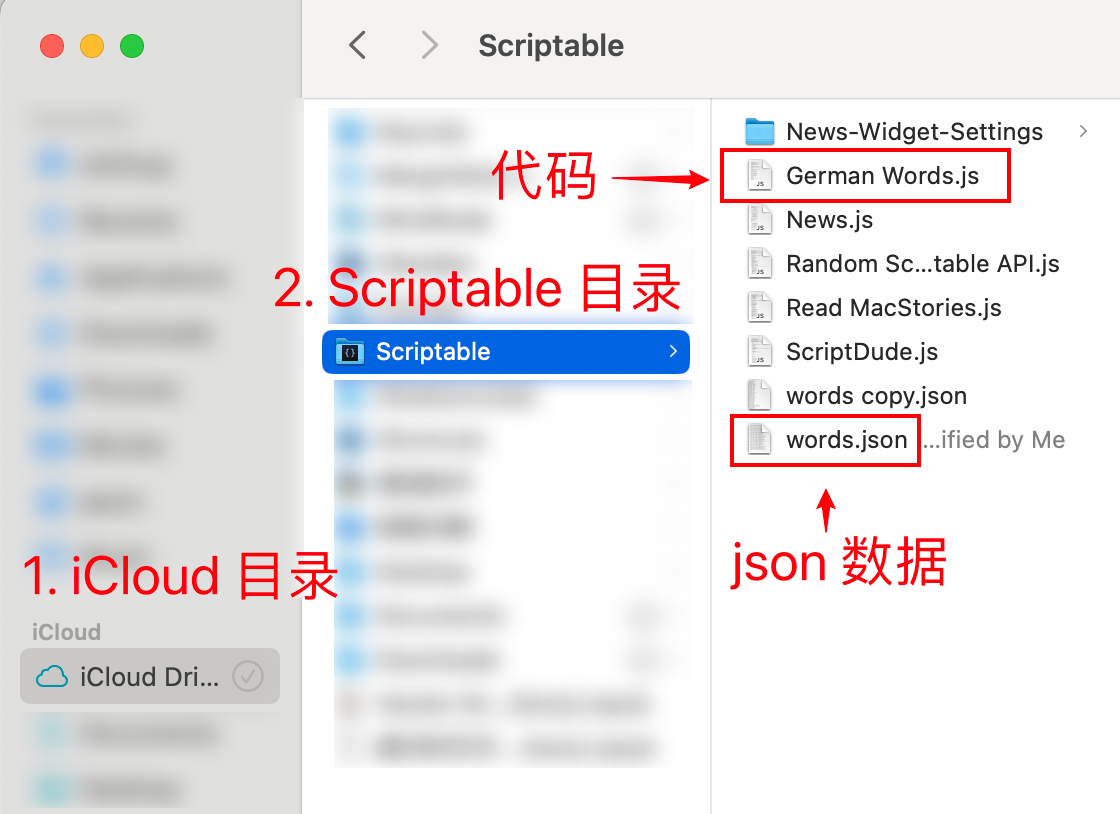
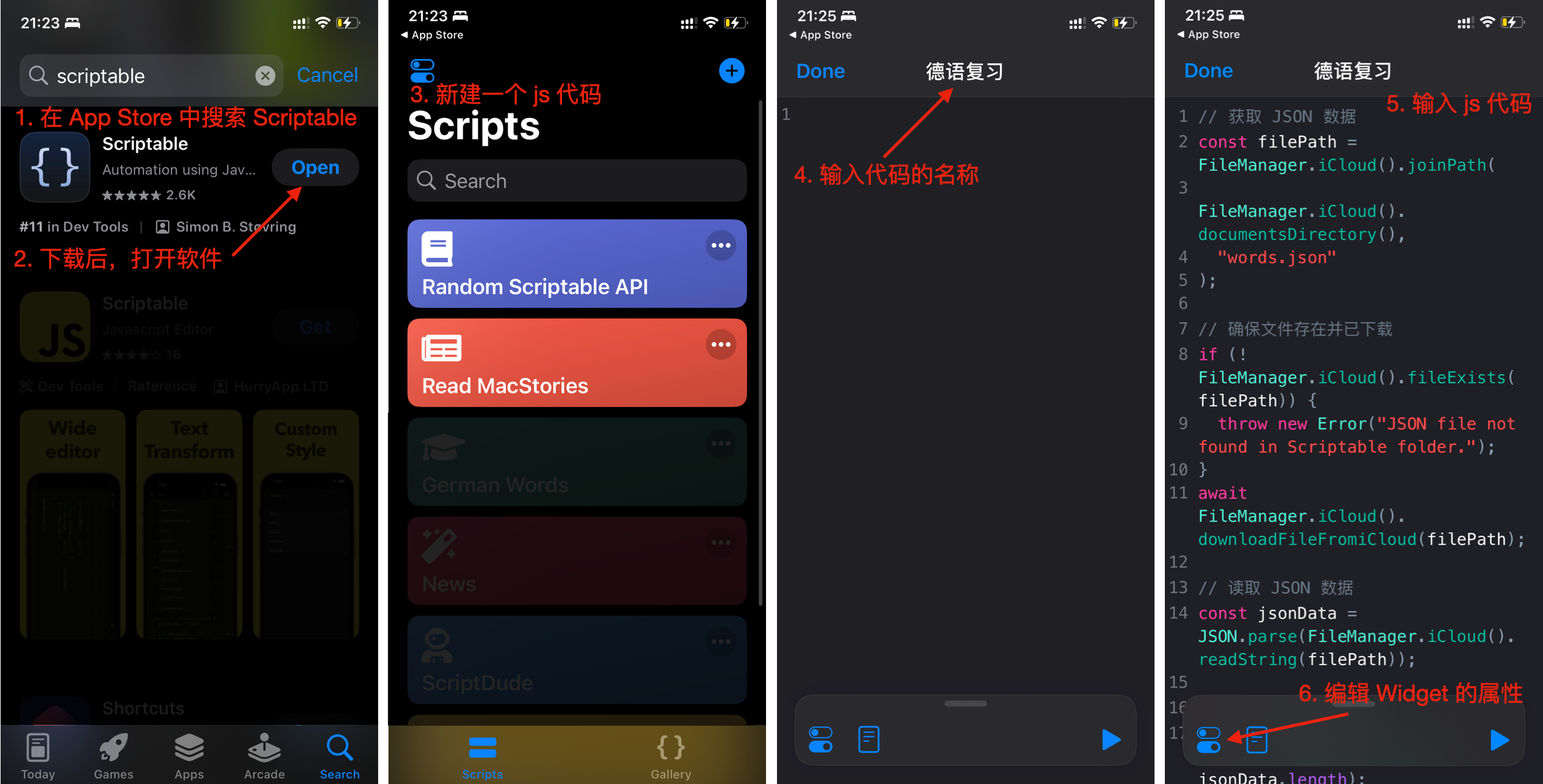
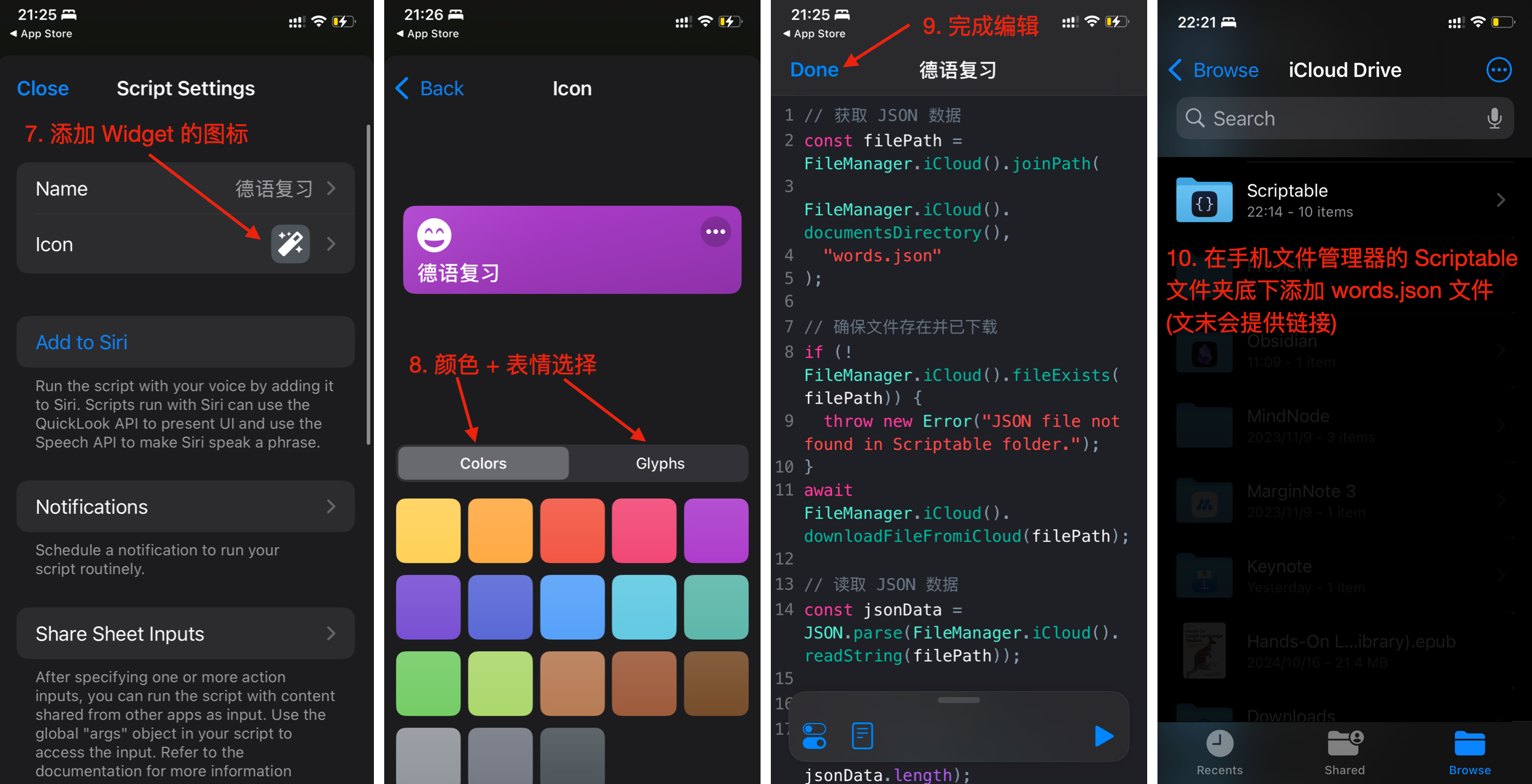
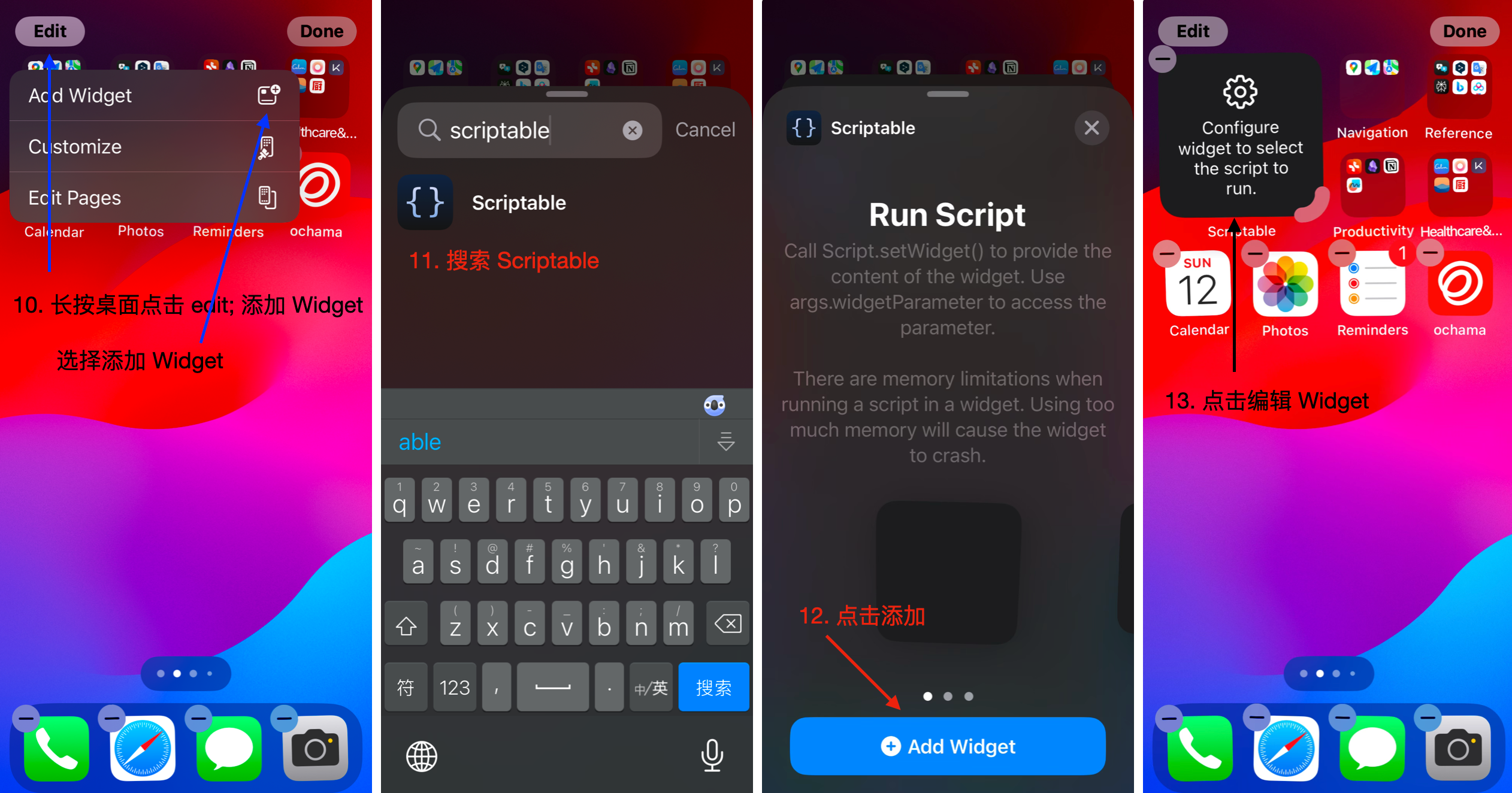
实现方法请看下面图片,下载请到文末。
为爱发电,如果对你有帮助,请不吝点赞和关注,谢谢 😁
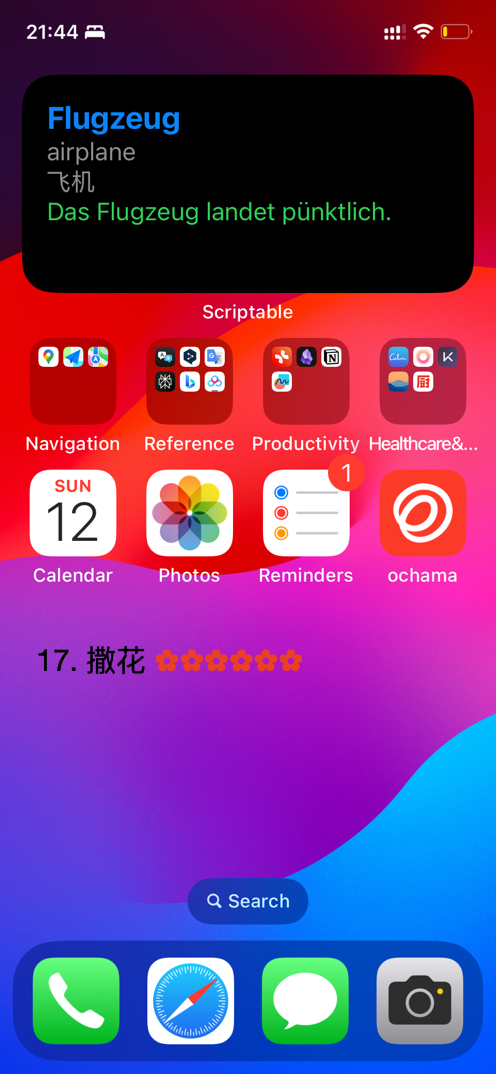
实现效果
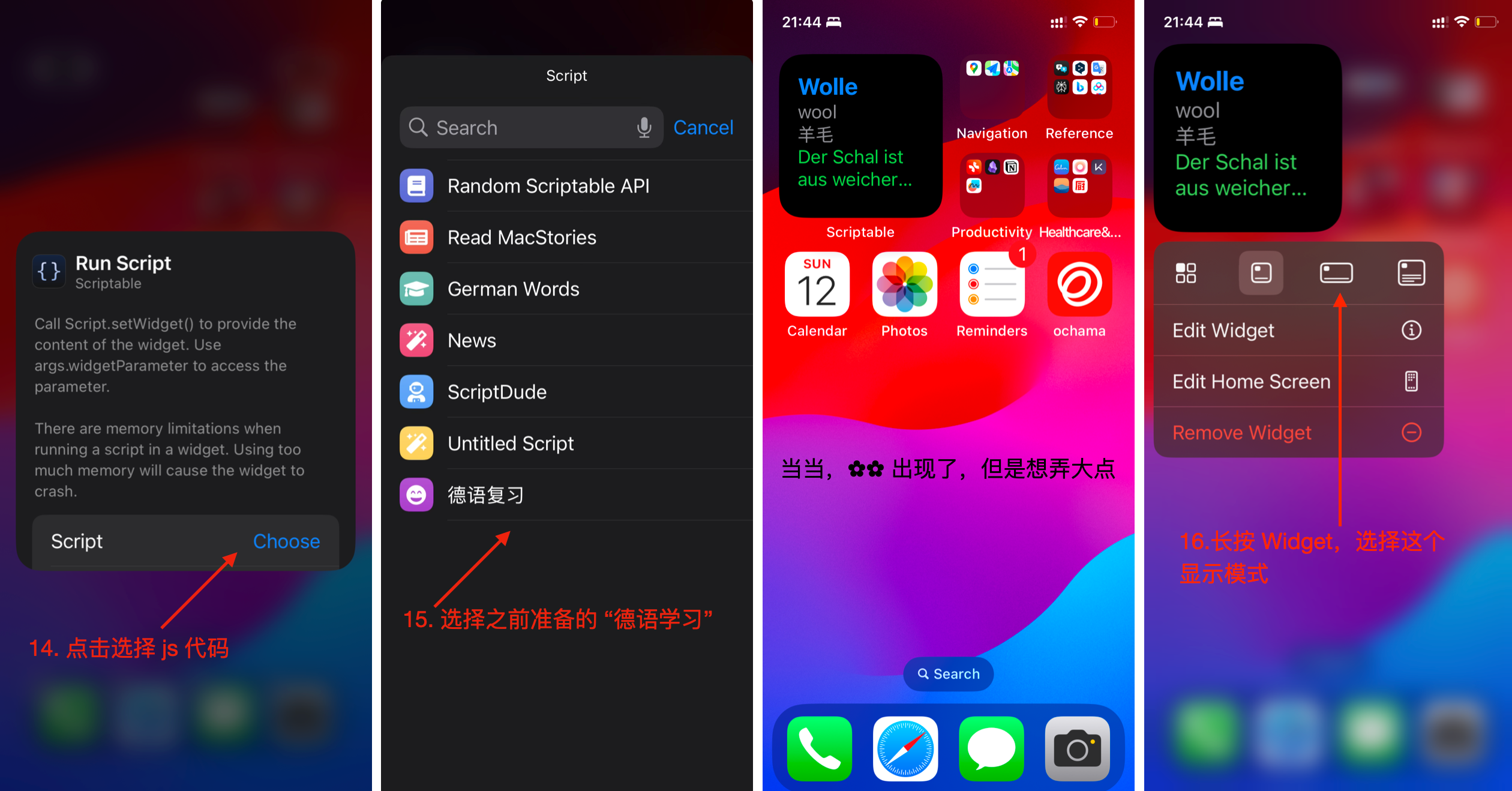
以下是实现步骤的具体展示:
用 Mac OS 端准备代码和数据
用 iOS 端准备代码和数据
iOS 端 Widget 添加
最终效果
实现代码码:
Scriptable 代码:
// 获取 JSON 数据
const filePath = FileManager.iCloud().joinPath(FileManager.iCloud().documentsDirectory(),"words.json");

// 确保文件存在并已下载
if (!FileManager.iCloud().fileExists(filePath)) {
throw new Error("JSON file not found in Scriptable folder.");
}
await FileManager.iCloud().downloadFileFromiCloud(filePath);

// 读取 JSON 数据
const jsonData = JSON.parse(FileManager.iCloud().readString(filePath));

// 随机选择一个单词
const randomIndex = Math.floor(Math.random() * jsonData.length);
const randomWord = jsonData[randomIndex];

// 创建小部件
let widget = new ListWidget();

let wordText = widget.addText(randomWord.de);
wordText.font = Font.boldSystemFont(20);
wordText.textColor = Color.blue();

let meaningText = widget.addText(randomWord.en);
meaningText.font = Font.systemFont(16);
meaningText.textColor = Color.gray();

let chText = widget.addText(randomWord.ch);
chText.font = Font.systemFont(16);
chText.textColor = Color.gray();

let exText = widget.addText(randomWord.ex);
exText.font = Font.systemFont(16);
exText.textColor = Color.green();
widget.addSpacer();

// 设置背景颜色
widget.backgroundColor = Color.dynamic(new Color("#ffffff"), new Color("#000000"));
widget.refreshAfterDate = new Date(Date.now() + 15000); // 15秒更新

// 返回小部件
Script.setWidget(widget);
widget.presentSmall();
Script.complete();
GPT 的提示词:
Given you a list of german words, please provide me the list of dict where each has keys: "de" which is the german word, "en" which is the corresponding English word of the german word in "de", and "ch" which is the corresponding Chinese word  of the german word in "de", and "ex" which is an example sentence of the german word in "de".

Here is an example:

Input:
Stift, Uhr

Ouput:
[{"de": "Stift", "en": "pen", "ch": "笔", "ex": "Er schreibt den Brief mit einem Stift."},
{"de": "Uhr", "en": "clock", "ch": "时钟", "ex": "Wie spät ist es an deiner Uhr?"}]

Instruction: I will give you a list of German words, please following the description, and generate me the corresponding English word, Chinese word, and an example sentence.
GPT 生成 JSON 数据 (保存在 words.json 文件中):
[
{"de": "Stift", "en": "pen", "ch": "笔", "ex": "Er schreibt den Brief mit einem Stift."},
{"de": "Uhr", "en": "clock", "ch": "时钟", "ex": "Wie spät ist es an deiner Uhr?"}
]
words.json 的德语词汇我会持续更新。感兴趣的朋友请到公众号后面回复 "德语复习",你将得到 words.json的实时链接,里面内容主要是从 https://learngerman.dw.com/en/ 上面获取的生词。
当然你也可以用我上面的提示词用 GPT 去生成自己的专属 `words.json
数据更新与获取 words.json 文件中的德语词汇会持续更新。感兴趣的朋友可以关注公众号并回复 “德语复习”,即可获取最新的 words.json 文件下载链接。 文件内容主要来源于 DW Learn German 平台。
总结 通过 Scriptable 和 tiny habit 的结合,轻松把德语学习融入日常生活。希望这个工具能帮助到正在学习德语的你!
不定期更新专业知识和有趣的东西,欢迎反馈、点赞、加星
您的鼓励和支持是我坚持创作的最大动力!ღ( ´・ᴗ・` ) 

中国智能体开发者社区,聚焦智能体与大模型开发,提供前沿资讯、实用工具链、开源项目及行业案例。通过技术沙龙、开发者大赛等活动,促进经验交流与协作,助力开发者快速构建创新智能应用。
更多推荐
 5
5 0
0- 0


 已为社区贡献2条内容

所有评论(0)