helm持久化部署prometheus
Grafana 配置grafana:admin:# --- Grafana 邮件配置 ---smtp:#password: xxxxxxxxxxxxxxxx # 用刚才生成的App Passwordserver:envFromSecret: "grafana-secrets" # ⚠️ 这里必须是字符串,不是列表storageClassName: alicloud-disk-essd # 使用阿里
·
加载helm库
[root@iZj6c1l5tx8mlviyq0z462Z ~]# helm repo add prometheus-community https://prometheus-community.github.io/helm-charts
"prometheus-community" has been added to your repositories
[root@iZj6c1l5tx8mlviyq0z462Z ~]# helm repo update
Hang tight while we grab the latest from your chart repositories...
...Successfully got an update from the "prometheus-community" chart repository
Update Complete. ⎈Happy Helming!⎈
自定义values.yaml
# prometheus-values.yaml

# --------------------
# Grafana 配置
# --------------------

grafana:
  enabled: true

  admin:
    existingSecret: grafana-secrets


  # --- Grafana 邮件配置 ---
  grafana.ini:
    smtp:
      enabled: true
      host: smtp.gmail.com:587
      user: job0201@gmail.com
      #password: xxxxxxxxxxxxxxxx   # 用刚才生成的App Password
      password: ${GF_SMTP_PASSWORD}
      from_address: job0201@gmail.com
      startTLS_policy: MandatoryStartTLS


      from_name: Grafana
      skip_verify: false
      ehlo_identity: grafana.xxxxxxxxxxxxxxxx.com
    server:
      root_url: https://grafana.xxxxxxxxxxxxxxxx.com
      domain: grafana.xxxxxxxxxxxxxxxx.com

  envFromSecret: "grafana-secrets"   # ⚠️ 这里必须是字符串,不是列表


  persistence:
    enabled: true
    storageClassName: alicloud-disk-essd   # 使用阿里云 ESSD 存储类
    accessModes:
      - ReadWriteOnce
    size: 20Gi
    type: pvc
  extraVolumeMounts:
    - name: grafana-storage
      mountPath: /var/lib/grafana
  extraVolumes:
    - name: grafana-storage
      persistentVolumeClaim:
        claimName: grafana
  adminPassword: admin   # 可修改为更安全密码
  extraVolumeMounts: []   # ✅ 确保为空
  extraVolumes: []        # ✅ 确保为空


  ingress:
    enabled: true
    ingressClassName: nginx
    annotations:
      kubernetes.io/ingress.class: nginx
      cert-manager.io/cluster-issuer: "letsencrypt-prod"
    hosts:
      - grafana.xxxxxxxxxxxxxxxx.com
    path: /
    pathType: Prefix
    tls:
      - secretName: xxxxxxxxxxxxxxxx.com-ssl
        hosts:
          - grafana.xxxxxxxxxxxxxxxx.com

# --------------------
# Prometheus 配置
# --------------------
prometheus:
  prometheusSpec:
    storageSpec:
      volumeClaimTemplate:
        metadata:
          name: prometheus-storage
        spec:
          storageClassName: alicloud-disk-essd
          accessModes: ["ReadWriteOnce"]
          resources:
            requests:
              storage: 100Gi
    # ✅ 确保这两个为空或不包含 /prometheus
  additionalVolumes: []
  additionalVolumeMounts: []


  ingress:
    enabled: true
    ingressClassName: nginx
    annotations:
      kubernetes.io/ingress.class: nginx
      cert-manager.io/cluster-issuer: "letsencrypt-prod"
    hosts:
      - prometheus.xxxxxxxxxxxxxxxx.com
    paths:
      - /
    pathType: Prefix
    tls:
      - secretName: xxxxxxxxxxxxxxxx.com-ssl
        hosts:
          - prometheus.xxxxxxxxxxxxxxxx.com


alertmanager:
  ingress:
    enabled: true
    ingressClassName: nginx
    annotations:
      kubernetes.io/ingress.class: nginx
      cert-manager.io/cluster-issuer: "letsencrypt-prod"
    hosts:
      - alertmanager.dxlreinb58fmxper.com
    paths:
      - /
    pathType: Prefix
    tls:
      - secretName: xxxxxxxxxxxxxxxx.com-ssl
        hosts:
          - alertmanager.xxxxxxxxxxxxxxxx.com

nodeExporter:
  enabled: false
创建secret
[root@iZj6c1l5tx8mlviyq0z462Z kube-prometheus-stack]# kubectl -n monitoring create secret generic grafana-secrets \
>   --from-literal=admin-user=admin \
>   --from-literal=admin-password=admin \
>   --from-literal=GF_SMTP_PASSWORD='xxxxxxxxxxxxxxxx'
secret/grafana-secrets created
按照自己定义的进行部署
[root@iZj6c1l5tx8mlviyq0z462Z kube-prometheus-stack]# helm upgrade prometheus --install prometheus-community/kube-prometheus-stack   --namespace monitoring -f values.yaml
Release "prometheus" does not exist. Installing it now.
I1113 12:05:40.286481 2424930 warnings.go:110] "Warning: unknown field \"spec.attachMetadata\""
I1113 12:05:40.286507 2424930 warnings.go:110] "Warning: unknown field \"spec.endpoints[1].trackTimestampsStaleness\""
I1113 12:05:40.286916 2424930 warnings.go:110] "Warning: unknown field \"spec.endpoints[0].enableHttp2\""
NAME: prometheus
LAST DEPLOYED: Thu Nov 13 12:05:34 2025
NAMESPACE: monitoring
STATUS: deployed
REVISION: 1
NOTES:
kube-prometheus-stack has been installed. Check its status by running:
  kubectl --namespace monitoring get pods -l "release=prometheus"

Get Grafana 'admin' user password by running:

  kubectl --namespace monitoring get secrets prometheus-grafana -o jsonpath="{.data.admin-password}" | base64 -d ; echo

Access Grafana local instance:

  export POD_NAME=$(kubectl --namespace monitoring get pod -l "app.kubernetes.io/name=grafana,app.kubernetes.io/instance=prometheus" -oname)
  kubectl --namespace monitoring port-forward $POD_NAME 3000

Get your grafana admin user password by running:

  kubectl get secret --namespace monitoring -l app.kubernetes.io/component=admin-secret -o jsonpath="{.items[0].data.admin-password}" | base64 --decode ; echo


Visit https://github.com/prometheus-operator/kube-prometheus for instructions on how to create & configure Alertmanager and Prometheus instances using the Operator.
配置的是gmail发送邮件,则需要在gmail上开启两步验证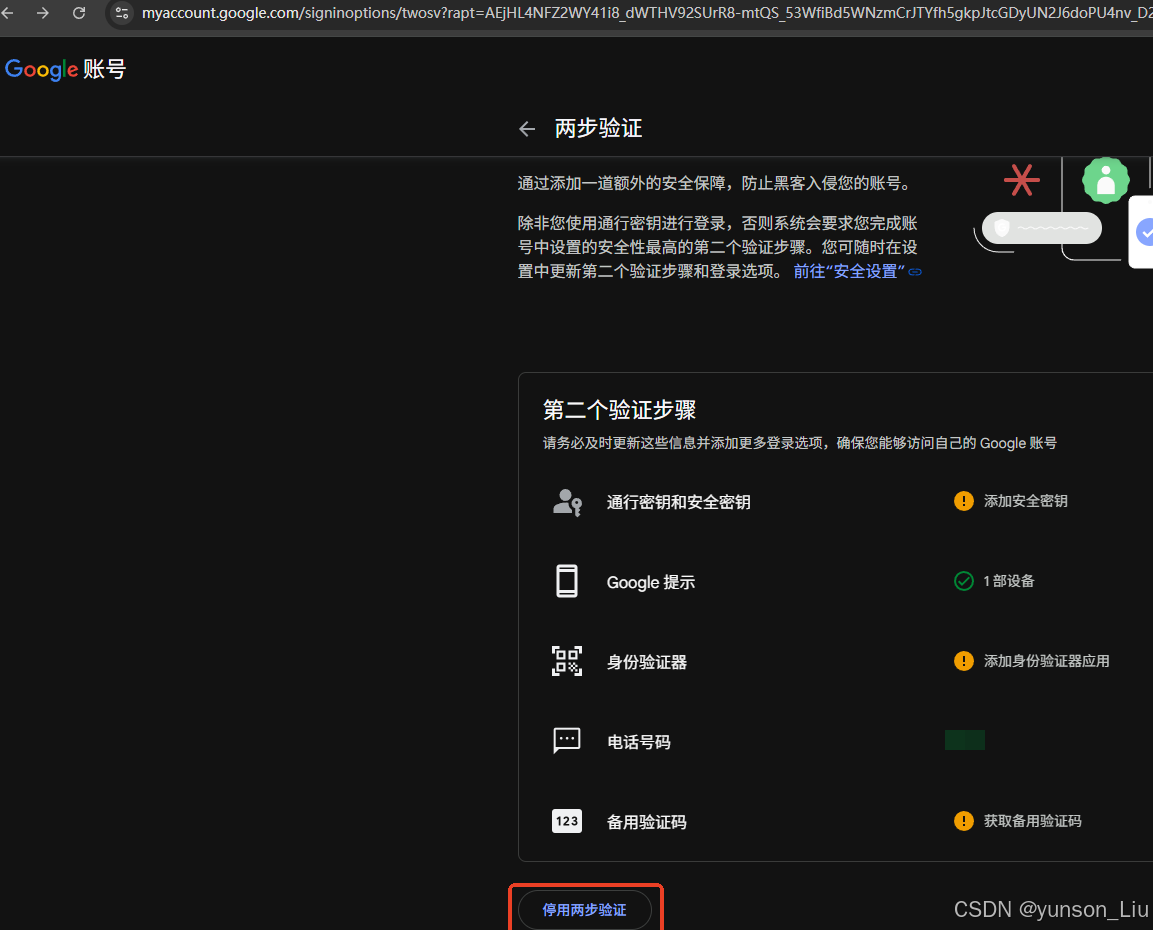
然后再开启app验证,配置app验证地址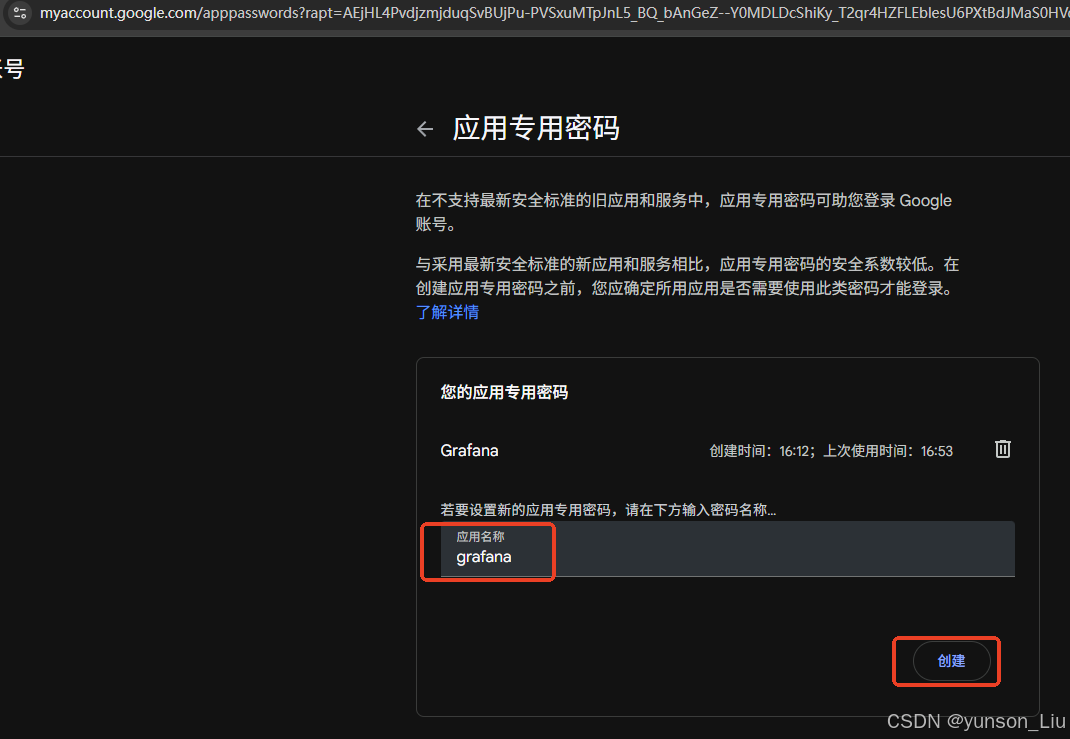
这会可以看到我们生成验证码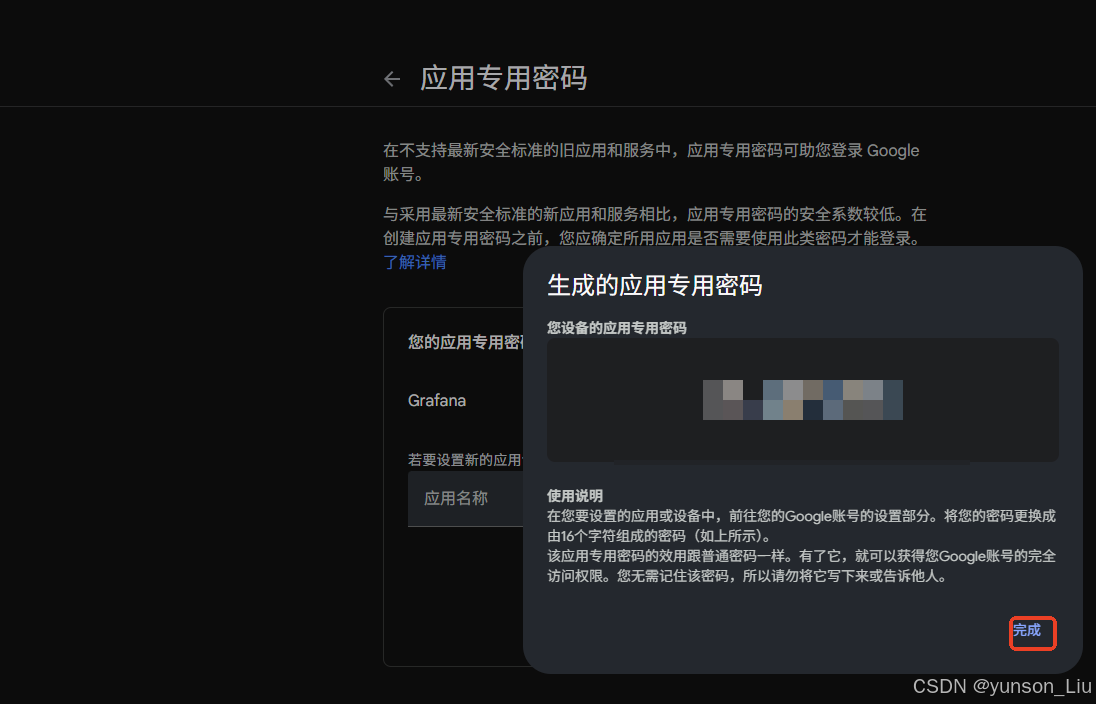
使用的时候注意将16个字母的空格去掉
查看grafana admin账号登录密码
kubectl get secret --namespace monitoring prometheus-grafana \
>   -o jsonpath="{.data.admin-password}" | base64 --decode ; echo
验证
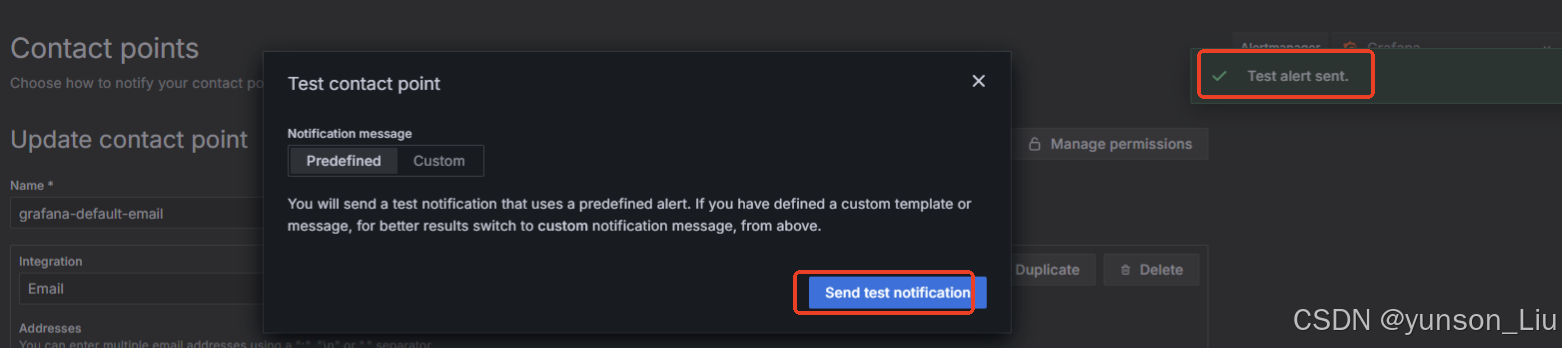
验证邮箱是否可以正常发送
查看Prometheus
[root@iZj6c1l5tx8mlviyq0z462Z ~]# helm list -n monitoring
NAME      	NAMESPACE 	REVISION	UPDATED                                	STATUS  	CHART                       	APP VERSION
prometheus	monitoring	1       	2025-11-13 12:05:34.491856489 +0800 CST	deployed	kube-prometheus-stack-79.5.0	v0.86.2
查看是否有正常创建pvc
[root@iZj6c1l5tx8mlviyq0z462Z ~]# kubectl get pvc -n monitoring
NAME                                                                    STATUS   VOLUME                   CAPACITY   ACCESS MODES   STORAGECLASS         VOLUMEATTRIBUTESCLASS   AGE
prometheus-grafana                                                      Bound    d-j6cgnqcu09o114xdqfdo   20Gi       RWO            alicloud-disk-essd   <unset>                 105m
prometheus-storage-prometheus-prometheus-kube-prometheus-prometheus-0   Bound    d-j6cgwbhrcfp1esnslscn   100Gi      RWO            alicloud-disk-essd   <unset>                 105m
查看pods列表
[root@iZj6c1l5tx8mlviyq0z462Z ~]# kubectl get pods -n monitoring
NAME                                                     READY   STATUS    RESTARTS   AGE
alertmanager-prometheus-kube-prometheus-alertmanager-0   2/2     Running   0          105m
prometheus-grafana-646d8f98d9-ldbzh                      3/3     Running   0          105m
prometheus-kube-prometheus-operator-5499cb58d8-2rfcn     1/1     Running   0          105m
prometheus-kube-state-metrics-f7d8f5f9b-k6rf7            1/1     Running   0          105m
prometheus-prometheus-kube-prometheus-prometheus-0       2/2     Running   0          105m

火山引擎开发者社区是火山引擎打造的AI技术生态平台,聚焦Agent与大模型开发,提供豆包系列模型(图像/视频/视觉)、智能分析与会话工具,并配套评测集、动手实验室及行业案例库。社区通过技术沙龙、挑战赛等活动促进开发者成长,新用户可领50万Tokens权益,助力构建智能应用。
更多推荐
 2
2 0
0- 0


 已为社区贡献1条内容

所有评论(0)