✅把一个本地项目导入gitee创建的仓库中
初始化本地git仓库
PS D:\aaa\driver25.11.19\driver> git init
Reinitialized existing Git repository in D:/aaa/driver25.11.19/driver/.git/
git init如果已有老仓库,要换新仓库
先删除:
git remote remove origin然后重新添加:
git remote add origin https://gitee.com/xxx/xxx.git对标到远端地址
PS D:\aaa\driver25.11.19\driver> git remote add origin https://gitee.com/the-pretty-boy-in-the-county/designated-driver.git
git remote add origin https://gitee.com/the-pretty-boy-in-the-county/designated-driver.git
创建并选择develop分支
PS D:\aaa\driver25.11.19\driver> git checkout -b develop
Switched to a new branch 'develop'
git checkout -b develop查看当前分支
PS D:\aaa\driver25.11.19\driver> git branch
* develop
main
git branch上传到gitee仓库
PS D:\aaa\driver25.11.19\driver> git push -u origin "develop"
git push -u origin "develop" 上传到develop分支
PS D:\aaa\driver25.11.19\driver> git push -u origin "develop"
error: src refspec develop does not match any
error: failed to push some refs to 'https://gitee.com/the-pretty-boy-in-the-county/designated-driver.git'
git push -u origin "develop"
若是初次创建
需加入暂存区
git add .
git commit -m "init"
git push -u origin develop
添加多个git仓库
👉 GitLab 继续叫 origin,Gitee 作为第二仓库
1️⃣ 给 Gitee 起一个新名字(比如 gitee)
git remote add gitee https://gitee.com/the-pretty-boy-in-the-county/enterprise.gitgit remote add gitee 仓库地址2️⃣ 检查添加的远程仓库地址
git remote -v你应该看到类似:
origin http://oauth2:glpat-xxx@59.110.23.183/zhangyao/erp.git erp git@59.110.23.183:zhangyao/erp.git gitee https://gitee.com/the-pretty-boy-in-the-county/enterprise.git3️⃣ 推送到 Gitee
git push gitee develop👉 不影响你现在的 GitLab
error
1,error: remote origin already exists.
为什么你 git remote add origin 会失败?
你执行了:
git remote add origin https://gitee.com/xxx/enterprise.gitGit 返回:
error: remote origin already exists.👉 因为:origin 这个名字已经被占用了
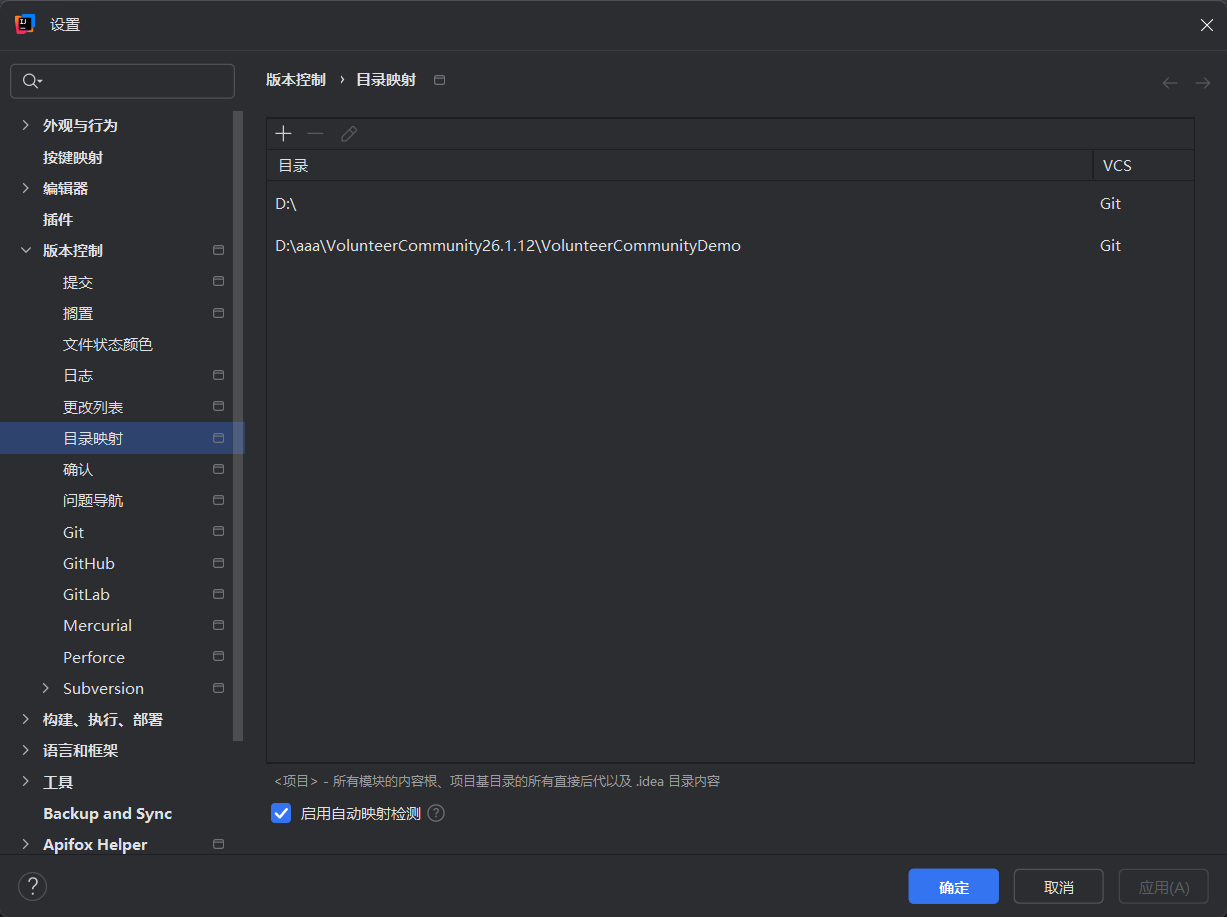
2,存在多个子目录或模块目录
可以在设置里将它删除

中国智能体开发者社区,聚焦智能体与大模型开发,提供前沿资讯、实用工具链、开源项目及行业案例。通过技术沙龙、开发者大赛等活动,促进经验交流与协作,助力开发者快速构建创新智能应用。
更多推荐


 7
7 0
0- 0


 已为社区贡献1条内容

所有评论(0)