KubeBlocks v1.0.0版本安装部署(redis,kafka,elasticsearch)
【代码】KubeBlocks v1.0.0版本安装部署(redis,kafka,elasticsearch)
·
前置条件
在k8s集群中安装KubeBlocks v1.0.0版本来管理多种类型的数据库
KubeBlocks v1.0.0版本 创建并连接 ApeCloud MySQL 集群
查看引擎仓库索引
kbcli addon index list
>
INDEX        URL
kubeblocks   https://github.com/apecloud/block-index.git

如果命令执行结果未显示或者你想要添加自定义索引仓库,则表明索引未建立,可使用 kbcli addon index add <index-name> <source> 命令手动添加索引。例如:
kbcli addon index add kubeblocks https://github.com/apecloud/block-index.git

如果不确定索引是否为最新版本,可使用如下命令更新索引。
kbcli addon index update kubeblocks
索引建立后,可以通过 addon search 命令检查想要安装的引擎是否在索引信息中存在
kbcli addon search elasticsearch
>
ADDON           VERSION         INDEX
elasticsearch   0.7.0           kubeblocks
elasticsearch   0.7.1           kubeblocks
elasticsearch   0.7.2           kubeblocks
elasticsearch   0.8.0           kubeblocks
elasticsearch   0.9.0           kubeblocks
安装引擎
当引擎有多个版本和索引源时,可使用 --index 指定索引源,--version 指定安装版本。系统默认以 kubeblocks 索引仓库为索引源,安装最新版本。
kbcli addon install elasticsearch --index kubeblocks --version x.y.z
验证该引擎是否安装成功
如果状态显示为 Enabled,则表明该引擎已成功安装。
kbcli addon list
>
NAME                           VERSION        PROVIDER    STATUS     AUTO-INSTALL
elasticsearch                  0.9.0          apecloud    Enabled    true

您可以执行以下命令停用引擎。如果您已使用该引擎创建集群,请先删除集群。
kbcli addon disable elasticsearch

您也可以启用该引擎。
kbcli addon disable elasticsearch

您也可以卸载该引擎。
kbcli addon uninstall elasticsearch
创建Redis集群
kbcli cluster create redis mycluster -n demo

如果您需要自定义集群规格,kbcli 也提供了诸多参数,如支持设置引擎版本、终止策略、CPU、内存规格。您可通过在命令结尾添加 --help 或 -h 来查看具体说明。比如:
kbcli cluster create redis --help

kbcli cluster create redis -h
>
  可以看到redis支持多种引擎版本:
 --mode='replication':
	Cluster topology mode. Legal values [standalone, replication, cluster, replication-twemproxy].

安装replication引擎版本redis集群
kbcli cluster create redis mycluster -n demo --mode='replication'

kbcli cluster connect -n demo mycluster
>
# you can use the following command to forward the service port to your local machine for testing the connection, using 127.0.0.1 as the host IP.
	kubectl port-forward -n demo service/mycluster-redis-redis 6379:6379

Endpoints:
COMPONENT        SERVICE-NAME                                  TYPE        PORT    INTERNAL                                                                                 EXTERNAL
redis            mycluster-redis-redis                     ClusterIP   6379    mycluster-redis-redis.demo.svc.cluster.local
redis-sentinel   mycluster-redis-sentinel-redis-sentinel   ClusterIP   26379   mycluster-redis-sentinel-redis-sentinel.demo.svc.cluster.local

Account Secrets:
COMPONENT        SECRET-NAME                                    USERNAME   PASSWORD-KEY
redis            mycluster-redis-account-default            default    <password>
redis-sentinel   mycluster-redis-sentinel-account-default   default    <password>

连接测试
redis-cli -a  <password>   --user default
创建kafka集群
查看支持的引擎版本:
kbcli cluster create kafka -h
>
    --mode='combined':
	Mode for Kafka kraft cluster, 'combined' is combined Kafka controller and broker,'separated' is broker and
	controller running independently. Legal values [combined, separated].

  kbcli cluster create kafka mycluster -n demo  --mode='separated'
创建elasticsearch集群
查看支持的引擎版本:
kbcli cluster create elasticsearch -h
>
  --mode='multi-node':
	Mode for ElasticSearch Legal values [single-node, multi-node].

kbcli cluster create elasticsearch mycluster -n demo  --mode='multi-node'

连接集群
Elasticsearch 提供 HTTP 访问协议,使用端口 9200 进行通信。您可通过本地主机访问集群。
curl http://127.0.0.1:9200/_cat/nodes?v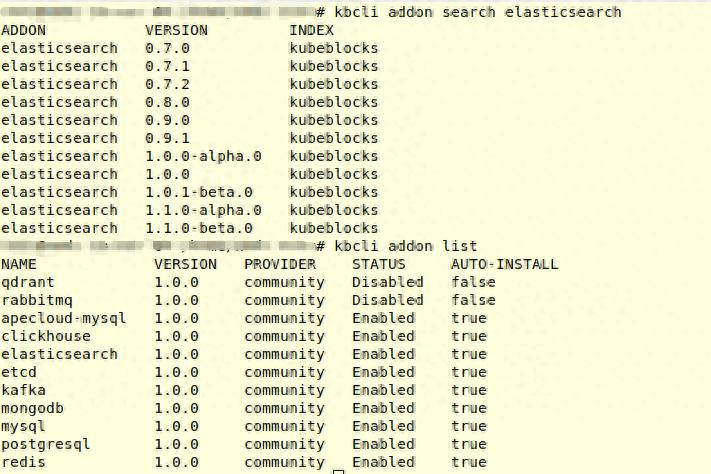

火山引擎开发者社区是火山引擎打造的AI技术生态平台,聚焦Agent与大模型开发,提供豆包系列模型(图像/视频/视觉)、智能分析与会话工具,并配套评测集、动手实验室及行业案例库。社区通过技术沙龙、挑战赛等活动促进开发者成长,新用户可领50万Tokens权益,助力构建智能应用。
更多推荐
 9
9 0
0- 0


 已为社区贡献3条内容

所有评论(0)