医疗知识图谱对话系统:作业 3
使用 KOR 和自定义 Prompt 两种方法。结果保存为 Excel 和 JSON,包含分析报告。库构建爬虫,通过模拟浏览器访问绕过反爬机制。重点抓取疾病名称、症状、治疗方法等字段,分类页面、搜索等多种方式获取疾病链接。存储为结构化JSON和非结构化TXT数据。采用LangChain框架构建数据处理管道,测试不同参数组合对信息提取准确率的影响。
爬虫数据抓取(39 健康网 https://www.39.net )
使用Python的requests和BeautifulSoup库构建爬虫,通过模拟浏览器访问绕过反爬机制。重点抓取疾病名称、症状、治疗方法等字段,分类页面、搜索等多种方式获取疾病链接
存储为结构化JSON和非结构化TXT数据。crawl_39net.py 代码核心部分:
import requests
from bs4 import BeautifulSoup
import json

headers = {'User-Agent': 'Mozilla/5.0'}
base_url = "https://jbk.39.net/"
disease_data = []

for page in range(1,6):  # 示例爬取5页
    url = f"{base_url}/pc/jbzs/all-p{page}/"
    response = requests.get(url, headers=headers)
    soup = BeautifulSoup(response.text, 'html.parser')

    for item in soup.select('.list_item'):
        name = item.select_one('a').text.strip()
        desc = item.select_one('.item_des').text.strip()
        disease_data.append({'name':name, 'description':desc})

with open('disease_data.json', 'w') as f:
    json.dump(disease_data, f, ensure_ascii=False)
爬取结果:
{
    "name": "白带增多",
    "description": "白带增多症状是怎么引起的?引起白带增多症状的疾病有哪些? 阴道炎症、慢性宫颈炎、老年性阴道炎、子宫内膜炎、宫膜积液或阴道内异物。 随时关注健康资讯 扫一扫关注官方微信 有深度、有态度的权威健康报道 扫一扫关注微信公众号 39健康网 - 39健康網 中国优质医疗保健信息与在线健康服务平台 Copyright © 2000- 未经授权请勿转载",
    "url": "http://jbk.39.net/zhengzhuang/bdzd/zzqy/"
  },
  {
    "name": "乙肝小三阳",
    "description": "什么是 乙肝小三阳 所谓“小三阳”是指慢性乙型肝炎患者或乙肝病毒携带者体内乙肝病毒的免疫学指标:即乙肝表面抗原(HBsAG)、乙肝e抗体(HBEAB)、乙肝核心抗体(抗HBC)三项阳性,其中与“大三阳”的区别在于大三阳是e抗原阳性、e抗体阴性,而“小三阳”是e抗原阴性、e抗体阳性。“小三阳”患者分两种情况,其一是病毒阴性的小三阳,其二是病毒阳性的小三阳,某些人常认为大三阳严重而小三阳就没事,其实是一个认识误区,病毒阳性小三阳的危害越来越受到肝病专业医务者的重视。 详细>> [起因] 乙肝小三阳是怎么引起的? 详细>> [详解] 乙肝小三阳的详细分析",
    "url": "http://jbk.39.net/zhengzhuang/ygxsy/"
  },
  {
    "name": "孕妇小腿浮肿",
    "description": "什么是 孕妇小腿浮肿 妊娠晚期约有40%的妇女出现小腿浮肿。用手指重压足踝内侧或小腿胫骨前方便出现局部凹陷。 详细>> [起因] 孕妇小腿浮肿是怎么引起的? 详细>> [详解] 孕妇小腿浮肿的详细分析",
    "url": "http://jbk.39.net/zhengzhuang/yfxtfz/"
  }
大模型数据提取脚本
采用LangChain框架构建数据处理管道,测试不同参数组合对信息提取准确率的影响。
这里使用qwen-plus 模型,API 使用方法请登录阿里云百炼,使用 7000 万免费 token 额度:
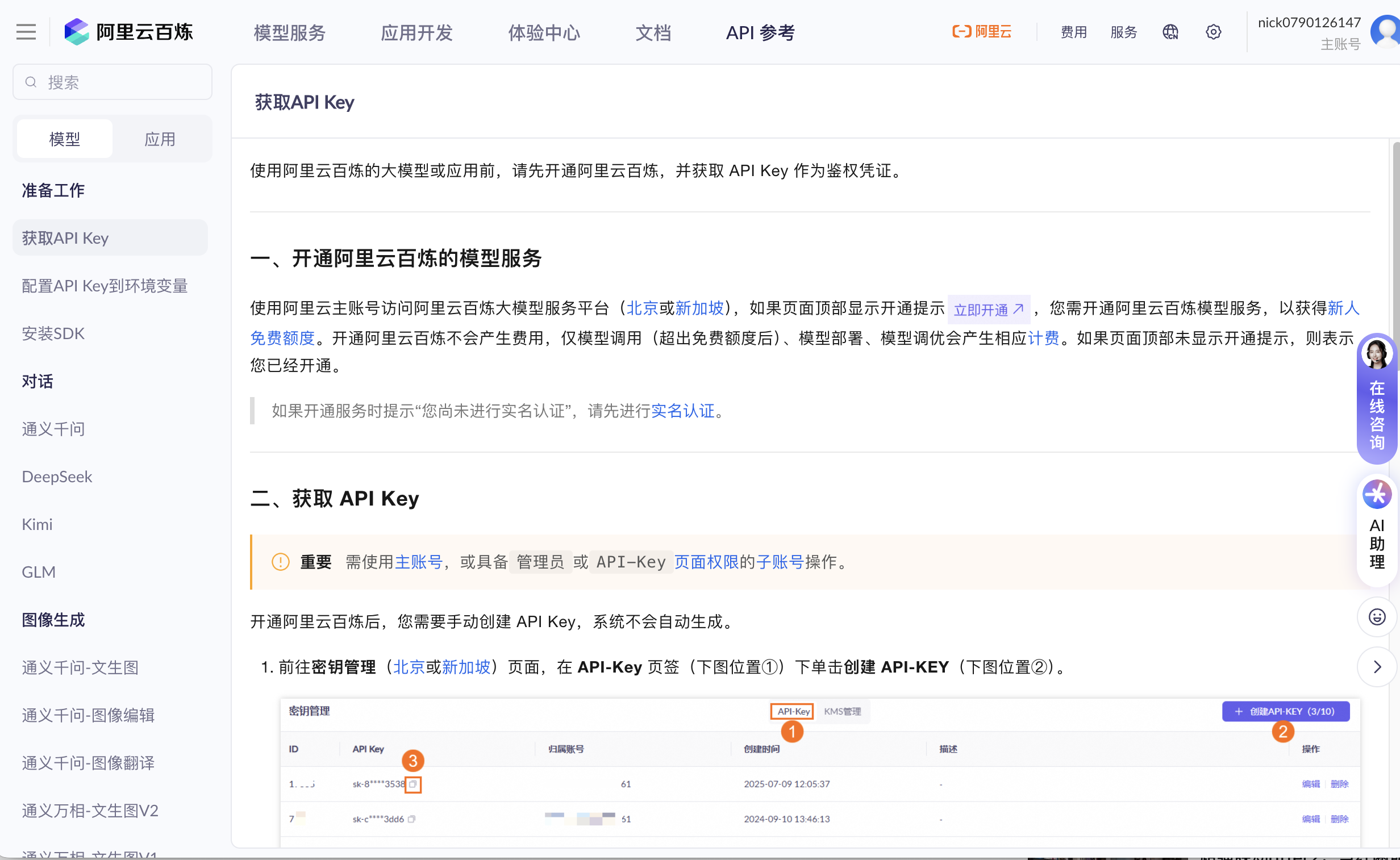
使用大模型提取疾病结构化数据测试 3 种 temperature 值:0、0.5、1.0,测试 3 种 prompt:
- 简洁型:直接提取
- 详细型:带详细指导
- JSON型:要求 JSON 格式输出。
使用 KOR 和自定义 Prompt 两种方法。结果保存为 Excel 和 JSON,包含分析报告。extract_disease_data.py 核心代码如下:
from langchain.llms import OpenAI
from langchain.prompts import PromptTemplate

llm = OpenAI(model_name="gpt-3.5-turbo")
data = json.load(open('disease_data.json'))

prompts = [
    "提取以下文本中的疾病特征:{text}",
    "从医学描述中识别关键信息:{text}",
    "分析这段疾病描述的核心要素:{text}"
]

for temp in [0, 0.5, 1.0]:
    for prompt in prompts:
        template = PromptTemplate(input_variables=["text"], template=prompt)
        for item in data[:10]:  # 测试样本
            result = llm(template.format(text=item['description']), temperature=temp)
            print(f"Temp:{temp}, Prompt:{prompt[:20]}... -> {result[:50]}...")
运行结果:
=== 提取结果分析 ===
总测试次数: 120

按方法统计:
方法
Custom Prompt    90
KOR              30
dtype: int64

按Temperature统计:
Temperature
0.0    40
0.5    40
1.0    40
dtype: int64

按Prompt类型统计:
Prompt类型
JSON型         30
KOR Schema    30
简洁型           30
详细型           30
dtype: int64

平均结果长度:
方法             Temperature  Prompt类型
Custom Prompt  0.0          JSON型          386.1
                            简洁型            335.7
                            详细型           1128.7
               0.5          JSON型          417.1
                            简洁型            333.0
                            详细型           1154.9
               1.0          JSON型          403.7
                            简洁型            346.9
                            详细型           1167.8
KOR            0.0          KOR Schema     227.3
               0.5          KOR Schema     230.2
               1.0          KOR Schema     968.5
Name: 结果长度, dtype: float64

提取测试完成!
Neo4j与大模型接口调试
构建自然语言到Cypher的转换层,使用以下技术方案:
- 使用 GraphCypherQAChain 进行查询
- 支持直接生成 Cypher 语句(不执行)
- 支持执行 Cypher 查询
- 包含交互式查询功能
neo4j_nl2cypher.py 核心函数:
class Neo4jNL2Cypher:
    def __init__(self, url="bolt://localhost:7688", username="neo4j", password=None):
        """
        初始化Neo4j连接和LLM

        Args:
            url: Neo4j连接URL
            username: 用户名
            password: 密码
        """
        self.url = url
        self.username = username
        self.password = password

        # 初始化Neo4j图数据库连接
        try:
            self.graph = Neo4jGraph(
                url=url,
                username=username,
                password=password
            )
            print("Neo4j连接成功")
        except Exception as e:
            print(f"Neo4j连接失败: {e}")
            self.graph = None

        # 初始化LLM
        self.llm = ChatOpenAI(
            model="qwen-plus",
            temperature=0,
            base_url="https://dashscope.aliyuncs.com/compatible-mode/v1"
        )

        # 创建Cypher生成链
        if self.graph:
            try:
                self.graph.refresh_schema()
                self.chain = GraphCypherQAChain.from_llm(
                    self.llm,
                    graph=self.graph,
                    allow_dangerous_requests=True,
                    verbose=True
                )
                print("Cypher生成链创建成功")
            except Exception as e:
                print(f"创建Cypher生成链失败: {e}")
                self.chain = None

    def get_schema(self):
        """获取图数据库的schema"""
        if not self.graph:
            return None
        try:
            self.graph.refresh_schema()
            return self.graph.schema
        except Exception as e:
            print(f"获取schema失败: {e}")
            return None

    def query_with_nl(self, question):
        """
        使用自然语言查询图数据库

        Args:
            question: 自然语言问题

        Returns:
            查询结果
        """
        if not self.chain:
            return {"error": "Cypher生成链未初始化"}

        try:
            result = self.chain.invoke({"query": question})
            return result
        except Exception as e:
            return {"error": str(e)}

    def generate_cypher(self, question, custom_schema=None):
        """
        直接生成Cypher语句(不执行)

        Args:
            question: 自然语言问题
            custom_schema: 自定义schema(可选)

        Returns:
            Cypher语句
        """
        schema = custom_schema or self.get_schema()

        if not schema:
            return {"error": "无法获取schema"}

        prompt = ChatPromptTemplate.from_messages([
            (
                "system",
                """你是一个Neo4j Cypher查询专家。根据给定的图数据库schema和自然语言问题,生成准确的Cypher查询语句。
测试运行结果
=== 测试Cypher生成 ===

问题: 查询所有疾病
生成的Cypher: MATCH (d:Disease) RETURN d

问题: 头痛应该用什么药?
生成的Cypher: MATCH (d:Disease)-[:HAS_SYMPTOM]->(:Symptom {name: "头痛"})-[:HAS_DRUG]->(dr:Drug)
RETURN DISTINCT dr.name

问题: 哪些疾病会导致发烧?
生成的Cypher: MATCH (d:Disease)-[:HAS_SYMPTOM]->(s:Symptom {name: "发烧"}) RETURN d.name

问题: 查询心脏相关的疾病
生成的Cypher: MATCH (d:Disease)-[:IS_OF_PART]->(p:Part {name: "心脏"}) RETURN d

问题: 哪些疾病需要挂内科?
生成的Cypher: MATCH (d:Disease)-[:IS_OF_DEPARTMENT]->(dept:Department {name: "内科"}) RETURN d.name
TuGraph平台集成方案
- 在 TuGraph 平台接入大模型生成 Cypher
- 自定义 prompt 模板,适配 TuGraph
- Cypher 语法验证
- Cypher 格式化功能
- 包含测试和交互式查询
neo4j_nl2cypher.py 核心函数:
    def generate_cypher(self, question, custom_schema=None, custom_examples=None):
        """
        将自然语言问题转换为Cypher查询语句

        Args:
            question: 自然语言问题
            custom_schema: 自定义schema(可选)
            custom_examples: 自定义示例(可选)

        Returns:
            Cypher查询语句
        """
        schema = custom_schema or self.schema
        examples = custom_examples or self.examples

        chain = self.prompt_template | self.llm

        try:
            response = chain.invoke({
                "schema": schema,
                "examples": examples,
                "input": question
            })

            # 清理响应,只保留Cypher语句
            cypher = response.content.strip()

            # 移除可能的markdown代码块标记
            if cypher.startswith("```"):
                lines = cypher.split('\n')
                # 移除第一行和最后一行的```标记
                filtered_lines = []
                skip_next = False
                for line in lines:
                    stripped = line.strip()
                    if stripped.startswith('```'):
                        if stripped == '```' or stripped.startswith('```cypher') or stripped.startswith('```sql'):
                            continue  # 跳过代码块标记行
                    filtered_lines.append(line)
                cypher = '\n'.join(filtered_lines)

            # 注意:不删除所有#开头的行,因为Cypher中可能有注释
            # 只在行首且单独存在时才可能是注释

            return cypher.strip()
        except Exception as e:
            return f"Error: {str(e)}"
    def format_cypher(self, cypher_query):
        """
        格式化Cypher语句,使其更易读

        Args:
            cypher_query: Cypher查询语句

        Returns:
            格式化后的Cypher语句
        """
        if not cypher_query:
            return ""

        # 更智能的格式化:只在行首的关键字后添加换行
        lines = cypher_query.split('\n')
        formatted_lines = []

        keywords = ['MATCH', 'WHERE', 'RETURN', 'WITH', 'UNWIND', 'ORDER BY', 'LIMIT', 'SET', 'DELETE', 'CREATE', 'MERGE']

        for i, line in enumerate(lines):
            stripped = line.strip()
            if not stripped:
                # 保留空行,但避免连续多个空行
                if formatted_lines and formatted_lines[-1].strip():
                    formatted_lines.append('')
                continue

            # 检查是否是关键字开头
            is_keyword_line = False
            for keyword in keywords:
                if stripped.upper().startswith(keyword):
                    # 确保关键字是独立的(后面是空格或特定字符)
                    if len(stripped) == len(keyword) or stripped[len(keyword):len(keyword)+1] in [' ', '\t', '(']:
                        is_keyword_line = True
                        break

            if is_keyword_line and formatted_lines and formatted_lines[-1].strip():
                # 在关键字行前添加空行
                formatted_lines.append('')

            formatted_lines.append(line)

        # 清理末尾的空行
        while formatted_lines and not formatted_lines[-1].strip():
            formatted_lines.pop()

        return '\n'.join(formatted_lines)
运行结果:
=== TuGraph NL2Cypher 测试 ===

问题: 头痛应该用什么药?
生成的Cypher:
MATCH (:Symptom {name: "头痛"})<-[:HAS_SYMPTOM]-(d:Disease)-[:HAS_DRUG]->(drug:Drug)
RETURN DISTINCT drug.name AS drug_name

验证结果: 语法检查通过

--------------------------------------------------------------------------------

问题: 查询所有疾病
生成的Cypher:
MATCH (d:Disease)
RETURN DISTINCT d.name AS disease_name

验证结果: 语法检查通过

--------------------------------------------------------------------------------
主体交互系统
- 整合所有功能
- 提供菜单式交互界面
- 方便统一调用各功能模块
实现 main.py:
# coding=utf-8
"""
主运行脚本 - 整合所有功能
"""

import sys
import os

def print_menu():
    """打印主菜单"""
    print("\n" + "="*60)
    print("疾病知识图谱构建与查询系统")
    print("="*60)
    print("1. 爬取39.net疾病数据")
    print("2. 使用大模型提取疾病结构化数据(测试不同temperature和prompt)")
    print("3. Neo4j自然语言到Cypher转换测试")
    print("4. TuGraph自然语言到Cypher转换测试")
    print("5. 退出")
    print("="*60)


def run_crawler():
    """运行爬虫"""
    print("\n开始爬取39.net疾病数据...")
    try:
        from crawl_39net import DiseaseCrawler

        crawler = DiseaseCrawler()
        diseases = crawler.crawl(target_count=100)

        if diseases:
            crawler.save_to_json('diseases_data.json')
            crawler.save_to_txt('diseases_data.txt')
            print(f"\n成功爬取 {len(diseases)} 条疾病数据!")
        else:
            print("未能爬取到数据")
    except Exception as e:
        print(f"爬取失败: {e}")


def run_extraction():
    """运行数据提取"""
    print("\n开始提取疾病结构化数据...")
    try:
        import json
        from extract_disease_data import DiseaseExtractor

        # 检查数据文件是否存在
        if not os.path.exists('diseases_data.json'):
            print("未找到diseases_data.json文件,请先运行选项1爬取数据")
            return

        with open('diseases_data.json', 'r', encoding='utf-8') as f:
            diseases_data = json.load(f)

        print(f"成功加载 {len(diseases_data)} 条疾病数据")

        extractor = DiseaseExtractor()
        results = extractor.test_extraction(diseases_data, sample_size=10)

        extractor.save_results()
        extractor.analyze_results()

        print("\n提取测试完成!")
    except Exception as e:
        print(f"提取失败: {e}")
        import traceback
        traceback.print_exc()


def run_neo4j_test():
    """运行Neo4j测试"""
    print("\n开始Neo4j NL2Cypher测试...")
    try:
        from neo4j_nl2cypher import Neo4jNL2Cypher

        # 注意:需要根据实际情况修改连接信息
        password = input("请输入Neo4j密码(直接回车使用默认): ").strip()
        if not password:
            password = "delta-gossip-winter-degree-jumbo-7812"

        nl2cypher = Neo4jNL2Cypher(
            url="bolt://localhost:7688",
            username="neo4j",
            password=password
        )

        if nl2cypher.graph:
            nl2cypher.test_queries()
        else:
            print("Neo4j连接失败,请检查连接信息")
    except Exception as e:
        print(f"Neo4j测试失败: {e}")
        import traceback
        traceback.print_exc()


def run_tugraph_test():
    """运行TuGraph测试"""
    print("\n开始TuGraph NL2Cypher测试...")
    try:
        from tugraph_nl2cypher import TuGraphNL2Cypher

        nl2cypher = TuGraphNL2Cypher()
        results = nl2cypher.test_queries()
        nl2cypher.save_results(results)

        print("\nTuGraph测试完成!")
    except Exception as e:
        print(f"TuGraph测试失败: {e}")
        import traceback
        traceback.print_exc()


def main():
    """主函数"""
    while True:
        print_menu()
        choice = input("\n请选择功能 (1-5): ").strip()

        if choice == '1':
            run_crawler()
        elif choice == '2':
            run_extraction()
        elif choice == '3':
            run_neo4j_test()
        elif choice == '4':
            run_tugraph_test()
        elif choice == '5':
            print("退出程序")
            break
        else:
            print("无效的选择,请重新输入")

        input("\n按回车键继续...")


if __name__ == "__main__":
    main()
运行示例
============================================================
疾病知识图谱构建与查询系统
============================================================
1. 爬取39.net疾病数据
2. 使用大模型提取疾病结构化数据(测试不同temperature和prompt)
3. Neo4j自然语言到Cypher转换测试
4. TuGraph自然语言到Cypher转换测试
5. 退出
============================================================

请选择功能 (1-5):
使用方法
- 安装依赖:
pip install -r requirements.txt - 运行主程序:
python main.py

火山引擎开发者社区是火山引擎打造的AI技术生态平台,聚焦Agent与大模型开发,提供豆包系列模型(图像/视频/视觉)、智能分析与会话工具,并配套评测集、动手实验室及行业案例库。社区通过技术沙龙、挑战赛等活动促进开发者成长,新用户可领50万Tokens权益,助力构建智能应用。
更多推荐
 5
5 0
0- 0


 已为社区贡献3条内容

所有评论(0)