Unity实现实时人声转文字功能
DictationRecognizer 使用这个对象可以识别语音输入转化为文本,使用这个对象有三个步骤~运行前确保当前电脑有麦克风输入设备,然后就可以说话测试转文字内容了,在此基础上可以任意拓展!现在好多语音转文字都需要接入SDK进行实现,UnityC#这里有原生的,下面看下如何实现!
·
现在好多语音转文字都需要接入SDK进行实现,UnityC#这里有原生的,下面看下如何实现!
DictationRecognizer 使用这个对象可以识别语音输入转化为文本,使用这个对象有三个步骤~
- 创建一个DictationRecognizer对象
- 注册Dictation 事件
- 开始识别听写
先把电脑的在线语音识别功能打开,调用的DLL要有Windows这一套。
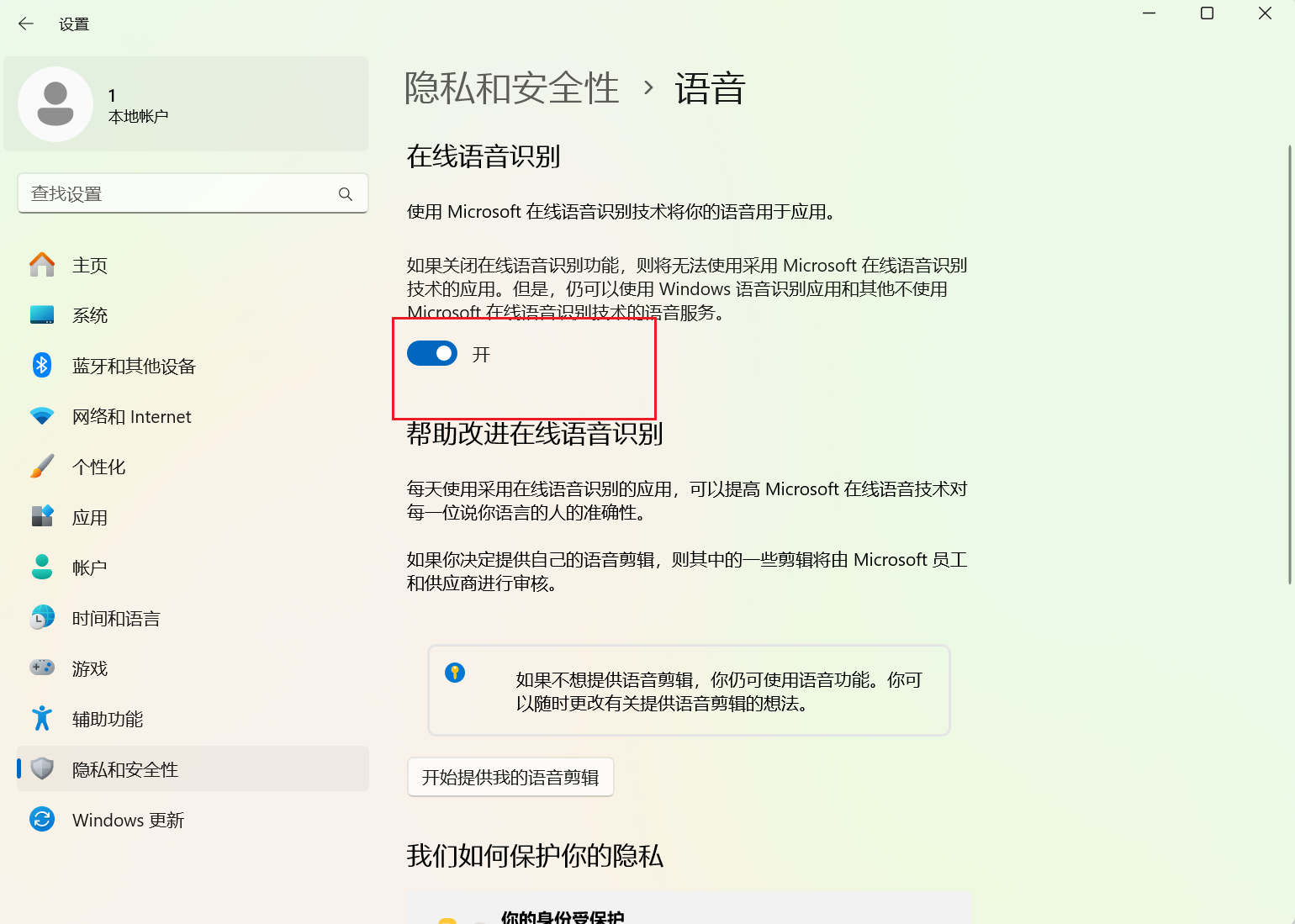
然后是代码,这里我做了个Demo,用来测试,以下是代码:
using System.Collections;
using System.Collections.Generic;
using UnityEngine;
using UnityEngine.UI;
using UnityEngine.Windows.Speech;

public class SpeechTestDemo : MonoBehaviour
{
    private DictationRecognizer dictationRecognizer;
    public Text textShow;
    // Use this for initialization
    void Start()
    {
        // 定义一个听写对象
        dictationRecognizer = new DictationRecognizer();

        //注册一个 结果回调 事件
        dictationRecognizer.DictationResult += DictationRecognizer_DictationResult;
        //注册一个 完成 事件
        dictationRecognizer.DictationComplete += DictationRecognizer_DictationComplete;
        //注册一个 错误 事件
        dictationRecognizer.DictationError += DictationRecognizer_DictationError;
        //注册一个 识别语句 的 事件
        dictationRecognizer.DictationHypothesis += DictationRecognizer_DictationHypothesis;

        dictationRecognizer.Start();
    }

    private void DictationRecognizer_DictationHypothesis(string text)
    {
        Debug.Log("进入了Hypothesis 的 事件 回调 : " + text);
        textShow.text = text;
        dictationRecognizer.Start();
    }

    private void DictationRecognizer_DictationError(string error, int hresult)
    {
        Debug.LogError("语音识别错误:" + error + " 状态码:" + hresult);
        //Debug.Log("进入了Error 的 事件 回调 : " + error + " 状态码 " + hresult);
        dictationRecognizer.Start();
    }

    private void DictationRecognizer_DictationComplete(DictationCompletionCause cause)
    {
        Debug.Log("进入了Complete 的 事件 回调 : " + cause);
        dictationRecognizer.Start();
    }

    private void DictationRecognizer_DictationResult(string text, ConfidenceLevel confidence)
    {
        //Debug.Log("进入了Result 的 事件 回调 : " + text + " 状态:" + GetConfidence(confidence));
        dictationRecognizer.Start();
    }

    void OnDestroy()
    {
        //销毁事件
        dictationRecognizer.DictationResult -= DictationRecognizer_DictationResult;
        dictationRecognizer.DictationComplete -= DictationRecognizer_DictationComplete;
        dictationRecognizer.DictationHypothesis -= DictationRecognizer_DictationHypothesis;
        dictationRecognizer.DictationError -= DictationRecognizer_DictationError;
        dictationRecognizer.Dispose();
    }
    string GetConfidence(ConfidenceLevel confidence)
    {
        string str = string.Empty;
        switch (confidence)
        {
            case ConfidenceLevel.High:
                str = "高可信度。只有非常确定的语音识别结果才会被接受。";
                break;
            case ConfidenceLevel.Medium:
                str = "中等可信度。这是默认值,适用于大多数场景,可以平衡识别准确性和灵敏度。";
                break;
            case ConfidenceLevel.Low:
                str = "低可信度。即使识别结果不太确定,也会被接受";
                break;
            case ConfidenceLevel.Rejected:
                str = "所有内容都被拒绝。这个级别通常用于调试,可以用来测试语音识别的边界情况";
                break;
            default:
                str = "空";
                break;
        }
        return str;
    }
}
Unity端UI结构分布:
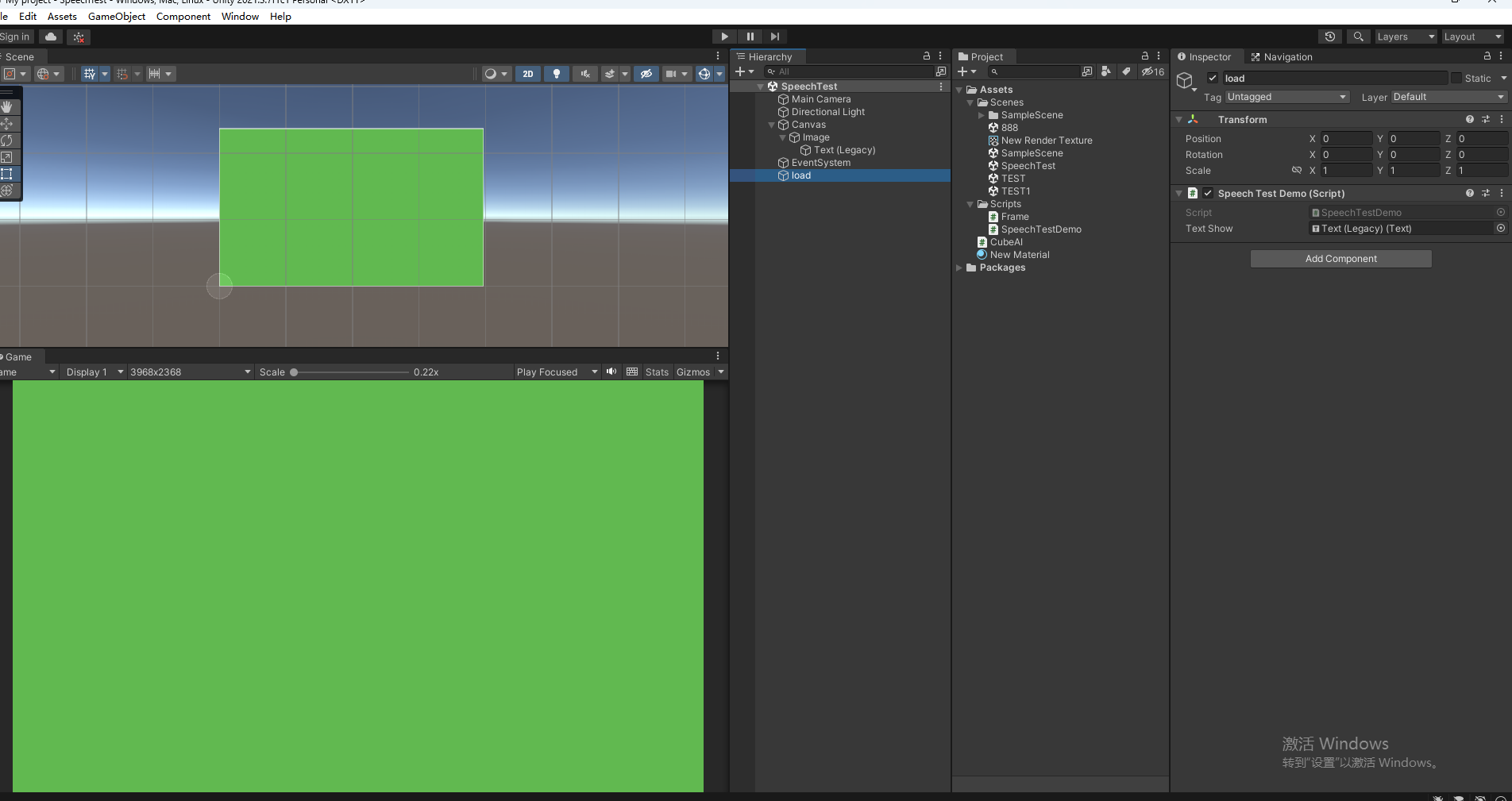
运行前确保当前电脑有麦克风输入设备,然后就可以说话测试转文字内容了,在此基础上可以任意拓展!!!

火山引擎开发者社区是火山引擎打造的AI技术生态平台,聚焦Agent与大模型开发,提供豆包系列模型(图像/视频/视觉)、智能分析与会话工具,并配套评测集、动手实验室及行业案例库。社区通过技术沙龙、挑战赛等活动促进开发者成长,新用户可领50万Tokens权益,助力构建智能应用。
更多推荐
 3
3 0
0- 0


 已为社区贡献1条内容

所有评论(0)