免费ssl证书申请和emqx ssl证书配置
本文介绍了如何为EMQX MQTT服务器申请免费SSL证书并配置SSL/TLS加密连接。主要内容包括:1) 使用Certbot工具申请Let's Encrypt免费SSL证书;2) 证书默认存储位置和权限设置;3) EMQX容器化部署时的配置文件映射方法;4) 修改EMQX配置文件启用SSL监听端口8883;5) 通过MQTT客户端工具验证SSL连接是否成功建立。整个过程详细说明了从证书申请到EM
免费ssl证书申请和emqx ssl证书配置
安装Certbot
sudo apt update # 更新包列表
sudo apt install certbot # 安装 Certbot
测试letsencrypt
curl -v https://acme-v02.api.letsencrypt.org/directory
申请证书
certbot certonly --standalone -d 域名
解释:
certbot certonly:以超级用户身份运行 Certbot 并仅获取证书。
• --standalone:以独立模式运行 Certbot,适用于没有运行 Web 服务器的情况。
• -d yourdomain.com -d www.yourdomain.com:指定需要获得证书的域名。
续签
certbot renew --dry-run
证书默认位置
Certificate is saved at: /etc/letsencrypt/live/域名/fullchain.pem
Key is saved at: /etc/letsencrypt/live/域名/privkey.pem
更改ssl证书权限
chmod 777 -R /etc/letsencrypt/archive/域名/
emqx初次按照,拷贝配置用,用后删除
docker run -d --restart=always --privileged=true --name hb-emqx -p 1883:1883 -p 8081:8081 -p 8083:8083 -p 8084:8084 -p 8883:8883 -p 18083:18083 emqx/emqx:5.7.2
拷贝emqx配置
新建目录:

mkdir -p /opt/emqx

拷贝emqx的etc配置到主机/opt/emqx

docker cp hb-emqx:/opt/emqx/etc  /opt/emqx/etc

log:
root@iZuf604eayxqjdhvkibn6zZ:~# docker cp hb-emqx:/opt/emqx/etc  /opt/emqx/
Successfully copied 177kB to /opt/emqx/
修改emqx配置
root@iZbp11svhk6jwlu9yi9z8qZ:~# vim /opt/emqx/etc/emqx.conf 增加配置
listeners.ssl.default {
  bind = "0.0.0.0:8883"
  ssl_options {
    # 单向认证时,该文件可以为空
    cacertfile = "/opt/emqx/my-certs/ca.crt"
    # PEM 格式的服务器证书
    certfile = "/opt/emqx/my-certs/fullchain1.pem"
    # PEM 格式的密钥文件
    keyfile = "/opt/emqx/my-certs/privkey1.pem"
    # verify_peer:双向认证
    # verify_none:单向认证,对于授权机构发的则不验证客户端证书
    verify = verify_none
    # 双向认证时设置为true
    # 单向认证时设置为false
    fail_if_no_peer_cert = false
  }
}
删除之前的emqx
docker rm -f hb-emqx
为什么删除呢:
因为没有进行磁盘映射,咱们需要将etc和certs映射
重新安装emqx(带磁盘映射)
docker run -d --restart=always --privileged=true --name hb-emqx -v /etc/letsencrypt/archive/域名:/opt/emqx/my-certs -v /opt/emqx/etc:/opt/emqx/etc -p 1883:1883 -p 8081:8081 -p 8083:8083 -p 8084:8084 -p 8883:8883 -p 18083:18083 emqx/emqx:5.7.2
查看log是否启动成功
docker logs -f hb-emqx

logs:
root@iZuf604eayxqjdhvkibn6zZ:~# docker logs -f hb-emqx
WARNING: Default (insecure) Erlang cookie is in use.
WARNING: Configure node.cookie in /opt/emqx/etc/emqx.conf or override from environment variable EMQX_NODE__COOKIE
WARNING: NOTE: Use the same cookie for all nodes in the cluster.
EMQX_RPC__PORT_DISCOVERY [rpc.port_discovery]: manual
EMQX_NODE__NAME [node.name]: emqx@172.17.0.2
Listener tcp:default on 0.0.0.0:1883 started.
2025-08-05T08:41:49.799610+00:00 [error] msg: cert_file_not_found, path: /opt/emqx/my-certs/ca.crt
Listener ssl:default on 0.0.0.0:8883 started.
Listener ws:default on 0.0.0.0:8083 started.
Listener wss:default on 0.0.0.0:8084 started.
Listener http:dashboard on :18083 started.
EMQX 5.7.2 is running now!
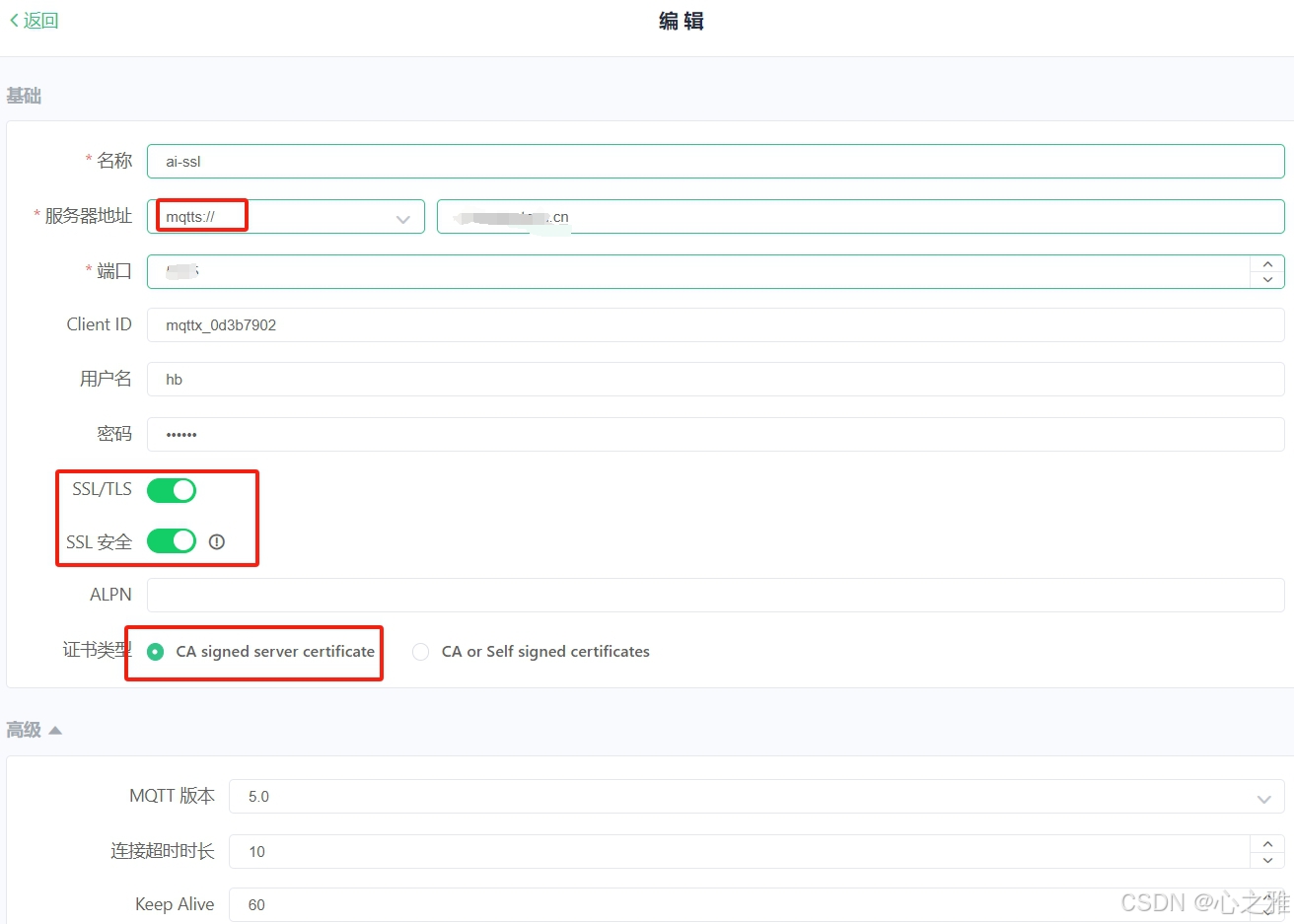
使用mqtt工具验证

火山引擎开发者社区是火山引擎打造的AI技术生态平台,聚焦Agent与大模型开发,提供豆包系列模型(图像/视频/视觉)、智能分析与会话工具,并配套评测集、动手实验室及行业案例库。社区通过技术沙龙、挑战赛等活动促进开发者成长,新用户可领50万Tokens权益,助力构建智能应用。
更多推荐
 5
5 0
0- 0


 已为社区贡献1条内容

所有评论(0)