|
Python
import asyncio
import json
import logging
import os
import shutil
from contextlib import AsyncExitStack
from typing import Any, Dict, List, Optional
import httpx
from dotenv import load_dotenv
from openai import OpenAI # OpenAI Python SDK
from mcp import ClientSession, StdioServerParameters
from mcp.client.stdio import stdio_client
# Configure logging
logging.basicConfig(
level=logging.INFO, format="%(asctime)s - %(levelname)s - %(message)s"
)
# =============================
# 配置加载类(支持环境变量及配置文件)
# =============================
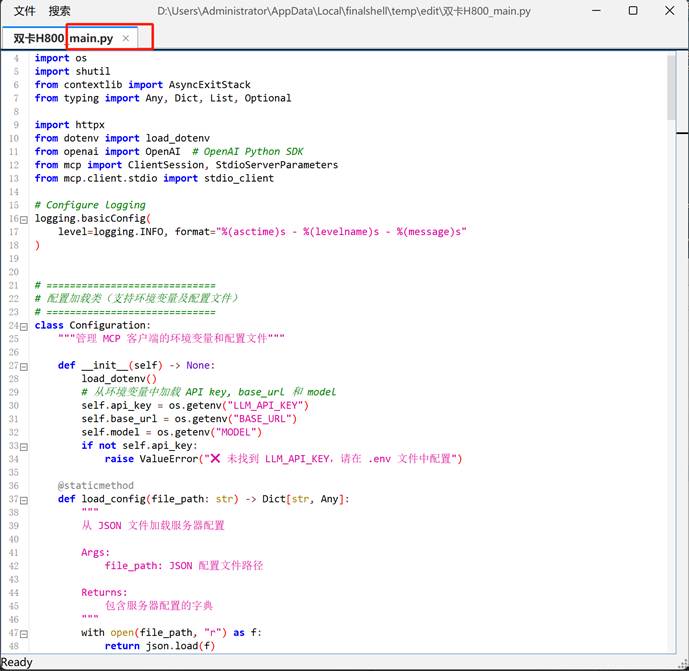
class Configuration:
"""管理 MCP 客户端的环境变量和配置文件"""
def __init__(self) -> None:
load_dotenv()
# 从环境变量中加载 API key, base_url 和 model
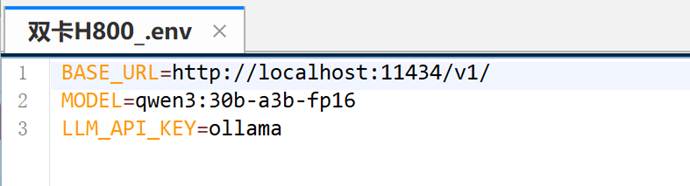
self.api_key = os.getenv("LLM_API_KEY")
self.base_url = os.getenv("BASE_URL")
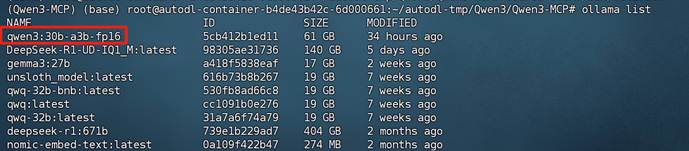
self.model = os.getenv("MODEL")
if not self.api_key:
raise ValueError("❌ 未找到 LLM_API_KEY,请在 .env 文件中配置")
@staticmethod
def load_config(file_path: str) -> Dict[str, Any]:
"""
从 JSON 文件加载服务器配置
Args:
file_path: JSON 配置文件路径
Returns:
包含服务器配置的字典
"""
with open(file_path, "r") as f:
return json.load(f)
# =============================
# MCP 服务器客户端类
# =============================
class Server:
"""管理单个 MCP 服务器连接和工具调用"""
def __init__(self, name: str, config: Dict[str, Any]) -> None:
self.name: str = name
self.config: Dict[str, Any] = config
self.session: Optional[ClientSession] = None
self.exit_stack: AsyncExitStack = AsyncExitStack()
self._cleanup_lock = asyncio.Lock()
async def initialize(self) -> None:
"""初始化与 MCP 服务器的连接"""
# command 字段直接从配置获取
command = self.config["command"]
if command is None:
raise ValueError("command 不能为空")
server_params = StdioServerParameters(
command=command,
args=self.config["args"],
env={**os.environ, **self.config["env"]} if self.config.get("env") else None,
)
try:
stdio_transport = await self.exit_stack.enter_async_context(
stdio_client(server_params)
)
read_stream, write_stream = stdio_transport
session = await self.exit_stack.enter_async_context(
ClientSession(read_stream, write_stream)
)
await session.initialize()
self.session = session
except Exception as e:
logging.error(f"Error initializing server {self.name}: {e}")
await self.cleanup()
raise
async def list_tools(self) -> List[Any]:
"""获取服务器可用的工具列表
Returns:
工具列表
"""
if not self.session:
raise RuntimeError(f"Server {self.name} not initialized")
tools_response = await self.session.list_tools()
tools = []
for item in tools_response:
if isinstance(item, tuple) and item[0] == "tools":
for tool in item[1]:
tools.append(Tool(tool.name, tool.description, tool.inputSchema))
return tools
async def execute_tool(
self, tool_name: str, arguments: Dict[str, Any], retries: int = 2, delay: float = 1.0
) -> Any:
"""执行指定工具,并支持重试机制
Args:
tool_name: 工具名称
arguments: 工具参数
retries: 重试次数
delay: 重试间隔秒数
Returns:
工具调用结果
"""
if not self.session:
raise RuntimeError(f"Server {self.name} not initialized")
attempt = 0
while attempt < retries:
try:
logging.info(f"Executing {tool_name} on server {self.name}...")
result = await self.session.call_tool(tool_name, arguments)
return result
except Exception as e:
attempt += 1
logging.warning(
f"Error executing tool: {e}. Attempt {attempt} of {retries}."
)
if attempt < retries:
logging.info(f"Retrying in {delay} seconds...")
await asyncio.sleep(delay)
else:
logging.error("Max retries reached. Failing.")
raise
async def cleanup(self) -> None:
"""清理服务器资源"""
async with self._cleanup_lock:
try:
await self.exit_stack.aclose()
self.session = None
except Exception as e:
logging.error(f"Error during cleanup of server {self.name}: {e}")
# =============================
# 工具封装类
# =============================
class Tool:
"""封装 MCP 返回的工具信息"""
def __init__(self, name: str, description: str, input_schema: Dict[str, Any]) -> None:
self.name: str = name
self.description: str = description
self.input_schema: Dict[str, Any] = input_schema
def format_for_llm(self) -> str:
"""生成用于 LLM 提示的工具描述"""
args_desc = []
if "properties" in self.input_schema:
for param_name, param_info in self.input_schema["properties"].items():
arg_desc = f"- {param_name}: {param_info.get('description', 'No description')}"
if param_name in self.input_schema.get("required", []):
arg_desc += " (required)"
args_desc.append(arg_desc)
return f"""
Tool: {self.name}
Description: {self.description}
Arguments:
{chr(10).join(args_desc)}
"""
# =============================
# LLM 客户端封装类(使用 OpenAI SDK)
# =============================
class LLMClient:
"""使用 OpenAI SDK 与大模型交互"""
def __init__(self, api_key: str, base_url: Optional[str], model: str) -> None:
self.client = OpenAI(api_key=api_key, base_url=base_url)
self.model = model
def get_response(self, messages: List[Dict[str, Any]], tools: Optional[List[Dict[str, Any]]] = None) -> Any:
"""
发送消息给大模型 API,支持传入工具参数(function calling 格式)
"""
payload = {
"model": self.model,
"messages": messages,
"tools": tools,
}
try:
response = self.client.chat.completions.create(**payload)
return response
except Exception as e:
logging.error(f"Error during LLM call: {e}")
raise
# =============================
# 多服务器 MCP 客户端类(集成配置文件、工具格式转换与 OpenAI SDK 调用)
# =============================
class MultiServerMCPClient:
def __init__(self) -> None:
"""
管理多个 MCP 服务器,并使用 OpenAI Function Calling 风格的接口调用大模型
"""
self.exit_stack = AsyncExitStack()
config = Configuration()
self.openai_api_key = config.api_key
self.base_url = config.base_url
self.model = config.model
self.client = LLMClient(self.openai_api_key, self.base_url, self.model)
# (server_name -> Server 对象)
self.servers: Dict[str, Server] = {}
# 各个 server 的工具列表
self.tools_by_server: Dict[str, List[Any]] = {}
self.all_tools: List[Dict[str, Any]] = []
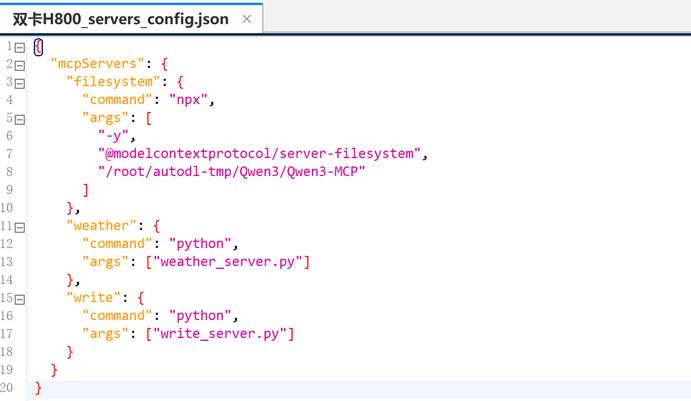
async def connect_to_servers(self, servers_config: Dict[str, Any]) -> None:
"""
根据配置文件同时启动多个服务器并获取工具
servers_config 的格式为:
{
"mcpServers": {
"sqlite": { "command": "uvx", "args": [ ... ] },
"puppeteer": { "command": "npx", "args": [ ... ] },
...
}
}
"""
mcp_servers = servers_config.get("mcpServers", {})
for server_name, srv_config in mcp_servers.items():
server = Server(server_name, srv_config)
await server.initialize()
self.servers[server_name] = server
tools = await server.list_tools()
self.tools_by_server[server_name] = tools
for tool in tools:
# 统一重命名:serverName_toolName
function_name = f"{server_name}_{tool.name}"
self.all_tools.append({
"type": "function",
"function": {
"name": function_name,
"description": tool.description,
"input_schema": tool.input_schema
}
})
# 转换为 OpenAI Function Calling 所需格式
self.all_tools = await self.transform_json(self.all_tools)
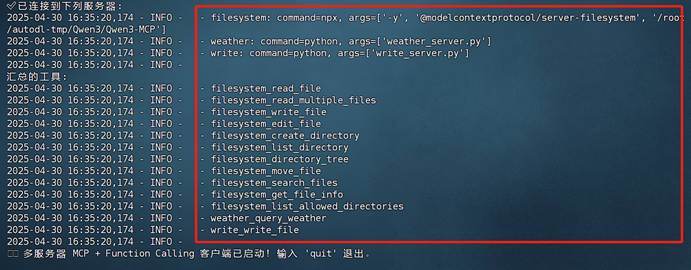
logging.info("\n✅ 已连接到下列服务器:")
for name in self.servers:
srv_cfg = mcp_servers[name]
logging.info(f" - {name}: command={srv_cfg['command']}, args={srv_cfg['args']}")
logging.info("\n汇总的工具:")
for t in self.all_tools:
logging.info(f" - {t['function']['name']}")
async def transform_json(self, json_data: List[Dict[str, Any]]) -> List[Dict[str, Any]]:
"""
将工具的 input_schema 转换为 OpenAI 所需的 parameters 格式,并删除多余字段
"""
result = []
for item in json_data:
if not isinstance(item, dict) or "type" not in item or "function" not in item:
continue
old_func = item["function"]
if not isinstance(old_func, dict) or "name" not in old_func or "description" not in old_func:
continue
new_func = {
"name": old_func["name"],
"description": old_func["description"],
"parameters": {}
}
if "input_schema" in old_func and isinstance(old_func["input_schema"], dict):
old_schema = old_func["input_schema"]
new_func["parameters"]["type"] = old_schema.get("type", "object")
new_func["parameters"]["properties"] = old_schema.get("properties", {})
new_func["parameters"]["required"] = old_schema.get("required", [])
new_item = {
"type": item["type"],
"function": new_func
}
result.append(new_item)
return result
async def chat_base(self, messages: List[Dict[str, Any]]) -> Any:
"""
使用 OpenAI 接口进行对话,并支持多次工具调用(Function Calling)。
如果返回 finish_reason 为 "tool_calls",则进行工具调用后再发起请求。
"""
response = self.client.get_response(messages, tools=self.all_tools)
# 如果模型返回工具调用
if response.choices[0].finish_reason == "tool_calls":
while True:
messages = await self.create_function_response_messages(messages, response)
response = self.client.get_response(messages, tools=self.all_tools)
if response.choices[0].finish_reason != "tool_calls":
break
return response
async def create_function_response_messages(self, messages: List[Dict[str, Any]], response: Any) -> List[Dict[str, Any]]:
"""
将模型返回的工具调用解析执行,并将结果追加到消息队列中
"""
function_call_messages = response.choices[0].message.tool_calls
messages.append(response.choices[0].message.model_dump())
for function_call_message in function_call_messages:
tool_name = function_call_message.function.name
tool_args = json.loads(function_call_message.function.arguments)
# 调用 MCP 工具
function_response = await self._call_mcp_tool(tool_name, tool_args)
messages.append({
"role": "tool",
"content": function_response,
"tool_call_id": function_call_message.id,
})
return messages
async def process_query(self, user_query: str) -> str:
"""
OpenAI Function Calling 流程:
1. 发送用户消息 + 工具信息
2. 若模型返回 finish_reason 为 "tool_calls",则解析并调用 MCP 工具
3. 将工具调用结果返回给模型,获得最终回答
"""
messages = [{"role": "user", "content": user_query}]
response = self.client.get_response(messages, tools=self.all_tools)
content = response.choices[0]
logging.info(content)
if content.finish_reason == "tool_calls":
tool_call = content.message.tool_calls[0]
tool_name = tool_call.function.name
tool_args = json.loads(tool_call.function.arguments)
logging.info(f"\n[ 调用工具: {tool_name}, 参数: {tool_args} ]\n")
result = await self._call_mcp_tool(tool_name, tool_args)
messages.append(content.message.model_dump())
messages.append({
"role": "tool",
"content": result,
"tool_call_id": tool_call.id,
})
response = self.client.get_response(messages, tools=self.all_tools)
return response.choices[0].message.content
return content.message.content
async def _call_mcp_tool(self, tool_full_name: str, tool_args: Dict[str, Any]) -> str:
"""
根据 "serverName_toolName" 格式调用相应 MCP 工具
"""
parts = tool_full_name.split("_", 1)
if len(parts) != 2:
return f"无效的工具名称: {tool_full_name}"
server_name, tool_name = parts
server = self.servers.get(server_name)
if not server:
return f"找不到服务器: {server_name}"
resp = await server.execute_tool(tool_name, tool_args)
return resp.content if resp.content else "工具执行无输出"
async def chat_loop(self) -> None:
"""多服务器 MCP + OpenAI Function Calling 客户端主循环"""
logging.info("\n🤖 多服务器 MCP + Function Calling 客户端已启动!输入 'quit' 退出。")
messages: List[Dict[str, Any]] = []
while True:
query = input("\n你: ").strip()
if query.lower() == "quit":
break
try:
messages.append({"role": "user", "content": query})
messages = messages[-20:] # 保持最新 20 条上下文
response = await self.chat_base(messages)
messages.append(response.choices[0].message.model_dump())
result = response.choices[0].message.content
# logging.info(f"\nAI: {result}")
print(f"\nAI: {result}")
except Exception as e:
print(f"\n⚠️ 调用过程出错: {e}")
async def cleanup(self) -> None:
"""关闭所有资源"""
await self.exit_stack.aclose()
# =============================
# 主函数
# =============================
async def main() -> None:
# 从配置文件加载服务器配置
config = Configuration()
servers_config = config.load_config("servers_config.json")
client = MultiServerMCPClient()
try:
await client.connect_to_servers(servers_config)
await client.chat_loop()
finally:
try:
await asyncio.sleep(0.1)
await client.cleanup()
except RuntimeError as e:
# 如果是因为退出 cancel scope 导致的异常,可以选择忽略
if "Attempted to exit cancel scope" in str(e):
logging.info("退出时检测到 cancel scope 异常,已忽略。")
else:
raise
if __name__ == "__main__":
asyncio.run(main()) |




 10
10 0
0


 已为社区贡献19条内容

所有评论(0)