《多模板复合验证的KD聚类匹配算法(MTCV-KCM)》及图像匹配常用的增强鲁棒性方法介绍
多模板复合验证的KD聚类匹配算法(MTCV-KCM)
Multi-Template Composite Verified KD-Clustered Matching Algorithm
该文章总结于本人的工程实践之中,综合利用多模板、复合匹配、二值化重匹配验证和KD-Tree空间聚类这四种算法,从模板、算法、判据三个维度来提升图像匹配算法的鲁棒性。本文除了介绍主要的多模板复合验证的KD聚类匹配算法外,还会介绍这几种工程上常用的方法代码。并以电芯注液孔识别为例,对比几种算法的效果,以证明MTCV-KCM算法的高稳定性。
文章目录
前言
如标题所示,该算法主要包含三个方面:①多模板。②复合匹配。 ③重匹配验证。④KD-Tree空间聚类邻近搜索。其主要目的是实现工程化的高鲁棒性目标匹配,且算法拥有可扩展性,可以兼容各位自己开发的匹配算法或者其他传统算法。该算法是我在实践过程中在算法层面进行识别优化所总结的经验,整理过后在此分享给大家。
在本文中,会关联涉及到的算法有模板匹配、Canny算子、霍夫圆算法、sobel算子、KD-Tree空间聚类邻近搜索,这些基础算法会有简短的介绍,但不会过于深入,主要是呈现如何应用。对于其原理,大家如果有需要或者不懂的,可以自行准备和学习。
一、普通模板匹配的问题
在机器视觉中,模板匹配是非常常用的算法之一,但模板匹配对于模板和被识别物体的要求是比较高的。如果模板和物体表面存在脏污、机器损伤、人为涂画或者其他影响工件表面质量的情况,很有可能会导致识别不稳定。
例如:
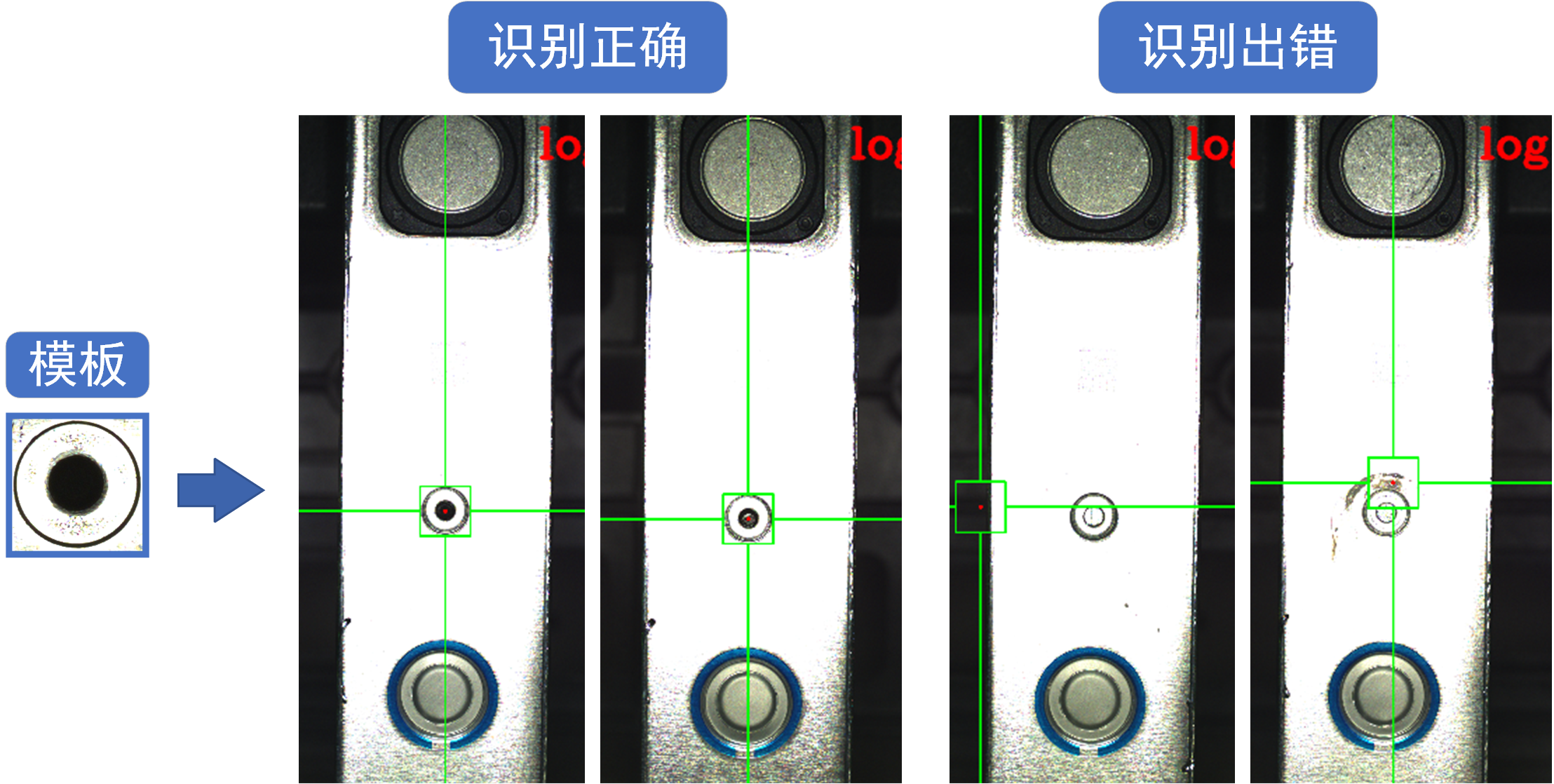
上图中是两个电池电芯的注液孔位置识别,其原理是根据一个简单的模板使用归一化相关系数匹配(cv2.TM_CCOEFF_NORMED)进行匹配。由图中对比可知,当识别目标比较干净的时候,识别效果较好。但当其附近出现一些脏污或者液面反光时,会导致识别出错。
这个出错概率不大,模板匹配的准确度能达到80%甚至90%的,但很显然,这种程度的准确率是绝对不够的。在工业生产中,准确度要达到一个非常高的程度。哪怕是一个准确率99.5%的高匹配度模板,工厂一天生产1万个电芯,理论上机器就会报警超过50次,这明显不可接受。
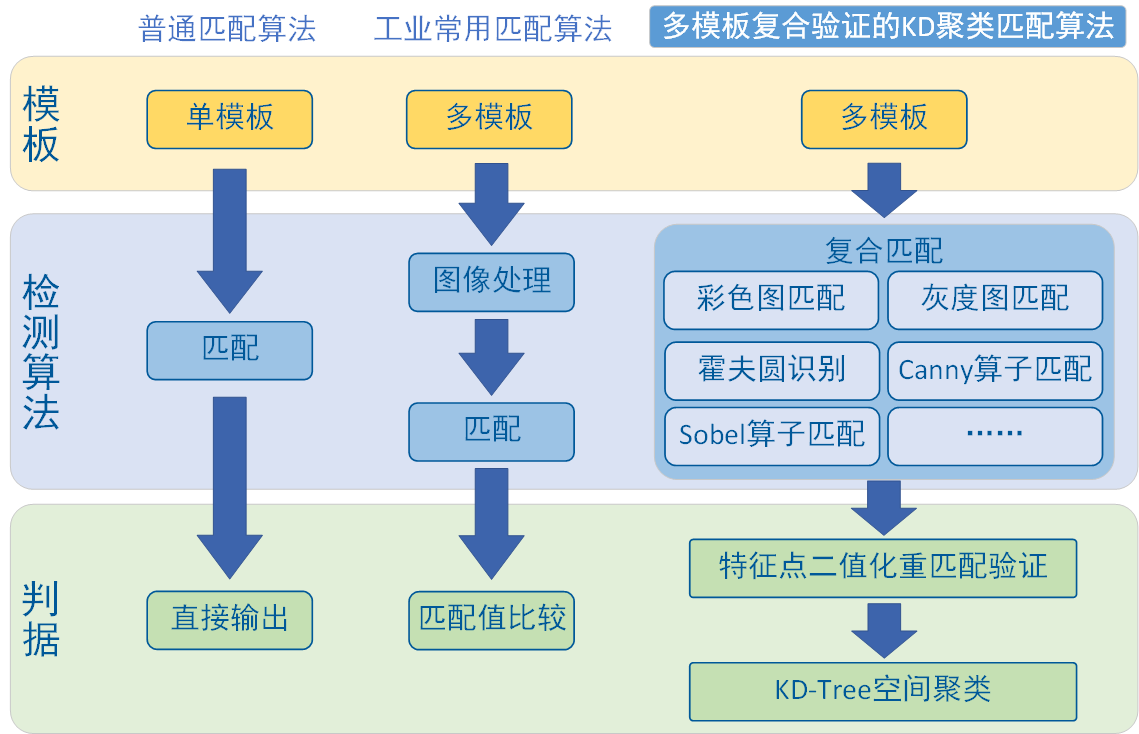
因此,我根据我的经验,提出基于多模板、复合匹配、二值化重匹配验证和KD-Tree空间聚类的联合算法,目的就是要提升模板匹配的准确率。本文主要介绍的技术路线如图所示:
二、多模板匹配
首先我们先从最简单的方法说起,多模板匹配最简单最常用的提升鲁棒性的工程方法。事先制作多个模板形成模板库,每个模板进行一次匹配,最终输出匹配度最高的结果。这种方法确实可以提高模板匹配的准确度,只要模板足够多,那算法的兼容性自然会变好,而且往后工程维护,只需要遇到问题就往里面添加模板就行。
代码:
import os
import cv2
import numpy as np


def img_show(img_input, name="1"):
    """
    图像显示函数
    Args:
        img_input: 输入图片,RGB、灰度图皆可
        name: 窗口命名,默认“1”
    """
    cv2.namedWindow("img - " + name, cv2.WINDOW_NORMAL)
    cv2.imshow("img - " + name, img_input)
    cv2.waitKey(0)
    cv2.destroyAllWindows()
    # 该程序由小幻月制作,如能帮助到您,十分荣幸
    # 小幻月博客地址:https://blog.csdn.net/NVKD2020


def img_multi_template_match(img_input):
    """ 多模板匹配 """
    # 加载模板(多模板)
    template_dir_path = "test_img/template/"  # 模板库路径
    template_list = os.listdir(template_dir_path)
    template = []
    for i in range(len(template_list)):
        template_path = template_dir_path + template_list[i]
        template_load = cv2.imdecode(np.fromfile(template_path, dtype=np.uint8), 1)
        template.append(template_load)

    # 逐一匹配,输出最大值
    max_val = 0
    max_loc = (0, 0)
    for i in range(len(template)):
        result_1 = cv2.matchTemplate(img_input, template[i], cv2.TM_CCOEFF_NORMED)  # 使用归一化交叉相关方法执行模板匹配
        _, val, _, loc = cv2.minMaxLoc(result_1)
        if val > max_val:
            # 匹配输出的是左上角点,需要转换回中心点,下面的cv2.circle才能正确画出圆
            max_loc = (loc[0] + template[i].shape[1] // 2, loc[1] + template[i].shape[0] // 2)
            max_val = val

    img_input = cv2.circle(img_input, max_loc, 20, (0, 0, 255), 3)
    img_show(img_input)
直接将读取的图片使用img_multi_template_match(img_input)导入函数中就行,其中模板库请更改为自己的模板库路径template_dir_path 。
效果也是很好很直接:
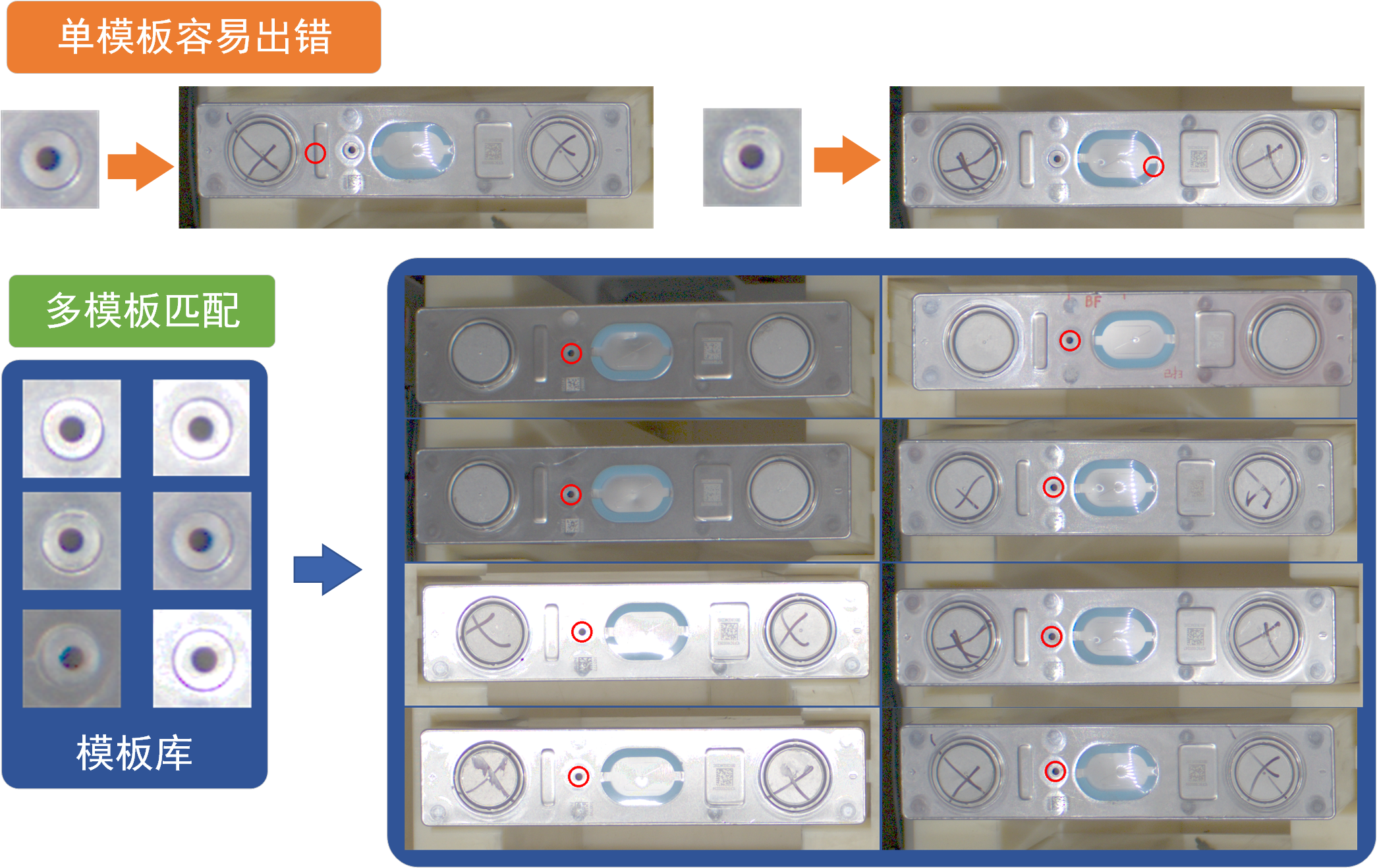
多模板匹配很暴力,效果也比较好,是很常用的方法。
但多模板匹配也存在比较大的问题:
1、在实际生产过程中,干扰来源是复杂且多样的,如下图所示,这些均为在实际生产过程中遇到的电池注液孔。
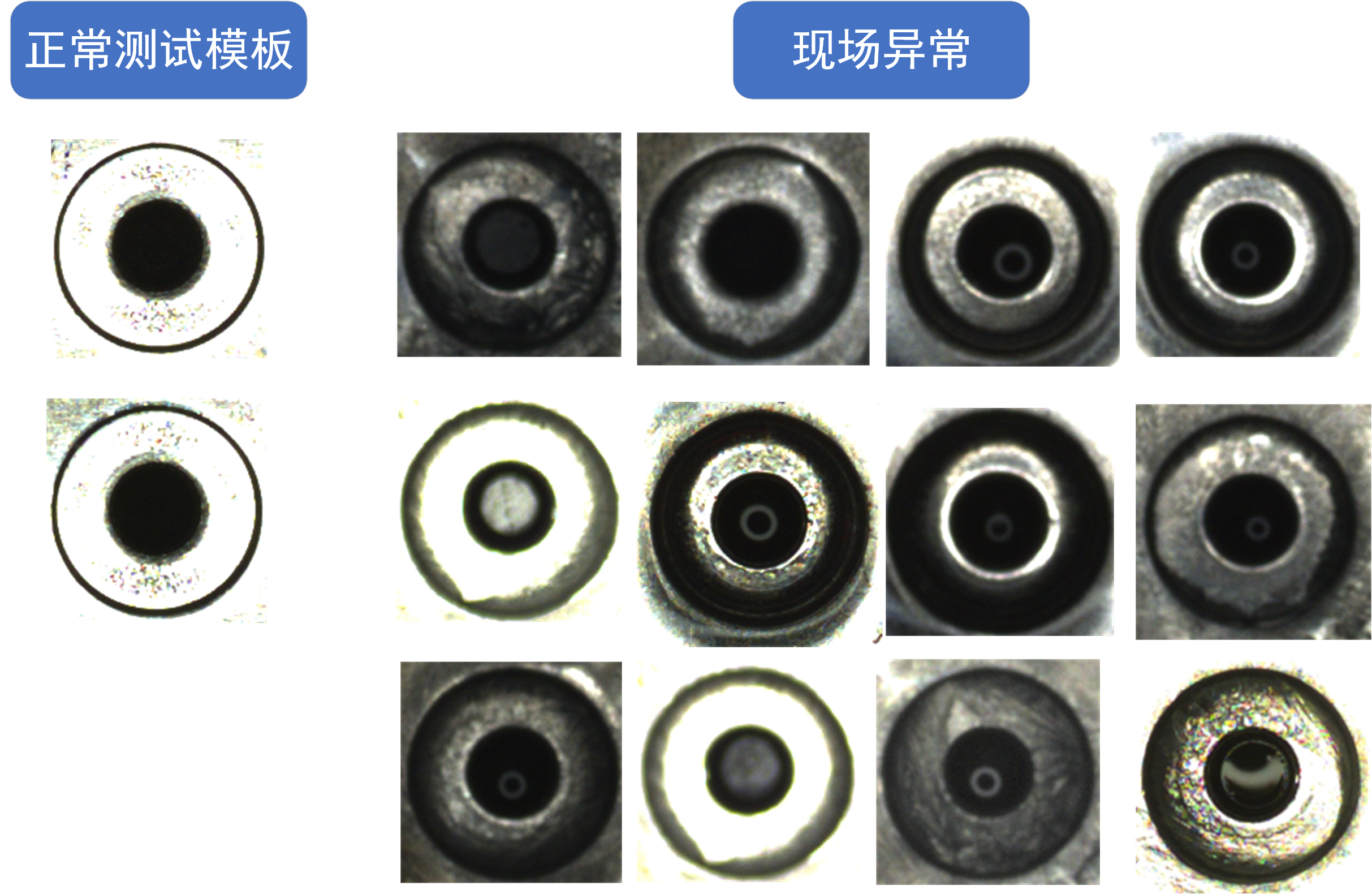
可以看见,生产现场的情况复杂,因光照、脏污等干扰因素影响,注液孔会呈现多种多样的形态。如果每一种均需要在生产过程中不断地添加模板,导致最后模板数量非常多,加载速度很慢。
2、更重要的是,在某些特定的情况下,模板库中会存在某个模板对工件上某个错误的位置呈现出高匹配度,该匹配度甚至高于正确的模板对正确位置的匹配度,严重影响算法的识别,这种情况下加模板不仅不会有正面效果,甚至会导致反效果。
因此,单纯依赖增加模板是不足的,我们需要更具鲁棒性、更科学的方法。
2.1、二值化重匹配验证
既然可能存在某些模板会匹配到错误的位置,那我们不妨增加一步简单的验证来实现匹配效果的强化。二值化重匹配验证法就是不错的一种选择。
根据匹配物形态选择特征点,作为二值化阈值,对模板匹配的位置进行二值化后对该位置再进行一次匹配,我称之为重匹配验证。这里我们匹配的是注液孔,我们使用注液孔中心作为特征点。效果如下所示:
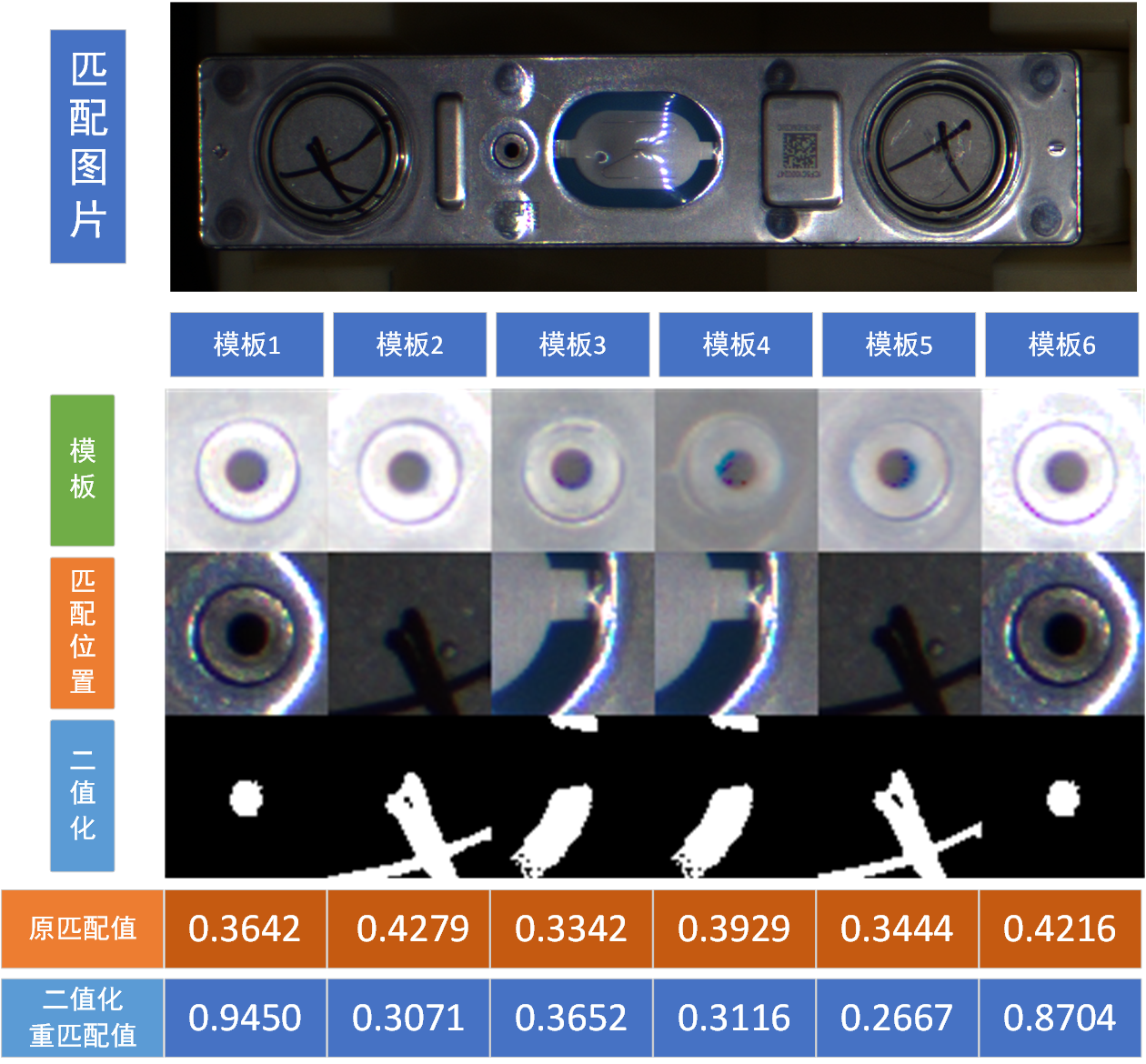
很明显可以看出如果匹配的位置正确,根据特征点选择的二值化后图像,会明显不同,这对我们进一步辨别哪些点属于高匹配值的误匹配点很有帮助。
import os
import cv2
import numpy as np


def img_show(img_input, name="1"):
    """
    图像显示函数
    Args:
        img_input: 输入图片,RGB、灰度图皆可
        name: 窗口命名,默认“1”
    """
    cv2.namedWindow("img - " + name, cv2.WINDOW_NORMAL)
    cv2.imshow("img - " + name, img_input)
    cv2.waitKey(0)
    cv2.destroyAllWindows()
    # 该程序由小幻月制作,如能帮助到您,十分荣幸
    # 小幻月博客地址:https://blog.csdn.net/NVKD2020


def img_multi_template_match(img_input):
    """ 多模板匹配 """
    # 加载模板(多模板)
    template_dir_path = "test_img/template/"  # 模板库文件夹路径
    template_list = os.listdir(template_dir_path)
    template = []
    for i in range(len(template_list)):
        template_path = template_dir_path + template_list[i]
        template_load = cv2.imdecode(np.fromfile(template_path, dtype=np.uint8), 1)
        template.append(template_load)

    # 逐一匹配,输出最大值
    img_1 = []
    max_val = 0
    max_loc = (0, 0)
    for i in range(len(template)):
        result_1 = cv2.matchTemplate(img_input, template[i], cv2.TM_CCOEFF_NORMED)  # 使用归一化交叉相关方法执行模板匹配
        _, val, _, loc = cv2.minMaxLoc(result_1)
        print("val = ", val)   # 显示原图匹配值

        # 将匹配到的位置裁切出来,灰度化
        rematch_img = img_input[loc[1]:loc[1] + template[i].shape[0], loc[0]:loc[0] + template[i].shape[1]]
        rematch_img_gray = cv2.cvtColor(rematch_img, cv2.COLOR_BGR2GRAY)

        # 选择特征点位置,这里我选择画面中心点作为特征点,各位选择特征点时需要视各位的工件而定
        rematch_img_h, rematch_img_w = rematch_img_gray.shape
        rematch_img_threshold_set = int(rematch_img_gray[rematch_img_h // 2][rematch_img_w // 2]) + 5  # 将阈值放松5,留点余地

        # 将模板灰度化,同样使用特征点进行二值化
        template_gray = cv2.cvtColor(template[i], cv2.COLOR_BGR2GRAY)
        template_h, template_w = template_gray.shape
        template_threshold_set = int(template_gray[template_h // 2][template_w // 2]) + 5

        # 二值化
        rematch_img_threshold = cv2.threshold(rematch_img_gray, rematch_img_threshold_set, 255, cv2.THRESH_BINARY_INV)[1]
        template_threshold = cv2.threshold(template_gray, template_threshold_set, 255, cv2.THRESH_BINARY_INV)[1]

        # 将二者进行匹配
        result_2 = cv2.matchTemplate(rematch_img_threshold, template_threshold, cv2.TM_CCOEFF_NORMED)  # 使用归一化交叉相关方法执行模板匹配
        _, val_2, _, _ = cv2.minMaxLoc(result_2)
        print("rematch_val = ", val_2)  # 显示重匹配数值

        rematch_img_threshold = cv2.cvtColor(rematch_img_threshold, cv2.COLOR_GRAY2BGR)  # 变回RGB图像,后面拼接需要
        template_threshold = cv2.cvtColor(template_threshold, cv2.COLOR_GRAY2BGR)

        img_1.append(cv2.vconcat([template[i], rematch_img, rematch_img_threshold]))

        if val_2 > max_val:
            # 匹配输出的是左上角点,需要转换回中心点,使用cv2.circle才能正确画出圆
            max_loc = (loc[0] + template[i].shape[1] // 2, loc[1] + template[i].shape[0] // 2)
            max_val = val_2

    print("max_val = ", max_val)
    print("max_loc = ", max_loc)
    img_1 = cv2.hconcat(img_1)
    img_show(img_1)
图片输入到img_multi_template_match中,模板库路径template_dir_path更改为自己的模板库路径
如果匹配在正确的位置上,使用二值化后,会更加突出图像本身的特征。
如果匹配到错误的位置上,使用二值化后,图像会与模板差距巨大。
特征点的位置需要根据各位现实情况进行选择
通过这种方法,我们就可以根据这个重新匹配的值作为判据,过滤掉某些高匹配值的错误位置。当然,此处仅仅只是作为抛砖引玉,各位大家可以用更加高明或者更加科学的方法,比如canny算子处理、sobel算子处理等方法,进行重匹配验证。
三、复合匹配
多模板匹配出现错误位置高匹配值的原因,很大程度上是因为模板库提取的画面特征不够独特,模板覆盖范围过广导致的。模板多但图像特征维度太单一很容易引起这样的问题。
既然模板侧无法提升算法鲁棒性,那我们就从算法侧提升,从不同的维度上对图像进行处理后再进行匹配,这样就可以利用不同的处理方法,过滤掉一些画面干扰。
普通的匹配算法仅仅只对彩色的原图或者灰度图进行匹配,那我们就增加图像维度,比如下面的代码就包含如下五种,从不同的维度去观测图像特征:
图像匹配:图像(彩色)— 模板(彩色)
图像匹配:图像(灰度图)— 模板(灰度图)
图像匹配:图像(Canny算子处理图)— 模板(Canny算子处理图)
霍夫圆检测:图像(灰度图)
图像匹配:图像(Sobel算子处理图)— 模板(Sobel算子处理图)
单模板复合匹配代码:
import os
import cv2
import numpy as np


def img_show(img_input, name="1"):
    """
    图像显示函数
    Args:
        img_input: 输入图片,RGB、灰度图皆可
        name: 窗口命名,默认“1”
    """
    cv2.namedWindow("img - " + name, cv2.WINDOW_NORMAL)
    cv2.imshow("img - " + name, img_input)
    cv2.waitKey(0)
    cv2.destroyAllWindows()
    # 该程序由小幻月制作,如能帮助到您,十分荣幸
    # 小幻月博客地址:https://blog.csdn.net/NVKD2020


def img_match(img_input, template_input):
    """ 复合匹配 """
    template_h, template_w = template_input.shape[:2]
    point_output = []
    val_output = []
    # ========================= 1、直接定位、匹配 =========================
    result_1 = cv2.matchTemplate(img_input, template_input, cv2.TM_CCOEFF_NORMED)  # 使用归一化交叉相关方法执行模板匹配
    _, max_val_1, _, max_loc_1 = cv2.minMaxLoc(result_1)
    max_loc_1 = (max_loc_1[0] + template_w // 2, max_loc_1[1] + template_h // 2)

    point_output.append(max_loc_1)
    val_output.append(max_val_1)

    # ========================= 2、灰度定位 灰度图、匹配 =========================
    img_input_gray = cv2.cvtColor(img_input, cv2.COLOR_BGR2GRAY)
    template_gray = cv2.cvtColor(template_input, cv2.COLOR_BGR2GRAY)
    result_2 = cv2.matchTemplate(img_input_gray, template_gray, cv2.TM_CCOEFF_NORMED)
    _, max_val_2, _, max_loc_2 = cv2.minMaxLoc(result_2)
    max_loc_2 = (max_loc_2[0] + template_w // 2, max_loc_2[1] + template_h // 2)

    point_output.append(max_loc_2)
    val_output.append(max_val_2)

    # ========================= 3、Canny定位、匹配 =========================
    img_input_canny = cv2.Canny(img_input_gray, 50, 150)
    template_canny = cv2.Canny(template_gray, 50, 150)
    result_3 = cv2.matchTemplate(img_input_canny, template_canny, cv2.TM_CCOEFF_NORMED)
    _, max_val_3, _, max_loc_3 = cv2.minMaxLoc(result_3)
    max_loc_3 = (max_loc_3[0] + template_w // 2, max_loc_3[1] + template_h // 2)

    point_output.append(max_loc_3)
    val_output.append(max_val_3)

    # ========================= 4、霍夫圆定位、匹配 =========================
    # 霍夫圆算法只能返回圆所在位置,我们因此输出的是圆位置和相应位置的彩色图匹配值
    img_circles = cv2.HoughCircles(img_input_gray, cv2.HOUGH_GRADIENT, dp=1, minDist=50, param1=150, param2=15, minRadius=5, maxRadius=9)
    print("img_circles = ", img_circles)
    if img_circles is not None:
        img_circles = np.uint16(np.around(img_circles))[0, 0]
        x, y = int(img_circles[0]), int(img_circles[1])
        x = x if x >= 0 else 0
        y = y if y >= 0 else 0

        max_loc_4 = (x, y)
        img_area_4 = img_input[y - template_h // 2:y + template_h // 2, x - template_w // 2:x + template_w // 2]

        result_houghcircle_1 = cv2.matchTemplate(img_area_4, template_input, cv2.TM_CCOEFF_NORMED)
        _, max_val_4, _, _ = cv2.minMaxLoc(result_houghcircle_1)

        point_output.append(max_loc_4)
        val_output.append(max_val_4)
    else:
        point_output.append(max_loc_1)  # 霍夫圆不一定能找得到,如果找不到就写入第一个,防止后面画图出错
        val_output.append(0)

    # ========================= 5、Sobel定位、匹配 =========================
    img_input_sobel_x = cv2.Sobel(img_input_gray, cv2.CV_64F, 1, 0, ksize=3)  # 计算x、y方向梯度
    img_input_sobel_y = cv2.Sobel(img_input_gray, cv2.CV_64F, 0, 1, ksize=3)
    template_sobel_x = cv2.Sobel(template_gray, cv2.CV_64F, 1, 0, ksize=3)
    template_sobel_y = cv2.Sobel(template_gray, cv2.CV_64F, 0, 1, ksize=3)

    img_input_abs_sobel_x = cv2.convertScaleAbs(img_input_sobel_x)  # 绝对值转换,将数据转为8位无符号整数
    img_input_abs_sobel_y = cv2.convertScaleAbs(img_input_sobel_y)
    template_1_abs_sobel_x = cv2.convertScaleAbs(template_sobel_x)
    template_1_abs_sobel_y = cv2.convertScaleAbs(template_sobel_y)

    img_input_sobel = cv2.addWeighted(img_input_abs_sobel_x, 0.5, img_input_abs_sobel_y, 0.5, 0)  # 合并梯度
    template_sobel = cv2.addWeighted(template_1_abs_sobel_x, 0.5, template_1_abs_sobel_y, 0.5, 0)

    result_5 = cv2.matchTemplate(img_input_sobel, template_sobel, cv2.TM_CCOEFF_NORMED)
    _, max_val_5, _, max_loc_5 = cv2.minMaxLoc(result_5)
    max_loc_5 = (max_loc_5[0] + template_w // 2, max_loc_5[1] + template_h // 2)

    point_output.append(max_loc_5)
    val_output.append(max_val_5)

    return point_output, val_output


def img_composite_match(img_input):
    """ 程序 """

    # 加载模板(单模板)
    template_path = "test_img/template/model_1.png"  # 模板文件路径
    template_1 = cv2.imdecode(np.fromfile(template_path, dtype=np.uint8), 1)

    # 复合匹配
    point, val = img_match(img_input, template_1)

    # 将这五种方法匹配到的点在图片上画出
    img_input = cv2.circle(img_input, point[0], 2, (255, 255, 0), 2)  # 彩色匹配:青色
    img_input = cv2.circle(img_input, point[1], 4, (0, 255, 0), 2)    # 灰度匹配:绿色
    img_input = cv2.circle(img_input, point[2], 6, (255, 0, 0), 2)    # Canny算子匹配:蓝色
    img_input = cv2.circle(img_input, point[3], 8, (0, 255, 255), 2)  # 霍夫圆检测:黄色
    img_input = cv2.circle(img_input, point[4], 10, (255, 0, 255), 2)  # Sobel算子匹配:紫色

    img_show(img_input)
将图片输入到函数img_composite_match中,匹配的模板路径为template_path
每个图片处理后会呈现不同的图像效果
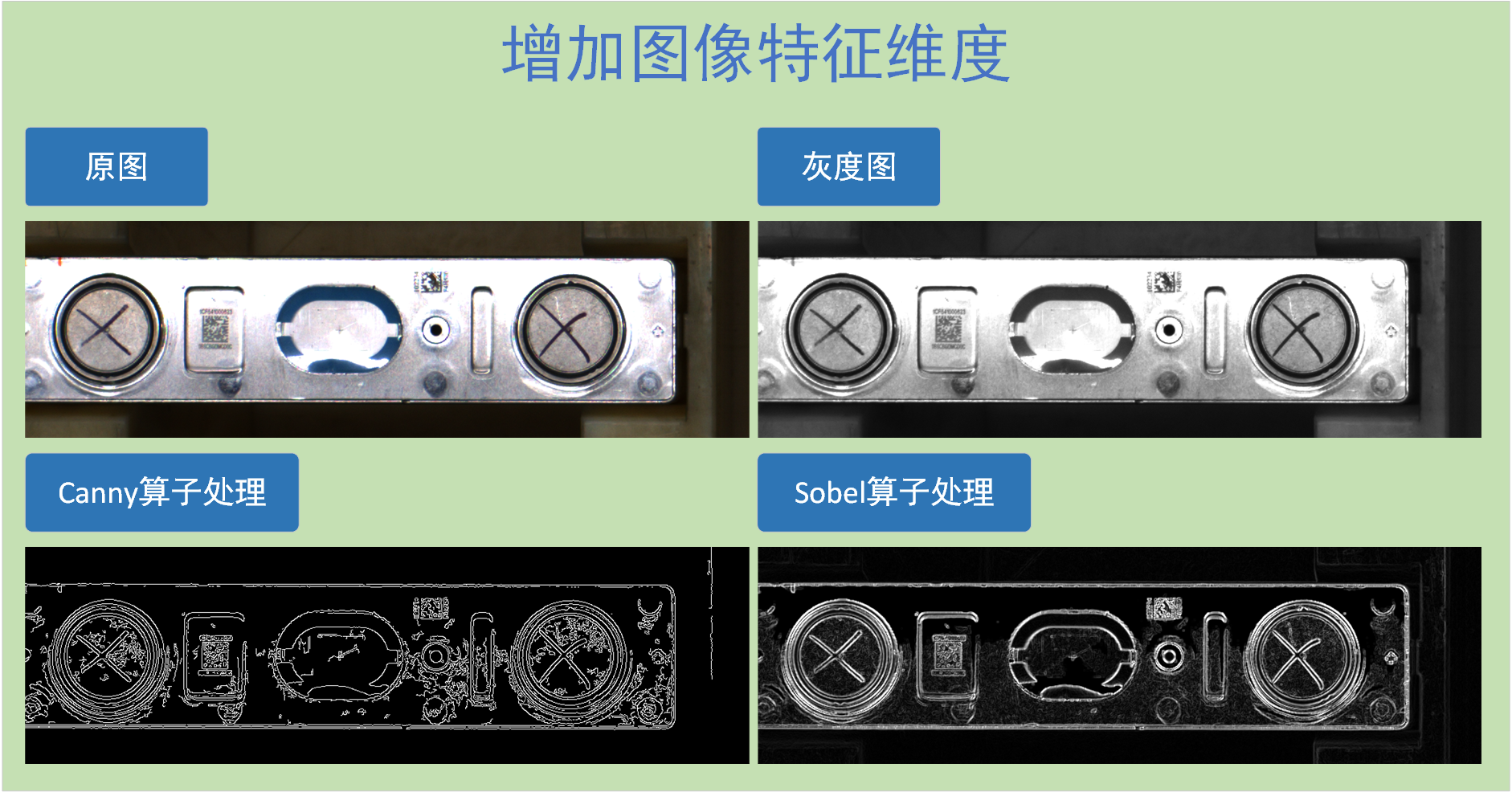
综合检测效果: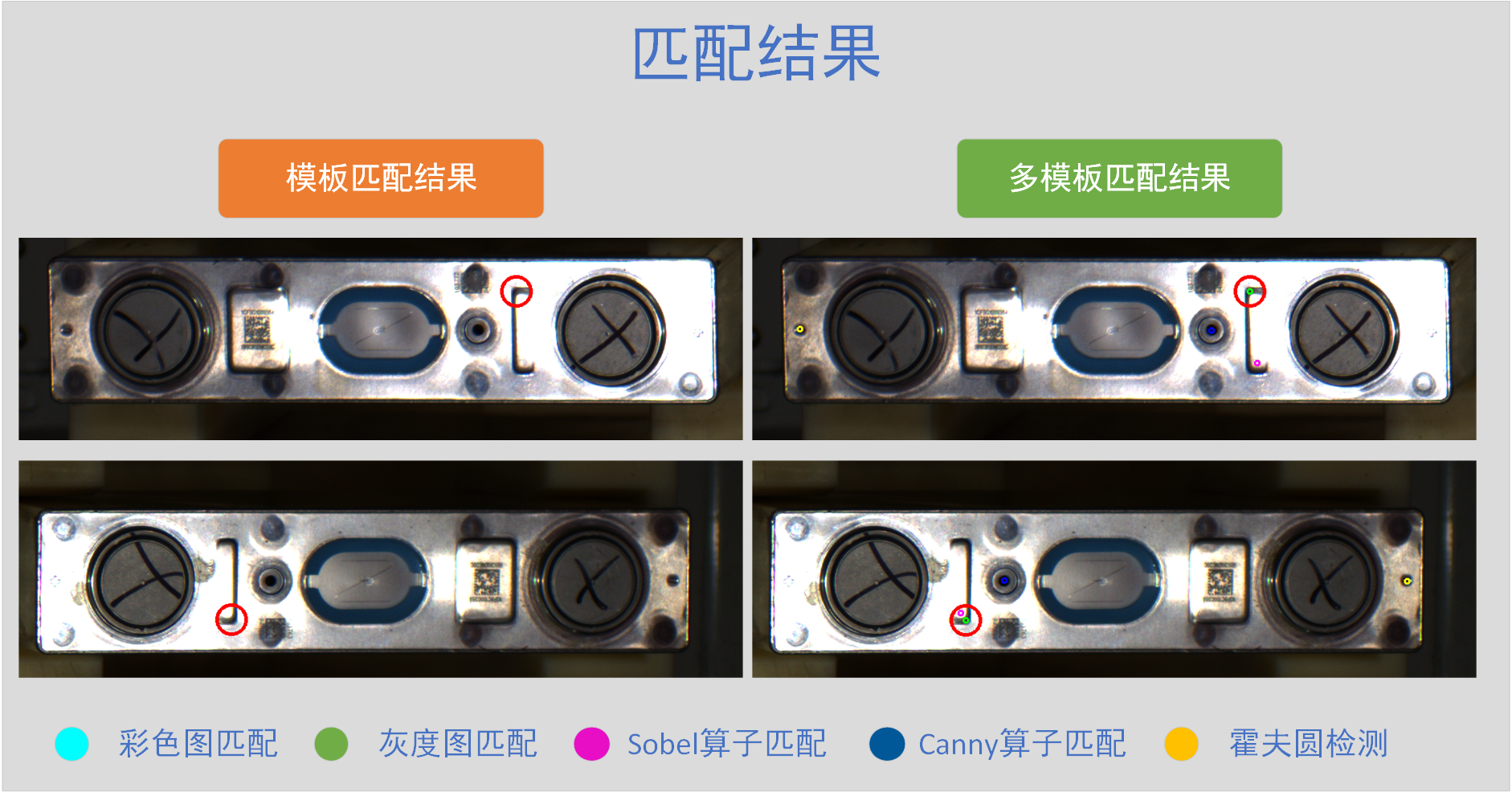
可以看到,经过不同的方法处理后的图片,会过滤掉不同的干扰项,在不同维度凸显图像的特征,我们使用这种方法进行图像匹配能够有效地规避不同的图像干扰,在不同的维度找到需要匹配的特征位置。
如上图所示,普通模板匹配的结果并不能很好地匹配到位置(图中绿色点灰度图匹配),但是经过Canny算子处理后的图像进行匹配,却能很好地匹配上孔的位置(图中蓝色点)。这证明,虽然从彩色图、灰度图的维度上无法正确寻找最佳匹配点,但在Canny算子的维度上去匹配,能够正确匹配到我们要寻找的位置。
你甚至可以加入自己写的算法,或者加入更多的算子进行图像处理,再进行匹配。
3.1 复合匹配与重匹配验证
复合匹配会使用多种不同的方法进行图像处理后,再进行匹配,但这里会出现一个新的问题:不同的方法处理后的图像与模板匹配后,匹配度会有显著的差异。如表所示:
| 彩色图 | 灰度图 | Canny算子 | 霍夫圆 | Sobel算子 | |
|---|---|---|---|---|---|
| 图像1 | 0.6335475444793701 | 0.6698629260063171 | 0.32209646701812744 | 0.6085864901542664 | 0.5821478366851807 |
| 图像2 | 0.4731557071208954 | 0.5298896431922913 | 0.2302411049604416 | 0.4731557071208954 | 0.43239179253578186 |
| 图像3 | 0.6930368542671204 | 0.7446691393852234 | 0.31556886434555054 | 0.6004103422164917 | 0.6859406232833862 |
| 图像4 | 0.47633957862854004 | 0.5260666608810425 | 0.3031710684299469 | 0.47633957862854004 | 0.5031097531318665 |
| 图像5 | 0.6324616074562073 | 0.6428160667419434 | 0.33800527453422546 | 0.6324616074562073 | 0.6678215861320496 |
表中是五张五种算法都正确匹配到的图片,虽然匹配的位置都是正确的,但Canny算子处理后的图像和模板的匹配值远小于彩色图像匹配和灰度图像匹配。直接使用复合匹配的最大匹配值输出匹配点,会导致每次输出都是彩色图像或灰度图像的匹配值,而后面其他算子则不起作用。
因此,复合匹配算法最好仅作为定位,将定位到的位置进行重匹配验证
例如2.1的二值化重匹配验证。代码:
import os
import cv2
import numpy as np


def img_show(img_input, name="1"):
    """
    图像显示函数
    Args:
        img_input: 输入图片,RGB、灰度图皆可
        name: 窗口命名,默认“1”
    """
    cv2.namedWindow("img - " + name, cv2.WINDOW_NORMAL)
    cv2.imshow("img - " + name, img_input)
    cv2.waitKey(0)
    cv2.destroyAllWindows()
    # 该程序由小幻月制作,如能帮助到您,十分荣幸
    # 小幻月博客地址:https://blog.csdn.net/NVKD2020


def img_match(img_input, template_input):
    """ 复合匹配 """
    template_h, template_w = template_input.shape[:2]
    point_output = []
    val_output = []
    # ========================= 1、直接定位、匹配 =========================
    result_1 = cv2.matchTemplate(img_input, template_input, cv2.TM_CCOEFF_NORMED)  # 使用归一化交叉相关方法执行模板匹配
    _, max_val_1, _, max_loc_1 = cv2.minMaxLoc(result_1)
    max_loc_1 = (max_loc_1[0] + template_w // 2, max_loc_1[1] + template_h // 2)

    point_output.append(max_loc_1)
    val_output.append(max_val_1)

    # ========================= 2、灰度定位 灰度图、匹配 =========================
    img_input_gray = cv2.cvtColor(img_input, cv2.COLOR_BGR2GRAY)
    template_gray = cv2.cvtColor(template_input, cv2.COLOR_BGR2GRAY)
    result_2 = cv2.matchTemplate(img_input_gray, template_gray, cv2.TM_CCOEFF_NORMED)
    _, max_val_2, _, max_loc_2 = cv2.minMaxLoc(result_2)
    max_loc_2 = (max_loc_2[0] + template_w // 2, max_loc_2[1] + template_h // 2)

    point_output.append(max_loc_2)
    val_output.append(max_val_2)

    # ========================= 3、Canny定位、匹配 =========================
    img_input_canny = cv2.Canny(img_input_gray, 50, 150)
    template_canny = cv2.Canny(template_gray, 50, 150)
    result_3 = cv2.matchTemplate(img_input_canny, template_canny, cv2.TM_CCOEFF_NORMED)
    _, max_val_3, _, max_loc_3 = cv2.minMaxLoc(result_3)
    max_loc_3 = (max_loc_3[0] + template_w // 2, max_loc_3[1] + template_h // 2)

    point_output.append(max_loc_3)
    val_output.append(max_val_3)

    # ========================= 4、霍夫圆定位、匹配 =========================
    # 霍夫圆算法只能返回圆所在位置,我们因此输出的是圆位置和相应位置的彩色图匹配值
    img_circles = cv2.HoughCircles(img_input_gray, cv2.HOUGH_GRADIENT, dp=1, minDist=50, param1=150, param2=15, minRadius=5, maxRadius=9)
    # print("img_circles = ", img_circles)
    if img_circles is not None:
        img_circles = np.uint16(np.around(img_circles))[0, 0]
        x, y = int(img_circles[0]), int(img_circles[1])
        x = x if x >= 0 else 0
        y = y if y >= 0 else 0

        max_loc_4 = (x, y)
        img_area_4 = img_input[y - template_h // 2:y + template_h // 2, x - template_w // 2:x + template_w // 2]

        result_houghcircle_1 = cv2.matchTemplate(img_area_4, template_input, cv2.TM_CCOEFF_NORMED)
        _, max_val_4, _, _ = cv2.minMaxLoc(result_houghcircle_1)

        point_output.append(max_loc_4)
        val_output.append(max_val_4)
    else:
        point_output.append(max_loc_1)  # 霍夫圆不一定能找得到,如果找不到就写入第一个,防止后面画图出错
        val_output.append(0)

    # ========================= 5、Sobel定位、匹配 =========================
    img_input_sobel_x = cv2.Sobel(img_input_gray, cv2.CV_64F, 1, 0, ksize=3)  # 计算x、y方向梯度
    img_input_sobel_y = cv2.Sobel(img_input_gray, cv2.CV_64F, 0, 1, ksize=3)
    template_sobel_x = cv2.Sobel(template_gray, cv2.CV_64F, 1, 0, ksize=3)
    template_sobel_y = cv2.Sobel(template_gray, cv2.CV_64F, 0, 1, ksize=3)

    img_input_abs_sobel_x = cv2.convertScaleAbs(img_input_sobel_x)  # 绝对值转换,将数据转为8位无符号整数
    img_input_abs_sobel_y = cv2.convertScaleAbs(img_input_sobel_y)
    template_1_abs_sobel_x = cv2.convertScaleAbs(template_sobel_x)
    template_1_abs_sobel_y = cv2.convertScaleAbs(template_sobel_y)

    img_input_sobel = cv2.addWeighted(img_input_abs_sobel_x, 0.5, img_input_abs_sobel_y, 0.5, 0)  # 合并梯度
    template_sobel = cv2.addWeighted(template_1_abs_sobel_x, 0.5, template_1_abs_sobel_y, 0.5, 0)

    result_5 = cv2.matchTemplate(img_input_sobel, template_sobel, cv2.TM_CCOEFF_NORMED)
    _, max_val_5, _, max_loc_5 = cv2.minMaxLoc(result_5)
    max_loc_5 = (max_loc_5[0] + template_w // 2, max_loc_5[1] + template_h // 2)

    point_output.append(max_loc_5)
    val_output.append(max_val_5)

    return point_output, val_output


def threshold_rematch(rematch_img, template_input):
	""" 二值化重匹配验证 """
    # 灰度化
    rematch_img_gray = cv2.cvtColor(rematch_img, cv2.COLOR_BGR2GRAY)
    template_gray = cv2.cvtColor(template_input, cv2.COLOR_BGR2GRAY)

    # 选择特征点位置,这里我选择画面中各三分之一的点作为特征点,各位选择特征点时需要视各位的工件而定
    rematch_img_h, rematch_img_w = rematch_img_gray.shape[:2]
    point_img_5 = int(rematch_img_gray[rematch_img_h // 2][rematch_img_w // 2]) + 5  # 选择特征点,阈值放松5
    rematch_img_threshold_set = point_img_5

    # 将模板同样使用特征点进行二值化
    template_h, template_w = template_gray.shape
    point_template_5 = int(template_gray[template_h // 2][template_w // 2]) + 5  # 选择特征点,阈值放松5
    template_threshold_set = point_template_5

    # 二值化
    rematch_img_threshold = cv2.threshold(rematch_img_gray, point_img_5, 255, cv2.THRESH_BINARY_INV)[1]
    template_threshold = cv2.threshold(template_gray, point_template_5, 255, cv2.THRESH_BINARY_INV)[1]

    # 将二者进行匹配
    result_2 = cv2.matchTemplate(rematch_img_threshold, template_threshold, cv2.TM_CCOEFF_NORMED)  # 使用归一化交叉相关方法执行模板匹配
    _, val_2, _, _ = cv2.minMaxLoc(result_2)

    return val_2


def img_composite_match(img_input):
    """ 程序 """

    # 加载模板(单模板)
    template_path = "test_img/template/model_1.png"  # 模板文件路径
    template_1 = cv2.imdecode(np.fromfile(template_path, dtype=np.uint8), 1)
    template_h, template_w = template_1.shape[:2]

    # 复合匹配
    point, _ = img_match(img_input, template_1)

    # 复合匹配匹配到的位置,单独拎出来
    log_1 = img_input[point[0][1] - template_h // 2:point[0][1] + template_h // 2,
                      point[0][0] - template_w // 2:point[0][0] + template_w // 2]
    log_2 = img_input[point[1][1] - template_h // 2:point[1][1] + template_h // 2,
                      point[1][0] - template_w // 2:point[1][0] + template_w // 2]
    log_3 = img_input[point[2][1] - template_h // 2:point[2][1] + template_h // 2,
                      point[2][0] - template_w // 2:point[2][0] + template_w // 2]
    log_4 = img_input[point[3][1] - template_h // 2:point[3][1] + template_h // 2,
                      point[3][0] - template_w // 2:point[3][0] + template_w // 2]
    log_5 = img_input[point[4][1] - template_h // 2:point[4][1] + template_h // 2,
                      point[4][0] - template_w // 2:point[4][0] + template_w // 2]

    # 获取对应区域的重匹配值
    val_1 = threshold_rematch(log_1, template_1)
    val_2 = threshold_rematch(log_2, template_1)
    val_3 = threshold_rematch(log_3, template_1)
    val_4 = threshold_rematch(log_4, template_1)
    val_5 = threshold_rematch(log_5, template_1)
    rematch_val = [val_1, val_2, val_3, val_4, val_5]
    print("rematch_val = ", rematch_val)  #  输出五种算法的重匹配值

    # 将这五种方法匹配到的点在图片上画出
    img_input = cv2.circle(img_input, point[0], 2, (255, 255, 0), 2)  # 彩色匹配:青色
    img_input = cv2.circle(img_input, point[1], 4, (0, 255, 0), 2)    # 灰度匹配:绿色
    img_input = cv2.circle(img_input, point[2], 6, (255, 0, 0), 2)    # Canny算子匹配:蓝色
    img_input = cv2.circle(img_input, point[3], 8, (0, 255, 255), 2)  # 霍夫圆检测:黄色
    img_input = cv2.circle(img_input, point[4], 10, (255, 0, 255), 2)  # Sobel算子匹配:紫色

    # 将重匹配值最大的位置在图片上画出
    rematch_max_val_log = rematch_val.index(max(rematch_val))
    img_input = cv2.circle(img_input, point[rematch_max_val_log], 20, (0, 0, 255), 2)  # 重匹配值最大点

    img_show(img_input)
效果如下所示:
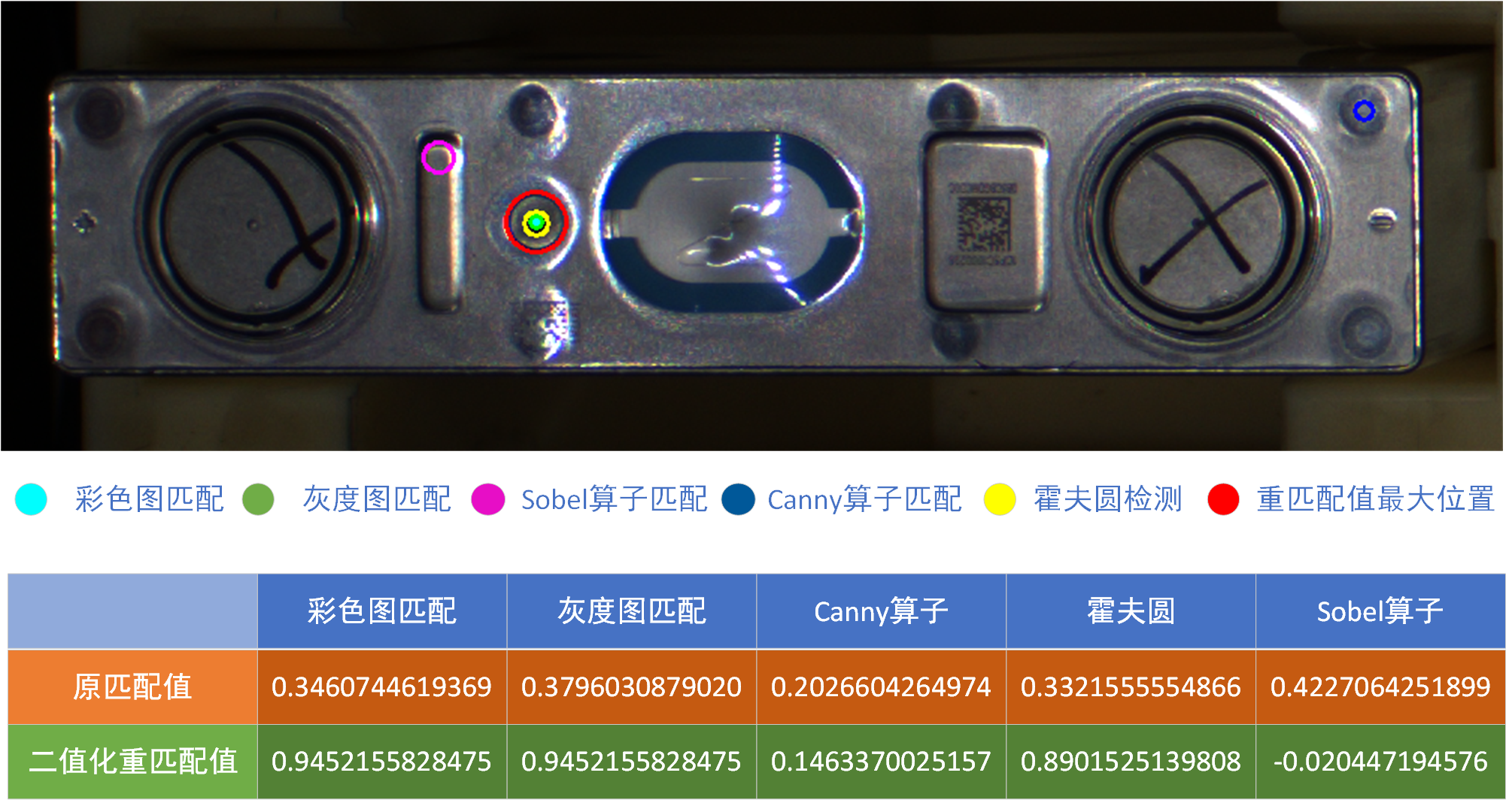
明显可以看出,虽然sobel算子的原匹配值够高,但明显匹配错误,经过二值化重匹配验证后,匹配值变得非常低。
而彩色图、灰度图和霍夫圆检测出来的位置是正确的,经过二值化重匹配验证后,匹配值非常高。
这就有效地避免了误判。
四、KD-Tree空间聚类邻近搜索
经过上述三个步骤,我们从最简单的模板匹配,增加了三重保障:多模板–复合匹配–重匹配验证,此时匹配算法的鲁棒性已经有了质的提升。这里介绍第四重保障算法:KD-Tree空间聚类。这种方法是在模板侧和算法侧之外,利用空间一致性校验,来进行算法鲁棒性的提升。
KD-Tree空间聚类通常用于点云数据或者SIFT特征点的近邻搜索,其原理简单可以概括成利用超平面递归划分高维空间,从而实现对数据的高效组织与检索。而图像可以理解为一种二维欧几里得空间的数据,在这里,我们可以利用KD-Tree算法对图像这种二维数据的点进行邻近搜索,将相近的点划分为同一个点集,以此排除离群的匹配位置点,进一步提升我们算法的鲁棒性。
核心思想是:将多个模板和多种匹配算法所找到的位置,使用KD-Tree算法找到其最大密度的核心位置。
纵观我们上述所写的算法,我们其实可以看出,大部分的图像匹配算法都能正确找到匹配位置,尤其是我们经过重匹配验证后的点位置,能有效地分辨出哪些是有效位置。这就给了我们使用聚类算法的条件,只要我们的点足够多,就可以“投票”投出一个准确的位置。
所以,我们设置一个适合的距离阈值,建立KD-Tree,进行邻近搜索,将出现最多的点集作为匹配正确的位置,输出点集的均值或者中值,能有效地增加点识别的鲁棒性。
我们先以多模板匹配+KD-Tree空间聚类为例,代码:
import os
import cv2
import numpy as np
from scipy.spatial import cKDTree


def img_show(img_input, name="1"):
    """
    图像显示函数
    Args:
        img_input: 输入图片,RGB、灰度图皆可
        name: 窗口命名,默认“1”
    """
    cv2.namedWindow("img - " + name, cv2.WINDOW_NORMAL)
    cv2.imshow("img - " + name, img_input)
    cv2.waitKey(0)
    cv2.destroyAllWindows()
    # 该程序由小幻月制作,如能帮助到您,十分荣幸
    # 小幻月博客地址:https://blog.csdn.net/NVKD2020


def img_multi_template_match(img_input):
    """ 多模板匹配 """
    # 加载模板(多模板)
    template_dir_path = "test_img/template/"  # 模板文件夹路径
    template_list = os.listdir(template_dir_path)
    template = []
    for i in range(len(template_list)):
        template_path = template_dir_path + template_list[i]
        template_load = cv2.imdecode(np.fromfile(template_path, dtype=np.uint8), 1)
        template.append(template_load)

    # 逐一匹配,获取匹配点
    point_list = []
    for i in range(len(template)):
        result_1 = cv2.matchTemplate(img_input, template[i], cv2.TM_CCOEFF_NORMED)  # 使用归一化交叉相关方法执行模板匹配
        _, val, _, loc = cv2.minMaxLoc(result_1)

        # 匹配输出的是左上角点,需要转换回中心点,下面的cv2.circle才能正确画出圆
        point_loc = (loc[0] + template[i].shape[1] // 2, loc[1] + template[i].shape[0] // 2)
        point_list.append(point_loc)

    # 计算最大密度点集, 使用KD-Tree近邻搜索
    kd_tree = cKDTree(point_list)  # 建立KD-Tree
    point_clusters = kd_tree.query_ball_point(point_list, r=20)  # 邻近搜索,阈值设置为20
    point_clusters = set(tuple(sorted(sub)) for sub in point_clusters)
    max_cluster = list(max(point_clusters, key=len, default=None))  # 保留最大的点集

    # 输出点集的均值
    x_sum, y_sum = 0, 0
    for num in max_cluster:
        x, y = point_list[num]
        x_sum += x
        y_sum += y
    center_x = int(x_sum / len(max_cluster))
    center_y = int(y_sum / len(max_cluster))

	# 在图像中画出来
    for i in range(len(point_list)):
        color = (np.random.randint(0, 255), np.random.randint(0, 255), np.random.randint(0, 255))
        img_input = cv2.circle(img_input, point_list[i], 5, color, 2)
    img_input = cv2.circle(img_input, (center_x, center_y), 20, (0, 255, 0), 2)
    img_show(img_input)
效果也是很简单的,直接找到最多点的点集,将点集均值作为匹配点。我们选择了一些光线不良的图片,效果如图所示: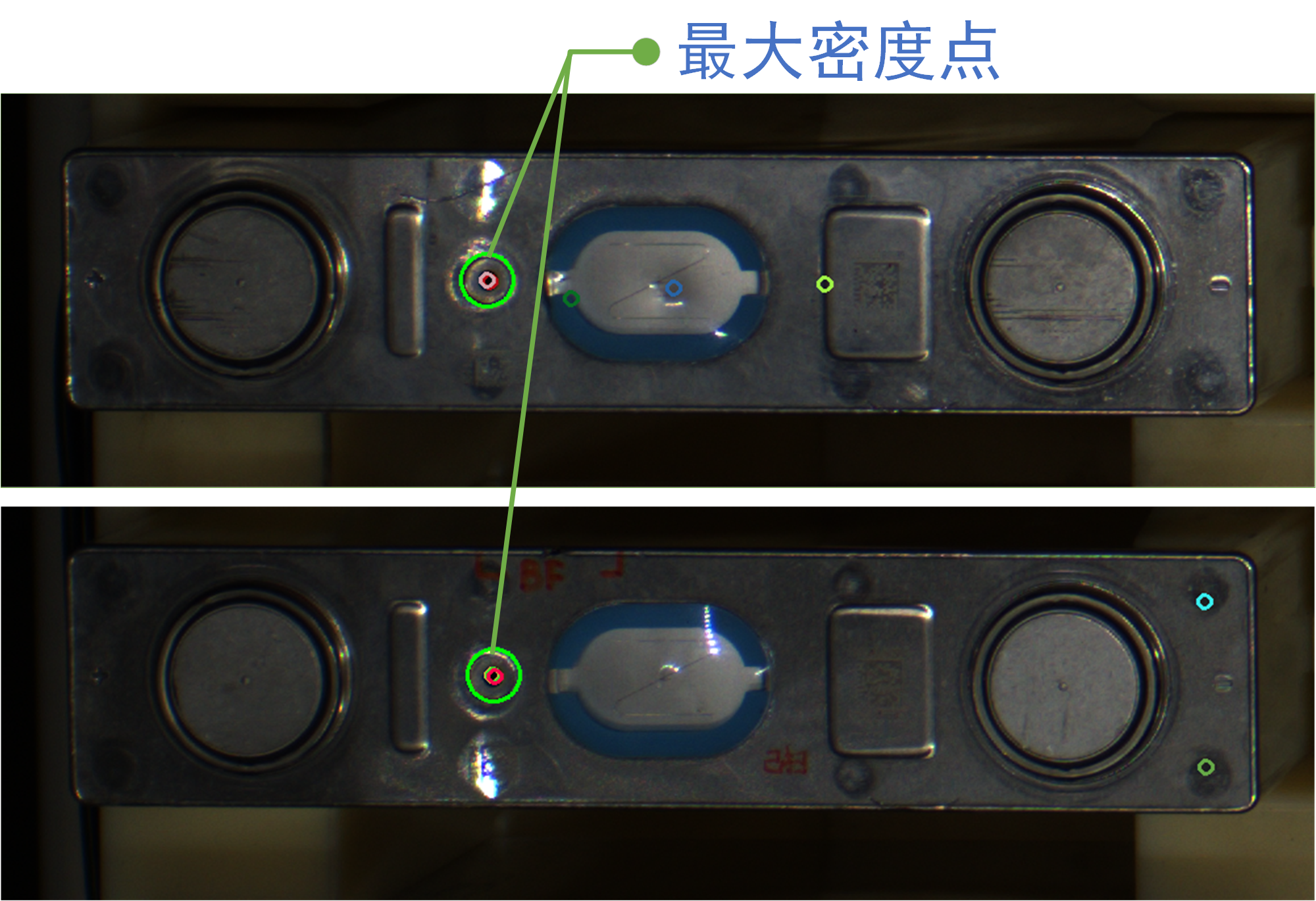
由图可以看出,面对如此恶劣的光照,大部分模板能匹配得到,少部分模板匹配不上。到通过KD-Tree算法聚类后,仅最多模板匹配得上的最大密度点,这给我们的算法鲁棒性得到较好的提升。
五、多模板复合验证的KD聚类匹配算法(MTCV-KCM)
经过上面四部分算法的介绍,我们从模板、算法和判别策略三个维度进行优化,匹配算法得到极大的提升,对于很多污渍、光照等干扰项,已经很难干扰我们识别的准确性。因此,我们将四部分综合后,得到本文最核心的综合算法:多模板复合验证的KD聚类匹配算法 Multi-Template Composite Verified KD-Clustered Matching Algorithm(MTCV-KCM)
全部代码如下所示:
import os
import cv2
import numpy as np
from scipy.spatial import cKDTree
import time


def img_show(img_input, name="1"):
    """
    图像显示函数
    Args:
        img_input: 输入图片,RGB、灰度图皆可
        name: 窗口命名,默认“1”
    """
    cv2.namedWindow("img - " + name, cv2.WINDOW_NORMAL)
    cv2.imshow("img - " + name, img_input)
    cv2.waitKey(0)
    cv2.destroyAllWindows()
    # 该程序由小幻月制作,如能帮助到您,十分荣幸
    # 小幻月博客地址:https://blog.csdn.net/NVKD2020


def composite_match(img_input, template_input):
    """ 复合匹配 """
    template_h, template_w = template_input.shape[:2]
    point_output = []
    val_output = []
    # ========================= 1、直接定位、匹配 =========================
    result_1 = cv2.matchTemplate(img_input, template_input, cv2.TM_CCOEFF_NORMED)  # 使用归一化交叉相关方法执行模板匹配
    _, max_val_1, _, max_loc_1 = cv2.minMaxLoc(result_1)
    max_loc_1 = (max_loc_1[0] + template_w // 2, max_loc_1[1] + template_h // 2)

    point_output.append(max_loc_1)
    val_output.append(max_val_1)

    # ========================= 2、灰度定位 灰度图、匹配 =========================
    img_input_gray = cv2.cvtColor(img_input, cv2.COLOR_BGR2GRAY)
    template_gray = cv2.cvtColor(template_input, cv2.COLOR_BGR2GRAY)
    result_2 = cv2.matchTemplate(img_input_gray, template_gray, cv2.TM_CCOEFF_NORMED)
    _, max_val_2, _, max_loc_2 = cv2.minMaxLoc(result_2)
    max_loc_2 = (max_loc_2[0] + template_w // 2, max_loc_2[1] + template_h // 2)

    point_output.append(max_loc_2)
    val_output.append(max_val_2)

    # ========================= 3、Canny定位、匹配 =========================
    img_input_canny = cv2.Canny(img_input_gray, 50, 150)
    template_canny = cv2.Canny(template_gray, 50, 150)
    result_3 = cv2.matchTemplate(img_input_canny, template_canny, cv2.TM_CCOEFF_NORMED)
    _, max_val_3, _, max_loc_3 = cv2.minMaxLoc(result_3)
    max_loc_3 = (max_loc_3[0] + template_w // 2, max_loc_3[1] + template_h // 2)

    point_output.append(max_loc_3)
    val_output.append(max_val_3)

    # ========================= 4、霍夫圆定位、匹配 =========================
    img_circles = cv2.HoughCircles(img_input_gray, cv2.HOUGH_GRADIENT, dp=1, minDist=50, param1=150, param2=15, minRadius=5, maxRadius=9)
    # print("img_circles = ", img_circles)
    if img_circles is not None:
        img_circles = np.uint16(np.around(img_circles))[0, 0]
        x, y = int(img_circles[0]), int(img_circles[1])
        x = x if x >= 0 else 0
        y = y if y >= 0 else 0

        max_loc_4 = (x, y)
        img_area_4 = img_input[y:y + template_h, x:x + template_w]

        result_houghcircle_1 = cv2.matchTemplate(img_area_4, template_input, cv2.TM_CCOEFF_NORMED)
        _, max_val_4, _, _ = cv2.minMaxLoc(result_houghcircle_1)

        point_output.append(max_loc_4)
        val_output.append(max_val_4)

    # ========================= 5、Sobel定位、匹配 =========================
    img_input_sobel_x = cv2.Sobel(img_input_gray, cv2.CV_64F, 1, 0, ksize=3)  # 计算x、y方向梯度
    img_input_sobel_y = cv2.Sobel(img_input_gray, cv2.CV_64F, 0, 1, ksize=3)
    template_sobel_x = cv2.Sobel(template_gray, cv2.CV_64F, 1, 0, ksize=3)
    template_sobel_y = cv2.Sobel(template_gray, cv2.CV_64F, 0, 1, ksize=3)

    img_input_abs_sobel_x = cv2.convertScaleAbs(img_input_sobel_x)  # 绝对值转换,将数据转为8位无符号整数
    img_input_abs_sobel_y = cv2.convertScaleAbs(img_input_sobel_y)
    template_1_abs_sobel_x = cv2.convertScaleAbs(template_sobel_x)
    template_1_abs_sobel_y = cv2.convertScaleAbs(template_sobel_y)

    img_input_sobel = cv2.addWeighted(img_input_abs_sobel_x, 0.5, img_input_abs_sobel_y, 0.5, 0)  # 合并梯度
    template_sobel = cv2.addWeighted(template_1_abs_sobel_x, 0.5, template_1_abs_sobel_y, 0.5, 0)

    result_5 = cv2.matchTemplate(img_input_sobel, template_sobel, cv2.TM_CCOEFF_NORMED)
    _, max_val_5, _, max_loc_5 = cv2.minMaxLoc(result_5)
    max_loc_5 = (max_loc_5[0] + template_w // 2, max_loc_5[1] + template_h // 2)

    point_output.append(max_loc_5)
    val_output.append(max_val_5)

    return point_output, val_output


def threshold_rematch(rematch_img, template_input):
    """ 二值化重匹配验证 """
    # 灰度化
    rematch_img_gray = cv2.cvtColor(rematch_img, cv2.COLOR_BGR2GRAY)
    template_gray = cv2.cvtColor(template_input, cv2.COLOR_BGR2GRAY)

    # 选择特征点位置,这里我选择画面中各三分之一的点作为特征点,各位选择特征点时需要视各位的工件而定
    rematch_img_h, rematch_img_w = rematch_img_gray.shape[:2]
    point_img_5 = int(rematch_img_gray[rematch_img_h // 2][rematch_img_w // 2]) + 5  # 选择特征点,阈值放松5
    rematch_img_threshold_set = point_img_5

    # 将模板同样使用特征点进行二值化
    template_h, template_w = template_gray.shape
    point_template_5 = int(template_gray[template_h // 2][template_w // 2]) + 5  # 选择特征点,阈值放松5
    template_threshold_set = point_template_5

    # 二值化
    rematch_img_threshold = cv2.threshold(rematch_img_gray, point_img_5, 255, cv2.THRESH_BINARY_INV)[1]
    template_threshold = cv2.threshold(template_gray, point_template_5, 255, cv2.THRESH_BINARY_INV)[1]

    # 将二者进行匹配
    result_2 = cv2.matchTemplate(rematch_img_threshold, template_threshold, cv2.TM_CCOEFF_NORMED)  # 使用归一化交叉相关方法执行模板匹配
    _, val_2, _, _ = cv2.minMaxLoc(result_2)

    return val_2


def match_program(img_input):
	""" 匹配程序 """

    # 加载模板(多模板)
    template_dir_path = "test_img/template/"
    template_list = os.listdir(template_dir_path)
    template = []
    for i in range(len(template_list)):
        template_path = template_dir_path + template_list[i]
        template_load = cv2.imdecode(np.fromfile(template_path, dtype=np.uint8), 1)
        template.append(template_load)

    # 每个模板进行匹配
    point_list = []
    val_list = []
    for i in range(len(template)):
        point_match, _ = composite_match(img_input, template[i])

        # 利用重匹配验证筛选重匹配值高的数据点
        # 复合匹配匹配到的位置,单独拎出来
        template_h, template_w = template[i].shape[:2]
        log_list = []
        for point_match_log in point_match:
            point_log = img_input[point_match_log[1] - template_h // 2:point_match_log[1] + template_h // 2,
                        point_match_log[0] - template_w // 2:point_match_log[0] + template_w // 2]
            log_list.append(point_log)

        # 获取对应区域的重匹配值
        rematch_val = []
        for log_1 in log_list:
            val_1 = threshold_rematch(log_1, template[i])
            rematch_val.append(val_1)

		# 过滤掉重匹配验证值太低的点
        for j in range(len(rematch_val)):
            if rematch_val[j] > 0.4:   # 设置阈值0.4
                point_list.append(point_match[j])

    # 计算最大聚合
    kd_tree = cKDTree(point_list)  # KD-Tree近邻搜索
    point_clusters = kd_tree.query_ball_point(point_list, r=20)
    point_clusters = set(tuple(sorted(sub)) for sub in point_clusters)
    max_cluster = list(max(point_clusters, key=len, default=None))  # 最大点集

    # 输出均值
    x_sum, y_sum = 0, 0
    for num in max_cluster:
        x, y = point_list[num]
        x_sum += x
        y_sum += y

    center_x = int(x_sum / len(max_cluster))
    center_y = int(y_sum / len(max_cluster))
    # print(center_x, center_y)

    for i in range(len(point_list)):
        color = (np.random.randint(0, 255), np.random.randint(0, 255), np.random.randint(0, 255))
        img_input = cv2.circle(img_input, point_list[i], 5, color, 2)
    img_input = cv2.circle(img_input, (center_x, center_y), 20, (0, 255, 0), 2)

	return img_input


if __name__ == '__main__':
    # 加载图片
    dir_path = "test_img/img_origin/img_list_1"
    path_list = os.listdir(dir_path)
    time_list = []
    for i in range(len(path_list)):
        path_1 = path_list[i]
        img_path = dir_path + "/" + path_list[i]
        img = cv2.imdecode(np.fromfile(img_path, dtype=np.uint8), 1)

        start_time = time.time()  # 开始计时

        img = match_program(img)

        end_time = time.time()  # 结束计时
        time_list.append(end_time - start_time)

		img_show(img)  # 显示图片,不用显示可以注销掉

		# 保存图片到指定文件夹
	    # out_put_dir = "test_img/output_1/output_list_1"
	    # out_path = out_put_dir + "/" + path_1
	    # cv2.imencode('.bmp', img)[1].tofile(out_path)

	# 输出平均检测时间
    avg_time = sum(time_list) / len(time_list)
    print(avg_time)
为了验证我们算法的鲁棒性,我们设计了一个光照、脏污、表面涂鸦都很复杂的场景,一共匹配了128张图片,模板库仅有6个模板,匹配结果如下所示:
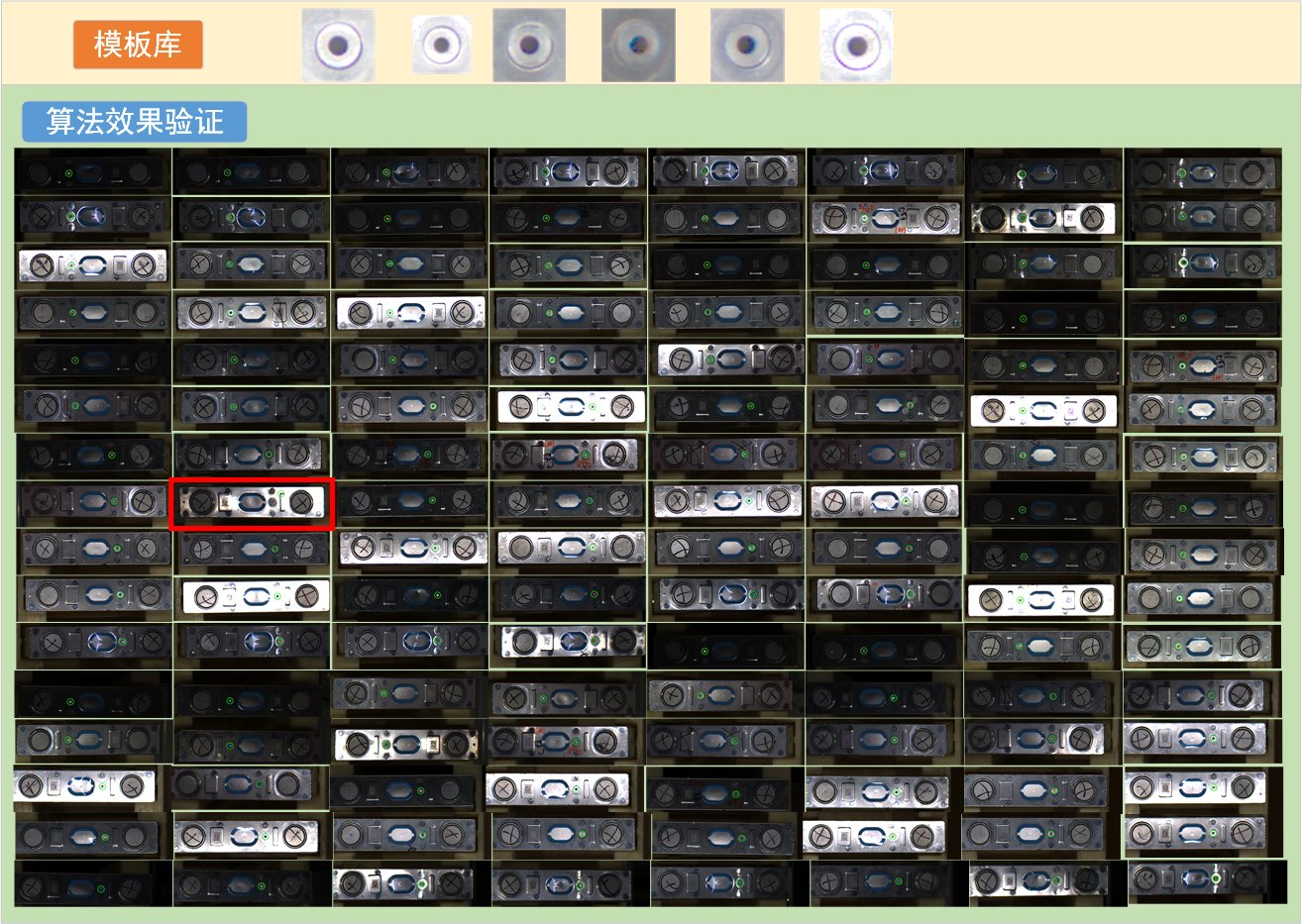
可以看出,哪怕是光照极端不良的情况,过曝和欠曝同时存在,识别效果也非常稳定,仅一个识别错误(红色框),其他都很准确地找到目标。
对几种识别算法进行测试,准确度统计如下所示:
| 正确检测 | 错误检测 | 准确率(%) | 单张图平均检测时间(ms) | |
|---|---|---|---|---|
| ① 单模板匹配(优良模板) | 118 | 10 | 92.19% | 26.8 |
| ② 单模板匹配(普通模板) | 92 | 36 | 71.88% | 25.3 |
| ③ 多模板匹配 | 113 | 15 | 88.28% | 144.7 |
| ④ 多模板匹配+二值化重匹配验证 | 119 | 9 | 92.97% | 151.3 |
| ⑤ 单模板复合匹配 | 90 | 38 | 70.31% | 63.7 |
| ⑥ 单模板复合匹配+二值化重匹配验证 | 125 | 3 | 97.66% | 63.7 |
| ⑦ 多模板+KD-Tree空间聚类 | 109 | 19 | 85.15% | 152.5 |
| ⑧ 多模板复合验证的KD聚类匹配算法 | 127 | 1 | 99.21% | 363.2 |
| ⑨ 伽马光照矫正+多模板复合验证的KD聚类匹配算法 | 128 | 0 | 100% | 384.7 |
该测试中,测试对象是128张光照较为极端的图片进行测试,包含了欠曝、过曝、涂鸦、脏污等工厂生产中常遇到的问题。多模板使用的模板库如上图所示,优良模板为图中第一个模板,普通模板为图中第四个模板。为了凸显算法优化效果,测试中的单模板均使用普通模板进行测试。
测试设备使用的是我的小笔记本,i7-10510U,性能羸弱,所以速度才会这么慢。大家使用更强的设备跑会有快的检测速度。
可以得出如下结论:
1、从表中 ① 和 ② 对比可知,选择一个优良模板对匹配算法的准确度至关重要
2、从表中 ①、② 和 ③ 的对比可知,模板库中如果混入不良模板,反而会对多模板算法造成影响。
3、从表中 ③ 和 ④ 对比可知,多模板匹配后,再进行一步验证,可以很好地提升算法的准确性。
4、从表中 ⑤ 和 ⑥ 对比可知,复合匹配虽然可以从不同维度处理图片,但同时也会混入该维度的干扰。这也是本文3.1中所说:复合匹配最好仅作为定位。
5、 从表中 ③ 和 ⑦ 对比可知,当用于聚类的点集太少时,很容易被错误匹配点干扰,反而会导致效果下降。因此KD-Tree需要一定数量的点进行聚类,才能输出较好地结果。
6、从表中 ⑧ 和 ⑨ 可以看出,综合上述所有算法的优势后的多模板复合验证的KD聚类匹配算法(MTCV-KCM),算法有极好的效果。
最后,测试图属于极端不良的光照情况,直接进行匹配一般来说是不对的。我们一般会先纠正画面光照效果,再进行算法匹配。这里仅作为测试算法鲁棒性才这样做,纠正光照后的效果也如表中⑨所示,效果极佳,哪怕是如此恶劣的光照条件,研究能准确识别所有的位置。伽马光照矫正算法和其他光照矫正的算法,详解请见本人的另一篇博客:《机器视觉中画面欠曝和过曝的原理理解及解决方法》
完整代码如下:
import os
import cv2
import numpy as np
from scipy.spatial import cKDTree
import time


def img_show(img_input, name="1"):
    """
    图像显示函数
    Args:
        img_input: 输入图片,RGB、灰度图皆可
        name: 窗口命名,默认“1”
    """
    cv2.namedWindow("img - " + name, cv2.WINDOW_NORMAL)
    cv2.imshow("img - " + name, img_input)
    cv2.waitKey(0)
    cv2.destroyAllWindows()
    # 该程序由小幻月制作,如能帮助到您,十分荣幸
    # 小幻月博客地址:https://blog.csdn.net/NVKD2020


def composite_match(img_input, template_input):
    """ 复合匹配 """
    template_h, template_w = template_input.shape[:2]
    point_output = []
    val_output = []
    # ========================= 1、直接定位、匹配 =========================
    result_1 = cv2.matchTemplate(img_input, template_input, cv2.TM_CCOEFF_NORMED)  # 使用归一化交叉相关方法执行模板匹配
    _, max_val_1, _, max_loc_1 = cv2.minMaxLoc(result_1)
    max_loc_1 = (max_loc_1[0] + template_w // 2, max_loc_1[1] + template_h // 2)

    point_output.append(max_loc_1)
    val_output.append(max_val_1)

    # ========================= 2、灰度定位 灰度图、匹配 =========================
    img_input_gray = cv2.cvtColor(img_input, cv2.COLOR_BGR2GRAY)
    template_gray = cv2.cvtColor(template_input, cv2.COLOR_BGR2GRAY)
    result_2 = cv2.matchTemplate(img_input_gray, template_gray, cv2.TM_CCOEFF_NORMED)
    _, max_val_2, _, max_loc_2 = cv2.minMaxLoc(result_2)
    max_loc_2 = (max_loc_2[0] + template_w // 2, max_loc_2[1] + template_h // 2)

    point_output.append(max_loc_2)
    val_output.append(max_val_2)

    # ========================= 3、Canny定位、匹配 =========================
    img_input_canny = cv2.Canny(img_input_gray, 50, 150)
    template_canny = cv2.Canny(template_gray, 50, 150)
    result_3 = cv2.matchTemplate(img_input_canny, template_canny, cv2.TM_CCOEFF_NORMED)
    _, max_val_3, _, max_loc_3 = cv2.minMaxLoc(result_3)
    max_loc_3 = (max_loc_3[0] + template_w // 2, max_loc_3[1] + template_h // 2)

    point_output.append(max_loc_3)
    val_output.append(max_val_3)

    # ========================= 4、霍夫圆定位、匹配 =========================
    img_circles = cv2.HoughCircles(img_input_gray, cv2.HOUGH_GRADIENT, dp=1, minDist=50, param1=150, param2=15, minRadius=5, maxRadius=9)
    # print("img_circles = ", img_circles)
    if img_circles is not None:
        img_circles = np.uint16(np.around(img_circles))[0, 0]
        x, y = int(img_circles[0]), int(img_circles[1])
        x = x if x >= 0 else 0
        y = y if y >= 0 else 0

        max_loc_4 = (x, y)
        img_area_4 = img_input[y:y + template_h, x:x + template_w]

        result_houghcircle_1 = cv2.matchTemplate(img_area_4, template_input, cv2.TM_CCOEFF_NORMED)
        _, max_val_4, _, _ = cv2.minMaxLoc(result_houghcircle_1)

        point_output.append(max_loc_4)
        val_output.append(max_val_4)

    # ========================= 5、Sobel定位、匹配 =========================
    img_input_sobel_x = cv2.Sobel(img_input_gray, cv2.CV_64F, 1, 0, ksize=3)  # 计算x、y方向梯度
    img_input_sobel_y = cv2.Sobel(img_input_gray, cv2.CV_64F, 0, 1, ksize=3)
    template_sobel_x = cv2.Sobel(template_gray, cv2.CV_64F, 1, 0, ksize=3)
    template_sobel_y = cv2.Sobel(template_gray, cv2.CV_64F, 0, 1, ksize=3)

    img_input_abs_sobel_x = cv2.convertScaleAbs(img_input_sobel_x)  # 绝对值转换,将数据转为8位无符号整数
    img_input_abs_sobel_y = cv2.convertScaleAbs(img_input_sobel_y)
    template_1_abs_sobel_x = cv2.convertScaleAbs(template_sobel_x)
    template_1_abs_sobel_y = cv2.convertScaleAbs(template_sobel_y)

    img_input_sobel = cv2.addWeighted(img_input_abs_sobel_x, 0.5, img_input_abs_sobel_y, 0.5, 0)  # 合并梯度
    template_sobel = cv2.addWeighted(template_1_abs_sobel_x, 0.5, template_1_abs_sobel_y, 0.5, 0)

    result_5 = cv2.matchTemplate(img_input_sobel, template_sobel, cv2.TM_CCOEFF_NORMED)
    _, max_val_5, _, max_loc_5 = cv2.minMaxLoc(result_5)
    max_loc_5 = (max_loc_5[0] + template_w // 2, max_loc_5[1] + template_h // 2)

    point_output.append(max_loc_5)
    val_output.append(max_val_5)

    return point_output, val_output


def threshold_rematch(rematch_img, template_input):
    """ 二值化重匹配验证 """
    # 灰度化
    rematch_img_gray = cv2.cvtColor(rematch_img, cv2.COLOR_BGR2GRAY)
    template_gray = cv2.cvtColor(template_input, cv2.COLOR_BGR2GRAY)

    # 选择特征点位置,这里我选择画面中各三分之一的点作为特征点,各位选择特征点时需要视各位的工件而定
    rematch_img_h, rematch_img_w = rematch_img_gray.shape[:2]
    point_img_5 = int(rematch_img_gray[rematch_img_h // 2][rematch_img_w // 2]) + 5  # 选择特征点,阈值放松5
    rematch_img_threshold_set = point_img_5

    # 将模板同样使用特征点进行二值化
    template_h, template_w = template_gray.shape
    point_template_5 = int(template_gray[template_h // 2][template_w // 2]) + 5  # 选择特征点,阈值放松5
    template_threshold_set = point_template_5

    # 二值化
    rematch_img_threshold = cv2.threshold(rematch_img_gray, point_img_5, 255, cv2.THRESH_BINARY_INV)[1]
    template_threshold = cv2.threshold(template_gray, point_template_5, 255, cv2.THRESH_BINARY_INV)[1]

    # 将二者进行匹配
    result_2 = cv2.matchTemplate(rematch_img_threshold, template_threshold, cv2.TM_CCOEFF_NORMED)  # 使用归一化交叉相关方法执行模板匹配
    _, val_2, _, _ = cv2.minMaxLoc(result_2)

    return val_2


def match_program(img_input):
    """ 多模板复合验证的KD聚类匹配算法 """

    # 加载模板(多模板)
    template_dir_path = "test_img/template/"
    template_list = os.listdir(template_dir_path)
    template = []
    for i in range(len(template_list)):
        template_path = template_dir_path + template_list[i]
        template_load = cv2.imdecode(np.fromfile(template_path, dtype=np.uint8), 1)
        template.append(template_load)

    # 每个模板进行匹配
    point_list = []
    val_list = []
    for i in range(len(template)):
        point_match, _ = composite_match(img_input, template[i])

        # 利用重匹配验证筛选重匹配值高的数据点
        # 复合匹配匹配到的位置,单独拎出来
        template_h, template_w = template[i].shape[:2]
        log_list = []
        for point_match_log in point_match:
            point_log = img_input[point_match_log[1] - template_h // 2:point_match_log[1] + template_h // 2,
                        point_match_log[0] - template_w // 2:point_match_log[0] + template_w // 2]
            log_list.append(point_log)

        # 获取对应区域的重匹配值
        rematch_val = []
        for log_1 in log_list:
            val_1 = threshold_rematch(log_1, template[i])
            rematch_val.append(val_1)

        for j in range(len(rematch_val)):
            if rematch_val[j] > 0.4:   # 设置阈值0.4
                point_list.append(point_match[j])

    # 计算最大聚合
    kd_tree = cKDTree(point_list)  # KD-Tree近邻搜索
    point_clusters = kd_tree.query_ball_point(point_list, r=20)
    point_clusters = set(tuple(sorted(sub)) for sub in point_clusters)
    max_cluster = list(max(point_clusters, key=len, default=None))

    # 输出均值
    x_sum, y_sum = 0, 0
    for num in max_cluster:
        x, y = point_list[num]
        x_sum += x
        y_sum += y

    center_x = int(x_sum / len(max_cluster))
    center_y = int(y_sum / len(max_cluster))

    for i in range(len(point_list)):
        color = (np.random.randint(0, 255), np.random.randint(0, 255), np.random.randint(0, 255))
        img_input = cv2.circle(img_input, point_list[i], 5, color, 2)
    img_input = cv2.circle(img_input, (center_x, center_y), 20, (0, 255, 0), 2)

	return img_input


def img_light_correction(img_input, multiple=1):
    """ gamma光照矫正 """
    img_real = img_input.copy()

    #  图像缩放
    img_input = cv2.resize(img_input, (img_input.shape[1] // multiple, img_input.shape[0] // multiple))

    # 将图像归一化到0-1范围
    img_normalized = img_input.astype(np.float32) / 255.0
    # 创建暗部和亮部掩膜
    dark_mask = (img_normalized < 220 / 255.0)
    bright_mask = ~dark_mask
    # 分别应用不同伽马值
    adjusted = np.zeros_like(img_normalized)
    adjusted[dark_mask] = np.power(img_normalized[dark_mask], 0.25)
    adjusted[bright_mask] = np.power(img_normalized[bright_mask], 1)
    # 将图像映射回255
    img_input = np.clip(adjusted * 255, 0, 255).astype(np.uint8)

    #  图像缩放
    img_input = cv2.resize(img_input, (img_real.shape[1], img_real.shape[0]))

    return img_input


if __name__ == '__main__':
    # 加载图片
    dir_path = "test_img/img_origin/img_list_4"  # 检测图片文件夹的路径
    path_list = os.listdir(dir_path)
    time_list = []
    for i in range(len(path_list)):
        path_1 = path_list[i]
        # 加载图片
        img_path = dir_path + "/" + path_1
        img = cv2.imdecode(np.fromfile(img_path, dtype=np.uint8), 1)

        start_time = time.time()  # 开始计时

        img = img_light_correction(img)  # 伽马光照矫正
        img = match_program(img)  # 匹配算法

        end_time = time.time()   # 结束计时
        time_list.append(end_time - start_time)

		img_show(img)   # 显示图片

	    # 保存图片,需要时再打开
	    # out_put_dir = "test_img/output_2/output_list_4"
	    # out_path = out_put_dir + "/" + path_1
	    # cv2.imencode('.bmp', img)[1].tofile(out_path)

	# 显示平均时间
    avg_time = sum(time_list) / len(time_list)
    print(avg_time)
效果: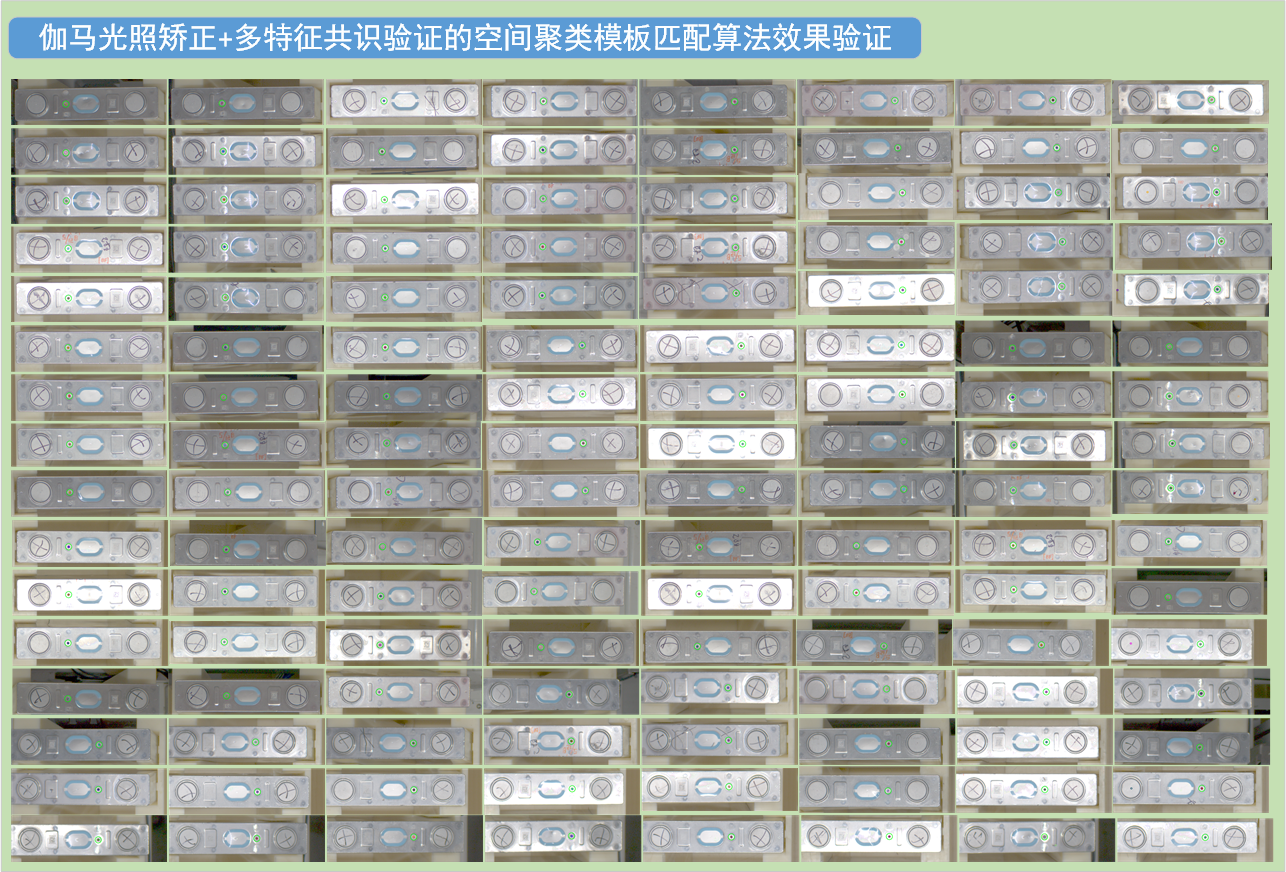
至此我的匹配算法尽善尽美!(自大)
我将这套算法命名为:多模板复合验证的KD聚类匹配算法 Multi-Template Composite Verified KD-Clustered Matching Algorithm (MTCV-KCM)
缺陷与不足
虽然我们的算法拥有极强的鲁棒性,但我用来测试的场景对机器视觉而言,属于低速场景和低精度场景,因此我们可以使用这样那样的方法进行优化。这种算法无疑是用计算资源换识别准确性,属于算法优化措施一类。
如果遇到对检测速度要求高的高速场景,这种算法的计算时间明显会存在不足。
如果遇到对检测精度要求高的高精度检测,这种聚类算法求平均的做法也会显得很粗糙。
所以算法亦有极限,硬件优化、双系统冗余和交叉验证等方面也是需要下功夫的。
当然,我们这里仅作为方法的介绍,各位还需要根据各自面对的场景,选择性使用优化措施,该上双系统的就上双系统,该开多线程的开多线程,方法不是唯一的,掌握更多手段才是我们的目的。
小幻月
2025年8月15日

中国智能体开发者社区,聚焦智能体与大模型开发,提供前沿资讯、实用工具链、开源项目及行业案例。通过技术沙龙、开发者大赛等活动,促进经验交流与协作,助力开发者快速构建创新智能应用。
更多推荐

 13
13 0
0- 0


 已为社区贡献1条内容

所有评论(0)