Integration of Harbor with Ceph RGW for High Availability and Scalable Object Storage
【代码】Integration of Harbor with Ceph RGW for High Availability and Scalable Object Storage。
Configuring Ceph RGW as the Object Storage Backend for Harbor with Multi-Region Support and Fault Tolerance
1. Assume the following prerequisites are already met:
1.1 Ceph RGW deployment has been completed and high availability configuration is working properly:
- The us-east and us-west RGW regions have been configured and are able to synchronize data correctly.
- Ceph RGW has been configured and high availability is achieved via a load balancer (such as HAProxy or Keepalived).
- The S3-compatible Ceph RGW backend has been configured for Harbor, and the RGW users and permissions are correctly set.
1.2 Harbor deployment environment is already in place:
- The Harbor instance has been deployed and is running normally.
- Your Harbor configuration file can access the S3 interface of Ceph RGW.
2. Update Harbor Configuration File
In the Harbor configuration file, specify Ceph RGW as the storage backend. Assume your Harbor configuration file is located at /opt/harbor/harbor.yml.
2.1 Configure Harbor to Use Ceph RGW as the Storage Backend
In the harbor.yml file, locate the storage configuration section and make the following modifications:
hostname: registry.lab.example.com
http:
  port: 80
https:
  port: 443
  certificate: /data/cert/registry.lab.example.com.crt
  private_key: /data/cert/registry.lab.example.com.key
harbor_admin_password: Harbor12345
database:
  password: root123
  max_idle_conns: 100
  max_open_conns: 900
  conn_max_lifetime: 5m
  conn_max_idle_time: 0
data_volume: /data
storage_service:
  s3:
    access_key: "FCEU7QB26X5YWWJ085BF"  					# Access key for the Ceph RGW user
    secret_key: "T5Kz5sCFUas7V1jnCN1vA4J1TbsGxmVDDAZzDkYy"  # Secret key for the Ceph RGW user
    bucket: "my-harbor-bucket"         						# The bucket name on Ceph RGW to store Harbor images
    regionendpoint: "http://192.168.126.100:8888"     		# The service endpoint of Ceph RGW (address of the load balancer or a single RGW instance)
    region: "us-east-1"               						# The default RGW region name, can be set to 'us-east' or 'us-west' based on your setup
    secure: false                     						# Set to true if using HTTPS; otherwise set to false
    v4auth: true                      						# Enable version 4 authentication for Ceph RGW
    forcepathstyle: true              						# Enforce path-style access for the Ceph RGW endpoint
    # encrypt: false            # Whether to enable server-side encryption for uploaded objects
    # rootdirectory: "/harbor"  # Use Harbor's default storage path within the bucket
    # redirect:
    #   disable: true           # Disable S3 302 redirects (recommended for compatibility)
trivy:
  ignore_unfixed: false
  skip_update: false
  skip_java_db_update: false
  offline_scan: false
  security_check: vuln
  insecure: false
  timeout: 5m0s
jobservice:
  max_job_workers: 10
  max_job_duration_hours: 24
  job_loggers:
    - STD_OUTPUT
    - FILE
  logger_sweeper_duration: 1 #days
notification:
  webhook_job_max_retry: 3
  webhook_job_http_client_timeout: 3 #seconds
log:
  level: info
  local:
    rotate_count: 50
    rotate_size: 200M
    location: /var/log/harbor
_version: 2.13.0
proxy:
  http_proxy:
  https_proxy:
  no_proxy:
  components:
    - core
    - jobservice
    - trivy
upload_purging:
  enabled: true
  age: 168h
  interval: 24h
  dryrun: false
cache:
  enabled: false
  expire_hours: 24
2.2 Configure Multi-Region Support (If Needed)
If you want to achieve redundancy and high availability across multiple regions (such as us-east and us-west), you can adjust the region and endpoint settings in the Harbor configuration to point to different RGW regions in Ceph.
You can set the region to us-east or us-west, and configure the access policies for different RGW regions via a load balancer.
Here’s an example of how to configure it in the harbor.yml file:
storage_service:
  s3:
    access_key: "<RGW_ACCESS_KEY>"  # Ceph RGW user access key
    secret_key: "<RGW_SECRET_KEY>"  # Ceph RGW user secret key
    bucket: "harbor-images"         # The bucket used to store Harbor images in Ceph RGW
    endpoint: "rgw-us-east.example.com"  # The endpoint for the us-east region (or load balancer)
    region: "us-east"               # The region for the Ceph RGW service
    secure: false                   # Set to true if using HTTPS, otherwise set to false
    v4auth: true                    # Enable version 4 authentication for Ceph RGW
    forcepathstyle: true            # Enforce path-style access for Ceph RGW
If you want to configure the us-west region, you can create a new section in your load balancer or proxy configuration to route traffic to the appropriate endpoint:
storage_service:
  s3:
    access_key: "<RGW_ACCESS_KEY>"
    secret_key: "<RGW_SECRET_KEY>"
    bucket: "harbor-images"
    endpoint: "rgw-us-west.example.com"  # The endpoint for the us-west region
    region: "us-west"                   # The region for the Ceph RGW service
    secure: false
    v4auth: true
    forcepathstyle: true
3. ( Optional ) Configure Harbor Certificate If Using HTTPS
If your Ceph RGW is configured with SSL (HTTPS), and you want Harbor to communicate with Ceph RGW over HTTPS, ensure that the corresponding SSL certificates are configured.
storage_service:
  s3:
    access_key: "<RGW_ACCESS_KEY>"  # Ceph RGW user access key
    secret_key: "<RGW_SECRET_KEY>"  # Ceph RGW user secret key
    bucket: "harbor-images"         # The bucket used to store Harbor images in Ceph RGW
    endpoint: "rgw.example.com"     # The endpoint for Ceph RGW (or load balancer)
    region: "us-east"               # The region for Ceph RGW service
    secure: true                    # Enable HTTPS
    ssl_cert_file: "/path/to/cert.pem"  # Path to the SSL certificate for Ceph RGW
    ssl_key_file: "/path/to/key.pem"    # Path to the private key for Ceph RGW
    v4auth: true                    # Enable version 4 authentication for Ceph RGW
    forcepathstyle: true            # Enforce path-style access for Ceph RGW endpoint
4. Update Harbor Configuration and Restart
After making the necessary changes to the configuration file, restart Harbor to apply the new settings.
docker-compose down
docker-compose up -d
You can obtain and verify this configuration by accessing the Harbor registry container and inspecting the S3 storage settings in the config.yml file. For example:
root@registry:/opt/harbor# docker exec -it registry cat /etc/registry/config.yml | grep -A10 s3
  s3:
    accesskey: FCEU7QB26X5YWWJ085BF
    secretkey: T5Kz5sCFUas7V1jnCN1vA4J1TbsGxmVDDAZzDkYy
    region: us-east-1
    bucket: my-harbor-bucket
    regionendpoint: http://192.168.126.100:8888
    secure: False
    v4auth: true
    forcepathstyle: true
  maintenance:
    uploadpurging:
root@registry:/opt/harbor#
If the S3 parameters such as accesskey, secretkey, bucket, and regionendpoint are correctly set, and Harbor is able to push and pull images without error, it indicates that the integration with Ceph RGW is working properly.
5. Test the Integration
5.1 Upload an Image:
First, upload a Docker image to Harbor. You can use the following docker push command to push an image to Harbor:
root@registry:~# docker tag docker.io/library/nginx:latest registry.lab.example.com/test/nginx:latest
root@registry:~# docker images | grep nginx
nginx                                      latest    a830707172e8   3 weeks ago    192MB
registry.lab.example.com/test/nginx        latest    a830707172e8   3 weeks ago    192MB
goharbor/nginx-photon                      v2.13.0   c922d86a7218   4 weeks ago    151MB
goharbor/nginx-photon                      v2.4.2    4189bfe82749   3 years ago    47.3MB
root@registry:~#
root@registry:~#
root@registry:~# docker push registry.lab.example.com/test/nginx:latest
The push refers to repository [registry.lab.example.com/test/nginx]
8030dd26ec5d: Pushed
d84233433437: Pushed
f8455d4eb3ff: Pushed
286733b13b0f: Pushed
46a24b5c31d8: Pushed
84accda66bf0: Pushed
6c4c763d22d0: Pushed
latest: digest: sha256:056c8ad1921514a2fc810a792b5bd18a02d003a99d6b716508bf11bc98c413c3 size: 1778
root@registry:~#
5.2 Check the Bucket:
After the image is uploaded, you can check if it was successfully stored in the Ceph RGW bucket by using the radosgw-admin tool:
root@ceph-admin-120:~# radosgw-admin bucket stats --bucket=my-harbor-bucket
{
    "bucket": "my-harbor-bucket",
    "num_shards": 11,
    "tenant": "",
    "versioning": "off",
    "zonegroup": "4e44ec7d-cef8-4c86-bf72-af8ddd5f5f9e",
    "placement_rule": "default-placement",
    "explicit_placement": {
        "data_pool": "",
        "data_extra_pool": "",
        "index_pool": ""
    },
    "id": "9fe33ef0-13da-40a7-bef1-ad7e3650b2ac.244282.1",
    "marker": "9fe33ef0-13da-40a7-bef1-ad7e3650b2ac.244282.1",
    "index_type": "Normal",
    "versioned": false,
    "versioning_enabled": false,
    "object_lock_enabled": false,
    "mfa_enabled": false,
    "owner": "synchronization-user",
    "ver": "0#576,1#482,2#617,3#467,4#589,5#479,6#544,7#560,8#586,9#502,10#517",
    "master_ver": "0#0,1#0,2#0,3#0,4#0,5#0,6#0,7#0,8#0,9#0,10#0",
    "mtime": "2025-05-08T06:56:23.636099Z",
    "creation_time": "2025-05-08T06:56:22.486771Z",
    "max_marker": "0#00000000575.1326.6,1#00000000481.2189.6,2#00000000616.1676.6,3#00000000466.1115.6,4#00000000588.1352.6,5#00000000478.2239.6,6#00000000543.2235.6,7#00000000559.1297.6,8#00000000585.1346.6,9#00000000501.1178.6,10#00000000516.2181.6",
    "usage": {
        "rgw.main": {
            "size": 820185698,
            "size_actual": 820269056,
            "size_utilized": 820185698,
            "size_kb": 800963,
            "size_kb_actual": 801044,
            "size_kb_utilized": 800963,
            "num_objects": 96
        },
        "rgw.multimeta": {
            "size": 0,
            "size_actual": 0,
            "size_utilized": 3294,
            "size_kb": 0,
            "size_kb_actual": 0,
            "size_kb_utilized": 4,
            "num_objects": 122
        }
    },
    "bucket_quota": {
        "enabled": false,
        "check_on_raw": false,
        "max_size": -1,
        "max_size_kb": 0,
        "max_objects": -1
    }
}
5.3 Checking Harbor Image in Ceph Bucket
root@ceph-admin-120:~# aws --endpoint-url=http://192.168.126.130:80 s3 ls s3://my-harbor-bucket/ --recursive
2025-05-08 13:25:56        629 docker/registry/v2/blobs/sha256/3e/3e544d53ce49d405a41bd59e97d102d77cc5412a717b3bae2295d237ccdfb706/data
2025-05-08 13:25:56       1208 docker/registry/v2/blobs/sha256/40/40a6e9f4e4564bc7213f3983964e76c27e1dc94ceb473f04a8460f5e95e365d1/data
2025-05-08 13:25:56        955 docker/registry/v2/blobs/sha256/4f/4f21ed9ac0c04aa7c64ffd32df025f4545ab9f007d175ce82c920903590daec7/data
2025-05-08 13:26:02   29139965 docker/registry/v2/blobs/sha256/61/61ffccc6e275302ac7c0b50430bfb4c942affd0ab8e4b6f7d5067963c2f47da5/data
2025-05-08 13:26:04   44150678 docker/registry/v2/blobs/sha256/91/91311529275035c77ef310fe38a81841c8f3e0a324cf6a68d86b36f48a145d0a/data
2025-05-08 13:26:05       8584 docker/registry/v2/blobs/sha256/a8/a830707172e8069c09cf6c67a04e23e5a1a332d70a90a54999b76273a928b9ce/data
2025-05-08 13:25:56        404 docker/registry/v2/blobs/sha256/d3/d38f2ef2d6f270e6bc87cad48e49a5ec4ebdd2f5d1d4955c4df3780dabbf2393/data
2025-05-08 13:25:56       1398 docker/registry/v2/blobs/sha256/d3/d3dc5ec71e9d6d1a06a1740efb4a875b28b102166509c8563c90b48f7c5e0bcb/data
2025-05-08 13:25:56         71 docker/registry/v2/repositories/test/nginx/_layers/sha256/3e544d53ce49d405a41bd59e97d102d77cc5412a717b3bae2295d237ccdfb706/link
2025-05-08 13:25:56         71 docker/registry/v2/repositories/test/nginx/_layers/sha256/40a6e9f4e4564bc7213f3983964e76c27e1dc94ceb473f04a8460f5e95e365d1/link
2025-05-08 13:25:56         71 docker/registry/v2/repositories/test/nginx/_layers/sha256/4f21ed9ac0c04aa7c64ffd32df025f4545ab9f007d175ce82c920903590daec7/link
2025-05-08 13:26:02         71 docker/registry/v2/repositories/test/nginx/_layers/sha256/61ffccc6e275302ac7c0b50430bfb4c942affd0ab8e4b6f7d5067963c2f47da5/link
2025-05-08 13:26:04         71 docker/registry/v2/repositories/test/nginx/_layers/sha256/91311529275035c77ef310fe38a81841c8f3e0a324cf6a68d86b36f48a145d0a/link
2025-05-08 13:26:05         71 docker/registry/v2/repositories/test/nginx/_layers/sha256/a830707172e8069c09cf6c67a04e23e5a1a332d70a90a54999b76273a928b9ce/link
2025-05-08 13:25:56         71 docker/registry/v2/repositories/test/nginx/_layers/sha256/d38f2ef2d6f270e6bc87cad48e49a5ec4ebdd2f5d1d4955c4df3780dabbf2393/link
2025-05-08 13:25:56         71 docker/registry/v2/repositories/test/nginx/_layers/sha256/d3dc5ec71e9d6d1a06a1740efb4a875b28b102166509c8563c90b48f7c5e0bcb/link
2025-05-08 13:26:05         71 docker/registry/v2/repositories/test/nginx/_manifests/revisions/sha256/056c8ad1921514a2fc810a792b5bd18a02d003a99d6b716508bf11bc98c413c3/link
2025-05-08 13:26:05         71 docker/registry/v2/repositories/test/nginx/_manifests/tags/latest/current/link
2025-05-08 13:26:05         71 docker/registry/v2/repositories/test/nginx/_manifests/tags/latest/index/sha256/056c8ad1921514a2fc810a792b5bd18a02d003a99d6b716508bf11bc98c413c3/link
root@ceph-admin-120:~#
6. Configure Ceph RGW High Availability (if needed)
6.1 Configure HAProxy to load balance traffic across multiple RGW instances:
If RGW high availability has not been set up in the previous configuration, you can configure load balancing for multi-region RGW using HAProxy and Keepalived. In the /etc/haproxy/haproxy.cfg file, define the backend RGW instances and the frontend for the load balancer:
Configure HAProxy to route requests to multiple RGW instances:
frontend frontend
    bind 192.168.126.100:8888
    default_backend backend

backend backend
    option forwardfor
    balance static-rr
    option httpchk HEAD / HTTP/1.0
    server rgw.movies-rgw-east.ceph-rgw-130.qwjmaa 192.168.126.130:80 check weight 100 inter 2s
    server rgw.movies-rgw-east.ceph-rgw-131.uybrrq 192.168.126.131:80 check weight 100 inter 2s
6.2 Configure Keepalived for high availability:
In the /etc/keepalived/keepalived.conf file, configure the virtual IP (VIP) and failover settings. This ensures that the HAProxy instance can be moved between different nodes in case of failure.
# This file is generated by cephadm.
global_defs {
    enable_script_security
    script_user root
}

vrrp_script check_backend {
    script "/usr/bin/curl http://192.168.126.130:9002/health"
    weight -20
    interval 2
    rise 2
    fall 2
}

vrrp_instance VI_0 {
  state MASTER
  priority 100
  interface ens33
  virtual_router_id 50
  advert_int 1
  authentication {
      auth_type PASS
      auth_pass qcufbjcg
  }
  unicast_src_ip 192.168.126.130
  unicast_peer {
    192.168.126.131
    192.168.126.132
  }
  virtual_ipaddress {
    192.168.126.100/24 dev ens33
  }
  track_script {
      check_backend
  }
}
7. Security and Permissions Configuration
Ensure that appropriate permissions are configured for the Harbor user in Ceph RGW. You can manage and verify permissions using the radosgw-admin tool.
root@ceph-admin-120:~# radosgw-admin user stats --uid="synchronization-user"
{
    "stats": {
        "size": 4468,
        "size_actual": 24576,
        "size_kb": 5,
        "size_kb_actual": 24,
        "num_objects": 6
    },
    "last_stats_sync": "2025-04-25T05:59:27.463488Z",
    "last_stats_update": "2025-05-08T13:27:08.247689Z"
}
8. Access Harbor and Ceph Dashboard
8.1 Ceph Dashboard
- https://192.168.126.121:8443/#/rgw/bucket
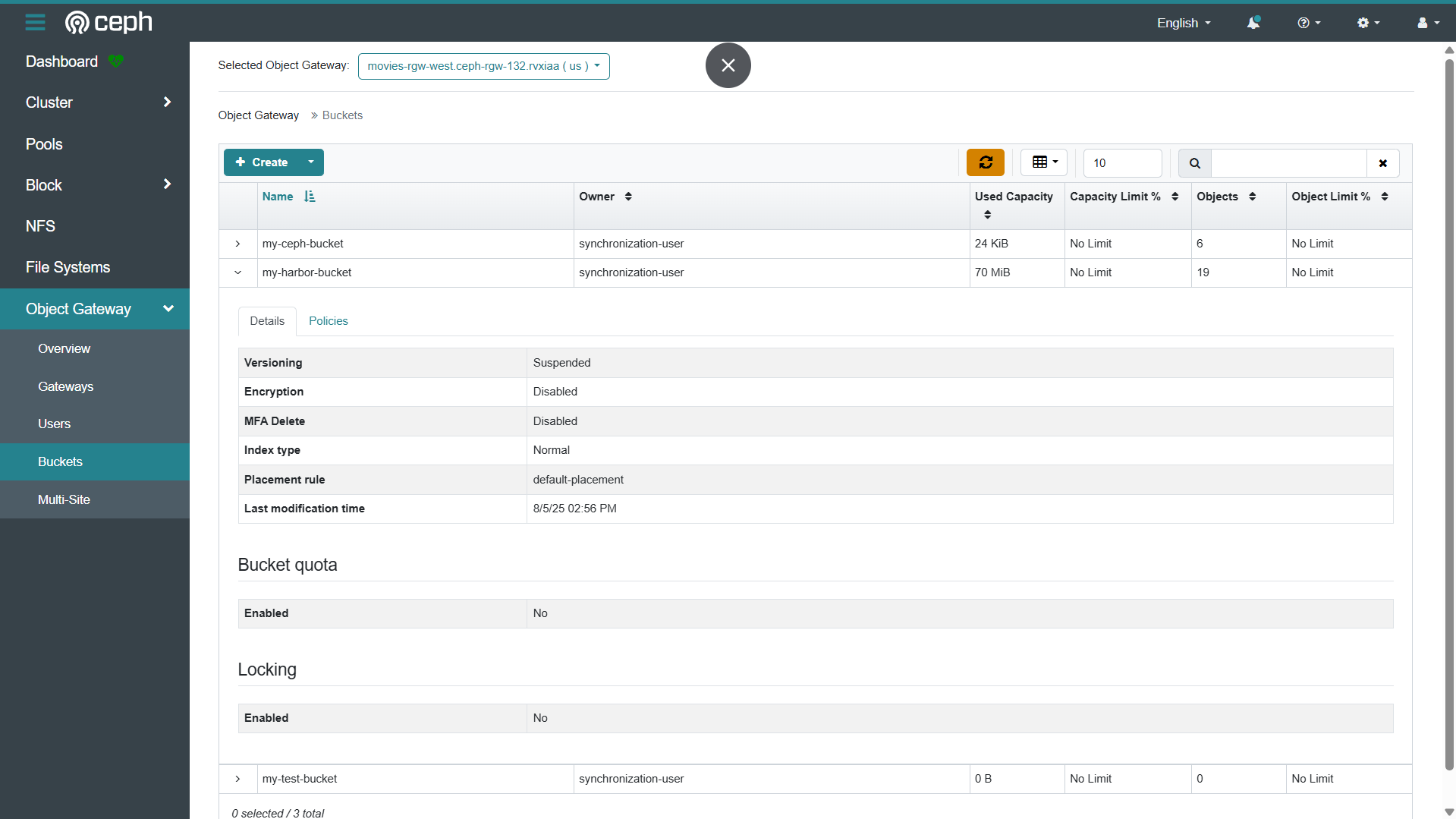
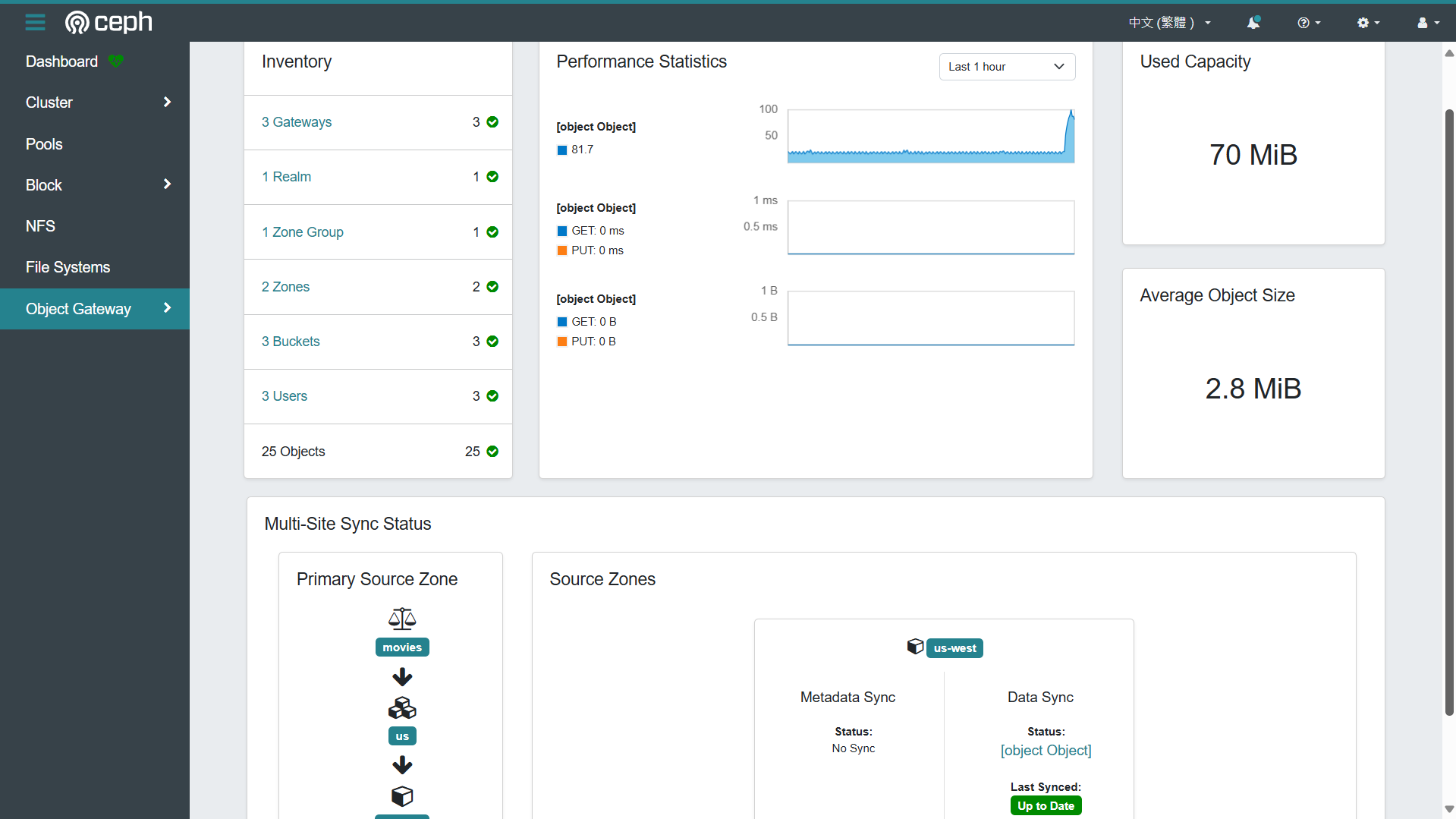
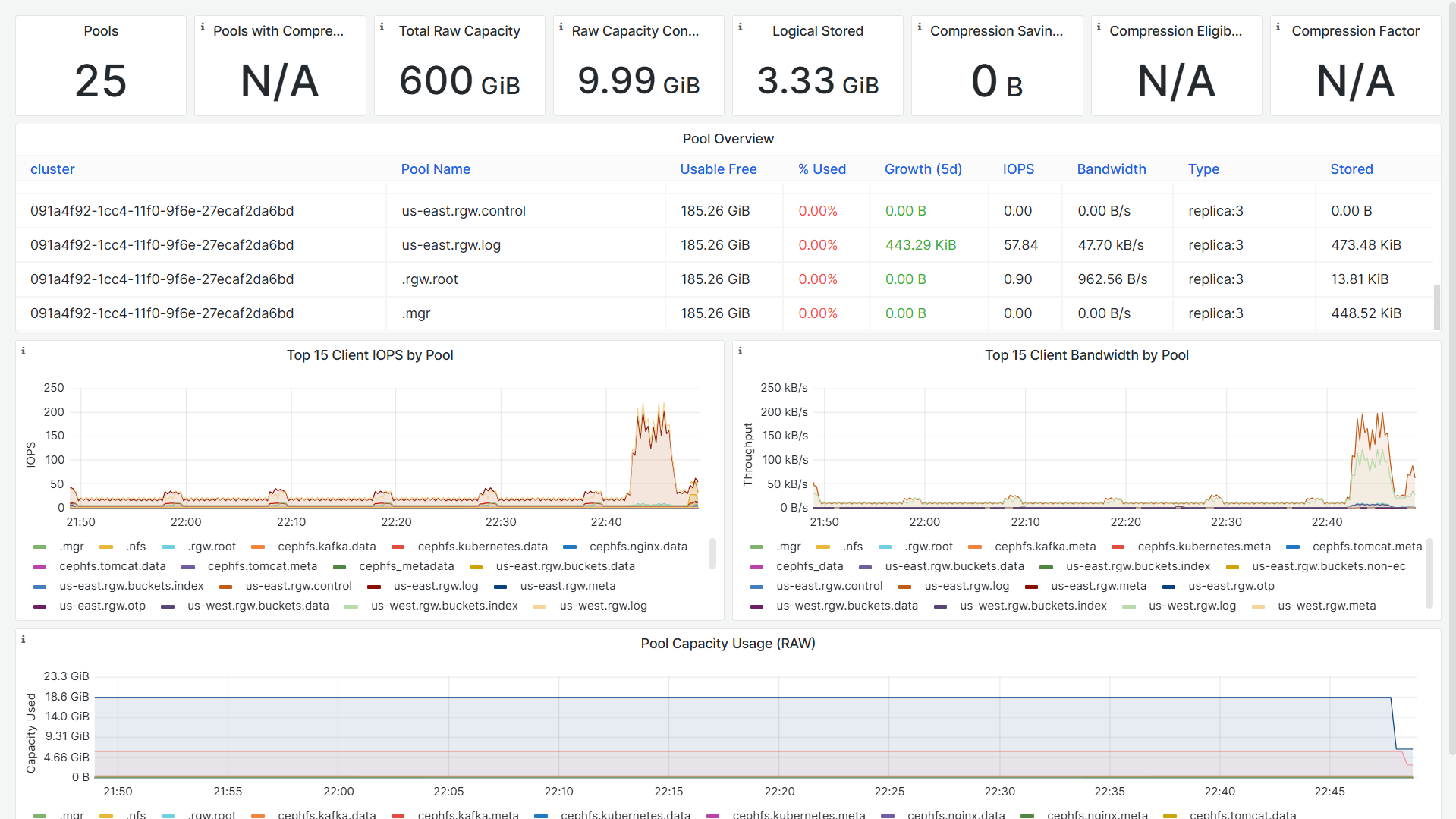
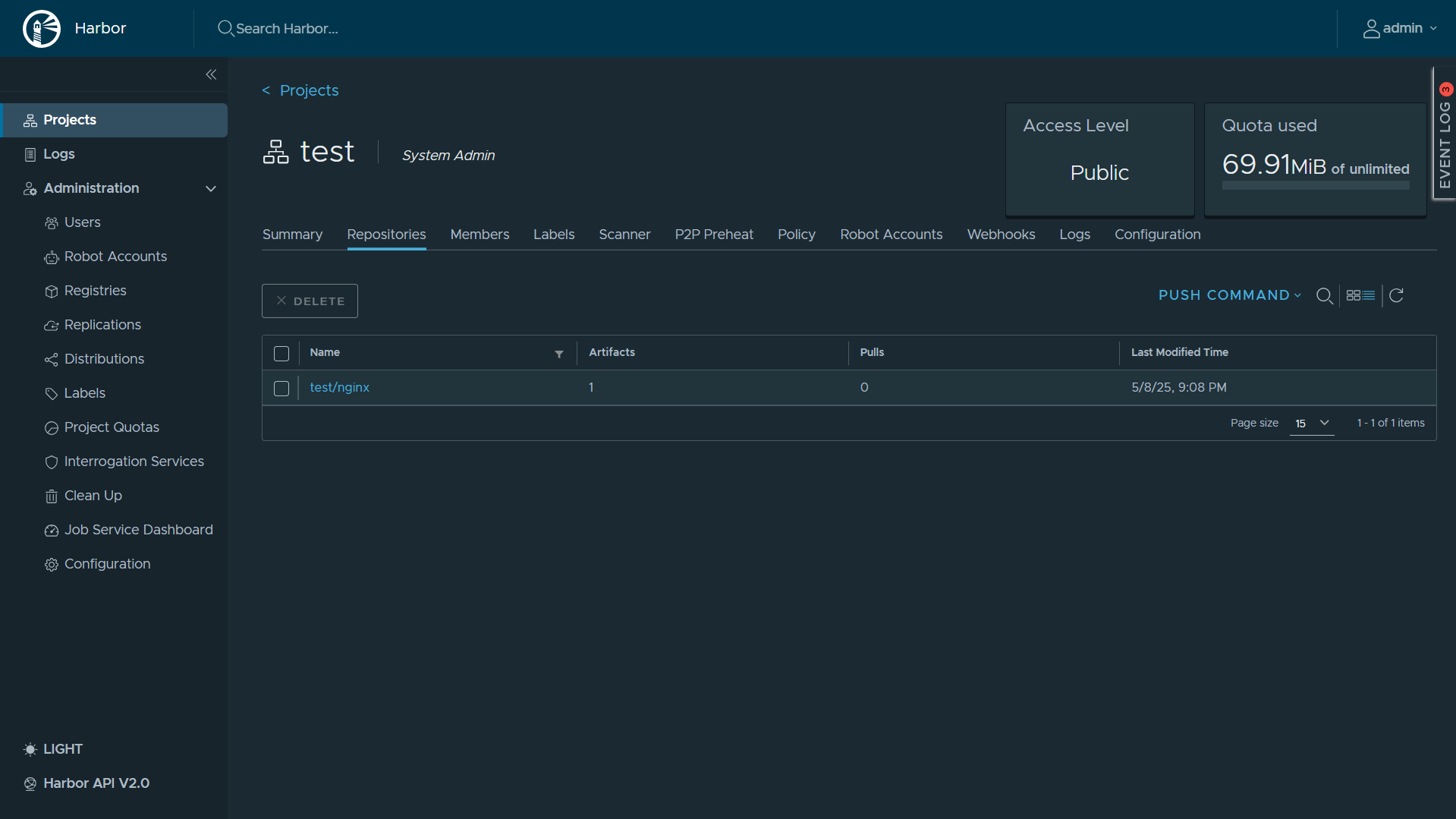
8.2 Harbor Dashboard
- https://192.168.126.59/harbor/projects/7/repositories
root@registry:/opt/harbor# docker ps
CONTAINER ID   IMAGE                                   COMMAND                  CREATED             STATUS                       PORTS                                                                            NAMES
0c651d975c3a   goharbor/harbor-jobservice:v2.13.0      "/harbor/entrypoint.…"   About an hour ago   Up About an hour (healthy)                                                                                    harbor-jobservice
2752986d66b9   goharbor/nginx-photon:v2.13.0           "nginx -g 'daemon of…"   About an hour ago   Up About an hour (healthy)   0.0.0.0:80->8080/tcp, :::80->8080/tcp, 0.0.0.0:443->8443/tcp, :::443->8443/tcp   nginx
a8d8f4b64d23   goharbor/trivy-adapter-photon:v2.13.0   "/home/scanner/entry…"   About an hour ago   Up About an hour (healthy)                                                                                    trivy-adapter
c499537fdee7   goharbor/harbor-core:v2.13.0            "/harbor/entrypoint.…"   About an hour ago   Up About an hour (healthy)                                                                                    harbor-core
78f187407ce4   goharbor/harbor-registryctl:v2.13.0     "/home/harbor/start.…"   About an hour ago   Up About an hour (healthy)                                                                                    registryctl
9e4a0e9f41be   goharbor/harbor-db:v2.13.0              "/docker-entrypoint.…"   2 hours ago         Up About an hour (healthy)                                                                                    harbor-db
bb7fc10f2f0d   goharbor/registry-photon:v2.13.0        "/home/harbor/entryp…"   2 hours ago         Up About an hour (healthy)                                                                                    registry
b546e8b31873   goharbor/harbor-portal:v2.13.0          "nginx -g 'daemon of…"   2 hours ago         Up About an hour (healthy)                                                                                    harbor-portal
3adbb4648c70   goharbor/redis-photon:v2.13.0           "redis-server /etc/r…"   2 hours ago         Up About an hour (healthy)                                                                                    redis
ea43812eec71   goharbor/harbor-log:v2.13.0             "/bin/sh -c /usr/loc…"   2 hours ago         Up About an hour (healthy)   127.0.0.1:1514->10514/tcp                                                        harbor-log
root@registry:/opt/harbor#
root@ceph-admin-120:~# ceph -s
  cluster:
    id:     091a4f92-1cc4-11f0-9f6e-27ecaf2da6bd
    health: HEALTH_OK

  services:
    mon: 3 daemons, quorum ceph-mon-121,ceph-mon-123,ceph-mon-122 (age 7h)
    mgr: ceph-mon-121.lecujw(active, since 7h), standbys: ceph-mon-122.fqawgp
    mds: 5/5 daemons up, 6 standby
    osd: 6 osds: 6 up (since 7h), 6 in (since 2w)
    rgw: 3 daemons active (3 hosts, 2 zones)

  data:
    volumes: 5/5 healthy
    pools:   25 pools, 785 pgs
    objects: 4.29k objects, 8.3 GiB
    usage:   28 GiB used, 572 GiB / 600 GiB avail
    pgs:     785 active+clean

  io:
    client:   17 KiB/s rd, 29 op/s rd, 0 op/s wr

root@ceph-admin-120:~#
root@ceph-admin-120:~#
root@ceph-admin-120:~#
root@ceph-admin-120:~#
root@ceph-admin-120:~# radosgw-admin sync status
          realm 639246d6-4f91-4b3f-b349-1c3506ead7d7 (movies)
      zonegroup 4e44ec7d-cef8-4c86-bf72-af8ddd5f5f9e (us)
           zone 9fe33ef0-13da-40a7-bef1-ad7e3650b2ac (us-east)
   current time 2025-05-08T14:42:49Z
zonegroup features enabled: resharding
                   disabled: compress-encrypted
  metadata sync no sync (zone is master)
      data sync source: 4876ce56-133c-491a-aa8f-806343e5385b (us-west)
                        syncing
                        full sync: 0/128 shards
                        incremental sync: 128/128 shards
                        data is caught up with source
root@ceph-admin-120:~#

火山引擎开发者社区是火山引擎打造的AI技术生态平台,聚焦Agent与大模型开发,提供豆包系列模型(图像/视频/视觉)、智能分析与会话工具,并配套评测集、动手实验室及行业案例库。社区通过技术沙龙、挑战赛等活动促进开发者成长,新用户可领50万Tokens权益,助力构建智能应用。
更多推荐
 5
5 0
0- 0


 已为社区贡献2条内容

所有评论(0)