记录一下从腾讯大模型lke获取token的过程
·
登陆腾讯云-首页-开发者工具-API Explorer-导航栏API Explorer-对话端相关接口-获取ws token
左侧各种语言代码示例-golang如下
package main

import (
        "fmt"

        "github.com/tencentcloud/tencentcloud-sdk-go/tencentcloud/common"
        "github.com/tencentcloud/tencentcloud-sdk-go/tencentcloud/common/errors"
        "github.com/tencentcloud/tencentcloud-sdk-go/tencentcloud/common/profile"
        lke "github.com/tencentcloud/tencentcloud-sdk-go/tencentcloud/lke/v20231130"
)

func main() {
        // 实例化一个认证对象,入参需要传入腾讯云账户 SecretId 和 SecretKey,此处还需注意密钥对的保密
        // 代码泄露可能会导致 SecretId 和 SecretKey 泄露,并威胁账号下所有资源的安全性。以下代码示例仅供参考,建议采用更安全的方式来使用密钥,请参见:https://cloud.tencent.com/document/product/1278/85305
        // 密钥可前往官网控制台 https://console.cloud.tencent.com/cam/capi 进行获取
        credential := common.NewCredential(
                "SecretId",
                "SecretKey",
        )
        // 实例化一个client选项,可选的,没有特殊需求可以跳过
        cpf := profile.NewClientProfile()
        cpf.HttpProfile.Endpoint = "lke.tencentcloudapi.com"
        // 实例化要请求产品的client对象,clientProfile是可选的
        client, _ := lke.NewClient(credential, "ap-guangzhou", cpf)

        // 实例化一个请求对象,每个接口都会对应一个request对象
        request := lke.NewGetWsTokenRequest()

        request.Type = common.Int64Ptr(5)
        request.BotAppKey = common.StringPtr("AppKey")

        // 返回的resp是一个GetWsTokenResponse的实例,与请求对象对应
        response, err := client.GetWsToken(request)
        if _, ok := err.(*errors.TencentCloudSDKError); ok {
                fmt.Printf("An API error has returned: %s", err)
                return
        }
        if err != nil {
                panic(err)
        }
        // 输出json格式的字符串回包
        fmt.Printf("%s", response.ToJsonString())
}
----在docker部署时遇到x509认证错误,已经在docker中安装了ca,但仍然没有解决,只能暂时跳过认证。。。。。
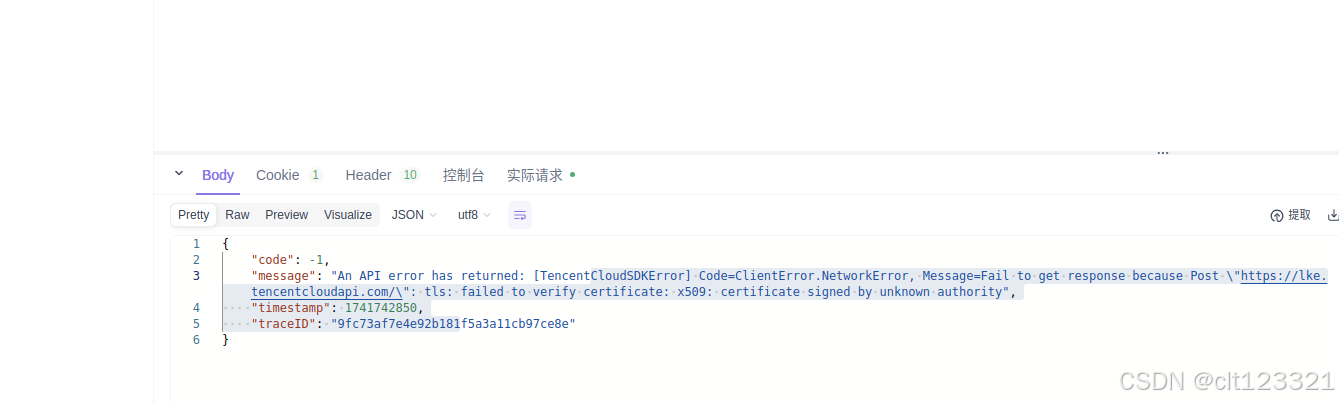
// 创建自定义的 Transport,跳过证书验证
	tr := &http.Transport{
		TLSClientConfig: &tls.Config{InsecureSkipVerify: true},
	}
	client := &http.Client{Transport: tr}
中国智能体开发者社区,聚焦智能体与大模型开发,提供前沿资讯、实用工具链、开源项目及行业案例。通过技术沙龙、开发者大赛等活动,促进经验交流与协作,助力开发者快速构建创新智能应用。
更多推荐


 3
3 0
0- 0


 已为社区贡献2条内容

所有评论(0)