graphRAG+ollama离线环境本地化部署
graphRAG+ollama离线环境本地化部署
graphrag论文由微软发布:From Local to Global: A Graph RAG Approach to Query-Focused Summarization,阅读地址:https://arxiv.org/pdf/2404.16130
1. ollama部署
conda环境准备
# 有时候sh执行时可能报错 [[ not found的错误,此时用 bash 执行
sh Miniconda3-....sh
# 查看安装是否成功
../miniconda3/bin/conda --version
# 激活base环境
../miniconda3/bin/conda init bash
source ~/.bashrc
安装ollama的python依赖包
pip install ollama
下载ollama的install文件
https://ollama.com/install.sh
下载后修改如下内容
status "Downloading ollama..."
# 注释此行
#curl --fail --show-error --location --progress-bar -o $TEMP_DIR/ollama "https://ollama.com/download/ollama-linux-${ARCH}${VER_PARAM}"
status "Installing ollama to $BINDIR..."
$SUDO install -o0 -g0 -m755 -d $BINDIR
#$SUDO install -o0 -g0 -m755 $TEMP_DIR/ollama $BINDIR/ollama
# 修改安装包位置
$SUDO install -o0 -g0 -m755 ./ollama-linux-amd64 $BINDIR/ollama
下载安装包,与install.sh放在同一目录
https://github.com/ollama/ollama/releases/
执行安装
./install.sh
在宿主机上直接安装时,ollama会默认启动,如果没有启动的话,需要手动启动ollama服务,启动后可以打开网页:http://127.0.0.1:11434
ollama serve
2. 下载模型
登录:https://www.ollama.com/library,查看ollama已提供的模型
graphRAG需要一个大模型和一个向量模型,模型存放在…/.ollama/models位置。
ollama pull mistral #llm
ollama pull nomic-embed-text #embedding
ollama list
由于ollama使用的是GGUF格式的模型文件,在内网中pull无法连接时,可以先在外网安装一个ollama,将模型下载下来,将models文件夹复制到内网使用。

ollama采用如下命令调用模型。
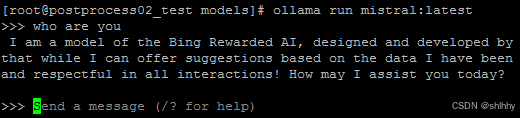
采用api调用ollama的模型
# llm
curl http://localhost:11434/api/chat -d '{
"model": "mistral",
"messages": [
{
"role": "user",
"content": "why is the sky blue?"
}
],
"stream": false
}'
# embedding
curl http://localhost:11434/api/embeddings -d '{
"model": "nomic-embed-text",
"prompt": "The sky is blue because of Rayleigh scattering"
}'
3. 运行graphRAG
安装graphrag依赖包
pip install graphrag
在某一目录下新建input目录,将一个或多个txt文件放入input目录下。
官方提供的示例时pg24022.txt是狄更斯的小说《圣诞颂歌》,下载地址如下。
curl https://www.gutenberg.org/cache/epub/24022/pg24022.txt
初始化工作区,此时会生成一系列空文件夹,cache,output,settings.yaml等。
python -m graphrag.index --init --root ./graphrag
修改.env文件的GRAPHRAG_API_KEY为ollama
修改生成的settings.yaml文件
llm:
model: mistral
# 需要注意的是这是使用v1,尽管前面在测试ollama的api接口时,采用/api/chat,但是在graphrag中采用的是/v1/chat/completions
api_base: http://localhost:11434/v1
embeddings:
llm:
model: nomic-embed-text
api_base: http://localhost:11434/api
修改完毕后,构建图
python -m graphrag.index --root ./graphrag
构图的工作流如下,基于微软在论文中提到的实现思路,执行过程GraphRAG主要实现了如下功能:
Source Documents → Text Chunks:将源文档分割成文本块。
Text Chunks → Element Instances:从每个文本块中提取图节点和边的实例。
Element Instances → Element Summaries:为每个图元素生成摘要。
Element Summaries → Graph Communities:使用社区检测算法将图划分为社区。
Graph Communities → Community Summaries:为每个社区生成摘要。
Community Summaries → Community Answers → Global Answer:使用社区摘要生成局部答案,然后汇总这些局部答案以生成全局答案。
执行中报错,修改graphrag\llm\openai\openai_embeddings_llm.py,注意model要修改成自已使用的向量模型
embedding_list = []
for inp in input:
embedding = ollama.embeddings(model="nomic-embed-text",prompt=inp)` `
embedding_list.append(embedding["embedding"])` `
return embedding_list
执行中报错,这是因为graphrag依赖tiktoken,联网环境下tiktoken自动下载cl100k_base编码,在离线环境中需要修改。
Exception type: <class ‘requests.exceptions.ConnectionError’>
Exception value: HTTPSConnectionPool(host=‘openaipublic.blob.core.windows.net’, port=443): Max retries exceeded with url: /encodings/cl100k_base.tiktoken (Caused by NameResolutionError(“<urllib3.connection.HTTPSConnection object at 0x7fdf29eef1f0>: Failed to resolve ‘openaipublic.blob.core.windows.net’ ([Errno -3] Temporary failure in name resolution)”))
首先根据报错信息确认blobpath:https://openaipublic.blob.core.windows.net/encodings/cl100k_base.tiktoken
手动下载cl100k_base.tiktoken文件,根据源码中read_file_cached()函数中cache_key的计算方法,将文件重命名为:9b5ad71b2ce5302211f9c61530b329a4922fc6a4
在graphrag调用tiktoken位置,指定cl100k_base.tiktoken的位置:
import os
os.environ["TIKTOKEN_CACHE_DIR"] = "/mnt/temp/graphrag"
上述方法失败了,直接修改read_file()函数,解决,不报错了。
def read_file():
blobpath = "https://openaipublic.blob.core.windows.net/encodings/cl100k_base.tiktoken"
cache_key = hashlib.sha1(blobpath.encode()).hexdigest()
cache_dir = "/mnt/temp/graphrag"
cache_path = os.path.join(cache_dir, cache_key)
with open(cache_path, "rb") as f:
data = f.read()
return data
运行完毕后,输出结果保存在output目录下,包含了一系列结果文件,图谱结果存于parquet、graphml文件中。
output/{curent_datetime}/artifacts/
create_final_entities.parquet:查看提取的实体数据
create_final_nodes.parquet:知识图谱中各类节点的信息
create_final_relationships.parquet:查看关系数据
create_final_community_reports.parquet:存放了通过社区算法聚合而来的各个社区信息描述和标题
create_final_text_units.parquet:源文件被分割后的文本片段
进行全局查询之前,先安装依赖。
pip install langchain_community
# 全局查询
# 询问本作的故事主题
# Global(全局)代表我对整本书提问
# global查询模式下的数据来源是create_final_nodes.parquet、create_final_entities.parquet 和create_final_community_reports.parquet
python -m graphrag.query --root ./ragtest --method global "What are the top themes in this story?"
# 局部查询
# 询问具体的细节
# 本地搜索方法从知识图谱中识别出与用户输入语义相关的一组实体。这些实体作为进入知识图谱的切入点,使得可以提取进一步的相关细节,例如连接的实体、关系、实体协变量和社区报告。此外,它还从与识别出的实体相关的原始输入文档中提取相关的文本片段。然后,这些候选数据源会被优先排序和过滤,以适应预定义大小的单个上下文窗口,从而用于生成对用户查询的响应
# local查询模式下的数据来源除了global涉及的数据之外,还包含create_final_text_units.parquet和create_final_relationships.parquet
python -m graphrag.query --root ./ragtest --method local "Who is Scrooge, and what are his main relationships?"
调用graphrag.query时报错OS error,定位后发现,接口调用过程中使用了lance.write_dataset()函数将向量写到本地目录,而上述安装与初始化操作在容器挂载目录/mnt下执行,无写入权限,因此将整个工作区移动到/home的个人目录下。
global提问报错:json.decoder.JSONDecodeError: Expecting value: line 1 column 1 (char 0)
修改…/graphrag/query/structured_search/global_search/search.py
# 定位到报错的函数:_map_response_single_batch
# 这是因为ollama中LLM的api的输入参数格式与graphrag默认LLM的格式不一样,因此,需要进行修改
# 查阅ollama的参考文献,找到mistral模型的/v1/chat/completions接口的输入参数格式
#search_messages = [
# {"role": "system", "content": search_prompt},
# {"role": "user", "content": query},
#]
search_messages = [ {"role": "user", "content": search_prompt + "\n\n### USER QUESTION ### \n\n" + query} ]
修改之后,成功执行。
local提问报错:ZeroDivisionError: Weights sum to zero, can’t be normalized
修改…/graphrag\query\llm\oai\embedding.py
# ollama版本不同时,需要根据实际情况修改
from langchain_community.embeddings.ollama import OllamaEmbeddings
# 定位到for attempt in retryer:
# with attempt:
# 将embedding计算修改为如下
embedding = (OllamaEmbeddings(model=self.model).embed_query(text) or [])
# 定位到async for attempt in retryer:
# with attempt:
# 将embedding计算修改为如下
embedding = (await OllamaEmbeddings(model=self.model).embed_query(text) or [])
修改之后,成功执行。
4. 讨论
GraphRAG最核心的卖点就在于一定程度上解决了聚焦于查询的总结性(QueryFocused Summarization,QFS)任务,提出了一种全局图形RAG方法,将知识图生成、检索增强生成(RAG)和查询焦点摘要(QFS)相结合,以支持对整个文本语料库进行人类情境理解。
项目中实体抽取完全采用大模型实现,并且在三元组的schema方面也未设置任何约束。
————————————————
版权声明:本文为博主原创文章,遵循 CC 4.0 BY-SA 版权协议,转载请附上原文出处链接和本声明。
原文链接:

火山引擎开发者社区是火山引擎打造的AI技术生态平台,聚焦Agent与大模型开发,提供豆包系列模型(图像/视频/视觉)、智能分析与会话工具,并配套评测集、动手实验室及行业案例库。社区通过技术沙龙、挑战赛等活动促进开发者成长,新用户可领50万Tokens权益,助力构建智能应用。
更多推荐
 0
0 0
0- 0


 已为社区贡献23条内容

所有评论(0)