TDengine 产品组件:taosAdapter
taosAdapter 是一个 TDengine 的配套工具,是 TDengine 和应用程序之间的桥梁和适配器,实例运行在服务器上,对外提供 Restful 及 WebSocket 的无需安装 TDengine 客户端的轻量化访问 TDengine 接口服务。TDengine 的各语言连接器通过 WebSocket 接口与 TDengine 进行通信,因此必须安装 taosAdapter。
简介
taosAdapter 是一个 TDengine 的配套工具,是 TDengine 和应用程序之间的桥梁和适配器,实例运行在服务器上,对外提供 Restful 及 WebSocket 的无需安装 TDengine 客户端的轻量化访问 TDengine 接口服务。
TDengine 的各语言连接器通过 WebSocket 接口与 TDengine 进行通信,因此必须要确保 taosAdapter 正常运行。
同时它也提供了一种易于使用和高效的方式来直接从数据收集代理软件(如 Telegraf、StatsD、collectd 等)摄取数据。它还提供了 InfluxDB/OpenTSDB 兼容的数据摄取接口,允许 InfluxDB/OpenTSDB 应用程序无缝移植到 TDengine。
架构图如下: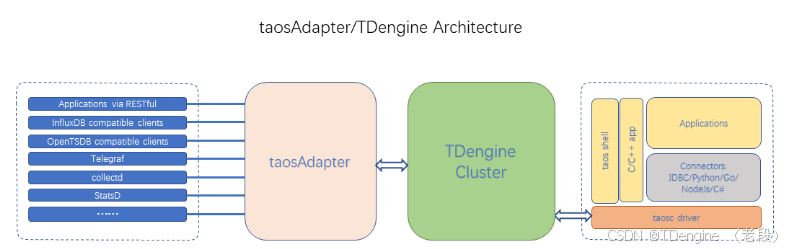
功能列表
taosAdapter 提供了以下功能:
- WebSocket 接口:
支持通过 WebSocket 协议执行 SQL、无模式数据写入、参数绑定和数据订阅功能。 - 兼容 InfluxDB v1 写接口:
https://docs.influxdata.com/influxdb/v2.0/reference/api/influxdb-1x/write/ - 兼容 OpenTSDB JSON 和 telnet 格式写入:
- collectd 数据写入:
collectd 是一个系统统计收集守护程序,请访问 https://collectd.org/ 了解更多信息。 - StatsD 数据写入:
StatsD 是一个简单而强大的统计信息汇总的守护程序。请访问 https://github.com/statsd/statsd 了解更多信息。 - icinga2 OpenTSDB writer 数据写入:
icinga2 是一个收集检查结果指标和性能数据的软件。请访问 https://icinga.com/docs/icinga-2/latest/doc/14-features/#opentsdb-writer 了解更多信息。 - TCollector 数据写入:
TCollector是一个客户端进程,从本地收集器收集数据,并将数据推送到 OpenTSDB。请访问 http://opentsdb.net/docs/build/html/user_guide/utilities/tcollector.html 了解更多信息。 - node_exporter 采集写入:
node_export 是一个机器指标的导出器。请访问 https://github.com/prometheus/node_exporter 了解更多信息。 - Prometheus remote_read 和 remote_write:
remote_read 和 remote_write 是 Prometheus 数据读写分离的集群方案。请访问https://prometheus.io/blog/2019/10/10/remote-read-meets-streaming/#remote-apis 了解更多信息。 - RESTful 接口:
RESTful API
WebSocket 接口
各语言连接器通过 taosAdapter 的 WebSocket 接口,能够实现 SQL 执行、无模式写入、参数绑定和数据订阅功能。参考 开发指南。
兼容 InfluxDB v1 写接口
您可以使用任何支持 HTTP 协议的客户端访问 Restful 接口地址 http://<fqdn>:6041/influxdb/v1/write 来写入 InfluxDB 兼容格式的数据到 TDengine。
支持 InfluxDB 参数如下:
db指定 TDengine 使用的数据库名precisionTDengine 使用的时间精度uTDengine 用户名pTDengine 密码ttl自动创建的子表生命周期,以子表的第一条数据的 TTL 参数为准,不可更新。更多信息请参考 创建表文档 的 TTL 参数。
注意: 目前不支持 InfluxDB 的 token 验证方式,仅支持 Basic 验证和查询参数验证。
示例:
curl --request POST http://127.0.0.1:6041/influxdb/v1/write?db=test --user "root:taosdata" --data-binary "measurement,host=host1 field1=2i,field2=2.0 1577836800000000000"
兼容 OpenTSDB JSON 和 telnet 格式写入
您可以使用任何支持 HTTP 协议的客户端访问 Restful 接口地址 http://<fqdn>:6041/<APIEndPoint> 来写入 OpenTSDB 兼容格式的数据到 TDengine。EndPoint 如下:
/opentsdb/v1/put/json/<db>
/opentsdb/v1/put/telnet/<db>
collectd 数据写入
配置 taosAdapter
配置 taosAdapter 接收 collectd 数据的方法:
-
在 taosAdapter 配置文件(默认位置为 /etc/taos/taosadapter.toml)中使能配置项
...
[opentsdb_telnet]
enable = true
maxTCPConnections = 250
tcpKeepAlive = false
dbs = ["opentsdb_telnet", "collectd", "icinga2", "tcollector"]
ports = [6046, 6047, 6048, 6049]
user = "root"
password = "taosdata"
...
其中 taosAdapter 默认写入的数据库名称为
collectd,也可以修改 taosAdapter 配置文件 dbs 项来指定不同的名称。user 和 password 填写实际 TDengine 配置的值。修改过配置文件 taosAdapter 需重新启动。 -
使用 taosAdapter 命令行参数或设置环境变量启动的方式,使能 taosAdapter 接收 collectd 数据功能,具体细节请参考 taosAdapter 的参考手册。
配置 collectd
collectd 使用插件机制可以以多种形式将采集到的监控数据写入到不同的数据存储软件。TDengine 支持直接采集插件和 write_tsdb 插件。
-
配置直接采集插件
修改 collectd 配置文件(默认位置 /etc/collectd/collectd.conf)相关配置项。
LoadPlugin network
<Plugin network>
         Server "<taosAdapter's host>" "<port for collectd direct>"
</Plugin>
其中 <taosAdapter’s host> 填写运行 taosAdapter 的服务器域名或 IP 地址。<port for collectd direct> 填写 taosAdapter 用于接收 collectd 数据的端口(默认为 6045)。
示例如下:
LoadPlugin network <Plugin network> Server "127.0.0.1" "6045" </Plugin> -
配置 write_tsdb 插件
修改 collectd 配置文件(默认位置 /etc/collectd/collectd.conf)相关配置项。
LoadPlugin write_tsdb
<Plugin write_tsdb>
        <Node>
                Host "<taosAdapter's host>"
                Port "<port for collectd write_tsdb plugin>"
                ...
        </Node>
</Plugin>
其中 <taosAdapter’s host> 填写运行 taosAdapter 的服务器域名或 IP 地址。<port for collectd write_tsdb plugin> 填写 taosAdapter 用于接收 collectd write_tsdb 插件的数据(默认为 6047)。
LoadPlugin write_tsdb
<Plugin write_tsdb>
        <Node>
                Host "127.0.0.1"
                Port "6047"
                HostTags "status=production"
                StoreRates false
                AlwaysAppendDS false
        </Node>
</Plugin>
然后重启 collectd:
systemctl restart collectd
StatsD 数据写入
配置 taosAdapter
配置 taosAdapter 接收 StatsD 数据的方法:
-
在 taosAdapter 配置文件(默认位置 /etc/taos/taosadapter.toml)中使能配置项
...
[statsd]
enable = true
port = 6044
db = "statsd"
user = "root"
password = "taosdata"
worker = 10
gatherInterval = "5s"
protocol = "udp"
maxTCPConnections = 250
tcpKeepAlive = false
allowPendingMessages = 50000
deleteCounters = true
deleteGauges = true
deleteSets = true
deleteTimings = true
...
其中 taosAdapter 默认写入的数据库名称为
statsd,也可以修改 taosAdapter 配置文件 db 项来指定不同的名称。user 和 password 填写实际 TDengine 配置的值。修改过配置文件 taosAdapter 需重新启动。 -
使用 taosAdapter 命令行参数或设置环境变量启动的方式,使能 taosAdapter 接收 StatsD 数据功能,具体细节请参考 taosAdapter 的参考手册
配置 StatsD
使用 StatsD 需要下载其源代码。其配置文件请参考其源代码下载到本地的根目录下的示例文件 exampleConfig.js 进行修改。其中 <taosAdapter’s host> 填写运行 taosAdapter 的服务器域名或 IP 地址,<port for StatsD> 请填写 taosAdapter 接收 StatsD 数据的端口(默认为 6044)。
backends 部分添加 "./backends/repeater"
repeater 部分添加 { host:'<taosAdapter's host>', port: <port for StatsD>}
示例配置文件:
{
port: 8125
, backends: ["./backends/repeater"]
, repeater: [{ host: '127.0.0.1', port: 6044}]
}
增加如下内容后启动 StatsD(假设配置文件修改为 config.js)。
npm install
node stats.js config.js &
icinga2 OpenTSDB writer 数据写入
配置 taosAdapter
配置 taosAdapter 接收 icinga2 数据的方法:
-
在 taosAdapter 配置文件(默认位置 /etc/taos/taosadapter.toml)中使能配置项
...
[opentsdb_telnet]
enable = true
maxTCPConnections = 250
tcpKeepAlive = false
dbs = ["opentsdb_telnet", "collectd", "icinga2", "tcollector"]
ports = [6046, 6047, 6048, 6049]
user = "root"
password = "taosdata"
...
其中 taosAdapter 默认写入的数据库名称为
icinga2,也可以修改 taosAdapter 配置文件 dbs 项来指定不同的名称。user 和 password 填写实际 TDengine 配置的值。修改过 taosAdapter 需重新启动。 -
使用 taosAdapter 命令行参数或设置环境变量启动的方式,使能 taosAdapter 接收 icinga2 数据功能,具体细节请参考 taosAdapter 的参考手册
配置 icinga2
-
使能 icinga2 的 opentsdb-writer(参考链接 https://icinga.com/docs/icinga-2/latest/doc/14-features/#opentsdb-writer)
-
修改配置文件
/etc/icinga2/features-enabled/opentsdb.conf填写 <taosAdapter’s host> 为运行 taosAdapter 的服务器的域名或 IP 地址,<port for icinga2> 填写 taosAdapter 支持接收 icinga2 数据的相应端口(默认为 6048)object OpenTsdbWriter "opentsdb" { host = "<taosAdapter's host>" port = <port for icinga2> }示例文件:
object OpenTsdbWriter "opentsdb" {
  host = "127.0.0.1"
  port = 6048
}
TCollector 数据写入
配置 taosAdapter
配置 taosAdapter 接收 TCollector 数据的方法:
-
在 taosAdapter 配置文件(默认位置 /etc/taos/taosadapter.toml)中使能配置项
...
[opentsdb_telnet]
enable = true
maxTCPConnections = 250
tcpKeepAlive = false
dbs = ["opentsdb_telnet", "collectd", "icinga2", "tcollector"]
ports = [6046, 6047, 6048, 6049]
user = "root"
password = "taosdata"
...
其中 taosAdapter 默认写入的数据库名称为
tcollector,也可以修改 taosAdapter 配置文件 dbs 项来指定不同的名称。user 和 password 填写实际 TDengine 配置的值。修改过配置文件 taosAdapter 需重新启动。 -
使用 taosAdapter 命令行参数或设置环境变量启动的方式,使能 taosAdapter 接收 tcollector 数据功能,具体细节请参考 taosAdapter 的参考手册
配置 TCollector
使用 TCollector 需下载其源代码。其配置项在其源代码中。注意:TCollector 各个版本区别较大,这里仅以当前 master 分支最新代码 (git commit: 37ae920) 为例。
修改 collectors/etc/config.py 和 tcollector.py 两个文件中相应内容。将原指向 OpenTSDB 宿主机的地址修改为 taosAdapter 被部署的服务器域名或 IP 地址,修改端口为 taosAdapter 支持 TCollector 使用的相应端口(默认为 6049)。
示例为源代码修改内容的 git diff 输出:
index e7e7a1c..ec3e23c 100644
--- a/collectors/etc/config.py
+++ b/collectors/etc/config.py
@@ -59,13 +59,13 @@ def get_defaults():
         'http_password': False,
         'reconnectinterval': 0,
         'http_username': False,
-        'port': 4242,
+        'port': 6049,
         'pidfile': '/var/run/tcollector.pid',
         'http': False,
         'http_api_path': "api/put",
         'tags': [],
         'remove_inactive_collectors': False,
-        'host': '',
+        'host': '127.0.0.1',
         'logfile': '/var/log/tcollector.log',
         'cdir': default_cdir,
         'ssl': False,
diff --git a/tcollector.py b/tcollector.py
index 21f9b23..4c71ba2 100755
--- a/tcollector.py
+++ b/tcollector.py
@@ -64,7 +64,7 @@ ALIVE = True
 # exceptions, something is not right and tcollector will shutdown.
 # Hopefully some kind of supervising daemon will then restart it.
 MAX_UNCAUGHT_EXCEPTIONS = 100
-DEFAULT_PORT = 4242
+DEFAULT_PORT = 6049
 MAX_REASONABLE_TIMESTAMP = 2209212000  # Good until Tue  3 Jan 14:00:00 GMT 2040
 # How long to wait for datapoints before assuming
 # a collector is dead and restarting it
@@ -943,13 +943,13 @@ def parse_cmdline(argv):
             'http_password': False,
             'reconnectinterval': 0,
             'http_username': False,
-            'port': 4242,
+            'port': 6049,
             'pidfile': '/var/run/tcollector.pid',
             'http': False,
             'http_api_path': "api/put",
             'tags': [],
             'remove_inactive_collectors': False,
-            'host': '',
+            'host': '127.0.0.1',
             'logfile': '/var/log/tcollector.log',
             'cdir': default_cdir,
             'ssl': False,
node_exporter 采集写入
Prometheus 使用的由 *NIX 内核暴露的硬件和操作系统指标的输出器
- 启用 taosAdapter 的配置 node_exporter.enable
- 设置 node_exporter 的相关配置
- 重新启动 taosAdapter
Prometheus remote_read 和 remote_write
配置 Prometheus 是通过编辑 Prometheus 配置文件 prometheus.yml (默认位置 /etc/prometheus/prometheus.yml)完成的。
配置第三方数据库地址
将其中的 remote_read url 和 remote_write url 指向运行 taosAdapter 服务的服务器域名或 IP 地址,REST 服务端口(taosAdapter 默认使用 6041),以及希望写入 TDengine 的数据库名称,并确保相应的 URL 形式如下:
- remote_read url :
http://<taosAdapter's host>:<REST service port>/prometheus/v1/remote_read/<database name> - remote_write url :
http://<taosAdapter's host>:<REST service port>/prometheus/v1/remote_write/<database name>
配置 Basic 验证
- username: <TDengine’s username>
- password: <TDengine’s password>
prometheus.yml 文件中 remote_write 和 remote_read 相关部分配置示例
remote_write:
  - url: "http://localhost:6041/prometheus/v1/remote_write/prometheus_data"
    basic_auth:
      username: root
      password: taosdata

remote_read:
  - url: "http://localhost:6041/prometheus/v1/remote_read/prometheus_data"
    basic_auth:
      username: root
      password: taosdata
    remote_timeout: 10s
    read_recent: true
RESTful 接口
您可以使用任何支持 HTTP 协议的客户端通过访问 RESTful 接口地址 http://<fqdn>:6041/rest/sql 来写入数据到 TDengine 或从 TDengine 中查询数据。细节请参考 REST API 文档。
安装
taosAdapter 是 TDengine 服务端软件 的一部分,如果您使用 TDengine server 您不需要任何额外的步骤来安装 taosAdapter。您可以从涛思数据官方网站下载 TDengine server 安装包。如果需要将 taosAdapter 分离部署在 TDengine server 之外的服务器上,则应该在该服务器上安装完整的 TDengine 来安装 taosAdapter。如果您需要使用源代码编译生成 taosAdapter,您可以参考构建 taosAdapter文档。
安装完成后使用命令 systemctl start taosadapter 可以启动 taosAdapter 服务。
配置
taosAdapter 支持通过命令行参数、环境变量和配置文件来进行配置。默认配置文件是 /etc/taos/taosadapter.toml。
命令行参数优先于环境变量优先于配置文件,命令行用法是 arg=val,如 taosadapter -p=30000 --debug=true,详细列表如下:
Usage of taosAdapter:
      --collectd.db string                           collectd db name. Env "TAOS_ADAPTER_COLLECTD_DB" (default "collectd")
      --collectd.enable                              enable collectd. Env "TAOS_ADAPTER_COLLECTD_ENABLE" (default true)
      --collectd.password string                     collectd password. Env "TAOS_ADAPTER_COLLECTD_PASSWORD" (default "taosdata")
      --collectd.port int                            collectd server port. Env "TAOS_ADAPTER_COLLECTD_PORT" (default 6045)
      --collectd.ttl int                             collectd data ttl. Env "TAOS_ADAPTER_COLLECTD_TTL"
      --collectd.user string                         collectd user. Env "TAOS_ADAPTER_COLLECTD_USER" (default "root")
      --collectd.worker int                          collectd write worker. Env "TAOS_ADAPTER_COLLECTD_WORKER" (default 10)
  -c, --config string                                config path default /etc/taos/taosadapter.toml
      --cors.allowAllOrigins                         cors allow all origins. Env "TAOS_ADAPTER_CORS_ALLOW_ALL_ORIGINS" (default true)
      --cors.allowCredentials                        cors allow credentials. Env "TAOS_ADAPTER_CORS_ALLOW_Credentials"
      --cors.allowHeaders stringArray                cors allow HEADERS. Env "TAOS_ADAPTER_ALLOW_HEADERS"
      --cors.allowOrigins stringArray                cors allow origins. Env "TAOS_ADAPTER_ALLOW_ORIGINS"
      --cors.allowWebSockets                         cors allow WebSockets. Env "TAOS_ADAPTER_CORS_ALLOW_WebSockets"
      --cors.exposeHeaders stringArray               cors expose headers. Env "TAOS_ADAPTER_Expose_Headers"
      --debug                                        enable debug mode. Env "TAOS_ADAPTER_DEBUG" (default true)
      --help                                         Print this help message and exit
      --httpCodeServerError                          Use a non-200 http status code when server returns an error. Env "TAOS_ADAPTER_HTTP_CODE_SERVER_ERROR"
      --influxdb.enable                              enable influxdb. Env "TAOS_ADAPTER_INFLUXDB_ENABLE" (default true)
      --instanceId int                               instance ID. Env "TAOS_ADAPTER_INSTANCE_ID" (default 32)
      --log.compress                                 whether to compress old log. Env "TAOS_ADAPTER_LOG_COMPRESS"
      --log.enableRecordHttpSql                      whether to record http sql. Env "TAOS_ADAPTER_LOG_ENABLE_RECORD_HTTP_SQL"
      --log.keepDays uint                            log retention days, must be a positive integer. Env "TAOS_ADAPTER_LOG_KEEP_DAYS" (default 30)
      --log.level string                             log level (trace debug info warning error). Env "TAOS_ADAPTER_LOG_LEVEL" (default "info")
      --log.path string                              log path. Env "TAOS_ADAPTER_LOG_PATH" (default "/var/log/taos")
      --log.reservedDiskSize string                  reserved disk size for log dir (KB MB GB), must be a positive integer. Env "TAOS_ADAPTER_LOG_RESERVED_DISK_SIZE" (default "1GB")
      --log.rotationCount uint                       log rotation count. Env "TAOS_ADAPTER_LOG_ROTATION_COUNT" (default 30)
      --log.rotationSize string                      log rotation size(KB MB GB), must be a positive integer. Env "TAOS_ADAPTER_LOG_ROTATION_SIZE" (default "1GB")
      --log.rotationTime duration                    deprecated: log rotation time always 24 hours. Env "TAOS_ADAPTER_LOG_ROTATION_TIME" (default 24h0m0s)
      --log.sqlRotationCount uint                    record sql log rotation count. Env "TAOS_ADAPTER_LOG_SQL_ROTATION_COUNT" (default 2)
      --log.sqlRotationSize string                   record sql log rotation size(KB MB GB), must be a positive integer. Env "TAOS_ADAPTER_LOG_SQL_ROTATION_SIZE" (default "1GB")
      --log.sqlRotationTime duration                 record sql log rotation time. Env "TAOS_ADAPTER_LOG_SQL_ROTATION_TIME" (default 24h0m0s)
      --logLevel string                              log level (trace debug info warning error). Env "TAOS_ADAPTER_LOG_LEVEL" (default "info")
      --maxAsyncConcurrentLimit int                  The maximum number of concurrent calls allowed for the C asynchronous method. 0 means use CPU core count. Env "TAOS_ADAPTER_MAX_ASYNC_CONCURRENT_LIMIT"
      --maxSyncConcurrentLimit int                   The maximum number of concurrent calls allowed for the C synchronized method. 0 means use CPU core count. Env "TAOS_ADAPTER_MAX_SYNC_CONCURRENT_LIMIT"
      --monitor.collectDuration duration             Set monitor duration. Env "TAOS_ADAPTER_MONITOR_COLLECT_DURATION" (default 3s)
      --monitor.disable                              Whether to disable monitoring. Env "TAOS_ADAPTER_MONITOR_DISABLE" (default true)
      --monitor.identity string                      The identity of the current instance, or 'hostname:port' if it is empty. Env "TAOS_ADAPTER_MONITOR_IDENTITY"
      --monitor.incgroup                             Whether running in cgroup. Env "TAOS_ADAPTER_MONITOR_INCGROUP"
      --monitor.pauseAllMemoryThreshold float        Memory percentage threshold for pause all. Env "TAOS_ADAPTER_MONITOR_PAUSE_ALL_MEMORY_THRESHOLD" (default 80)
      --monitor.pauseQueryMemoryThreshold float      Memory percentage threshold for pause query. Env "TAOS_ADAPTER_MONITOR_PAUSE_QUERY_MEMORY_THRESHOLD" (default 70)
      --node_exporter.caCertFile string              node_exporter ca cert file path. Env "TAOS_ADAPTER_NODE_EXPORTER_CA_CERT_FILE"
      --node_exporter.certFile string                node_exporter cert file path. Env "TAOS_ADAPTER_NODE_EXPORTER_CERT_FILE"
      --node_exporter.db string                      node_exporter db name. Env "TAOS_ADAPTER_NODE_EXPORTER_DB" (default "node_exporter")
      --node_exporter.enable                         enable node_exporter. Env "TAOS_ADAPTER_NODE_EXPORTER_ENABLE"
      --node_exporter.gatherDuration duration        node_exporter gather duration. Env "TAOS_ADAPTER_NODE_EXPORTER_GATHER_DURATION" (default 5s)
      --node_exporter.httpBearerTokenString string   node_exporter http bearer token. Env "TAOS_ADAPTER_NODE_EXPORTER_HTTP_BEARER_TOKEN_STRING"
      --node_exporter.httpPassword string            node_exporter http password. Env "TAOS_ADAPTER_NODE_EXPORTER_HTTP_PASSWORD"
      --node_exporter.httpUsername string            node_exporter http username. Env "TAOS_ADAPTER_NODE_EXPORTER_HTTP_USERNAME"
      --node_exporter.insecureSkipVerify             node_exporter skip ssl check. Env "TAOS_ADAPTER_NODE_EXPORTER_INSECURE_SKIP_VERIFY" (default true)
      --node_exporter.keyFile string                 node_exporter cert key file path. Env "TAOS_ADAPTER_NODE_EXPORTER_KEY_FILE"
      --node_exporter.password string                node_exporter password. Env "TAOS_ADAPTER_NODE_EXPORTER_PASSWORD" (default "taosdata")
      --node_exporter.responseTimeout duration       node_exporter response timeout. Env "TAOS_ADAPTER_NODE_EXPORTER_RESPONSE_TIMEOUT" (default 5s)
      --node_exporter.ttl int                        node_exporter data ttl. Env "TAOS_ADAPTER_NODE_EXPORTER_TTL"
      --node_exporter.urls strings                   node_exporter urls. Env "TAOS_ADAPTER_NODE_EXPORTER_URLS" (default [http://localhost:9100])
      --node_exporter.user string                    node_exporter user. Env "TAOS_ADAPTER_NODE_EXPORTER_USER" (default "root")
      --opentsdb.enable                              enable opentsdb. Env "TAOS_ADAPTER_OPENTSDB_ENABLE" (default true)
      --opentsdb_telnet.batchSize int                opentsdb_telnet batch size. Env "TAOS_ADAPTER_OPENTSDB_TELNET_BATCH_SIZE" (default 1)
      --opentsdb_telnet.dbs strings                  opentsdb_telnet db names. Env "TAOS_ADAPTER_OPENTSDB_TELNET_DBS" (default [opentsdb_telnet,collectd_tsdb,icinga2_tsdb,tcollector_tsdb])
      --opentsdb_telnet.enable                       enable opentsdb telnet,warning: without auth info(default false). Env "TAOS_ADAPTER_OPENTSDB_TELNET_ENABLE"
      --opentsdb_telnet.flushInterval duration       opentsdb_telnet flush interval (0s means not valid) . Env "TAOS_ADAPTER_OPENTSDB_TELNET_FLUSH_INTERVAL"
      --opentsdb_telnet.maxTCPConnections int        max tcp connections. Env "TAOS_ADAPTER_OPENTSDB_TELNET_MAX_TCP_CONNECTIONS" (default 250)
      --opentsdb_telnet.password string              opentsdb_telnet password. Env "TAOS_ADAPTER_OPENTSDB_TELNET_PASSWORD" (default "taosdata")
      --opentsdb_telnet.ports ints                   opentsdb telnet tcp port. Env "TAOS_ADAPTER_OPENTSDB_TELNET_PORTS" (default [6046,6047,6048,6049])
      --opentsdb_telnet.tcpKeepAlive                 enable tcp keep alive. Env "TAOS_ADAPTER_OPENTSDB_TELNET_TCP_KEEP_ALIVE"
      --opentsdb_telnet.ttl int                      opentsdb_telnet data ttl. Env "TAOS_ADAPTER_OPENTSDB_TELNET_TTL"
      --opentsdb_telnet.user string                  opentsdb_telnet user. Env "TAOS_ADAPTER_OPENTSDB_TELNET_USER" (default "root")
      --pool.idleTimeout duration                    Set idle connection timeout. Env "TAOS_ADAPTER_POOL_IDLE_TIMEOUT"
      --pool.maxConnect int                          max connections to server. Env "TAOS_ADAPTER_POOL_MAX_CONNECT"
      --pool.maxIdle int                             max idle connections to server. Env "TAOS_ADAPTER_POOL_MAX_IDLE"
      --pool.maxWait int                             max count of waiting for connection. Env "TAOS_ADAPTER_POOL_MAX_WAIT"
      --pool.waitTimeout int                         wait for connection timeout seconds. Env "TAOS_ADAPTER_POOL_WAIT_TIMEOUT" (default 60)
  -P, --port int                                     http port. Env "TAOS_ADAPTER_PORT" (default 6041)
      --prometheus.enable                            enable prometheus. Env "TAOS_ADAPTER_PROMETHEUS_ENABLE" (default true)
      --restfulRowLimit int                          restful returns the maximum number of rows (-1 means no limit). Env "TAOS_ADAPTER_RESTFUL_ROW_LIMIT" (default -1)
      --smlAutoCreateDB                              Whether to automatically create db when writing with schemaless. Env "TAOS_ADAPTER_SML_AUTO_CREATE_DB"
      --ssl.certFile string                          ssl cert file path. Env "TAOS_ADAPTER_SSL_CERT_FILE"
      --ssl.enable                                   enable ssl. Env "TAOS_ADAPTER_SSL_ENABLE"
      --ssl.keyFile string                           ssl key file path. Env "TAOS_ADAPTER_SSL_KEY_FILE"
      --statsd.allowPendingMessages int              statsd allow pending messages. Env "TAOS_ADAPTER_STATSD_ALLOW_PENDING_MESSAGES" (default 50000)
      --statsd.db string                             statsd db name. Env "TAOS_ADAPTER_STATSD_DB" (default "statsd")
      --statsd.deleteCounters                        statsd delete counter cache after gather. Env "TAOS_ADAPTER_STATSD_DELETE_COUNTERS" (default true)
      --statsd.deleteGauges                          statsd delete gauge cache after gather. Env "TAOS_ADAPTER_STATSD_DELETE_GAUGES" (default true)
      --statsd.deleteSets                            statsd delete set cache after gather. Env "TAOS_ADAPTER_STATSD_DELETE_SETS" (default true)
      --statsd.deleteTimings                         statsd delete timing cache after gather. Env "TAOS_ADAPTER_STATSD_DELETE_TIMINGS" (default true)
      --statsd.enable                                enable statsd. Env "TAOS_ADAPTER_STATSD_ENABLE"
      --statsd.gatherInterval duration               statsd gather interval. Env "TAOS_ADAPTER_STATSD_GATHER_INTERVAL" (default 5s)
      --statsd.maxTCPConnections int                 statsd max tcp connections. Env "TAOS_ADAPTER_STATSD_MAX_TCP_CONNECTIONS" (default 250)
      --statsd.password string                       statsd password. Env "TAOS_ADAPTER_STATSD_PASSWORD" (default "taosdata")
      --statsd.port int                              statsd server port. Env "TAOS_ADAPTER_STATSD_PORT" (default 6044)
      --statsd.protocol string                       statsd protocol [tcp or udp]. Env "TAOS_ADAPTER_STATSD_PROTOCOL" (default "udp4")
      --statsd.tcpKeepAlive                          enable tcp keep alive. Env "TAOS_ADAPTER_STATSD_TCP_KEEP_ALIVE"
      --statsd.ttl int                               statsd data ttl. Env "TAOS_ADAPTER_STATSD_TTL"
      --statsd.user string                           statsd user. Env "TAOS_ADAPTER_STATSD_USER" (default "root")
      --statsd.worker int                            statsd write worker. Env "TAOS_ADAPTER_STATSD_WORKER" (default 10)
      --taosConfigDir string                         load taos client config path. Env "TAOS_ADAPTER_TAOS_CONFIG_FILE"
      --uploadKeeper.enable                          Whether to enable sending metrics to keeper. Env "TAOS_ADAPTER_UPLOAD_KEEPER_ENABLE" (default true)
      --uploadKeeper.interval duration               send to Keeper interval. Env "TAOS_ADAPTER_UPLOAD_KEEPER_INTERVAL" (default 15s)
      --uploadKeeper.retryInterval duration          retry interval. Env "TAOS_ADAPTER_UPLOAD_KEEPER_RETRY_INTERVAL" (default 5s)
      --uploadKeeper.retryTimes uint                 retry times. Env "TAOS_ADAPTER_UPLOAD_KEEPER_RETRY_TIMES" (default 3)
      --uploadKeeper.timeout duration                send to Keeper timeout. Env "TAOS_ADAPTER_UPLOAD_KEEPER_TIMEOUT" (default 5s)
      --uploadKeeper.url string                      Keeper url. Env "TAOS_ADAPTER_UPLOAD_KEEPER_URL" (default "http://127.0.0.1:6043/adapter_report")
  -V, --version                                      Print the version and exit
示例配置文件参见 example/config/taosadapter.toml。
跨域配置
使用浏览器进行接口调用时,请根据实际情况设置如下跨域(CORS)参数:
cors.allowAllOrigins:是否允许所有来源访问,默认为true。cors.allowOrigins:允许跨域访问的来源列表,支持多个来源,以逗号分隔。cors.allowHeaders:允许跨域访问的请求头列表,支持多个请求头,以逗号分隔。cors.exposeHeaders:允许跨域访问的响应头列表,支持多个响应头,以逗号分隔。cors.allowCredentials:是否允许跨域请求包含用户凭证,如 cookies、HTTP 认证信息或客户端 SSL 证书。cors.allowWebSockets:是否允许 WebSockets 连接。
如果不通过浏览器进行接口调用无需关心这几项配置。
以上配置对以下接口生效:
- RESTful 接口请求
- WebSocket 接口请求
- InfluxDB v1 写接口
- OpenTSDB HTTP 写入接口
关于 CORS 协议细节请参考:https://www.w3.org/wiki/CORS_Enabled 或 https://developer.mozilla.org/zh-CN/docs/Web/HTTP/CORS。
连接池配置
taosAdapter 使用连接池管理与 TDengine 的连接,以提高并发性能和资源利用率。连接池配置对以下接口生效,且以下接口共享一个连接池:
- RESTful 接口请求
- InfluxDB v1 写接口
- OpenTSDB JSON 和 telnet 格式写入
- Telegraf 数据写入
- collectd 数据写入
- StatsD 数据写入
- 采集 node_exporter 数据写入
- Prometheus remote_read 和 remote_write
连接池的配置参数如下:
pool.maxConnect:连接池允许的最大连接数,默认值为 2 倍 CPU 核心数。建议保持默认设置。pool.maxIdle:连接池中允许的最大空闲连接数,默认与pool.maxConnect相同。建议保持默认设置。pool.idleTimeout:连接空闲超时时间,默认永不超时。建议保持默认设置。pool.waitTimeout:从连接池获取连接的超时时间,默认设置为 60 秒。如果在超时时间内未能获取连接,将返回 HTTP 状态码 503。该参数从版本 3.3.3.0 开始提供。pool.maxWait:连接池中等待获取连接的请求数上限,默认值为 0,表示不限制。当排队请求数超过此值时,新的请求将返回 HTTP 状态码 503。该参数从版本 3.3.3.0 开始提供。
HTTP 返回码配置
taosAdapter 通过参数 httpCodeServerError 来控制当底层 C 接口返回错误时,是否在 RESTful 接口请求中返回非 200 的 HTTP 状态码。当设置为 true 时,taosAdapter 会根据 C 接口返回的错误码映射为相应的 HTTP 状态码。具体映射规则请参考 HTTP 响应码。
该配置只会影响 RESTful 接口。
参数说明
httpCodeServerError:- 设置为
true时:根据 C 接口返回的错误码映射为相应的 HTTP 状态码。 - 设置为
false时:无论 C 接口返回什么错误,始终返回 HTTP 状态码200(默认值)。
- 设置为
内存限制配置
taosAdapter 将监测自身运行过程中内存使用率并通过两个阈值进行调节。有效值范围为 1 到 100 的整数,单位为系统物理内存的百分比。
该配置只会影响以下接口:
- RESTful 接口请求
- InfluxDB v1 写接口
- OpenTSDB HTTP 写入接口
- Prometheus remote_read 和 remote_write 接口
参数说明
pauseQueryMemoryThreshold:- 当内存使用超过此阈值时,taosAdapter 将停止处理查询请求。
- 默认值:
70(即 70% 的系统物理内存)。
pauseAllMemoryThreshold:- 当内存使用超过此阈值时,taosAdapter 将停止处理所有请求(包括写入和查询)。
- 默认值:
80(即 80% 的系统物理内存)。
当内存使用回落到阈值以下时,taosAdapter 会自动恢复相应功能。
HTTP 返回内容:
- 超过
pauseQueryMemoryThreshold时:- HTTP 状态码:
503 - 返回内容:
"query memory exceeds threshold"
- HTTP 状态码:
- 超过
pauseAllMemoryThreshold时:- HTTP 状态码:
503 - 返回内容:
"memory exceeds threshold"
- HTTP 状态码:
状态检查接口:
可以通过以下接口检查 taosAdapter 的内存状态:
- 正常状态:
http://<fqdn>:6041/-/ping返回code 200。 - 内存超过阈值:
- 如果内存超过
pauseAllMemoryThreshold,返回code 503。 - 如果内存超过
pauseQueryMemoryThreshold,且请求参数包含action=query,返回code 503。
- 如果内存超过
相关配置参数:
monitor.collectDuration:内存监控间隔,默认值为3s,环境变量为TAOS_MONITOR_COLLECT_DURATION。monitor.incgroup:是否在容器中运行(容器中运行设置为true),默认值为false,环境变量为TAOS_MONITOR_INCGROUP。monitor.pauseQueryMemoryThreshold:查询请求暂停的内存阈值(百分比),默认值为70,环境变量为TAOS_MONITOR_PAUSE_QUERY_MEMORY_THRESHOLD。monitor.pauseAllMemoryThreshold:查询和写入请求暂停的内存阈值(百分比),默认值为80,环境变量为TAOS_MONITOR_PAUSE_ALL_MEMORY_THRESHOLD。
您可以根据具体项目应用场景和运营策略进行相应调整,并建议使用运营监控软件及时进行系统内存状态监控。负载均衡器也可以通过这个接口检查 taosAdapter 运行状态。
无模式写入创建 DB 配置
从 3.0.4.0 版本 开始,taosAdapter 提供了参数 smlAutoCreateDB,用于控制在 schemaless 协议写入时是否自动创建数据库(DB)。
smlAutoCreateDB 参数只会影响以下接口:
- InfluxDB v1 写接口
- OpenTSDB JSON 和 telnet 格式写入
- Telegraf 数据写入
- collectd 数据写入
- StatsD 数据写入
- node_exporter 数据写入
参数说明
smlAutoCreateDB:- 设置为
true时:在 schemaless 协议写入时,如果目标数据库不存在,taosAdapter 会自动创建该数据库。 - 设置为
false时:用户需要手动创建数据库,否则写入会失败(默认值)。
- 设置为
结果返回条数配置
taosAdapter 提供了参数 restfulRowLimit,用于控制 HTTP 接口返回的结果条数。
restfulRowLimit 参数只会影响以下接口的返回结果:
- RESTful 接口
- Prometheus remote_read 接口
参数说明
restfulRowLimit:- 设置为正整数时:接口返回的结果条数将不超过该值。
- 设置为
-1时:接口返回的结果条数无限制(默认值)。
日志配置
- 可以通过设置 --log.level 参数或者环境变量 TAOS_ADAPTER_LOG_LEVEL 来设置 taosAdapter 日志输出详细程度。有效值包括:panic、fatal、error、warn、warning、info、debug 以及 trace。
- 从 3.3.5.0 版本 开始,taosAdapter 支持通过 HTTP 接口动态修改日志级别。用户可以通过发送 HTTP PUT 请求到 /config 接口,动态调整日志级别。该接口的验证方式与 /rest/sql 接口相同,请求体中需传入 JSON 格式的配置项键值对。
以下是通过 curl 命令将日志级别设置为 debug 的示例:
curl --location --request PUT 'http://127.0.0.1:6041/config' \
-u root:taosdata \
--data '{"log.level": "debug"}'
服务管理
启动/停止 taosAdapter
在 Linux 系统上 taosAdapter 服务默认由 systemd 管理。使用命令 systemctl start taosadapter 可以启动 taosAdapter 服务。使用命令 systemctl stop taosadapter 可以停止 taosAdapter 服务。使用命令 systemctl status taosadapter 来检查 taosAdapter 运行状态。
升级 taosAdapter
taosAdapter 和 TDengine server 需要使用相同版本。请通过升级 TDengine server 来升级 taosAdapter。
与 taosd 分离部署的 taosAdapter 必须通过升级其所在服务器的 TDengine server 才能得到升级。
移除 taosAdapter
使用命令 rmtaos 可以移除包括 taosAdapter 在内的 TDengine server 软件。
监控指标
taosAdapter 目前仅采集 RESTful/WebSocket 相关请求的监控指标,其他接口暂无监控指标。
taosAdapter 将监控指标上报给 taosKeeper,这些监控指标会被 taosKeeper 写入监控数据库,默认是 log 库,可以在 taoskeeper 配置文件中修改。以下是这些监控指标的详细介绍。
adapter_requests 表记录 taosAdapter 监控数据,字段如下:
| field | type | is_tag | comment |
|---|---|---|---|
| ts | TIMESTAMP | timestamp | |
| total | INT UNSIGNED | 总请求数 | |
| query | INT UNSIGNED | 查询请求数 | |
| write | INT UNSIGNED | 写入请求数 | |
| other | INT UNSIGNED | 其他请求数 | |
| in_process | INT UNSIGNED | 正在处理请求数 | |
| success | INT UNSIGNED | 成功请求数 | |
| fail | INT UNSIGNED | 失败请求数 | |
| query_success | INT UNSIGNED | 查询成功请求数 | |
| query_fail | INT UNSIGNED | 查询失败请求数 | |
| write_success | INT UNSIGNED | 写入成功请求数 | |
| write_fail | INT UNSIGNED | 写入失败请求数 | |
| other_success | INT UNSIGNED | 其他成功请求数 | |
| other_fail | INT UNSIGNED | 其他失败请求数 | |
| query_in_process | INT UNSIGNED | 正在处理查询请求数 | |
| write_in_process | INT UNSIGNED | 正在处理写入请求数 | |
| endpoint | VARCHAR | 请求端点 | |
| req_type | NCHAR | TAG | 请求类型:0 为 REST,1 为 WebSocket |
httpd 升级为 taosAdapter 的变化
在 TDengine server 2.2.x.x 或更早期版本中,taosd 进程包含一个内嵌的 http 服务(httpd)。如前面所述,taosAdapter 是一个使用 systemd 管理的独立软件,拥有自己的进程。并且两者有一些配置参数和行为是不同的,请见下表:
| # | embedded httpd | taosAdapter | comment |
|---|---|---|---|
| 1 | httpEnableRecordSql | –logLevel=debug | |
| 2 | httpMaxThreads | n/a | taosAdapter 自动管理线程池,无需此参数 |
| 3 | telegrafUseFieldNum | 请参考 taosAdapter telegraf 配置方法 | |
| 4 | restfulRowLimit | restfulRowLimit | 内嵌 httpd 默认输出 10240 行数据,最大允许值为 102400。taosAdapter 也提供 restfulRowLimit 但是默认不做限制。您可以根据实际场景需求进行配置 |
| 5 | httpDebugFlag | 不适用 | httpdDebugFlag 对 taosAdapter 不起作用 |
| 6 | httpDBNameMandatory | 不适用 | taosAdapter 要求 URL 中必须指定数据库名 |
访问官网
了解 TDengine 更多内容欢迎访问 TDengine 官网

中国智能体开发者社区,聚焦智能体与大模型开发,提供前沿资讯、实用工具链、开源项目及行业案例。通过技术沙龙、开发者大赛等活动,促进经验交流与协作,助力开发者快速构建创新智能应用。
更多推荐
 18
18 0
0- 0


 已为社区贡献8条内容

所有评论(0)