系列教程六| 微调 Qwen2-VL:实现 LaTeX 公式 OCR 识别!
一.项目介绍
在学术论文、教材、科研报告等文档中,数学公式通常以图片形式存在,而解析这些公式并转换为 LaTeX 代码是一个具有挑战性的任务。传统 OCR 方法对于数学符号识别存在诸多挑战。本项目旨在利用 Qwen2-VL 这一强大的多模态大模型,在 BitaHub 平台上针对 LaTeX OCR 任务进行微调训练。该任务的目标是使模型能够精准识别数学公式,并将其转换为可编辑的 LaTeX 代码,从而提升数学、科研、教育等领域的公式解析和编辑效率。
二.创建Bitahub项目
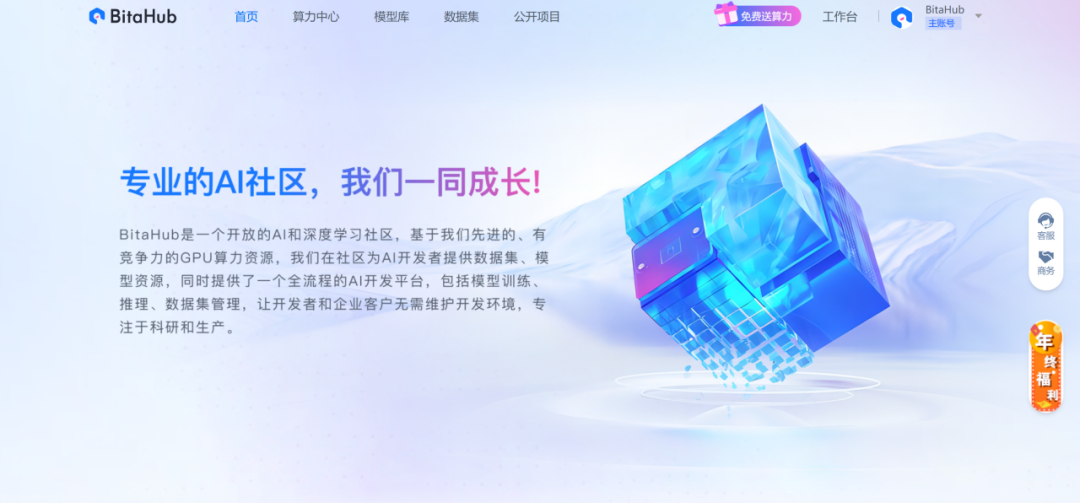
1.进入BitaHub官网,完成注册后点击右上角进入工作台。
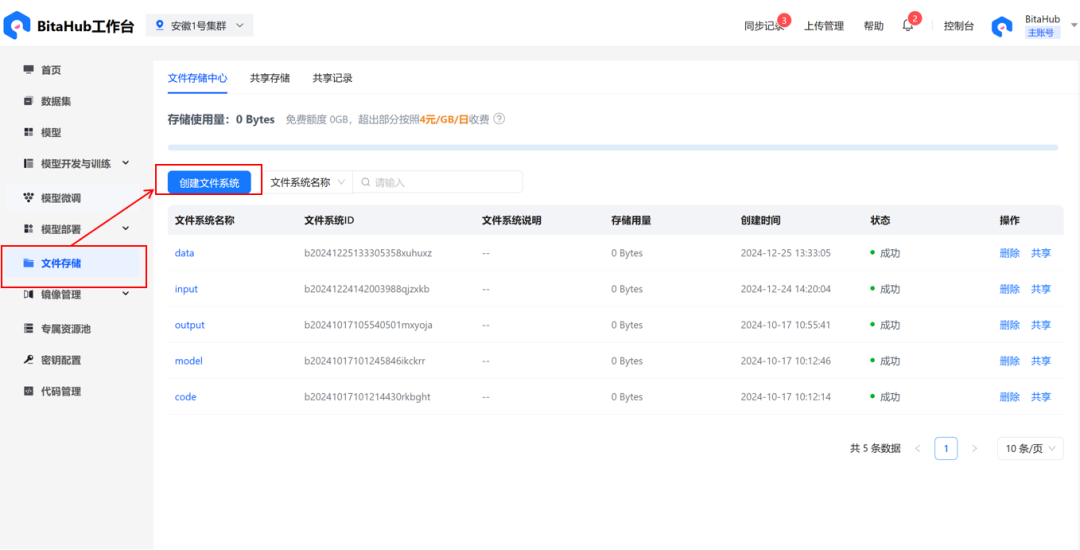
2.在文件存储中创建文件系统。可以在BitaHub主页下载此次训练所需要数据集,并将其存入刚刚创建的文件系统当中。这里给出模型的下载地址:https://hf-mirror.com/Qwen/Qwen2-VL-2B-Instruct(可先将模型下载至本地,再上传至文件系统)
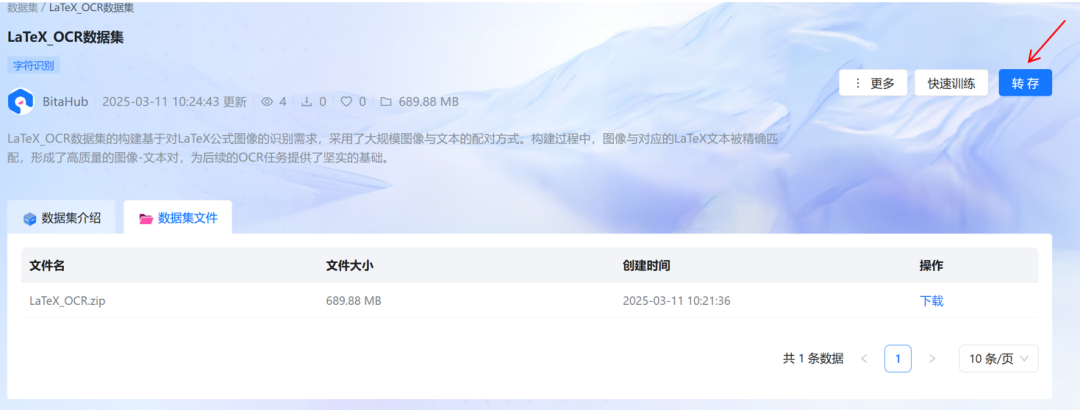
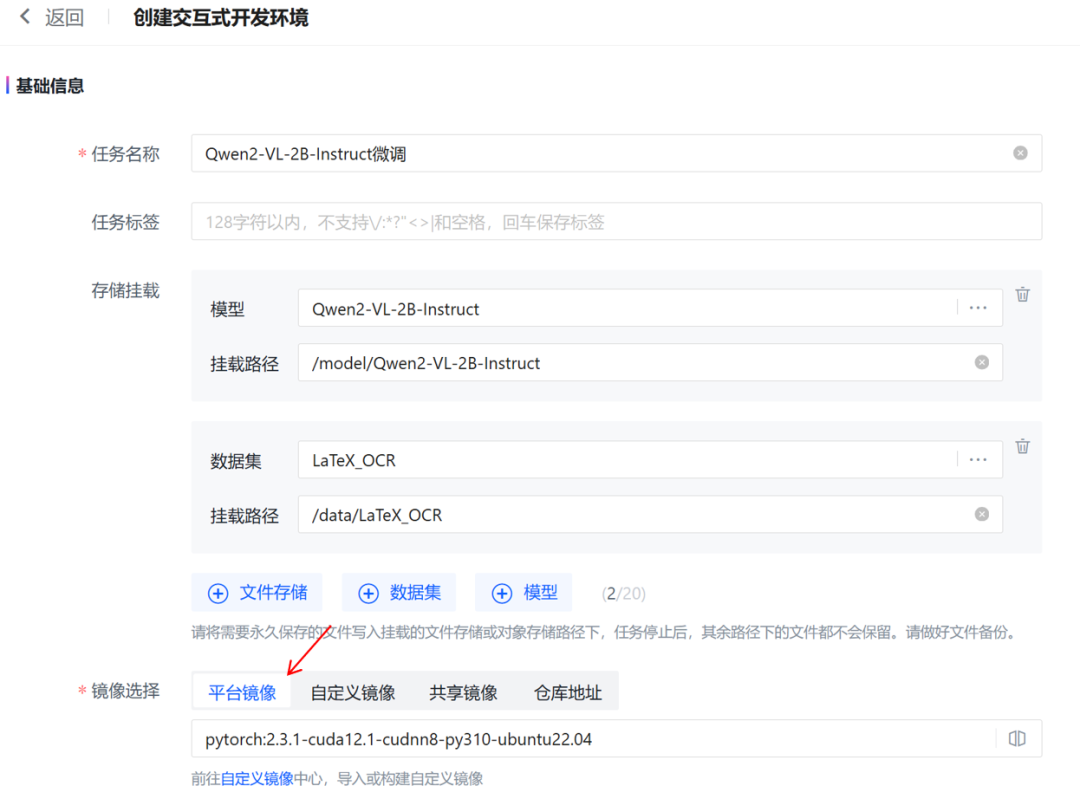
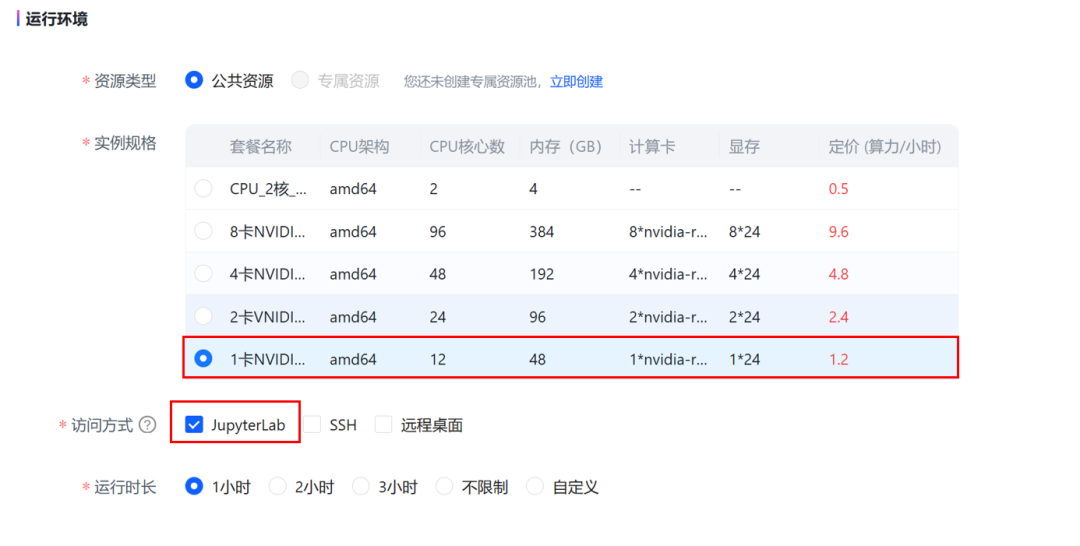
3.在「模型开发和训练」中,创建新的开发环境。
-
在「存储挂载」中添加模型和数据集;选择平台镜像。
-
选择 JupyterLab访问方式,单卡4090GPU套餐。
三.项目步骤详解
1. 环境准备
首先,项目需要安装一些必要的 Python 库,包括 unsloth、torch、transformers等。这些库用于模型的加载、微调、训练和推理。
pip install unslothpip install --upgrade torch torchvision --index-url https://download.pytorch.org/whl/cu118pip install --upgrade 'optree>=0.13.0'pip install --upgrade transformers
2. 加载预训练模型
项目使用了 Qwen2-VL-2B-Instruct 模型,Qwen2-VL系列是基于Qwen-VL框架的大规模视觉语言模型,能够动态处理不同分辨率的图像和视频,支持多语言理解和设备操作。模型通过 unsloth 库加载,并启用了 4-bit 量化以节省显存。
from unsloth import FastVisionModelimport torch# 本地模型文件夹的路径,需要根据实际情况修改local_model_path = "/model/Qwen2-VL-2B-Instruct"model, tokenizer = FastVisionModel.from_pretrained(local_model_path,load_in_4bit = True,use_gradient_checkpointing = "unsloth")
3. 模型微调配置
为了微调模型,项目使用了 LoRA(Low-Rank Adaptation) 技术,这是一种高效的微调方法,可以在不改变原始模型参数的情况下,通过添加少量参数来适应新任务。
model = FastVisionModel.get_peft_model(model,finetune_vision_layers = True,finetune_language_layers = True,finetune_attention_modules = True,finetune_mlp_modules = True,r = 16,lora_alpha = 16,lora_dropout = 0,bias = "none",random_state = 3407,use_rslora = False,loftq_config = None,)
4. 数据准备
项目使用了 LaTeX_OCR 数据集,该数据集包含了图像和对应的 LaTeX 公式。数据集通过 datasets 库加载,并将其转换为模型训练所需的格式。
from datasets import load_dataset# 加载数据集dataset = load_dataset("./data/LaTeX_OCR", split="train")
通过索引可以访问数据集中的具体样本。每个样本包含两个字段:image(图像)和 text(对应的 LaTeX 公式)。
dataset[2]["image"]
dataset[2]["text"]'H ^ { \\prime } = \\beta N \\int d \\lambda \\biggl \\{ \\frac { 1 } { 2 \\beta ^ { 2 } N ^ { 2 } } \\partial _ { \\lambda } \\zeta ^ { \\dagger } \\partial _ { \\lambda } \\zeta + V ( \\lambda ) \\zeta ^ { \\dagger } \\zeta \\biggr \\} \\ .'将原始数据集中的每个样本转换为模型训练所需的对话格式。以便模型能够理解输入(图像和指令)并生成输出(LaTeX 公式)。
instruction = "Write the LaTeX representation for this image."def convert_to_conversation(sample):conversation = [{ "role": "user","content" : [{"type" : "text", "text" : instruction},{"type" : "image", "image" : sample["image"]} ]},{ "role" : "assistant","content" : [{"type" : "text", "text" : sample["text"]} ]},]return { "messages" : conversation }pass
converted_dataset = [convert_to_conversation(sample) for sample in dataset]converted_dataset[0]
{'messages': [{'role': 'user','content': [{'type': 'text','text': 'Write the LaTeX representation for this image.'},{'type': 'image','image': <PIL.PngImagePlugin.PngImageFile image mode=RGB size=160x40>}]},{'role': 'assistant','content': [{'type': 'text','text': '{ \\frac { N } { M } } \\in { \\bf Z } , { \\frac { M } { P } } \\in { \\bf Z } , { \\frac { P } { Q } } \\in { \\bf Z }'}]}]}
5. 模型训练
项目使用了 SFTTrainer 来进行模型训练。训练过程中,模型会根据输入的图像和对应的 LaTeX 公式进行微调。
from unsloth import is_bf16_supportedfrom unsloth.trainer import UnslothVisionDataCollatorfrom trl import SFTTrainer, SFTConfigFastVisionModel.for_training(model)trainer = SFTTrainer(model = model,tokenizer = tokenizer,data_collator = UnslothVisionDataCollator(model, tokenizer),train_dataset = converted_dataset,args = SFTConfig(per_device_train_batch_size = 2,gradient_accumulation_steps = 4,warmup_steps = 5,max_steps = 30,learning_rate = 2e-4,fp16 = not is_bf16_supported(),bf16 = is_bf16_supported(),logging_steps = 1,optim = "adamw_8bit",weight_decay = 0.01,lr_scheduler_type = "linear",seed = 3407,output_dir = "outputs",report_to = "none",remove_unused_columns = False,dataset_text_field = "",dataset_kwargs = {"skip_prepare_dataset": True},dataset_num_proc = 4,max_seq_length = 2048,),)
trainer_stats = trainer.train()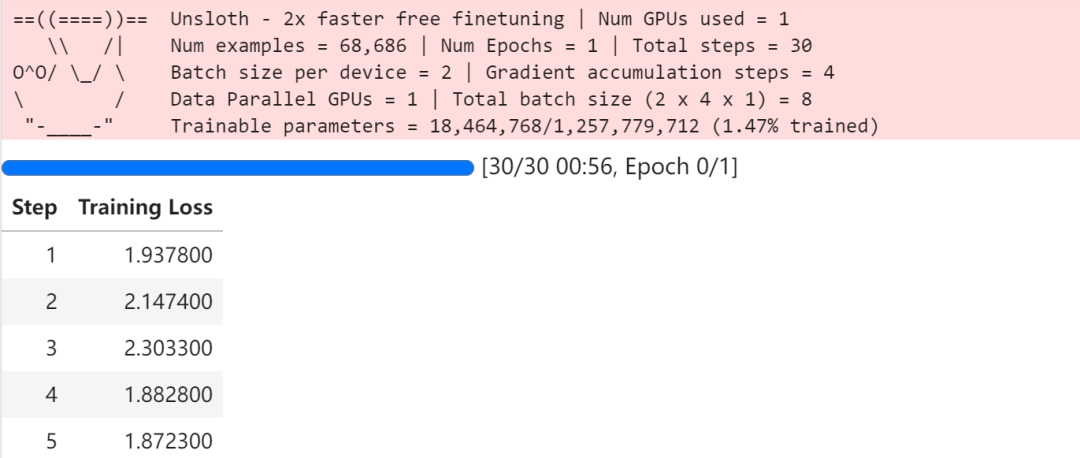
6. 模型推理
训练完成后,模型可以用于推理。项目提供了一个简单的推理示例,输入一张图像,模型会生成对应的 LaTeX 公式。
FastVisionModel.for_inference(model)image = dataset[2]["image"]instruction = "Write the LaTeX representation for this image."messages = [{"role": "user", "content": [{"type": "image"},{"type": "text", "text": instruction}]}]input_text = tokenizer.apply_chat_template(messages, add_generation_prompt = True)inputs = tokenizer(image,input_text,add_special_tokens = False,return_tensors = "pt",).to("cuda")from transformers import TextStreamertext_streamer = TextStreamer(tokenizer, skip_prompt = True)_ = model.generate(**inputs, streamer = text_streamer, max_new_tokens = 128,use_cache = True, temperature = 1.5, min_p = 0.1)
四.总结
该项目展示了如何使用 Qwen2-VL-2B-Instruct 模型进行视觉语言任务的微调,特别是图像到 LaTeX 公式的转换。通过使用 Unsloth 库和 LoRA 技术,项目实现了高效的模型微调和推理,适合学术研究和实际应用。
BitaHub社区更多模型及教程持续更新中,期待您的关注!

中国智能体开发者社区,聚焦智能体与大模型开发,提供前沿资讯、实用工具链、开源项目及行业案例。通过技术沙龙、开发者大赛等活动,促进经验交流与协作,助力开发者快速构建创新智能应用。
更多推荐
 21
21 0
0- 0


 已为社区贡献5条内容

所有评论(0)