大模型应用开发(二十)_模型微调
大模型应用开发(二十)_模型微调
OpenAI 官网微调文档: https://platform.openai.com/docs/guides/model-optimization
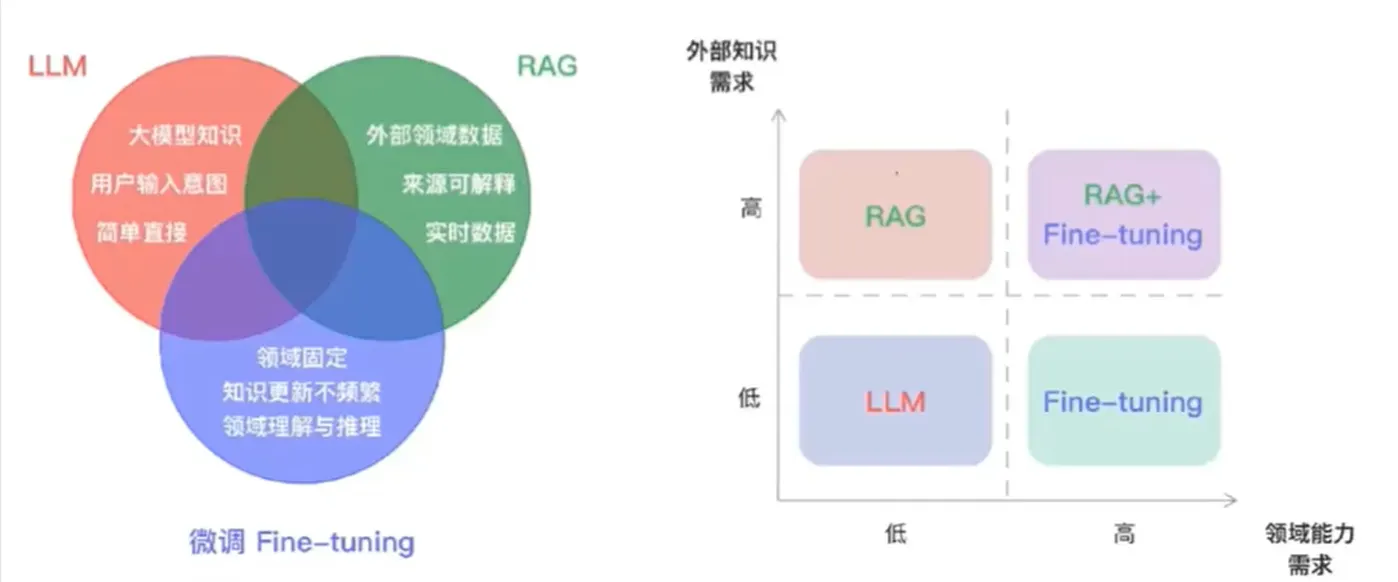
提高大语言模型(LLM)回答的准确性和一致性通常有三种方式:
- prompt优化:prompt优化可以在文本生成和行为控制上提供初步帮助。
- RAG(检索增强生成):RAG侧重补充训练数据中没有的或过时的信息
- fine-tuning(微调):fine-tuning则主要调整模型的行为模式,如语气、回答一致性和语言风格。
OpenAl 这个图就把优化上下文信息内容和 LLM 行为优化分两个轴,一个针对 what the model needs to know ,一个针对 how the model needs to act
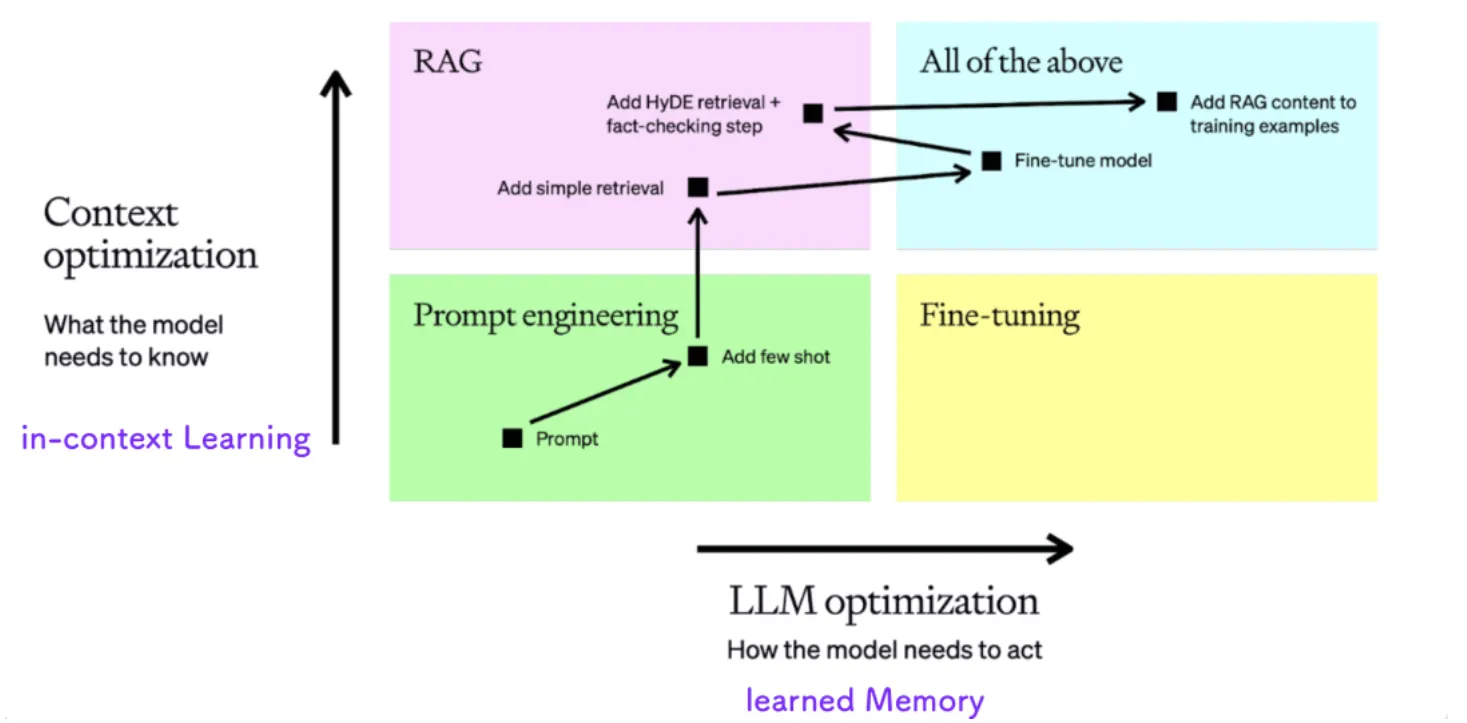
黑色方块和箭头指的是常见优化LLM accuracy和保持consistent behavior的常规步骤:
1、初始提示 (Prompt):首先从一个基础提示(Prompt)开始。提示是你提供给模型的问题或输入,模型会根据这个提示生成结果
2、添加静态的 Few-Shot示例:Few-shot学习是指在提示中添加几个示例,这些示例展示了你期望的输入-输出关系。通过静态地添加这些示例,你可以提高模型生成结果的一致性。同时可以evals评估测试
3、加入动态检索步骤:通过检索机制,模型可以动态地根据问题获取与之相关的 Few-shot 示例。这有助于提高模型的性能,因为它可以在每次生成时获取到更相关的上下文。
4、准备数据集并进行微调:为了提高模型的一致性,你需要准备一个包含 50 个以上示例的数据集,并在这个数据集上对模型进行微调
5、优化检索和加入事实检查步骤::索机制帮助模型找到更相关的上下文,而事实检査步骤可以帮助检测模型生成的错误(也称为“幻觉”),以确保模型生成的内容更加准确。
6、再次训练模型:在加入了新的检索机制和事实检査步骤后,你可以用增强的输入数据重新训练模型,以进一步提高性能
OpenAI 模型已经预训练,能够处理广泛的主题和任务。微调允许你使用 OpenAI 基础模型,提供你期望在应用程序中输入和输出的类型,从而得到一个在你要使用的任务中表现优异的模型。
微调可能是一个耗时过程,但它也能使模型以特定方式一致地格式化响应或处理新颖的输入。你可以结合提示工程使用微调,从而获得比单独提示更多的优势:
- 你可以提供比单个请求的上下文窗口中能容纳的更多的示例输入和输出,使模型能够处理更多种类的提示。
- 你可以使用更短的提示,包含更少的示例和上下文数据,这可以在大规模使用中节省代币成本,并可能降低延迟。
- 你可以使用专有或敏感数据进行训练,而无需在每次请求中都通过示例包含这些数据。
- 你可以训练一个更小、更便宜、更快的模型,使其在特定任务上表现出色,而使用大型模型则成本效益不高。
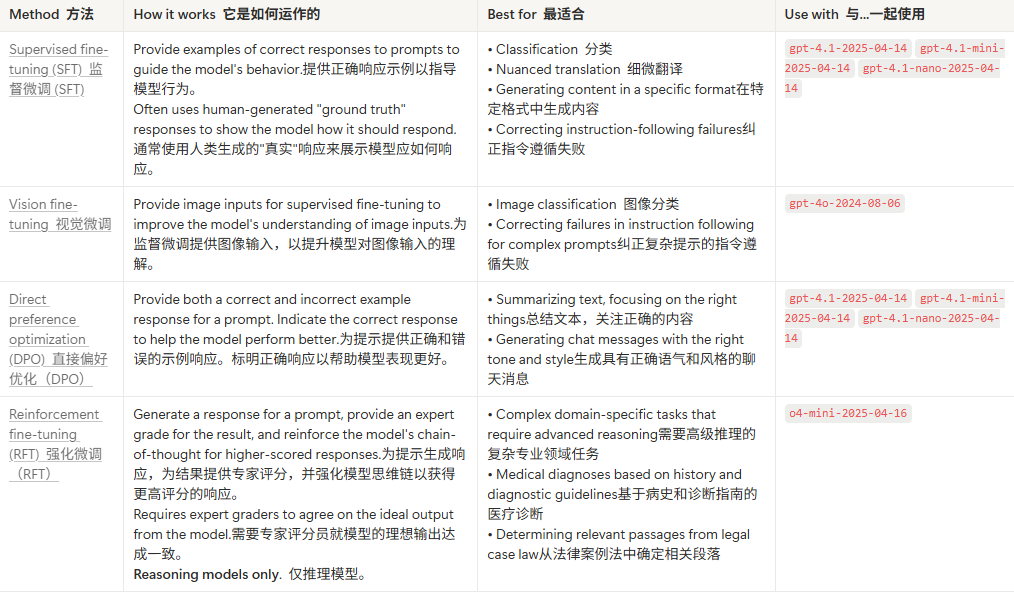
1. 微调方法
这些是 OpenAI 平台目前支持的微调方法。
2. 微调的工作原理
在 OpenAI 平台中,可以在控制面板或通过 API 创建微调模型。这是微调过程的一般步骤:
- 收集一组示例作为训练数据
- 将数据集上传至 OpenAI,并使用 JSONL 格式
- 使用上述方法之一创建微调任务,根据目标——这将开始微调训练过程
- 对于 RFT,还需要定义一个评分器来评估模型的性能
- 评估结果
3. 监督微调
监督微调(SFT)允许您使用针对特定用例的示例来训练 OpenAI 模型。结果是更可靠地生成您期望的风格和内容的定制模型。
监督微调包含四个主要部分:
- 构建你的训练数据集以确定什么是“好的”
- 上传一个包含示例提示和期望模型输出的训练数据集
- 为基座模型创建一个微调任务,使用您的训练数据
- 使用微调模型评估您的结果
3.1 构建数据集
构建一个稳健、有代表性的数据集,以便从微调模型中获得有用结果。使用以下技术和注意事项。
3.1.1 合适的示例数量
- 可以提供的用于微调的最少示例数量是 10 个
- 在 50-100 个示例上进行微调后有所改进,但适合你的正确数量差异很大,取决于具体应用场景
- 建议从 50 个精心设计的示例开始,并评估结果
如果使用 50 个好的示例后性能有所提升,尝试添加更多示例以观察进一步的结果。如果 50 个示例没有产生任何影响,则在添加训练数据之前重新思考你的任务或提示。
3.1.2 什么是好的示例
- 无论在应用程序中期望什么样的提示和输出,尽可能逼真
- 具体、清晰的问题和答案
- 使用历史数据、专家数据、记录数据或其他类型收集的数据
3.1.3 格式化数据
- 使用 JSONL 格式,每个训练数据文件的一行包含一个完整的 JSON 结构
- 使用聊天补全格式
- 你的文件必须至少有 10
JSONL 格式示例文件
一个调用 get_weather 函数的 JSONL 训练数据示例:
{"messages":[{"role":"user","content":"What is the weather in San Francisco?"},{"role":"assistant","tool_calls":[{"id":"call_id","type":"function","function":{"name":"get_current_weather","arguments":"{\\"location\\": \\"San Francisco, USA\\", \\"format\\": \\"celsius\\"}"}}]}],"parallel_tool_calls":false,"tools":[{"type":"function","function":{"name":"get_current_weather","description":"Get the current weather","parameters":{"type":"object","properties":{"location":{"type":"string","description":"The city and country, eg. San Francisco, USA"},"format":{"type":"string","enum":["celsius","fahrenheit"]}},"required":["location","format"]}}}]}
{"messages":[{"role":"user","content":"What is the weather in Minneapolis?"},{"role":"assistant","tool_calls":[{"id":"call_id","type":"function","function":{"name":"get_current_weather","arguments":"{\\"location\\": \\"Minneapolis, USA\\", \\"format\\": \\"celsius\\"}"}}]}],"parallel_tool_calls":false,"tools":[{"type":"function","function":{"name":"get_current_weather","description":"Get the current weather","parameters":{"type":"object","properties":{"location":{"type":"string","description":"The city and country, eg. Minneapolis, USA"},"format":{"type":"string","enum":["celsius","fahrenheit"]}},"required":["location","format"]}}}]}
{"messages":[{"role":"user","content":"What is the weather in San Diego?"},{"role":"assistant","tool_calls":[{"id":"call_id","type":"function","function":{"name":"get_current_weather","arguments":"{\\"location\\": \\"San Diego, USA\\", \\"format\\": \\"celsius\\"}"}}]}],"parallel_tool_calls":false,"tools":[{"type":"function","function":{"name":"get_current_weather","description":"Get the current weather","parameters":{"type":"object","properties":{"location":{"type":"string","description":"The city and country, eg. San Diego, USA"},"format":{"type":"string","enum":["celsius","fahrenheit"]}},"required":["location","format"]}}}]}
{"messages":[{"role":"user","content":"What is the weather in Memphis?"},{"role":"assistant","tool_calls":[{"id":"call_id","type":"function","function":{"name":"get_current_weather","arguments":"{\\"location\\": \\"Memphis, USA\\", \\"format\\": \\"celsius\\"}"}}]}],"parallel_tool_calls":false,"tools":[{"type":"function","function":{"name":"get_current_weather","description":"Get the current weather","parameters":{"type":"object","properties":{"location":{"type":"string","description":"The city and country, eg. Memphis, USA"},"format":{"type":"string","enum":["celsius","fahrenheit"]}},"required":["location","format"]}}}]}
{"messages":[{"role":"user","content":"What is the weather in Atlanta?"},{"role":"assistant","tool_calls":[{"id":"call_id","type":"function","function":{"name":"get_current_weather","arguments":"{\\"location\\": \\"Atlanta, USA\\", \\"format\\": \\"celsius\\"}"}}]}],"parallel_tool_calls":false,"tools":[{"type":"function","function":{"name":"get_current_weather","description":"Get the current weather","parameters":{"type":"object","properties":{"location":{"type":"string","description":"The city and country, eg. Atlanta, USA"},"format":{"type":"string","enum":["celsius","fahrenheit"]}},"required":["location","format"]}}}]}
{"messages":[{"role":"user","content":"What is the weather in Sunnyvale?"},{"role":"assistant","tool_calls":[{"id":"call_id","type":"function","function":{"name":"get_current_weather","arguments":"{\\"location\\": \\"Sunnyvale, USA\\", \\"format\\": \\"celsius\\"}"}}]}],"parallel_tool_calls":false,"tools":[{"type":"function","function":{"name":"get_current_weather","description":"Get the current weather","parameters":{"type":"object","properties":{"location":{"type":"string","description":"The city and country, eg. Sunnyvale, USA"},"format":{"type":"string","enum":["celsius","fahrenheit"]}},"required":["location","format"]}}}]}
{"messages":[{"role":"user","content":"What is the weather in Chicago?"},{"role":"assistant","tool_calls":[{"id":"call_id","type":"function","function":{"name":"get_current_weather","arguments":"{\\"location\\": \\"Chicago, USA\\", \\"format\\": \\"celsius\\"}"}}]}],"parallel_tool_calls":false,"tools":[{"type":"function","function":{"name":"get_current_weather","description":"Get the current weather","parameters":{"type":"object","properties":{"location":{"type":"string","description":"The city and country, eg. Chicago, USA"},"format":{"type":"string","enum":["celsius","fahrenheit"]}},"required":["location","format"]}}}]}
{"messages":[{"role":"user","content":"What is the weather in Boston?"},{"role":"assistant","tool_calls":[{"id":"call_id","type":"function","function":{"name":"get_current_weather","arguments":"{\\"location\\": \\"Boston, USA\\", \\"format\\": \\"celsius\\"}"}}]}],"parallel_tool_calls":false,"tools":[{"type":"function","function":{"name":"get_current_weather","description":"Get the current weather","parameters":{"type":"object","properties":{"location":{"type":"string","description":"The city and country, eg. Boston, USA"},"format":{"type":"string","enum":["celsius","fahrenheit"]}},"required":["location","format"]}}}]}
{"messages":[{"role":"user","content":"What is the weather in Honolulu?"},{"role":"assistant","tool_calls":[{"id":"call_id","type":"function","function":{"name":"get_current_weather","arguments":"{\\"location\\": \\"Honolulu, USA\\", \\"format\\": \\"celsius\\"}"}}]}],"parallel_tool_calls":false,"tools":[{"type":"function","function":{"name":"get_current_weather","description":"Get the current weather","parameters":{"type":"object","properties":{"location":{"type":"string","description":"The city and country, eg. Honolulu, USA"},"format":{"type":"string","enum":["celsius","fahrenheit"]}},"required":["location","format"]}}}]}
{"messages":[{"role":"user","content":"What is the weather in San Antonio?"},{"role":"assistant","tool_calls":[{"id":"call_id","type":"function","function":{"name":"get_current_weather","arguments":"{\\"location\\": \\"San Antonio, USA\\", \\"format\\": \\"celsius\\"}"}}]}],"parallel_tool_calls":false,"tools":[{"type":"function","function":{"name":"get_current_weather","description":"Get the current weather","parameters":{"type":"object","properties":{"location":{"type":"string","description":"The city and country, eg. San Antonio, USA"},"format":{"type":"string","enum":["celsius","fahrenheit"]}},"required":["location","format"]}}}]}
相应的 JSON 数据
{
  "messages": [
    { "role": "user", "content": "What is the weather in San Francisco?" },
    {
      "role": "assistant",
      "tool_calls": [
        {
          "id": "call_id",
          "type": "function",
          "function": {
            "name": "get_current_weather",
            "arguments": "{\\"location\\": \\"San Francisco, USA\\", \\"format\\": \\"celsius\\"}"
          }
        }
      ]
    }
  ],
  "parallel_tool_calls": false,
  "tools": [
    {
      "type": "function",
      "function": {
        "name": "get_current_weather",
        "description": "Get the current weather",
        "parameters": {
          "type": "object",
          "properties": {
            "location": {
                "type": "string",
                "description": "The city and country, eg. San Francisco, USA"
            },
            "format": { "type": "string", "enum": ["celsius", "fahrenheit"] }
          },
          "required": ["location", "format"]
        }
      }
    }
  ]
}
3.1.4 从大模型中提取
构建小模型训练数据集的一种方法是将大模型的结果蒸馏出来,以此创建用于监督微调的训练数据。这种技术的总体流程是:
- 为更大模型(如
gpt-4.1)调整提示,直到在评估标准下获得出色性能。 - 使用任何方便的技术捕获模型生成的结果——请注意,响应 API 默认存储模型响应 30 天。
- 使用上述工具和技术,利用符合您标准的较大模型捕获的响应来生成数据集。
- 使用从较大模型创建的数据集来调整较小模型(如
gpt-4.1-mini)。
这种技术可以使你训练一个小模型,使其在特定任务上的表现与一个更大、更昂贵的模型相似。
3.2 上传训练数据
将示例数据集上传至 OpenAI。使用它来更新模型的权重,并生成与数据集中包含的输出类似的输出。
除了文本补全,还可以训练模型以更有效地生成结构化的 JSON 输出或函数调用。
1.导航至控制台 > 微调。
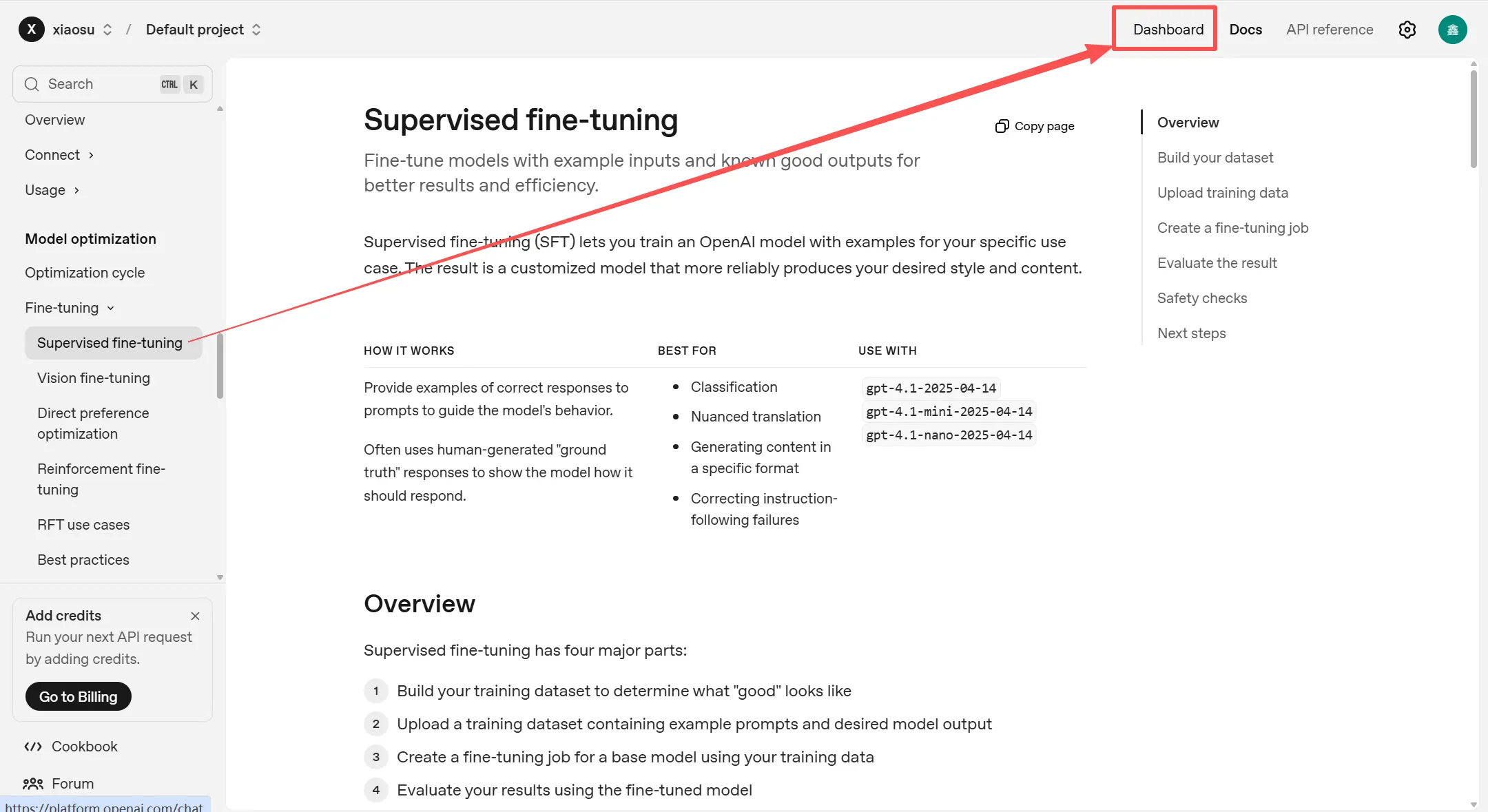
2.点击 + 创建。
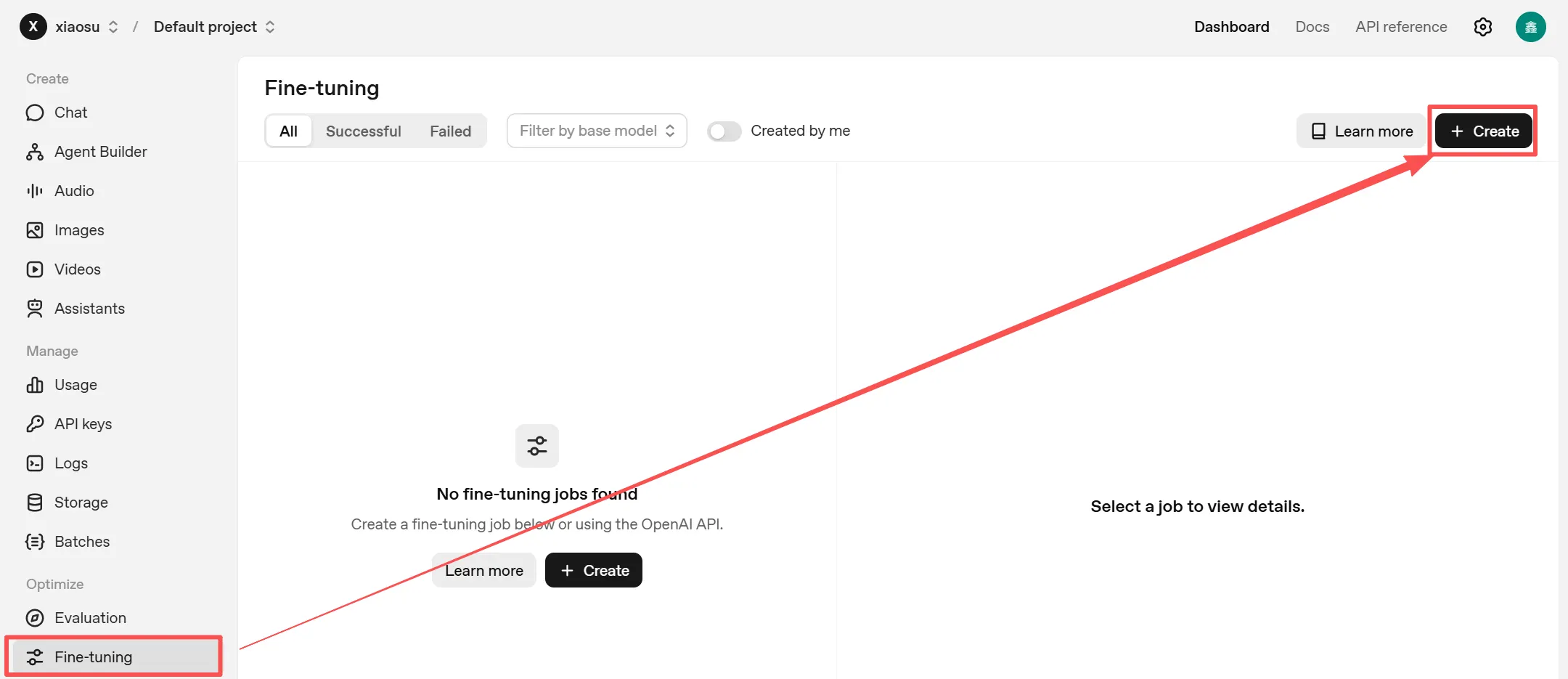
3.在训练数据下,上传您的 JSONL 文件。
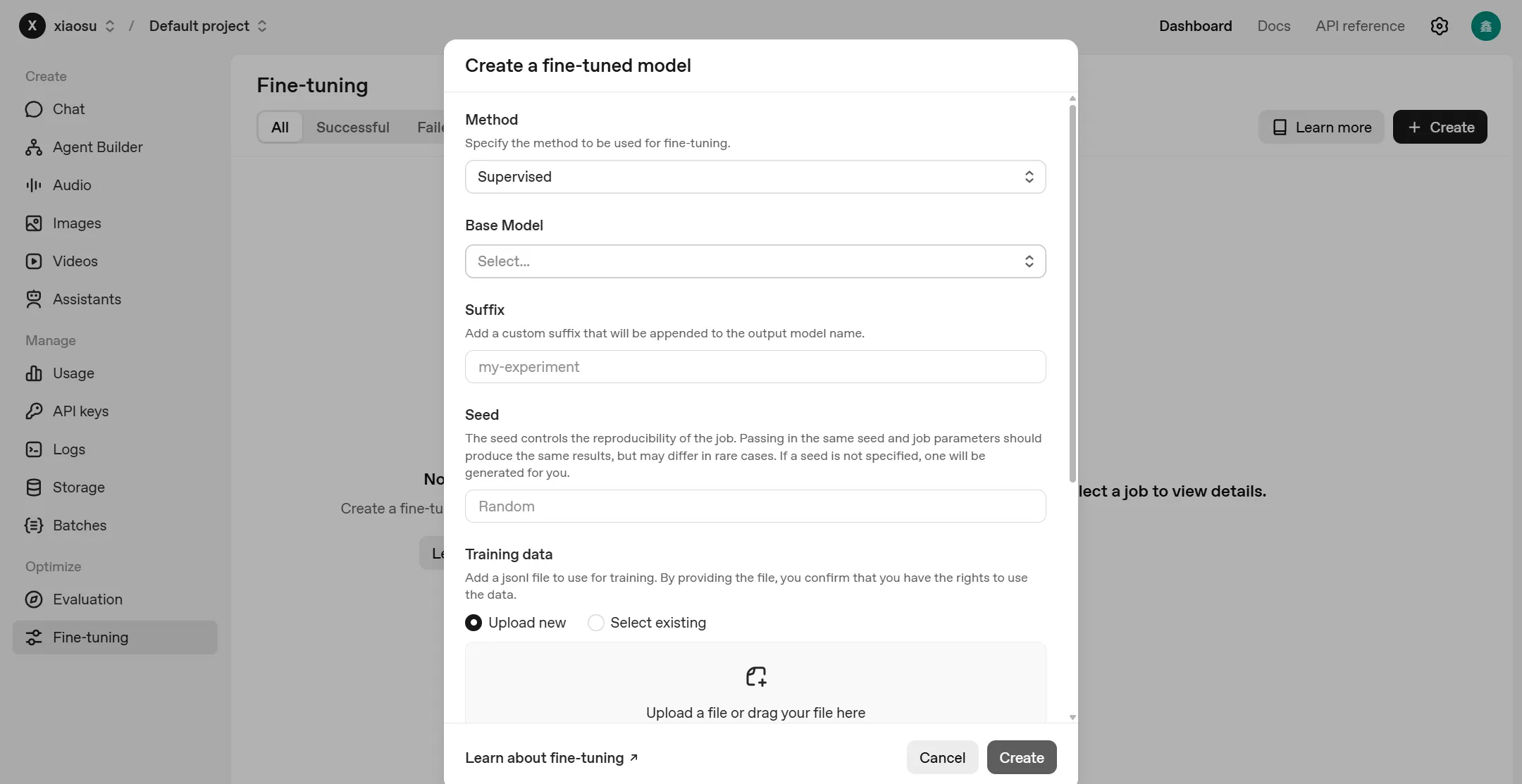
3.3 创建微调任务
测试数据上传后,请创建一个微调任务,使用您提供的训练数据来定制基础模型。在创建微调任务时,您必须指定:
- 用于微调的基础模型(
model)。这可以是 OpenAI 模型 ID 或先前微调过的模型的 ID。在模型文档中查看哪些模型支持微调。 - 一个训练文件(
training_file)的 ID。这是您在上一步中上传的文件。 - 一种微调方法(
method)。这指定了你想要使用哪种微调方法来定制模型。监督微调是默认选项。
1.在相同的+创建模态中,完成所需字段。
2.选择监督微调作为方法,并选择您想要训练的模型。
3.准备好后,点击创建以开始任务。
3.4 评估结果
使用以下方法检查您的微调模型的表现。根据需要调整您的提示、数据和微调作业,直到您获得满意的结果。微调的最佳方式是持续迭代。
3.4.1 Compare to evals 与 evals 比较
要查看你的微调模型是否比原始基础模型表现更好,可以使用 evals。在运行你的微调作业之前,从你在步骤 1 中收集的训练数据集中划分出数据。这些保留数据在你使用 evals 时充当对照组。确保训练数据和保留数据具有大致相同的用户输入类型和模型响应的多样性。
3.4.2 监控状态
在仪表板中检查微调作业的状态,或通过在 API 中轮询作业 ID 来检查。
1.导航至微调控制面板。
2.选择监控的任务。
3.查看状态、检查点、消息和指标。
3.4.3 使用微调模型
当微调模型完成训练后,就像使用 OpenAI 基础模型一样,在 Responses 或 Chat Completions API 中使用其 ID。
- 在仪表板中导航到微调作业。
- 在右侧窗格中,导航到输出模型并复制模型 ID。它应该以
ft:…开头。 - 打开 Playground。
- 在模型下拉菜单中粘贴模型 ID。这里也能看到创建的其他微调模型。
- 运行一些提示,测试微调模型表现。
使用 API 调用示例
curl <https://api.openai.com/v1/responses> \\
  -H "Content-Type: application/json" \\
  -H "Authorization: Bearer $OPENAI_API_KEY" \\
  -d '{
    "model": "ft:gpt-4.1-nano-2025-04-14:openai::BTz2REMH",
    "input": "What is 4+4?"
  }'
3.4.4 使用检查点
检查点是你可以使用的模型。我们在每个训练周期结束时为你创建一个完整的模型检查点。它们在微调模型早期改进但随后开始记忆数据集而不是学习可推广知识的情况下很有用——这种情况被称为 _过拟合。检查点提供了你在过程中不同时刻的自定义模型版本。
- 导航至微调控制面板。
- 在左侧面板中选择您想要调查的工作。等待它成功。
- 在右侧面板中,向下滚动到检查点列表。
- 将任何检查点悬停以查看在 Playground 中启动的链接。
- 在 Playground 中提示检查点模型以测试其行为。
目前,仅保存并可用的是该作业最后三个 epoch 的检查点。

火山引擎开发者社区是火山引擎打造的AI技术生态平台,聚焦Agent与大模型开发,提供豆包系列模型(图像/视频/视觉)、智能分析与会话工具,并配套评测集、动手实验室及行业案例库。社区通过技术沙龙、挑战赛等活动促进开发者成长,新用户可领50万Tokens权益,助力构建智能应用。
更多推荐
 12
12 0
0- 0


 已为社区贡献39条内容

所有评论(0)