快速上手大模型:深度学习3(实践:线性神经网络Softmax)
本文详细介绍了Softmax回归在图像分类任务中的应用,主要包括:1) 理论回顾部分解释Softmax操作将输出转化为概率分布的过程;2) 实现步骤包含参数初始化、模型定义、交叉熵损失函数构建和分类精度评估;3) 使用Fashion-MNIST数据集进行训练和预测的完整流程。文章提供了完整的PyTorch实现代码,包括数据预处理、模型训练和评估方法。通过Softmax回归可将线性模型输出转化为多类
目录
1 Softmax回归
1.1 回归VS分类
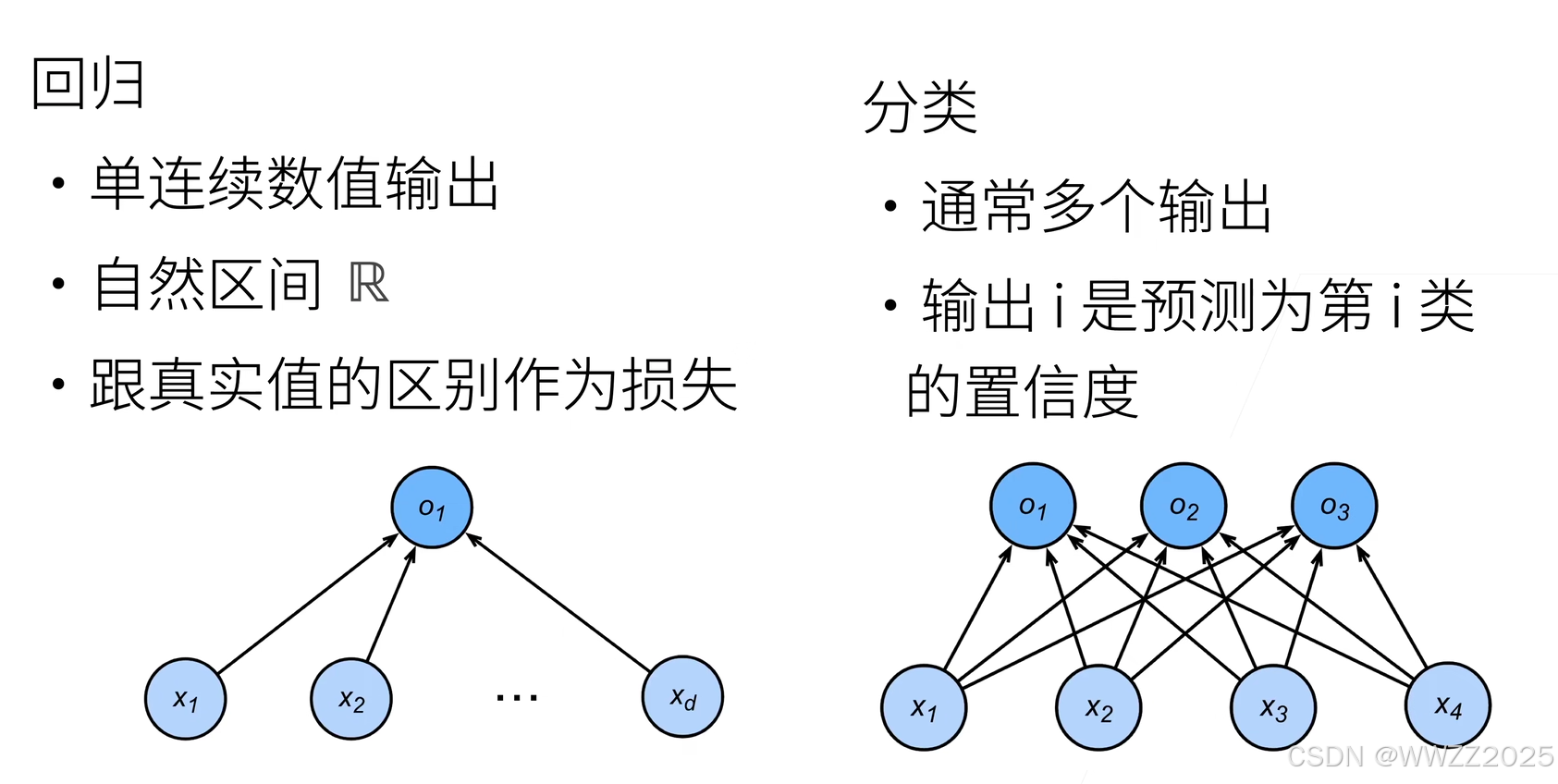
1.2 Softmax理论回顾
Sotfmax回归是一个多类分类模型,使用Sotfmax操作子得到每个类的预测置信度,使用交叉熵衡量预测和真实的区别。
理论上我们通过计算均方损失来找到预测值,但在实际使用中我们只需知道实际类别的概率,即置信度,故可以将问题转为Softmax。此处其实就是前文所述的特征缩放问题,详见1:https://blog.csdn.net/weixin_45728280/article/details/153586780?spm=1011.2415.3001.5331#1.2.3%20Z-score%E5%BD%92%E4%B8%80%E5%8C%96%28Z-score%20normalization%29
定义预测概率
,概非副率和为1、非负,计算
即为损失(交叉熵),y运算公式:
,详见5.4:https://blog.csdn.net/weixin_45728280/article/details/153778299?spm=1011.2415.3001.5331
1.3 Softmax实现
1.3.1 求解步骤
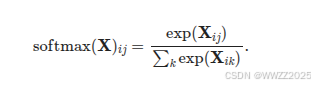
(1)对每个项求幂(使用
exp);(2)对每一行求和(小批量中每个样本是一行),得到每个样本的规范化常数;
(3)将每一行除以其规范化常数,确保结果的和为1,公式如下:
1.3.2 调用库
import torch
from IPython import display
from d2l import torch as d2l

batch_size = 256
train_iter, test_iter = d2l.load_data_fashion_mnist(batch_size)
1.3.3 初始化模型参数
输入:将展平每个图像,把它们看作长度为784的向量
输出:数据集有10个类别,所以网络输出维度为10
权重将构成一个的矩阵, 偏置将构成一个的行向量。 与线性回归一样,使用正态分布初始化我们的权重
W,偏置初始化为0。num_inputs = 784 num_outputs = 10 W = torch.normal(0, 0.01, size=(num_inputs, num_outputs), requires_grad=True) b = torch.zeros(num_outputs, requires_grad=True)
1.3.4 定义Softmax操作
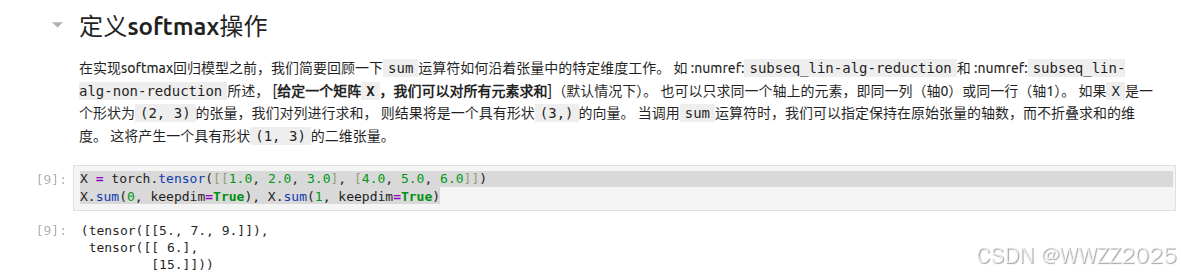
运算原理:
两个1*3的矩阵进行求和,0表示行求和、1表示列求和。
X = torch.tensor([[1.0, 2.0, 3.0], [4.0, 5.0, 6.0]])
X.sum(0, keepdim=True), X.sum(1, keepdim=True)
def softmax(X):
    X_exp = torch.exp(X)    #对每个元素取指数
    partition = X_exp.sum(1, keepdim=True)  #列求和,保持纬度
    return X_exp / partition  # 这里应用了广播机制
随机抽取2*5的矩阵元素,将其转化为正态分布形式,求其和为1。
X = torch.normal(0, 1, (2, 5))
X_prob = softmax(X)
X_prob, X_prob.sum(1)
1.3.5 定义模型
def net(X):
    return softmax(torch.matmul(X.reshape((-1, W.shape[0])), W) + b)
线性模型,转为分布率。
1.3.6 定义损失函数
y = torch.tensor([0, 2])
y_hat = torch.tensor([[0.1, 0.3, 0.6], [0.3, 0.2, 0.5]])
y_hat[[0, 1], y]
第一个样本第0列、第二个样本第2列是真实样本标签;
预测第0行0列、第1行2列的值。
def cross_entropy(y_hat, y):
    return - torch.log(y_hat[range(len(y_hat)), y])

cross_entropy(y_hat, y)
交叉熵运算。
1.3.7 分类精度
准确度测算:
def accuracy(y_hat, y):  #@save
    """计算预测正确的数量"""
    if len(y_hat.shape) > 1 and y_hat.shape[1] > 1:
        y_hat = y_hat.argmax(axis=1)
    cmp = y_hat.type(y.dtype) == y
    return float(cmp.type(y.dtype).sum())
accuracy(y_hat, y) / len(y)def evaluate_accuracy(net, data_iter): #@save """计算在指定数据集上模型的精度""" if isinstance(net, torch.nn.Module): net.eval() # 将模型设置为评估模式 metric = Accumulator(2) # 正确预测数、预测总数 with torch.no_grad(): for X, y in data_iter: metric.add(accuracy(net(X), y), y.numel()) return metric[0] / metric[1] class Accumulator: #@save """在n个变量上累加""" def __init__(self, n): self.data = [0.0] * n def add(self, *args): self.data = [a + float(b) for a, b in zip(self.data, args)] def reset(self): self.data = [0.0] * len(self.data) def __getitem__(self, idx): return self.data[idx] evaluate_accuracy(net, test_iter)
1.3.8 训练
def train_epoch_ch3(net, train_iter, loss, updater):  #@save
    """训练模型一个迭代周期(定义见第3章)"""
    # 将模型设置为训练模式
    if isinstance(net, torch.nn.Module):
        net.train()
    # 训练损失总和、训练准确度总和、样本数
    metric = Accumulator(3)
    for X, y in train_iter:
        # 计算梯度并更新参数
        y_hat = net(X)
        l = loss(y_hat, y)
        if isinstance(updater, torch.optim.Optimizer):
            # 使用PyTorch内置的优化器和损失函数
            updater.zero_grad()
            l.mean().backward()
            updater.step()
        else:
            # 使用定制的优化器和损失函数
            l.sum().backward()
            updater(X.shape[0])
        metric.add(float(l.sum()), accuracy(y_hat, y), y.numel())
    # 返回训练损失和训练精度
    return metric[0] / metric[2], metric[1] / metric[2]

class Animator:  #@save
    """在动画中绘制数据"""
    def __init__(self, xlabel=None, ylabel=None, legend=None, xlim=None,
                 ylim=None, xscale='linear', yscale='linear',
                 fmts=('-', 'm--', 'g-.', 'r:'), nrows=1, ncols=1,
                 figsize=(3.5, 2.5)):
        # 增量地绘制多条线
        if legend is None:
            legend = []
        d2l.use_svg_display()
        self.fig, self.axes = d2l.plt.subplots(nrows, ncols, figsize=figsize)
        if nrows * ncols == 1:
            self.axes = [self.axes, ]
        # 使用lambda函数捕获参数
        self.config_axes = lambda: d2l.set_axes(
            self.axes[0], xlabel, ylabel, xlim, ylim, xscale, yscale, legend)
        self.X, self.Y, self.fmts = None, None, fmts

    def add(self, x, y):
        # 向图表中添加多个数据点
        if not hasattr(y, "__len__"):
            y = [y]
        n = len(y)
        if not hasattr(x, "__len__"):
            x = [x] * n
        if not self.X:
            self.X = [[] for _ in range(n)]
        if not self.Y:
            self.Y = [[] for _ in range(n)]
        for i, (a, b) in enumerate(zip(x, y)):
            if a is not None and b is not None:
                self.X[i].append(a)
                self.Y[i].append(b)
        self.axes[0].cla()
        for x, y, fmt in zip(self.X, self.Y, self.fmts):
            self.axes[0].plot(x, y, fmt)
        self.config_axes()
        display.display(self.fig)
        display.clear_output(wait=True)


def train_ch3(net, train_iter, test_iter, loss, num_epochs, updater):  #@save
    """训练模型(定义见第3章)"""
    animator = Animator(xlabel='epoch', xlim=[1, num_epochs], ylim=[0.3, 0.9],
                        legend=['train loss', 'train acc', 'test acc'])
    for epoch in range(num_epochs):
        train_metrics = train_epoch_ch3(net, train_iter, loss, updater)
        test_acc = evaluate_accuracy(net, test_iter)
        animator.add(epoch + 1, train_metrics + (test_acc,))
    train_loss, train_acc = train_metrics
    assert train_loss < 0.5, train_loss
    assert train_acc <= 1 and train_acc > 0.7, train_acc
    assert test_acc <= 1 and test_acc > 0.7, test_acc


lr = 0.1

def updater(batch_size):
    return d2l.sgd([W, b], lr, batch_size)

num_epochs = 10
train_ch3(net, train_iter, test_iter, cross_entropy, num_epochs, updater)
1.3.9 预测
def predict_ch3(net, test_iter, n=6):  #@save
    """预测标签(定义见第3章)"""
    for X, y in test_iter:
        break
    trues = d2l.get_fashion_mnist_labels(y)
    preds = d2l.get_fashion_mnist_labels(net(X).argmax(axis=1))
    titles = [true +'\n' + pred for true, pred in zip(trues, preds)]
    d2l.show_images(
        X[0:n].reshape((n, 28, 28)), 1, n, titles=titles[0:n])

predict_ch3(net, test_iter)
1.4 Softmax简洁实现
import torch
from torch import nn
from d2l import torch as d2l

batch_size = 256
train_iter, test_iter = d2l.load_data_fashion_mnist(batch_size)

# PyTorch不会隐式地调整输入的形状。因此,
# 我们在线性层前定义了展平层(flatten),来调整网络输入的形状
net = nn.Sequential(nn.Flatten(), nn.Linear(784, 10))

def init_weights(m):
    if type(m) == nn.Linear:
        nn.init.normal_(m.weight, std=0.01)

net.apply(init_weights);

loss = nn.CrossEntropyLoss(reduction='none')

trainer = torch.optim.SGD(net.parameters(), lr=0.1)

num_epochs = 10
d2l.train_ch3(net, train_iter, test_iter, loss, num_epochs, trainer)
整体代码逻辑是这样,但因d2l版本变更,此代码需要更换为旧版d2l方可运行。
2 图像分类数据集
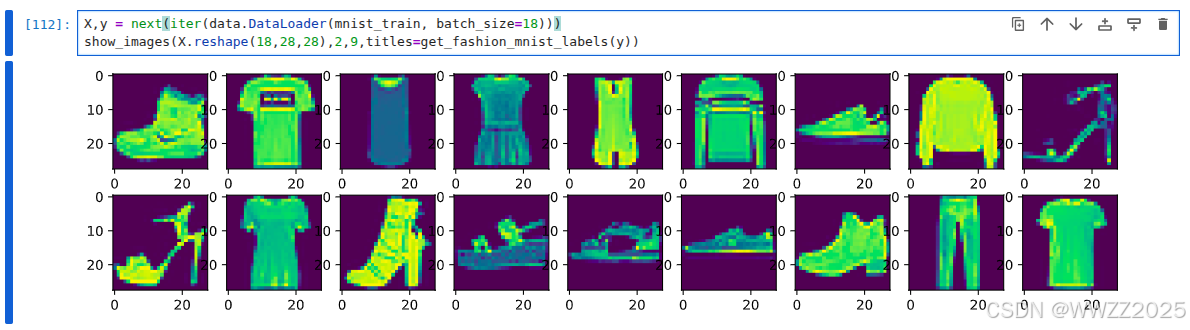
目前常使用Fashion-MNIST数据集对模型进行效果验证,库导入方法如下:
%matplotlib inline
import torch
import torchvision
from torch.utils import data
from torchvision import transforms
from d2l import torch as d2l

d2l.use_svg_display()
trans = transforms.ToTensor() mnist_train = torchvision.datasets.FashionMNIST(root="../data", train=True, transform=trans, download=True) mnist_test = torchvision.datasets.FashionMNIST(root="../data", train=False, transform=trans, download=True) len(mnist_train),len(mnist_test)def get_fashion_mnist_labels(labels): """返回Fashion-MNIST数据集的文本标签""" text_labels = [ 't-shirt','trouser','pullover','dress','coat','sandal','shirt','sneaker','bag','ankle_boot' ] return [text_labels[int(i)] for i in labels] def show_images(imgs, num_rows, num_cols, titles=None,scale=1.5): """Plot a list of images.""" figsize = (num_cols * scale, num_rows * scale) _, axes = d2l.plt.subplots(num_rows, num_cols, figsize=figsize) axes = axes.flatten() for i, (ax, img) in enumerate(zip(axes, imgs)): if torch.is_tensor(img): #图片张量 ax.imshow(img.numpy()) else: #PIL图片 ax.imshow(img) X,y = next(iter(data.DataLoader(mnist_train, batch_size=18))) show_images(X.reshape(18,28,28),2,9,titles=get_fashion_mnist_labels(y))
取小批量数据,大小为batch_size
batch_size = 256

def get_dataloader_workers():
    """使用4个进程读取数据"""
    return 8

train_iter = data.DataLoader(mnist_train, batch_size, shuffle=True,
                            num_workers=get_dataloader_workers())
timer = d2l.Timer()
for X,y in train_iter:
    continue
f'{timer.stop():.2f} sec'

火山引擎开发者社区是火山引擎打造的AI技术生态平台,聚焦Agent与大模型开发,提供豆包系列模型(图像/视频/视觉)、智能分析与会话工具,并配套评测集、动手实验室及行业案例库。社区通过技术沙龙、挑战赛等活动促进开发者成长,新用户可领50万Tokens权益,助力构建智能应用。
更多推荐
 22
22 0
0- 0


 已为社区贡献25条内容

所有评论(0)