jenkins中出现ERROR: No such file /root/.jenkins/workspace/xxxx/pom.xmlPerhaps you need to specify the
Commit message: "更新插件"项目中没有pom文件,项目路径填写错误。添加pom文件或者填写正确的项目路径。
·
目录
【错误收集】
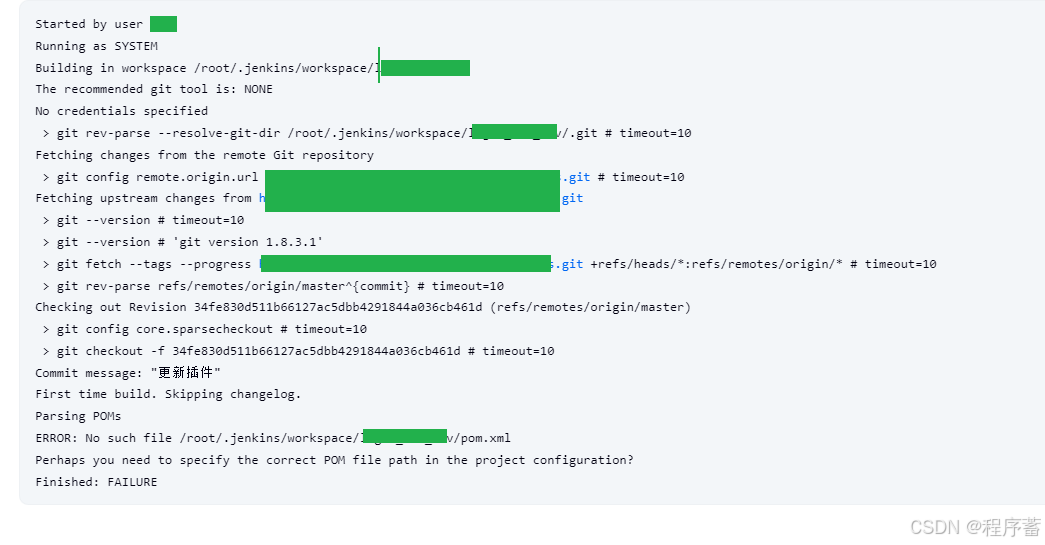
Started by user xxx
Running as SYSTEM
Building in workspace /root/.jenkins/workspace/lagou_edu_dev
The recommended git tool is: NONE
No credentials specified
 > git rev-parse --resolve-git-dir /root/.jenkins/workspace/xxxx/.git # timeout=10
Fetching changes from the remote Git repository
 > git config remote.origin.url https://gitee.com/xxxxx.git # timeout=10
Fetching upstream changes from https://gitee.com/xxxxx.git
 > git --version # timeout=10
 > git --version # 'git version 1.8.3.1'
 > git fetch --tags --progress https://gitee.com/xxxxx.git +refs/heads/*:refs/remotes/origin/* # timeout=10
 > git rev-parse refs/remotes/origin/master^{commit} # timeout=10
Checking out Revision 34fe830d511b66127ac5dbb4291844a036cb461d (refs/remotes/origin/master)
 > git config core.sparsecheckout # timeout=10
 > git checkout -f 34fe830d511b66127ac5dbb4291844a036cb461d # timeout=10
Commit message: "更新插件"
First time build. Skipping changelog.
Parsing POMs
ERROR: No such file /root/.jenkins/workspace/xxxx/pom.xml
Perhaps you need to specify the correct POM file path in the project configuration?
Finished: FAILURE
【错误分析】
ERROR: No such file /root/.jenkins/workspace/xxxx/pom.xml
Perhaps you need to specify the correct POM file path in the project
项目中没有pom文件,项目路径填写错误
【解决办法】
添加pom文件或者填写正确的项目路径
【运行结果】


火山引擎开发者社区是火山引擎打造的AI技术生态平台,聚焦Agent与大模型开发,提供豆包系列模型(图像/视频/视觉)、智能分析与会话工具,并配套评测集、动手实验室及行业案例库。社区通过技术沙龙、挑战赛等活动促进开发者成长,新用户可领50万Tokens权益,助力构建智能应用。
更多推荐
 16
16 0
0- 0


 已为社区贡献1条内容

所有评论(0)