【2025年10月】离线安装M2M100问题汇总(包括安装whisper)
github的assets下载yt-dlp二进制文件运行,使用插件cookie-editor导出netscape为cookies.txt文件就可以愉快的下载了。在布尔值这里卡了很久,甚至怀疑transformers源码读取出了问题,证明是sentencepiece.bpe.model下载出错。这个model文件很重要,wget下载下来是网页形式,可以点进去下载下来,大小是2.42M核对一下,出错基
-
镜像站地址 https://hf-mirror.com/facebook/m2m100_1.2B
-
点击Files and versions这几个文件可以使用wget -c 断点续传下载下来,rust_model.ot可以不用下
-
需要sentencepiece,pip安装
ImportError: M2M100Tokenizer requires the SentencePiece library but it was not found in your environment.
- 不需要spm_100k.model了,名字是sentencepiece.bpe.model
OSError: Unable to load vocabulary from file. Please check that the provided vocabulary is accessible and not corrupted
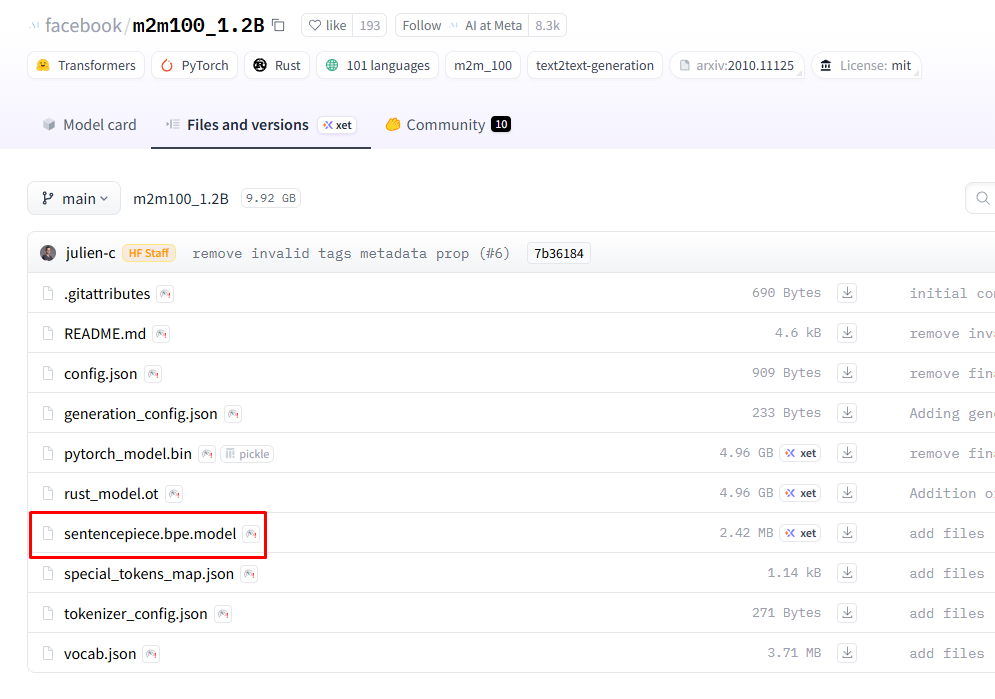
-
这个model文件很重要,wget下载下来是网页形式,可以点进去下载下来,大小是2.42M核对一下,出错基本是这个问题
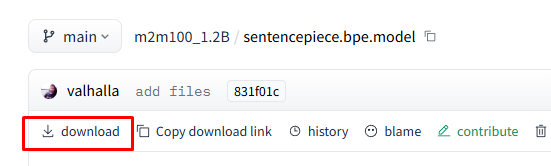
-
在布尔值这里卡了很久,甚至怀疑transformers源码读取出了问题,证明是sentencepiece.bpe.model下载出错
AttributeError: ‘bool’ object has no attribute ‘src_lang’
- 检查方式 print(type(tokenizer)),正确输出
<class ‘transformers.models.m2m_100.tokenization_m2m_100.M2M100Tokenizer’>
- 检查 sentencepiece.bpe.model 文件内容不是合法的 SentencePiece 模型
import sentencepiece as spm
sp = spm.SentencePieceProcessor(model_file="填写model路径")
print("✅ 模型加载成功")
RuntimeError: Internal: could not parse ModelProto from /home/x/fanyi_models/m2m100_1.2B/sentencepiece.bpe.model
另外whisper安装选择了medium.en,下载地址参考最新的版本
https://github.com/openai/whisper/blob/main/whisper/init.py
脚本代码由chatgpt生成
调用whisper脚本
import whisper

# 1️⃣ 加载模型(支持中文用 medium / large,多语言;仅英文可用 medium.en)
model = whisper.load_model("/home/x/fanyi_models/medium.en.pt")

# 2️⃣ 转录 webm 文件
result = model.transcribe("/home/x/fanyi_models/test_models/chris.m4a")

# 3️⃣ 保存为 .srt 文件
with open("chris.srt", "w", encoding="utf-8") as f:
    for seg in result["segments"]:
        start = seg["start"]
        end = seg["end"]
        text = seg["text"].strip()

        # 格式化时间戳为 SRT 格式
        def fmt_time(s):
            h = int(s // 3600)
            m = int((s % 3600) // 60)
            s = s % 60
            ms = int((s - int(s)) * 1000)
            return f"{h:02d}:{m:02d}:{int(s):02d},{ms:03d}"

        f.write(f"{seg['id'] + 1}\n{fmt_time(start)} --> {fmt_time(end)}\n{text}\n\n")
生成双语字幕的脚本,直接读取分割后srt进行翻译,可能有更好的方式
from transformers import M2M100ForConditionalGeneration, M2M100Tokenizer
from tqdm import tqdm

# === 模型路径 ===
model_path = "/home/x/fanyi_models/m2m100_1.2B"  # 改为你的模型目录
tokenizer = M2M100Tokenizer.from_pretrained(model_path, local_files_only=True)
model = M2M100ForConditionalGeneration.from_pretrained(model_path, local_files_only=True)

tokenizer.src_lang = "en"
tgt_lang = "zh"

# === 输入输出路径 ===
input_file = "chris.srt"
output_file = "chris_bilingual.srt"

# === 读取原始字幕 ===
with open(input_file, "r", encoding="utf-8") as f:
    lines = f.readlines()

output_lines = []
buffer = []

# === 翻译循环 ===
for line in tqdm(lines, desc="Translating"):
    if line.strip() == "":
        # 段落结束
        if buffer:
            text = " ".join(buffer).strip()
            inputs = tokenizer(text, return_tensors="pt")
            generated_tokens = model.generate(
                **inputs,
                forced_bos_token_id=tokenizer.get_lang_id(tgt_lang)
            )
            zh_translation = tokenizer.batch_decode(generated_tokens, skip_special_tokens=True)[0]
            # 写入原英文 + 中文
            output_lines.append(text + "\n")
            output_lines.append(zh_translation.strip() + "\n\n")
            buffer = []
        else:
            output_lines.append("\n")
        continue

    if "-->" in line or line.strip().isdigit():
        output_lines.append(line)
    else:
        buffer.append(line.strip())

# === 保存双语字幕 ===
with open(output_file, "w", encoding="utf-8") as f:
    f.writelines(output_lines)

print(f"✅ 双语字幕已生成:{output_file}")
github的assets下载yt-dlp二进制文件运行,使用插件cookie-editor导出netscape为cookies.txt文件就可以愉快的下载了

火山引擎开发者社区是火山引擎打造的AI技术生态平台,聚焦Agent与大模型开发,提供豆包系列模型(图像/视频/视觉)、智能分析与会话工具,并配套评测集、动手实验室及行业案例库。社区通过技术沙龙、挑战赛等活动促进开发者成长,新用户可领50万Tokens权益,助力构建智能应用。
更多推荐
 3
3 0
0- 0


 已为社区贡献33条内容

所有评论(0)