终于有人把 MCP 的概念给我讲明白了
下达命令的大老板。AI 的运行环境,相当于“管家办公室”。AI 的大脑,负责思考和决策。这是一个百宝箱,里面装着各种MCP Tools (工具),专门干脏活累活(比如查网页、读文件、查数据库)。
不管是搞 AI Coding,还是做 AI 应用,今年有个绕不开的技术点:MCP。

很多同学第一次接触 MCP,感觉云里雾里,到现在可能也是一知半解。
本文将用相对通俗的语言配合一些动图,让大家不仅知道 MCP 是什么、为什么用,通过 Cherry Studio 让大家“看见”MCP 的过程,理论与实践相结合。
MCP 是什么?
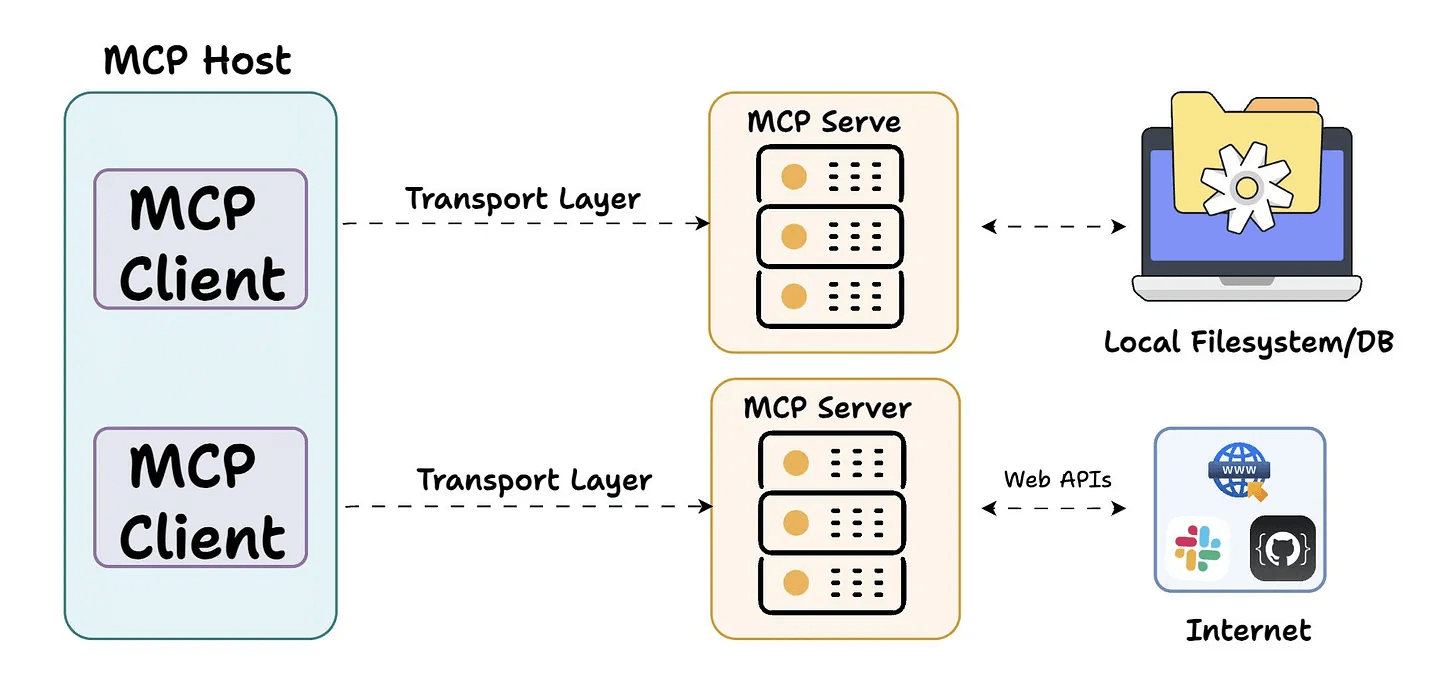
简单讲, MCP 是一个 AI Agent 调用工具的协议。
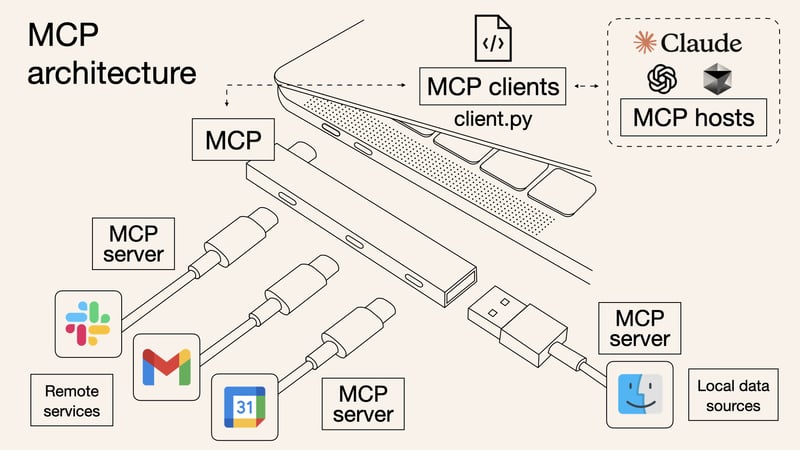
MCP 的客户端和服务端建立连接,然后可以通过服务端调用工具执行各种操作。
为什么需要 MCP?
解决传统的 M × N 集成噩梦
在 MCP 出现之前,AI Agent 连接外部工具,基本就是“硬编码”一对一手工对接。
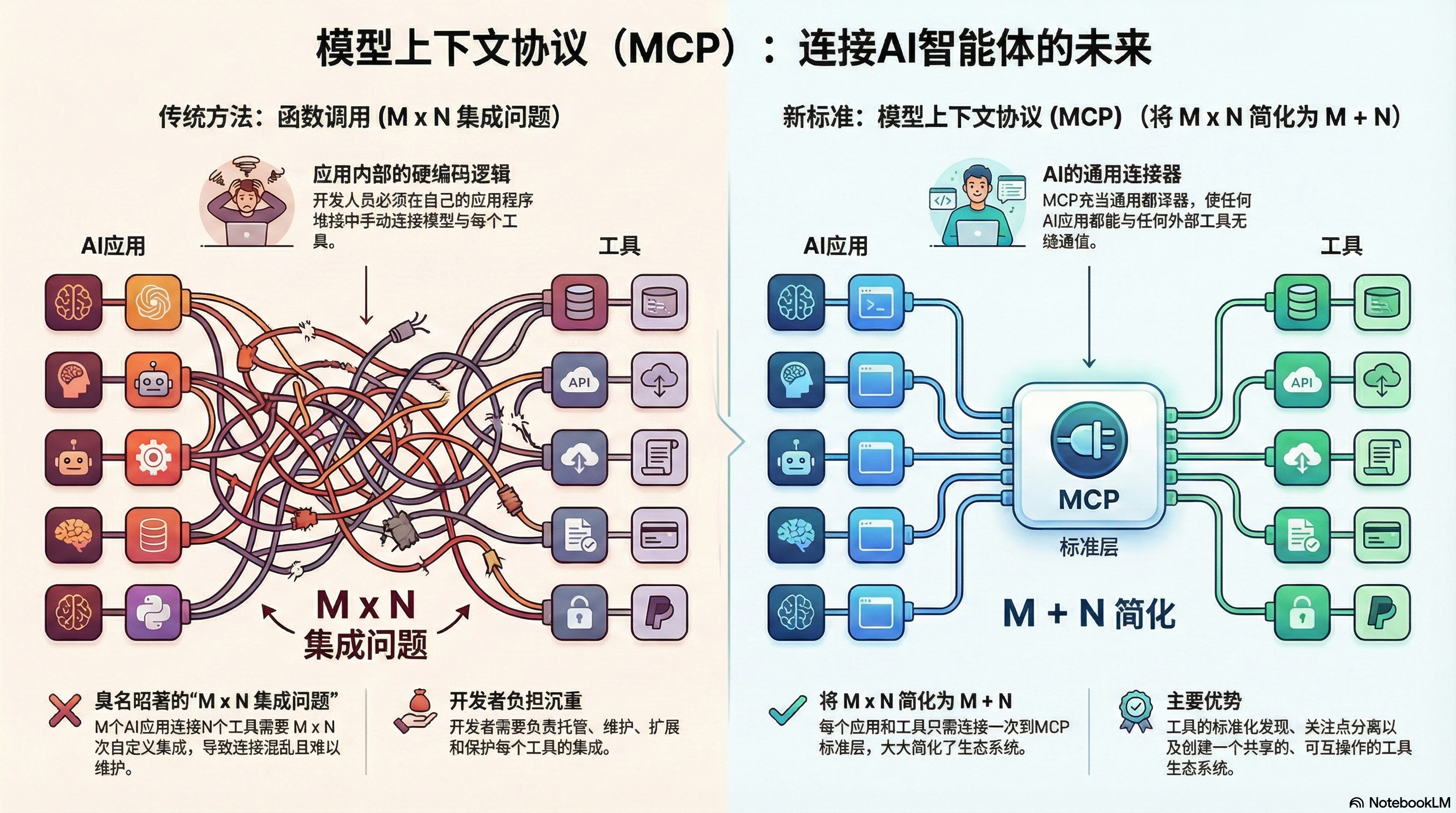
比如说,你有 M 个 AI 应用,N 个工具(数据库、文件系统啥的),那就得写 M × N 个集成模块。每对接一个新工具,都要从头适配一遍,费时费力。
MCP 怎么解决的?引入一个通用协议,就像 USB-C 标准一样。
有了 MCP,M 个 AI 应用只需实现一次 MCP 客户端,N 个工具只需实现一次 MCP 服务器。一次对接,解锁整个生态——这才是真正的效率提升!
标准化工具的发现和使用
MCP 的核心在于让工具可被发现、可被使用,尤其是跨多个 Agent、模型或平台时。
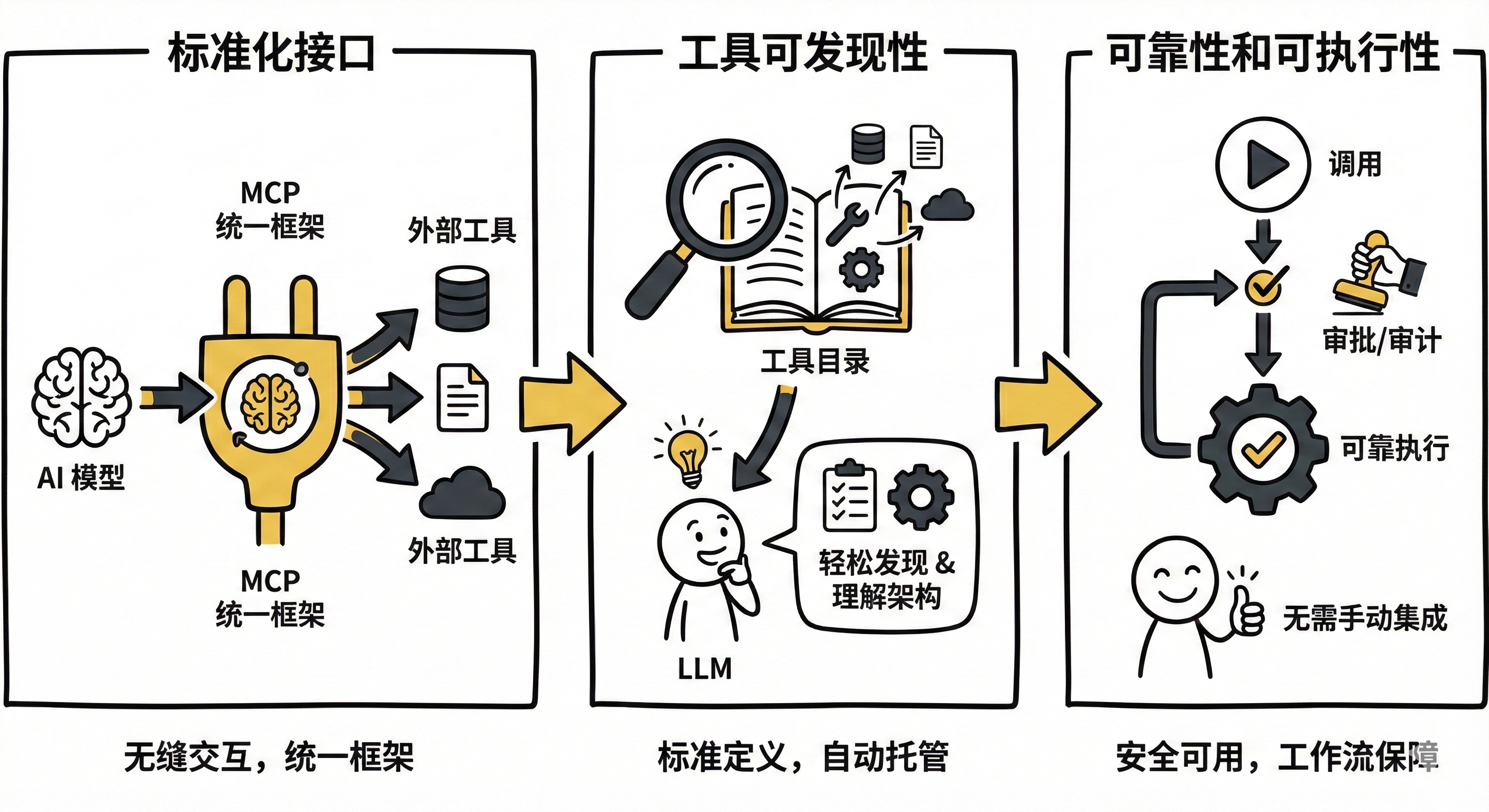
主要有以下几点:
- 标准化接口: MCP 提供统一框架,让 AI 模型与外部工具无缝交互
- 工具可发现性: 标准化了工具的定义、托管和向 LLM 暴露的方式,LLM 能轻松发现可用工具、理解架构并使用
- 可靠性和可执行性: 确保工具可靠可用、可发现、可执行,无需手动定制集成,还能提供调用前的审批和审计工作流
拓展能力边界
大语言模型虽然很智能,但也不是万能的。很多任务需要调用各种工具来实现。
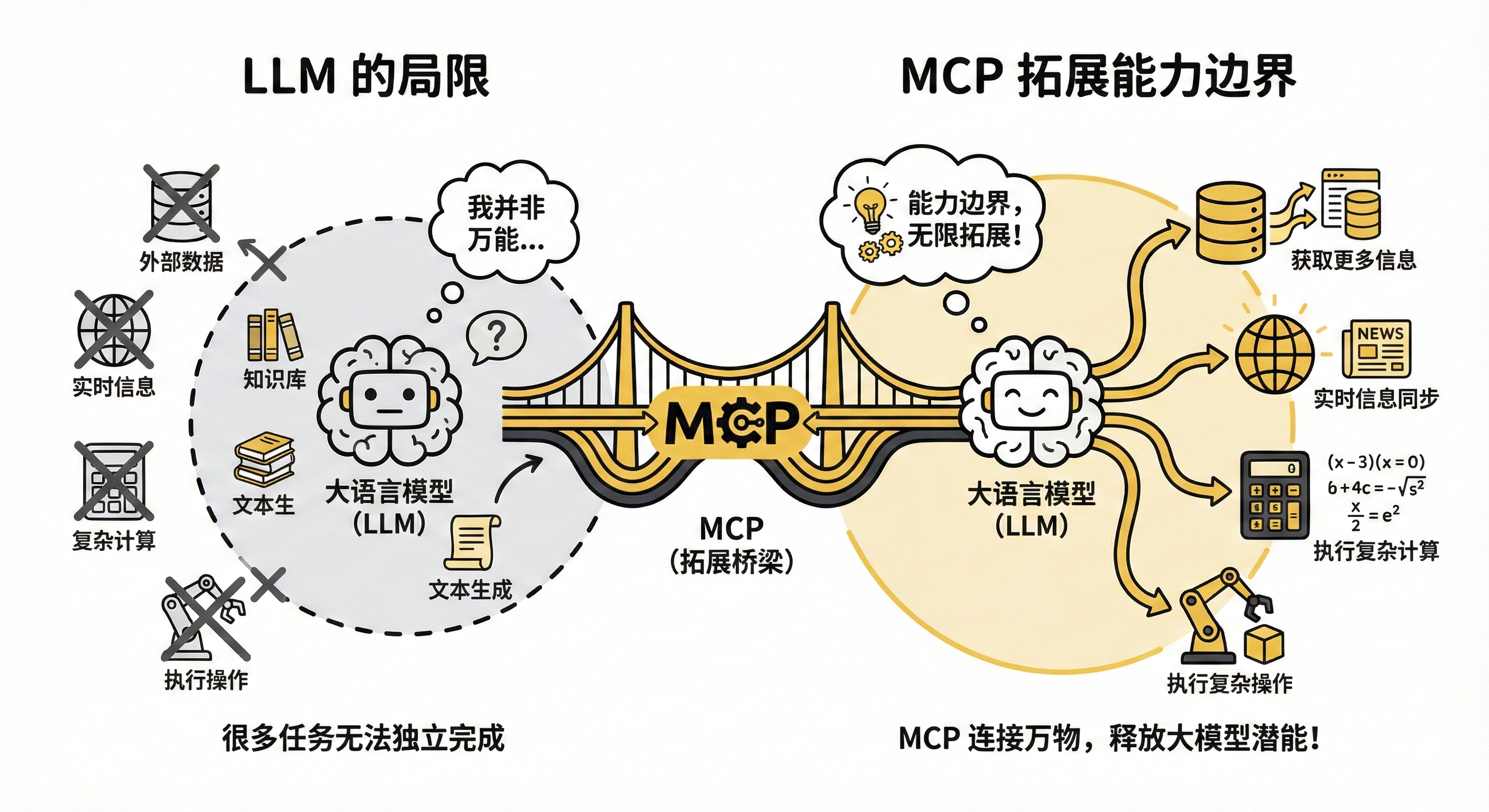
有了 MCP 就拓展了大模型的能力边界,它能够获取更多信息,能够执行更多复杂的操作。
MCP 的原理
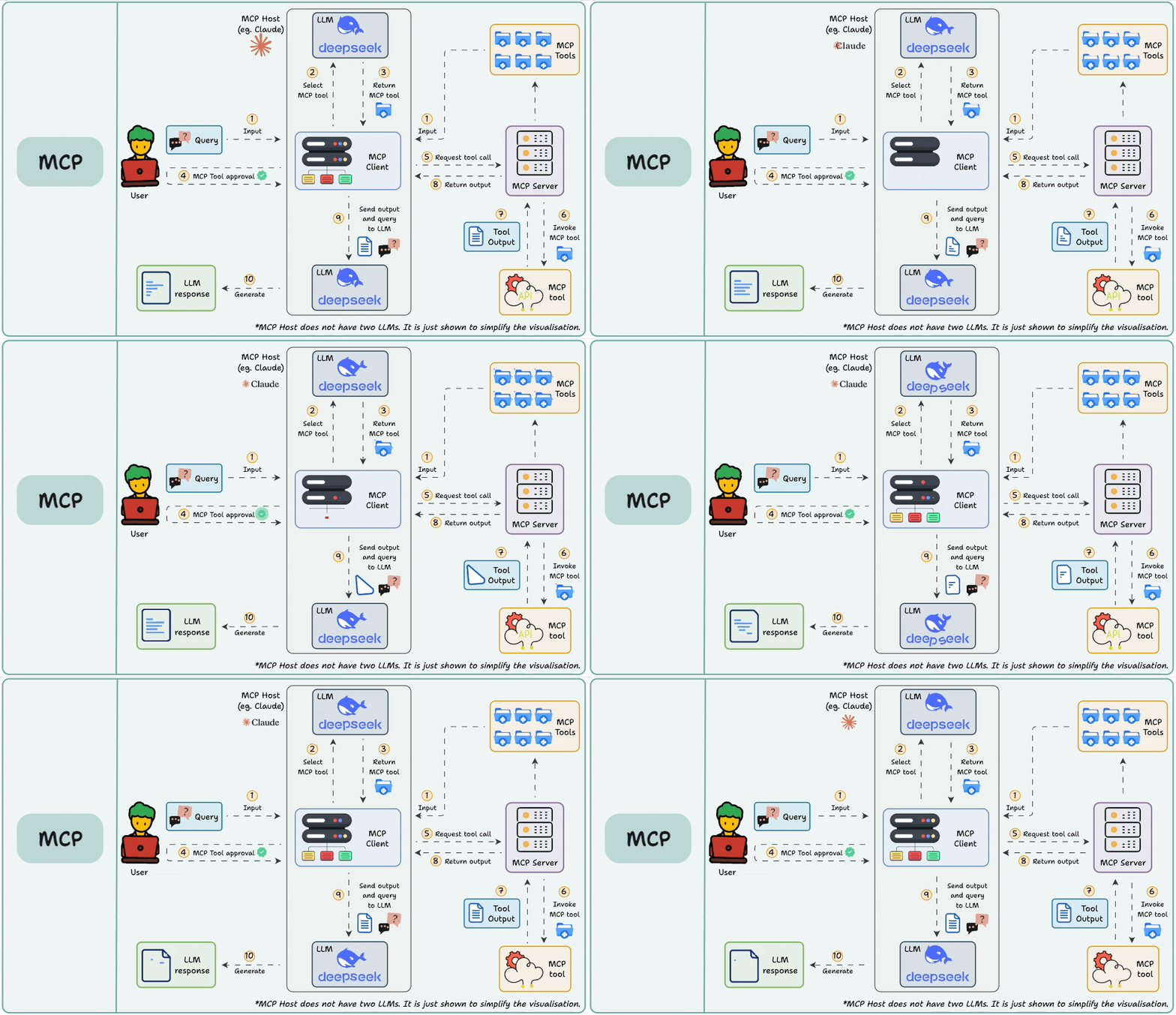
整个过程,就像“大老板(用户)找管家(AI)办事,管家指挥专业工匠(MCP Server)干活”的过程。
核心角色介绍
- User(用户): 下达命令的大老板。
- MCP Host (客户端,如 Cursor、Cherry Studio、Qoder等): AI 的运行环境,相当于“管家办公室”。
- LLM (大模型,如图中的 deepseek): AI 的大脑,负责思考和决策。
- MCP Server (服务端): 这是一个百宝箱,里面装着各种MCP Tools (工具),专门干脏活累活(比如查网页、读文件、查数据库)。
执行过程
第一阶段:提出需求与分析 (步骤 1-3)
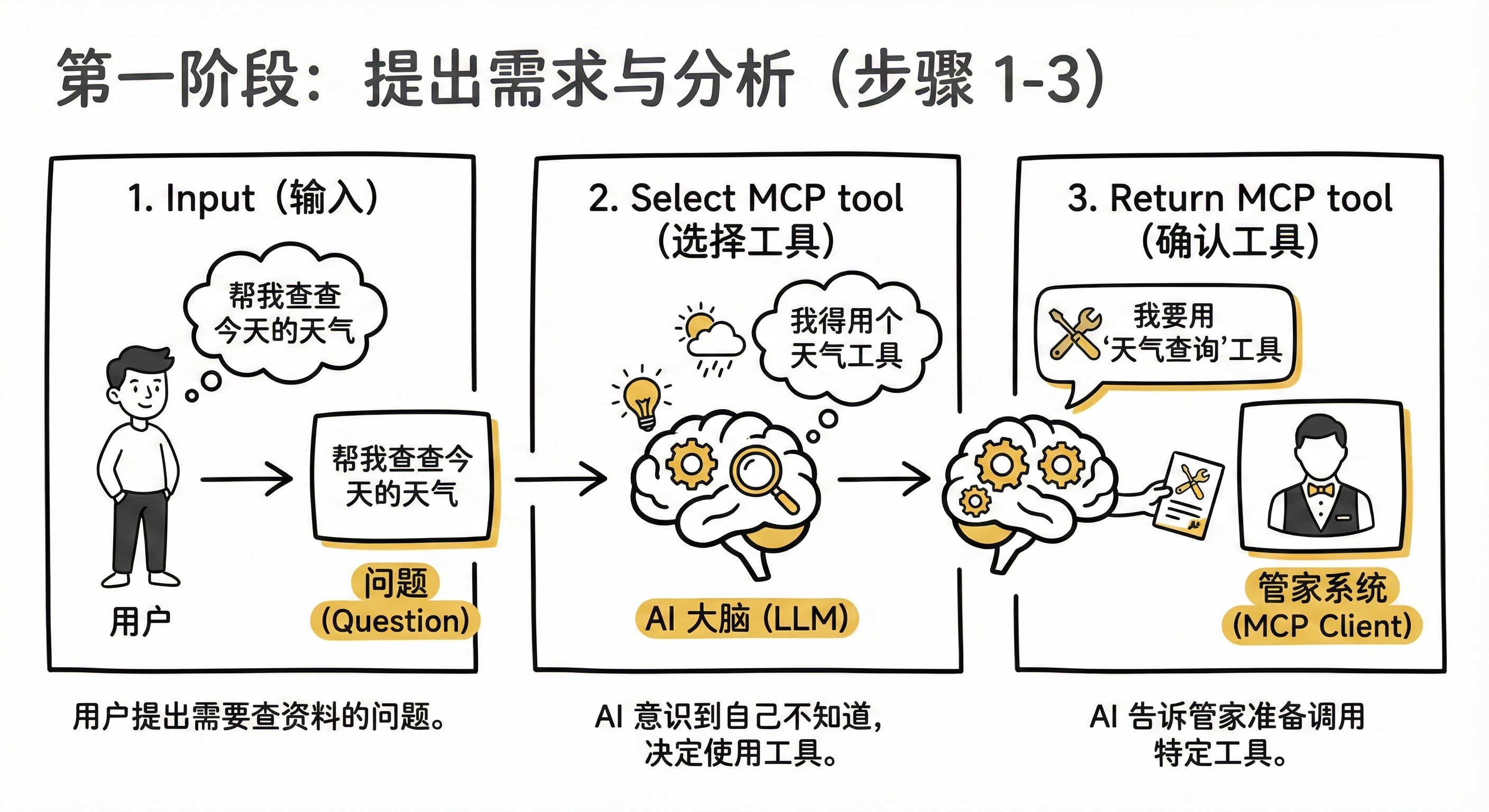
- Input (输入): 你(用户)问了一个需要查资料或操作电脑的问题(比如“帮我查查今天的天气”)。
- Select MCP tool (选择工具): AI 大脑(LLM)一看,发现自己不知道今天天气,心想:“我得用个天气工具才行”。
- Return MCP tool (确认工具):AI 告诉管家系统(MCP Client):“我要用‘天气查询’这个工具,准备调用它。”
第二阶段:安全审批 (步骤 4)
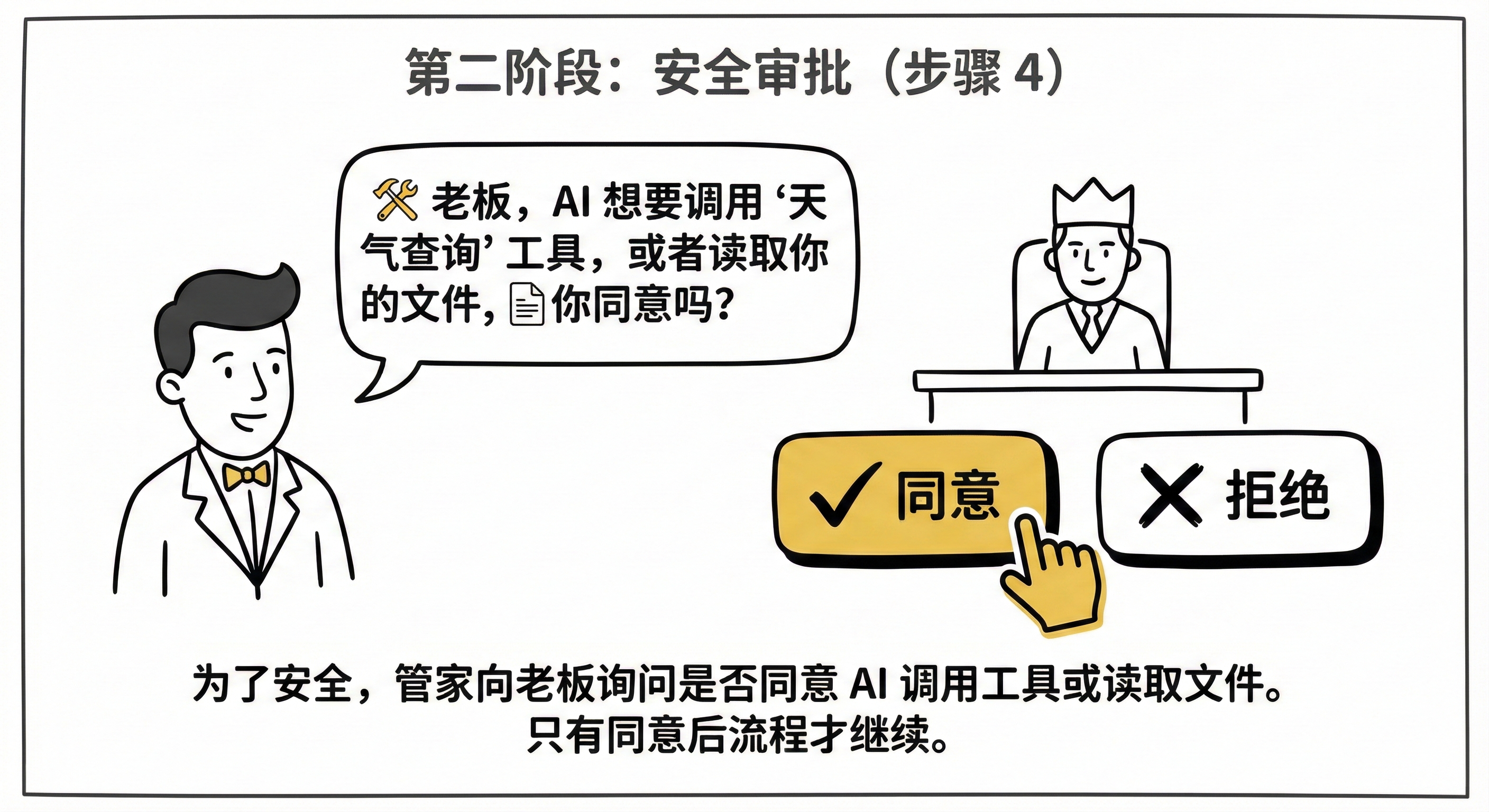
- MCP Tool approval (工具审批): 这一步很关键! 为了安全,管家会转头问你:“老板,AI 想要调用‘天气查询’工具,或者读取你的文件,你同意吗?”只有你点了“同意”,流程才会继续。
第三阶段:干活与反馈 (步骤 5-8)
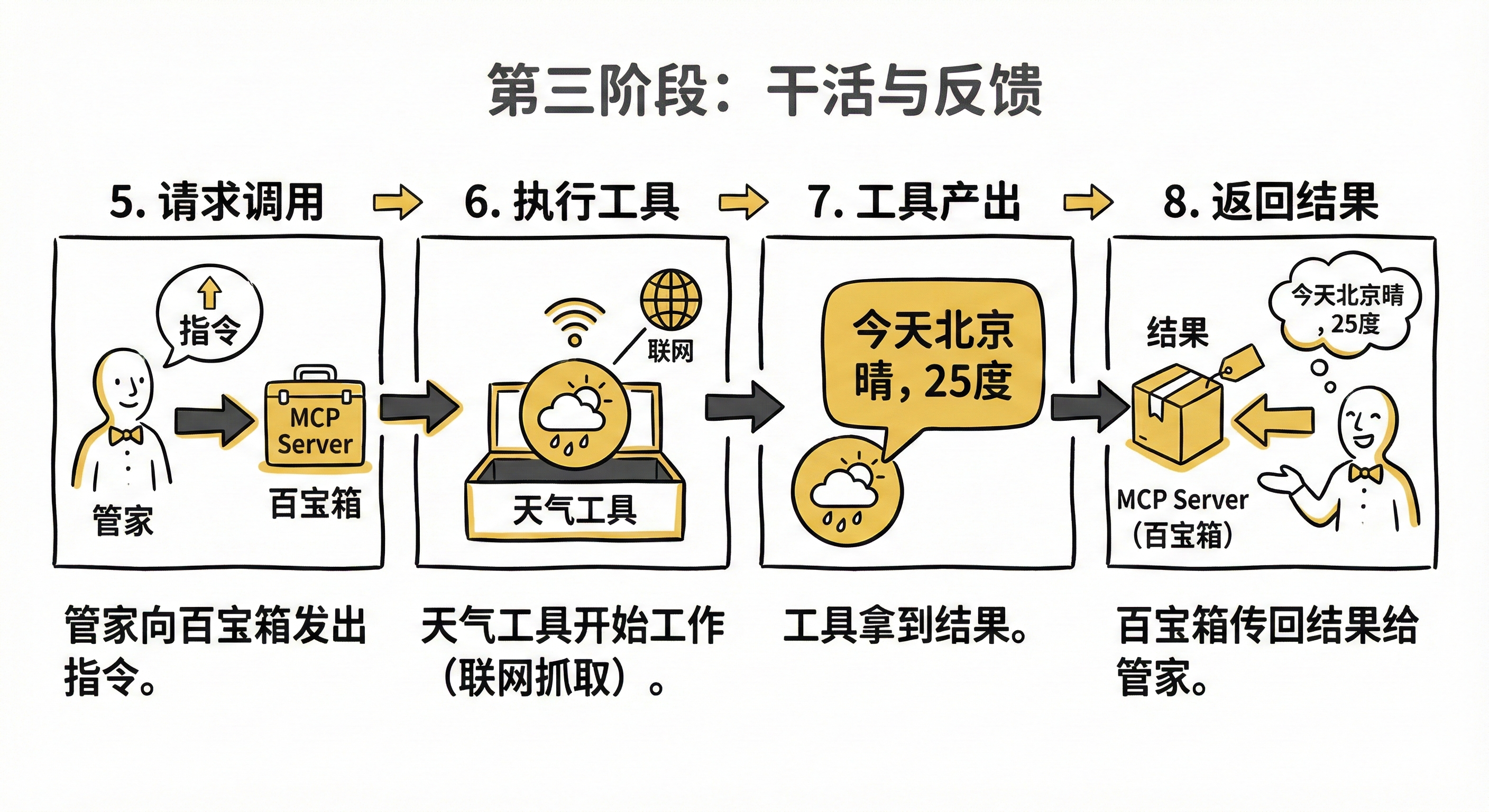
- Request tool call (请求调用): 获得批准后,管家向存放工具的百宝箱(MCP Server)发出指令。
- Invoke MCP tool (执行工具): 百宝箱里的“天气工具”开始工作(比如联网去气象局抓取数据)。
- Tool Output (工具产出): 工具干完活了,拿到结果(例如:“今天北京晴,25度”)。
- Return output (返回结果): 百宝箱把这个结果打包,传回给管家系统。
第四阶段:整理汇报 (步骤 9-10)

- Send output and query to LLM (发送结果给 AI): 管家拿着你最初的问题和工具查到的结果,一起交给 AI 大脑。就像对 AI 说:“老板问天气的,工具查到了是25度,你组织下语言回复吧。”
- Generate (生成回答): AI 大脑结合数据,写出一段通顺的人话(“杭州今天天气晴朗,气温25度…”),最终展示给你。
理论结合实践
为了“看见” MCP 的执行过程,我们采用 Cherry Studio 做演示。
传送门:https://www.cherry-ai.com/
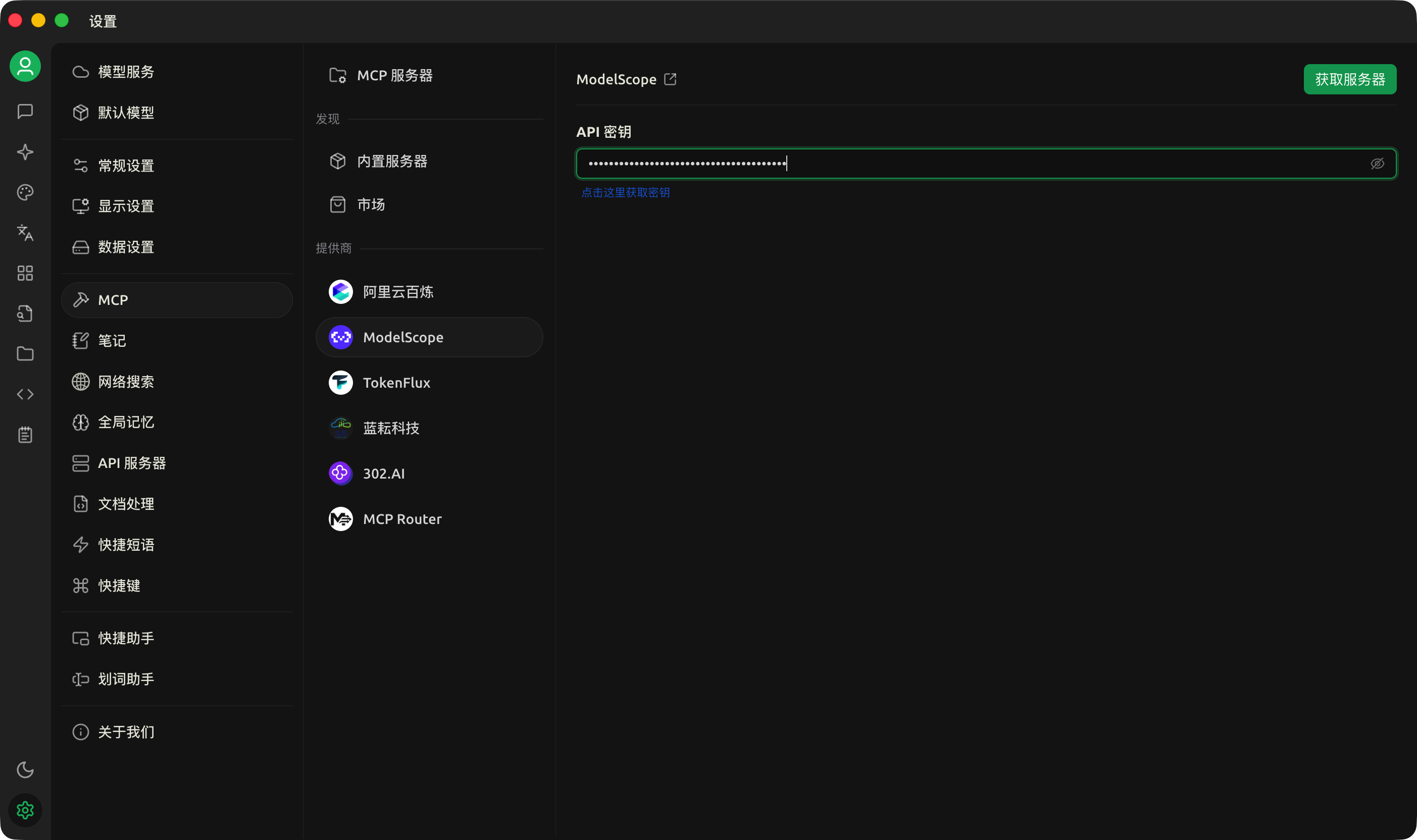
设置 - MCP - ModelScope 获取魔搭的密钥粘贴到这里。
在网页版「开启」想用的 MCP 服务:
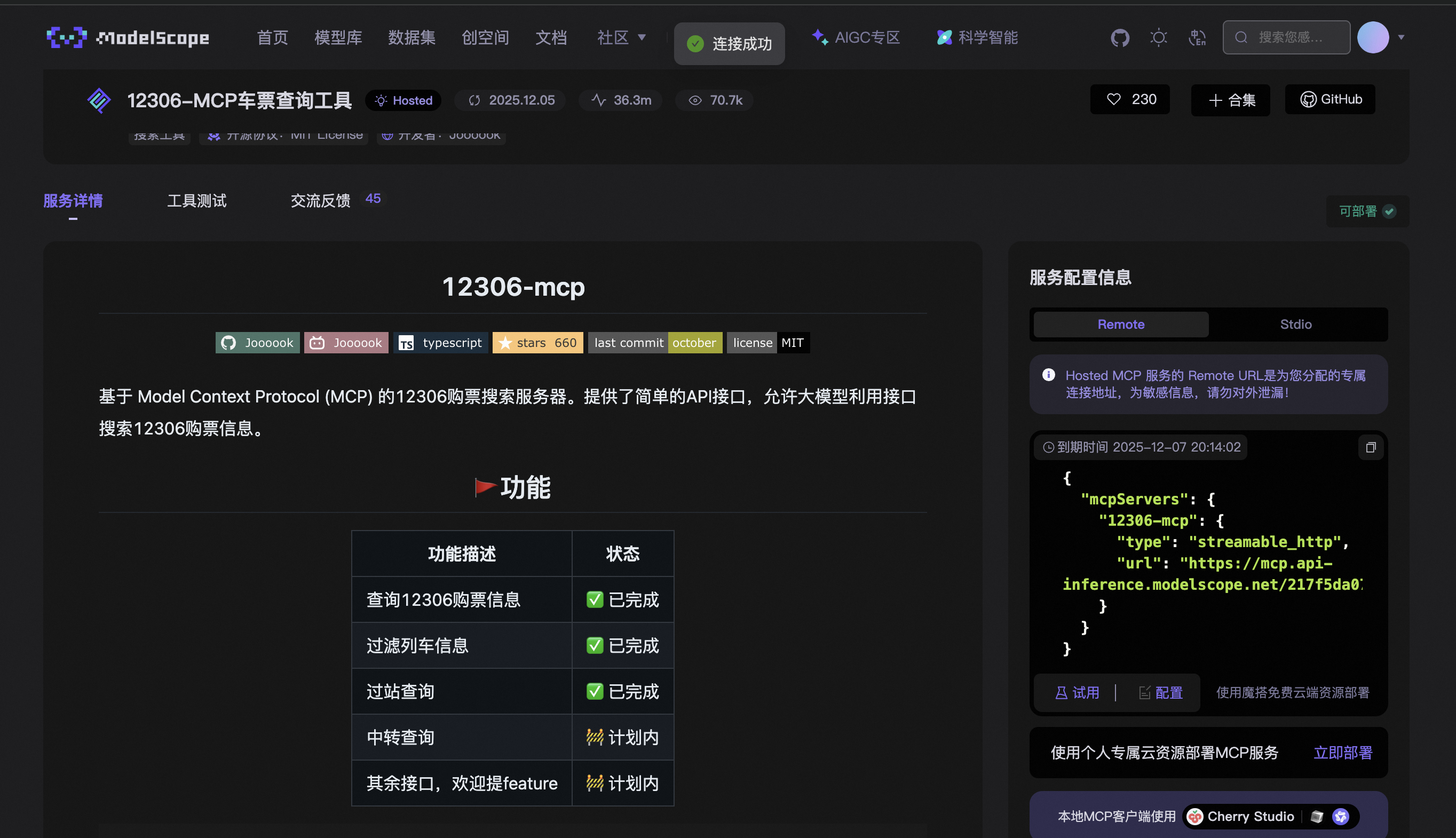
12306 车票查询:https://www.modelscope.cn/mcp/servers/@Joooook/12306-mcp
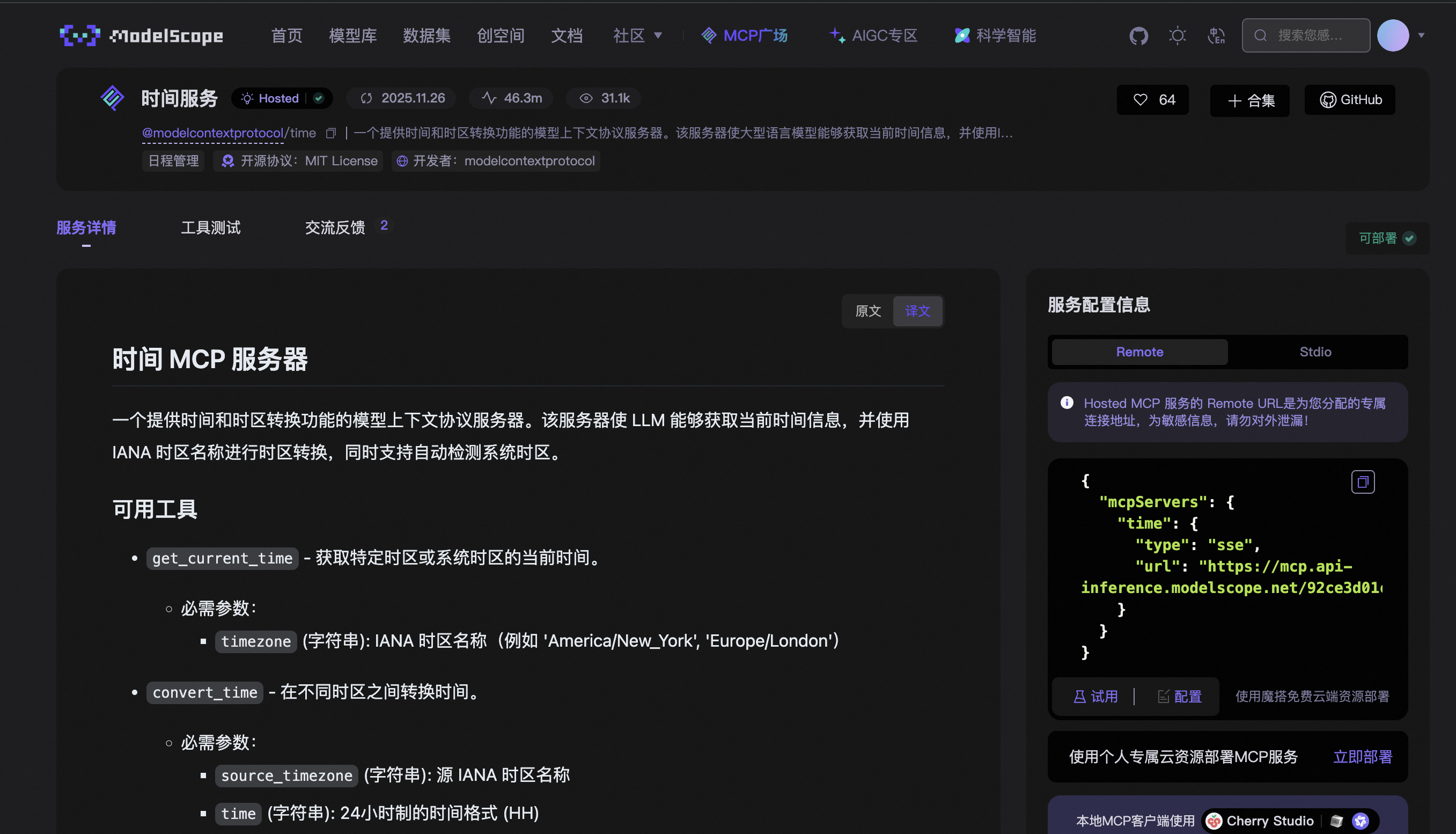
时间服务:https://www.modelscope.cn/mcp/servers/@modelcontextprotocol/time
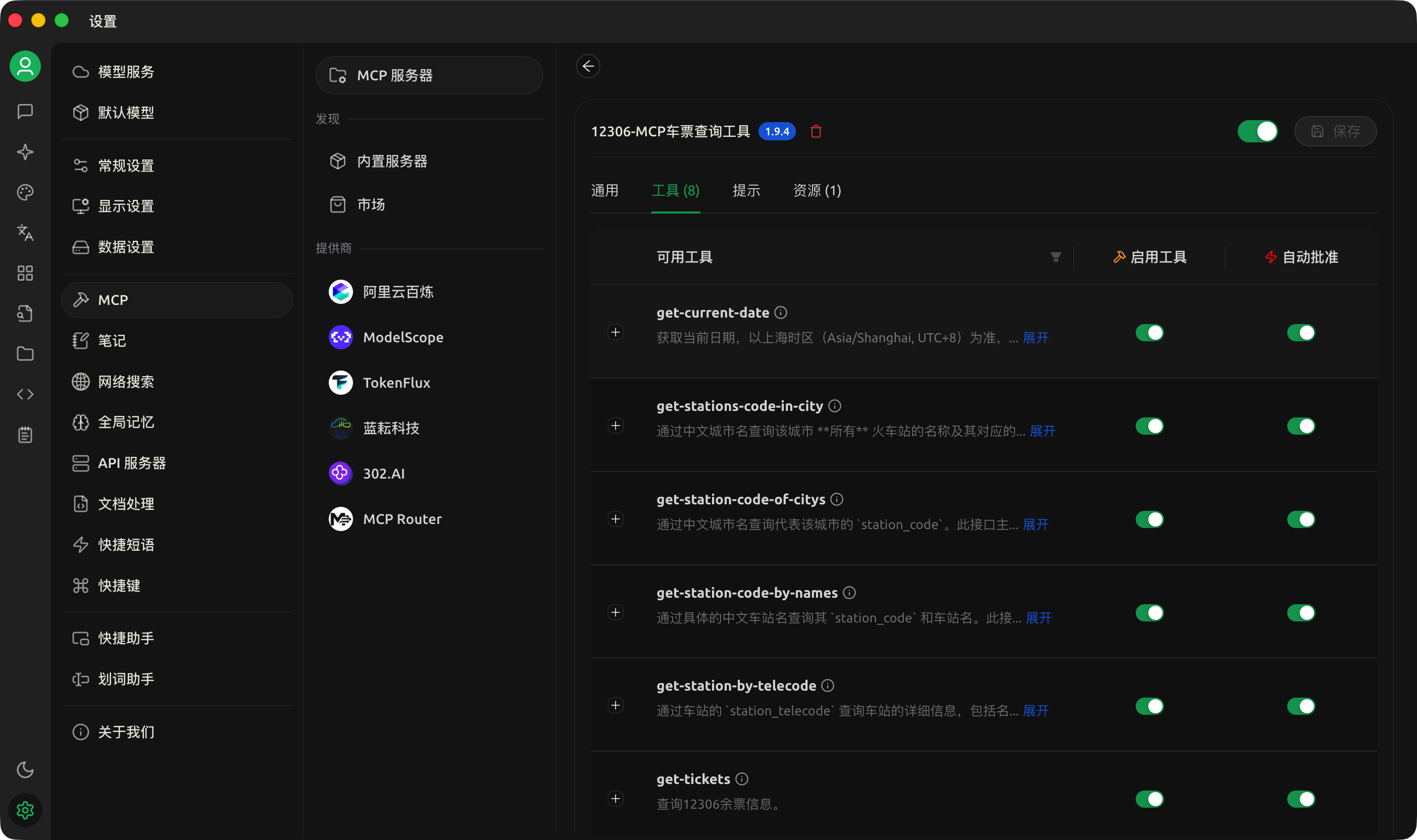
在 Cherry Studio 中「获取服务器」
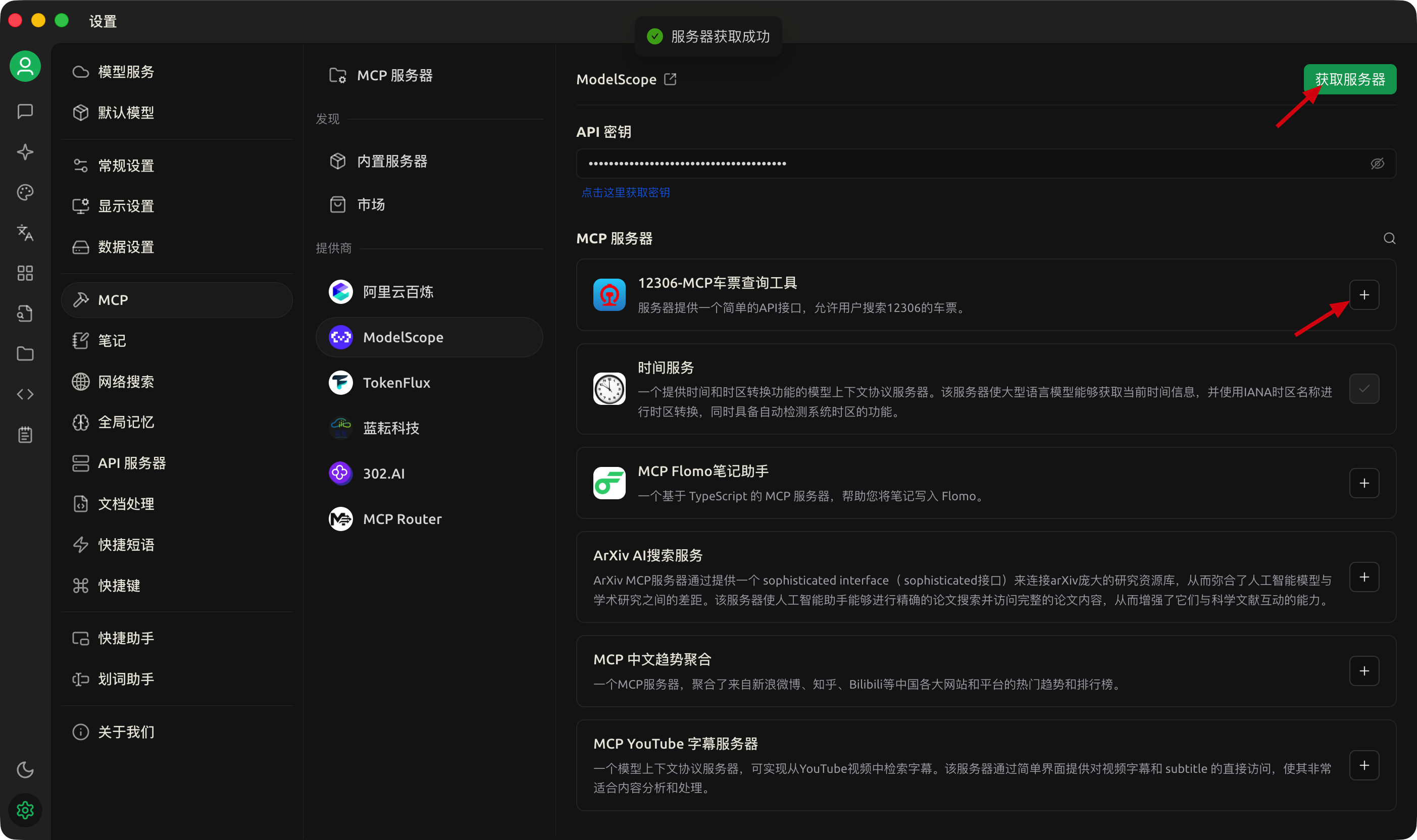
并且「+」启用。
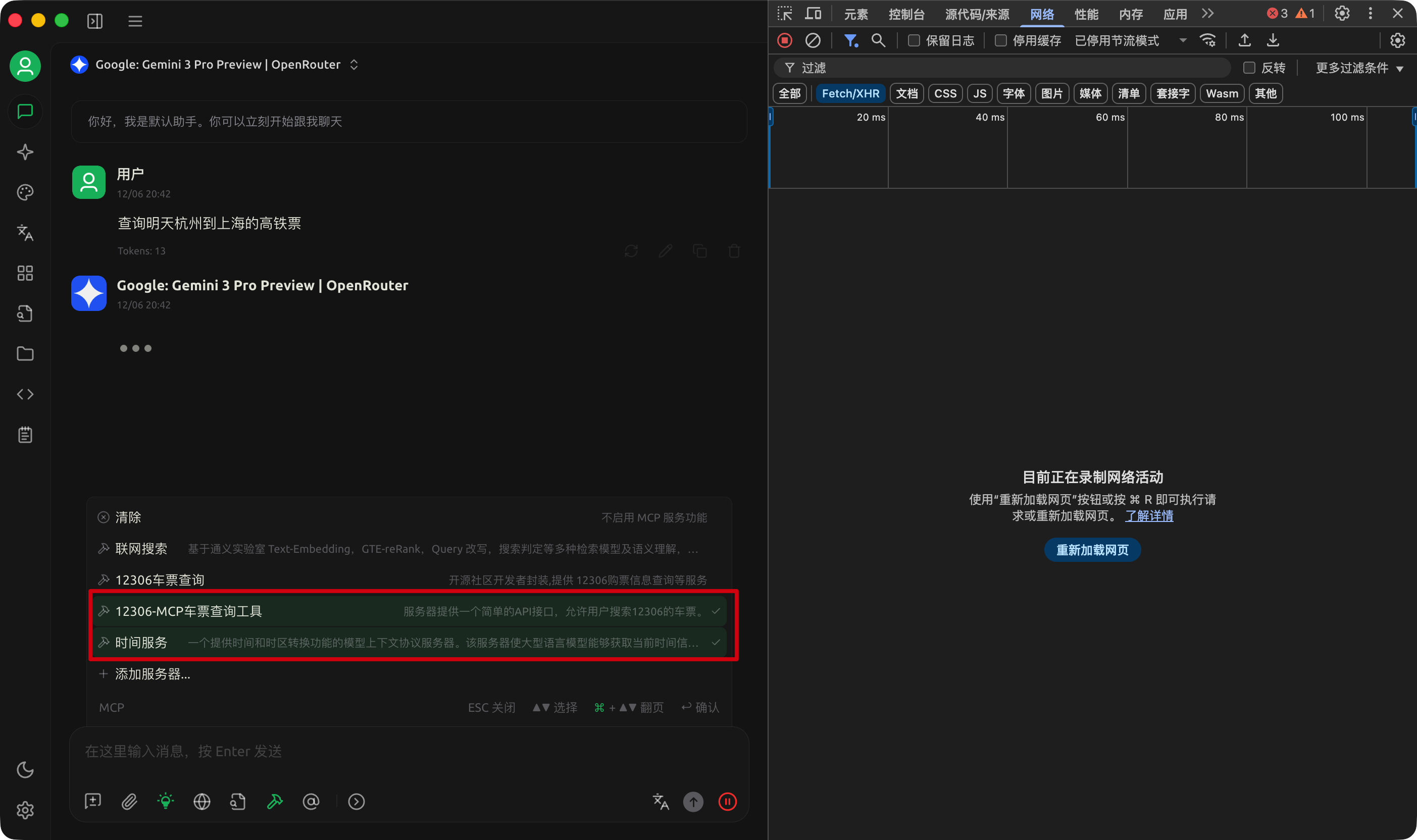
回到对话框中,选择可能会用到的 MCP。
直接对话,可以看到 Cherry Studio 调用对应 MCP 的参数。
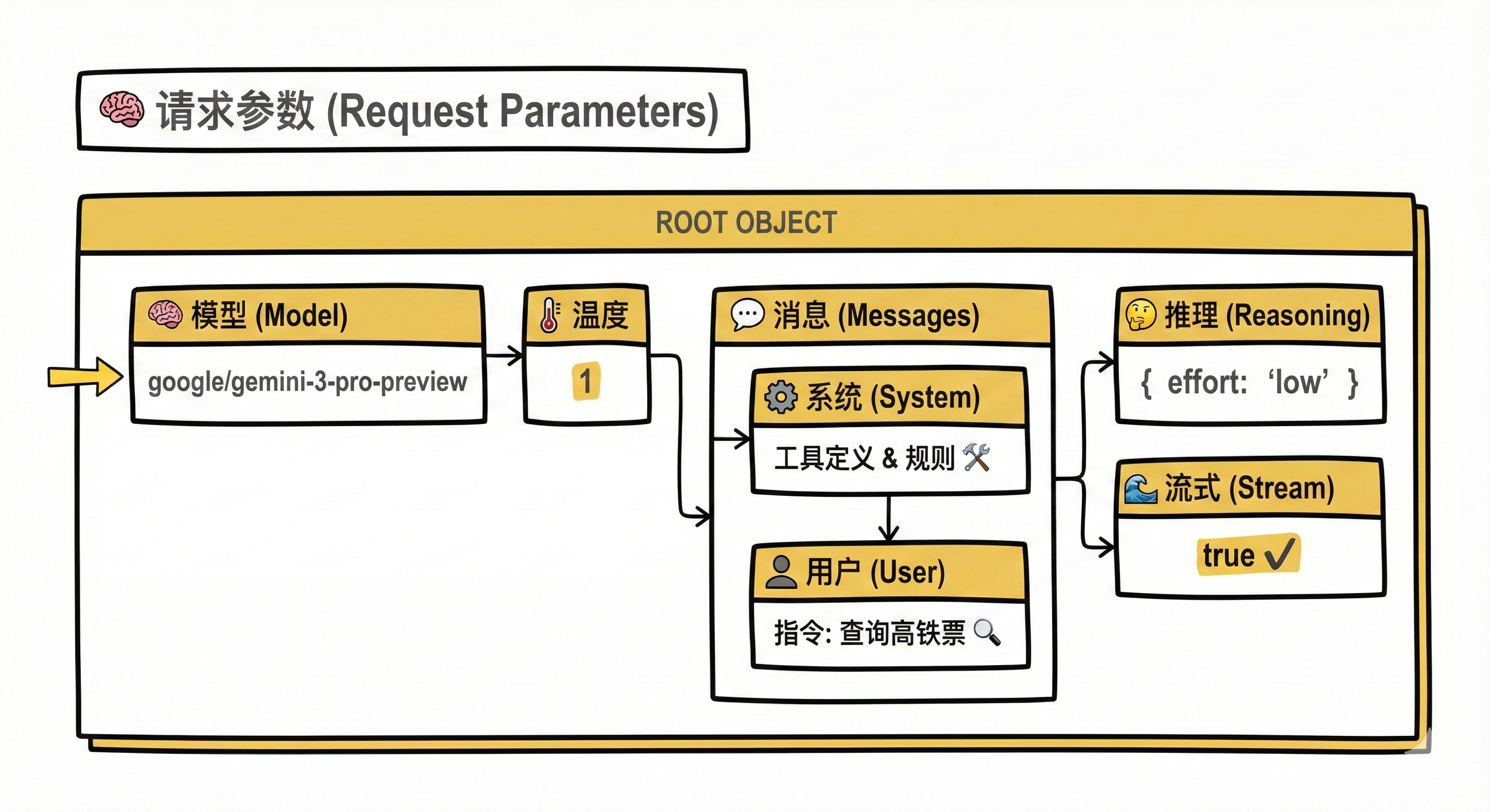
具体的请求参数如下:
{
    "model": "google/gemini-3-pro-preview",
    "temperature": 1,
    "messages": [
        {
            "role": "system",
            "content": "In this environment you have access to a set of tools you can use to answer the user's question. \\\nYou can use one tool per message, and will receive the result of that tool use in the user's response. You use tools step-by-step to accomplish a given task, with each tool use informed by the result of the previous tool use.\n\n## Tool Use Formatting\n\nTool use is formatted using XML-style tags. The tool name is enclosed in opening and closing tags, and each parameter is similarly enclosed within its own set of tags. Here's the structure:\n\n<tool_use>\n  <name>{tool_name}</name>\n  <arguments>{json_arguments}</arguments>\n</tool_use>\n\nThe tool name should be the exact name of the tool you are using, and the arguments should be a JSON object containing the parameters required by that tool. For example:\n<tool_use>\n  <name>python_interpreter</name>\n  <arguments>{\"code\": \"5 + 3 + 1294.678\"}</arguments>\n</tool_use>\n\nThe user will respond with the result of the tool use, which should be formatted as follows:\n\n<tool_use_result>\n  <name>{tool_name}</name>\n  <result>{result}</result>\n</tool_use_result>\n\nThe result should be a string, which can represent a file or any other output type. You can use this result as input for the next action.\nFor example, if the result of the tool use is an image file, you can use it in the next action like this:\n\n<tool_use>\n  <name>image_transformer</name>\n  <arguments>{\"image\": \"image_1.jpg\"}</arguments>\n</tool_use>\n\nAlways adhere to this format for the tool use to ensure proper parsing and execution.\n\n## Tool Use Examples\n\nHere are a few examples using notional tools:\n---\nUser: Generate an image of the oldest person in this document.\n\nA: I can use the document_qa tool to find out who the oldest person is in the document.\n<tool_use>\n  <name>document_qa</name>\n  <arguments>{\"document\": \"document.pdf\", \"question\": \"Who is the oldest person mentioned?\"}</arguments>\n</tool_use>\n\nUser: <tool_use_result>\n  <name>document_qa</name>\n  <result>John Doe, a 55 year old lumberjack living in Newfoundland.</result>\n</tool_use_result>\n\nA: I can use the image_generator tool to create a portrait of John Doe.\n<tool_use>\n  <name>image_generator</name>\n  <arguments>{\"prompt\": \"A portrait of John Doe, a 55-year-old man living in Canada.\"}</arguments>\n</tool_use>\n\nUser: <tool_use_result>\n  <name>image_generator</name>\n  <result>image.png</result>\n</tool_use_result>\n\nA: the image is generated as image.png\n\n---\nUser: \"What is the result of the following operation: 5 + 3 + 1294.678?\"\n\nA: I can use the python_interpreter tool to calculate the result of the operation.\n<tool_use>\n  <name>python_interpreter</name>\n  <arguments>{\"code\": \"5 + 3 + 1294.678\"}</arguments>\n</tool_use>\n\nUser: <tool_use_result>\n  <name>python_interpreter</name>\n  <result>1302.678</result>\n</tool_use_result>\n\nA: The result of the operation is 1302.678.\n\n---\nUser: \"Which city has the highest population , Guangzhou or Shanghai?\"\n\nA: I can use the search tool to find the population of Guangzhou.\n<tool_use>\n  <name>search</name>\n  <arguments>{\"query\": \"Population Guangzhou\"}</arguments>\n</tool_use>\n\nUser: <tool_use_result>\n  <name>search</name>\n  <result>Guangzhou has a population of 15 million inhabitants as of 2021.</result>\n</tool_use_result>\n\nA: I can use the search tool to find the population of Shanghai.\n<tool_use>\n  <name>search</name>\n  <arguments>{\"query\": \"Population Shanghai\"}</arguments>\n</tool_use>\n\nUser: <tool_use_result>\n  <name>search</name>\n  <result>26 million (2019)</result>\n</tool_use_result>\nAssistant: The population of Shanghai is 26 million, while Guangzhou has a population of 15 million. Therefore, Shanghai has the highest population.\n\n## Tool Use Available Tools\nAbove example were using notional tools that might not exist for you. You only have access to these tools:\n<tools>\n\n<tool>\n  <name>tool-12306_M-get_current_date_06mcp</name>\n  <description>获取当前日期,以上海时区(Asia/Shanghai, UTC+8)为准,返回格式为 \"yyyy-MM-dd\"。主要用于解析用户提到的相对日期(如“明天”、“下周三”),提供准确的日期输入。</description>\n  <arguments>\n    {\"jsonSchema\":{\"type\":\"object\",\"properties\":{},\"additionalProperties\":false,\"$schema\":\"http://json-schema.org/draft-07/schema#\"}}\n  </arguments>\n</tool>\n\n\n<tool>\n  <name>tool-12306_M-get_stations_code_in_city_06mcp</name>\n  <description>通过中文城市名查询该城市 **所有** 火车站的名称及其对应的 `station_code`,结果是一个包含多个车站信息的列表。</description>\n  <arguments>\n    {\"jsonSchema\":{\"type\":\"object\",\"properties\":{\"city\":{\"type\":\"string\",\"description\":\"中文城市名称,例如:\\\"北京\\\", \\\"上海\\\"\"}},\"required\":[\"city\"],\"additionalProperties\":false,\"$schema\":\"http://json-schema.org/draft-07/schema#\"}}\n  </arguments>\n</tool>\n\n\n<tool>\n  <name>tool-12306_M-get_station_code_of_citys_06mcp</name>\n  <description>通过中文城市名查询代表该城市的 `station_code`。此接口主要用于在用户提供**城市名**作为出发地或到达地时,为接口准备 `station_code` 参数。</description>\n  <arguments>\n    {\"jsonSchema\":{\"type\":\"object\",\"properties\":{\"citys\":{\"type\":\"string\",\"description\":\"要查询的城市,比如\\\"北京\\\"。若要查询多个城市,请用|分割,比如\\\"北京|上海\\\"。\"}},\"required\":[\"citys\"],\"additionalProperties\":false,\"$schema\":\"http://json-schema.org/draft-07/schema#\"}}\n  </arguments>\n</tool>\n\n\n<tool>\n  <name>tool-12306_M-get_station_code_by_names_06mcp</name>\n  <description>通过具体的中文车站名查询其 `station_code` 和车站名。此接口主要用于在用户提供**具体车站名**作为出发地或到达地时,为接口准备 `station_code` 参数。</description>\n  <arguments>\n    {\"jsonSchema\":{\"type\":\"object\",\"properties\":{\"stationNames\":{\"type\":\"string\",\"description\":\"具体的中文车站名称,例如:\\\"北京南\\\", \\\"上海虹桥\\\"。若要查询多个站点,请用|分割,比如\\\"北京南|上海虹桥\\\"。\"}},\"required\":[\"stationNames\"],\"additionalProperties\":false,\"$schema\":\"http://json-schema.org/draft-07/schema#\"}}\n  </arguments>\n</tool>\n\n\n<tool>\n  <name>tool-12306_M-get_station_by_telecode_06mcp</name>\n  <description>通过车站的 `station_telecode` 查询车站的详细信息,包括名称、拼音、所属城市等。此接口主要用于在已知 `telecode` 的情况下获取更完整的车站数据,或用于特殊查询及调试目的。一般用户对话流程中较少直接触发。</description>\n  <arguments>\n    {\"jsonSchema\":{\"type\":\"object\",\"properties\":{\"stationTelecode\":{\"type\":\"string\",\"description\":\"车站的 `station_telecode` (3位字母编码)\"}},\"required\":[\"stationTelecode\"],\"additionalProperties\":false,\"$schema\":\"http://json-schema.org/draft-07/schema#\"}}\n  </arguments>\n</tool>\n\n\n<tool>\n  <name>tool-12306_M-get_tickets_06mcp</name>\n  <description>查询12306余票信息。</description>\n  <arguments>\n    {\"jsonSchema\":{\"type\":\"object\",\"properties\":{\"date\":{\"type\":\"string\",\"minLength\":10,\"maxLength\":10,\"description\":\"查询日期,格式为 \\\"yyyy-MM-dd\\\"。如果用户提供的是相对日期(如“明天”),请务必先调用 `get-current-date` 接口获取当前日期,并计算出目标日期。\"},\"fromStation\":{\"type\":\"string\",\"description\":\"出发地的 `station_code` 。必须是通过 `get-station-code-by-names` 或 `get-station-code-of-citys` 接口查询得到的编码,严禁直接使用中文地名。\"},\"toStation\":{\"type\":\"string\",\"description\":\"到达地的 `station_code` 。必须是通过 `get-station-code-by-names` 或 `get-station-code-of-citys` 接口查询得到的编码,严禁直接使用中文地名。\"},\"trainFilterFlags\":{\"type\":\"string\",\"pattern\":\"^[GDZTKOFS]*$\",\"maxLength\":8,\"default\":\"\",\"description\":\"车次筛选条件,默认为空,即不筛选。支持多个标志同时筛选。例如用户说“高铁票”,则应使用 \\\"G\\\"。可选标志:[G(高铁/城际),D(动车),Z(直达特快),T(特快),K(快速),O(其他),F(复兴号),S(智能动车组)]\"},\"earliestStartTime\":{\"type\":\"number\",\"minimum\":0,\"maximum\":24,\"default\":0,\"description\":\"最早出发时间(0-24),默认为0。\"},\"latestStartTime\":{\"type\":\"number\",\"minimum\":0,\"maximum\":24,\"default\":24,\"description\":\"最迟出发时间(0-24),默认为24。\"},\"sortFlag\":{\"type\":\"string\",\"default\":\"\",\"description\":\"排序方式,默认为空,即不排序。仅支持单一标识。可选标志:[startTime(出发时间从早到晚), arriveTime(抵达时间从早到晚), duration(历时从短到长)]\"},\"sortReverse\":{\"type\":\"boolean\",\"default\":false,\"description\":\"是否逆向排序结果,默认为false。仅在设置了sortFlag时生效。\"},\"limitedNum\":{\"type\":\"number\",\"minimum\":0,\"default\":0,\"description\":\"返回的余票数量限制,默认为0,即不限制。\"},\"format\":{\"type\":\"string\",\"pattern\":\"^(text|csv|json)$\",\"default\":\"text\",\"description\":\"返回结果格式,默认为text,建议使用text与csv。可选标志:[text, csv, json]\"}},\"required\":[\"date\",\"fromStation\",\"toStation\"],\"additionalProperties\":false,\"$schema\":\"http://json-schema.org/draft-07/schema#\"}}\n  </arguments>\n</tool>\n\n\n<tool>\n  <name>tool-12306_M-get_interline_tickets_06mcp</name>\n  <description>查询12306中转余票信息。尚且只支持查询前十条。</description>\n  <arguments>\n    {\"jsonSchema\":{\"type\":\"object\",\"properties\":{\"date\":{\"type\":\"string\",\"minLength\":10,\"maxLength\":10,\"description\":\"查询日期,格式为 \\\"yyyy-MM-dd\\\"。如果用户提供的是相对日期(如“明天”),请务必先调用 `get-current-date` 接口获取当前日期,并计算出目标日期。\"},\"fromStation\":{\"type\":\"string\",\"description\":\"出发地的 `station_code` 。必须是通过 `get-station-code-by-names` 或 `get-station-code-of-citys` 接口查询得到的编码,严禁直接使用中文地名。\"},\"toStation\":{\"type\":\"string\",\"description\":\"出发地的 `station_code` 。必须是通过 `get-station-code-by-names` 或 `get-station-code-of-citys` 接口查询得到的编码,严禁直接使用中文地名。\"},\"middleStation\":{\"type\":\"string\",\"default\":\"\",\"description\":\"中转地的 `station_code` ,可选。必须是通过 `get-station-code-by-names` 或 `get-station-code-of-citys` 接口查询得到的编码,严禁直接使用中文地名。\"},\"showWZ\":{\"type\":\"boolean\",\"default\":false,\"description\":\"是否显示无座车,默认不显示无座车。\"},\"trainFilterFlags\":{\"type\":\"string\",\"pattern\":\"^[GDZTKOFS]*$\",\"maxLength\":8,\"default\":\"\",\"description\":\"车次筛选条件,默认为空。从以下标志中选取多个条件组合[G(高铁/城际),D(动车),Z(直达特快),T(特快),K(快速),O(其他),F(复兴号),S(智能动车组)]\"},\"earliestStartTime\":{\"type\":\"number\",\"minimum\":0,\"maximum\":24,\"default\":0,\"description\":\"最早出发时间(0-24),默认为0。\"},\"latestStartTime\":{\"type\":\"number\",\"minimum\":0,\"maximum\":24,\"default\":24,\"description\":\"最迟出发时间(0-24),默认为24。\"},\"sortFlag\":{\"type\":\"string\",\"default\":\"\",\"description\":\"排序方式,默认为空,即不排序。仅支持单一标识。可选标志:[startTime(出发时间从早到晚), arriveTime(抵达时间从早到晚), duration(历时从短到长)]\"},\"sortReverse\":{\"type\":\"boolean\",\"default\":false,\"description\":\"是否逆向排序结果,默认为false。仅在设置了sortFlag时生效。\"},\"limitedNum\":{\"type\":\"number\",\"minimum\":1,\"default\":10,\"description\":\"返回的中转余票数量限制,默认为10。\"},\"format\":{\"type\":\"string\",\"pattern\":\"^(text|json)$\",\"default\":\"text\",\"description\":\"返回结果格式,默认为text,建议使用text。可选标志:[text, json]\"}},\"required\":[\"date\",\"fromStation\",\"toStation\"],\"additionalProperties\":false,\"$schema\":\"http://json-schema.org/draft-07/schema#\"}}\n  </arguments>\n</tool>\n\n\n<tool>\n  <name>tool-12306_M-get_train_route_stations_06mcp</name>\n  <description>查询特定列车车次在指定区间内的途径车站、到站时间、出发时间及停留时间等详细经停信息。当用户询问某趟具体列车的经停站时使用此接口。</description>\n  <arguments>\n    {\"jsonSchema\":{\"type\":\"object\",\"properties\":{\"trainCode\":{\"type\":\"string\",\"description\":\"要查询的车次 `train_code`,例如\\\"G1033\\\"。\"},\"departDate\":{\"type\":\"string\",\"minLength\":10,\"maxLength\":10,\"description\":\"列车出发的日期 (格式: yyyy-MM-dd)。如果用户提供的是相对日期,请务必先调用 `get-current-date` 解析。\"},\"format\":{\"type\":\"string\",\"pattern\":\"^(text|json)$\",\"default\":\"text\",\"description\":\"返回结果格式,默认为text,建议使用text。可选标志:[text, json]\"}},\"required\":[\"trainCode\",\"departDate\"],\"additionalProperties\":false,\"$schema\":\"http://json-schema.org/draft-07/schema#\"}}\n  </arguments>\n</tool>\n\n</tools>\n\n## Tool Use Rules\nHere are the rules you should always follow to solve your task:\n1. Always use the right arguments for the tools. Never use variable names as the action arguments, use the value instead.\n2. Call a tool only when needed: do not call the search agent if you do not need information, try to solve the task yourself.\n3. If no tool call is needed, just answer the question directly.\n4. Never re-do a tool call that you previously did with the exact same parameters.\n5. For tool use, MAKE SURE use XML tag format as shown in the examples above. Do not use any other format.\n\n# User Instructions\n\n\nNow Begin! If you solve the task correctly, you will receive a reward of $1,000,000."
        },
        {
            "role": "user",
            "content": "查询明天杭州到上海的高铁票"
        }
    ],
    "reasoning": {
        "effort": "low"
    },
    "stream": true
}
提示词中列举了工具的使用方法,可用的工具,用户的问题。
其中工具使用规则部分:
**工具使用规则**
为了完成任务,请务必始终遵守以下规则:
1. **始终为工具提供正确的参数**。切勿将变量名作为操作参数,请直接使用具体的值。
2. **仅在必要时调用工具**:若无需获取外部信息,请勿调用搜索代理(Search Agent),应尝试自行解决任务。
3. 如果无需调用工具,请直接回答问题。
4. **切勿**使用完全相同的参数重复执行之前已进行过的工具调用。
5. 进行工具调用时,**务必**使用如上示例所示的 XML 标签格式。严禁使用任何其他格式。

# 用户指令
现在开始!如果你能正确完成任务,将获得 1,000,000 美元的奖励。
有意思的是,最后还“欺骗”AI ,正确完成任务能够获得 100万美元奖励。
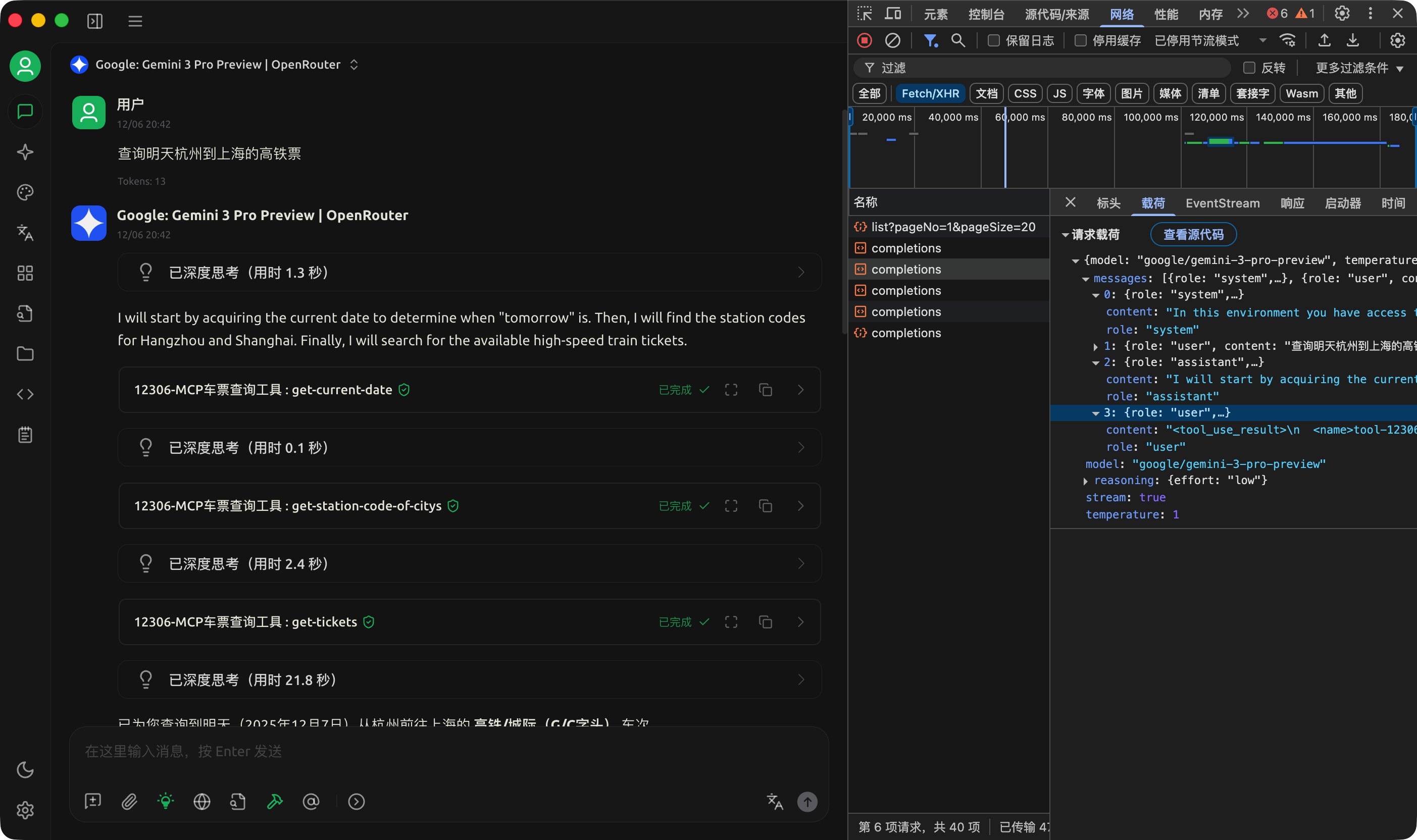
我们可以看到每次调用的参数和返回值信息。
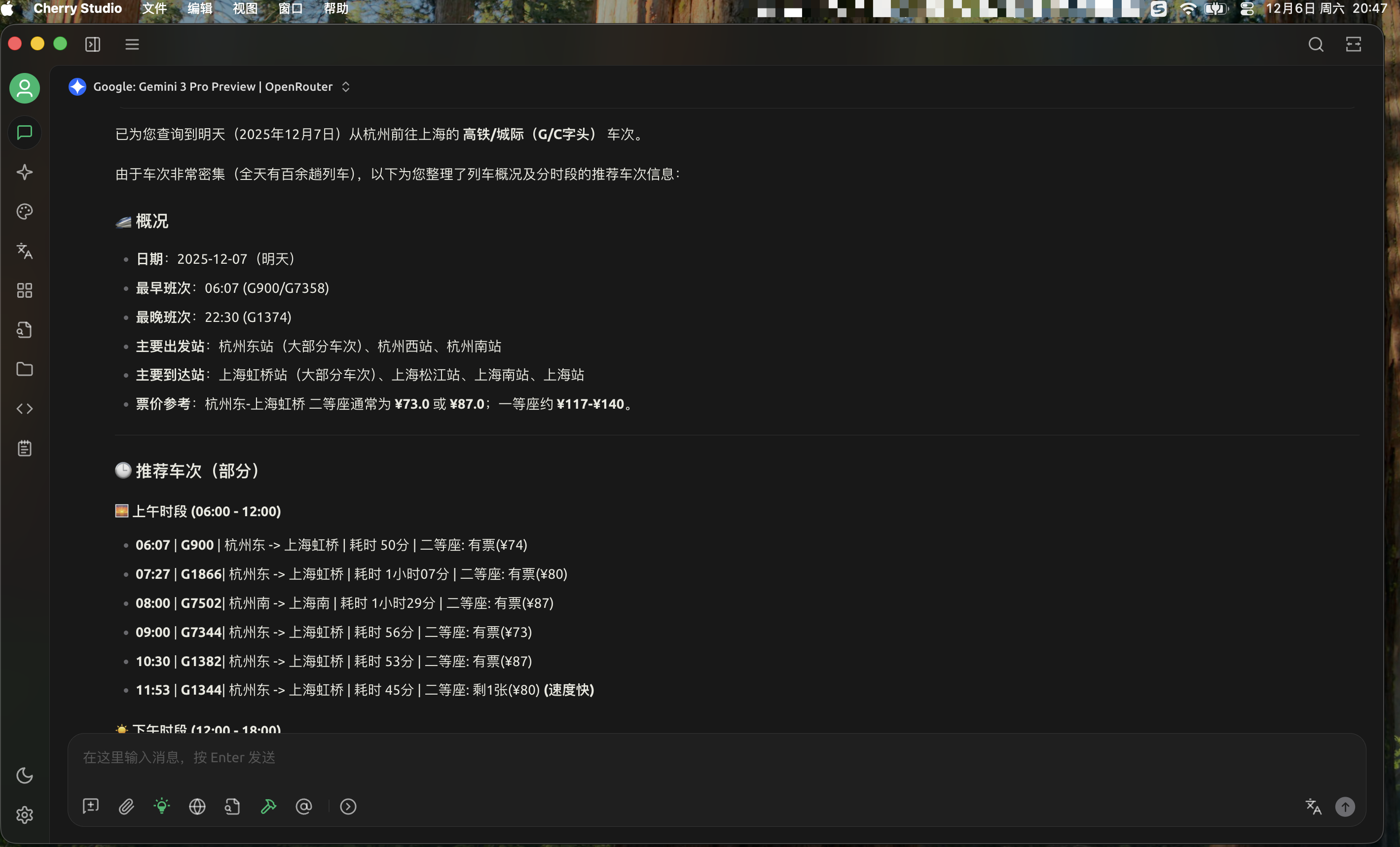
最终给出每个时间段的车次、耗时和是否有票等。
当前 MCP 应用问题
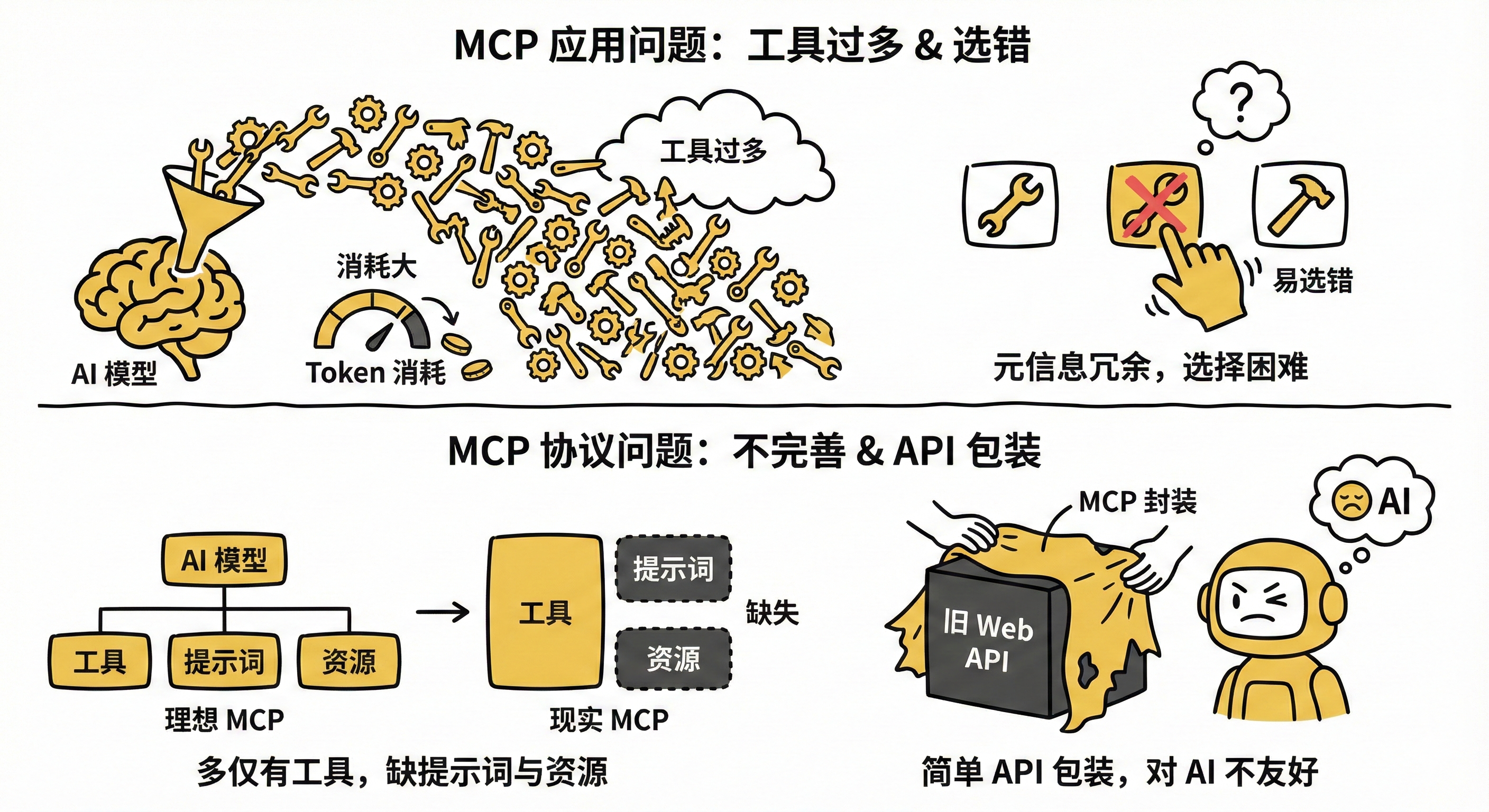
在实际 AI 应用中,如果你开启的 MCP 工具过多时,把这些工具元信息发给大模型会消耗很多 tokens。而且如果相似的 MCP 过多,很容易选错。
当前 MCP 协议不完善,虽然MCP协议包括:工具、提示词,还有资源,然而实际上现在绝大多数 MCP 工具只有工具,没有资源和提示词。
而且现在很多人封装 MCP 服务的时候,只是把之前面向 Web 的 API 包装成了MCP协议给模型的调用,对 AI 并不是很友好。
MCP 协议相关经典资料,微信公众号 “ 悟鸣AI ” 回复「mcp」自动获取。
如果你认为文章对你有帮助,欢迎关注我的 CSDN 账号和微信公众号 “ 悟鸣AI ”(见下方↓),一起跟上 AI 发展步伐。


火山引擎开发者社区是火山引擎打造的AI技术生态平台,聚焦Agent与大模型开发,提供豆包系列模型(图像/视频/视觉)、智能分析与会话工具,并配套评测集、动手实验室及行业案例库。社区通过技术沙龙、挑战赛等活动促进开发者成长,新用户可领50万Tokens权益,助力构建智能应用。
更多推荐
 17
17 0
0- 0


 已为社区贡献24条内容

所有评论(0)