Unity制作红点系统
本文介绍了一个基于Unity实现的红点系统方案。该系统采用树形结构管理节点,包含以下核心功能:1) 支持添加/删除节点(通过"|"分隔的路径字符串);2) 自动更新父节点红点数量;3) 提供一键清空子节点功能;4) 支持为节点绑定回调函数。关键技术点包括:使用字典存储子节点、递归更新父节点红点数、泛型单例模式实现系统管理。通过PlayPanel、LevelPanel等UI组件演
·
UI素材:
https://assetstore.unity.com/packages/2d/gui/icons/2d-simple-ui-pack-218050
 先看效果(不要太注重我的叙利亚ui,做的类似邮件的效果)
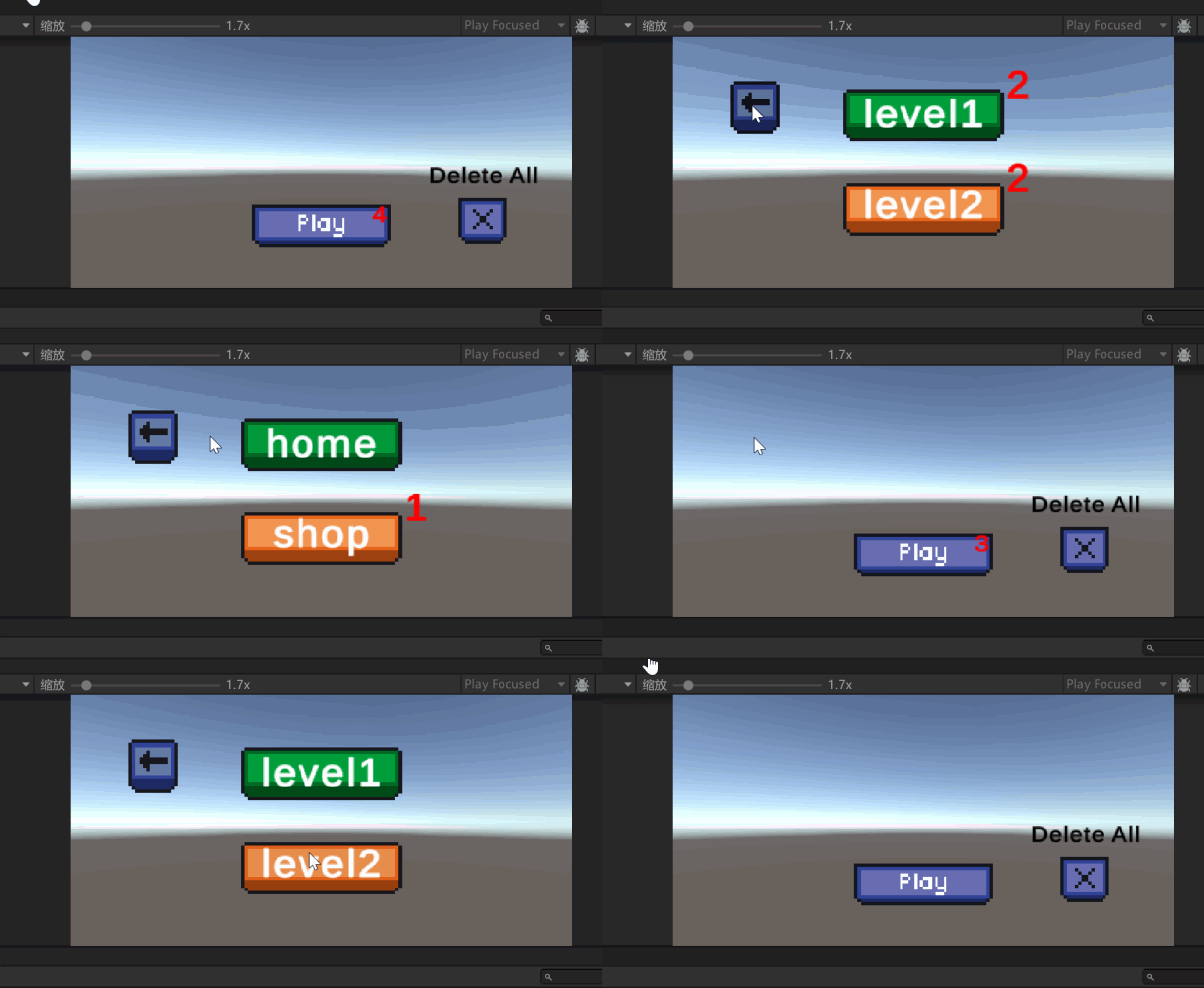
点击到叶子节点的时候红点消失,对应的父节点红点数量减一,Deleteall按钮相当于一键已读功能,不过可以在任何位置对它的子节点一键已读
例子节点路径:
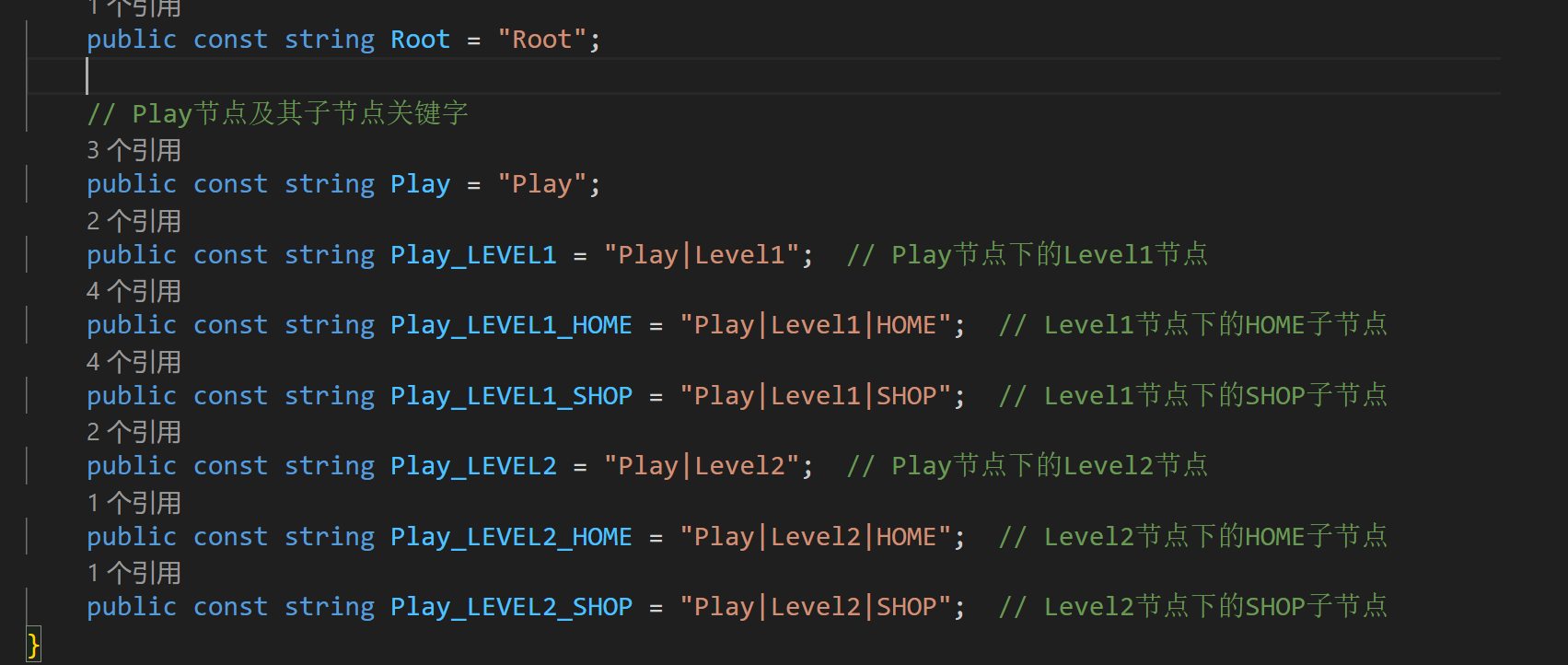
API如下:
添加节点(key是你自定义的节点路径)


删除节点


一键删除某个节点和对应子节点


给某个节点添加回调函数(经过该结点的时候立马会红点数进行更改)


获得当前结点红点数目

完整代码:
RedPointKey
using System.Collections;
using System.Collections.Generic;
using UnityEngine;

public class RedPointKey : MonoBehaviour
{
    // 根节点关键字
	public const string Root = "Root";

	// Play节点及其子节点关键字
	public const string Play = "Play";
	public const string Play_LEVEL1 = "Play|Level1";  // Play节点下的Level1节点
	public const string Play_LEVEL1_HOME = "Play|Level1|HOME";  // Level1节点下的HOME子节点
	public const string Play_LEVEL1_SHOP = "Play|Level1|SHOP";  // Level1节点下的SHOP子节点
	public const string Play_LEVEL2 = "Play|Level2";  // Play节点下的Level2节点
	public const string Play_LEVEL2_HOME = "Play|Level2|HOME";  // Level2节点下的HOME子节点
	public const string Play_LEVEL2_SHOP = "Play|Level2|SHOP";  // Level2节点下的SHOP子节点
}
RedPointNode
using System.Collections;
using System.Collections.Generic;
using UnityEngine;

public class RedPointNode
{
    public int redNum;//红点数
    public string key;//节点关键字
    public Dictionary<string, RedPointNode> childrenNode;//子节点
    public delegate void RedPointChangeDelegate(int redNum);
    public RedPointChangeDelegate OnRedPointChange;

    public RedPointNode(string keyName)
    {
        key = keyName;
        childrenNode = new Dictionary<string, RedPointNode>();
    }

}
RedPointSystem
using System.Collections;
using System.Collections.Generic;
using UnityEditor.TerrainTools;
using UnityEngine;
using UnityEngine.InputSystem;

public class RedPointSystem : SingletonAutoMono<RedPointSystem>
{
    public RedPointNode root;//根节点

    private RedPointSystem()
    {
        root = new RedPointNode(RedPointKey.Root);
    }

    //添加节点的方法
    public RedPointNode AddNode(string key)
    {
        if (FindNode(key) != null)
        {
            Debug.Log("该节点已经存在");
            return null;
        }

        string[] keys = key.Split('|');
        RedPointNode currentNode = root;

        foreach (string k in keys)
        {
            if (!currentNode.childrenNode.ContainsKey(k))
            {
                currentNode.childrenNode[k] = new RedPointNode(k);
            }
            currentNode = currentNode.childrenNode[k];
        }

        currentNode.redNum += 1;
        currentNode.OnRedPointChange?.Invoke(currentNode.redNum);
        UpdateParents(keys);

        return currentNode;

    }

    public RedPointNode FindNode(string key)
    {
        string[] keys = key.Split("|");
        RedPointNode currentNode = root;
        foreach (string k in keys)
        {
            if (!currentNode.childrenNode.ContainsKey(k))
            {
                return null;//没有找到该节点
            }
            currentNode = currentNode.childrenNode[k];
        }
        return currentNode;
    }

    //更新所有父节点的红点数
    public void UpdateParents(string[] keys)
    {
        // 从最后一个节点开始,一直回溯到 Root
        for (int i = keys.Length - 1; i >= 0; i--)
        {
            RedPointNode currentNode = root;
            for (int j = 0; j <= i; j++)
            {
                currentNode = currentNode.childrenNode[keys[j]];
            }

            //非叶子节点
            if (currentNode.childrenNode.Count > 0)
            {
                // 重新计算当前节点的 redNum = 子节点总和
                currentNode.redNum = 0;
                foreach (var child in currentNode.childrenNode.Values)
                {
                    currentNode.redNum += child.redNum;
                }
            }
            currentNode.OnRedPointChange?.Invoke(currentNode.redNum);
        }
    }

    public void DeleteNode(string key)
    {
        RedPointNode node = FindNode(key);
        if (node == null) return;

        // 叶子节点减一
        node.redNum = Mathf.Clamp(node.redNum - 1, 0, node.redNum);
        node.OnRedPointChange?.Invoke(node.redNum);

        // 回溯更新父节点
        string[] keys = key.Split('|');
        UpdateParents(keys);
    }

    // 一键清空某个节点及其所有子节点的红点
    public void ClearNode(string key)
    {
        RedPointNode node = FindNode(key);
        if (node == null) return;

        // 递归清空自己和所有子节点
        ClearRecursively(node);

        // 回溯更新父节点
        string[] keys = key.Split('|');
        UpdateParents(keys);
    }

    private void ClearRecursively(RedPointNode node)
    {
        node.redNum = 0;
        node.OnRedPointChange?.Invoke(node.redNum);

        foreach (var child in node.childrenNode.Values)
        {
            ClearRecursively(child);
        }
    }

    public void SetCallBack(string key, RedPointNode.RedPointChangeDelegate cb)
    {
        RedPointNode redPointNode = FindNode(key);
        if (redPointNode == null) return;
        redPointNode.OnRedPointChange += cb;
    }

    //获取红点数目
    public int GetRedPointNum(string key)
    {
        RedPointNode redPointNode = FindNode(key);
        if (redPointNode == null) return 0;

        return redPointNode.redNum;
    }


}
泛型单例模式代码:
SingletonAutoMono
using System.Collections;
using System.Collections.Generic;
using UnityEngine;

//C#中 泛型知识点
//设计模式 单例模式的知识点
//继承这种自动创建的 单例模式基类 不需要我们手动去拖 或者 api去加了
//想用他 直接 GetInstance就行了
public class SingletonAutoMono<T> : MonoBehaviour where T : MonoBehaviour
{
    private static T instance;

    public static T GetInstance()
    {
        if( instance == null )
        {
            GameObject obj = new GameObject();
            //设置对象的名字为脚本名
            obj.name = typeof(T).ToString();
            //让这个单例模式对象 过场景 不移除
            //因为 单例模式对象 往往 是存在整个程序生命周期中的
            DontDestroyOnLoad(obj);
            instance = obj.AddComponent<T>();
        }
        return instance;
    }

}
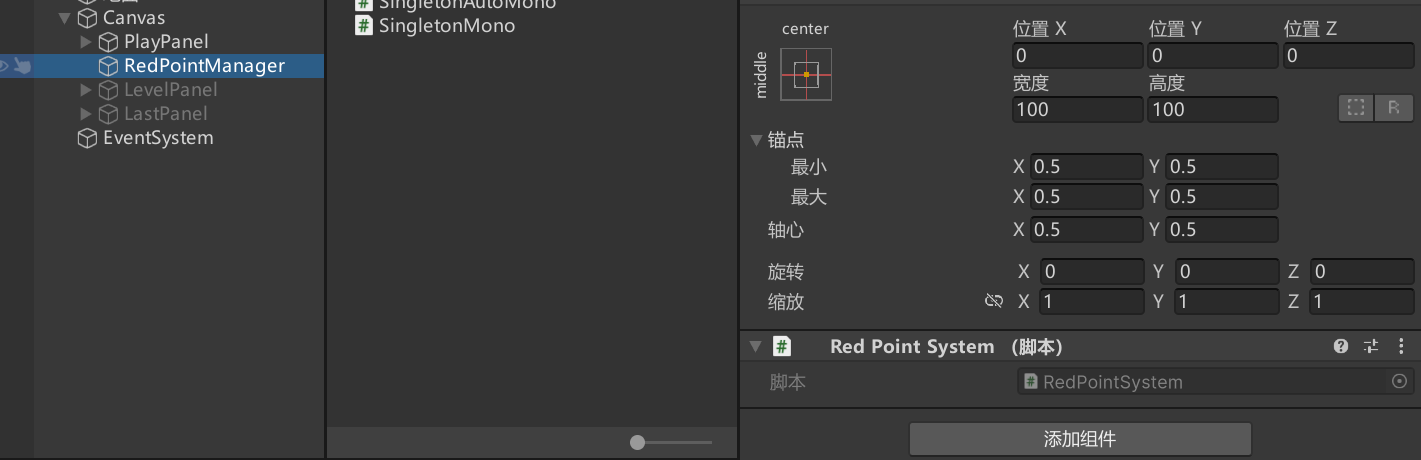
我的UI之间的测试代码(参考)
using System.Collections;
using System.Collections.Generic;
using TMPro;
using UnityEngine;
using UnityEngine.UI;

public class PlayPanel : MonoBehaviour
{
    public TextMeshProUGUI text;
    public Button button;
    public Button deleteAll;
    public GameObject levelPanel;


    // Start is called before the first frame update
    void Start()
    {
        RedPointSystem.GetInstance().AddNode(RedPointKey.Play_LEVEL1_HOME);
        RedPointSystem.GetInstance().AddNode(RedPointKey.Play_LEVEL1_SHOP);
        RedPointSystem.GetInstance().AddNode(RedPointKey.Play_LEVEL2_HOME);
        RedPointSystem.GetInstance().AddNode(RedPointKey.Play_LEVEL2_SHOP);

        button.onClick.AddListener(OnPlay);
        deleteAll.onClick.AddListener(()=>{ RedPointSystem.GetInstance().ClearNode(RedPointKey.Play); });
        InitPanel();
    }

    // Update is called once per frame
    void Update()
    {

    }

    public void RefreshRedPointState(int redNum, Transform t)
    {
        if (redNum <= 0)
        {
            t.gameObject.SetActive(false);
        }
        else
        {
            t.gameObject.SetActive(true);
            t.GetComponent<TextMeshProUGUI>().text = redNum.ToString();
        }
    }

    public void InitPanel()
    {
        RefreshRedPointState(RedPointSystem.GetInstance().GetRedPointNum(RedPointKey.Play), button.transform.Find("RedNum"));
        RedPointSystem.GetInstance().SetCallBack(RedPointKey.Play,(int redNum)=>{RefreshRedPointState(redNum,button.transform.Find("RedNum"));});
    }

    public void OnPlay()
    {
        transform.gameObject.SetActive(false);
        levelPanel.SetActive(true);
    }
}
using System.Collections;
using System.Collections.Generic;
using TMPro;
using UnityEngine;
using UnityEngine.UI;

public class LevelPanel : MonoBehaviour
{
    public GameObject playPanel;
    public GameObject lastPanel;
    public Button backButton;
    public Button level1;
    public Button level2;
    void Start()
    {
        backButton.onClick.AddListener(OnBack);
        level1.onClick.AddListener(()=>{ transform.gameObject.SetActive(false);lastPanel.SetActive(true); });
        InitPanel();
    }

    // Update is called once per frame
    void Update()
    {

    }

    public void OnBack()
    {
        transform.gameObject.SetActive(false);
        playPanel.SetActive(true);
    }

    public void RefreshRedPointState(int redNum, Transform t)
    {
        if (redNum <= 0)
        {
            t.gameObject.SetActive(false);
        }
        else
        {
            t.gameObject.SetActive(true);
            t.GetComponent<TextMeshProUGUI>().text = redNum.ToString();
        }
    }

    public void InitPanel()
    {
        RefreshRedPointState(RedPointSystem.GetInstance().GetRedPointNum(RedPointKey.Play_LEVEL1), level1.transform.Find("RedNum"));
        RefreshRedPointState(RedPointSystem.GetInstance().GetRedPointNum(RedPointKey.Play_LEVEL2), level2.transform.Find("RedNum"));
        RedPointSystem.GetInstance().SetCallBack(RedPointKey.Play_LEVEL1, (int redNum) => { RefreshRedPointState(redNum, level1.transform.Find("RedNum")); });
        RedPointSystem.GetInstance().SetCallBack(RedPointKey.Play_LEVEL2,(int redNum)=>{RefreshRedPointState(redNum,level2.transform.Find("RedNum"));});
    }
}
using System.Collections;
using System.Collections.Generic;
using TMPro;
using UnityEngine;
using UnityEngine.UI;

public class LastPanel : MonoBehaviour
{
    public GameObject levelPanel;
    public Button backButton;
    public Button home;
    public Button shop;
    void Start()
    {
        backButton.onClick.AddListener(OnBack);
        home.onClick.AddListener(()=>{ RedPointSystem.GetInstance().DeleteNode(RedPointKey.Play_LEVEL1_HOME); });
        shop.onClick.AddListener(()=>{ RedPointSystem.GetInstance().DeleteNode(RedPointKey.Play_LEVEL1_SHOP); });
        InitPanel();
    }

    // Update is called once per frame
    void Update()
    {

    }

    public void OnBack()
    {
        transform.gameObject.SetActive(false);
        levelPanel.SetActive(true);
    }

    public void RefreshRedPointState(int redNum, Transform t)
    {
        if (redNum <= 0)
        {
            t.gameObject.SetActive(false);
        }
        else
        {
            t.gameObject.SetActive(true);
            t.GetComponent<TextMeshProUGUI>().text = redNum.ToString();
        }
    }

    public void InitPanel()
    {
        RefreshRedPointState(RedPointSystem.GetInstance().GetRedPointNum(RedPointKey.Play_LEVEL1_HOME), home.transform.Find("RedNum"));
        RefreshRedPointState(RedPointSystem.GetInstance().GetRedPointNum(RedPointKey.Play_LEVEL1_SHOP), shop.transform.Find("RedNum"));
        RedPointSystem.GetInstance().SetCallBack(RedPointKey.Play_LEVEL1_HOME, (int redNum) => { RefreshRedPointState(redNum, home.transform.Find("RedNum")); });
        RedPointSystem.GetInstance().SetCallBack(RedPointKey.Play_LEVEL1_SHOP,(int redNum)=>{RefreshRedPointState(redNum,shop.transform.Find("RedNum"));});
    }
}
当中的一些代码我对其进行了修改,满足了我的需求
对你有用的话点个赞OvO

火山引擎开发者社区是火山引擎打造的AI技术生态平台,聚焦Agent与大模型开发,提供豆包系列模型(图像/视频/视觉)、智能分析与会话工具,并配套评测集、动手实验室及行业案例库。社区通过技术沙龙、挑战赛等活动促进开发者成长,新用户可领50万Tokens权益,助力构建智能应用。
更多推荐
 24
24 0
0- 0


 已为社区贡献1条内容

所有评论(0)