关于Graphrag调用阿里云embedding API出错的解决办法分享
·
其实在本地部署Graphrag按照官方的教程:https://microsoft.github.io/graphrag/get_started/一步一步执行便可。但是在运行命令执行之后:
graphrag index --root ./christmas会莫名的中断,我在查看了日志之后发现,是因为我调用的是阿里云的embedding API然后与settings.yaml文件里面的初始设置冲突有关系:
14:08:34,572 graphrag.index.operations.embed_text.strategies.openai INFO embedding 25 inputs via 25 snippets using 2 batches. max_batch_size=16, batch_max_tokens=8191
14:08:37,135 httpx INFO HTTP Request: POST
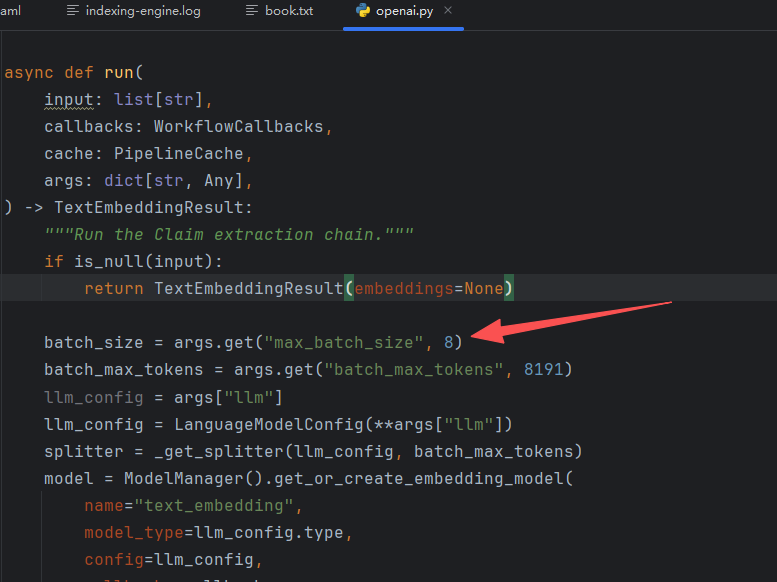
因为阿里云DashScope的embedding API限制批处理大小不能超过10,但默认设置的是16,所以在settings.yaml文件里面更改:
models:
  default_chat_model:
    ...(前面不变)
    max_batch_size: 8
  default_embedding_model:
    ...(前面不变)
    max_batch_size: 8

embed_text:
  model_id: default_embedding_model
  vector_store_id: default_vector_store
  batch_size: 8
  batch_max_tokens: 8191
然后还需要在graphrag/index/operations/embed_text/strategies/openai.py这个文件里面对应地方进行改成8:

中国智能体开发者社区,聚焦智能体与大模型开发,提供前沿资讯、实用工具链、开源项目及行业案例。通过技术沙龙、开发者大赛等活动,促进经验交流与协作,助力开发者快速构建创新智能应用。
更多推荐
 2
2 0
0- 0


 已为社区贡献2条内容

所有评论(0)