结合通义千问大模型做一个文档一键翻译的功能
·
需求是:上传文档,选择要翻译的语言,就可以转出相应的文档,支持:Word文档、Excel表、PDF文档、以及图片。
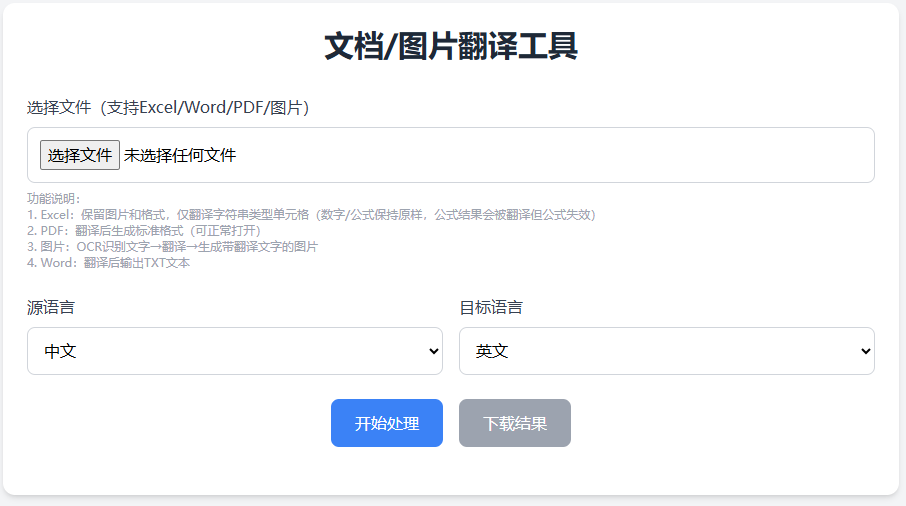
支持多种语言互相翻译
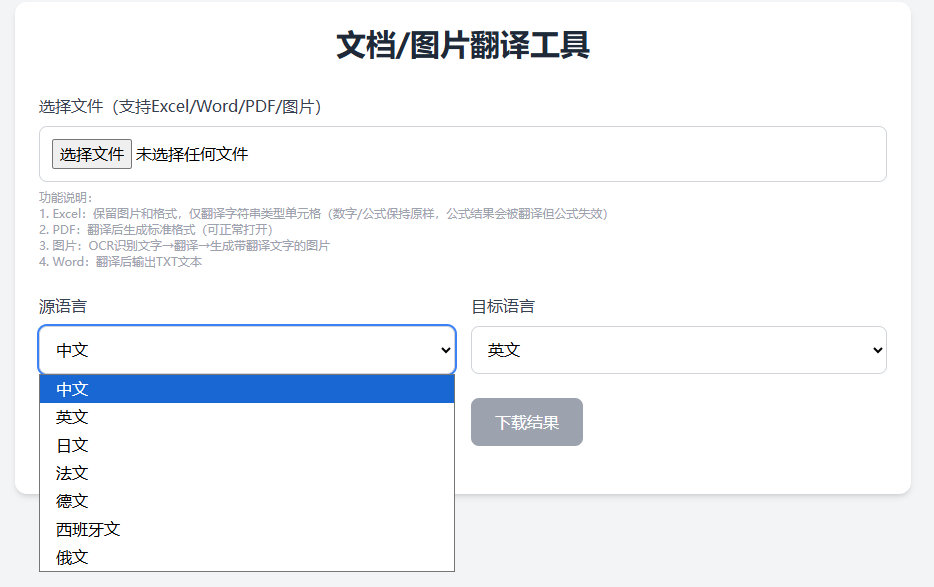
前端的实现代码:
<!DOCTYPE html>
<html lang="zh-CN">

<head>
    <meta charset="UTF-8">
    <meta name="viewport" content="width=device-width, initial-scale=1.0">
    <title>文档/图片翻译工具</title>
    <script src="https://cdn.tailwindcss.com"></script>
</head>

<body class="bg-gray-100 min-h-screen flex flex-col items-center p-5">
    <div class="w-full max-w-4xl bg-white rounded-xl shadow-md p-6">
        <h1 class="text-3xl font-bold text-center text-gray-800 mb-8">文档/图片翻译工具</h1>

        <!-- 文件上传区域(支持图片) -->
        <div class="mb-6">
            <label class="block text-gray-700 font-medium mb-2">选择文件(支持Excel/Word/PDF/图片)</label>
            <input type="file" id="fileUpload" accept=".xlsx,.xls,.docx,.pdf,.jpg,.jpeg,.png,.gif"
                class="w-full p-3 border border-gray-300 rounded-lg focus:outline-none focus:ring-2 focus:ring-blue-500">
            <p id="fileInfo" class="mt-2 text-sm text-gray-500"></p>
            <p class="text-xs text-gray-400 mt-1">
                功能说明:<br>
                1. Excel:保留图片和格式,仅翻译字符串类型单元格(数字/公式保持原样,公式结果会被翻译但公式失效)<br>
                2. PDF:翻译后生成标准格式(可正常打开)<br>
                3. 图片:OCR识别文字→翻译→生成带翻译文字的图片<br>
                4. Word:翻译后输出TXT文本
            </p>
        </div>

        <!-- 语言选择区域 -->
        <div class="grid grid-cols-1 md:grid-cols-2 gap-4 mb-6">
            <div>
                <label class="block text-gray-700 font-medium mb-2">源语言</label>
                <select id="sourceLang"
                    class="w-full p-3 border border-gray-300 rounded-lg focus:outline-none focus:ring-2 focus:ring-blue-500">
                    <option value="zh">中文</option>
                    <option value="en">英文</option>
                    <option value="ja">日文</option>
                    <option value="fr">法文</option>
                    <option value="de">德文</option>
                    <option value="es">西班牙文</option>
                    <option value="ru">俄文</option>
                </select>
            </div>
            <div>
                <label class="block text-gray-700 font-medium mb-2">目标语言</label>
                <select id="targetLang"
                    class="w-full p-3 border border-gray-300 rounded-lg focus:outline-none focus:ring-2 focus:ring-blue-500">
                    <option value="en">英文</option>
                    <option value="zh">中文</option>
                    <option value="ja">日文</option>
                    <option value="fr">法文</option>
                    <option value="de">德文</option>
                    <option value="es">西班牙文</option>
                    <option value="ru">俄文</option>
                </select>
            </div>
        </div>

        <!-- 操作按钮 -->
        <div class="flex justify-center gap-4 mb-6">
            <button id="translateBtn"
                class="px-6 py-3 bg-blue-500 text-white rounded-lg hover:bg-blue-600 transition-colors disabled:bg-gray-400 disabled:cursor-not-allowed">
                开始处理
            </button>
            <button id="downloadBtn"
                class="px-6 py-3 bg-green-500 text-white rounded-lg hover:bg-green-600 transition-colors disabled:bg-gray-400 disabled:cursor-not-allowed"
                disabled>
                下载结果
            </button>
        </div>

        <!-- 进度提示 -->
        <div id="progress" class="hidden text-center text-gray-700 mb-4">
            <div class="inline-block animate-spin border-4 border-gray-200 border-t-blue-500 rounded-full w-6 h-6 mb-2">
            </div>
            <p id="progressText">处理中,请稍候...</p>
        </div>

        <!-- 错误提示 -->
        <div id="error" class="hidden text-center text-red-500 mb-4"></div>
    </div>

    <script>
        const fileUpload = document.getElementById('fileUpload');
        const fileInfo = document.getElementById('fileInfo');
        const translateBtn = document.getElementById('translateBtn');
        const downloadBtn = document.getElementById('downloadBtn');
        const progress = document.getElementById('progress');
        const progressText = document.getElementById('progressText');
        const error = document.getElementById('error');
        let uploadedFile = null;
        let translationId = null;
        let fileName = null;

        // 文件选择监听
        fileUpload.addEventListener('change', (e) => {
            if (e.target.files.length > 0) {
                uploadedFile = e.target.files[0];
                const fileSize = (uploadedFile.size / 1024 / 1024).toFixed(2);
                fileInfo.textContent = `文件名:${uploadedFile.name} | 大小:${fileSize}MB | 格式:${path.extname(uploadedFile.name).toLowerCase()}`;
                translateBtn.disabled = false;
                downloadBtn.disabled = true;
                error.classList.add('hidden');
            }
        });

        // 处理按钮
        translateBtn.addEventListener('click', async () => {
            if (!uploadedFile) return;

            progress.classList.remove('hidden');
            translateBtn.disabled = true;
            error.classList.add('hidden');

            const formData = new FormData();
            formData.append('file', uploadedFile);
            formData.append('sourceLang', document.getElementById('sourceLang').value);
            formData.append('targetLang', document.getElementById('targetLang').value);

            try {
                // 图片OCR处理可能较慢,更新进度提示
                if (['.jpg', '.jpeg', '.png', '.gif'].includes(path.extname(uploadedFile.name).toLowerCase())) {
                    progressText.textContent = '图片OCR识别中...(可能需要10-30秒)';
                }

                const response = await fetch('http://localhost:3800/api/translate', {
                    method: 'POST',
                    body: formData
                });

                const result = await response.json();
                if (!response.ok) throw new Error(result.message || '处理失败');

                translationId = result.translationId;
                fileName = result.fileName;
                downloadBtn.disabled = false;
                progressText.textContent = '处理完成!';
                alert(result.message);
            } catch (err) {
                error.textContent = err.message;
                error.classList.remove('hidden');
                translateBtn.disabled = false;
            } finally {
                setTimeout(() => progress.classList.add('hidden'), 30000);
            }
        });

        // 下载按钮
        downloadBtn.addEventListener('click', async () => {
            if (!translationId) return;

            try {
                window.location.href = `http://localhost:3800/api/download/${translationId}`;
                // 下载后重置状态
                setTimeout(() => {
                    downloadBtn.disabled = true;
                    uploadedFile = null;
                    fileInfo.textContent = '';
                }, 1000);
            } catch (err) {
                error.textContent = err.message;
                error.classList.remove('hidden');
            }
        });

        // 辅助函数:获取文件扩展名
        const path = {
            extname: (filename) => {
                const lastDotIndex = filename.lastIndexOf('.');
                return lastDotIndex === -1 ? '' : filename.slice(lastDotIndex).toLowerCase();
            }
        };
    </script>
</body>

</html>
后端的实现代码:
const express = require('express');
const multer = require('multer');
const fs = require('fs-extra');
const path = require('path');
const { v4: uuidv4 } = require('uuid');
const axios = require('axios');
const mammoth = require('mammoth');
const pdfParse = require('pdf-parse');
const sharp = require('sharp');
const Tesseract = require('tesseract.js');
const { PDFDocument, StandardFonts, rgb } = require('pdf-lib');
const XlsxPopulate = require('xlsx-populate');
const turndown = require('turndown'); // 新增这一行
// 修正docx库的导入方式
const docx = require('docx');
const { Document, Paragraph, TextRun, Packer } = docx;
const app = express();
const port = 3800;
// 通义千问API配置
const TONGYI_API_URL = 'https://dashscope.aliyuncs.com/api/v1/services/aigc/text-generation/generation';
const TONGYI_API_KEY = 'sk-'; // 注意:实际使用时应通过环境变量加载
// 语言映射(支持OCR语言)
const LANG_MAP = {
zh: { name: '中文', ocrLang: 'chi_sim' },
en: { name: '英文', ocrLang: 'eng' },
ja: { name: '日文', ocrLang: 'jpn' },
fr: { name: '法文', ocrLang: 'fra' },
de: { name: '德文', ocrLang: 'deu' },
es: { name: '西班牙文', ocrLang: 'spa' },
ru: { name: '俄文', ocrLang: 'rus' }
};
// 临时目录配置
const UPLOAD_DIR = path.join(__dirname, 'uploads');
const TRANSLATE_DIR = path.join(__dirname, 'translations');
const TEMP_DIR = path.join(__dirname, 'temp');
[UPLOAD_DIR, TRANSLATE_DIR, TEMP_DIR].forEach(dir => fs.ensureDirSync(dir));
// ====================== 核心工具函数 ======================
/**
* 1. 翻译文本(适配API响应格式)
*/
async function translateText(text, sourceLang, targetLang) {
try {
if (!text.trim()) return '';
const response = await axios.post(
TONGYI_API_URL,
{
model: 'qwen-plus',
input: {
messages: [
{ role: 'system', content: `仅将${sourceLang}翻译成${targetLang},保持原格式,不添加额外内容` },
{ role: 'user', content: text }
]
},
parameters: { result_format: 'text', temperature: 0.1 }
},
{
headers: { 'Authorization': `Bearer ${TONGYI_API_KEY}`, 'Content-Type': 'application/json' },
timeout: 300000
}
);
if (response.data.error) throw new Error(`API错误:${response.data.error.message}`);
return response.data.output.text.trim() || '';
} catch (err) {
throw new Error(`翻译失败:${err.message}`);
}
}
/**
* 2. 处理Excel(保留图片,仅翻译文字 - 兼容公式单元格+清理临时文件)
*/
async function processExcel(filePath, sourceLang, targetLang) {
try {
// 1. 打开原Excel文件(保留所有格式和图片)
const workbook = await XlsxPopulate.fromFileAsync(filePath);
console.log(`Excel文件打开成功,包含工作表:${workbook.sheets().map(s => s.name()).join(', ')}`);
// 2. 遍历所有工作表
for (const sheet of workbook.sheets()) {
const sheetName = sheet.name();
console.log(`正在处理工作表:${sheetName}`);
const usedRange = sheet.usedRange();
if (!usedRange) {
console.log(`工作表${sheetName}无有效数据,跳过`);
continue;
}
const startCell = usedRange.startCell();
const endCell = usedRange.endCell();
const startRow = startCell.rowNumber();
const endRow = endCell.rowNumber();
const startCol = startCell.columnNumber();
const endCol = endCell.columnNumber();
console.log(`工作表${sheetName}有效范围:行${startRow}-${endRow},列${startCol}-${endCol}`);
for (let row = startRow; row <= endRow; row++) {
for (let col = startCol; col <= endCol; col++) {
const cell = sheet.cell(row, col);
let cellValue = cell.value();
// 公式单元格处理
const isFormula = typeof cellValue === 'string' && cellValue.startsWith('=');
if (isFormula) {
console.log(`单元格[${row},${col}]包含公式:${cellValue.substring(0, 50)}...`);
try {
const formulaResult = cell.result();
if (typeof formulaResult === 'string' && formulaResult.trim()) {
const translatedText = await translateText(formulaResult.trim(), sourceLang, targetLang);
cell.value(translatedText);
console.log(`公式结果翻译:${formulaResult.substring(0, 30)}... → ${translatedText.substring(0, 30)}...`);
} else {
console.log(`单元格[${row},${col}]公式结果非文本,跳过翻译`);
}
} catch (formulaErr) {
console.log(`单元格[${row},${col}]公式计算失败,跳过:`, formulaErr.message);
}
continue;
}
// 非公式单元格处理
if (cellValue === null || cellValue === undefined || typeof cellValue !== 'string') {
continue;
}
const text = cellValue.trim();
if (text) {
console.log(`翻译单元格[${row},${col}]:${text.substring(0, 30)}...`);
const translatedText = await translateText(text, sourceLang, targetLang);
cell.value(translatedText);
console.log(`翻译后:${translatedText.substring(0, 30)}...`);
}
}
}
}
// 3. 保存临时翻译文件
const tempOutputPath = path.join(TEMP_DIR, `${uuidv4()}.xlsx`);
await workbook.toFileAsync(tempOutputPath);
console.log(`Excel临时翻译完成,路径:${tempOutputPath}`);
return tempOutputPath;
} catch (err) {
console.error('Excel处理失败详情:', err);
throw new Error(`Excel处理失败:${err.message}`);
}
}
/**
* 3. 处理PDF(翻译文字,生成标准PDF格式)
*/
async function processPDF(filePath, sourceLang, targetLang) {
try {
// 1. 提取PDF文字
const buffer = fs.readFileSync(filePath);
const pdfData = await pdfParse(buffer);
const text = pdfData.text.trim();
if (!text) throw new Error('PDF中未提取到文字');
// 2. 翻译文字
const translatedText = await translateText(text, sourceLang, targetLang);
// 3. 用pdf-lib生成标准PDF
const pdfDoc = await PDFDocument.create();
const font = await pdfDoc.embedFont(StandardFonts.Helvetica);
const page = pdfDoc.addPage([600, 800]);
// 设置文字样式和位置
page.drawText(translatedText, {
x: 50,
y: 750,
font: font,
size: 12,
color: rgb(0, 0, 0),
maxWidth: 500,
lineHeight: 15
});
// 保存PDF
const pdfBytes = await pdfDoc.save();
const outputPath = path.join(TEMP_DIR, `${uuidv4()}.pdf`);
fs.writeFileSync(outputPath, pdfBytes);
return outputPath;
} catch (err) {
throw new Error(`PDF处理失败:${err.message}`);
}
}
/**
* 4. 处理图片OCR+翻译+生成新图片
*/
async function processImage(filePath, sourceLang, targetLang) {
try {
// 1. 验证图片有效性并获取尺寸
const imageInfo = await sharp(filePath).metadata().catch(() => null);
if (!imageInfo) throw new Error('上传的文件不是有效图片');
const { width, height } = imageInfo;
if (!width || !height) throw new Error('无法获取图片尺寸');
// 2. 图片预处理(按比例缩放,最大宽度1200px)
const maxWidth = 1200;
let scaledWidth = width;
let scaledHeight = height;
if (scaledWidth > maxWidth) {
scaledHeight = Math.round((scaledHeight * maxWidth) / scaledWidth);
scaledWidth = maxWidth;
}
const processedImgPath = path.join(TEMP_DIR, `${uuidv4()}.png`);
await sharp(filePath)
.resize(scaledWidth, scaledHeight, { fit: 'inside', withoutEnlargement: true })
.grayscale()
.threshold(150)
.toFile(processedImgPath);
// 3. OCR识别文字
const { data: { text: ocrText } } = await Tesseract.recognize(
processedImgPath,
LANG_MAP[sourceLang].ocrLang,
{ logger: m => console.log('OCR进度:', m.status) }
);
if (!ocrText.trim()) throw new Error('图片中未识别到文字');
// 4. 翻译文字
const translatedText = await translateText(ocrText.trim(), LANG_MAP[sourceLang].name, LANG_MAP[targetLang].name);
const textLines = translatedText.split('\n').filter(line => line.trim());
// 5. 计算自适应字体大小和行高
const baseFontSize = 24;
const maxFontSize = Math.floor(scaledWidth * 0.05); // 最大不超过图片宽度5%
const minFontSize = 12;
const fontSize = Math.min(Math.max(baseFontSize, minFontSize), maxFontSize);
const lineHeight = fontSize * 1.2;
// 6. 生成与原图尺寸匹配的SVG
let svgText = '';
if (textLines.length === 0) {
svgText = `<text x="${scaledWidth / 2}" y="${scaledHeight / 2}" font-family="Arial" font-size="${fontSize}" text-anchor="middle" dominant-baseline="middle" fill="black">无翻译结果</text>`;
} else {
// 文字垂直居中
const totalTextHeight = textLines.length * lineHeight;
const startY = (scaledHeight - totalTextHeight) / 2 + (fontSize / 2);
svgText = `<text font-family="Arial" font-size="${fontSize}" fill="black">`;
textLines.forEach((line, index) => {
const y = startY + (index * lineHeight);
svgText += `<tspan x="${scaledWidth / 2}" y="${y}" text-anchor="middle">${escapeXml(line)}</tspan>`;
});
svgText += `</text>`;
}
// 生成固定尺寸的SVG(避免尺寸不匹配)
const svgBuffer = Buffer.from(`
<svg width="${scaledWidth}" height="${scaledHeight}" xmlns="http://www.w3.org/2000/svg">
<rect width="100%" height="100%" fill="white" opacity="0.8"/>
${svgText}
</svg>
`);
// 7. 合成图片(确保SVG与原图尺寸一致)
const outputPath = path.join(TEMP_DIR, `${uuidv4()}.png`);
await sharp(processedImgPath)
.composite([{
input: svgBuffer,
gravity: 'northwest' // 左上角对齐,完全覆盖原图
}])
.toFile(outputPath);
return outputPath;
} catch (err) {
throw new Error(`图片处理失败:${err.message}`);
}
}
/**
* 辅助函数:转义XML特殊字符
*/
function escapeXml(text) {
return text
.replace(/&/g, '&')
.replace(/</g, '<')
.replace(/>/g, '>')
.replace(/"/g, '"')
.replace(/'/g, ''');
}
/**
* 5. 统一文档处理入口
*/
async function processDocument(filePath, fileExt, sourceLang, targetLang) {
switch (fileExt) {
case '.xlsx':
case '.xls':
return await processExcel(filePath, LANG_MAP[sourceLang].name, LANG_MAP[targetLang].name);
case '.pdf':
return await processPDF(filePath, LANG_MAP[sourceLang].name, LANG_MAP[targetLang].name);
case '.jpg':
case '.jpeg':
case '.png':
case '.gif':
return await processImage(filePath, sourceLang, targetLang);
case '.docx':
// 修复Word文档处理逻辑
try {
// 1. 提取Word文档文本
const result = await mammoth.extractRawText({ path: filePath });
const originalText = result.value.trim();
if (!originalText) throw new Error('Word文档中未提取到文字');
console.log('Word文本提取完成,开始翻译');
// 2. 翻译文本
const translatedText = await translateText(
originalText,
LANG_MAP[sourceLang].name,
LANG_MAP[targetLang].name
);
// 3. 按换行分割并生成段落
const paragraphs = translatedText.split('\n').filter(line => line.trim() !== '');
if (paragraphs.length === 0) {
throw new Error('翻译结果中未提取到有效段落');
}
// 4. 生成新的Word文档(使用正确的docx库API)
const doc = new Document({
sections: [{
children: paragraphs.map(paragraphText => new Paragraph({
children: [
new TextRun({
text: paragraphText,
size: 24, // 12pt
font: 'Arial',
})
],
spacing: {
after: 150 // 段落间距
}
}))
}]
});
// 5. 保存文档(使用Packer.toBuffer)
const tempWordPath = path.join(TEMP_DIR, `${uuidv4()}.docx`);
const buffer = await Packer.toBuffer(doc);
fs.writeFileSync(tempWordPath, buffer);
return tempWordPath;
} catch (err) {
console.error('Word处理详细错误:', err);
throw new Error(`Word处理失败:${err.message}`);
}
default:
throw new Error(`不支持的格式:${fileExt}`);
}
}
// ====================== 接口配置 ======================
// 文件上传配置
const storage = multer.diskStorage({
destination: (req, file, cb) => cb(null, UPLOAD_DIR),
filename: (req, file, cb) => {
const safeFileName = file.originalname.replace(/[\\/:*?"<>|]/g, '_');
const timestamp = new Date().getTime();
const fileName = `${timestamp}_${safeFileName}`;
cb(null, fileName);
}
});
const upload = multer({
storage,
fileFilter: (req, file, cb) => {
const allowedExts = ['.xlsx', '.xls', '.docx', '.pdf', '.jpg', '.jpeg', '.png', '.gif'];
const ext = path.extname(file.originalname).toLowerCase();
allowedExts.includes(ext) ? cb(null, true) : cb(new Error('仅支持Excel/Word/PDF/图片格式'), false);
},
limits: { fileSize: 20 * 1024 * 1024 } // 20MB限制
});
// 翻译接口
app.post('/api/translate', upload.single('file'), async (req, res) => {
try {
if (!req.file) return res.status(400).json({ message: '请上传文件' });
const { sourceLang, targetLang } = req.body;
const fileExt = path.extname(req.file.originalname).toLowerCase();
const originalFilePath = req.file.path;
const originalFileName = req.file.filename;
// 验证语言参数
if (!LANG_MAP[sourceLang] || !LANG_MAP[targetLang]) {
return res.status(400).json({ message: '不支持的语言类型' });
}
try {
console.log(`处理文件:${originalFileName}(格式:${fileExt})`);
const tempOutputPath = await processDocument(originalFilePath, fileExt, sourceLang, targetLang);
// 永久保存翻译结果
const translationId = uuidv4();
const sourceLangName = LANG_MAP[sourceLang].name;
const targetLangName = LANG_MAP[targetLang].name;
const resultExt = path.extname(tempOutputPath);
const resultFileName = `${translationId}_${path.basename(originalFileName, path.extname(originalFileName))}_${sourceLangName}_${targetLangName}${resultExt}`;
const finalResultPath = path.join(TRANSLATE_DIR, resultFileName);
fs.moveSync(tempOutputPath, finalResultPath, { overwrite: false });
res.json({
success: true,
translationId,
originalFileName: req.file.originalname,
storedOriginalFileName: originalFileName,
resultFileName,
message: '处理完成!'
});
} catch (err) {
res.status(500).json({ message: err.message });
}
} catch (err) {
res.status(400).json({ message: err.message });
}
});
// 下载接口
app.get('/api/download/:identifier', async (req, res) => {
try {
const { identifier } = req.params;
const files = fs.readdirSync(TRANSLATE_DIR);
// 匹配文件:优先按translationId匹配
let targetFile = files.find(f => f.startsWith(identifier + '_'));
if (!targetFile) {
targetFile = files.find(f => f.includes(identifier));
}
if (!targetFile) return res.status(404).json({ message: '翻译结果不存在' });
const filePath = path.join(TRANSLATE_DIR, targetFile);
// 解析原始文件名
const originalFileName = targetFile.split('_')[1]
? targetFile.split('_').slice(1).join('_').replace(/_(中文|英文|日文|法文|德文|西班牙文|俄文)_(中文|英文|日文|法文|德文|西班牙文|俄文)/, '')
: targetFile;
// 设置响应头
const ext = path.extname(targetFile).toLowerCase();
let contentType = 'application/octet-stream';
if (ext === '.xlsx') contentType = 'application/vnd.openxmlformats-officedocument.spreadsheetml.sheet';
if (ext === '.pdf') contentType = 'application/pdf';
if (ext.match(/\.(jpg|jpeg|png|gif)$/)) contentType = `image/${ext.slice(1)}`;
if (ext === '.docx') contentType = 'application/vnd.openxmlformats-officedocument.wordprocessingml.document';
if (ext === '.txt') contentType = 'text/plain';
res.setHeader('Content-Type', contentType);
// 使用RFC 5987标准支持中文文件名
res.setHeader('Content-Disposition', `attachment; filename*=UTF-8''${encodeURIComponent(originalFileName)}`);
// 流式下载
const stream = fs.createReadStream(filePath);
stream.pipe(res);
console.log(`文件下载:${targetFile} → 客户端`);
} catch (err) {
res.status(500).json({ message: `下载失败:${err.message}` });
}
});
// 定期清理临时文件(每天凌晨3点执行)
const schedule = require('node-schedule');
schedule.scheduleJob('0 0 3 * * *', () => {
try {
console.log('开始清理临时文件...');
const files = fs.readdirSync(TEMP_DIR);
files.forEach(file => {
const filePath = path.join(TEMP_DIR, file);
fs.unlinkSync(filePath);
});
console.log(`清理完成,共删除${files.length}个临时文件`);
} catch (err) {
console.error('临时文件清理失败:', err.message);
}
});
// 静态文件目录(前端页面)
app.use(express.static('public'));
// 启动服务器
app.listen(port, () => {
console.log(`服务器运行在:http://localhost:${port}`);
console.log('支持格式:Excel(.xlsx/.xls)、Word(.docx)、PDF(.pdf)、图片(.jpg/.png/.gif)');
});page.json文件:
{
  "name": "document-translator",
  "version": "1.0.0",
  "description": "多格式文档翻译工具(支持图片保留+图片OCR)",
  "main": "server.js",
  "dependencies": {
    "axios": "^1.7.7",
    "docx": "^8.5.0",
    "express": "^4.19.2",
    "fs-extra": "^11.2.0",
    "mammoth": "^1.8.0",
    "multer": "^1.4.5-lts.1",
    "node-schedule": "^2.1.1",
    "pdf-lib": "^1.17.1",
    "pdf-parse": "^1.1.1",
    "sharp": "^0.33.5",
    "tesseract.js": "^5.1.0",
    "turndown": "^7.2.2",
    "uuid": "^9.0.1",
    "xlsx": "^0.18.5",
    "xlsx-populate": "^1.21.0"
  },
  "scripts": {
    "start": "node server.js"
  },
  "engines": {
    "node": ">=16.0.0"
  }
}
整体的目录结构如下: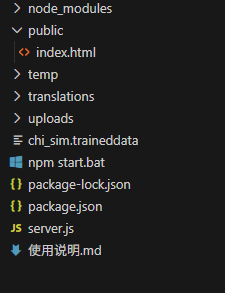
安装环境:npm install
启动项目:npm start
整个工具的实现都由AI生成!
目前也放到服务器上试用着,只是初步实现的小工具,还有很多细节以及没经过大师测试,可能会存在较多BUG,欢迎指正!
试用地址:http://122.152.213.79:3800/
更换成自己的Key就可以使用了 ,具体可以到通义千问账号申请一个。
本程序由AI编程生成。

中国智能体开发者社区,聚焦智能体与大模型开发,提供前沿资讯、实用工具链、开源项目及行业案例。通过技术沙龙、开发者大赛等活动,促进经验交流与协作,助力开发者快速构建创新智能应用。
更多推荐



 5
5 0
0- 0


 已为社区贡献2条内容

所有评论(0)