pycharm安装Robotics Toolbox for Python报错解决
安装过程中显示:ERROR: Could not build wheels for roboticstoolbox-python, which is required to install pyproject.toml-based projects #496。只安装 MSBuild工具 是没用的, 我已经帮大家验证过了。你们有兴趣可以自己试试不勾选,然后看看报不报错。我没有测试需要哪一个,我使用的
为了快速安装,采用阿里云镜像进行安装:
pip3 install roboticstoolbox-python -i https://mirrors.aliyun.com/pypi/simple/ --trusted-host mirrors.aliyun.com安装过程中显示:ERROR: Could not build wheels for roboticstoolbox-python, which is required to install pyproject.toml-based projects #496
或者:
setuptools._distutils.errors.DistutilsPlatformError: Microsoft Visual C++ 14.0 or greater is required. Get it with "Microsoft C++ Build Tools": https://visualstudio.microsoft.com/visual-cpp-build-tools/
[end of output]
note: This error originates from a subprocess, and is likely not a problem with pip.
ERROR: Failed building wheel for roboticstoolbox-python
Failed to build roboticstoolbox-python
ERROR: Could not build wheels for roboticstoolbox-python, which is required to install pyproject.toml-based projects
安装visual studio即可解决:
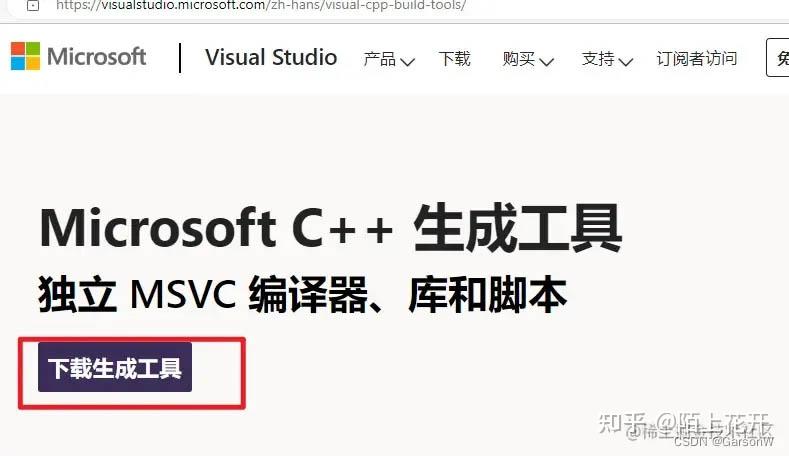
 https://visualstudio.microsoft.com/zh-hans/visual-cpp-build-tools/
解决
进入 vs官网,下载安装
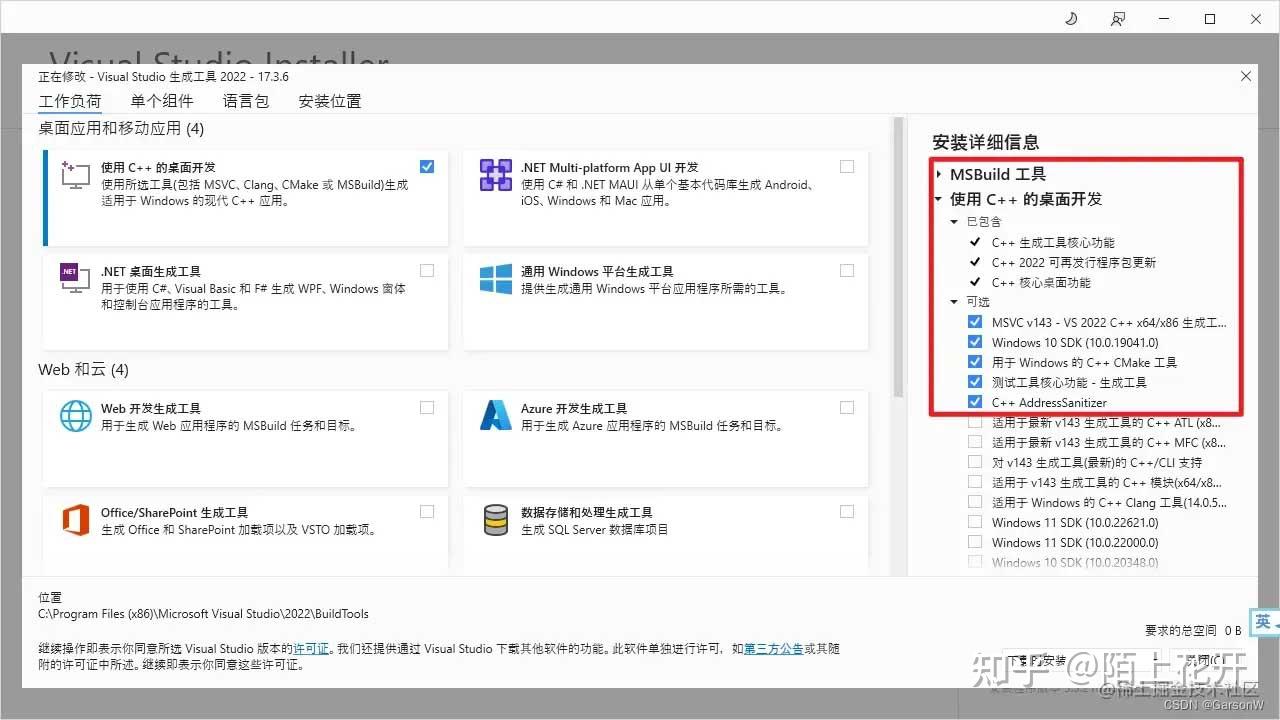
成功安装后,还要安装以下内容:
重新执行 pip:
pip3 install roboticstoolbox-python -i https://mirrors.aliyun.com/pypi/simple/ --trusted-host mirrors.aliyun.com成功下载!
注意一定勾选上“使用C++的桌面开发”
只安装 MSBuild工具 是没用的, 我已经帮大家验证过了
然后“使用C++的桌面开发”中的可选内容
我没有测试需要哪一个,我使用的是默认的前五个
你们有兴趣可以自己试试不勾选,然后看看报不报错

火山引擎开发者社区是火山引擎打造的AI技术生态平台,聚焦Agent与大模型开发,提供豆包系列模型(图像/视频/视觉)、智能分析与会话工具,并配套评测集、动手实验室及行业案例库。社区通过技术沙龙、挑战赛等活动促进开发者成长,新用户可领50万Tokens权益,助力构建智能应用。
更多推荐
 8
8 0
0- 0


 已为社区贡献2条内容

所有评论(0)